USER MANUAL WEP200 SAMSUNG
English 1
Français....21
Español 43
Português 65
Contents
BEFORE USING YOUR HEADSET
Checking phone compatibility ....3
Your headset overview ....3
Checking the accessories....4
Charging the headset....4
Storage of the headset....6
BASIC OPERATIONS
Turning the headset on/off....6
Pairing with your Bluetooth phone....8
Wearing the headset 9
Making a call....10
Ending a call 11
Answering a call 11
Rejecting a call....12
Adjusting the volume 12
Using enhanced features 12
APPENDIX
Frequently asked questions....13
Safety approvals....15
Warranty and parts replacement....17
Correct disposal of this product 19
Thank you for purchasing the Samsung Bluetooth Mono Headset WEP200, we hope you will be delighted with its operation.
Please read this user's guide to get started, and to make the best use of the headset's many features.
Driving safety
- When you are driving a car, driving is your first responsibility.
- When using your headset while driving, follow local regulations in the country or region you are in.
BEFORE USING YOUR HEADSET

Checking phone compatibility
Your headset is compatible with most Bluetooth phones that are compliant with Bluetooth version 2.0 and support the headset and/or hands-free profile(s). Ensure that your phone has Bluetooth capability by visiting your phone manufacturer's web site.

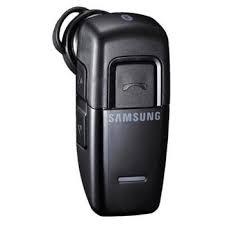
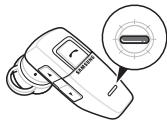
Your headset overview
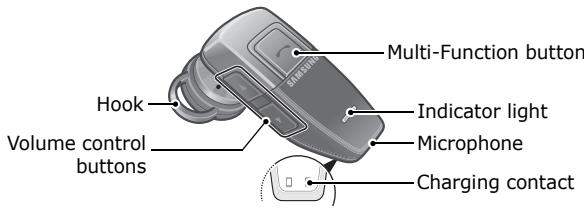

Checking the accessories
Make sure you have the following items with your headset:
Set 1: Charging case, Travel adapter, Manual, 2 headset hooks
Set 2: Charging case, Manual, 2 headset hooks
For Set 2, use your phone charger as a power source for recharging.

Charging the headset
Your headset uses a rechargeable battery. You must charge the battery fully before using the headset for the first time.
1 Put the headset in the supplied charging case and close the cover.
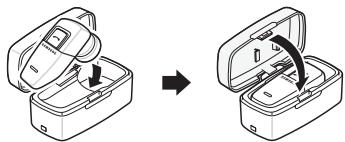
2 Plug the travel adapter into the case's charging socket. 3 Plug the travel adapter into the electrical outlet.
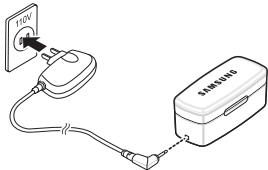
For Set 1, use the travel adapter provided.
- Charge the headset until the red light on the headset turns to blue.
- The headset will be fully charged in approximately 2 hours.
4 Remove the travel adapter from the case.

WARNING
Do not attempt to charge the headset with anything other than the travel adapter provided. Using an unauthorized travel adapter may damage the headset.

IMPORTANT
Removing the travel adapter from the case during charging will turn the headset off and stop the charging progress. The headset cannot be used while charging.

Storage of the headset
- Always store the headset with the power off and make sure it is safely protected.
- Avoid storage at high temperatures (above 40°C / 104°F), such as in a hot vehicle or in direct sunlight. (Storage at high temperatures can damage performance and reduce battery life).
- Do not expose the headset or any of its supplied parts to rain or other liquids.
BASIC OPERATIONS

Turning the headset on/off
| To | Press and hold | You will hear | You will see |
| turn the headset on | the Multi-Function button for 4 seconds until you see 4 blue flashes on the indicator light, then release. | a tone. | the indicator light flashes while the power is on (see Meaning of the indicator light). |
| To | Press and hold | You will hear | You will see |
| turn the headset off | the Multi-Function button for 4 seconds until you see 2 blue flashes on the indicator light, then release. | series of 2 tones. | the indicator light stops flashing. |
Meaning of the indicator light
| Light | Tone | Status |
| Flashes in blue every 8 seconds. | Quick series of 2 tones. (Active mode starts.) | The headset is in Active mode. • The headset has an active call in progress. • You can talk up to 4 hours.* |
| Flashes in blue every 3 seconds. | Quick series of 2 tones. (Standby mode starts.) | The headset is in Standby mode. • The headset is waiting for a call. • The headset can be in Standby mode up to 70 hours.* |
| Flashes in red instead of blue. | 5 tones every 20 seconds. | The battery of the headset is low. Recharge the battery. • There is only 1 minute of talk time left. |
* Depending on the phone type and usage, the actual time may vary.

Pairing with your Bluetooth phone
Pairing will create a unique and encrypted wireless link between two Bluetooth enabled devices, such as your Bluetooth phone and Bluetooth headset.
1. Ensure that the headset is off (see Turning the headset on/off). 2. Press and hold the Multi-Function button until the indicator light turns on in blue (approximately 8 seconds).
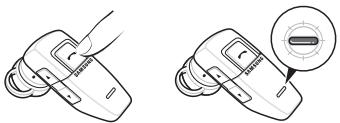
3. Set your Bluetooth phone to discover the headset by following your phone's guide. Typically, the steps involve going to a 'Setup', 'Connect', or 'Bluetooth' menu on your phone and then selecting the option to discover Bluetooth devices.
4. Your phone will find the Samsung WEP200 headset and ask if you want to pair with it. Confirm this by pressing the Yes or OK key.
5. Enter a passkey or PIN, 0000 (4 zeros), then press the Yes or OK key.
IMPORTANT
If pairing was successful, the indicator light will flash in blue 10 times rapidly before going to flashing every 3 seconds. If unsuccessful, the light remains on, and you will need to re-attempt pairing.

Wearing the headset
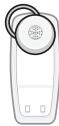
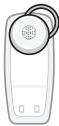
Wear the headset on your ear. In general, you will get better performance when there are no obstructions (including parts of your body) between the headset and the phone.
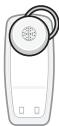
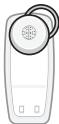
Depending on what ear you are going to wear the headset, simply adjust the hook accordingly.
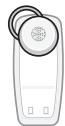
▲ Left
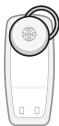
▲ Right
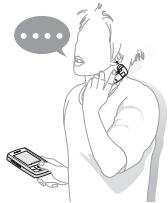
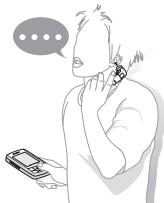
Making a voice activated call
If the voice recognition feature is on, you can make a voice activated call.
1 Press the Multi-Function button once. You will hear the voice-activation tone. 2 Say the name of the person you wish to call.
Depending on your phone, this feature may not be supported.
Redialing the last number
If the voice recognition feature is off, press and hold the Multi-Function button for 2 seconds, twice.
If the voice recognition feature is on,
1 Press the Multi-Function button and listen for the voice-activation tone. When you hear it, press the button again to cancel the feature. 2 Press and hold the Multi-Function button to access the recent call list. 3 Press and hold the Multi-Function button to make a call to the last number you have dialed or received.

Ending a call
Press the Multi-Function button once.

Answering a call
- After you hear the ring tone, press the Multi-Function button once.
- If you answer the call with your phone, you can transfer the call to the headset by pressing the Multi-Function button.

IMPORTANT
Do not hold the Multi-Function button down too long when making a call with your voice, ending, or answering a call. This should only be a quick tap.

Rejecting a call
When you receive a call, press and hold the Multi-Function button for 2 seconds to reject the call. Depending on your phone's setting or type, you may only be able to mute the ringer or this feature may not be supported.

Adjusting the volume
Press [▲] on the side of the headset to increase the volume level and [▼] to decrease the volume level.

Using enhanced features
Enhanced features are available for phones that support the hands-free Bluetooth profile and enhanced features.
- Answering a second call (switching between 2 calls)
When your phone notifies you of another incoming call while you are on a call, press and hold the Multi-Function button for 2 seconds.
You can switch between calls by pressing and holding it for 2 seconds.
Depending on your phone, this feature may not be supported.
- Placing a call on hold
While you are on a call, press and hold the Multi-Function button for 2 seconds.
To retrieve the call, press and hold the Multi-Function button for 2 seconds again.
Depending on your phone, this feature may not be supported.
- Switching off the microphone
Press and hold the Up volume control button to switch off the headset's microphone.
To switch it back on, press and hold the button again.
APPENDIX
Frequently asked questions
| How far away from my phone will the headset work? | The operating range is typically up to 30 feet (10 metres). |
| Will the headset work with my cordless phone at home? | The headset is not designed for use with cordless phones. |
| Will the headset work with laptops, PCs, and PDAs? | The headset will work with devices that are compliant with Bluetooth version 2.0 and support the headset and/or hands-free profile(s). |
| Will anything cause interference with my conversation when I'm using the headset? | Appliances such as cordless phones and wireless networking equipment may cause interference with your conversation. To reduce any interference, keep the headset away from other devices that use or produce radio waves. |
| Will the headset interfere with my car's electronics, radio, or computer? | The headset produces significantly less power than a typical mobile phone. It also only emits signals that are in compliance with the international Bluetooth standard. Therefore, you should not expect any interference with standard consumer-grade electronics equipment. |
| Can other Bluetooth phone users hear my conversation? | When you pair the headset to your Bluetooth phone, you are creating a private link between only these two Bluetooth devices. The wireless Bluetooth technology used in the headset is not easily monitored by third parties, because Bluetooth wireless signals are significantly lower in radio frequency power than those produced by a typical mobile phone. |
| How do I take care of the headset? | To clean the headset, use a clean, soft cloth that is slightly damp. |
FCC
FCC ID: A3LWEP200
This device complies with part 15 of the FCC Rules. Operation is subject to the following two conditions:
(1) This device may not cause harmful interference, and (2) this device must accept any interference received, including interference that may cause undesired operation.
This equipment has been tested and found to comply with the limits for a Class B digital device, pursuant to part 15 of the FCC Rules. These limits are designed to provide reasonable protection against harmful interference in a residential installation. This equipment generates, uses, and can radiate radio frequency energy and, if not installed and used in accordance with the instructions, may cause harmful interference to radio communications. However, there is no guarantee that interference will not occur in a particular installation. If this equipment does cause harmful interference to radio or television reception, which can be determined by turning the equipment off and on, the user is encouraged to try to correct the interference by one or more of the following measures:
- Reorient or relocate the receiving antenna.
- Increase the separation between the equipment and receiver.
- Connect the equipment into an outlet on a circuit different from that to which the receiver is connected.
- Consult the dealer or an experienced radio/TV technician for help.
The device and its antenna must not be co-located or operating in conjunction with any other antenna or transmitter.
Users are not permitted to make changes or modify the device in any way.
Changes or modifications not expressly approved by Samsung will void the user's authority to operate the equipment.
Industry Canada
IC ID: 649E-WEP200
Operation is subject to the following two conditions: (1) This device may not cause interference, and (2) This device must accept any interference, including interference that may cause undesired operation of the device.
The term "IC:" before the certification/registration number only signifies that registration was performed based on a Declaration of Conformity indicating that Industry Canada technical specifications were met. It does not imply that Industry Canada approved the equipment.
Bluetooth
The Bluetooth® word mark and logos are owned by the Bluetooth SIG, Inc. and any use of such marks by Samsung is under license. Other trademarks and trade names are those of their respective owners.

Warranty and parts replacement
Samsung warrants this product as free of defects in material, design and workmanship for the period of one year from the original date of purchase.
If during the period of warranty this product proves defective under normal use and service, you should return the product to the retailer from whom it was originally purchased or to a qualified service center. The liability of Samsung and its appointed maintenance company is limited to the cost of repair and/or replacement of the unit under warranty.
- The warranty is limited to the original purchaser.
- A copy of your receipt or other proof of purchase is required for proper warranty service.
- The warranty is void if the serial number, date code label, or product label is removed, or if the product has been subject to physical abuse, improper installation, modification, or repair by unauthorized third parties.
- The responsibility of Samsung products shall be limited to the repair or replacement of the product at its sole discretion.
- Specifically exempt from any warranty are limited-life consumable components such as batteries and other accessories.
- Samsung is not liable for any incidental or consequential damages arising from the use or misuse of any Samsung product.
- This warranty gives you specific rights, and you may have other rights which vary from area to area.
- Unless otherwise instructed in the User Guide, the user may not, under any circumstances, attempt to perform service, adjustments or repairs on the unit, whether in or out of warranty. It must be returned to the purchase point, factory or authorized service agency for all such work.
- Samsung will not assume any responsibility for any loss or damage incurred in shipping. All repair work on Samsung products by unauthorized third parties voids any warranty.

(Waste Electrical & Electronic Equipment)
This marking shown on the product or its literature indicates that it should not be disposed of with other household wastes at the end of its working life.
To prevent possible harm to the environment or human health from uncontrolled waste disposal, please separate this from other types of wastes and recycle it responsibly to promote the sustainable reuse of material resources.
Household users should contact either the retailer where they purchased this product, or their local government office, for details of where and how they can take this item for environmentally safe recycling.
Business users should contact their supplier and check the terms and conditions of the purchase contract. This product should not be mixed with other commercial wastes for disposal.
Table of Contents
BEFORE USING YOUR HEADSET
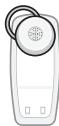
▲ Left
▲ Right
Make a voice call
▲ Left
▲ Right
▲ Left
▲ Right

Make a call