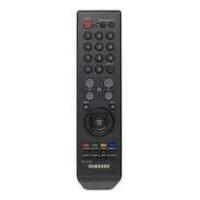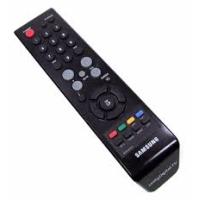
DCB-B270 - DVB SAMSUNG - Free user manual and instructions
Find the device manual for free DCB-B270 SAMSUNG in PDF.



User questions about DCB-B270 SAMSUNG
0 question about this device. Answer the ones you know or ask your own.
Ask a new question about this device
Download the instructions for your DVB in PDF format for free! Find your manual DCB-B270 - SAMSUNG and take your electronic device back in hand. On this page are published all the documents necessary for the use of your device. DCB-B270 by SAMSUNG.
USER MANUAL DCB-B270 SAMSUNG
Instructions for use
GB
NL
FR
Instructions for use ....GB
Instructions for use ....GB
Instructions for use
GB
SAMSUNG Service Hotline :
0900 20 200 88 (€ 0.10/ Min)

Correct Disposal of This Product (Waste Electrical & Electronic Equipment)
(Applicable in the European Union and other European countries with separate collection systems)

This marking shown on the product or its literature, indicates that it should not be disposed with other
household wastes at the end of its working life. To prevent possible harm to the environment or human health from uncontrolled waste disposal, please separate this from other types of wastes and recycle it responsibly to promote the sustainable reuse of material resources.
Household users should contact either the retailer where they purchased this product, or their local government office, for details of where and how they can take this item for environmentally safe recycling.
Business users should contact their supplier and check the terms and conditions of the purchase contract. This product should not be mixed with other commercial wastes for disposal.
SAFETY INSTRUCTIONS
This STB has been manufactured to satisfy international safety standards.
Please read the following recommended safety precautions carefully.
MAINS SUPPLY: AC 100-240V\~, 50/60Hz
OVERLOADING: Do not overload wall outlets, extension cords or adapters as this can result in fire or electrical shock.
LIQUIDS: Keep liquids away from the STB.
CLEANING: Before cleaning, disconnect the STB from the wall socket. Use a cloth lightly dampened with water(no solvents) to clean the exterior.
VENTILATION: Do not block the STB ventilation holes. Ensure that free airflow is maintained around the STB. Never store the STB where it is exposed to direct sunlight or near heating equipment e.g. a radiator. Never stack other electronic equipment on top of the STB. Place the STB at least 30mm from the wall. Need at least 10mm from the top and both side of the STB for ventilation.
ATTACHMENTS: Do not use any attachment that is not recommended by the manufacturer; it may cause a hazard or damage the equipment.
SERVICING: Do not attempt to service this product yourself. Any attempt to do so will make the warranty invalid. Refer all servicing to a qualified service agent.
LIGHTNING: If the STB is installed in an area subject to intense lightning activity, protection devices for the STB mains connector and modem telephone line are essential. The individual manufacturer's instruction for safeguarding other equipment, such as TV set, Hi-Fi, etc., connected to the STB must also be followed during lightning storms.
GROUNDING: CATV cable MUST BE EARTHED. The grounding system must comply with local regulations.
Note: 1. Dispose the used batteries at designated place for environment protection.
-
The Mains plug is used as a disconnect device and shall stay readily operable at any time.
-
Apparatus shall not be exposed to dripping or splashing and no objects filled with liquids, such as vases, shall be placed on the apparatus.
CONTENTS
Safety Instructions....1
General Features 3
Connecting Your "STB" 4
Description 6
Front Panel 6
Rear Panel 7
Remote Control Unit 8
Basic Functions 10
Operating The Receiver 15
Main Menu....15
-
EPG - Electronic Program Guide ..... 15
-
Channel 16
2.1 Manual Scan 16
2.2 Channel List....17
2.3 Favorite Channel 17
2.4 Parental Guide....18
2.4.1 Program Grade 18
2.4.2 Lock/Unlock Channel 18
2.4.3 Change PIN Code 18
- Timer 19
3.1 Scheduled Timers....19
3.3 Manual Setting 19
3.3 Guard Band Time 19
- Setup 20
4.1 Preference....20
4.1.1 TV Aspect Ratio 20
4.1.2 Aspect Ratio 20
4.1.3 TV Setting....20
4.1.4 Automatic Subtitles....20
4.1.5 Banner Time....21
4.2 Transparency 21
4.2.1 OSD 21
4.2.2 Subtitles 21
4.2.3 Teletext....21
4.3 Language....22
4.3.1 OSD 22
4.3.2 Audio Out 22
4.3.3 Subtitles 22
4.4 System....23
4.4.1 Product Info....23
4.4.2 Reset....23
4.5 Irdeto CA Status....24
4.5.1 CA Status 24
4.5.2 IRD Status....24
4.5.3 Loader Status 24
4.5.4 Mail Box 24
Troubleshooting 25
Disposal 25
Technical Specifications 26
GENERAL FEATURES
1. USER SECTION
▶ SOFTWARE DOWNLOAD VIA Network & PC(Secured)
ADVANCED ELECTRONIC PROGRAM GUIDE
MULTI LANGUAGE SUPPORTED FOR OSD
SUBTITLE & TELETEXT(OSD & VBI) SUPPORTED WITH MULTI LANGUAGE
FULL FUNCTION INFRARED REMOTE CONTROL UNIT
▶ SCART OUTPUT
- LOW POWER CONSUMPTION
4 FAVORITE LISTS
▶ AUTO UPDATED EPG
PASS LOOP FOR RGB SIGNAL
15 TIMERS TO RESERVE PROGRAMS(EVENTS) FOR TURNING ON/OFF
2. TUNER SECTION
▶ VHF, UHF BAND 50\~870 MHz
MAX 7 Msps SYMBOL RATE
16\~256 QAM Modulation Format
LOOP OUTPUT FOR ANALOG RECEIVER
3. VIDEO SECTION
DVB-C COMPLIANT
MPEG-2 VIDEO(MP@ML)
1\~15 Mb/s DATA RATE
▶ SUPPORTS ASPECT RATIO 4:3(NORMAL) AND 16:9(WIDE SCREEN)
4. AUDIO SECTION
MPEG-1 AUDIO LAYER I & II
MONO, DUAL, STEREO AND JOINT STEREO AUDIO MODE
32, 44.1 AND 48 kHz SAMPLING FREQUENCIES
VOLUME CONTROL AND MUTE FUNCTION THROUGH REMOTE CONTROL UNIT
SPDIF DIGITAL AUDIO OUTPUT
CONNECTING YOUR "STB"
1. LOCATION OF THE RECEIVER
Your STB should be placed under proper ventilation.
Don't put in completely enclosed cabinet that will restrict the flow of air, resulting in overheating.
The location should be safeguarded from direct sunlight, excess moisture, rough handling or household pets.
Avoid stacking other electronic components on the top of the receiver.
The location should be safely accessible by the cable from your antenna system.
2. CONNECTING THE RECEIVER WITH DISH SYSTEM
After installing your antenna system, connect the coaxial cable to "CABLE IN" terminal marked at the rear of the STB.
All cable connectors should be finger tightened; do not use any kind of wrench while tightening connectors. The cable should be 75ohm impedance coaxial cable.
3. CONNECTING THE RECEIVER TO TV
To connect the receiver with your television, you can use Scart Cable.
In the case of connecting your TV through SCART cable, connect the SCART connector marked AV1 (TV) to the respective SCART port on the TV.
4. CONNECTING YOUR ANALOG RECEIVER
To facilitate the user using analog receiver to view analog channels, STB has been provided with a loop through terminal marked as "LOOP".
Connect the coaxial cable from this terminal to the IF input terminal of your analog receiver. Now by keeping the STB in standby, you will be able to tune and view analog channels from your analog receiver.
5. CONNECTING YOUR VCR or DVD
To connect a VCR or DVD player, the STB has been provided with SCART at the rear marked "AV2 (EXT)".
Using a SCART connector, the VCR or DVD player can be connected to the receiver.
6. CONNECTING DIGITAL AUDIO SYSTEM
Connect a fiber optic cable between DIGITAL AUDIO OUT on the receiver and Optical SPDIF on the Digital Audio System.
Connecting Figure

text_image
Signal Cable CABLE IN LOOP AV1 (TV) AV2 (EXT) TUR MAX AV 100A/40V- 50 MHz Fan: 250V TAAR SIGNAL MOBIE OUT MINIMAL DO NOT OPEN ELECTRICAL SWITCH RADIANCE OFFAL PC7. INSERTING SMARTCARDS FOR IRDETO SERVICES
In order to view a scrambled service, you need to have a valid Smartcard. This STB has the Irdeto embedded to view Irdeto programmes.
Note : Insert the Smartcard with the gold coloured chip facing downwards.
DESCRIPTION
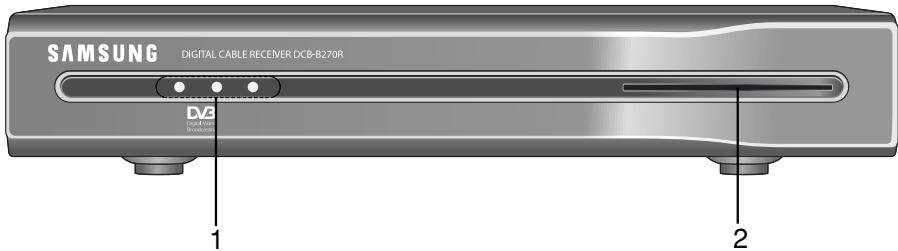
Front Panel
text_image
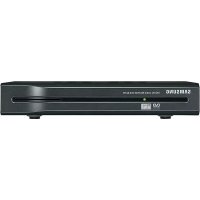
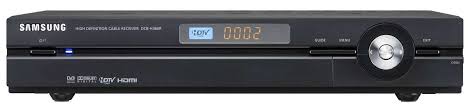
SAMSUNG DIGITAL CABLE RECEIVER DCB-B270R DV3 1 21. LED Display
When the Red LED lights, the set-top box enters standby mode When the Green LED lights, it enters the operation mode. When the Yellow LED lights, it starts work and check internal systems.
2. Card Slot
1 Slot for Irdeto smartcard.
Rear Panel
text_image
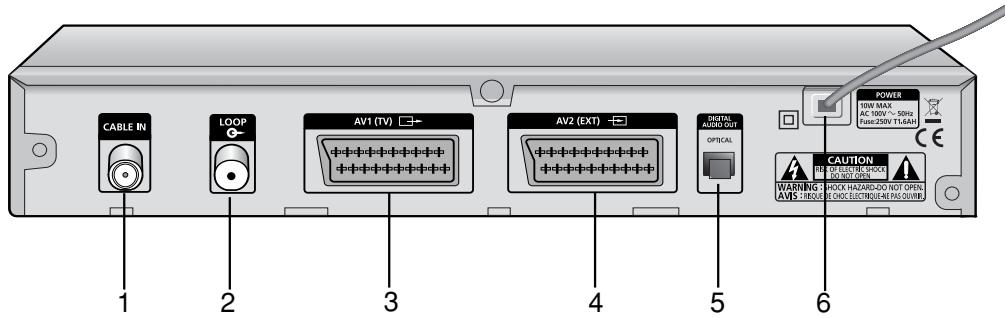
CABLE IN LOOP AV1 (TV) AV2 (EXT) OPTICAL POWER 50kV MAX AC 100V ~ 50Hz Fuse:250V T-1.6AH CAUTION WARNING: CHOC HA/240-DDD NOT OPEN. AVIS: CREVER: CHOC ELECTRIO-NE PAS OUBB- CABLE IN This port is connected the coaxial cable from your Cable system.
- LOOP To enable the connection of an Analog receiver. The receiver is provided with this "LOOP" port.
- AV1 (TV) This is used to connect to your TV.
- AV2 (EXT) This is used to connect to your VCR or DVD.
- DIGITAL AUDIO OUT Output for connection to a digital amplifier.
- AC MAINS This is to plug in the AC mains power cord. The input AC voltage range is 100V to 240V, 50Hz/60Hz supply.
Remote Control Unit
text_image
STANDBY/ON INFO TV/RADIO 1 2 3 i 1 2 3 4 5 6 7 8 9 FW OH PRE ON 0 VOL CH MENO RETURN OK GUIDE PG+ PG- TIMER TEXT ALT AUDIO SUBTITLE SAMSUNGNote: When inserting batteries, make sure that the polarity(+/-) is correct.
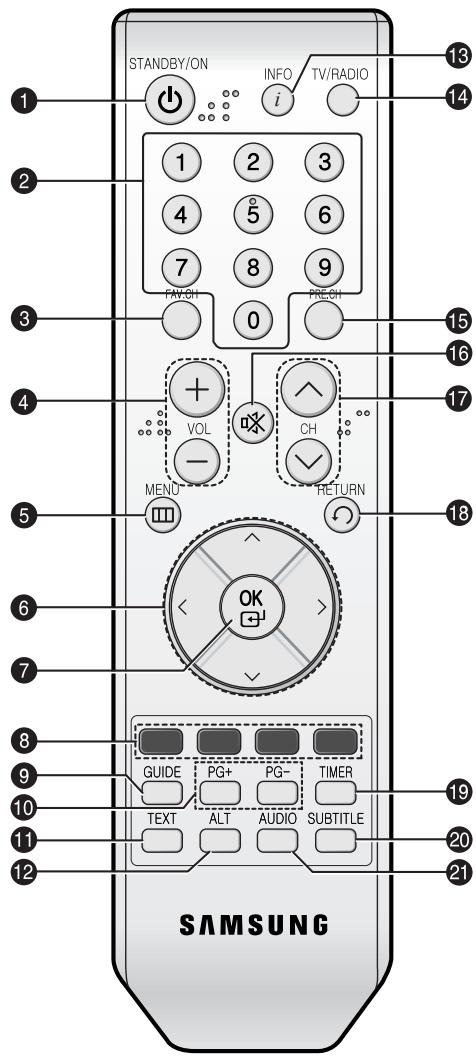
- STANDBY/ON Turns the STB on and off.
- 0-9 Numeric key Press to enter numeric value and select the channel directly by entering number on the service list.
- FAV.CH Displays the favorite channel lists.
- VOL+/VOL- Press to increase or decrease the volume.
- MENU Displays the main on-screen menu.
- Arrow Key Controls the cursor in the menu.
- OK Confirms a selection.
- Color key (Red, Green, Yellow, Blue)
Used to select special operation for the STB.
- GUIDE Displays the on-screen Electronic Program Guide (EPG).
- PG+/PG- Press to move up or down pages on Teletext mode.
- TEXT Select the teletext mode.
- ALT Select the soundtrack list for the current service.
- INFO Press to display information for current program.
- TV/Radio toggle between the TV and Radio channel.
- PRE.CH Turns to the previous channel.
- ☑ (MUTE) This key is for toggling between normal & muted audio.
- CH^/CH▼ Press to change channels.
- RETURN Returns to the previous menu.
- TIMER Press this key to reserve the programs in EPG.
- SUBTITLE Press to change a subtitle language.
- AUDIO Press to select a Audio mode.
BASIC FUNCTIONS
1. Display Screen
Before you can view the television program, you must perform the installation.
Therefore you will see only menu images at first.
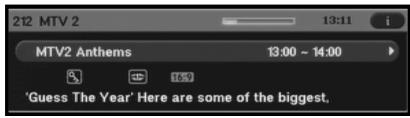
After the television channels have been programmed, you will see the following picture (banner) each time you switch channels:
text_image
MTV2 Anthems 13:00 ~ 14:00 'Guess The Year' Here are some of the biggest,- Press the INFO key in view mode.
- Select the channel by pressing Numeric (0\~9) keys or ▲/▼keys or CH ∧ /CH ∨ keys and press TV/RADIO key to move to TV or Radio channel.
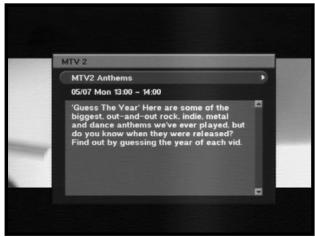
- When the INFO key is pressed in second time, detailed information for current program can be displayed on another window.
text_image
MTV 2 MTV2 Anthems 05/07 Mon 13:00 - 14:00 Guess The Year Here are some of the biggest out-and-out rock, indie metal and dance anthems we've ever played, but do you know when they were released! Find out by guessing the year of each vid.- When the INFO key is pressed in third time, another detailed information window appears. You can see the informations such as time, audio track, video track and signal.
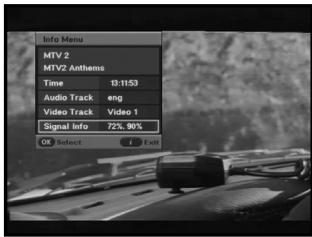
text_image
Info Menu MTV 2 MTV2 Anthems Time 13:11:53 Audio Track eng Video Track Video 1 Signal Info 72%, 90% OK Select Exit- If program is supported, you can see following icon list.
Age Grade
Favorite Channel
Soundtrack
Mail Icon
Teletex
Subtitle
16:9 Picture Size
Program Progressive Status
Announcement
Scramble Channel
Locked Channel
You will also see this picture each time you change channels.
When you press TV/RADIO key on the Remote Control Unit, TV and RADIO program are toggled.
2. Volume Control
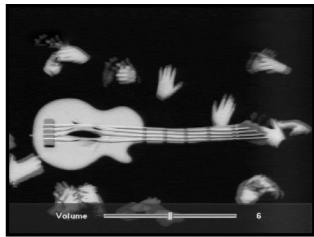
To control the volume level :
- Press the VOL+/VOL- keys or ◀/▶ keys to adjust the volume level.
- Press the ⚙ (MUTE) key to turn to silence mode.
- Press the ☑ (MUTE) key again or VOL+ or VOL- keys in order to cancel the mute function.
natural_image
Black-and-white photo of a guitar with abstract white shapes and a scale bar labeled 'Volume' (no readable text or symbols)3. Select Soundtrack
- Press the ALT key to see the soundtrack list.
- Press the ▲/▼ and OK keys to select one.
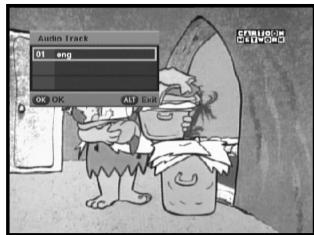
text_image
Audio Track 01 eng OK OK ALT Start4. Service List
- Press the OK key while you are viewing a program.
- Select list by pressing the TV/RADIO or FAV key.
- Select the channel by pressing the ▲/▼.
- Press the OK key to watch that channel.
The colour key corresponds the following service list.
- Red key : Sort
- Yellow key : Edit FAV.
- Green key : Lock
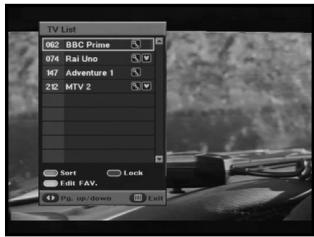
text_image
TV List 062 BBC Prime 074 Rai Uno 147 Adventure 1 212 MTV 2 Sort Edit FAV. Pg. up/down Exit5. Setting the Favorite Channel
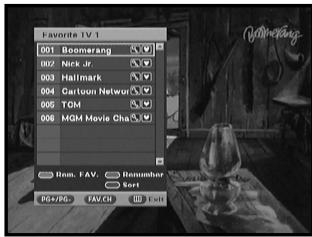
If you set favorite channel first time, when you press the FAV.CH key you will see the following message "Favorite Channel Lists are empty!". In this case, press the OK key while you are viewing a program. Then press YELLOW key and select the favorite channel list you want to edit. (Four lists are supported.) Finally you can add or remove channels as pressing YELLOW key.
Once you proceed the steps above, you can immediately register the present channel to the favorite channel list.
- Press the FAV.CH key while you are viewing a program.
- To add the current channel to the Favorite channels, press the YELLOW key.
To delete a favorite channel from the Favorite channel list, press the RED key.
To watch the favorite channel
- Press the FAV.CH key and then select the channel by using ▲/▼ keys.
- To return to whole channel list, press the FAV.CH key repeatedly.
6. Changing the Subtitle Language
When the current broadcasting program provides subtitle, press the SUBTITLE key to see the current subtitle language list.
- Press the SUBTITLE key to see the subtitle language List.
- Use the ▲/▼ keys to select a subtitle language you want.
- Press the OK key and then the subtitle language you want is displayed. To do text off, press the SUBTITLE key and select '01 off'. Then, press OK key.
text_image
Favorite TV 1 001 Boomersc 002 Nerk Jr. 003 Hallmark 004 Gettoun Network 005 TOM 006 MGM Movie Cha Hom. FAV. Remumber Sort PG+PGF FAVCH Exit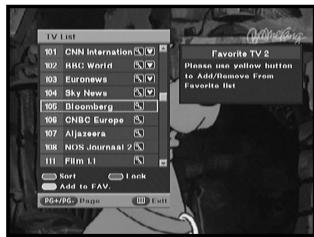
text_image
TV List 101 CNN Internation 102 HRC World 103 Euronews 104 Sky News 105 Disomberg 106 CHS Europe 107 Aljazeera 108 NOS Journals 2 111 Film L1 Kort Add to FAV. Favorite TV 2 Please use yellow buttons to Add/Demers From Favorite It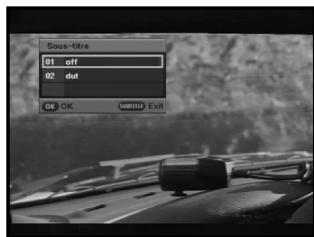
text_image
Sous-tire 01 off 02 dot OK Exit7. Selecting the Audio mode
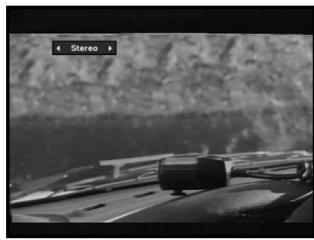
Depending on the particular program being broadcast, you can listen to stereo, mono, right, or left.
- Press the AUDIO key to see the Audio menu.
- Use the ◀/▶ keys to select a Audio menu.
Stereo: Select this to listen to the audio track in stereo.
Left: Select to listen to the left audio track through both speakers.
Right: Select this to listen to the right audio track through both speakers.
Mono: Select this to listen to the audio track in mono.
natural_image
Close-up of a car's front wheel and dashboard with visible mechanical components, set against a textured wall (no text or symbols)8. Changing the Teletext OSD
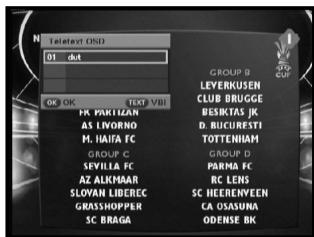
- When the current broadcasting program provides Teletext OSD, press the TEXT key to see the current Teletext OSD list.
- Use the ▲/▼ keys to select a Teletext OSD you want.
- Press the OK key and then the Teletext OSD you want is displayed on the screen.
- When Teletext screen is displayed, press the ▲/▼, ◀/▶, PG+, PG-, or Numeric keys to go to desired page. Pressing PG+ or PG- moves the page by 100 pages.
- Press the TEXT key to exit.
text_image
TateText OSD 01 dot OK OK TEXT VBI FR PARTIAN AS LVORNO F. HAIFA FC GROUP C SEVELLA FC AZ ALKMAAR SLOVAN LIBEREC GRASSHOPPER SC BRAGA GROUP B LEVERKUSEN CLUB BRUGGE BESIKTAS JK D. BUCURESTI TOTENHAM GROUP D PARMA FC RC LENS SC HEEREINVEEN CA OSASUNA ODENSE BK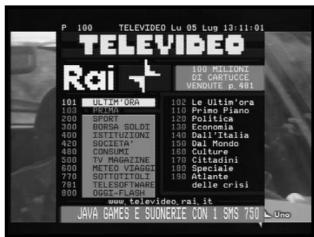
text_image
P 100 TELEVIDEO Lu 05 Lug 13:11:01 TELEVIDEO Rai + 101 ULTRI'ORA 102 PRIMA 103 SPINDA 104 BORSA SOLO 105 ZERIKONI 106 SOCIENTA 107 CONSUMI 108 TV MAGGALI 109 METES VEAGUI 110 GYOTOTOLI 111 TELESOFTWARE 112 DEREFAISH 113 LEUTI'ORA 114 Primo PIANO 115 ECONOMI 116 SANTANA 117 GUSTAVELIA 118 DAL Mondo 119 CULTURE 120 LITUMINI 121 TATIINI 122 SELLANDE 123 DELTA 124 DELTA CRISI www.televideo.rai.it JAVA GAMES E SUNVERLE CON I SMS 7509. Changing the Teletext VBI
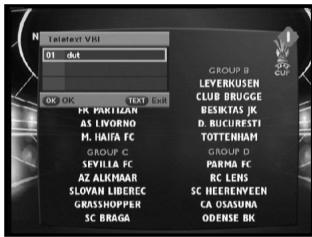
- When the current broadcasting program provides Teletext VBI, press the TEXT key twice to see the current Teletext VBI list.
- This Teletext will be displayed to the screen by TV, which supports Teletext.
- Use the ▲/▼ keys to select a Teletext VBI you want.
- Press the OK key and then the Teletext VBI you want is displayed on the screen.
text_image
Teletext VIRI 01 dut OK OK TEXT EUI GROUP B LEVERKUSEN CLUB BRUGGE BESIKTAS JK D. BUCURESTI TOTTENHAM GROUP D SPYLLA FC AZ ALKMAR SLOVAN LIBEREC GRASSHOPPER SC BRAGA PARM FC RC LEHS SC HEERENVEEN CA OSASUNA ODENSE BKAfter installing your antenna system and STB with appropriate connectors.
- Plug in the AC main power and switch on the receiver.
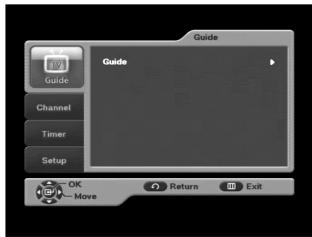
- Press the MENU key to bring up the main menu.
The following on screen display will appear:
The sub menu topics will be displayed.
For the sub-menus Guide, Channel, Timer and Setup.
text_image
Guide Guide Channel Timer Setup OK Move Return Exit1. EPG-Electronic Program Guide
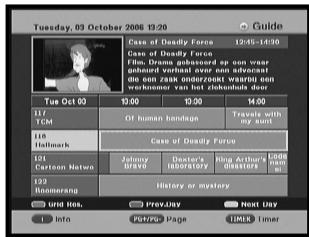
The electronic program guide gives you a channel list for the channels.
- Select "GUIDE" in the main menu, then press the OK key.
RED key : Time interval can be adjusted by pressing this key. It is rotated by 30 minutes.1st: 30 minutes 2nd: 1 hour 3rd: 1 hour and 30 minutes
GREEN key : Green key is for moving back to the previous date.
YELLOW key : Yellow key is for moving to the next coming date.
- Press the PG+/PG- or ▲/▼ keys to select the desired channel, then press the OK key.
Note: Quick way to access the GUIDE menu : Just press the GUIDE key while you are viewing a program.
- If the information of highlighted program doesn't appear fully, INFO key will be available any time. You can scroll the window by pressing PG+/PG- or ▲/▼ keys.
- When the TIMER key on the remote control is pressed in the EPG screen, if the current channel involves an event, timer is set immediately and the set timer is indicated on the EPG screen. A program that has been set in this way is indicated on "Scheduled Timers" menu in "Timer" menu.
text_image
Tuesday, 03 October 2006 19:20 Guide Case of Deadly Force 12:45-14:00 Case of Deadly Force File Name: ghostport@op.com/vear Ding: 18.000000000000000000000000000000000000000000000000000000000000000 Tue Oct 03 11/17 TCM 11/18 Hallmark 12/1 Cartoon Netwo 12/2 Himmerang Case of Deadly Force Of human handbags Travels with my arm Case of Deadly Force Johnny Davy Dostare's laboratory King Arthur's dassette History or mystery Grid Nos. Prev Day Next Day Info PSY/PGP Page IMME Timer2. Channel
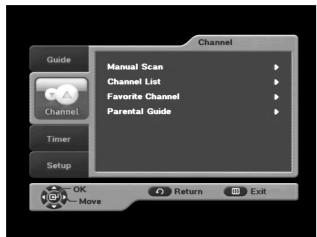
This menu consists of 4 sub-menus:
Manual Scan, Channel List, Favorite Channel and Parental Guide.
- Select "Channel" in the main menu by using ▲/▼ keys.
- Place the cursor on this sub menu and press the OK key.
text_image
Channel Guide Channel Timer Setup OK Move Manual Scan Channel List Favorite Channel Parental Guide Return Exit2.1 Manual Scan
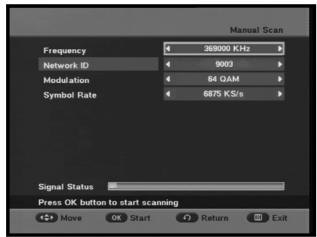
To tune-in new channels, the STB has been provided with "Manual Scan" where the channel data can be entered by the user.
After selecting the "Manual Scan" from the Channel Menu, the following screen will be displayed:
- Input the frequency of the channel you want to find.
The followings are defined as a default, but optionally you can choose it.
Signal Status bar shows you if it is valid.
● Input the frequency of the channel you want to find.
- Input the Network Id of the channel you want to find.
- Press the OK key start scanning.
- Select the Modulation of the channel you want to find. You can select the value of 16, 32, 64, 128, 256.
● Input the symbol rate of channel you want to find.
- After select option, press OK key to start the scan process.
text_image
Manual Scan Frequency 369000 KHz Network ID 9003 Modulation 64 QAM Symbol Rate 6875 KS/s Signal Status Press OK button to start scanning Move OK Start Return Exit2.2 Channel List
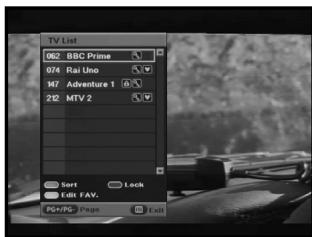
This function is used to delete the channels.
- Select the list by pressing the TV/RADIO or FAV.CH key.
- Select the channel by pressing the ▲/▼ keys.
- Press the OK key to watch that channel.
The color key corresponds the following service list.
- To sort the channels in order of alphabet or default (channel number) press the RED key.
- To lock the channel press GREEN key. Whenever you need to view the channel, you will have to enter the PIN at the request window. It means that you can access all parental locked channels with entering PIN Code on any parental locked channel successfully.
- To edit favorite channel list press the YELLOW key. Select favorite channel list you want to edit.(Four lists are supported.)
Note : Quick way to access the channel list menu : Just press the OK key while you are viewing a program
2.3 Favorite Channel
You can edit the favorite channel list.
- To delete a favorite channel from the favorite channel list, press the RED key.
- To change the current channel number into new one, press the GREEN key. After selecting the channel number by using ◀ / ▶ keys, press OK key.
- To sort the channels in order of alphabet or default(channel number) press the BLUE key.
Note : Quick way to access the Favorite channel menu : Just press the FAV.CH key while you are viewing a program.
text_image
TV List 062 BBC Prime 074 Rai Uno 167 Adventure 1 212 MTV 2 Sort Lock Edit FAV. POSTS Page Exit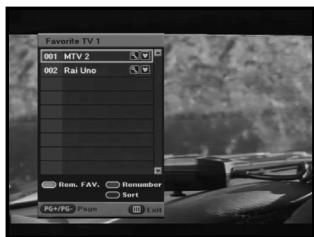
text_image
Favorite TV 1 001 MTV 2 002 Rai Uno Rem. FAV. Remember Sort PGFPG Phase Exit2.4 Parental Guide
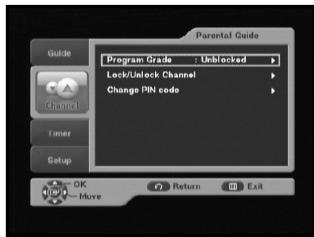
This feature sets viewing restrictions and prevents unauthorized access to your STB through the PIN(Personal Identification Number), which is a 4 digit number. (The factory preset PIN Code:0000)
2.4.1 Program Grade
You can block the specific channel by selecting age. If the available age of the channel is older than age which you set, that channel will be blocked.
● You can choose age from 4 to 17.
- "All blocked" means that you cannot watch any channels regardless of the grade.
- "Unblocked" means that you can watch the all channels regardless of the grade.
text_image
Parental Guide Guide Program Grade Unblocked Lock/Unlock Channel Change PIN code Timer Setup OK Move Return Exit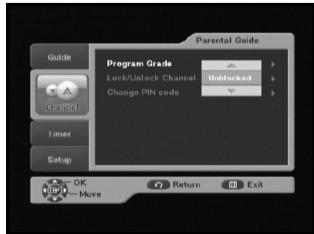
text_image
Parental Guide Guide Program Grade Lock/Unlock Channel Unlocked Change PIN code Timer Setup OK Move Return Exit2.4.2 Lock/Unlock Channel
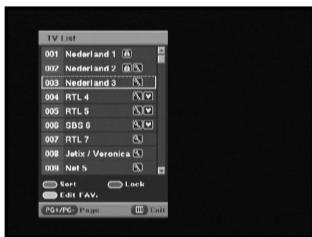
- To lock the channel press GREEN key. Whenever you need to view the channel, you will have to enter the PIN at the request window. It means that you can access all parental locked channels with entering PIN Code on any parental locked channel successfully.
- To unlock the channel press GREEN key one more time. "Lock" and "Unlock" are toggled.
text_image
TV List 001 Nederland 1 002 Nederland 2 003 Nederland 3 004 RTL 4 005 RTL 5 006 GBD 6 007 RTL 7 008 Jelix / Veronica 009 Net S Text Lock Edit FAV: POSTC Page Edit2.4.3 Change PIN code
You can change current PIN code into new one.
Note : If you forgot the PIN code, please call SAMSUNG Service Hotline. You can find the phone number inside the cover.
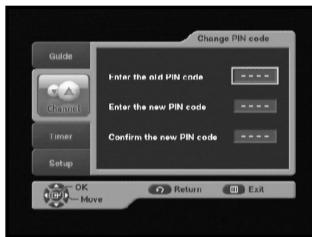
text_image
Change PIN code Enter the old PIN code ***** Enter the new PIN code ***** Confirm the new PIN code ***** OK Move Return Exit3. Timer
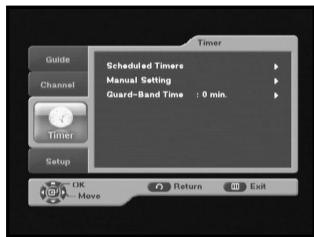
Through this menu you can reserve the programs and configure the settings.
3.1 Scheduled Timers
You can see the channels you reserved through EPG or manual settings.
- To add the timers press the RED key. You can reserve the program manually.
- To edit the timers press the GREEN key after highlighting the cursor on the program you want to edit. But it is impossible to edit the timers which was set through EPG.
- To delete the timers press the BLUE key after highlighting the cursor on the program you want to delete.
text_image
Guide Channel Timer Setup Scheduled Timere Manual Setting Guard-Band Time : 0 min. OK Move Return Exit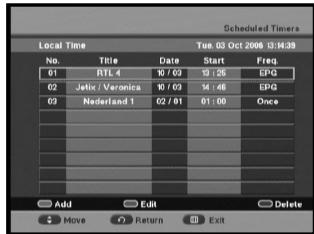
text_image
Scheduled Timers Local Time Tue 03 Oct 2008 13:00:39 No. Title Date Start Prev. BTL 4 10 / 62 91:35 SPG 02 Jelix / Varonica 10 / 62 14:46 EPG 02 Nederland 1 02 / 61 01:00 Once Add Exit Delete Move Return Exit3.2 Manual Setting
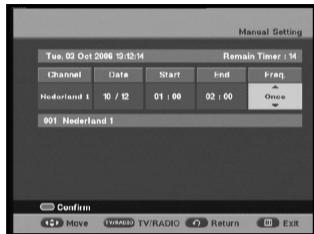
You can reserve the programs manually.
Set channel, date, start/end time and frequency by using
◀/▶ or ▲/▼ keys
text_image
Manual Setting Tue, 02 Oct 2006 10:12:14 Remain Timer 14 Channel Date Start End Break Nederland 1 10 / 12 01 : 00 02 : 00 Once 001 Nederland 1 Confirm Move TV/RADIO Return Exit3.3 Guard-Band Time
Guard-Band time is a function to ensure, that whole event will fit in set time boundaries. 1 minute of Guard-Band Time means that STB will start this timer operation 1 minute before set time and end 1 minute after set time.
Note : If the timers are conflicted with guard-band time, they will not be reserved.
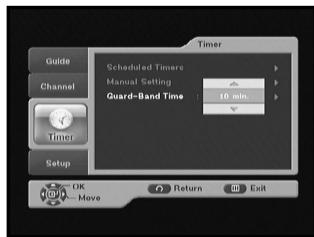
text_image
Timer Guide Channel Timer Setup OK Move Return Exit Scheduled Timere Manual Setting Guard-Band Time: 10 min.4. Setup
4.1 Preference
This option enables you to change preset setting such as Aspect Ratio, TV setting as per your requirement. You can set the various preference settings you want.
- Place the cursor on this sub menu and press OK key.
4.1.1 TV Aspect Ratio
- Select the TV Aspect Ratio : STANDARD 4:3 ratio or WIDE SCREEN 16:9 ratio type.
4.1.2 Aspect Ratio
- 16:9 LB: LB means the letter box. Select this when you want to see a 16:9 ratio image on the 4:3 ratio TV monitor. It shrinks the 16:9 ratio image with no screen distortion so the top and bottom of the screen are black empty.
- Pan Scan: The image is centered focused so the other edges that exceed the screen limits are cropped.
- Full: Select this when you want to see an image with converted to full screen regardless of the aspect ratio of sources.
4.1.3 TV Setting
- Select the TV setting : Composite or RGB. You can select the Video signal type.
4.1.4 Automatic Subtitles
- Select Automatic Subtitles "On" or "Off". If you select "On" and the channels support subtitles, you can see the subtitles automatically. You don't need to press SUBTITLE key.
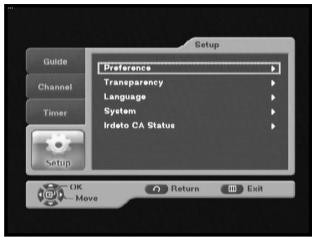
text_image
Setup Guide Channel Timer Setup OK Move Return Exit Preference Transparency Language System Irdato CA Status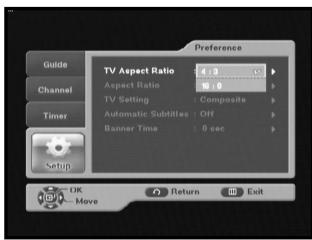
text_image
Preference Guide Channel Timer Setup TV Aspect Ratio 4.0 Aspect Ratio 10.0 TV Setting : Composite Automatic Subtitles : Off Banner Time : 0 sec OK Move Return Exit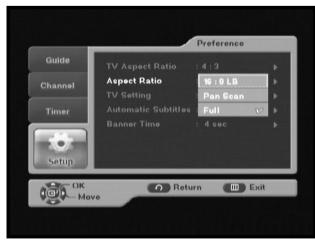
text_image
Preference Guide Channel Timer Setup OK Move Return Exit TV Aspect Ratio : 4 : 9 Aspect Ratio : 16 / 10 LB TV Setting : Pan Scan Automatic Subtitles : Full Banner Time : 4 sec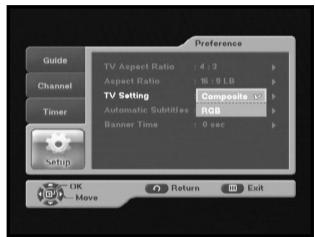
text_image
Preference Guide Channel Timer Setup TV Aspect Ratio : 4.9 GB Aspect Ratio : 16.9 GB TV Setting Automatic Subtitles : Composite RGB Banner Time : 0 sec OK Move Return Exit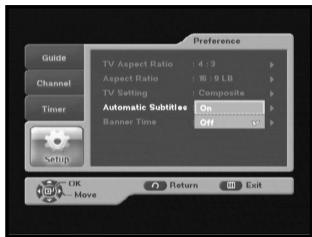
text_image
Guide Channel Timer Setup Preference TV Aspect Ratio 4.3 p Aspect Ratio 9 LB p TV Setting Composite p Automatic Subtilies On Banner Time Off OK Return Exit4.1.5 Banner Time
- Set the display duration of the banner(information) box displayed in the screen. The time ranges from 0 to 60 seconds.
- Setting is made with the numeric keys or ▲/▼ keys.
4.2 Transparency
4.2.1 OSD
- Select OSD transparency level from 0 to 100%. Setting is made with numeric keys or ▲/▼ keys.
4.2.2 Subtitles
- Select Subtitles transparency level from 0 to 100%. Setting is made with numeric keys or ▲/▼ keys.
4.2.3 Teletext
- Select Teletext transparency level from 0 to 100%. Setting is made with numeric keys or ▲/▼ keys.
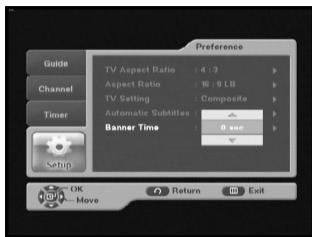
text_image
Preference Guide Channel Timer Setup OK Move Return Exit TV Aspect Ratio : 4 : 3 Aspect Ratio : 16 : 9 LB TV Setting : Composite Automatic Subtitles : Banner Time : 0 sec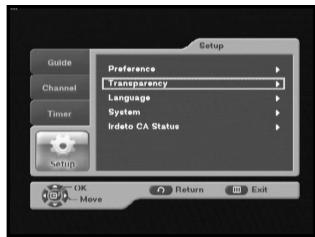
text_image
Setup Guide Channel Timer Setup OK Move Return Exit Preference Transparency Language System Irdeto CA Statue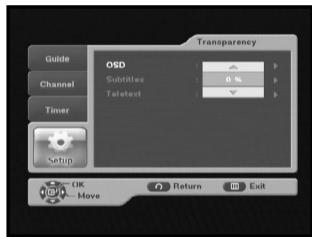
text_image
Transparency Guide OSD Channel Substitutes 0 % Timer Teletext Setup OK Move Return Exit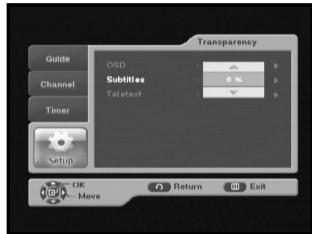
text_image
Transparency Guide OSD Subtitles Telotext Channel Timer Setup OK Move Return Exit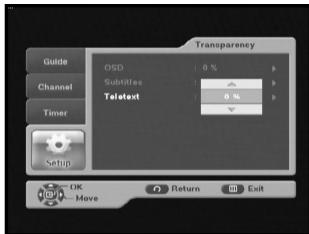
text_image
Transparency Guide OSD : 0 % Channel Subtilies : Telatext : 0 % Timer Setup OK Move O Return Exit4.3 Language
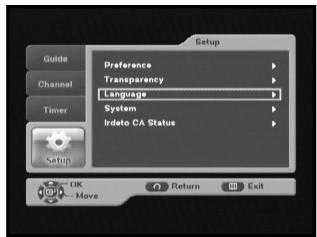
The Language option allows the user to select the desired language for OSD, Audio Out and Subtitles. 3 languages are available.
4.3.1 OSD
You can set the OSD language. To accommodate user from different regions speaking different languages, OSD languages are available 3 languages. (English, Nederlands and Français provided currently)
- Use the ▲/▼ keys to select a desired language, then press the OK key.
text_image
Setup Guide Channel Timer Setup Preference Transparency Language System Ideto CA Status OK Move Return Exit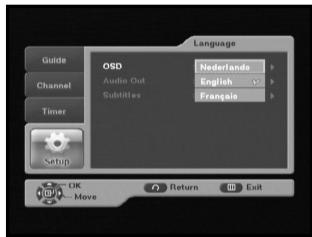
text_image
Language Guide OSD Nederlands Channel Audio Out English Substitutes Frangels Timer Setup OK Move Return Exit4.3.2 Audio Out
You can set the audio language.
- Use the ▲/▼ keys to select a desired language, then press the OK key.
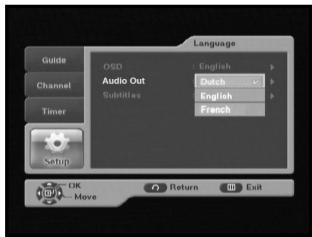
text_image
Language Guide OSD English Channel Audio Out Dutch Subtitles English French Timer Setup OK Move Return Exit4.3.3 Subtitles
You can set the language of subtitles.
- Use the ▲/▼ keys to select a desired language, then press the OK key.
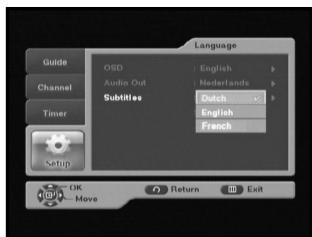
text_image
Language Guide OSD : English Channel Audio Out : Netherlands Timer Subtitles : Dutch English French Setup OK Move Return Exit4.4 System
This menu consists of 2 sub-menus : Product Info and Reset.
- Place the cursor on this sub menu and press OK key.
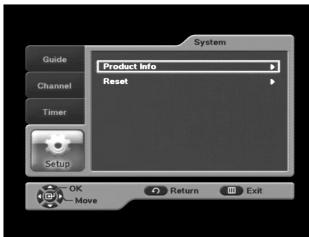
text_image
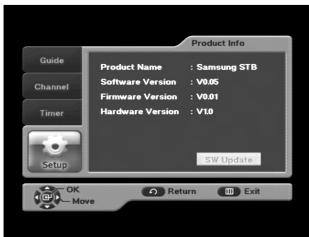
System Guide Channel Timer Setup OK Move Product Info Reset Return Exit4.4.1 Product Info
If you have to contact your service provider or a service center they might ask for information available from this menu.
Place the cursor on this sub menu and press the OK key.
- If new software is available SW Update button will be activated. Then press OK key to update new software.
Note : If the receiver is updated via "SW Update", the version number may be changed.
text_image
Product Info Guide Channel Timer Product Name : Samsung STB Software Version : V0.05 Firmware Version : V0.01 Hardware Version : V10 SW Update OK Move Return Exit4.4.2 Reset
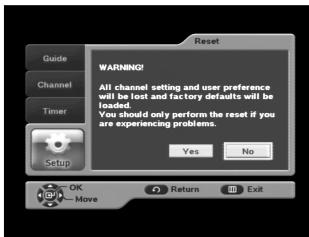
This is to restore the factory set values in case the user has encountered some problems after changing any new values of channel data and others, which may be in error. Select Reset menu in System menu and press OK key. If you want to continue, select "YES" in the warning window. The receiver will be reset to settings automatically. Please note that the Factory Default procedure may take a few seconds.
text_image
Guide Channel Timer Setup OK Move Reset WARNING! All channel setting and user preference will be lost and factory defaults will be loaded. You should only perform the reset if you are experiencing problems. Yes No Return Exit4.5 Irdeto CA Status
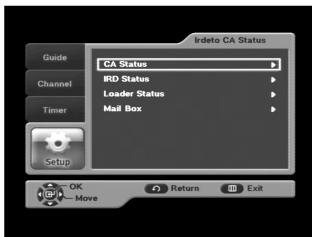
The menu provides the information of the smartcard and the STB. Press the OK key to enter the sub menu.
4.5.1 CA Status
You can see the CA status (Smart Card EMM/ECM information).
4.5.2 IRD Status
You can see the IRD status (technical information about the IRD, CA, Smart Card and software loaded into it).
4.5.3 Loader Status
You can see the information about the IRD, and software loaded into it.
4.5.4 Mail Box
You can read the message sent to the individual decoders. We can save the maximum 10 mail messages.
text_image
IIndeto CA Status Guide Channel Timer Setup OK Move Return Exit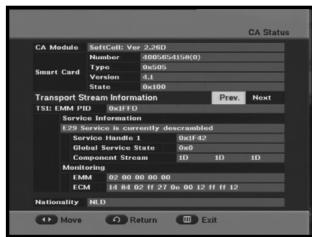
text_image
CA Status CA Module SoftCell: Yes 3.260 Number 400/DS4156(0) Smart Card Type 0x05 Version 0x10 State 0x10 Transport Stream Service 15E: Edit PID 0xFFD Service Information E29 Service is currently deconvolved Service Handl. 1 0xFFD Global Service State 0x0 Component Stream ID ID Monitoring 02:00:00:00:00 EMC 14.84.02 FF 27.0x.00 12 FF 12 Nationality NLD More Return Exit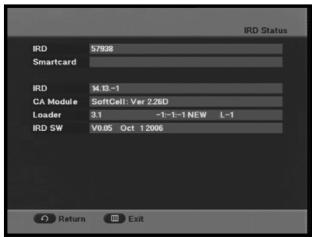
text_image
IRD Status IRD 57928 Smartcard IRD 14.13-1 CA Module SoftCell: Var 2.26D Loader 3.1 -1-1-1 NEW L-1 IRD SW V9.05 Oct 12006 Return Exit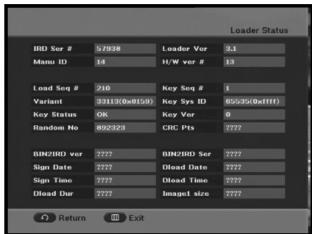
text_image
Loader Status BID Ser # 57938 Loader Var 3.1 Mamu ID 14 H/W var # 13 Load Seq # 210 Key Seq # 1 Variant 33113(0x8129) Key Sys ID 65525(0x8FF) Key Status OK Key Ver 0 Random No 892323 CRC Pts 7777 BIN2HIO var 7777 BIN2HIO Ser 7777 Sign Date 7777 Dead Date 7777 Sign Time 7777 Dead Time 7777 Dead Due 7777 Image# size 7777 Return Exit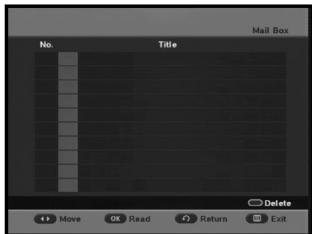
text_image
Mail Box No. Title Delete Move Read Return ExitTROUBLESHOOTING
| Problem | Possible cause | Solution of the problem |
| No display LED on the front panel; No power supply | Power cord not plugged in correctly | Power cord plug in correctly |
| No pictures on the screen | Receiver in Standby mode; SCART not connected tightly to video output of television; incorrect channel or video output selected on television | Set receiver to “On”; Check connection; Check channel and video output (TV instruction manual) |
| No sound | SCART connected incorrectly; Loudness level = 0; Muting active | Check connection; Increase loudness on television set; Press the MUTE key |
| Remote Control does not operate directly | Incorrect operation; Batteries dead or inserted incorrectly | Point remote control towards the Receiver. Replace batteries or insert correctly |
| Poor picture quality signal strength in | Signal strength too low | Check all wire connections. |
| On-Screen Error Messages: “Searching for signal” “No signal” | cable not connected or not tight | Check connection |
| On-Screen Error Message “No programs are stored” | Channel lists not installed | Scan channels. Please go to Installation menu |
| On-Screen Error Messages: “Smartcard failure” “Unknown smartcard” “Please insert Smartcard”. | Smartcard: - not plugged in correctly; - not plugged in. | (depend on model) Check the Smartcard. “Insert the Smartcard.” |
DISPOSAL
The device, packaging material (e.g. Styrofoam) and the batteries must never be disposed of with household refuse. Please obtain appropriate information about the regulations in your community, and dispose of all refuse in accordance with regulations at the separate locations provided.
TECHNICAL SPECIFICATIONS
Power supply
Type
Input voltage
Fuse rating
SMPS
AC 100-240V\~, 50/60 Hz
250 V/T1.6AH
Tuner & Demodulator
Input Frequency
DEMODULATION
SYMBOL RATE
Constellation
CABLE OUT
VHF,UHF BAND(50\~870 MHz)
QAM DVB-C
MAX 7 Msps
16, 32, 64, 128, 256 QAM
LOOP OUT FOR ANALOG RECEIVER
Video decoder
System decoding
Profile and level
Data rate
Video formats
Picture resolution
MPEG 2 ISO/IEC 13818-2
(Transport Stream)
MPEG 2 MP@ML (4:2:2)
1 \~ 15 Mb/s
4:3 (normal) & 16:9 (widescreen)
720(H) x 576(V) x 50 fields/sec
Audio Decoder
System decoding
Audio mode
Sampling frequency
MPEG 1 ISO/TEC 11172\~3 layer I & II
MONO, DUAL, STEREO, JOINT STEREO
32, 44.1, 48 kHz
BASE-BAND AUDIO/VIDEO OUTPUT
VIDEO
Interface
Impedance
Output level
AUDIO Interface
Impedance
Output level
S/PDIF (Digital Audio Output)
PAL
2 SCART (AV1, AV2)
75 Ω
1 Vp-p
SCART
600 balance
2.0Vp-p max (controllable)
MEMORY
Flash
SDRAM
2MB
16MB
PHISICAL SPECIFICATION
Size (W x D x H)
Weight (Net)
233 x 176 x 38 mm
0.95Kg
MEMO

natural_image
Simple gray rounded rectangle outline on white background (no text or symbols)DCB-B270R
Gebruiksaanwijzing
NL
SAMSUNG Service Hotline
0900 20 200 88 (€ 0.10/ Min)

text_image
212 MTV 2 MTV2 Anthems 13:00 ~ 14:00 'Guess The Year' Here are some of the biggest,text_image
MIV 2 MTV2 Anthems 05/07 Mon 18:00 - 14:00 Guess The Year Here are some of the biggest out and out (rock, idle metal) and dance anthems we've ever played, but do you know what they were released. Find out by guessing the year of each visitnatural_image
Black-and-white photo of a guqin on a stand with abstract white shapes and a volume slider (no text or symbols)3. Geluidstrack selecteren
natural_image
Black and white photo of a vintage car cockpit with a steering wheel, no visible text or symbolsVHF, UHF (50\~870 MHz)
DEMODULATIE
QAM DVB-C
SYMBOOLFREQUENTIE
MAX 7 Msps
Constellatie
16, 32, 64, 128, 256 QAM
KABELUITGANG
LOOP OUT VOOR ANALOGE ONTVANGER
Videodecoder
Systeemdecoding
MPEG 2 ISO/IEC 13818 (Transport Stream)
Profiel en niveau
MPEG 2 MP@ML (4:2:2)
Gegevenssnelheid
1 \~ 15 Mb/s
Video-indelingen
text_image
MTV2 Anthems 13:00 ~ 14:00 'Su 1:59 'Guess The Year' Here are some of the biggest,text_image
MTV 2 MTV2 Anthems 05/07 Mon 13:00 - 14:00 Guess The Year here are some of the biggest one and out rock, idle metal and dance anthems we've ever played, but do you know when they were released! Find out by guessing the year of each vid.natural_image
Black-and-white photo of a guitar with abstract white shapes and a scale bar labeled 'Volume' (no readable text or symbols)natural_image
Black-and-white photo of a vintage car cockpit with visible engine and camera (no text or symbols)BANDES VHF, UHF (50\~870 MHz)
Démodulation
QAM DVB-C
Taux de symbole
7 Msps max.
Constellation
16, 32, 64, 128, 256 QAM
Sortie du câble
Dimensions (L x P x H)
233 x 176 x 38 mm
Poids (net)
0,95 kg
MEMO
MEMO
MEMO
SAMSUNG
MF68-00418A