DEX5350 - Computer AOPEN - Free user manual and instructions
Find the device manual for free DEX5350 AOPEN in PDF.


| Product type | Desktop computer |
| Brand | AOPEN |
| Model | DEX5350 |
| Dimensions (W x D x H) | 180 x 350 x 380 mm |
| Weight | 8 kg |
| Power supply | 300 W |
| Processor | Variable configurations (Intel or AMD) |
| RAM memory | Configurable (e.g., 8 GB DDR4) |
| Storage | SATA hard drive / M.2 SSD |
| Connectivity | USB 3.0, USB-C, HDMI, VGA, Audio jack |
| Network | Gigabit Ethernet, optional Wi-Fi |
| Audio | Speaker output, microphone input |
| Operating temperature | 10°C to 35°C |
| Operating humidity | 20% to 80% (non-condensing) |
| Power consumption | Less than 200 W under normal use |
| Main functions | Office work, internet browsing, multimedia |
| Maintenance and cleaning | Clean with a dry cloth, avoid liquids |
| Safety | Do not replace the battery incorrectly (risk of explosion) |
| Spare parts | Available at aopen.com |
| Repairability | Repairable by a qualified professional |
| Recycling | Do not dispose of with household waste. Follow WEEE directives. |
| General information | User manual and instructions available in PDF |
Frequently Asked Questions - DEX5350 AOPEN
User questions about DEX5350 AOPEN
0 question about this device. Answer the ones you know or ask your own.
Ask a new question about this device
Download the instructions for your Computer in PDF format for free! Find your manual DEX5350 - AOPEN and take your electronic device back in hand. On this page are published all the documents necessary for the use of your device. DEX5350 by AOPEN.
USER MANUAL DEX5350 AOPEN
Personal Computer User Guide for DEX5350 Series
Disposal Instruction (US)
For better protection of our earth, please don't throw this electronic device into municipal trash bin when discarding. To minimize pollution and ensure utmost protection of the global environment, please recycle the product. For more information about the collection and recycling of Waste Electrical and Electronic Equipment (WEEE), you are invited to visit our homepage at www.aopen.com under "Green Products"
糜葉上の指示
Instruction de Disposition (French)
Copyright of this publication belongs to AOpen Inc. AOpen reserves the right to change the content of this publication without obligation to notify any party of such changes or revisions. No part of this publication may be reproduced, transcribed, transmitted, translated into any language, stored in a retrieval system in any form or by any means electronically, mechanically, optically without the prior written permission of this company.
Disclaimer
AOpens makes no warranties or representations, either expressed or implied, with respect to the content herein and specifically disclaims any warranties, merchantability of fitness for any particular purpose.
AOpen and AOpen logos used herein are registered trademarks of AOpen Inc.
All other brand names and trademarks are owned by their respective owners.
Copyright © 2015 by AOpen Inc.
All rights reserved.
Safety Instructions
- Please read these safety instructions carefully.
- Please keep this User's Manual for later reference.
- Please disconnect this equipment from connector before cleaning. Don't use liquid or prayed detergent for cleaning. Use moisture sheet or cloth for cleaning.
- Make sure the equipment is connected to the power source with the correct voltage, frequency, and ampere.
- All cautions and warnings on the equipment should be noted.
- Never pour any liquid into opening; this could cause fire or electrical shock.
- Never open the equipment. For safety reason, the equipment should only be opened by qualified service personnel.
- If one of the following situations arises, get the equipment checked by service personnel:
a. Liquid has penetrated into the equipment.
b. The equipment has been exposed to moisture.
c. The equipment has not worked well or you can not get it work according to users manual.
d. The equipment has dropped and damaged.
e. If the equipment has obvious sign of breakage.
- Caution on use of battery: Use the battery recommended by the manufacturer or the same type of battery installed by the manufacturer. If incorrect battery is used, it may cause explosion or fire hazard. Recycle or discard used batteries according the manufacturer's instruction or your local authority.
- Safety caution concerning laser products:
DVD-ROM/CD-RW combo drive is "Class I Laser Product" This equipment, built with DVD and/or CD disc drives using laser beam to read or write data on optical discs, is classified as "Class 1 laser product". While the laser optical drive is reading data from or writing data to an optical disc, do not force open the disc drive door. Press the Eject button to retrieve the optical disc only after the in-use indicator goes off.
- Ambient operation temperature: 0 40 degrees C.

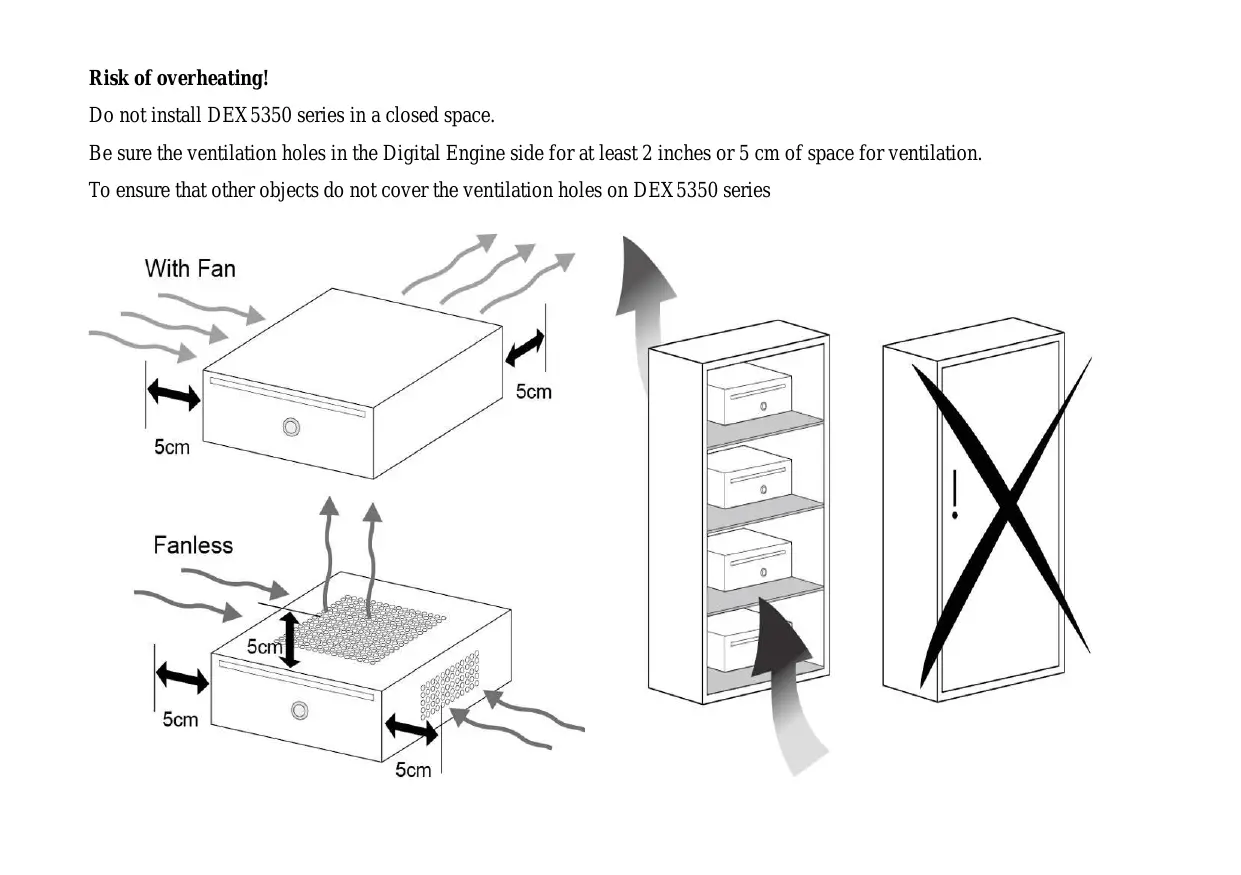
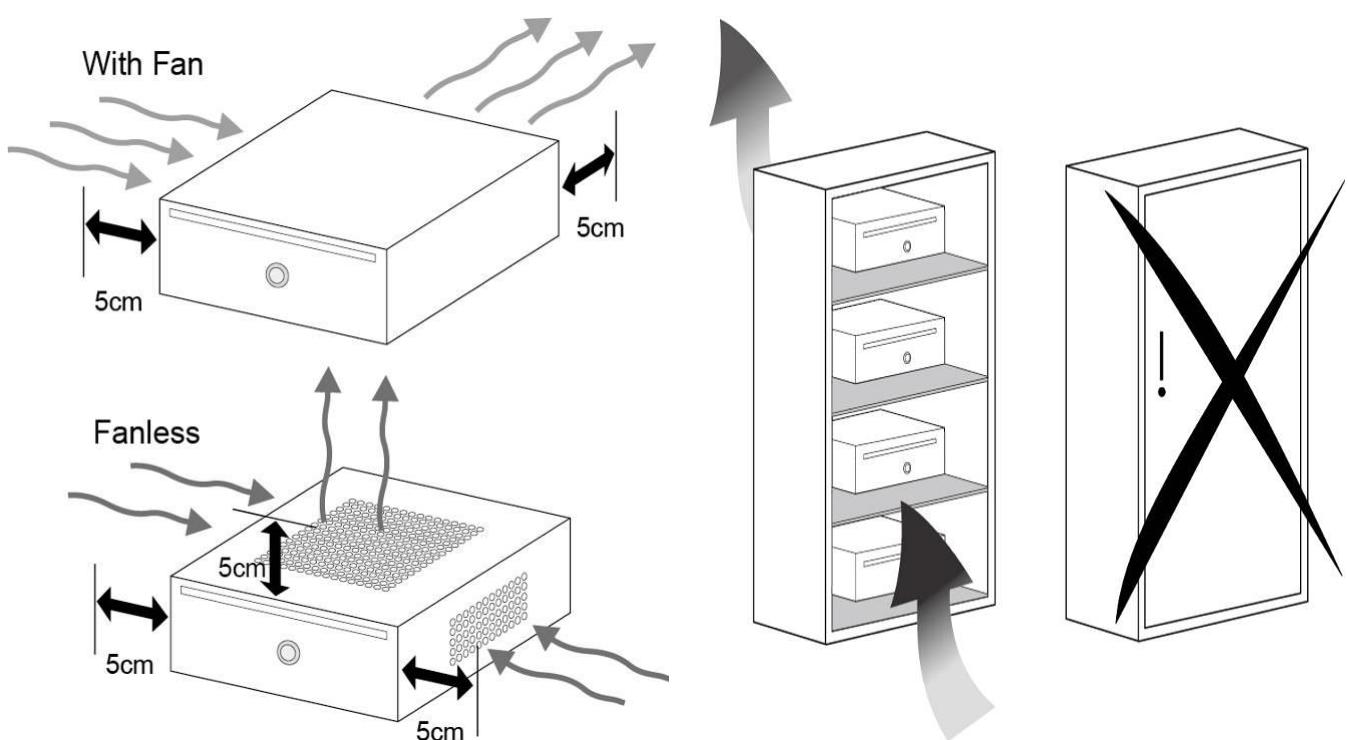
Risk of overheating!
Do not install DEX5350 series in a closed space.
Be sure the ventilation holes in the Digital Engine side for at least 2 inches or 5cm of space for ventilation.
To ensure that other objects do not cover the ventilation holes on DEX5350 series
FCC notice
This device has been tested and found to comply with the limits for a Class B digital device pursuant to Part 15 of the FCC Rules. These limits are designed to provide reasonable protection against harmful interference in a residential installation. This device generates, uses, and can radiate radio frequency energy and, if not installed and used in accordance with the instructions, may cause harmful interference to radio communications.
However, there is no guarantee that interference will not occur in a particular installation. If this device does cause harmful interference to radio or television reception, which can be determined by turning the device off and on, the user is encouraged to try to correct the interference by one or more of the following measures:
Reorient or relocate the receiving antenna.
Increase the separation between the device and receiver.
Connect the device into an outlet on a circuit different from that to which the receiver is connected.
■ Consult the dealer or an experienced radio/television technician for help
Notice: Shielded cables
All connections to other computing devices must be made using shielded cables to maintain compliance with FCC regulations.
Notice: Peripheral devices
Only peripherals (input/output devices, terminals, printers, etc.) certified to comply with Class B limits may be attached to this equipment. Operation with non-certified peripherals is likely to result in interference to radio and TV reception.
Caution
Changes or modifications not expressly approved by the manufacturer could void the user's authority, which is granted by the Federal Communications Commission, to operate this computer.
Operation conditions
This device complies with Part 15 of the FCC Rules. Operation is subject to the following two conditions: (1) this device may not cause harmful interference, and (2) this device must accept any interference received, including interference that may cause undesired operation.
Notice: Canadian users
This Class B digital apparatus complies with Canadian ICES-003
Index
1.Outlook 2
2. Product Specification 4
3.Packing List. 5
4. Chassis and Holder Dimension 6
1.Outlook
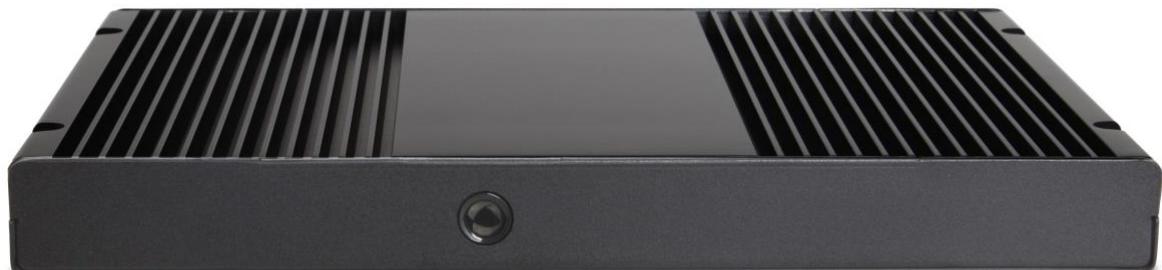
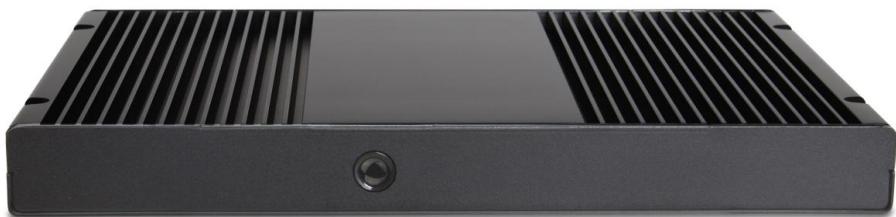
Front IO
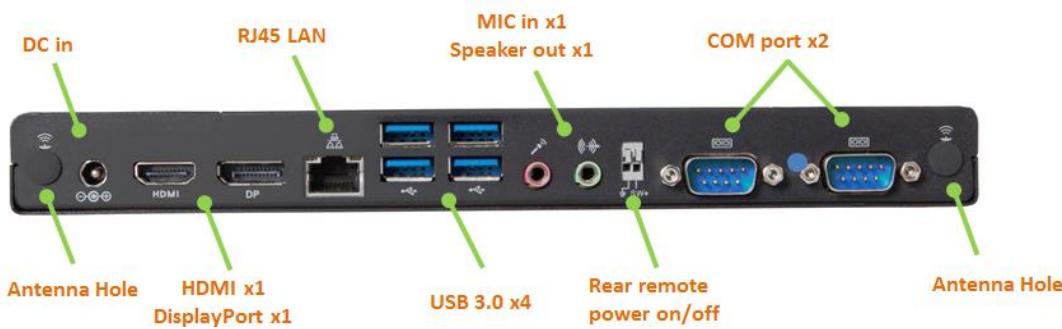
Rear IO
2.2. Product Specification
| CPU | Intel Broadwell U CPU |
| Memory | Dual Channel Mode, support SO-DIMM DDR3Lx 2, 1333 MHz, Max memory size : 16GB |
| Graphics | Intel® HD graphic, integrated on CPU |
| Storage | Support M.2 x1, 2.5" SATA HDD x1 |
| Expansion | Full Size mini Card x 1 |
| Slot | Half Size Mini Card x 1 |
| Audio | Realtek ALC269Q HD Audio CODEC |
| LAN | Intel WGI218LM x1 |
| Front Panel IO | Power Button x1 |
| Rear Panel IO | DC 19V Jack x1, HDMI x1, DisplayPort x1 , RJ45 LAN x1, USB 3.0 x4, HD Audio ports (Line out x1, Mic in x1), RS232 x2 |
| Adapter | 65W (19V, 3.42A) AC Power Adapter |
| Input Voltage | AC 100 ~ 240V |
3. Packing List
1 x DEX5350 system
1 x User Guide
1 x Driver CD
1 x 65W Adapter
1 x Power Cord
1 x L type Holder with 4 pcs of M3 screw
Note: The accessory is depneds on differnce SKU.
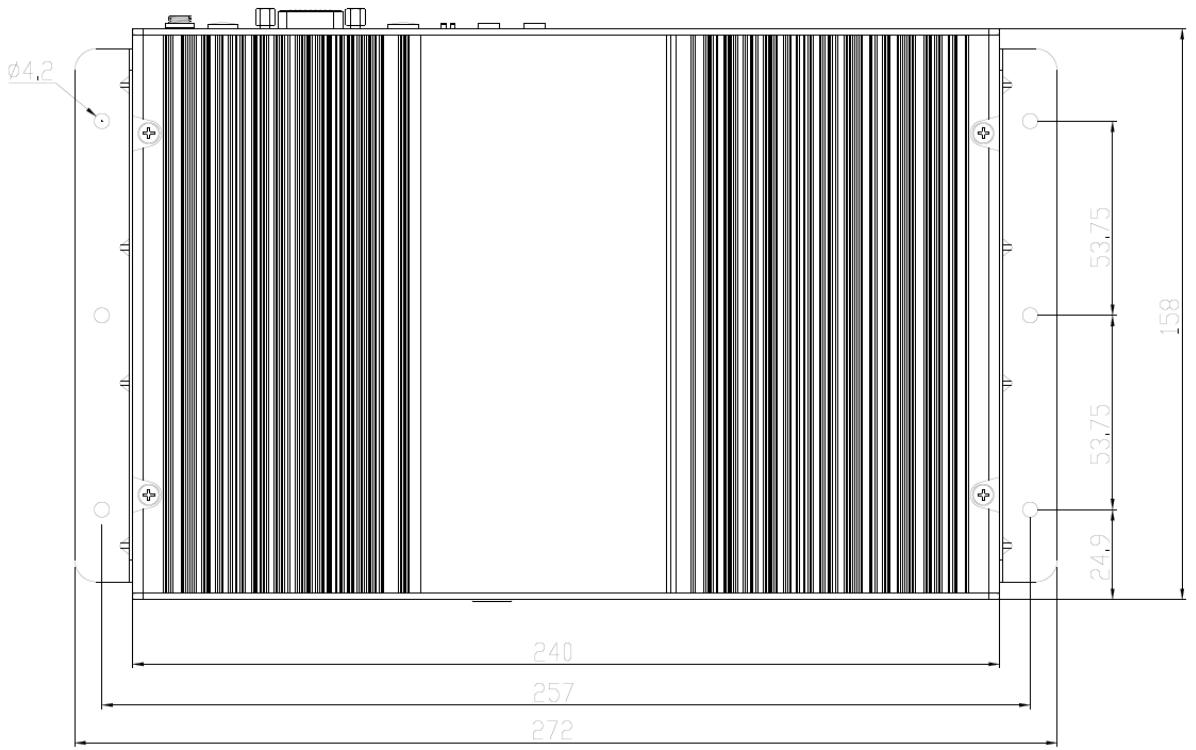
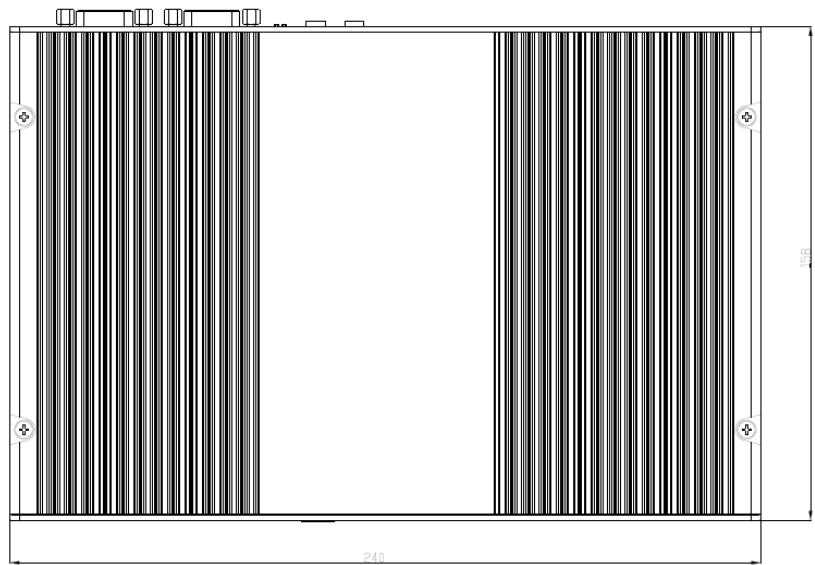
4. Chassis and Holder Dimension
A. Dimension of DEX5350 (unit: mm [inch])

B. LH02 L type Holder (Include 2 piece holder and 4 FPH M3 screws)
Dimension of L type Holder. (Unit: mm)