USER MANUAL CYLINDRA EV8 FABER
Instruction Booklet
Instructions Manual
Manuel d'Instructions
Bedienungsanleitung
Gebruiksaanwijzing
Manual de instrucciones
Bruksanvisning
INDEX
IT
SAFETY INFORMATION......15
CHARACTERISTICS 18
INSTALLATION....19
USE 23
CARE AND CLEANING 24
TABLE OF CONTENTS
FR
SAFETY INSTRUCTIONS....26
CHARACTERISTICS....29
INSTALLATION....30
USE 34
CLEANING AND MAINTENANCE 35
TABLE OF CONTENTS
EN
Wall Drilling
AIR OUTLET FILTERING VERSION
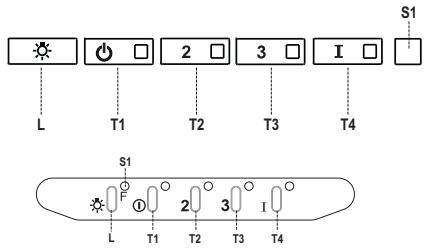
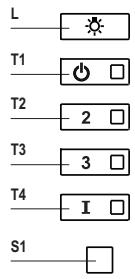
Control panel
Lighting
For your safety and correct operation of the appliance, read this manual carefully before installation and use. Always keep these instructions with the appliance even if you move or sell it. Users must fully know the operation and safety features of the appliance.

The wire connection has to be done by a specialized technician.
- The manufacturer will not be held liable for any damages resulting from incorrect or improper installation.
- The minimum safety distance between the cooker top and the extractor hood is 650 mm (some models can be installed at a lower height, please refer to the paragraphs on working dimensions and installation).
- If the instructions for installation for the gas hob specify a greater distance, this must be respected.
- Check that the mains voltage corresponds to that indicated on the rating plate fixed to the inside of the hood.
- Means for disconnection must be incorporated in the fixed wiring in accordance with the wiring rules.
- For Class I appliances, check that the domestic power supply guarantees adequate earthing.
- Connect the extractor to the exhaust flue through a pipe of minimum diameter 120 mm. The route of the flue must be as short as possible.
- Regulations concerning the discharge of air have to be fulfilled.
- Do not connect the extractor hood to exhaust ducts carrying combustion fumes (boilers, fireplaces, etc.).
- If the extractor is used in conjunction with non-electrical appliances (e.g. gas burning appliances), a sufficient degree of aeration must be guaranteed in the room in order to prevent the backflow of exhaust gas. When the cooker hood is used in conjunction with appliances supplied with energy other than electric, the negative pressure in the room must not exceed 0.04 mbar to prevent fumes being drawn back into the room by the cooker hood.
- The air must not be discharged into a flue that is used for exhausting fumes from appliances burning gas or other fuels.
- If the supply cord is damaged, it must be replaced by the manufacturer or its service agent.
- Connect the plug to a socket complying with current regulations, located in an accessible place.
- With regards to the technical and safety measures to be adopted for fume discharging, it is important to closely follow the regulations provided by the local authorities.
⚠ WARNING: Before installing the Hood, remove the protective films.
- Use only screws and small parts in support of the hood.
⚠ WARNING: Failure to install the screws or fixing device in accordance with these instructions may result in electrical hazards.
- Do not look directly at the light through optical devices (binoculars, magnifying glasses...).
- Do not flambé under the range hood; risk of fire.
- This appliance can be used by children aged from 8 years and above and persons with reduced physical, sensory or mental capabilities or lack of experience and knowledge if they have been given supervision or instruction concerning use of the appliance in a safe way and understand the hazards involved. Children shall not play with the appliance. Cleaning and user maintenance shall not be made by children without supervision.
- Children should be supervised to ensure that they do not play with the appliance.
- The appliance is not to be used by persons (including children) with reduced physical, sensory or mental capabilities, or lack of experience and knowledge, unless they have been given supervision or instruction.
⚠️ Accessible parts may become hot when used with cooking appliances.
- Clean and/or replace the Filters after the specified time period (Fire hazard). See paragraph Care and Cleaning.
- There shall be adequate ventilation of the room when the range hood is used at the same time as appliances burning gas or other fuels (not applicable to appliances that only discharge the air back into the room).
- The symbol 📁 on the product or on its packaging indicates that this product may not be treated as household waste. Instead it shall be handed over to the applicable collection point for the recycling of electrical and electronic equipment. By ensuring this product is disposed of correctly, you will help prevent potential negative consequences for the environment and human health, which could otherwise be caused by inappropriate waste handling of this product. For more detailed information about recycling of this product, please contact your local city office, your household waste disposal service or the shop where you purchased the product.
Dimensions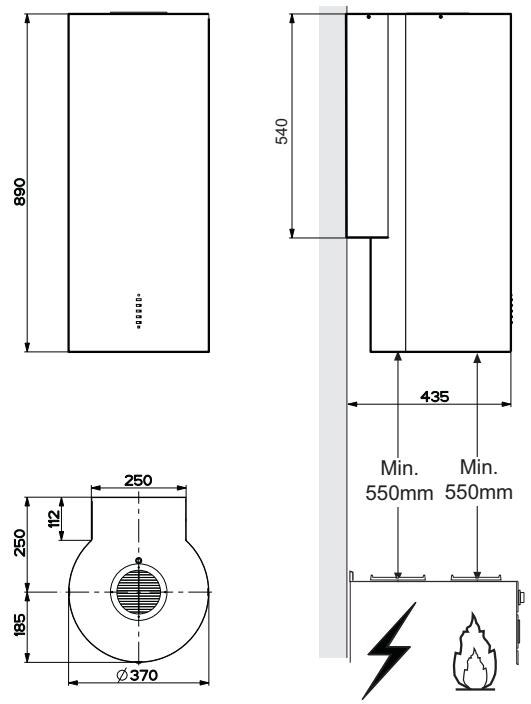
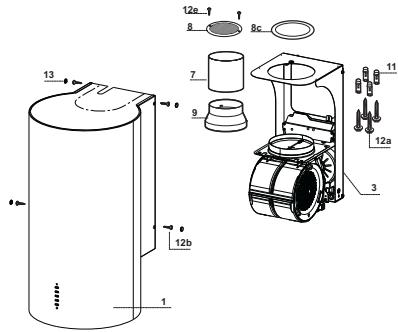
Components
| Ref. | Q.ty | Product components |
| 1 | 1 | Hood equipped with: Controls, Lights, Filters |
| 3 | 1 | Hood support equipped with the Exhaust Group |
| 7 | 1 | tube in PVC |
| 8 | 1 | Directioned grid |
| 8c | 1 | Air outlet reduction ø 120mm |
| 9 | 1 | Reduction flange ø 150-120 mm |
| Ref. | Q.ty | Installation components |
| 11 | 4 | Small blocks ø 10 |
| 12a | 4 | Screws 5 x 70 |
| 12b | 4 | Screws M4 x 15 |
| 12e | 2 | Screws 2,9 x 9,5 |
| 13 | 4 | Screws plug M4 |
| Q.ty | Documentations |
| 1 | Instruction booklet |
Wall drilling and bracket fixing
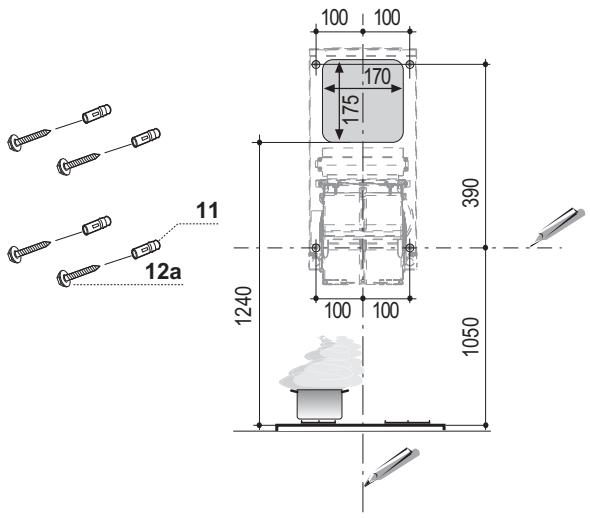
When installing the hood in recycling version it has to be taken into consideration that space remaining between the hood and the upper limit (ceiling or self) is at least 8-10 cm.
On the wall, draw:
- a Vertical line up to the ceiling or upper limit, at the centre of the area in which the hood is to be fitted;
- a Horizontal line at a minimum of 1050 mm above the Cooker Top;
- As indicated, mark a reference point at 100 mm to the right of the vertical reference line.
- Repeat this operation on the other side, checking that the two marks are level.
- As indicated, mark a reference point at 390 mm above the horizontal reference line, and at 100 mm to the right of the vertical reference line.
- Repeat this operation on the other side, checking that the two marks are level.
- Drill at the points marked, using a 10 mm diameter drill bit.
- Insert the plugs 11 into the holes.
- Lean the hood support 3 against the wall, making sure that the holes in the hood support correspond to those in the wall.
- Block the hood support to the wall using 4 screws 12a (5 x 70) supplied with the hood.
- Before fastening the screws definitively, make sure that the support is well-levelled. Only after this operation proceed with the definitive tightening of the screws.
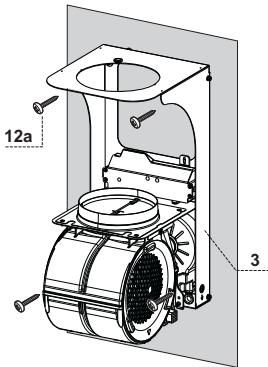
Air outlet connection in the ducting version
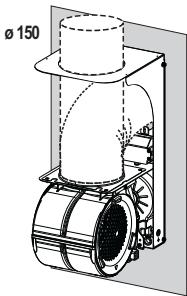
When installing the hood in ducting version, basing on the installer's choice, a rigid or a flexible pipe with a diameter of 150 or 120 mm is used in order to connect the hood to the air outlet piping. The pipe connection can be made on the upper part or on the back side of the hood.
AIR OUTLET ON THE BACK SIDE OF THE HOOD
- When drilling the air outlet hole in the wall, proceed in accordance with the scheme in the paragraph concerning the wall drilling.
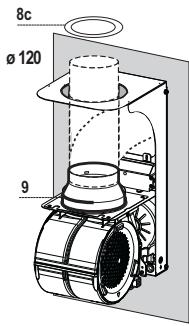
- In case the connection is made with a 120 mm diameter pipe, insert the reduction flange 9 on the hood body outlet.
- Fix the pipe with an adequate quantity of pipe clamps. This material is not supplied together with the hood.
- Remove the charcoal filter if present.
AIR OUTLET ON THE UPPER PART OF THE HOOD
- If the hood is connected to the air outlet piping using a 150 mm diameter pipe, use a rigid or flexible pipe.
- If the connection is made with a 120 mm diameter pipe, insert the reduction flange 9 on the hood body outlet.
- Fix the air outlet reduction 8c to the air outlet hole of the hood support with the screws supplied with the hood.
- Connect the hood to the piping with a rigid or flexible pipe.
- Fix the pipe with an adequate number of pipe clamps. This material is not supplied with the hood.
- Remove the charcoal filter if present.
RECIRCULATION VERSION AIR OUTLET
- Insert the PVC pipe 7 provided onto the hood canopy outlet.
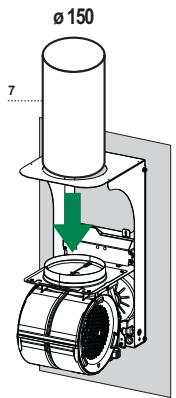
Hood body mounting
Ducting version
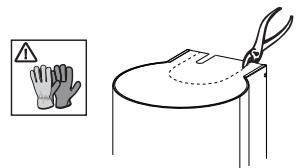
- If the air outlet connection on the upper part of the hood has been chosen, it will be necessary to remove the pre-cut piece.
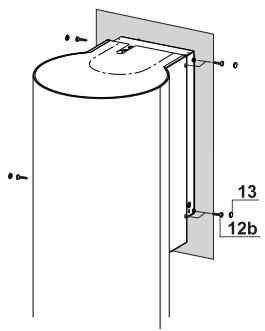
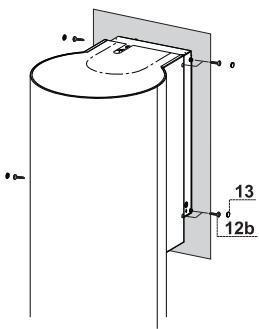
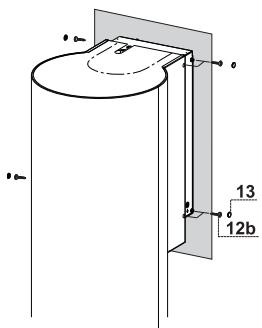
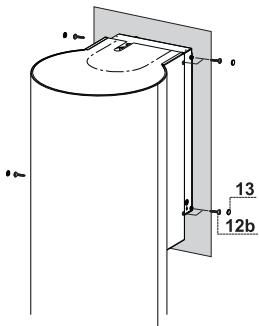
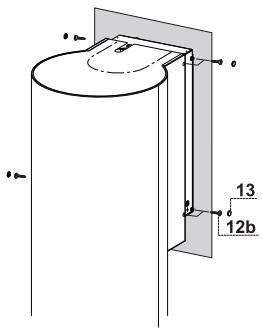
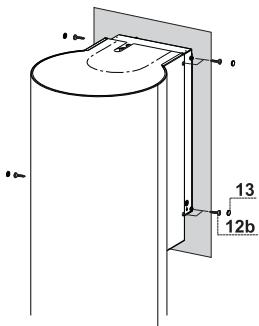
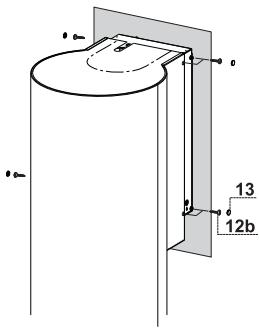
- Lean the hood body on the support and fix it laterally with the 4 screws 12b.
- Cover the screw seats with the plugs 13 supplied with the hood.
Recycling version
- Remove the pre-cut piece.
- Lean the hood body on the support and fix it laterally with the 4 12b screws.
- Cover the screw seats with the plugs 13 supplied with the hood.
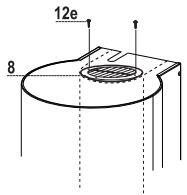
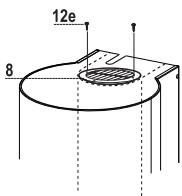
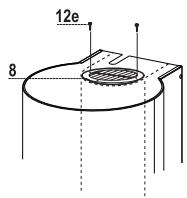
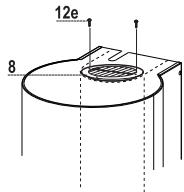
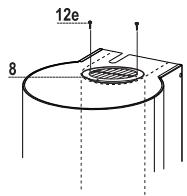
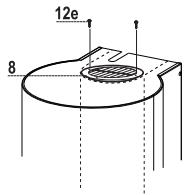
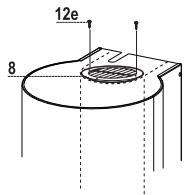
- Place the directed grid 8 on the pipe and make sure that it is correctly installed.
- Fix the directed grid 8 with the screws 12e supplied together with the hood.
- Make sure that the charcoal filters are present.
- Connect the hood to the mains through a twopole switch having a contact gap of at least 3 mm.
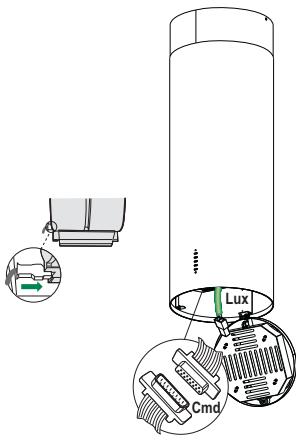
- Open the lighting unit by pulling on the notch.
- Remove the filters one at a time by pushing them towards the back of the group and pulling down at the same time.
- Being sure that the connector of the feeding cable is correctly inserted in the socket placed on the side of the fan.
- Connect the control connector Cmd.
- Connect the Spotlights connector Lux to the socket provided behind the lighting unit cover.
- Replace the filters, make sure that the handle is visible on the outside, and the lighting unit.
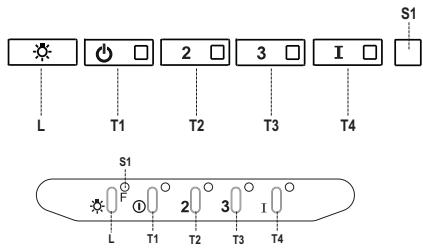
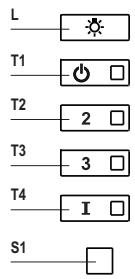
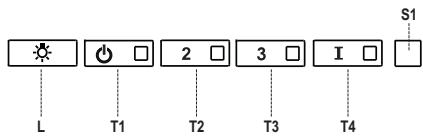
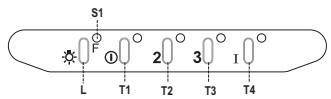
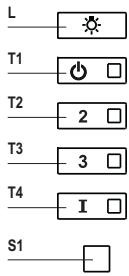
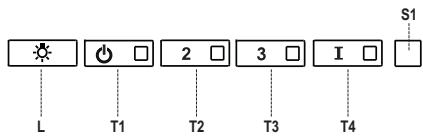
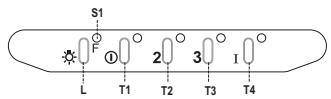
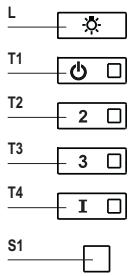
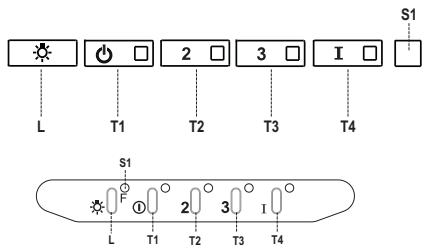
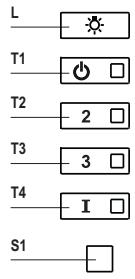
Control panel
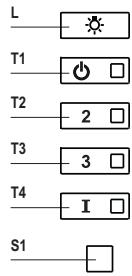
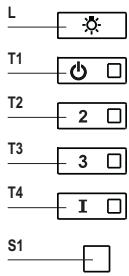
| Button | Led | Function |
| L | - | Turns the lights on/off at maximum strength. |
| T1 | Fixed | Turns the motor on/off at speed one. |
| T2 | Fixed | Turns the Motor on at speed two. |
| - | Press and hold the button for approximately 3 seconds, with all the loads turned off (Motor and Lights), to turn the Activated Charcoal Filter alarm on. The relevant LED flashes twice to confirm.To turn the alarm off, press the button again and hold for at least 3 seconds. The relevant LED flashes once. |
| T3 | Fixed | Turns the Motor on at speed three. |
| - | Press and hold the button for approximately 3 seconds, with all the loads turned off (Motor and Lights), to perform a reset of Filter saturation alarm. The LED S1 flashes three times. |
| T4 | Fixed | Turns the Motor on at INTENSIVE Speed.This speed is timed to run for 6 minutes. At the end of this time, the system returns automatically to the speed that was set before. If it is activated with the motor turned off, the hood will switch to OFF at the end of the time. |
| - | Press and hold for 3 seconds to enable the remote control, indicated by the LED flashing twice.Press and hold for 3 seconds to disable the remote control, indicated by the LED flashing just once. |
| S1 | Fixed | Signals the Metal Grease Filter saturation alarm, indicating that it is necessary to wash the filters. The alarm is triggered after the Hood has been in operation for 100 working hours. |
| Flashing | When this is activated, it signals the Activated Charcoal Filter saturation alarm, indicating that the filter must be changed; the Metal Grease Filters must also be washed. The Activated Charcoal Filter saturation alarm comes into operation after the Hood has been working for 200 hours. |
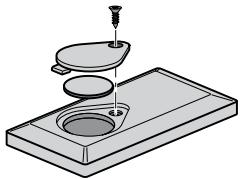
REMOTE CONTROL (OPTIONAL)
This appliance can be commanded using a remote control, powered by a CR2032 type 3 V battery (not supplied).
- Do not place the remote control near heat sources.
- Do not discard the batteries with normal waste, they must be put into the specific containers.
These can be washed in the dishwasher, and need to be cleaned whenever the S1 Led comes on or at least once every 2 months use, or more frequently if use is particularly intensive.
CLEANING THE FILTERS
Resetting the alarm signal
- Turn the Lights and the Suction Motor off.
- Press T3 and hold for at least 3 seconds, until LED flashes three times in confirmation.
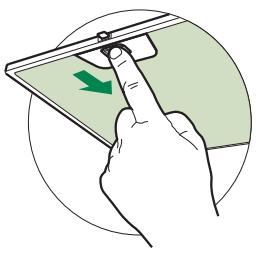
Cleaning the Filters
- Open the lighting unit by pulling on the notch.
- Remove the Filter, pushing it towards the back of the unit and at the same time pulling downward.
- Wash the filter without bending it, and leave it to dry thoroughly before replacing (if the surface of the filter changes colour over time, this will have absolutely no effect on its efficiency).
- Replace, taking care to ensure that the handle faces forwards.
- Replace the lighting unit.
This cannot be washed or regenerated, and must be changed when LED S1 starts to flash, or at least once every 4 months. The alarm signal, if it has been activated, only appears when the suction motor is turned on.
Activating the alarm signal
- In recirculation version hoods, the filter saturation alarm must be activated on installation or at a later date.
- Turn the lights and the suction motor off.
- Press button T2 and hold it for 5 seconds until the LED flashes twice in confirmation.
CHANGING
Resetting the alarm signal
- Turn the lights and the suction motor off.
- Press T3 and hold for at least 3 seconds, until LED flashes three times in confirmation.
Changing the filter
- Open the lighting unit by pulling on the notch provided.
- Remove the metal grease filter.
- Remove the saturated activated charcoal filter, using the hooks provided.
- Fit the new filter, hooking it into place.
- Fit the Grease filter and the Light Unit back into place.
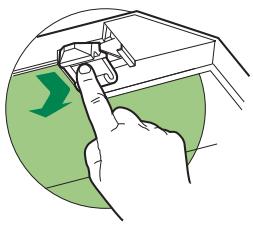
Lighting unit
- For replacement contact technical support ("To purchase contact technical support").

AIR OUTLET FILTER VERSION
Control panel
Lighting
Electrical connection
![graph TD A["Sun"] --> B["Power Symbol"] B --> C["2"] C --> D["3"] D --> E["I"] E --> F["S1"] G["L"] --> H["T1"] I["T2"] --> J["T3"] K["T4"] --> L["T4"] M["S1"] --> N["F"] N --> O["①"] O --> P["2"] P --> Q["3"] Q --> R["I"] R --> S["T4"]](/content/2024/11/224380/images/46d332410021cc22937803138b9009f4e326c70ac13ef6eb46441bf24c777762.jpg)
Control panel
Lighting
LED spotlight
AIR OUTLET FILTER VERSION
Control panel
Lighting
Wall drilling
ELECTRICAL CONNECTION
Control panel
Lighting
Components
Wall drilling
AIR OUTLET FILTERING VERSION
Electrical connection
![graph TD A["Sun"] --> B["Power Symbol"] B --> C["2"] C --> D["3"] D --> E["I"] E --> F["S1"] G["L"] --> H["T1"] I["T2"] --> J["T3"] K["T4"] --> L["T4"] M["S1"] --> N["F"] N --> O["①"] O --> P["2"] P --> Q["3"] Q --> R["I"] R --> S["T4"]](/content/2024/11/224380/images/99ff32997dee331d66a63746504f6b9169f0e306895307c5df1b334784ddba16.jpg)
Control panel
Lighting