
BS445 - Diagnostic scale MEDISANA - Free user manual and instructions
Find the device manual for free BS445 MEDISANA in PDF.


| Product type | Diagnostic scale |
| Brand | MEDISANA |
| Model | BS445 |
| Power supply | 3 AAA batteries, 1.5 V |
| Maximum weighing capacity | 180 kg |
| Intended use | Domestic |
| Wireless communication | Bluetooth 4.0 / Bluetooth Smart |
| Smartphone compatibility | iOS (iPhone 4S+, iPad 3+) and Android (version 4.3+ with Bluetooth 4.0) |
| Measurement functions | Weight, body fat percentage, body water, muscle mass, bone mass, BMR, BMI |
| Memory | 8 users, up to 30 memory slots |
| Display | Digital screen |
| Weighing surface | Glass (estimated) |
| Start-up | Step-On function (step onto scale) |
| Safety | Do not use with a pacemaker, pregnant woman, wet feet; do not stand on edges |
| Cleaning and maintenance | Soft dry cloth; avoid corrosive products |
| Repairability | Do not open; entrust repairs to a specialized workshop |
| Dedicated app | VitaDock+ (free) |
| Package contents | Diagnostic scale, batteries, instruction manual |
Frequently Asked Questions - BS445 MEDISANA
User questions about BS445 MEDISANA
0 question about this device. Answer the ones you know or ask your own.
Ask a new question about this device
Download the instructions for your Diagnostic scale in PDF format for free! Find your manual BS445 - MEDISANA and take your electronic device back in hand. On this page are published all the documents necessary for the use of your device. BS445 by MEDISANA.
USER MANUAL BS445 MEDISANA
natural_image
Line drawing of a human foot pressing on a square foot on a flat surface (no text or symbols)text_image
160 cm SETtext_image
PI AGE 30 SET 3text_image
842 kg SETtext_image
General Bluetooth Bluetooth ONnatural_image
Line drawing of a human foot pressing on a square base with a small rectangular object nearby (no text or symbols)Read the instruction manual carefully before using this device, especially the safety instructions, and keep the instruction manual for future use. Should you give this device to another person, it is vital that you also pass on these instructions for use.
• This device should only be used in private households.
• This device should only be used by people who weigh less than 180 kg.
• This device should not be used during pregnancy.
- Due to the electrical current which flows through the body, this device should not be used for body fat analysis in children for safety reasons. However children may be weighed without any concerns.
- The device many not be used by anyone fitted with a heart pacemaker, or any other medical implant. The indication of body fat may be inaccurate in the event of diabetes or other medical / physical conditions. The same applies to highly trained sportsmen.
- The device should not be used if it is not functioning perfectly, if it has fallen into or under water, or it has been damaged.

Risk of slipping and falling!
Never step onto the scales with wet feet. Never step onto the scales while wearing socks or similar. Never place the scales on an uneven surface. While weighing, never stand on the edge of the scales.
Always stand still in the middle of the scales, so that each foot touches 2 electrodes, (the left foot on the two on the left, and the right foot on the two on the right).

Dangerous for children!
Batteries can prove fatal if swallowed. Therefore please keep batteries and the device itself out of the reach of children. If a battery is swallowed, please consult a doctor immediately. Keep children away from packaging material. This can constitute a choking hazard, for example.

Hazards associated with batteries!
Batteries must not be deformed, taken apart, thrown into a fire or short circuited. If a battery has leaked, avoid contact with the battery fluid. Rinse any affected areas with water and consult a doctor immediately.
When replacing the batteries, observe the correct polarity (+/-).
Only use the same or equivalent type of battery (3x AAA, 1,5 V).
Protect the batteries from excessive heat. Remove the batteries from the device when they have expired or you are no longer using the device. This helps avoid damage which may arise from a leak.

Risk of material damage!
Protect the device from moisture. Keep the scales away from water.
The surface of the scales is slippery when wet or damp. Keep the surface dry.
Do not keep the scales in a hot surroundings and protect from strong sunlight.
Protect the scales from any impact or shaking.
Do not make any changes to the scales and do not open them up.
Any repairs should only be carried out by a specialist workshop or in a service centre.
Floors may be coated with a variety of paints or artificial materials and are treated with a wide variety of care products. Some of these materials contain elements which attack and soften the device's feet. Therefore, place a non-slip, non-yielding base under it.
When cleaning, do not use any strong chemicals, or aggressive or foaming cleaning materials.
We hereby declare that bathroom scales model BS 445 connect, art. 40441 complies with the fundamental requirements of the European RTTE Directive 1999/5/EC. You can request the complete EC Conformity Declaration from Medisana AG, Jagenbergstrasse 19, 41468 Neuss, Germany, or you can also download it from the Medisana homepage (www.medisana.com/bs445connect).
For further information und country-specific service addresses visit www.medisana.com/bs445connect.
MEDISANA®
natural_image
Line drawing of a human foot pressing on a square base with a small rectangular object nearby (no text or symbols)1 Simply stand on the scales barefoot (without socks or similar).
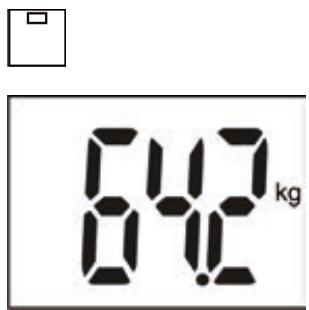
text_image
842 kg2 Your weight is shown.
B) Setting the personal data in the scales
The scales can store the data (gender, athlete mode, height, age) for 8 people with up to 30 memory locations each. The values preset in the scales are: Male, 165 cm, 30 years old, kg.
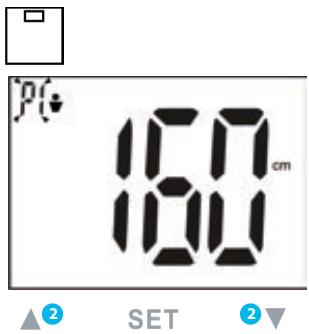
text_image
PG 100 cm 100 SET1 Press the SET button until the memory slot flashes in the display.
2 Select the desired memory slot using the ▲ /▼ -buttons.
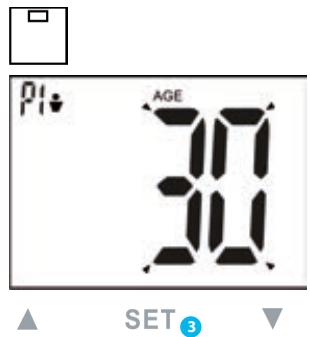
text_image
PI AGE 30 SET 33 Press the SET button to save the selection. Continue accordingly to make the settings for gender, athletic condition, height and age.
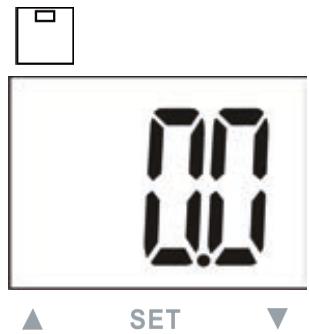
text_image
00 SET4 After you have set your personal data, the display shows "0.0".
5 To finish the scale settings, simply stand barefoot on the scales.
text_image
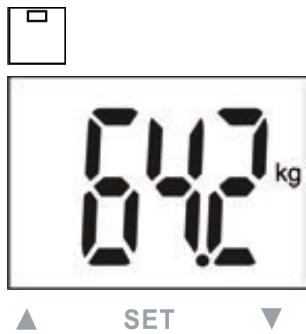
842 kg SET6 The display shows the following measurements: • Weight • Proportion body fat • Proportion body water • Proportion muscle mass • Bone mass • BMR (calory requirement) • BMI
C) Connect your scales with your smartphone\*
*iOS: iPhone 4S and later, iPad 3 and later. Android: Devices which support Google- Android-Version 4.3 and Bluetooth® 4.0 technology.
Please carry out the personal setting process on the scales as described in point B). The scales and the smart phone must be paired as per Bluetooth ^® 4.0 /Bluetooth ^® Smart ^® . Install the current VitaDock+ app and follow the instruction steps given in the following.
text_image
ANDROID APP ON Google play Available on the App Store1 Free download of the VitaDock+ app in the app store or Google Play store.
text_image
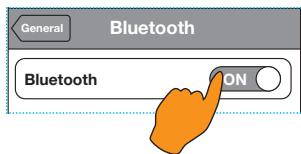
General Bluetooth Bluetooth ON2 Activate Bluetooth® on your iOS or Android appliance.
3 Start the app.
Ensure that there is a stable connection to the internet (3G or WLAN). Register now with your VitaDock online account.
If you don't have your own account yet, you can register free now at VitaDock Online.
text_image
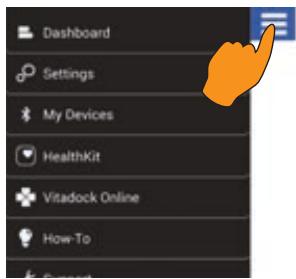
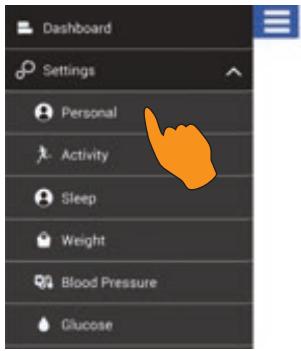
Dashboard Settings My Devices HealthKit Vitadock Online How-To4 Tap the symbol "≡" top left in the app, to get into the settings in the app.
text_image
Dashboard Settings Personal Activity Sleep Weight Blood Pressure Glucose5 Select "Settings" and "Personal". Enter your personal settings and touch "Save" when you're finished. This will bring you back to the start menu.
text_image
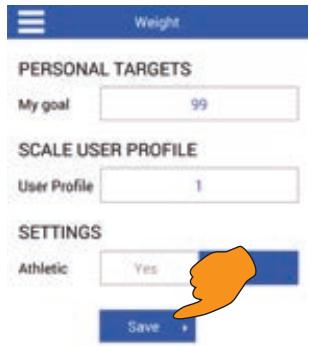
Weight PERSONAL TARGETS My goal 99 SCALE USER PROFILE User Profile 1 SETTINGS Athletic Yes Save6 Tap the symbol “≡” top left again, now select “Weight” and enter your information. Finally click on “Save”.
bar
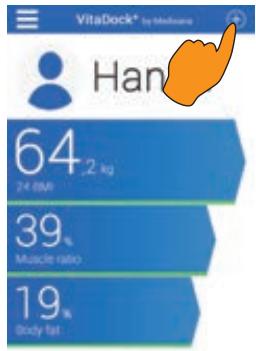
| Metric | Value (%) | | :--- | :--- | | Average Weight (kg) | 64 | | Muscle Ratio (%) | 39 | | Body Fat (%) | 19 |7 Now select the symbol “⊕”. on the top right. This will bring you to the menu “My devices”.
8 To establish a connection between smart phone / tablet and scales press the SET button and select your memory location, which you defined in step 6.
Stand on the scales barefoot (without socks or similar) and carry out a complete measurement (confirmed at the end by a beep).
text_image
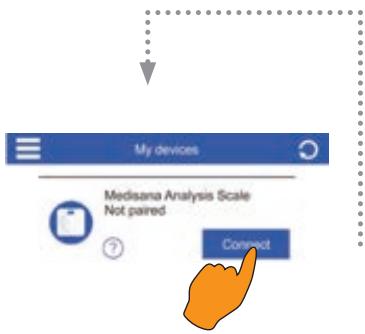
My devices Medisana Analysis Scale Not paired ? Correct9 The scales appear after the beep in the menu "My devices" in the app.
IMPORTANT: Enter a personal target weight. The selected profile in the app must also agree with the scales (cf. section B).
10 Now select the blue button "Connect" beside the "Medisana Analysis Scales" displayed.
Note: If the scales are already paired with your mobile device, the button will be green.
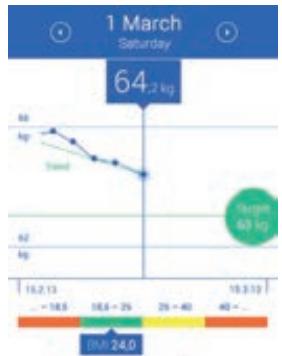
line
| Date | Value (kg) | |---|---| | 1 March Saturday | 64.2 | | 15.2.13 | -18.5 | | 18.6 - 25 | 18.6 | | 29 - 40 | 29 | | 40 - ... | 40 | | 19.3.10 | 19.3 | | 24.0 | 24.0 |11 The measurement data are automatically transferred to and stored by the app VitaDock+.
Note: If the measurement data was not transferred to the app, repeat the measurement.
Note: A stable internet connection is required to synchronise the scales with the app.
D) Weight measurement using your smartphone and the VitaDock+ app
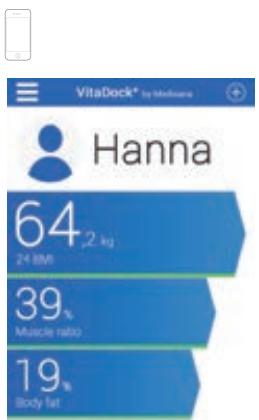
bar
| Metric | Value (%) | | :--- | :--- | | Muscle ratio | 39 | | Body fat | 19 | | 24-5PM | 64 | Hanna | 64 |1 Start the app.
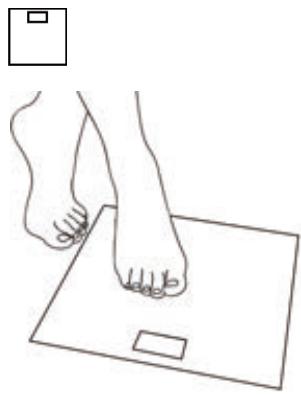
natural_image
Line drawing of a human foot pressing on a square base with a small rectangular object nearby (no text or symbols)2 Stand on the scales barefoot and carry out a complete measurement (confirmed at the end by a beep).
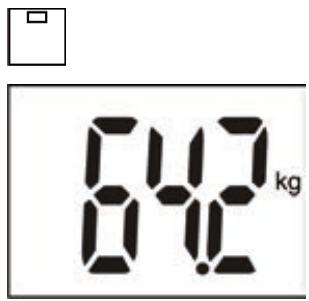
text_image
842 kg3 The display shows the following measurements:
- Weight
• Proportion body fat
• Proportion body water
• Proportion muscle mass - Bone mass
• BMR (calory requirement)
• BMI
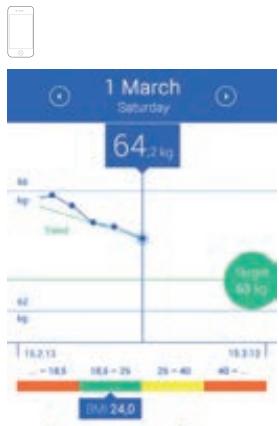
line
| Date | Value (kg) | |---|---| | 15/2/13 | -18.5 | | 16/5/13 | 18.5 - 25 | | 25-40 | 25 - 40 | | 10/3/13 | 40 | | 19/3/13 | 60 | | 24/0 | 64.2 kg |4 Now select the symbol “⊕” on the top right in the app. Now select the green button “Connect” beside the “Medisana Analysis Scales” displayed.
5 The measurement data are automatically transferred to and stored by the app.
REMARQUES IMPORTANTES ! A CONSERVER ABSOLUMENT !
natural_image
Line drawing of a human foot pressing on a square object on a flat surface (no text or symbols)text_image
PI AGE 30 SET 3text_image
842 kg SETtext_image
General Bluetooth Bluetooth ONline
| Date | Value (kg) | |---|---| | 15.2.13 | -18.5 | | 15.6 - 25 | 18.6 | | 29 - 40 | 25 | | 40 | 40 | | 15.3.10 | 24.0 | | 1 March Saturday | 64.2 kg |natural_image
Line drawing of a human foot pressing on a square base with a small rectangular object nearby (no text or symbols)natural_image
Line drawing of a human foot pressing on a square base with a small rectangular object nearby (no text or symbols)text_image
PI AGE 30 SET 3text_image
842 kg SETtext_image
General Bluetooth Bluetooth ONline
| Date | Value (kg) | |---|---| | 1 March Saturday | 64.2 | | 15/2/13 | -18.5 | | 18/6 - 25 | 18.6 - 25 | | 25 - 40 | 25 - 40 | | 40 - | 40 | | 18/3/13 | - | | 24/0 | 24.0 |natural_image
Line drawing of a human foot pressing on a square surface with a small rectangular object nearby (no text or symbols)text_image
1 March Saturday 64.2 kg Weight 60 kg 15.2.13 - 18.5 18.6 - 25 25 - 40 40 - 19.3.10 24.0natural_image
Line drawing of a human foot pressing on a square surface (no text or symbols)text_image
General Bluetooth Bluetooth ONline
| Date | Value (kg) | |---|---| | 1 March Saturday | 64.2 | | 15.2.13 - 18.5 | 16.5 | | 18.5 - 25 | 18.8 | | 29 - 40 | 25 | | 40 - ... | 40 | | 19.3.10 - 24.0 | 24.0 |natural_image
Line drawing of a human foot pressing on a square base with a small rectangular object nearby (no text or symbols)natural_image
Line drawing of a human foot pressing on a square object on a flat surface (no text or symbols)text_image
PI AGE 30 SET 3text_image
00:00 SETtext_image
842 kg SETtext_image
General Bluetooth Bluetooth ONnatural_image
Line drawing of a human foot pressing on a square base with a small rectangular object nearby (no text or symbols)text_image
1 March Saturday 64.2 kg 50 kg Trend 60 kg 16.2.13 - 18.5 18.6 - 25 25 - 40 40 - 19.3.13 Time: 24.0natural_image
Line drawing of a human foot pressing on a square foot on a flat surface (no text or symbols)text_image
160 cm SETtext_image
PI AGE 30 SET 3text_image
842 kg SETtext_image
General Bluetooth Bluetooth ON2 Activeer Bluetooth® op uw iOS-of Androidtoestel.