
WOBURN - Bluetooth speaker MARSHALL - Free user manual and instructions
Find the device manual for free WOBURN MARSHALL in PDF.



| Product Type | Active stereo Bluetooth speaker |
| Brand | Marshall |
| Model | WOBURN |
| Dimensions (W x H x D) | 400 x 308 x 200 mm |
| Weight | 7.90 kg |
| Power Supply | 100-240 V~, 50-60 Hz, 200 W max |
| Standby Power Consumption | Energy saving mode: 0.43 W; Standard mode: 8.7 W |
| Amplification | Class D: 2 x 20 W + 1 x 50 W |
| Speakers | 2 x 25 mm dome tweeters (ferrofluid cooled), 2 x 127 mm woofers |
| Frequency Response | 35 Hz - 22,000 Hz |
| Max SPL | 110 dB at 1 m |
| Wireless Connectivity | Bluetooth 4.0+EDR with aptX codec |
| Audio Inputs | 1 x 3.5 mm stereo input, 1 x RCA input (L/R), 1 x optical input (stereo PCM) |
| Main Functions | Bluetooth pairing, source selection, volume/bass/treble adjustment, standby modes (energy saving and standard), wake up |
| Box Contents | Marshall WOBURN active stereo speaker, power cord, 3.5 mm jack spiral cable, user manual and warranty information |
| Care and Cleaning | Clean with a dry cloth only. No user-serviceable parts inside. Refer all servicing to qualified personnel. |
| Safety | Do not expose to water or moisture. Do not block ventilation openings. Unplug during thunderstorms or long periods of non-use. Do not insert objects into the bass port. Use only accessories supplied by the manufacturer. |
| Spare Parts and Repairability | The front grille is not removable. For any repair, contact an authorized service center. Limited one-year warranty. |
| General Information | Compliant with European (CE) and American (FCC) standards. Intertek certified (ETL). PSE marking Japan. Made in China. |
Frequently Asked Questions - WOBURN MARSHALL
User questions about WOBURN MARSHALL
0 question about this device. Answer the ones you know or ask your own.
Ask a new question about this device
Download the instructions for your Bluetooth speaker in PDF format for free! Find your manual WOBURN - MARSHALL and take your electronic device back in hand. On this page are published all the documents necessary for the use of your device. WOBURN by MARSHALL.
USER MANUAL WOBURN MARSHALL
IMPORTANT SAFETY INSTRUCTIONS
IMPORTANT SAFETY INSTRUCTIONS
- Read these instructions - All the safety and operating instructions should be read before this product is operated.
- Keep these instructions - The safety and operating instructions should be retained for future reference.
Heed all warnings - All warnings on the appliance and in the operating instructions should be adhered to. - Follow all instructions - All operating and use instructions should be followed.
WARNING!
- WARNING – To reduce the risk of fire or electric shock, do not expose this apparatus to rain or moisture. The apparatus shall not be exposed to dripping or splashing and that objects filled with liquids, such as vases, shall not be placed on apparatus.
- WARNING - do not cover.
- WARNING - only use attachments/accessories specified by the manufacturer (such as the exclusive supply adapter, battery etc).
- WARNING - the plug is the main disconnect device and should be used as such. The disconnect device should remain readily accessible.
- WARNING - this active loudspeaker may emit high sound pressure levels.
- WARNING - do not listen too close to the active loudspeaker.
- WARNING - do not listen for an extended period of time at a high sound pressure level.
- WARNING - do not attempt to remove the active loudspeaker chassis, there are no user serviceable parts.
- WARNING - do not plug a guitar into the WOBURN.
- WARNING - do not insert body parts or objects into the bass port for risk of injury.
DANGER-of dropping the product.
DANGER-of sharp corners.
MOISTURE AND HUMIDITY
The active loudspeaker should be located in a place free from moisture and water.
- Do not use this apparatus near water. Do not expose it to rain or dripping water. Do not splash water on it.
INSTALLATION
- Do not install near any heat sources such as radiators, heat registers, stoves, or other apparatus (including amplifiers) that produce heat.
- No naked flame sources, such as lighted candles, should be placed on the active loudspeaker.
- Do not block any ventilation openings. Install in accordance with the manufacturer's instructions.

- Use only with the cart, stand, tripod, bracket, or table specified by the manufacturer, or sold with the apparatus. When a cart is used, use caution when moving the cart/appartus combination to avoid injury from tip-over.
CONNECTION
- Connect the active loudspeaker according to the instructions in the manual.
- Connect the active loudspeaker only to the correct mains voltage as shown on the equipment.
- Protect the power cord from being walked on or pinched particularly at plugs, convenience receptacles, and the point where they exit the apparatus.
- Use only power cables of the type specified in the operating instructions or as marked on the active loudspeaker. Do not substitute the separate power cable included with this active loudspeaker with any other power supply – use only the power cable provided by the manufacturer.
- Do not defeat the safety purpose of the polarized or grounding-type plug. A polarized plug has two blades with one wider than the other. A grounding plug has two blades and a third grounding prong. The wide blade or the third prong are provided for your safety. If the provided plug does not fit into your outlet, consult an electrician for replacement of the obsolete outlet.
- Unplug this apparatus during lightning storms or when unused for long periods of time.
- Do not install in an area that impedes access to the power plug. Disconnecting the power plug is the only way to completely remove power to the product and the plug must be readily accessible at all times.
CLEANING
- Clean only with dry cloth.
MAINTENANCE
-
Refer all servicing to qualified service personnel. Servicing is required when the apparatus has been damaged in any way, such as power-supply cord or plug is damaged, liquid has been spilled or objects have fallen into the apparatus, the apparatus has been exposed to rain or moisture, does not operate normally, or has been dropped.
-
CAUTION: These servicing instructions are for use by qualified service personnel only. To reduce the risk of electric shock, do not perform any servicing unless you are qualified to do so.
SAFTEY LABELS

CAUTION AVIS
RISK OF ELECTRIC SHOCK DO NOT OPEN

ATTENTION: RISQUE DE CHOC ELECTRIQUE-NE PAS OUVRIR
CAUTION: To prevent the risk of electric shock, do not remove cover (or back plate). There are no user serviceable parts inside. Refer servicing to qualified service personnel.

This appliance may not be treated as regular household waste. Management of WEEE (Waste Electrical and Electronic Equipment) is applicable in member states of the European Union and other European countries with individual national policies on the management of WEEE. If you need more information on the collection, reuse and recycling systems, please contact your local or regional waste administration facility.

KAGA HIGHTEC CO. LTD
Japan PSE Mark. The product complies with the following standards J60065 (H23), ARIB STD T-66 Ver.3.6, J55013 (H22).

Intertek 3114849
CONFORMS TO
ANSI/UL STD 60065
CERTIFIED TO
CAN/CSA STD.C22.2
No.60065
This product conforms to ANSI/UL Std. 60065 and is Certified to CAN/CSA Std. C22.2 No. 60065.

The product complies with the following European directives: the electromagnetic compatibility directive 2004/108/EC. The low voltage directive 2006/95/EC.

This equipment is a Class II or a double-insulated electrical appliance. It has been designed in such a way that it does not require a safety connection to electrical earth.
LANGUAGE INDEX
ENGLISH
SECTIONS
PAGE
- SAFETY INSTRUCTIONS
- SAFETY LABELS
- LANGUAGE INDEX
- THE WOBURN
- BOX CONTENTS
- GENERAL DESCRIPTION
- TURNING THE POWER ON/OFF
- USING THE WOBURN WITH YOUR DEVICES
-
CHOOSING YOUR SOURCE
-
BLUETOOTH CONNECTION
- CABLE CONNECTION
- INPUT 1 - 3.5MM STEREO PLUG
- INPUT 2 - RCA PORTS
- OPTICAL AUDIO
022.STANDBY MODES - ADJUSTING SOUND
- TECHNICAL INFORMATION
- TROUBLE SHOOTING
- WARRANTY INFO
FRENCH - FRANCAIS
PAGE 031
JAPANESE-日本語
PAGE 061
GERMAN - DEUTSCH
PAGE 091
SPANISH - ESPANOL
PAGE 121
ITALIAN - ITALIANO
PAGE 151
SIMPLIFIED CHINESE - 简体中文
PAGE 181
TRADITIONAL CHINESE - 繁體中文
PAGE 211
WOBURN
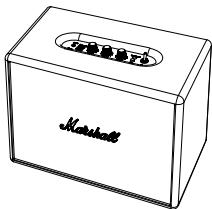
YOU'VE JUST BROUGHT HOME YET ANOTHER UNCOMPROMISING ADDITION TO MARSHALL'S LEGACY OF LOUD, THE WOBURN. THE MEETING POINT BETWEEN MODERN TECHNOLOGY AND VINTAGE MARSHALL STYLING, THIS ACTIVE STEREO LOUDSPEAKER BRINGS MARSHALL'S ICONIC HARD AND HEAVY SOUND DIRECTLY TO YOUR LIVING ROOM.
BUT, WAIT A MINUTE, BEFORE YOU TURN IT UP, MAKE SURE YOU READ THIS MANUAL CAREFULLY AND HOLD ON TO IT, ALONG WITH THE INCLUDED WARRANTY INFORMATION IN CASE YOU EVER NEED IT.
WHEN IT COMES TO SOUND QUALITY, THE WOBURN SPARES NO EXPENSE. IT'S DESIGNED WITH LOUD IN MIND AND YOU'LL QUICKLY HEAR BY ITS PERFORMANCE THAT IT HOLDS TRUE TO THE MARSHALL NAME. THIS LOUDSPEAKER HITS HIGH TREBLES CLEANLY, HANDLES LOW BASS WITH EASE AND HAS A CLEAR, LIFELIKE MID RANGE. THE ANALOGUE TREBLE, BASS AND VOLUME KNOBS GIVE YOU CUSTOM CONTROL OF YOUR SOUND. WITH UNIQUE SOUND DESIGN AND QUALITY COMPONENTS, IT'S MADE TO DELIVER ACCURATE RESPONSE THROUGHOUT THE FREQUENCY RANGE. THE WOBURN IS LITERALLY BUILT TO THRILL.
THE WOBJURN GIVES YOU THE FREEDOM TO HOOK UP YOUR SMARTPHONE, TABLET OR LAPTOP USING THE 3.5MM AUXILIARY INPUT, CONNECT WIRELESSLY VIA BLUETOOTH®, PLUG IN YOUR RECORD PLAYER USING THE RCA INPUT, OR USE THE OPTICAL OUTPUT FOR DEVICES LIKE APPLE TV.
BUT LET'S BE HONEST, LOOKS MATTER, AND WITH IT'S DURABLE VINYL COVERING, GOLD Piping, VINTAGE STYLE FRET, AND ICONIC MARSHALL SCRIPT LOGO, THE WOBURN DOES NOT DISAPPOINT. IT'S CLASSIC DESIGN ECHOES THE VIBE OF THE GOLDEN YEARS OF ROCK'N'ROLL.
SO, PLUG THIS BEAST IN, CRANK IT UP AND HEAR THE DEFINING SOUND THAT PUT MARSHALL ON THE MAP
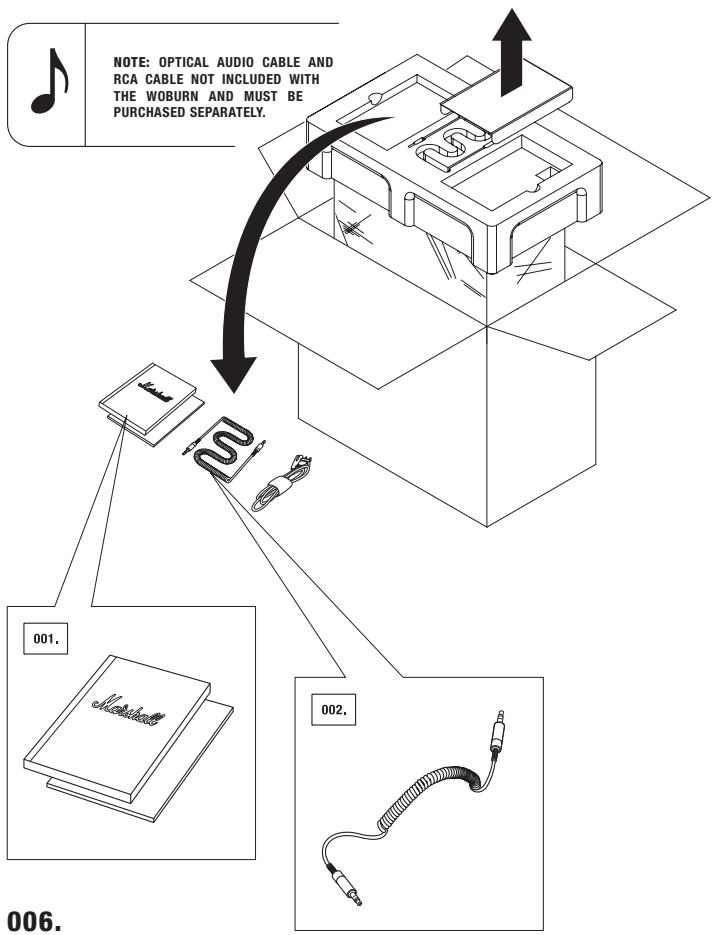
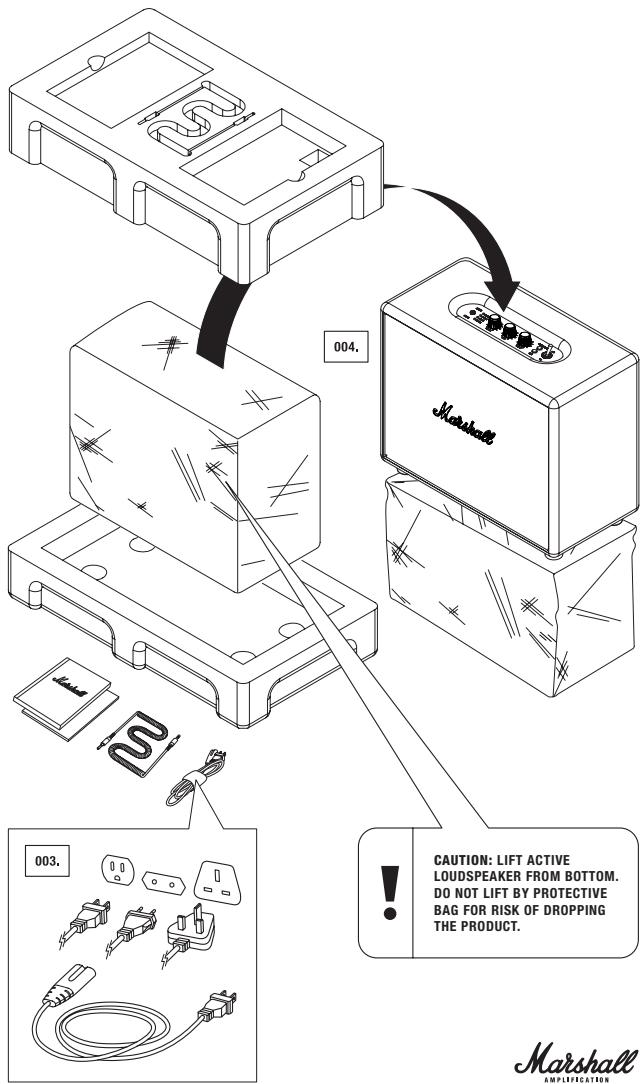
BOX CONTENTS
- USER MANUAL & WARRANTY INFORMATION
- DOUBLE-ENDIED COIL CORD WITH 3.5MM STEREO PLUGS TO CONNECT TO YOUR MUSIC PLAYER
- POWER CORD
- MARSHALL WOBURN ACTIVE STEREO LOUDSPEAKER
WOBURN
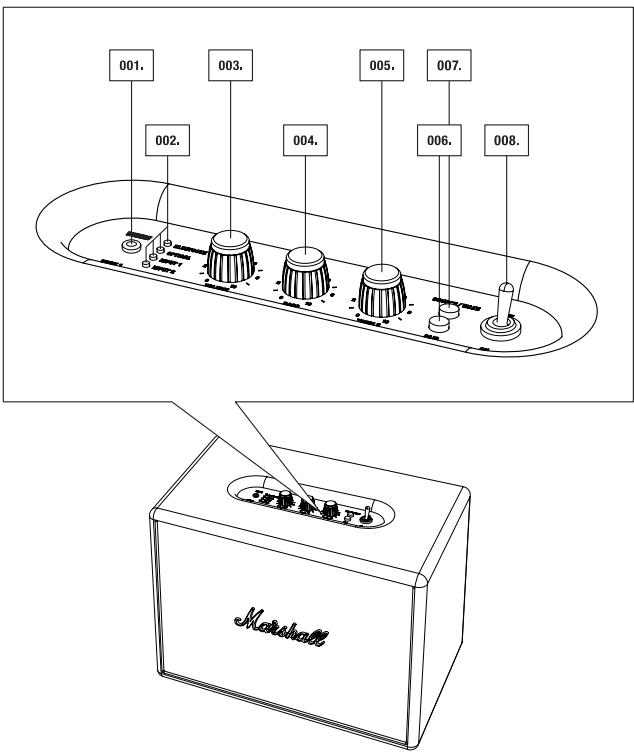
GENERAL DESCRIPTION
- INPUT FOR 3.5MM STEREO PLUG
- LED LIGHT SOURCE INDICATOR
- VOLUME
- BASS
- TREBLE
- PAIR BUTTON
- SOURCE/WAKE BUTTON
-
POWER SWITCH
-
STANDBY MODE SWITCH (POWERSAVER MODE AND STANDARD MODE)
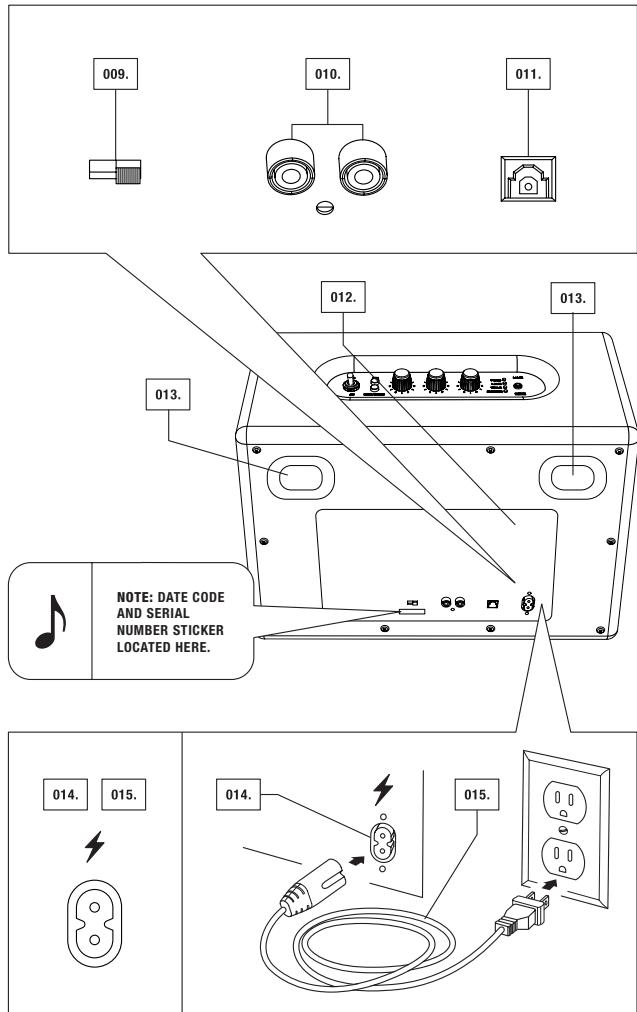
010.RCA INPUT (LEFT & RIGHT) - OPTICAL INPUT
- BACK PLATE
- BASS PORT
- POWER JACK
- POWER CORD
WOBURN
USING THE WOBURN WITH YOUR DEVICES
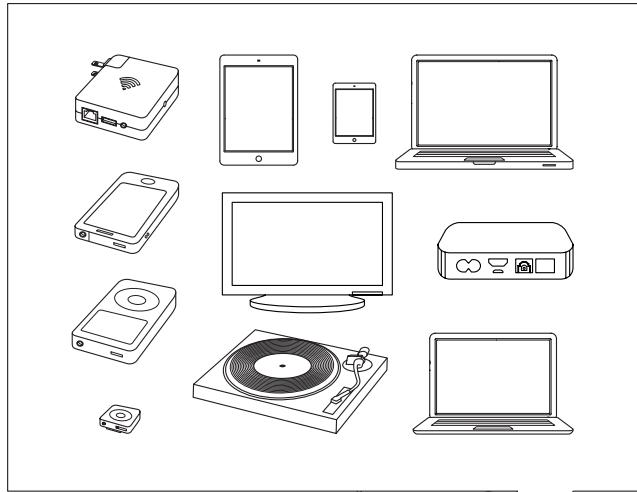
THE WOBURN IS A LOUDSPEAKER CREATED FOR TODAY'S WORLD. WITH MULTIPLE CONNECTION SOURCES, THERE ARE LOADS OF WAYS TO CONNECT TO YOUR SPEAKER, WHETHER VIA YOUR PHONE, TURNSTABLES, TV OR WIRELESSLY VIA THE LATEST VERSION OF BLUETOOTH®, FEATURING aptX® TECHNOLOGY. THE ADVANTAGE OF aptX® TECHNOLOGY IS THAT THE SOUND QUALITY VIA BLUETOOTH IS SIGNIFICantly BETTER THAN A2DP BLUETOOTH. BELOW YOU WILL FIND MORE DETAILS ABOUT THE CONNECTION SOURCES, IN TWO CATEGORIES:
- WIRELESS CONNECTION VIA BLUETOOTH
- CONNECTION VIA THE 3.5MM, RCA, OR OPTICAL AUDIO CABLE
CHOOSING YOUR SOURCE
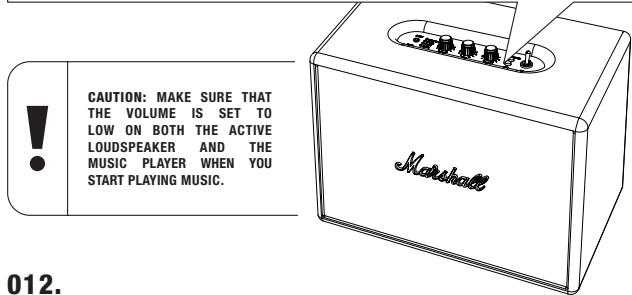
- PUSH THE SOURCE/WAKE BUTTON TO CHOOSE YOUR SOURCE AND/OR TO SWITCH BETWEEN CONNECTED SOURCES.
- A LIT LED LIGHT INDICATES WHICH SOURCE YOU HAVE SELECTED.
ORDER OF CONNECTIONS (FROM TOP TO BOTTOM):
- BLUETOOTH
- OPTICAL
- INPUT 1 - 3.5MM STERO PLUG
- INPUT 2 - RCA PORTS
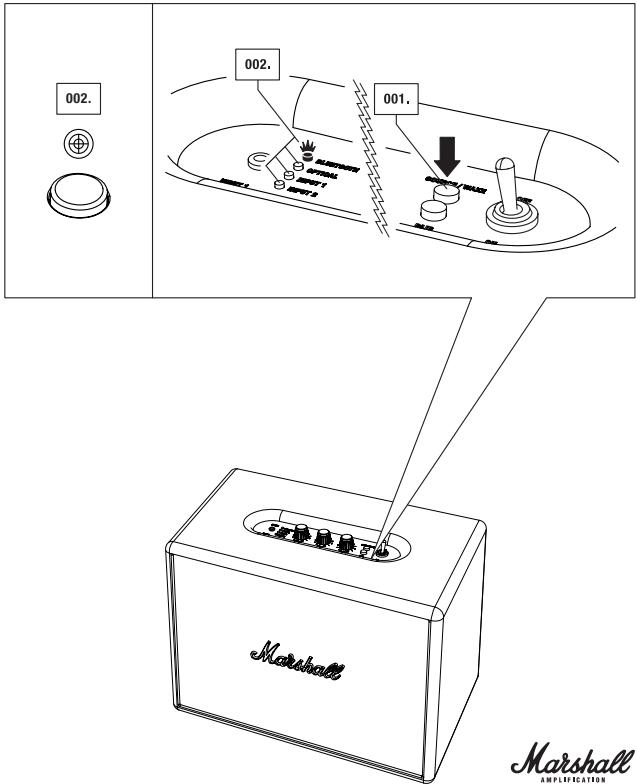
CONNECTING VIA BLUETOOTH
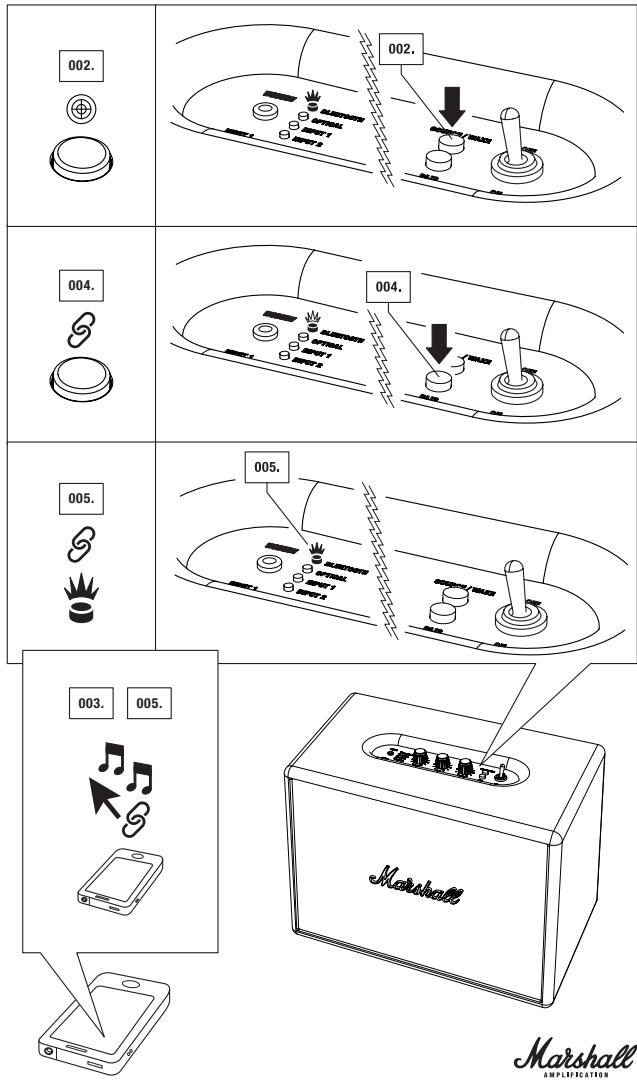
WITH THE HELP OF BLUETOOTH TECHNOLOGY, BLUETOOTH-COMPATIBLE DEVICES CAN EASILY BE CONNECTED TO EACH OTHER OVER A SHORT WIRELESS CONNECTION. USE YOUR BLUETOOTH-ENABLED SMARTPHONE, TABLET OR COMPUTER TO STREAM MUSIC TO YOUR DIRECTLY TO YOUR WOBURN WITH NO WIRES ATTACHED. USE YOUR NEWLY FOUND FREEDOM TO MOVE AROUND WITH ALL YOUR MUSIC AT YOUR FINGERTIPS. FOLLOW THESE STEPS TO CONNECT YOUR WOBURN WIRELESSLY TO YOUR BLUETOOTH DEVICE.
- TURN THE WOBURN ACTIVE STERO LOUDSPEAKER ON (SEE PAGE 010.).
- SELECT BLUETOOTH AS SOURCE BY PUSHING THE SOURCE/WAKE BUTTON UNTIL THE BLUETOOTH LED IS LIT.
- ACTIVATE THE BLUETOOTH FUNCTIONALITY ON YOUR DEVICE (SMARTPHONE, TABLET, COMPUTER).
- PRESS THE PAIR BUTTON. THE LED LIGHT ON THE WOBURN WILL START TO FLASH RAPIDLY IN RED.
- ON YOUR DEVICE, SELECT THE WOBUYN SPEAKER FROM YOUR LIST. THE LED LIGHT ON THE SPEAKER WILL TURN TO A STEADY RED.
- YOU ARE NOW READY TO PLAY YOUR MUSIC WIRELESSLY VIA THE WOBURN SPEAKER.

NOTES:
- YOU ONLY NEED TO PAIR YOUR SMARTPHONE/TABLET/COMPUTER WITH THE WOBIURN ONCE, AFTER WHICH THE DEVICE WILL BE INCLUDED IN THE LIST OF YOUR BLUETOOTH DEVICES.
- WHEN PAIRING A NEW DEVICE, PRESS THE PAIR BUTTON AGAIN, AND REPEAT STEPS ABOVE.
- UP TO SIX DEVICES CAN BE STORED IN THE SPEAKER'S MEMORY.
CONNECTING VIA BLUETOOTH
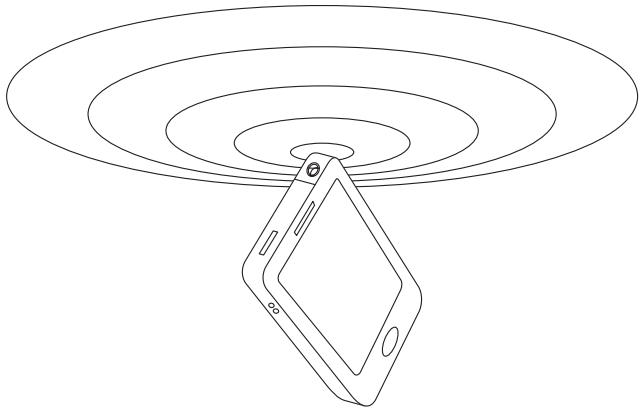
LOCATING YOUR DEVICES VIA BLUETOOTH
SELECT BLUETOOTH AS THE INPUT SOURCE BY PRESSING SOURCE/WAKE ON THE SPEAKER. BLUETOOTH IS NOW ACTIVATED, WITH A FLASHING RED LIGHT IF NO DEVICE IS CONNECTED, AND A SOLID RED LIGHT IF A DEVICE IS CONNECTED. WOBURN SPEAKER WILL NOW AUTOMATICALLY SEARCH FOR PAIRED DEVICES FOR 3 MINUTES, AND THE LED WILL RAPIDLY FLASH RED DURING THE SEARCH. THE WOBURN SPEAKER WILL LOCATE DEVICES WITHIN RANGE THAT HAVE PREVIOUSLY BEEN CONNECTED AND WILL CONNECT THEM AUTOMATICALLY. IF NO DEVICES ARE LOCATED WITHIN THREE MINUTES, THE WOBURN SPEAKER WILL REVERT TO STANDBY STATUS (EITHER POWERSAVER MODE OR STANDARD MODE, DEPENDING ON WHICH OPTION YOU CHOOSE. THERE IS MORE INFORMATION ON MODES IN THE STANDBY MODES SECTION ON PAGE 022.). IF THE PAIR BUTTON IS PRESSED WHILE BLUETOOTH IS SELECTED AS THE AUDIO SOURCE, THE WOBURN LOUDSPEAKER WILL PERFORM A NEW SEARCH FOR THREE MINUTES AFTERWARDS, DURING WHICH TIME, THE LED LIGHT WILL RAPIDLY FLASH RED.

NOTES:
- THE AUTO CONNECTION FUNCTION WILL NOT WORK IF THE WOBURN LOUD SPEAKER IS TURNED OFF VIA THE MAIN POWER SWITCH AT THE TOP OF THE UNIT.
- CONNECTING A SEVENTH DEVICE WILL ERASE THE FIRST DEVICE STORED IN THE WOBLURN'S MEMORY
- ALWAYS START BLUETOOTH IN YOUR SMARTPHONE/COMPUTER FIRST, AND THEN START WO-BURN LOUD-speAKER TO RECEIVE AN AUTO CONNECTION.
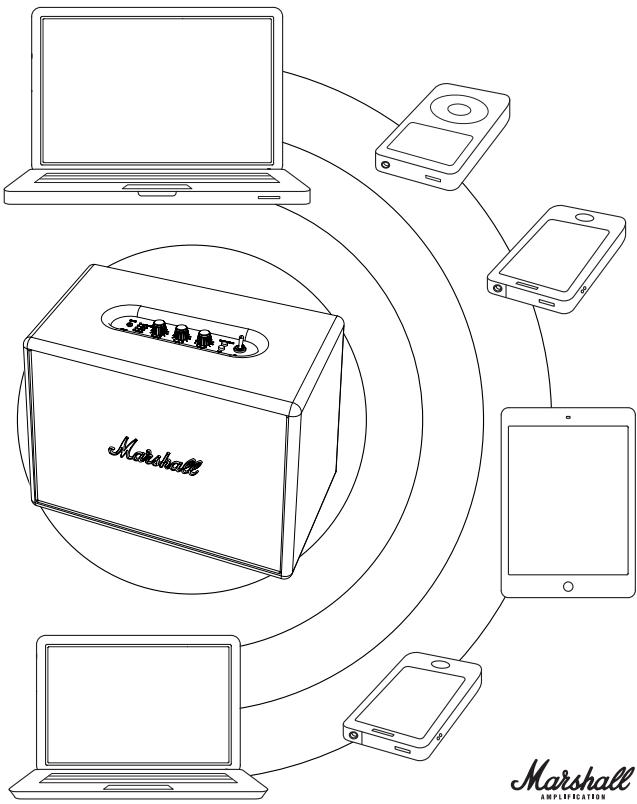
BLUETOOTH AUTO CONNECTION
IF A DEVICE IS MOVED OUTSIDE THE RANGE OF WOBUURN SPEAKER (APPROXIMATELY 10 METRES WITHOUT OBSTACLES), THAT DEVICE IS DISCONNECTED. THE DEVICE IS AUTOMATICALLY CONNECTED AGAIN WHEN IT IS MOVED BACK WITHIN RANGE. THE WOBUURN SPEAKER CAN MEMORISE UP TO SIX DEVICES AND ALWAYS STARTS SEARCHING FOR THE LAST DEVICE THAT HAS BEEN CONNECTED. IF THE WOBUURN SPEAKER HAS BEEN CONNECTED TO DEVICES A-B-C-D-E-F IN THAT ORDER, DEVICE F IS GIVEN FIRST PRIORITY, WHILE DEVICE A IS GIVEN LAST PRIORITY. EVERY TIME THE WOBUURN STARTS UP, IT WILL PERFORM AN AUTO CONNECTION OF DEVICES WITHIN ITS RANGE.
CONNECTING SOURCES BY CABLE
THERE ARE A NUMBER OF WAYS TO CONNECT TO YOUR WOBIURN THE OLD FASHIONED WAY, USING A CABLE. USE ONE OF THE THREE AUDIO INPUTS AVAILABLE: INPUT 1 - 3.5MM STEREO PLUG, INPUT 2 - RCA ANALOGUE INPUT OR THE OPTICAL AUDIO DIGITAL INPUT.
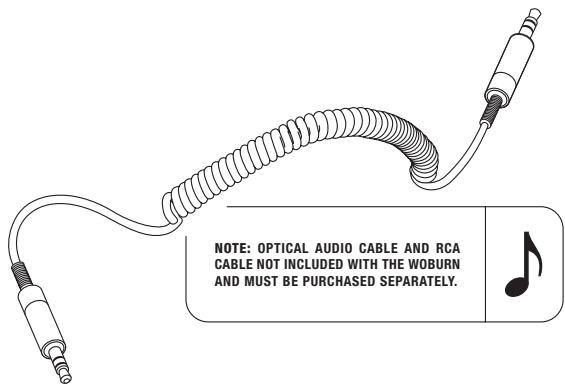
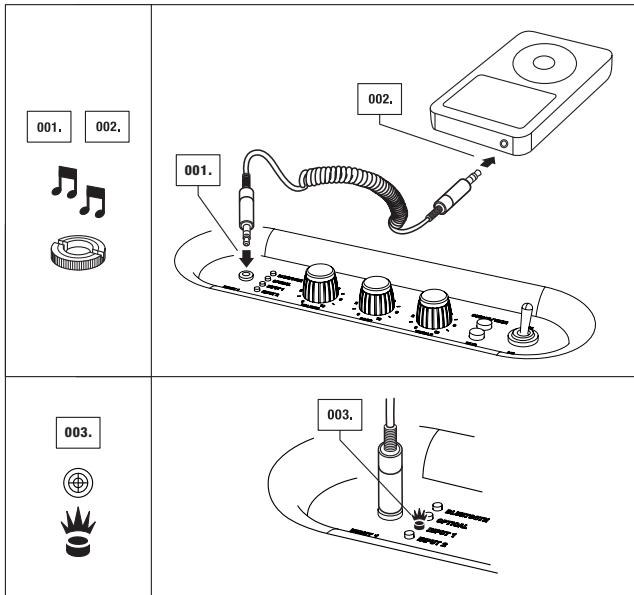
- INPUT 1 - 3.5MM STEREO PLUG USE THE DOUBLE-ENDED COIL CORD WITH 3.5MM PLUGS TO CONNECT TO AUDIO SOURCES THAT HAVE AUDIO OUTPUT SUCH AS A MOBILE TELEPHONE, IPHONE/IPAD/IPOD, MP3 PLAYER, OR AIRPORT EXPRESS.
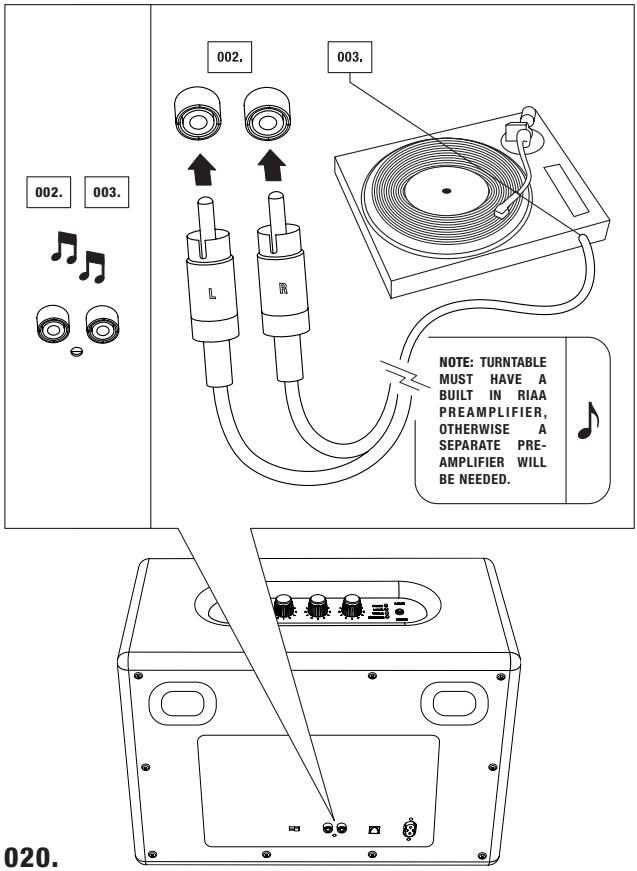
- INPUT 2 - RCA ANALOGUE INPUT USE THE RCA ANALOGUE INPUT TO CONNECT TO YOUR CD PLAYER, TURNTABLE (WITH RIAA) OR SONOS UNIT.
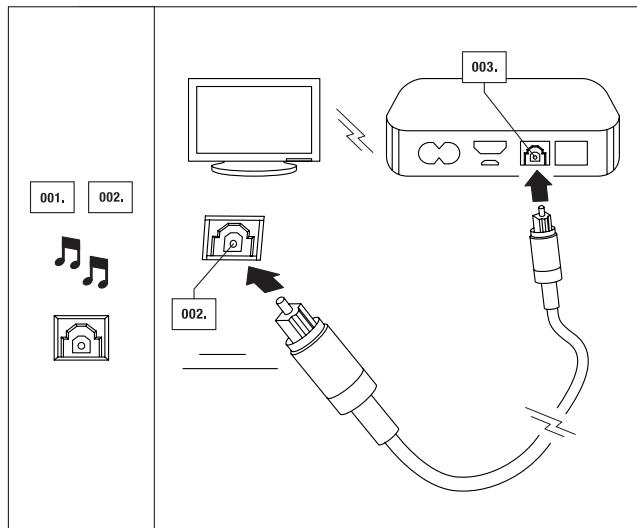
- OPTICAL AUDIO DIGITAL INPUT USE THE OPTICAL INPUT TO CONNECT TO YOUR TV, APPLE TV, AIRPORT EXPRESS, HARD DISK PLAYER, STREAMING PLAY, AND SATELLITE OR CABLE RECEIVER. OPTICAL INPUT WORKS WITH PCM STEREO ONLY. IF A CONNECTED DEVICE SENDS 5.1 AUDIO (OR SIMILAR SURROUND SOUND), THE WOBURN WILL NOT FUNCTION. SET THE AUDIO OUT TO STEREO ONLY ON YOUR TV, EVEN IF THE SHOW IS BROADCAST IN 5.1 AUDIO.
INPUT 1 - 3.5MM STEREO PLUG
- CONNECT THE CORD WITH THE 3.5MM STEREO PLUG TO THE INPUT LABELLED INPUT 1 ON THE LOUDSPEAKER.
- CONNECT THE CORD WITH THE 3.5MM STEREO PLUG TO THE MUSIC PLAYER.
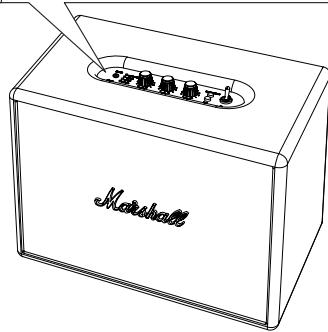
- SELECT INPUT 1 AS SOURCE BY PUSHING THE SOURCE/WAKE BUTTON UNTIL THE INPUT 1 LED IS LIT (SEE PAGE 013.).
Marshall
AMPLIFICATION
INPUT 2 - RCA PORTS
- SELECT INPUT 2 AS SOURCE BY PUSHING THE SOURCE/WAKE BUTTON UNTIL THE INPUT 2 LED IS LIT (SEE PAGE 013.).
- CONNECT THE CORD WITH THE RCA PLUGS TO THE MATCHING Sockets (LEFT AND RIGHT) ON THE LOUDSPEAKER.
- CONNECT THE RCA CORD TO THE RCA PORT ON YOUR SOURCE.
020.
OPTICAL AUDIO
- SELECT OPTICAL AS SOURCE BY PUSHING THE SOURCE/WAKE BUTTON UNTIL THE OPTICAL LED IS LIT (SEE PAGE 013.).
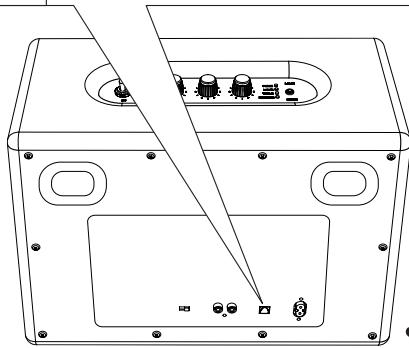
- CONNECT THE OPTICAL AUDIO CABLE'S CONNECTOR POINTS TO THE OUTPUT PORT LOCATED ON THE BACK OF THE LOUDSPEAKER LABELLED OPTICAL IN.
- CONNECT THE OPTICAL AUDIO CABLE TO THE OPTICAL AUDIO INPUT ON YOUR HOME THEATRE, APPLE TV OR OTHER RECEIVER.
Marshall
AMPLIFICATION
STANDBY MODES
ON THE BACK OF YOUR WO BURN, YOU WILL FIND A SWITCH THAT ALLOWS YOU TO CHOOSE BETWEEN TWO DIFFERENT STANDBY MODES: POWERSAVER OR STANDARD.
EUROPEAN UNION REGULATION STATES THAT ELECTRONIC DEVICES MAY ONLY HAVE 0.5W POWER CONSUMPTION IN STANDBY MODE (THE EUROPEAN DIRECTIVE ON ENERGY RELATED PRODUCTS, OR ERP). THIS IS WHY THE WOBLIN'S FACTORY DEFAULT SETTING IS THE POWERSAVER MODE, BECAUSE THE POWERSAVER MODE SAVES MORE ENERGY THAN THE STANDARD MODE.
AS THE NAME IMPLIES, USING THIS SETTING SAVES POWER. WHEN YOU STOP PLAYING MUSIC, THE WOURN WILL GO INTO A LOW-POWER STATE AFTER 20 MINUTES. POWERSAVER MODE CAN BE DISABLED IF YOU WANT WOURN TO START AUTOMATICALLY AND STAY VISIBLE ON YOUR LIST OF BLUETOOTH DEVICES AFTER 20 MINUTES. TO DISABLE POWERSAVER, SIMPLY CHANGE THE SWITCH TO STANDARD MODE.
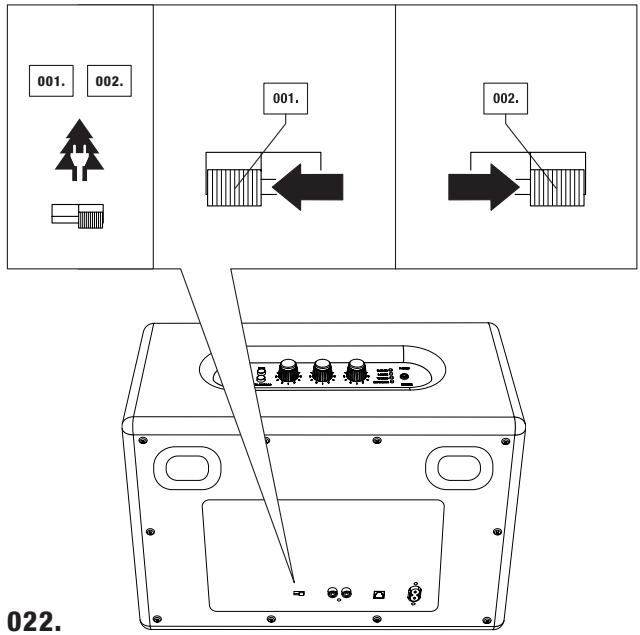
POWERSAVER & STANDARD
- POWERSAVER STANDBY MODE: THE WOBURN WILL GO TO POWER SAVING STANDBY MODE AFTER 20 MINUTES OF NOT RECEIVING A SOUND SIGNAL. IF YOU HAVE CHOSEN TO USE THE POWERSAVER STANDBY MODE, THE WOBURN WILL NOT WAKE UP AUTOMATICALLY WHEN YOU BEGIN PLAYING MUSIC AND WILL NOT SHOW UP AS AN AVAILABLE DEVICE IN YOUR BLUETOOTH LIST AFTER IT HAS GONE INTO THIS LOW-Power State. TO ACTIVATE WOBURN AND PLAY MUSIC FROM ANY SOURCE AFTER THE UNIT HAS GONE TO STANDBY MODE, PRESS THE WAKE BUTTON ONCE. THIS WILL BRING THE WOBURN BACK TO LIFE AND READY TO PLAY AGAIN.
- STANDARD STANDBY MODE: THE WOBUYN WILL GO INTO STANDBY MODE AFTER 20 MINUTES OF NOT RECEIVING A SOUND SIGNAL. IF YOU HAVE CHOSEN TO USE THE STANDARD STANDBY MODE, THE WOBUYN WILL AUTOMATICALLY 'WAKE UP' WHEN THE LAST SOURCE IS PLAYED. FOR EXAMPLE, IF A SOURCE CONNECTED WITH A CABLE BEINS TO PLAY, THE SPEAKER WAKES UP AUTOMATICALLY WHEN THAT SOURCE IS SELECTED. IF A BLUETOOTH DEVICE WAS USED AS THE LAST SOURCE, SIMPLY TOUCHING THE LATEST BLUETOOTH DEVICE TO HAVE BEEN USED WILL WAKE THE WOBUYN UP AUTOMATICALLY. IF YOU WANT TO PLAY ANOTHER BLUETOOTH DEVICE INSTEAD OF THE LAST ONE USED, PRESS THE WAKE BUTTON ONCE TO PLAY MUSIC AGAIN.
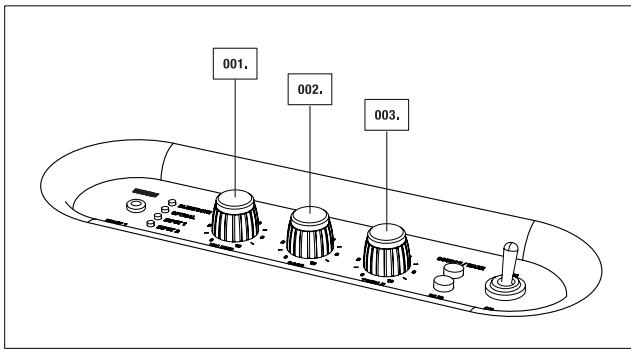
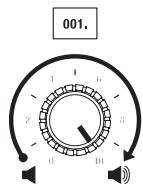
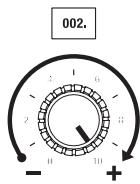
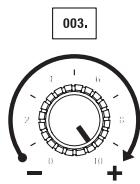
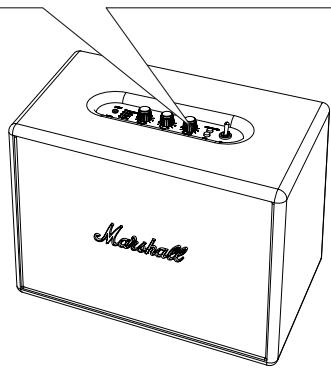
ADJUSTING THE VOLUME/BASS/TREBLE
TURN THE KNOB TO ADJUST THE:
- VOLUME
002.BASS - TREBLE
TECHNICAL INFORMATION
SOUND SPECIFICATION
- ACTIVE STEREO LOUDSPEAKER WITH BASS REFLEX SYSTEM
CLASS D AMPLIFIERS: 2X20W+1X50W - 1" DOME TWEETERS: 2X (FERROFLUID COOLED)
- 5 14 WOOFERS: 2X
MAX SPL: 110DB @ 1M (GROUND PLANE 300HZ 3%THD)
BASS AND TREBLE TONE CONTROLS
FREQUENCY RANGE: 35-22.000HZ
CROSSOVER FREQUENCY: 2800HZ
CONNECTIVITY
- BLUETOOTH: STANDARD V4.0 + EDR aptX® CODEC
- INPUT 1 - 3.5MM: 1X
- INPUT 2 - RCA: 2X
- OPTICAL INPUT: 1X
TECHNICAL INFORMATION
- MAINS INPUT VOLTAGE: 100-240V~/200W
ABSOLUTE MIN/MAX: 90-264V~ - MAINS FREQUENCY: 50-60HZ
MAX PEAK POWER CONSUMPTION: 200W - TWO STANDBY MODES: POWERSAVER MODE (0,43W) AND STANDARD MODE (8,7W)
MAX POWER OUTPUT: 80W RMS - WEIGHT: 7.90KG / 17.42 LBS
SIZE: 400 × 308 × 200MM / 15.75 × 11.40 × 7.87IN
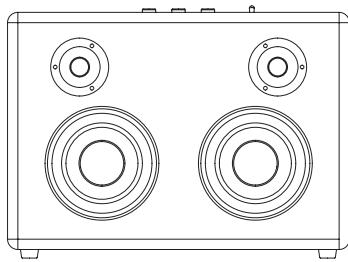

NOTE: THE FRONT FRET IS NOT REMOVAEABLE. THIS ILLUSTRATION INTENDS TO SHOW THE INTERNAL SPEAKER LAYOUT. DO NOT ATTEMPT TO REMOVE THE FRONT FRET FOR RISK OF DAMAGING YOUR ACTIVE LOUD SPEAKER.
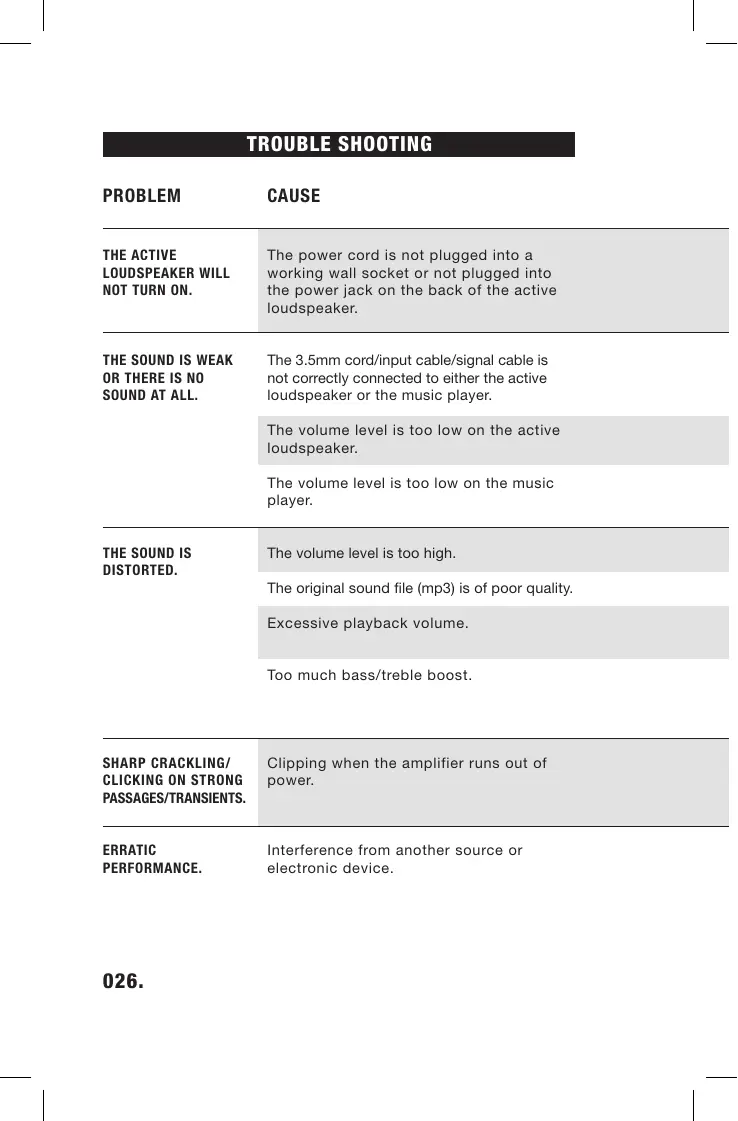
TROUBLE SHOOTING
PROBLEM
CAUSE
THE ACTIVE LOUDSPEAKER WILL NOT TURN ON.
The power cord is not plugged into a working wall socket or not plugged into the power jack on the back of the active loudspeaker.
THE SOUND IS WEAK OR THERE IS NO SOUND AT ALL.
The 3.5mm cord/Input cable/signal cable is not correctly connected to either the active loudspeaker or the music player.
The volume level is too low on the active loudspeaker.
The volume level is too low on the music player.
THE SOUND IS DISTORTED.
The volume level is too high.
The original sound file (mp3) is of poor quality.
Excessive playback volume.
Too much bass/treble boost.
SHARP CRACKLING/ CLICKING ON STRONG PASSAGES/TRANSIENTS.
Clipping when the amplifier runs out of power.
ERRATIC PERFORMANCE.
Interference from another source or electronic device.
WOBURN
ACTION
Plug the power cord into a working wall socket and plug the connector into the power jack on the back of the active loudspeaker.
Unplug and re-plug the 3.5mm cord/Input cable/signal cable into both the active loudspeaker and the music player.
Turn up the volume on the active loudspeaker.
Turn up the volume on the music player.
Turn down the volume.
Try another sound file (mp3) or music player.
Turn down playback level on the volume knob or reduce the sound level on the music player.
Turn down the volume control on the control panel and/or music player. Reduce the bass boost on the control panel or excessive bass boost/eq on the music player.
Turn down the volume on the speaker or on the music player. Reduce the bass boost.
Move the active loudspeaker to another spot or turn off or move other electronic devices.
BLUETOOTH TROUBLE SHOOTING
| PROBLEM | CAUSE |
| BLUETOOTH WILL NOT CONNECT. | Woburn is too far away from your device during the pairing process. |
| BLUETOOTH CONNECTION DOES NOT WORK AS WELL AS IT SHOULD. | You may be in an area with poor reception. |
| THE SOUND QUALITY IS POOR WHEN CONNECTED THROUGH BLUETOOTH. | The greater the distance between the Woburn and the Bluetooth device, the poorer the sound quality will be. |
| BLUETOOTH CONNECTION IS BROKEN OR DISRUPTED. | The Bluetooth connection only works when it is near the device. The connection is automatically broken if the Bluetooth device moves outside of the area. The connection may even be affected due to obstacles such as walls or doors. |
| THE WOBURN LOUDSPEAKER CANNOT FIND A BLUETOOTH CONNECTION. | The loudspeaker cannot search or connect correctly in the following cases: · If there is a strong electric field surrounding the Woburn. · If the Bluetooth device is turned off, not available or does not function as it should. · Please note that items such as, for example, microwave ovens, wireless network adapters, fluorescent lights and gas cookers use the same frequency range as the Bluetooth device, which could lead to electrical disturbances. |
| 028. |
WOBURN
ACTION
Place the Woburn closer to the Bluetooth device during the pairing process.
Move to an area with better reception to improve Bluetooth connectivity.
Move the Woburn closer to the Bluetooth device. If the distance exceeds the Bluetooth device's wireless range, the connection will be lost.
Ensure that the Woburn is placed near the Bluetooth device, and unobstructed by obstacles such as walls or doors.
Please ensure that there is no electrical interference surrounding the Woburn, that your Bluetooth device is on and working properly.

NOTES:
- A BLUETOOTH DEVICE COULD CAUSE SOUND-RELATED OR TECHNICAL FAULTS, DEPENDING ON USE, IN THE FOLLOWING CASES:
WHEN SOME PART OF THE BODY IS IN CONTACT WITH THE RECEIVING/INSMITTING SYSTEM FOR THE BLUETOOTH DEVICE OR THE WOBURN LOUDSPEAKER. - ELECTRICAL VARIATIONS DUE TO OBSTACLES IN THE FORM OF WALLS, CORNERS, ETC.
-
EXPOSURE TO ELECTRICAL DISRUPTIONS FROM DEVICES WITHIN THE SAME FREQUENCY BAND, FOR EXAMPLE MEDICAL EQUIPMENT, MICROWAVE OVENS AND WIRELESS NETWORKS.
-
THIS WIRELESS DEVICE MAY CAUSE ELECTRICAL DISRUPTIONS DURING USE.
- YOU DO NOT NEED TO ENTER THE PIN CODE (PASSWORD) WHEN CONNECTING THE BLUETOOTH DEVICE TO WOBURN SPEAKER. IF THE WINDOW FOR ENTERING THE PIN CODE IS DISPLAYED, YOU SHOULD ENTER <0000> .
- YOU CANNOT CONNECT TO A BLUETOOTH DEVICE THAT ONLY SUPPORTS THE HF (HANDS FREE) AREA FUNCTION.
FRANÇAIS
INDEX
- CONSIGNES DE SECURITÉ
- ÉTIQUETTES DE SECURITE
- LE WOBURN
036.CONTENU DU CARTON
042.DESCRIPTION GÉNÉRALE - ALLUMER/ARRÉTER L'APPAREL
- UTILISATION DU WOBURN AVEC VOS APPAREILS
- CHOIX DE VOTRE SOURCE
-
CONNEXION BLUETOOTH
-
CONNECTION PAR CABLE
053.ENTREE 1-PRISE STEREO 3,5MM - ENTRÉE 2 - PORTS RCA
055.AUDIO OPTIQUE - MODES VEILLE
- RÉGLAGE DU SON
- INFORMATIONS TECHNIQUES
- DEPANNAGE
- INFORMATIONS SUR LA GARANTIE
CONSIGNES DE SECURITE IMPORTANTES
CONSIGNES DE SECURITE IMPORTANTES
LE SON EST FAIBLE OU
IL N'Y A PAS DE SON
DU TOUT.
Please note: Zound Industries International AB (referred to subsequently as Zound Industries) does NOT accept products shipped to its address. Please refer to our website for more details on how to make warranty claims.
Every product Zound Industries sells is designed to meet and even exceed your expectations. Zound Industries is dedicated to providing excellent products using today's advanced technology. However, electronic products may encounter technical difficulties resulting from a manufacturing defect. This is why Zound Industries offers a one (1) year limited warranty on every product it sells.
Zound Industries hereby warrants that, under normal use, this product will be free from defects in materials and workmanship for a period of one (1) year from the date you purchased or received (whichever occurs later) the product from the Zound Industries retailer.
This limited warranty does not apply to defects resulting from accident, abuse, misapplication, unauthorized repair, modification, disassembly, improper operation or maintenance, or usage not in accordance with product instructions.
Other than the limited warranty set forth above, Zound Industries expressly disclaims and excludes all warranties, expressed or implied, including, without limitation, the implied warranties of merchantability and fitness for a particular purpose, relating to the use or performance of the product.
ZOUND INDUSTRIES SHALL NOT BE LIABLE FOR SPECIAL, INDIRECT, INCIDENTAL OR CONSEQUENTIAL DAMAGES RESULTING FROM THE USE OR INABILITY TO USE THIS PRODUCT, REGARDLESS OF THE LEGAL THEORY ON WHICH THE CLAIM IS BASED.
This limited warranty gives you specific legal rights, and you may also have other rights that vary under local laws that shall not be affected by this limited warranty. This warranty extends only to you and cannot be transferred or assigned. If any provision of this limited warranty is unlawful, void or unenforceable, that provision shall be deemed
severable and shall not affect any remaining provisions. In case of any inconsistency between the English and other versions of this limited warranty, the English version shall prevail.
This limited warranty supersedes all other warranties that are associated or included with this product.

This symbol indicates that this prod
uct shall not be treated as household
waste. Instead it shall be handed over to the poor.
to the applicable collection point for
the recycling of electrical and electronic
equipment. This product was produced after
Jan 1, 2006.
If you believe your product is defective or needs servicing or repair within the warranty period, please refer to the instructions on www.marshallheadphones.com/support/warranty.
For any questions or concerns contact
support@marshallheadphones.com.
Designed in Stockholm · Produced in China
WARRANTY
CESKY
JEDNOLETA OMEZENA ZÁRUKA
Please note: Zound Industries International AB (referred to subsequently as Zound Industries) does NOT accept products shipped to its address. Please refer to our website for more details on how to make warranty claims.
Every product Zound Industries sells is designed to meet and even exceed your expectations. Zound Industries is dedicated to providing excellent products using today's advanced technology. However, electronic products may encounter technical difficulties resulting from a manufacturing defect. This is why Zound Industries offers a one (1) year limited warranty on every product it sells.
Zound Industries hereby warrants that, under normal use, this product will be free from defects in materials and workmanship for a period of one (1) year from the date you purchased or received (whichever occurs later) the product from the Zound Industries retailer.
This limited warranty does not apply to defects resulting from accident, abuse, misapplication, unauthorized repair, modification, disassembly, improper operation or maintenance, or usage not in accordance with product instructions.
Other than the limited warranty set forth above, Zound Industries expressly disclaims and excludes all warranties, expressed or implied, including, without limitation, the implied warranties of merchantability and fitness for a particular purpose, relating to the use or performance of the product.
ZOUND INDUSTRIES SHALL NOT BE LIABLE FOR SPECIAL, INDIRECT, INCIDENTAL OR CONSEQUENTIAL DAMAGES RESULTING FROM THE USE OR INABILITY TO USE THIS PRODUCT, REGARDLESS OF THE LEGAL THEORY ON WHICH THE CLAIM IS BASED.
This limited warranty gives you specific legal rights, and you may also have other rights that vary under local laws that shall not be affected by this limited warranty. This warranty extends only to you and cannot be transferred or assigned. If any provision of this limited warranty is unlawful, void or unenforceable, that provision shall be deemed
severable and shall not affect any remaining provisions. In case of any inconsistency between the English and other versions of this limited warranty, the English version shall prevail.
This limited warranty supersedes all other warranties that are associated or included with this product.
This symbol indicates that this product shall not be treated as household waste. Instead it shall be handed over to the applicable collection point for the recycling of electrical and electronic equipment. This product was produced after Jan 1, 2006.
If you believe your product is defective or needs servicing or repair within the warranty period, please refer to the instructions on www.marshallheadphones.com/support/warranty.
For any questions or concerns contact support@marshallheadphones.com.
Designed in Stockholm · Produced in China
WARRANTY
FRANCAIS
GARANTIE LIMITEE D'UN AN
www.marshallheadphones.com/support/warranty.
質問等の問題合わせ先
zound-support@kagaht.co.jp
Stück木ルムにテサイン·中国製
WARRANTY
DEUTSCH
EIN (1) JAHR EINGESCHRANKTE GARANTIE
support@marshallheadphones.com
Designet i Stockholm · Produret i Kina
WARRANTY
NEDERLANDS
BEPERKTE GARANTIE VAN EEN (1) JAAR
support@marshallheadphones.com
Ontworpen in Stockholm · Geproduceserd in China
WOBURN
POLSKI
ROCZNA OGRANICZONA GWARANCJA (1 ROK)
support@marshallheadphones.com.
設計於斯德哥爾摩·中國製造

- IMPORTANT SAFETY INSTRUCTIONS
- WARNING!
- MOISTURE AND HUMIDITY
- INSTALLATION
- CONNECTION
- CLEANING
- MAINTENANCE
- SAFTEY LABELS
- LANGUAGE INDEX
- ENGLISH
- PAGE
- FRENCH - FRANCAIS
- WOBURN
- BOX CONTENTS
- GENERAL DESCRIPTION
- USING THE WOBURN WITH YOUR DEVICES
- CHOOSING YOUR SOURCE
- CONNECTING VIA BLUETOOTH
- NOTES:
- LOCATING YOUR DEVICES VIA BLUETOOTH
- BLUETOOTH AUTO CONNECTION
- CONNECTING SOURCES BY CABLE
- INPUT 1 - 3.5MM STEREO PLUG
- INPUT 2 - RCA PORTS
- OPTICAL AUDIO
- STANDBY MODES
- POWERSAVER & STANDARD
- ADJUSTING THE VOLUME/BASS/TREBLE
- TECHNICAL INFORMATION
- SOUND SPECIFICATION
- CONNECTIVITY
- TROUBLE SHOOTING
- PROBLEM
- CAUSE
- ACTION
- FRANÇAIS
- INDEX
- CONSIGNES DE SECURITE IMPORTANTES
- WARRANTY
- CESKY
- FRANCAIS
- DEUTSCH
- EIN (1) JAHR EINGESCHRANKTE GARANTIE
- NEDERLANDS
- POLSKI
Brand : MARSHALL
Model : WOBURN
Category : Bluetooth speaker