
DO720K - Coffee machine DOMO - Free user manual and instructions
Find the device manual for free DO720K DOMO in PDF.



| Product type | Espresso coffee machine with built-in grinder |
| Brand | DOMO |
| Model | DO720K |
| Dimensions (L x D x H) | Approx. 30 x 25 x 35 cm |
| Weight | Approx. 10 kg |
| Power supply | 220-240 V ~ 50/60 Hz |
| Pressure | 15 bar |
| Water tank capacity | 1.8 L |
| Bean hopper capacity | 250 g |
| Number of grind settings | 30 levels (from 0 to 30) |
| Beverage types | Single espresso, double espresso, cappuccino, café au lait, hot water |
| Functions | Built-in grinder, tamper, steam wand, hot water, auto shut-off, standby |
| Auto shut-off | After 20 minutes of inactivity |
| Cleaning | Removable parts washable with hot water, clean grinder every 2 weeks |
| Descaling | Every 4 to 6 months (light indicator) |
| Warranty | 2 years (accessories: 6 months) |
| Included accessories | Filter holder, small and large filters, tamper, milk pitcher, cleaning brushes, pin |
| Customer service | +32 14 21 71 91, info@linea2ooo.be |
| Power consumption | 1450 W |
Frequently Asked Questions - DO720K DOMO
User questions about DO720K DOMO
0 question about this device. Answer the ones you know or ask your own.
Ask a new question about this device
Download the instructions for your Coffee machine in PDF format for free! Find your manual DO720K - DOMO and take your electronic device back in hand. On this page are published all the documents necessary for the use of your device. DO720K by DOMO.
USER MANUAL DO720K DOMO
All of our products are always submitted to a strict quality control before they are sold to you.
Should you nevertheless experience problems with your device, we sincerely regret this.
In that case, we kindly request you to contact our customer service.
Our staff will gladly assist you.

+32 14 21 71 91

info@linea2000.be
Monday-Thursday:8.30-12.00 and 13.00-17.00
Friday: 8.30-12.00 and 13.00-16.30
This appliance has a two year warranty period. During this period the manufacturer is responsible for any failures that are the direct result of construction failure. When these failures occur the appliance will be repaired or replaced if necessary. The warranty will not be valid when the damage to the appliance is caused by wrong use, not following the instructions or repairs executed by a third party. The guarantee is issued with the original till receipt. All parts, which are subject to wear, are excluded from the warranty. If your device breaks down within the 2-year warranty period, you can return the device together with your receipt to the shop where you purchased it.
The guarantee on accessories and components that are liable to wear-and-tear is only 6 months.
The guarantee and responsibility of the supplier and manufacturer lapse automatically in the following cases:
If the instructions in this manual have not been followed.
In case of incorrect connection, e.g., electrical voltage that is too high.
In case of incorrect, rough or abnormal use.
In case of insufficient or incorrect maintenance.
In case of repairs or alterations to the device by the consumer or non-authorised third parties.
If the customer used parts or accessories that are not recommended or provided by the supplier / manufacturer.
SAFETY INSTRUCTIONS
When using electrical appliances, basic safety precautions should always be taken, including the following:
- Read all instructions carefully. Keep this manual for future reference.
Make sure all packaging materials and promotional stickers have been removed before using the appliance for the first time. Make sure children cannot play with the packaging materials.
This appliance is intended to be used in household and similar applications such as:
staff kitchen areas in shops, offices and other working environments;
farm houses;
by clients in hotels, motels and other residential type environments;
bed and breakfast type environments.
Children should be supervised to ensure that they do not play with the appliance.
This appliance can be used by children aged from 16 years and above and persons with reduced physical, sensory or mental capabilities or lack of experience and knowledge if they have been given
supervision or instruction concerning use of the appliance in a safe way and understand the hazards involved. Children shall not play with the appliance. Cleaning and user maintenance shall not be made by children unless they are older than 16 and supervised.
- Keep the appliance and its cord out of reach of children younger than 16 years.
The appliance must be disconnected from its power source when not in use, during service and when replacing parts. Allow to cool before putting on or taking off parts, and before cleaning the appliance. - CAUTION: In order to avoid a hazard this appliance must not be supplied through an external switching device, such as a timer, or connected to a circuit that is regularly switched on and off by the utility.
The surfaces of the appliance are likely to get hot during use. It is advised not to touch the surfaces of the appliance other than the handles to avoid burns. - Never leave the appliance unattended while it is functioning.
- Do not use or store this appliance outdoors.
Do not use this appliance for other than intended use. - Check carefully that the voltage and frequency of the power net match the indications on the rating label of the appliance.
- The plug must be plugged into an appropriate outlet that is installed and grounded in accordance with all local standards and requirements.
- Do not operate this appliance with a damaged cord or plug or in the event the appliance malfunctions or has been damaged in any manner. Return the appliance to the DOMO Service Department or its service agent for examination, repair, or electrical or mechanical adjustment. Do not try to repair the appliance yourself.
To protect against electrical shock or burns, do not immerse unit, cord, or plug in water or other liquid.
Do not operate the appliance with wet hands.
A short power supply cord is provided to reduce the risk of becoming entangled in or tripping over a longer cord. DO NOT USE WITH AN EXTENSION CORD. - Unwrap the cord completely to prevent overheating of the cord.
- Do not let the power supply cord hang over the edge of a counter, or touch hot surfaces.
- Do not allow the power cord supply to run underneath or around the unit.
- Do not place on or near a hot gas or electric burner or sink, or in a heated oven.
- Do not place near flammable materials, gases or explosives.
- Make sure the appliance is correctly assembled, then plug the cord in the wall outlet. To disconnect, turn controls to "OFF" or "o" position, then remove the plug from the wall. Never pull the cord or appliance to remove the plug from the socket.
- Failure to maintain this appliance in a clean condition could adversely affect the life of the appliance and possibly result in a hazardous situation.
- During boiling, hot steam may come through the filter or any other opening. Keep hands and face at a safe distance during operation.
Any injury or damage caused by failure to comply with these rules are at your own risk. Neither the manufacturer, importer, or the supplier may be held liable.
Do not overfill the kettle. Never add water above the maximum level marked on the appliance. - Do not spill any liquid on the connector.
Only use the utensils delivered with the appliance.
Do not move the appliance while in use or when still hot. Allow to cool before moving the appliance. - Do not remove the porta-filter while brewing coffee. Caution should also be taken while removing the porta-filter since the metal parts will be hot.
PARTS
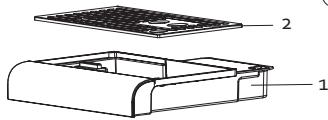
- Drip tray
- Drip tray grille
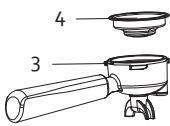
- Portafilter
- Small filter
- Accessory storage space
- Cleaning pin
- Cleaning brush (2x)
- Large filter
- Bean reservoir lid
- Bean reservoir
- Water reservoir lid
- Water reservoir
- Steam nozzle
- Grinding
- Grinderroutlet
- Grindersupport
- Brew head
- Control panel
- Tamper
- Milk jug
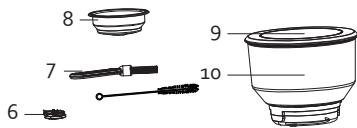
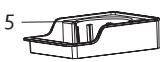
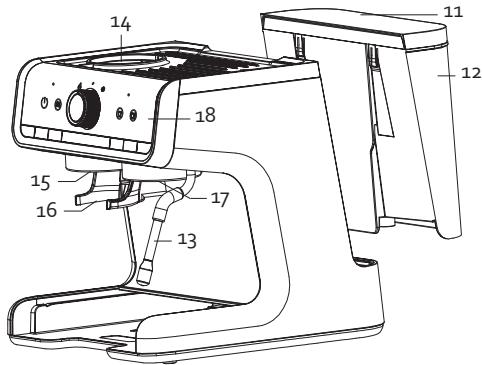

19

20
CONTROL PANEL
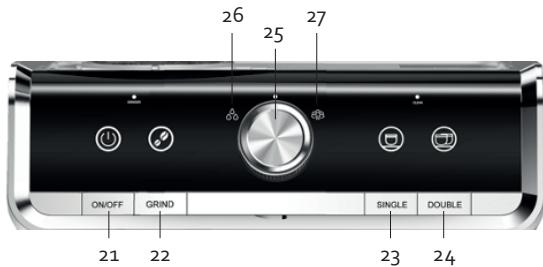
- On/off button
- Grind button: to grind coffee beans
- Single button: for 1 cup of espresso
- Double button: for a double shot of espresso or 2 cups
- Rotary knob
- Hot water indicator lamp
- Steam indicator lamp
BEFORE THE FIRST USE
- Check that all accessories for the device are present and that the unit is not damaged.
- Flush out the pipes. First, allow the water to run through without adding ground coffee to the filter of the portafilter. See section: 'usage/coffee'. Afterwards, throw away the water.
- Flush out the steam nozzle. See section: 'usage/hot water feature'. Afterwards, throw away the water.
Clean all parts with a moist cloth.
USE
If the unit is not used for 20 minutes, it will automatically go into sleep mode. Press the on-off button on the unit to activate it and to enable the standby mode.
GRINDER
Placement
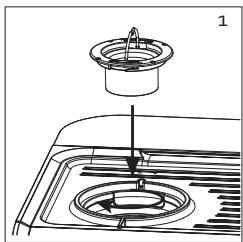
- Make sure the grinder sits correctly in the unit and that it is screwed in tight.
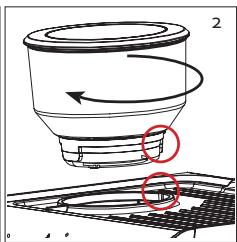
- Place the reservoir on the grinder. Make sure that the protrusion on the back of the reservoir is aligned on the indent on the unit. Rotate the reservoir clockwise until it is rotated to the number markings on the front of the reservoir.
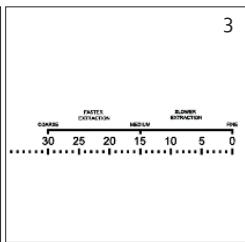
- The number markings indicate the coarseness of the ground coffee. There are 30 settings. Rotate the reservoir clockwise for finely ground coffee. The finest grind is indicated by o. Rotate the reservoir anticlockwise for coarsely ground coffee. The coarsest grind is indicated by 30.
- If the indicator lamp on the left is lit red, the bean reservoir is not placed properly. The lamp turns white when the reservoir is properly in place. If you press the grind button when the reservoir is not placed properly, you will hear an alert 3 times and the indicator lamp of the left will light up.
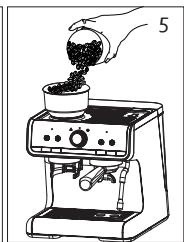
- Remove the lid from the bean reservoir. Add the beans by slowly pouring them into the reservoir. Do not overfill the reservoir. Place the lid back.
Usage
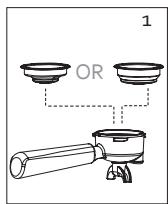
- Select the desired filter and push this into the portafilter.
the small filter is for one espressor
the large filter is for 2 cups or a double espressor
- Insert the plug in the power socket and press the on-off button.
- Put the portafilter under the grinder outlet. You let the portafilter rest in the provided support.
- Press the grind button. Coffee is ground automatically for 7 seconds. For a double espresso, press the grind button again.
- Take the portafilter from the support and tap it with the rubber on the underside on the counter so that the ground coffee is dispersed evenly.
- Place the tamper on top of the ground coffee and press softly with a rotating movement to spread the coffee evenly. Now press the ground coffee stiffly with the tamper with a force of ± 20kg and remove any excess coffee from the edge.
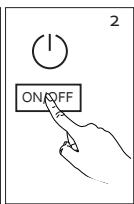
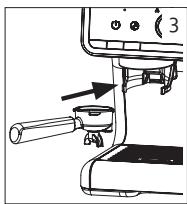
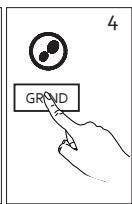
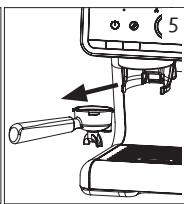
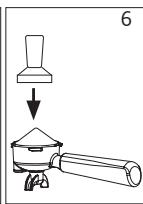
Use the grinder up to a maximum of 3 minutes per grind. Allow for sufficient time between each grind.
The unit is equipped with overheating protection. The safety engages if you press the grind button too often or for too long. You will then hear 3 alerts and the indicator lamp on the left will blink. Wait 6 minutes until the grinder has cooled off. You can then grind again as normal.
Only use coffee beans in the bean reservoir. Never fill the reservoir with ground coffee, instant coffee, or other ingredients or objects.
COFFEE
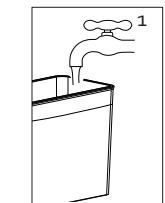
- Fill the water reservoir with the desired amount of water. Make sure it the level is within the 'MIN' and 'MAX' indicators on the reservoir. The reservoir is removable. Open the lid and take the reservoir out of the unit.
- Insert the plug in the power socket and press the on-off button. Make sure the rotary knob is at the middle position. When you turn on the unit, it will start to heat up. The on/off button's indicator lamp will blink. If all indicator lamps are lit, the unit has heated up and goes into standby mode.
- Fill the portafilter with ground coffee. See section: 'grinder'.
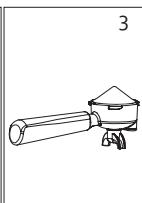
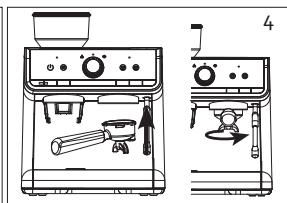
- Put the portafilter under the brew head. Hold the handle so that it correctly aligns with the 'insert' indicator on the unit and sits properly in the groove. Turn it slowly to the right so that the portafilter handle is diagonal with respect to the unit.
- Place 1 or 2 cups on the drip tray.
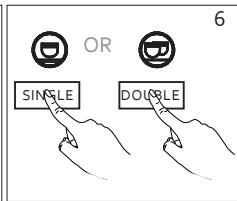
- Press the single button if you used a small filter. Press the double button if you used a large filter, which will give you a double espresso or 2 cups of espresso. The indicator lamp for the selected coffee will light up.
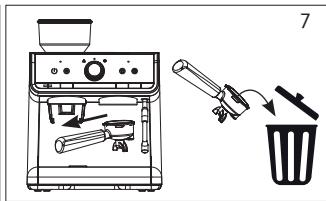
- When the preparation is ready, the unit will go back to standby mode. All indicator lamps will light up again. Remove the portafilter from the unit and coffee grounds from the portafilter. Regularly empty the drip tray. If the tray is full, you will see a red float in the grille.

Empty water reservoir
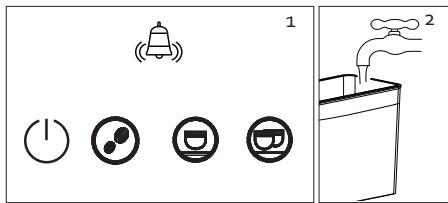
- If the water reservoir is empty, you will hear an alert that the reservoir must be refilled. You hear an alert and the 4 indicator lamps will light up (on-off, grind, single, and double). Turn off the unit.
- Fill the water reservoir with the desired amount of water. Make sure it the level is within the 'MIN' and 'MAX' indicators on the reservoir. The reservoir is removable. Open the lid and take the reservoir out of the unit. Turn the unit back on.
SETTINGS
There are different ways to set the unit to your likings. We recommend that you first try the unit with the factory settings. If these are not to your liking, use the instructions in the instruction manual to personalise the unit to your liking and align it to the coffee beans you want to use. Besides the settings, the type and quality of the coffee beans influence the taste and intensity of your espresso.
Adjusting coarseness
There are number markings on the bean reservoir that indicate the coarseness of the ground coffee. There are 30 settings. You have to adjust the coarseness and rotate the reservoir while the device is grinding. If you rotate it while the unit is in standby mode, a bean might get into the grinder and stop it.
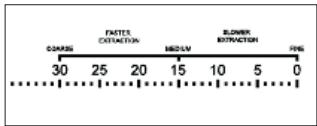
First, try the coarseness at position 15 and taste the coffee. You can then adjust the coarseness based on this taste. A grinding coarseness that is too fine gives the coffee a bitter taste. If it is too coarse, the coffee will be weak and watery.
Rotate the reservoir clockwise for finely ground coffee. The finest grind is indicated by o. Rotate the reservoir anticlockwise for coarsely ground coffee. The coarsest grind is indicated by 30.
Setting grinder volume
You can set the amount of ground coffee for the grind button to your personal preference. The standard setting is 7 seconds. The amount of ground coffee you make depends on the type of bean and the coarseness setting.
Press and hold the grind button. Grinding will start. Release the button when you have achieved the desired amount of ground coffee. The new amount of ground coffee for the grind button is now set.
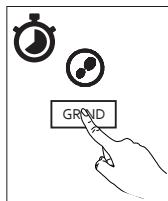
Note: the minimum grind time is 5 seconds. If you grind for less than 5 seconds, the unit will not record that as the new amount. The standard factory setting will be retained.
Setting coffee volume
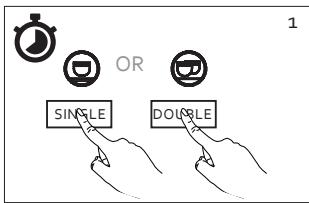
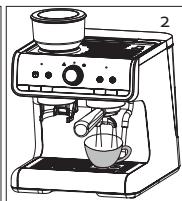
You can adjust the amount for the single and double buttons to between 20 ml and 250 ml.
- Press and hold the button that you want to set the volume (single or double).
- The preparation starts and the indicator lamp for the selected button will light up.
- When you obtain the desired amount, release the button. The preparation stops and you will hear an alert, which indicates that the amount is set as the new volume for the button.
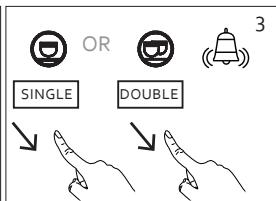
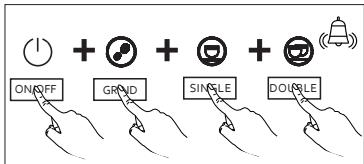
Restore factory settings
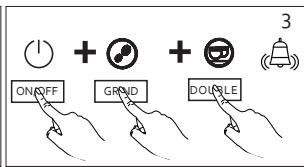
If you want to restore all factory settings, press all four buttons — on-off, grind, single, double — at the same time.
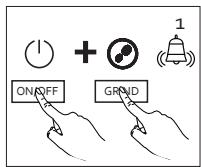
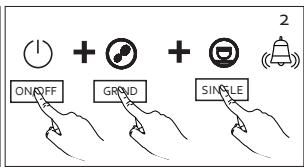
You can also reset each button back to its factory setting.
- Grind: as default the grinder works for 7 seconds. If you want
to restore this factory setting, press the 2 buttons — on-off, grind — at the same time. Keep pressing the buttons until you hear an alert.
- Single: the single button default is for a volume of 30 - 45ml . If you want to restore this factory setting, press the 3 buttons — on-off, grind, single — at the same time. Keep pressing the buttons until you hear an alert.
- Double: the double button default is for a volume of 60-75 ml. If you want to restore this factory setting, press the 3 buttons — on-off, grind, double — at the same time. Keep pressing the buttons until you hear an alert.
Tips for a perfect espresso
- Read the instruction on the coffee bean packaging. It often provides recommendations. Save your coffee beans in a closed container in a cool place, e.g. your fridge. Do not overfill the bean reservoir. Coffee beans exposed to air lose their taste within a few days. With ground coffee, this can even occur within a few hours.
To achieve the optimal coffee temperature, we recommend that you heat up the unit and the cup. Use the same method as for preparing coffee, but do not add ground coffee to the filter of the portafilter. Keep your cups above the unit, which acts as a cup warmer.
Grind 7-9 grams of coffee for a perfect espresso. You can adjust the grinding time. How long the unit takes to provide 7-9 grams of ground coffee depends on the coarseness setting and type of coffee bean.
Always make sure that the ground coffee is evenly spread out in the filter. This improves the permeation effect. Water by its nature flows along the easiest path with least resistance (i.e. the least coffee). Now press with the tamper with a force of 20 kg. You can practice with a scale to estimate how much pressure you need with the tamper. Remove any excess coffee from the edge to prevent loose ground coffee dropping into your cup.
The perfect espresso is 35 ml and takes 25-30 seconds to complete. If it takes more or less time to finish, adjust the coarseness of the ground coffee. If it takes less time, your grind is probably too coarse and the coffee will taste weak. If it takes more time, your grind is too fine and the coffee will taste too bitter.
Finally, check the colour of the cream. Ideally, it should be a light brown colour and evenly distributed.
Does the coffee taste too bitter or too acid?
The grinding coarseness is too fine.
You use too much ground coffee in proportion to the amount of water.
You tamped the coffee with too much force.
Does the coffee taste too weak or watery?
The grinding coarseness is too coarse.
You use too little ground coffee in proportion to the amount of water.
You did not tamp the coffee hard enough.
STEAM NOZZLE
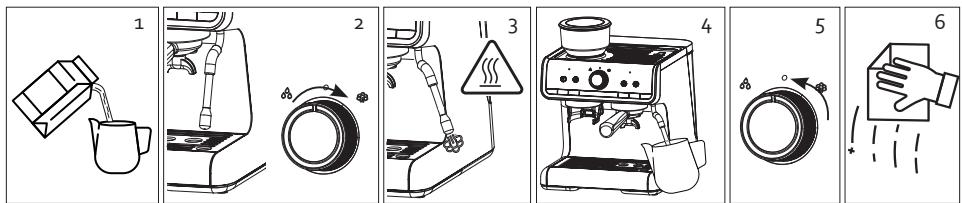
You use the steam nozzle to froth milk to achieve the perfect cappuccino or latte.
- Fill the milk jug with cold, whole milk. Be careful not to overfill the milk jug. Frothing the milk will increase its volume.
- Place a collection beaker under the steam nozzle or turn it toward the drip tray. In standby mode, turn the rotary knob to the steam indicator lamp. The indicator lamp blinks as the steam heats up. As it heats up, some hot water will drip from the steam nozzle.
- When the steam indicator lamp blinks, the unit has heated up and steam will come out of the steam nozzle.
Note: the steam emitted by the steam nozzle is very, very hot, so keep your hands away from the unit while it is in operation.
4. Bring the milk jug up to the steam wand and insert the steam nozzle a few millimetres into the milk. As the milk expands in volume, keep lowering the jug slightly until the steam nozzle tip is just below the surface of the milk. If you insert the steam nozzle too deeply into the milk, it heats the milk but does not froth air into the milk and no foam will form.
Note: do not use the steam feature for more than 5 minutes at a time.
5. When you obtain the desired amount of foam, turn the rotary knob to the middle position.
6. Clean the steam nozzle after every use.
Note: the steam nozzle may still be really hot.
The unit must cool down after using the steam feature. While cooling, the indicator lamp on the right will blink. Some vapour will drip onto the drip tray, which is normal.
HOT WATER FEATURE
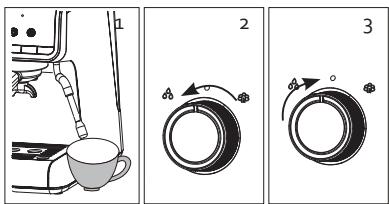
- Place a cup under the steam nozzle.
- In standby mode, turn the rotary knob to the hot water feature indicator lamp. Hot water will be emitted from the steam nozzle and the indicator lamp blinks.
- Turn the rotary knob back to the middle position to finish.
Note: the maximum amount of hot water you can produce with this feature is 180-220 ml.
CLEANING AND MAINTENANCE
Note: Before cleaning the unit, pull the plug out of the power socket and let the unit cool down. To avoid the risk of electric shock, never immerse the cord, plug, or unit in water or other liquids.
- Clean all removable parts (filters, portafilter, tamper, milk jug, drip tray, and grille) with clean warm water after use. Never use aggressive or abrasive cleaning agents. Dry off the parts before putting them back.
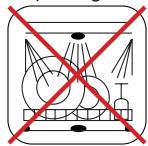
Note: these parts are not dishwasher safe.
- Wipe the unit housing clean with a soft, damp cloth to remove stains.
- Flush the unit regularly by brewing without putting ground coffee in the filter.
- Flush out the steam nozzle regularly by using the hot water feature. You can clear the opening of the nozzle with the large needle of the cleaning pin.
If filter holes are clogged, you can clear them with the small needle of the cleaning pin.
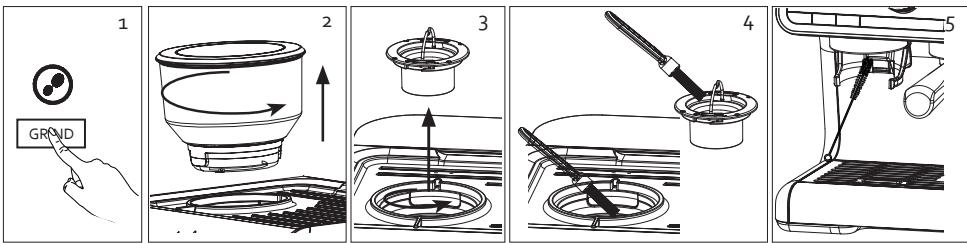
Cleaning the grinder
We recommend you clean the grinder every two weeks. Clean it earlier if you notice that the grinder produces less ground coffee. If you set the coarseness to a fine grind setting, you may need to clean the grinder more often.
- Make sure the bean reservoir is empty before cleaning the grinder. Press the grind button until the remaining coffee beans are ground and the reservoir and grinder are empty.
- Remove the bean reservoir. Rotate the reservoir anticlockwise until the number markings are at the back. The reservoir clicks loose and you can lift it out of the unit.
- Remove the grinder. Hold the grinder by the iron handle and loosen it anticlockwise. Lift the grinder out of the unit.
- Using the cleaning brush to clean both parts of the grinder, both the part that you just removed and the part that is integrated into the unit. You can find the brush in the accessory storage space behind the drip tray.
Note: do not clean the grinder with water.
- Regularly clean the shaft of the grinder outlet using the brush supplied to avoid or remove build-up.
- Return everything to its original position.
DESCALING
When?
Descale the unit regularly, on average every 4 to 6 months. Regularly descending ensures the quality of your coffee will be consistent, lowers energy consumption, and extends the espresso machine's working life. After producing 15 litres, the indicator lamp will blink on the left to indicate that the unit needs descaling.
How?
You can use descaling product for coffee machines or water and vinegar.
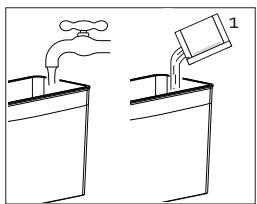
- Fill the water reservoir with 1 litre of warm water in combination with 1 descaling tablet for coffee machines, 120 ml liquid descaler for coffee machines, or 1.5 tablespoons of vinegar.
- Place the portafilter with filter without ground coffee in the unit.
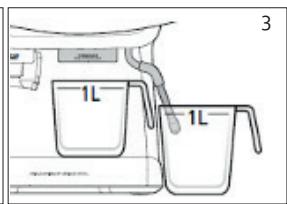
- Place a 1-litre collection beaker under the brew head and a second 1-litre collection beaker under the steam nozzle.
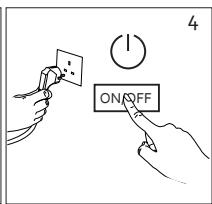
- Insert the plug in the power socket, turn on the unit, and let it heat up.
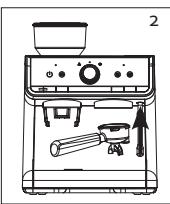
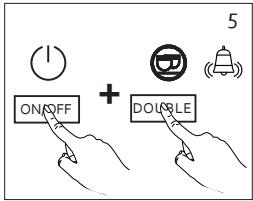
- Press and hold the on-off and double buttons at the same time. The indicator lamp on the right will blink.
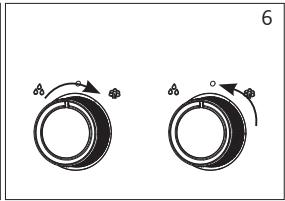
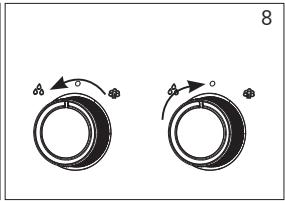
- Step 1: Turn the rotary knob clockwise, the steam indicator lamp will light up. The pump starts and hot water is emitted from the brew head and steam nozzle. If no more water is emitted from the unit and it beeps, Step 1 is finished. The steam indicator lamp is no longer lit and the middle position indicator lamp blinks. Turn the rotary knob back to the middle position.
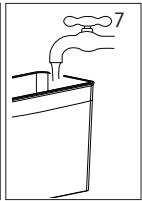
- Step 2: The unit must now be flushed with clean water to ensure no lime residue remains. Rinse the water reservoir and fill it with clean water. Empty both collection beakers.
Note: do not wait too long to carry out the following step. If you wait longer than 5 minutes, the unit will switch off the descending procedure.
- Step 3: flush out the unit. Turn the rotary knob anticlockwise. The hot water indicator lamp blinks. The pump starts and hot water is emitted from the brew head and steam nozzle. If no more water is emitted from the unit, the unit has finished draining. The hot water feature indicator lamp is no longer lit and the middle position indicator lamp blinks. Turn the rotary knob back to the middle position. You hear an alert indicating the descaling procedure is finished.
ENVIRONMENTAL GUIDELINES
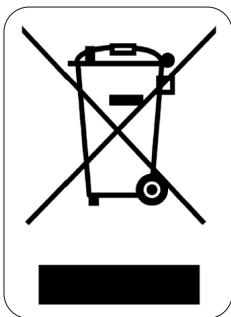
This symbol on the product or on its packaging indicates that this product may not be treated as household waste. Instead it must be brought to the applicable collection point for recycling of electrical and electronic equipment. By ensuring this product is disposed of correctly, you will help prevent potential negative consequences for the environment and human health, which could otherwise be caused by inappropriate waste handling of this product. For more detailed information about recycling of this product, please contact your local city office, your household waste disposal service or the shop where you purchased the product.

The packaging is recyclable. Please treat the packaging ecologically.
GARANTIA


- SAFETY INSTRUCTIONS
- PARTS
- CONTROL PANEL
- BEFORE THE FIRST USE
- USE
- GRINDER
- Placement
- Usage
- COFFEE
- Empty water reservoir
- SETTINGS
- Adjusting coarseness
- Setting grinder volume
- Setting coffee volume
- Restore factory settings
- Tips for a perfect espresso
- STEAM NOZZLE
- HOT WATER FEATURE
- CLEANING AND MAINTENANCE
- Cleaning the grinder
- DESCALING
- When?
- How?
- ENVIRONMENTAL GUIDELINES
- GARANTIA
Brand : DOMO
Model : DO720K
Category : Coffee machine