
TM-P60II - Portable thermal printer EPSON - Free user manual and instructions
Find the device manual for free TM-P60II EPSON in PDF.
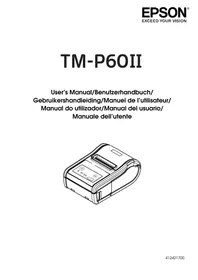



| Product Type | Portable thermal printer |
| Brand | Epson |
| Model | TM-P60II |
| Dimensions (L x D x H) | 103 x 159 x 65 mm |
| Weight | Approximately 629 g (including battery and belt clip) |
| Power supply | Lithium-ion battery OT-BY60II (7.4 V / 2000 mAh) or EPSON PS-11 AC adapter (12 V / 1.0 A or 24 V / 1.5 A) |
| Battery life / capacity | Lithium-ion battery 7.4 V / 2000 mAh |
| Print resolution | 203 dpi x 203 dpi |
| Print width | 54 mm (60 mm paper) or 52.5 mm (58 mm paper) |
| Print speed | Approximately 100 mm/s |
| Interface | USB 2.0 (Full-speed) and wireless (Bluetooth / IEEE802.11a/b/g/n) |
| Print method | Thermal line, unidirectional with friction drive |
| Paper type | Thermal paper roll (width 57.5 ± 0.5 mm or 59.5 ± 0.5 mm without spacer, thickness 50–80 μm) |
| Main functions | Mobile printing, wireless connection, rechargeable battery, belt clip, paper end detection, error beep |
| Maintenance and cleaning | Clean the thermal print head with a cotton swab soaked in alcohol (ethanol or isopropanol) every 3 months |
| Safety | Avoid moisture and dust, do not disassemble, use only specified batteries, caution hot print head |
| Spare parts and repairability | Battery OT-BY60II, AC adapter PS-11, battery charger OT-CH30II, belt clip |
| General information | Brand: Epson, Model: TM-P60II, Category: Portable thermal printer |
Frequently Asked Questions - TM-P60II EPSON
User questions about TM-P60II EPSON
0 question about this device. Answer the ones you know or ask your own.
Ask a new question about this device
Download the instructions for your Portable thermal printer in PDF format for free! Find your manual TM-P60II - EPSON and take your electronic device back in hand. On this page are published all the documents necessary for the use of your device. TM-P60II by EPSON.
USER MANUAL TM-P60II EPSON
A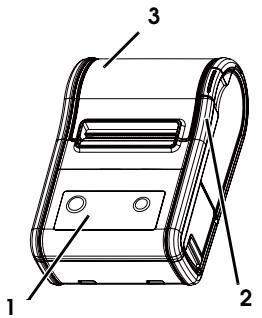
4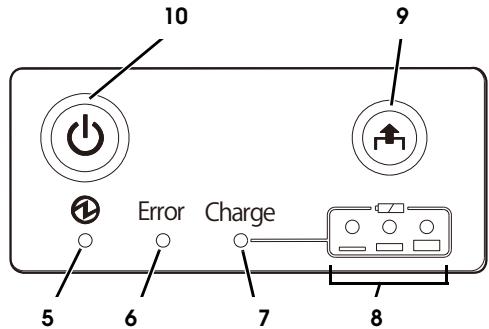
B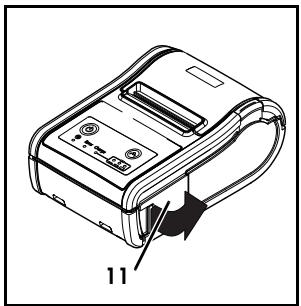
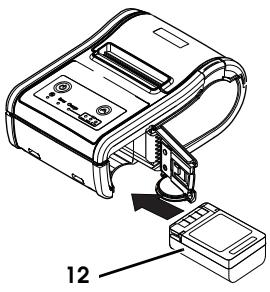
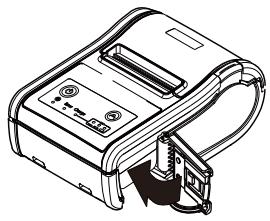
C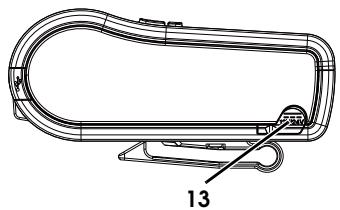
D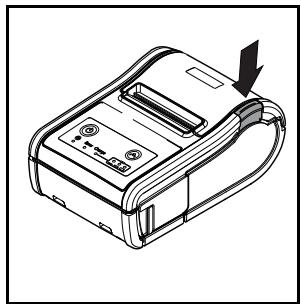
E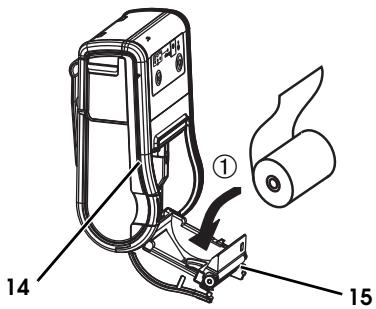
F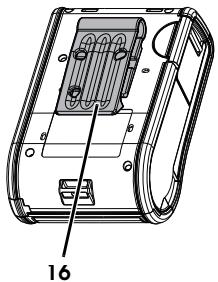
G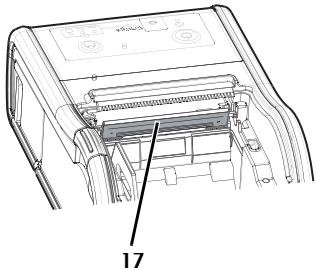
Standards and Approvals
The following standards are applied only to the printers that are so labeled. (EMC is tested using EPSON power supplies.)
| Europe: | CE Marking |
| Directive: | 1999/5/EC |
| EN300328 | |
| EN301489-1 | |
| EN301489-17 | |
| EN60950-1 | |
| EN62311 |
North America: FCC/ICES-003 Class A
We, Seiko Epson Corporation, hereby declare that the equipment Models, M292A and M292B, are in compliance with the essential requirements and other relevant provisions of Directive 1999/5/EC.
WARNING
The connection of a non-shielded printer interface cable to this printer will invalidate the EMC standards of this device.
You are cautioned that changes or modifications not expressly approved by Seiko Epson Corporation could void your authority to operate the equipment.
For Canadian Users
This Class A digital apparatus complies with Canadian ICES-003.
FCC Compliance Statement For American Users
This equipment has been tested and found to comply with the limits for a Class A digital device, pursuant to Part 15 of the FCC Rules. These limits are designed to provide reasonable protection against harmful interference when the equipment is operated in a commercial environment.
This equipment generates, uses, and can radiate radio frequency energy and, if not installed and used in accordance with the instruction manual, may cause harmful interference to radio communications.
Operation of this equipment in a residential area is likely to cause harmful interference, in which case the user will be required to correct the interference at his own expense.
Indication of the manufacturer and the importer in accordance with requirements of directive 2011/65/EU (RoHS)
Manufacturer: SEIKO EPSON CORPORATION
Address: 3-5, Owa 3-chome, Suwa-shi, Nagano-ken 392-8502, Japan
Telephone: 81-266-52-3131 Fax: 81-266-52-8409
Importer: EPSON EUROPE B.V.
Address: Azië building, Atlas ArenA, Hoogoorddreef 5, 1101 BA Amsterdam Zuidoost, The Netherlands Telephone: 31-20-314-5000
English
Illustrations
All of the illustrations are at the beginning of this manual. They are identified by letters (A, B, C . . ). Some of the illustrations have numbers in them. See the list below for the meaning of the numbers. The text has references to the letters and the numbers. For example: "See Illustration A" or "See A 6." ("A 6" means number 6 on Illustration A.)
Illustration A:
- Control panel
- Open button
- Roll paper cover
- Control panel 5 Power LED
- Error LED
- Charge LED
- Battery LED
- Feed button
10 Power button
Illustration B
- Battery cover
- Battery
Illustration C
- Connector for the AC adapter
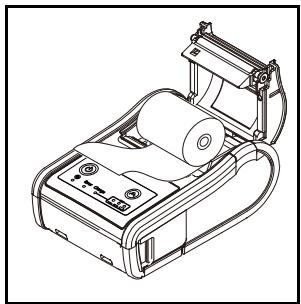
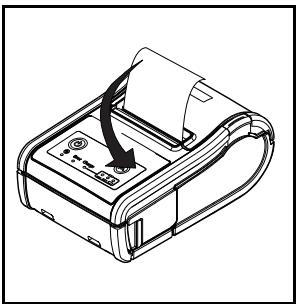
Illustration D
Illustration E
- Open button
- Roll paper cover
Illustration F
- Belt clip
Illustration G
- Thermal head
Cautions
All rights reserved. No part of this publication may be reproduced, stored in a retrieval system, or transmitted in any form or by any means, electronic, mechanical, photocopying, recording, or otherwise, without the prior written permission of Seiko Epson Corporation. No patent liability is assumed with respect to the use of the information contained herein. While every precaution has been taken in the preparation of this book, Seiko Epson Corporation assumes no responsibility for errors or omissions.
Neither is any liability assumed for damages resulting from the use of the information contained herein. Neither Seiko Epson Corporation nor its affiliates shall be liable to the purchaser of this product or third parties for damages, losses, costs, or expenses incurred by purchaser or third parties as a result of: accident, misuse, or abuse of this product or unauthorized modifications, repairs, or alterations to this product, or (excluding the U.S.) failure to strictly comply with Seiko Epson Corporation's operating and maintenance instructions.
Seiko Epson Corporation shall not be liable against any damages or problems arising from the use of any options or any consumable products other than those designated as Original EPSON Products or EPSON Approved Products by Seiko Epson Corporation.
Depending on the area, the interface cable may be included with the product. If so, use that cable. Seiko Epson Corporation shall not be held liable for any damage resulting from electromagnetic interference that occurs from the use of any interface cables other than those designated as Epson approved products by Seiko Epson Corporation.
EPSON is a registered trademark of Seiko Epson Corporation in Japan and other countries/regions.
NOTICE: The contents of this manual are subject to change without notice.
Copyright © 2012 by Seiko Epson Corporation, Nagano, Japan.
Important Safety Information
This section presents important information intended to ensure safe and effective use of this product. Read this section carefully and store it in an accessible location.
Key to Symbols
The symbols in this manual are identified by their level of importance, as defined below. Read the following carefully before handling the product.
DANGER:
Dangers must be observed carefully to avoid serious injury or death.
WARNING:
Warnings must be observed carefully to avoid serious bodily injury.
CAUTION:
Cautions must be observed to avoid minor injury to yourself, damage to your equipment, or loss of data.
Note:
Notes have important information and useful tips on the operation of your product.
Safety Precautions
! WARNINGS:
Shut down your equipment immediately if it produces smoke, a strange odor, or unusual noise. Continued use may lead to fire. Immediately unplug the equipment and contact your dealer or a Seiko Epson service center for advice.
Never attempt to repair this product yourself. Improper repair work can be dangerous.
Never disassemble or modify this product. Tampering with this product may result in injury or fire.
Be sure to use the specified power source, EPSON PS-11 (Model: M235A).
Connection to an improper power source may cause fire.
Do not allow foreign matter to fall into the equipment. Penetration by foreign objects may lead to fire.
If water or other liquid spills into this equipment, do not continue to use it. Continued use may lead to fire. Unplug the equipment immediately and contact your dealer or a Seiko Epson service center for advice.
CAUTIONS:
Do not connect cables in ways other than those mentioned in this manual. Different connections may cause equipment damage and burning.
When connecting a serial cable, do not stress the connector part. Doing so may damage that part.
Be careful not to drop this product. The product may break or cause injury if it is dropped.
Do not use in locations subject to high humidity or dust levels. Excessive humidity and dust may cause equipment damage or fire.
Do not place heavy objects on top of this product. Never stand or lean on this product. Equipment may fall or collapse, causing breakage and possible injury.
To ensure safety, unplug this product before leaving it unused for an extended period.
Before moving the product, unplug it and unplug all cables connected to it.
Take care not to injure your fingers on the manual cutter
- When you remove printed paper
- When you perform other operations such as loading/replacing roll paper Do not use aerosol sprayers containing flammable gas inside or around this product. Doing so may cause fire.
Safety Precautions for Rechargeable Battery Pack
! DANGERS:
If any liquid from the battery gets into your eyes, promptly wash it out with clean water for more than 10 minutes and consult your doctor at once. If you do not, the liquid may cause loss of eyesight.
Never disassemble or modify the battery pack. This may cause fire, explosion, leakage, overheating or damage.
Do not expose the battery to fire or heat it. This may cause fire, explosion, leakage, overheating or damage.
! WARNINGS:
Keep the battery pack away from fire or flame if it produces a strange odor or leakage.
Otherwise fire or explosion may occur.
Should any battery liquid get on skin or clothing, promptly wash it off with clean water. If you do not, the liquid may damage your skin.
Do not expose the battery to water. Do not allow water to contact the terminals. This may cause fire, overheating, or electric shock.
Safety Label
The caution label on the product indicates the following precaution.

CAUTION:
During printing or after printing, the thermal head can be very hot.
Restriction of Use
When this product is used for applications requiring high reliability/safety, such as transportation devices related to aviation, rail, marine, automotive, etc.; disaster prevention devices; various safety devices, etc.; or functional/precision devices, etc.; you should use this product only after giving consideration to including fail-safes and redundancies into your design to maintain safety and total system reliability. Because this product was not intended for use in applications requiring extremely high reliability/safety, such as aerospace equipment, main communication equipment, nuclear power control equipment, or medical equipment related to direct medical care, etc., please make your own judgment on this product's suitability after a full evaluation.
Notes on Use
☐ The printer does not operate with only the AC adapter. Always install the enclosed battery OT-BY60II in the printer even when using the AC adapter. ☐ Be sure to use the power switch to turn the printer on and off. ☐ To communicate with a computer via a USB cable, connect the cable before turning on the printer. ☐ To use the USB cable, it is recommended to secure it to avoid stress on it. ☐ Be sure not to open the roll paper cover when the printer is operating. ☐ Protect the printer from impact. ☐ Do not apply excessive force to the printer case. ☐ Do not place food or beverages such as coffee on the case of the printer. ☐ For Bluetooth interface models, when the wireless connection is ended while the printer is offline, reconnection may not be possible. In such case, remove the cause of offline and reconnect it. ☐ For Bluetooth interface models, if you establish a radio connection between the host computer and the printer each time you start printing instead of maintaining the connection, it may take a while between the time you send a print job and the time that the printer actually starts printing. This happens because connecting the host computer and the printer requires some time. The time required for connection depends on the operating environment.
For American Users
WARNING:
The cords included with this product contain chemicals, including lead, known to the State of California to cause birth defects or other reproductive harm. Wash hands after handling. (This notice is provided in accordance with Proposition 65 in Cal. Health & Safety Code §25249.5 and following.)
Notes on Power Supply
Battery Pack
Before using the printer for the first time, charge the battery OT-BY60II. To install and charge the battery, see "Installing and Charging Battery."
Read also the safety precautions for the rechargeable battery described previously in this manual.
WARNING:
Be sure to use the battery OT-BY60II. Using a battery other than the one specified may cause fire, explosion, leakage, overheating or other damage.
CAUTION:
Dispose of used batteries according to the instructions.
External Power Supply
This product uses a listed power unit marked "Class 2" or "LPS," with the output voltage of either maximum 1.0 A at DC12 V, or maximum 1.5 A at DC 24V.
With the optional AC adapter EPSON PS-11 [Model: M235A], the output voltage is maximum 1.5 A at DC 24V, and the input voltage is AC 100V to 240 V.
Recycling the Batteries
Contains a lithium-ion battery. Must be recycled or disposed of properly.
Note:
Do not disassemble the battery pack.

For European Users
About the crossed out wheeled bin label
The crossed out wheeled bin label that can be found on your product indicates that this product and incorporated batteries should not be disposed of via the normal household waste stream. To prevent possible harm to the environment or human health, please separate this product and its batteries from other waste streams to ensure that it can be
recycled in an environmentally sound manner. For more details on available collection facilities, please contact your local government office or the retailer where you purchased this product. Use of the chemical symbols Pb, Cd or Hg indicates if these metals are used in the battery.

For American Users
The lithium-ion battery is recyclable. At the end of its useful life, under various state and local laws, it is illegal to dispose of this battery into your municipal waste stream. Please call 1-800-8-BATTERY for information on how to recycle this battery.
Unpacking
The following items are included for the standard specification printer. If any item is damaged, contact your dealer.
Printer □ Roll paper Battery pack (OT-BY60II) and its User's Manual USB cable □ User's Manual (this manual)
Downloading Drivers, Utilities, and Manuals
Further product information is written in the TM-P60II Technical Reference Guide.
The latest versions of drivers, utilities, and manuals can be downloaded from one of the following URLs.
For customers in North America, go to the following web site:
http://www.epsonexpert.com/ and follow the on-screen instructions.
For customers in other countries, go to the following web site:
http://download.epson-biz.com/?service=pos
Part Names
See Illustrations A.
Control Panel
The control panel (A 4) has the power LED, Error LED, Charge LED, Battery LED, Feed button, and Power button. See A 5 through A 10.
Control Panel (LEDs and Buttons)
Power LED (Green)
| Power LED | Meanings |
| On | Power is on. |
| Off | Power is off. |
| Flashing | The printer is powering-off. |
Error LED (Orange)
| Printer Condition | Error LED | Meanings |
| Power On | On | Printer is offline (paper out, power-on initialization, roll paper cover open, the remaining battery charge is at S level). |
| Off | Printer is in normal operation, is running a self-test, or feeding paper using the Feed button. | |
| Flashing | The thermal head is too high in temperature, roll paper cover was opened during printing, autocutter malfunction, abnormality in a memory R/W check, power supply voltage is extremely high/low, the CPU has executed an incorrect address, or abnormality in internal circuit connection. |
Charge LED (Orange)
| Printer Condition | Charge LED | Meanings |
| Power On and battery installed | On | The battery is being charged. |
| Off | The battery is fully charged. | |
| Flashing | There is abnormality in battery charging. |
Battery LED (White)
| Printer Condition | Battery LED | Error LED | Battery charge status | Meanings |
| Power On | 3 LEDs On | Off | Level H | |
| 2 LEDs On | Off | Level M | ||
| 1 LED On | Off | Level L | You can continue printing, but replacement or charge of the battery is recommended. | |
| 1 LED flashing | Off | Level S * | Replace or charge the battery. (Printing may stop in the middle.) | |
| On | Replace or charge the battery. (The printer is unable to print.) | |||
| Power on and buzzer sounds. | 3 LEDs Off | On | Level E | Replace or charge the battery. |
*You can select whether to continue printing or to stop printing when only 1 LED flashes.
① (Power) button
Press this button to turn the power on or off. To turn the power off, hold the button for more than 2 seconds.
Feed button
Press this button to feed paper.
Installing and Charging Battery
Follow the steps below to install and charge the battery.
Note:
The battery can be charged only when the temperature is 0 \~ 40°C {32 \~ 104°F}.
- Make sure that the printer is turned off.
- Slide the battery cover (B 11) to open it.
- Install the battery (B 12), and close the battery cover.
- Connect the AC adapter to the printer. See illustration C for the connector. Recharging starts.
Notes:
Recharging will take approximately 3 hours with the AC adapter or with the optional battery charger OT-CH60II. For detailed information on the battery charger, see its user's manual. The time described above is the time required to charge a battery pack that is fully discharged.
Recharging the battery at 35° C 95° F} or higher activates the internal temperature control of the printer, which may require a longer charging time than the specified one. The Charge LED flashes while charging the battery.
Installing or Replacing Roll Paper
Follow the steps below and see illustration D to install or replace the roll paper.
CAUTION:
Be sure to use roll paper that meets the specifications.
Note:
Do not use roll paper that has the paper glued to the core.
- Press the open button to open the roll paper cover.
- Remove the used roll paper core if there is one, and insert the new roll paper. Note: Note the direction the paper comes off the roll.
- Pull out some paper, close the cover, and tear off the paper with the manual cutter.
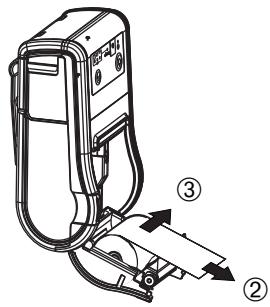
Installing or Replacing Roll Paper Vertically
You can hang the printer vertically on a belt using a clip on the back of the printer. When you use the printer vertically, follow the steps below to install the roll paper.
Note:
Be sure that the roll paper end is on the bottom when you use the printer vertically.
- Press the open button (E 14) to open the roll paper cover (E 15).
- Remove the used roll paper core if there is one.
- Set the new roll paper on the inside of the roll paper cover. See ① in illustration E. Note: Note the direction the paper comes off the roll.
- Pull the leading edge of the roll paper. See ② in illustration E.
- Align the left edge of the roll paper with the edge of the cover. See ③ in illustration E.
- Close the roll paper cover and tear off the paper with the manual cutter.
Changing the Paper Width
You can change the paper width from 58 mm to 60 mm by removing the spacer installed in the roll paper holder and changing the setting for the paper width. For detailed information on changing the paper width, see the TM-P60II Technical Reference Guide.
Belt Clip
You can hang the printer on your belt using the belt clip (F 16) attached to the back of the printer.
Buzzer
The factory default is set to On (buzzer sounds) to indicate the following:
☐ Remaining battery charge is not adequate
☐ Roll paper end
Error
Troubleshooting
No lights on the control panel
Check that the battery is installed.
ERROR LED is flashing or on
☐ The printer temperature may be too high. The printer resumes printing automatically when the temperature returns to normal. ☐ Make sure that the roll paper cover is properly closed. ☐ Make sure that roll paper is installed. ☐ When the printer power is on, if the Error LED and the Charge LED are on, the remaining battery charge is not enough for printer operation. The battery must be fully charged. ☐ When the battery is being charged, if the Error LED is on, an abnormality has
occurred. The battery must be replaced with a new one.
☐ Turn off the power, wait several seconds, and then turn it on again. If the error remains, contact a qualified service person.
Cleaning the Thermal Head
CAUTION:
After printing, the thermal head can be very hot. Be careful not to touch it and to let it cool before you clean it. Do not damage the thermal head by touching it with your fingers or any hard object.
Turn off the printer, open the paper roll cover, and clean the thermal elements of the thermal head (G 17) with a cotton swab moistened with an alcohol solvent (ethanol or IPA).
Epson recommends cleaning the thermal head periodically (generally every 3 months) to maintain print quality.
Note: For the battery specifications, see its User's Manual. TM-P60II Specifications
| Print method | Thermal line printing | |
| Print density | 203 dpi × 203 dpi (dpi: dots per 25.4 mm (dots per inch)) | |
| Printing direction | Unidirectional with friction feed | |
| Printing width (default) | (60-mm paper width) 54 mm {2.13}", 432 dot positions (58-mm paper width) 52.5 mm {2.07}", 420 dot positions | |
| Print font | Fonts | Font A: 12 × 24, Font B (default): 10 × 24, Font C: 8 × 16 |
| Characters per line | (60-mm paper width) Font A: 36, Font B: 43, Font C: 54 (58-mm paper width) Font A: 35, Font B: 42, Font C: 52 | |
| Character size (W×H) | Font A: 1.50 × 3.0, Font B: 1.25 × 3.0, Font C: 1.0 × 2.0 | |
| Character set | 95 Alphanumeric, 12 International, 128 × 11 Graphic | |
| Paper | Roll paper width (default) | 57.5 ± 0.5 mm {2.26 ± 0.02"} (59.5 ± 0.5 mm {2.34 ± 0.02"} by removing the spacer installed) |
| Paper thickness | 50 μm ~ 80 μm | |
| Roll paper core external diameter | (Roll paper) 18 mm {0.71"} minimum (Continuous label paper) 31.4 mm {1.24"} minimum | |
| Specified thermal paper | Original: Nippon Paper: TF50KS-E (paper width: 58 mm) Kanzaki Specialty Paper: P350 (paper thickness: 62 μm), P310 (paper thickness: 58 μm), P300 (paper thickness: 56 μm) | |
| Max. Print speed | Approximately 100 mm/s {3.94"/s} (when printing with a fully charged battery at 25°C {77°F}) | |
| Paper feed speed | 100 mm/s {3.94"/s} (continuous paper feed with the Feed button.) | |
| Line spacing (default) | 3.75 mm {0.148"} | |
| Interface | USB (Compliance: USB 2.0, communication speed: Full-speed (12 Mbps), Wireless (Bluetooth®/ IEEE802.11a/b/g/n) | |
| Receive buffer | 4,096 bytes | |
| Power consumption | Specified battery | Lithium-ion battery: Product name: OT-BY60II, Trade name: Seiko Epson CorporationOutput: DC 7.4 V, Capacity: 2000 mAh |
| Supply voltage | Output voltage: Either max. 1.0 A at DC12 V, or max. 1.5 A at DC 24V(When using the optional AC adapter EPSON PS-11 (Model: M235A)) Output voltage: Max. 1.5 A at DC 24V, Input voltage: AC 100V to 240 V | |
| Temperature /humidity | Operation | 0 ~ 40°C {32 ~ 104°F}, 10 ~ 90% RH |
| Storage | High temperature and humidity: 45°C {113°F}, 90%RH Abnormal operations not found when the printer is left under the environment of 25°C {77°F}, 60% RH for 2 hours after it was left in the following conditions:High temperature: 70°C {158°F} for 120 hoursLow temperature: -25°C {-13°F} for 120 hours | |
| Overall dimensions | 103 × 159 × 65 mm {4.1 × 6.3 × 2.6"} (W × D × H) | |
| Weight (Mass) | Approx. 629 g {1.38 lb}(including battery and belt clip, excluding roll paper) | |
Open Source Software License
- This product includes open source software programs listed in Section 4) according to the license terms of each open source software program.
- We provide the source code of the GPL Programs and LGPL Programs (each is defined in Section 4) to you on a CD-ROM for a charge covering the cost of performing such distribution, such as the cost of media, shipping and handling until five (5) years after the discontinuation of same model of this product. If you desire to receive the source code above, please contact the customer support for your region.
- The open source software programs are WITHOUT ANY WARRANTY; without even the implied warranty of MERCHANTABILITY AND FITNESS FOR A PARTICULAR PURPOSE. See the license agreements of each open source software program for more details, which are described on "OPEN SOURCE SOFTWARE LICENSE TERMS" in this documentation.
- The list of open source software programs included with this printer product and the whole license agreements of each license can be found in the following URL. http://xxx.xxx.xxx.xxx/licenses/ * For the underlined part in the above URL, input each printer's IP address.
German
Illustrations
Copyright © 2012, Seiko Epson Corporation, Nagano, Japan.
Copyright © 2012, Seiko Epson Corporation, Nagano, Japan.
Copyright © 2012 Seiko Epson Corporation, Nagano, Japan.
Seiko Epson Corporation shall not be liable against any damages or problems arising from the use of any options or any consumable products other than those designated as Original EPSON Products or EPSON Approved Products by Seiko Epson Corporation.
For European users
Copyright © 2012 Seiko Epson Corporation, Nagano, Italy.
For European users
WEEE (Waste Electrical and Electronic Equipment) Directive
This information only applies to customers in the European Union, according to Directive 2002/96/EC OF THE EUROPEAN PARLIAMENT AND OF THE COUNCIL OF 27 January 2003 on waste electrical and electronic equipment (WEEE) and legislation transposing and implementing it into the various national legal systems.
For other countries, please contact your local government to investigate the possibility of recycling your product.

English
The crossed out wheeled bin label that can be found on your product indicates that this product should not be disposed of via the normal household waste stream. To prevent possible harm to the environment or human health please separate this product from other waste streams to ensure that it can be recycled in an environmentally sound manner. For more details on available collection facilities please contact your local government office or the retailer where you purchased this product.
German
- STANDARDS AND APPROVALS
- WARNING
- FOR CANADIAN USERS
- FCC COMPLIANCE STATEMENT FOR AMERICAN USERS
- INDICATION OF THE MANUFACTURER AND THE IMPORTER IN ACCORDANCE WITH REQUIREMENTS OF DIRECTIVE 2011/65/EU (ROHS)
- ENGLISH
- ILLUSTRATIONS
- ILLUSTRATION A
- ILLUSTRATION B
- ILLUSTRATION C
- ILLUSTRATION D
- ILLUSTRATION E
- ILLUSTRATION F
- ILLUSTRATION G
- CAUTIONS
- IMPORTANT SAFETY INFORMATION
- KEY TO SYMBOLS
- DANGER
- CAUTION
- NOTE
- SAFETY PRECAUTIONS
- WARNINGS
- SAFETY PRECAUTIONS FOR RECHARGEABLE BATTERY PACK
- DANGERS
- SAFETY LABEL
- RESTRICTION OF USE
- NOTES ON USE
- FOR AMERICAN USERS
- NOTES ON POWER SUPPLY
- BATTERY PACK
- EXTERNAL POWER SUPPLY
- RECYCLING THE BATTERIES
- FOR EUROPEAN USERS
- ABOUT THE CROSSED OUT WHEELED BIN LABEL
- UNPACKING
- DOWNLOADING DRIVERS, UTILITIES, AND MANUALS
- PART NAMES
- CONTROL PANEL
- CONTROL PANEL (LEDS AND BUTTONS)
- BATTERY LED (WHITE)
- ① (POWER) BUTTON
- FEED BUTTON
- INSTALLING AND CHARGING BATTERY
- NOTES
- INSTALLING OR REPLACING ROLL PAPER
- INSTALLING OR REPLACING ROLL PAPER VERTICALLY
- CHANGING THE PAPER WIDTH
- BELT CLIP
- BUZZER
- TROUBLESHOOTING
- NO LIGHTS ON THE CONTROL PANEL
- ERROR LED IS FLASHING OR ON
- CLEANING THE THERMAL HEAD
- OPEN SOURCE SOFTWARE LICENSE
- GERMAN
- WEEE (WASTE ELECTRICAL AND ELECTRONIC EQUIPMENT) DIRECTIVE
Brand : EPSON
Model : TM-P60II
Category : Portable thermal printer