
EX281N - Microwave ESSENTIELB - Free user manual and instructions
Find the device manual for free EX281N ESSENTIELB in PDF.



| Brand | ESSENTIELB |
| Model | EX281N |
| Product type | Microwave |
| Capacity | 28 liters |
| Dimensions (W × D × H) | 52 × 50.8 × 32.6 cm |
| Net weight | 18 kg |
| Power supply | 230 V ~ 50 Hz |
| Microwave frequency | 2450 MHz |
| Microwave power | 900 W |
| Grill power | 1100 W |
| Convection power | 2500 W |
| Microwave power levels | 5 (P100, P80, P50, P30, P10) |
| Automatic programs | 10 (A1 to A10) |
| Timer | 0 to 95 minutes |
| Display | LED digital |
| Cooking modes | Microwave, grill, convection, combined (grill + microwave) |
| Special functions | Defrost by weight/time, quick cooking, keep warm, deodorization, mute function, child lock |
| Included accessories | Glass tray (⌀ 31.5 cm), metal tripod |
| Installation | Countertop appliance (do not built-in) |
| Safety | Door lock, child lock, automatic shut-off system |
| Care and cleaning | Clean with soft sponge and soapy water, do not use abrasives |
| Repairability | Contact the retailer's after-sales service |
| Warranty | Valid from date of purchase, does not cover damages due to misuse |
Frequently Asked Questions - EX281N ESSENTIELB
User questions about EX281N ESSENTIELB
0 question about this device. Answer the ones you know or ask your own.
Ask a new question about this device
Download the instructions for your Microwave in PDF format for free! Find your manual EX281N - ESSENTIELB and take your electronic device back in hand. On this page are published all the documents necessary for the use of your device. EX281N by ESSENTIELB.
USER MANUAL EX281N ESSENTIELB
To help you get the best out of your purchase
PLEASE READ THESE INSTRUCTIONS CAREFULLY BEFORE USING THE APPLIANCE AND KEEP THEM FOR FUTURE REFERENCE.
WARNING: to avoid any risk of fire, electric shock, or injury when using an electrical appliance, always follow the basic safety precautions indicated below.
Intended Use
- This appliance is intended for domestic use only. Any other (professional) use is prohibited.
- This appliance is not intended for use in domestic and similar applications such as the following:
- staff kitchen areas in stores, offices and other professional environments;
- farms;
- hotels, motels and other accommodation type environments;
- bed and breakfast type environments.
Child Safety
- This appliance may be used by children aged 8 and up, by persons with lack of knowledge or experience, and by persons with reduced physical,
sensory or mental capabilities, on condition that they have received training and are supervised for safe use of the appliance, with sufficient understanding of the risks involved. Children must not play with this appliance. Cleaning and maintenance must not be carried out by children under 8. Children aged 8 and up may carry out these tasks, but only with supervision.
- Keep the appliance and its power cord out of the reach of children under 8 when the appliance is in operation and when it is cooling down after use.
- CAUTION: when the appliance is used in combined mode, children may use the oven only under adult supervision, due to the temperatures generated.
- Accessible parts may become hot during use. Young children must be kept away from the appliance.
Unpacking
- Remove all parts of the packaging.
- Remove all labels and stickers.
- Once you have unpacked your appliance, please check it carefully for any signs of damage.
If there is any damage, do not use it, and contact your dealer immediately.
Installation/electrical connection
- Please follow the instructions and respect the safety distances provided in the “Installation of the appliance” section.
- Do not install the microwave oven in a closed cupboard.
- A minimum of 30~cm of space must be left above the oven for correct operation.
- It is essential that access to the power outlet must not be blocked after installation.
- Keep this appliance indoors and in a dry place. The appliance must not be installed close to water or kitchen sinks, in a damp basement or close to a pool. Do not use the appliance within three feet of a water source with any risk of the appliance falling in or being splashed.
- Before plugging in your appliance, make sure that your home power supply voltage matches the information shown on the rating plate.
- The power outlet used for connection of the appliance must be protected by a ground fault interrupter with an activation threshold no higher than 30 ~mA . Consult your electrician for more information.
-
Only connect your appliance to a grounded socket.
-
If the power cable is damaged, it must be replaced by your dealer, their customer service department or similarly qualified personnel, to prevent any danger.
- If using an extension cable, it must have a built-in earth connection and must be able to handle the power requirements of the appliance. Make all provisions to ensure that nobody can tamper with the appliance.
- This appliance is not intended to be operated by means of an external timer or a separate remote control system.
Repair/cleaning/maintenance
- In the event of any problem, it is essential to contact the customer service department of your dealer, to prevent any danger.
- WARNING: Maintenance or repair operations that involve removal of the mica waveguide cover (resulting in emission of microwaves) can only be carried out by an appropriately skilled person.
-
WARNING: It is dangerous for anyone other than an appropriately skilled person to carry out miscellaneous services or repairs involving removal of the cover that provides protection against exposure to microwave energy.
-
WARNING: Never open the cover!
- The appliance must be cleaned regularly and any food deposits removed.
- Always keep the oven interior, door seal and neighboring parts clean and dry, by cleaning them regularly. Insufficient cleaning could lead to degradation of the product surface condition and could have an adverse effect on the appliance's service life, potentially leading to a dangerous situation.
- Never use abrasive cleaning products, scouring sponges or sharp objects, to avoid damaging the surface coating.
- The appliance must not be steam cleaned.
- Unplug the appliance from the power outlet when you are not using it or when you are cleaning it.
Precautions for use
- Before using the appliance each time, check that it is in good general condition.
- Never leave the appliance unattended when it is plugged in.
- WARNING: Do not use the microwave oven in the following situations:
- the door is not closed properly or is damaged,
- the door hinges are damaged,
seals and sealing surfaces are damaged,
- the oven door glass is damaged,
- frequent electrical sparks are seen inside the microwave oven even though there are no metal objects inside it. In the event of any of the above conditions, ensure that the microwave is repaired by a qualified person before using again.
WARNING: Only use utensils that are suitable for use in a microwave. Only use accessories supplied and recommended by your dealer.
- Never use the microwave if it is dirty, or if there is condensation present on the walls. Wipe it and leave it to dry before using.
- Do not try to use the microwave with the door open. It is essential not to override or make changes to the locking mechanism.
- Never place any object between the front of the oven and the door, do not allow deposits of dirt, food or cleaning products to form on the sealing surfaces.
- Never place the appliance, power cable or plug in water or any other liquid.
- Never put water into the vent openings of the appliance.
- Never pour water into the oven, or any other liquid likely to cause damage, especially to the turntable drive motor.
- Never handle the appliance or the plug with wet hands.
- Never let the power cable hang over the edge of a table or work surface, and never let it come into contact with hot surfaces.
- When unplugging the cable, always grip the plug to disconnect it. Never pull on the power cable itself.
Special precautions
- WARNING: Liquids and other foodstuffs must not be heated in hermetically sealed containers because there is a risk of explosion.
- If cooking potatoes, apples or any other fruit or vegetable that has a skin, be sure to pierce it with a fork before cooking.
- Never cook eggs inside their shells or heat hard-boiled eggs in a microwave oven because they can burst, even after cooking is finished.
- Do not try to fry food in your microwave oven.
-
Do not heat corrosive liquids or chemical products in the microwave.
-
Small portions of food that require only a short cooking time must not be left too long: they will be overcooked or even burnt.
- Remember to stir the food during cooking and always at the end of cooking.
Fire hazard/risk of burns
- Do not cook any food in a napkin or paper towel, even if it is recommended by a recipe.
- Do not use newspaper or paper towels for cooking.
- When cooking food in plastic or paper containers, keep an eye on the oven and be aware of the risk of such materials catching fire.
- The microwave oven is designed to heat up food and drinks. Using the appliance to dry food or laundry or to warm up heating pads, slippers, sponges, wet laundry or other similar items could lead to risk of injury or fire.
- WARNING: If any smoke is emitted, turn off or unplug the microwave and leave the door shut to smother any flames.
-
Never use the microwave oven with nothing inside. This could carry a risk of damaging the appliance, starting a fire, or starting sparks inside it.
-
Do not cover up or block the vent openings of your microwave oven.
- WARNING: The appliance and its accessible parts will get hot during use. Precautions must be taken to avoid contact with the heating elements.
- WARNING: Reheating beverages that have gone cold can cause a sudden delayed spurt of boiling liquid, so precautions must be taken when handling the container.
- WARNING: The contents of bottles and jars of baby food should be stirred or shaken and the temperature should be checked carefully before feeding, to avoid any risk of burns.
- WARNING: Do not allow children to use the appliance without supervision, unless they have been given appropriate instructions to allow them to use it safely and to understand the risks incurred by incorrect use.
- Never leave the appliance unattended when reheating or cooking food in single-use plastic or paper containers, or other inflammable materials.
Radio frequencies
-
Using the microwave oven could cause interference affecting your radio, television or other similar equipment.
-
In order to reduce or eliminate potential interference, take the following measures:
- clean the door and the door seal,
- change the position of the radio or television aerial,
- move the microwave oven in relation to the affected device,
- move the microwave oven further away from the affected device,
- connect the microwave oven to another power outlet so that the oven and the affected device are using different circuits.
Modo de empleo
| Instructions | Affichage | Micro-ondes | Gril | Combi. |
| 1 | C-1 | ● | ● | |
| 2 | C-2 | ● | ● | |
| 3 | C-3 | ● | ● | |
| 4 | C-4 | ● | ● | ● |
You have just purchased an Essentiel b product. Thank you for choosing our brand. We pay particular attention to the RELIABILITY, EASE OF USE and DESIGN of our products.
We hope that this microwave oven will give you complete satisfaction.
contents
instructions
| your product | 73 |
| Package contents | 73 |
| Technical characteristics | 73 |
| description of appliance | 74 |
| General description of oven | 74 |
| Description of display screen | 74 |
| Description of control panel | 75 |
| grounding | 76 |
| unpacking the microwave oven | 76 |
| installation of the appliance | 76 |
| first-time use | 78 |
| guide to utensils | 78 |
| Glass turntable | 78 |
| Using the metal grill | 78 |
| Other utensils (not provided) | 79 |
| using the appliance | 80 |
| Adjusting the clock | 80 |
| Activate the timer | 80 |
| Microwave cooking | 80 |
| Cooking in Grill mode | 81 |
| Cooking by convection (with preheating Function) | 81 |
| Cooking by convection (without preheating Function) | 81 |
| Grill and combined cooking | 82 |
| DeProsting by weight | 82 |
| DeProsting by time | 82 |
| Cooking in several stages | 83 |
| Low temperature control | 83 |
| Automatic cooking programs | 83 |
| Express microwave cooking | 85 |
| Deodorization | 85 |
| Mute Function | 85 |
| Check time | 85 |
| Child safety lock | 85 |
| ECO Function | 85 |
| Turntable reset Function | 86 |
| cleaning and care | 87 |
| Cleaning the inside of the microwave oven | 87 |
| Cleaning the outside of the microwave oven | 87 |
| troubleshooting guide | 88 |
your product
Package contents
1 microwave oven
1 glass turntable, 31.5 cm
1 metal tripod
1 instruction manual
Technical characteristics
Model: EX 281n
Power supply: 230V 50Hz
- Microwave frequency: 2450 MHz
- Microwave output power: 900 W
- Grill output power: 1100 W
Natural convection power: 2500 W
Capacity: 28 liters
- 5 microwave power levels
10 automatic programs
Defrosting function
Interior light
Electronic control
LED display
Digital timer display from 0 to 95 minutes
Child safety lock
External diameter of glass turntable: 31.5 cm
Audio signal at end of cooking
Dimensions (L x D x H): 52 x 50.8 x 32.6 cm
Net weight: 18 kg
description of appliance
General description of oven
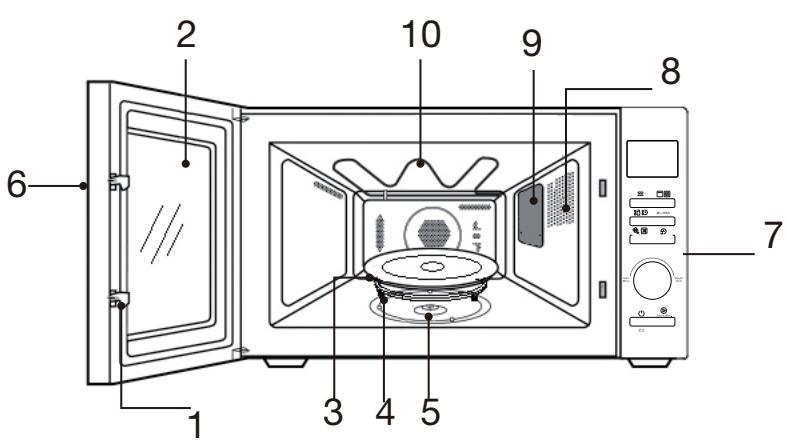
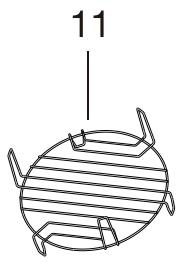
| 1 | Door safety locking system | 7 | Control panel |
| 2 | Window | 8 | Ventilation holes |
| 3 | Glass turntable | 9 | Mica wave guide cover |
| 4 | Turntable ring | 10 | Grill resistance |
| 5 | Turntable shaft | 11 | Metal tripod |
| 6 | Handle |
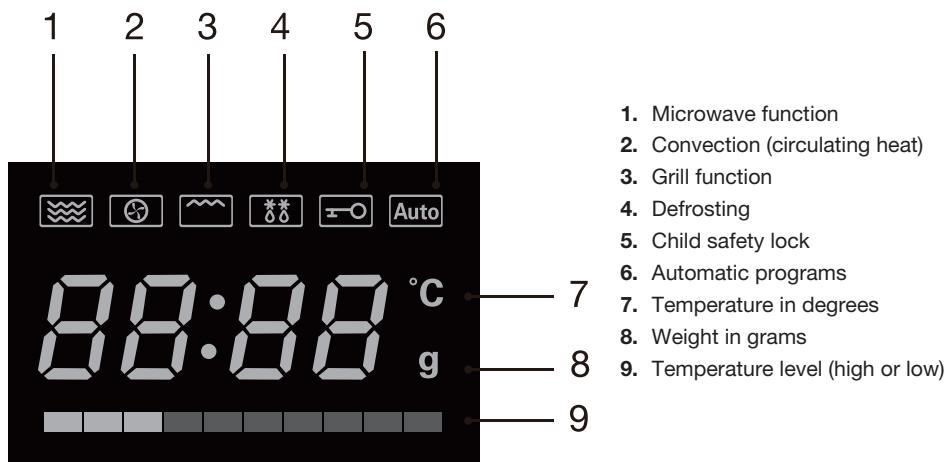
Description of display screen
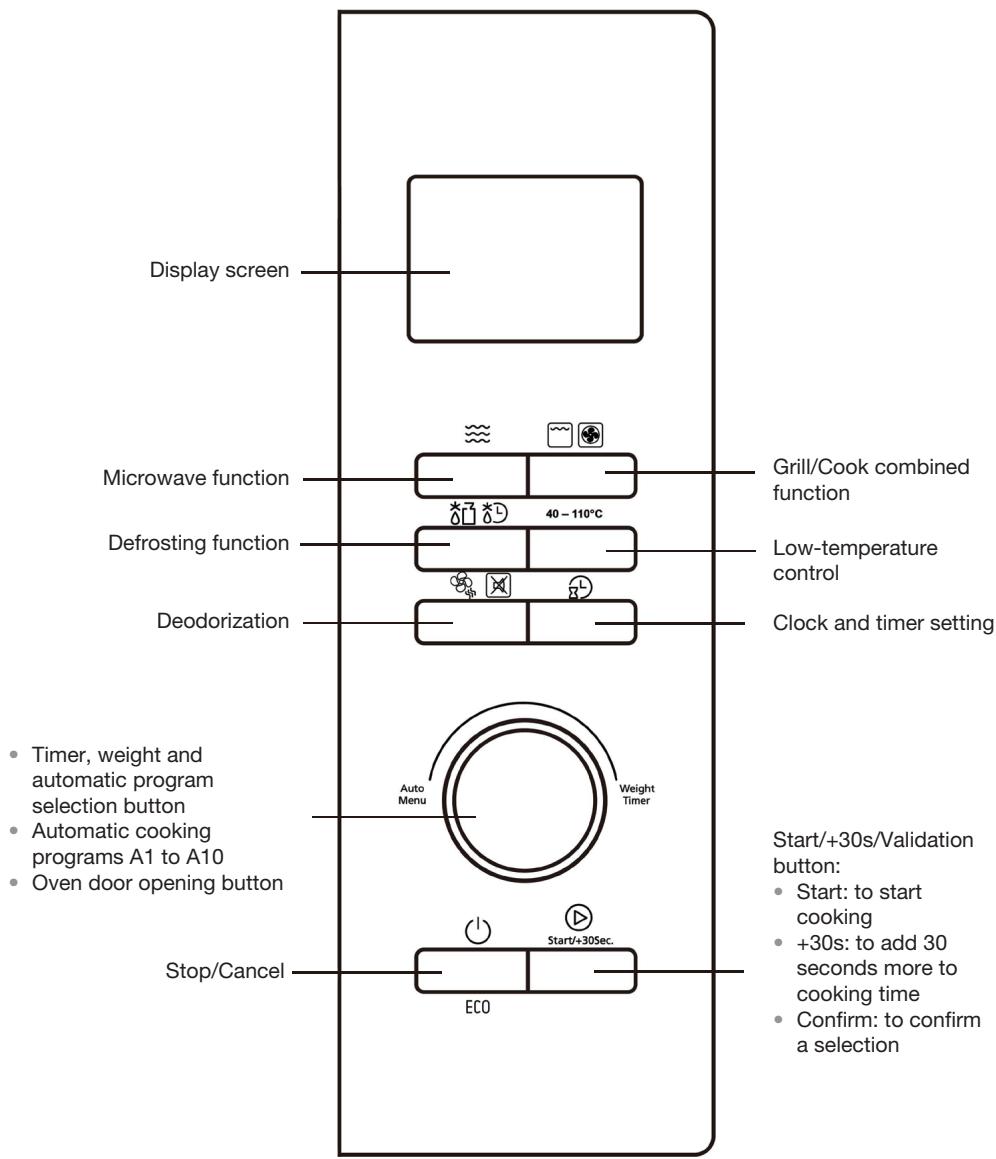
Description of control panel
grounding
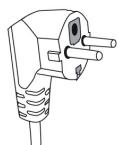
This microwave oven is equipped with a ground connection. It must be connected to a wall power outlet equipped with a ground connection.

Caution: Incorrect implementation of the plug could result in a risk of electric shock.
If there is a short-circuit, the ground connection reduces the risk of electric shock, by allowing the current to be discharged via the ground wire.
For any issues concerning grounding or electrical connection, please consult a qualified electrician.
If an extension cable is necessary, only use a three-wire extension cable equipped with a ground connection.
unpacking the microwave oven
- Remove all packaging and accessories from the inside and outside of the microwave oven, then inspect it carefully to check that no damage has occurred during transportation.
- If there is any sign of visible damage to the appliance, such as deformation of the door, do not use it, but contact the customer service department of your dealer.
- Before using the microwave for the first time, clean the inside with a damp cloth.
installation of the appliance
- The product must be installed in accordance with the national regulations covering electrical installation work.
- Place the microwave oven on a stable and level surface. Leave sufficient clearance space around the appliance to allow a good level of ventilation. Leave about 20 to 30~cm above the appliance, 10~cm between the back and the wall, and 20~cm between the sides and any adjacent wall.
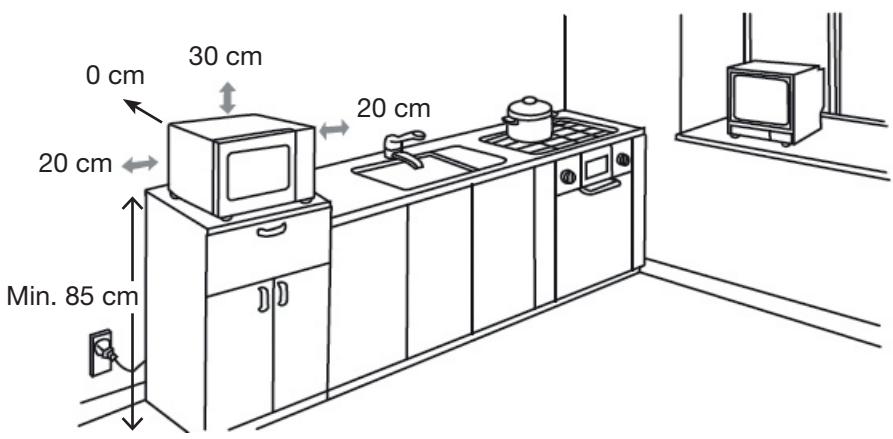
Make sure that there is nothing in the way of the ventilation holes in the sides, top and rear of the appliance.

Warning: Do not install your appliance on a cooktop or any other device generating heat. Otherwise, there is a risk of damage to your appliance and the warranty will not apply in such conditions.
- Do not install this microwave oven outdoors or in areas with high humidity or excessive heat.
- It is also recommended to avoid placing this appliance near to a radio or television, as its magnetic field may create interference.
- Do not put anything on top of the microwave.
- Do not install the microwave oven in a closed cupboard.
- Before plugging in your appliance, check that the voltage of your domestic mains power supply matches the voltage shown on the rating plate of the microwave oven and that the power cable plug is suitable for the power outlet.
- Plug your microwave oven into a wall power outlet with a ground connection.

Caution: You must never remove the mica wave guide cover (emission of microwaves) which is screwed into the inside of the microwave oven to protect the magnetron.
The temperature of the accessible surfaces (door and external surface) can be high when the appliance is in use.
first-time use
- As there may be residual grease from the manufacturing process still in the inside of the microwave oven or the heating elements, there may often be an odor released (or even a small amount of smoke) when the appliance is used for the first time. This is normal and will stop happening after the appliance has been used a few times. Open doors and windows to make sure your room is well ventilated so that the odors will dissipate.
- We therefore recommend that you proceed as follows: run the appliance in grill mode a few times, with no food inside.
Caution: The microwave oven must never be operated without food inside except in grill mode. It must never run like this in combined mode or microwave mode.
guide to utensils
Glass turntable
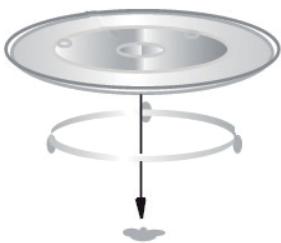
- Never turn the glass turntable upside down. It is designed to fit perfectly onto the drive shaft.
- The glass turntable and the turntable ring must always be present in the microwave oven when in use.
- Handle the turntable with care to prevent it from being broken.
- If the turntable is cracked or broken, or if the turntable ring is damaged, do not use the microwave oven and order replacement parts identical to the original items from your dealer.
- The turntable turns in both directions: this is normal.
- Always put the food and containers onto the glass turntable for cooking. Make sure that you position your dish or plate on the center of the glass turntable to prevent the risk of it bumping against the walls or door of the oven.
Using the metal grill
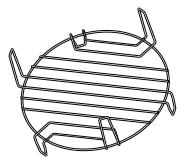
Place the metal grill on the turntable. It allows the heat to circulate correctly around the food. You can also use it to heat two dishes at the same time.
- It can be used in Grill mode and with the "C-2" combined function (microwave and grill). The grill must never be used in microwave mode only.
Other utensils (not provided)
It is strongly recommended that you should use suitable containers that present no risk for cooking in the microwave oven. In general, heat-resistant ceramic, glass and plastic-based containers are suitable for microwave cooking. Check that the container is marked as "Microwave resistant".

Caution: Never use metal utensils or utensils with metal seals with the microwave cooking function. Microwaves cannot penetrate metal. Metal objects can generate sparks or flashes that can result in serious damage to your appliance.
- For short cooking times, plastic or cardboard containers can be used, as well as frozen dishes wrapped in plastic wrap, on condition that the film is pierced with a fork beforehand to allow steam to escape.
- Do not use metal, cast iron or earthenware crockery that contains even a very small proportion of metal (including silver or gold).
- Heat from the food can be transmitted to the cooking container, which could become hot. Use oven gloves to handle containers.
-
It is advisable to use glass or plastic lids or plastic wrap to:
-
prevent too much evaporation (mainly during long cooking times),
- reduce cooking times,
- avoid food drying out,
-
preserve flavor.
-
The lid needs to be pierced with a few holes or to have openings so that pressure does not build up. If microwave-safe plastic bags are used, they must always be open.

Caution: Only some specific types of plastic wrap can be used in a microwave. Check the instructions on the packaging.
using the appliance
1. Adjusting the clock:
When you plug the microwave oven in, it displays "0:00", and plays an audio signal.
- Press "L", and "00:00" is displayed.
- Turn to set the hour (between 0 and 23).
- Press "L" and the minute numbers flash.
- Turn to set the minutes (between 0 and 59).
- Press "L" to finish setting the clock, " : " flashes on screen.
Note:
During the clock setting process, if you press " / ECO", the oven will automatically go back to the previous status.
2. Activate the timer
- Press "L" twice, "00:00" is displayed.
- Turn to set the timer (between 0 and 95 minutes).
- Press to confirm the setting. Start/+30Sec.
- When the program time has run down, the audio signal is heard 5 times.
3. Microwave cooking
- Press " _i = 1^n - 1_j = 1^n - 1_k = 1^n - 1 once, "P100" is displayed.
- Press "several times or turn to the required power setting: from 100% to 10% , “P100”, “P80”, “P50”, “P30”, “P10”.
- Press to confirm.
- Turn to set the cooking time. (The cooking time must be between 0:05 and 95:00.)
- Press Start / + 30Sec. to start cooking.
Microwave power table
| Press | 1 time | 2 times | 3 times | 4 times | 5 times |
| Microwave power level | 100% | 80% | 50% | 30% | 10% |
4. Cooking in Grill mode
- Press "~~" once, "G-1" will flash on screen.
- Press " to confirm the function, "G-1" is displayed.
- Turn "Q" to set cooking time (between 0 and 95 minutes).
- Press " Start+30Sec. " button to start cooking.
Note: halfway through the cooking time, the oven will emit an audio signal twice. At this point, you can either let cooking continue, or open the oven door and turn food over to ensure that it is cooked more thoroughly.
Close the door, then press " to continue cooking. If no operation is performed, cooking continues automatically.
5. Cooking by convection (with preheating function)
Cooking by convection can allow you to cook food as you would in a conventional oven. The microwave function is not used in this mode. It is recommended that you should preheat the oven to the correct temperature before placing food in the oven.
-
Press " " twice, "140" will flash on screen.
-
Press " " to confirm the function. "140" is displayed.
-
Press "several times or turn to select cooking temperature (between 140^ and 230^ ).
-
Press " Start / + 30Sec. " to confirm temperature.
-
Press " Start + 30Sec, " to start preheating. When the required preheating temperature is reached, the audio signal is heard twice to remind you to put your food into the oven. The temperature flashes on screen.
-
Place food in the oven and close the door. Turn to set cooking time.
-
Press " 口 Start +/ 30Sec. " button to start cooking.
6. Cooking by convection (without preheating function)
- Press " twice, "140" flashes on screen.
- Press " " to confirm the function. "140" is displayed.
- Press "several times or turn to select convection cooking temperature. Note: Temperature selection range between 140^ and 230^ .
- Press " to confirm temperature.
- Turn to set cooking time.
- Press " Start/+30Sec. " button to start cooking.
7. Grill and combined cooking
- Press "three times, "C-1" flashes on screen.
- Press "or turn " to select combination mode from C-1 to C-4.
- Press " Start+30sec. " to confirm your selection.
- Turn "Q" to set cooking time (between 0 and 95 minutes).
- Press " Start+30Sec. " button to start cooking.
| Instructions | Display | Microwave | Grill | Combi |
| 1 | C-1 | ● | ● | |
| 2 | C-2 | ● | ● | |
| 3 | C-3 | ● | ● | |
| 4 | C-4 | ● | ● | ● |
8. Defrosting by weight
- Press "OK" to choose the defrosting by weight function, "dEF1" is displayed on screen.
- Turn to choose the weight of the food (in g): "100", "200", "300", "400", "500", "600", "800", "1000", "1200", "1400", "1600", "1800" and "2000".
- Press " Start + 30Sec. " to confirm defrosting. At the end of the program, the audio signal is heard five times.
- The audio signal is heard twice to remind you to turn your food items over halfway through the defrosting time.
9. Defrosting by time
- Press "X" twice to choose the defrosting by time function, "dEF2" is displayed on screen.
- Turn to set the defrosting time. The maximum time is 95 minutes.
- Press " Start + 30sec. " to confirm defrosting. At the end of the program, the audio signal is heard five times.
10. Cooking in several stages
You can program your oven to link 2 different cooking sequences together automatically. Defrosting mode can only be programmed as the first stage. After each stage the audio signal is heard once and the next stage will start.
NOTE: Automatic menus and preheating cannot be included in a multi-stage cooking program.
For example, if you were programming the following cooking stages:
Defrosting (5 minutes)
Microwave cooking (7 minutes at 80% power)
- Press “ ” twice, the screen will display “dEF2”.
- Turn until the screen displays a defrosting time of "5:00" minutes.
- Press "~~" once.
- Press the " Start+30Sec." button to confirm.
- Turn to adjust microwave power until the screen displays "P80".
- Press the " Start+30Sec." button to confirm.
- Turn to adjust cooking time to 7 minutes.
- Press the " Start/+30Sec. " button to start cooking.
11. Low temperature control
- Press "40 - 110°C".
- Press "40 - 110°C" several times or turn to choose cooking until "L1", "L2", "L3", "L4" or "L5" is displayed.
- Press " Start/+30Sec." to confirm.
- Turn to choose cooking temperature.
- Press " Start/+30Sec." to confirm.
- Turn to adjust cooking time.
- Press the " Start+30Sec. " button to start cooking.
12. Automatic cooking programs
- When the oven is off, turn clockwise to choose the required function. "A1" "A2" "A3" ... "A10" will be displayed in sequence on screen.
- Press " Start/+30Sec." to confirm the menu chosen.
- Turn to choose the food weight when "g" appears.
- Press " Start/+30sec. " to start cooking.
Auto. menus
| Menu | Weight | Display | Power |
| A1 AUTO REHEATING | 150g | 150 | 100% |
| 250g | 250 | ||
| 350g | 350 | ||
| 450g | 450 | ||
| 600g | 600 | ||
| A2 POTATOES | 1 (about 230g) | 1 | 100% |
| 2 (about 460g) | 2 | ||
| 3 (about 690g) | 3 | ||
| A3 MEAT | 150g | 150 | 100% |
| 300g | 300 | ||
| 450g | 450 | ||
| 600g | 600 | ||
| A4 VEGETABLES | 150g | 150 | 100% |
| 350g | 350 | ||
| 500g | 500 | ||
| A5 FISH | 150g | 150 | 80% |
| 250g | 250 | ||
| 350g | 350 | ||
| 450g | 450 | ||
| 650g | 650 | ||
| A6 PASTA | 50g (with 450 ml water) | 50 | 80% |
| 100g (with 800 ml water) | 100 | ||
| 150g (with 1200 ml water) | 150 | ||
| A7 SOUP | 200ml | 200 | 100% |
| 400ml | 400 | ||
| 600ml | 600 | ||
| A8 CAKE | 475g | 475 | Preheating at 160°C |
| A9 PUZZA | 200g | 200 | C-4 |
| 300g | 300 | ||
| 400g | 400 | ||
| A10 CHICKEN | 500g | 500 | C-4 |
| 750g | 750 | ||
| 1000g | 1000 | ||
| 1200g | 1200 |
13. Express microwave cooking
When the oven is off, turn to left to select cooking time directly, and press “ ” to cook at 100% power. This program can be set as the first stage in a multi-stage cooking sequence.
14. Deodorization
- When the oven is off, press "OK" once, the screen displays "AS1".
- Press " 口 Start +30Sec. " to start deodorization (100% microwave power for 5 minutes).
15. Mute function
When the oven is off, press " 空 空 " twice, the screen displays "AS2". Then press " 空 Start+30Sec. " to go into mute mode. In this mode, audio signals are deactivated.
In mute mode, press " 品 品 twice, the screen displays "AS2".
Then press " Start + 30Sec. " to come out of mute mode.
16. Check time
- During cooking, press "L" to check current time.
- During cooking, press " 一 _ 一 ^ 一 ", current power will be displayed for 3 seconds.
17. Child safety lock
Lock: When the oven is off, press 12 ECO for 3 seconds; a long audio signal is heard, indicating that the lock is activated; the screen then displays the current time if the clock has been set or "I". All buttons become inactive.
Unlock: Hold in the “ / ECO ” button for 3 seconds. A long audio signal is heard, indicating that the child safety lock is deactivated.
18. ECO function
To go into ECO mode, press the “ ” button quickly when the oven is off. The display screen goes off.
To come out of ECO mode, press any button. The screen comes on again.
19. Turntable reset function
Once cooking is finished, if the turntable is not in its original position, the light, the fan and the turntable operate. The oven stops operating when the reset process is complete.
- This function only runs when cooking is finished. In the event of a break or opening of the door during cooking, the reset function is not available.
- During reset, opening the door or pressing (1) / ECO cancels the current operation.
cleaning and care

Important:
- Unplug the power cord from the power outlet before performing cleaning and, if possible, leave the door open to deactivate the microwave oven.
- Never use any brush, scouring sponge or abrasive pad to clean the appliance. You would risk damaging it!
It is recommended that the microwave oven should be cleaned regularly and any food deposits should be removed. If the appliance is not kept in a good condition of cleanliness, its surface could be damaged and its service life could be reduced, leading to a dangerous situation.
Cleaning the inside of the microwave oven
- Splashes and spattering of food inside the oven must be cleaned off every day, using a soft sponge and hot soapy water. Rinse with clean water and dry carefully using a soft cloth.
- Never use abrasive cleaning products or scouring sponges for cleaning.
- Regularly check the cleanliness of the mica wave guide cover (emission of microwaves) located inside the oven.
- Do not remove the wave guide cover (mica sheet).
- Once the oven has cooled down, you can clean the glass turntable, shaft and turntable ring with a soft sponge and hot soapy water. Rinse with clean water and dry carefully with a soft cloth.
Cleaning the outside of the microwave oven
- The external surface of the microwave oven is painted metal. Clean it with a slightly damp soft cloth with hot soapy water, then clean water. Then dry carefully with a clean dry cloth.
- Be careful not to let water get inside the appliance via the vent openings.
- Clean the control panel very carefully. Wipe it with a slightly damp soft cloth (with water only). Do not use chemical products. Avoid using too much water.
troubleshooting guide

Caution: In the event of any problem, it is essential to contact the customer service department of your dealer or a qualified and approved electrician for this type of repair, to prevent any danger.
Normal operation
| Microwave oven interfering with your television reception. | Television and radio reception can be affected when the microwave oven is running. This interference is similar to that generated by small electrical appliances such as mixers, vacuum cleaners and fans. It is normal. |
| Microwave oven light is dim. | During microwave cooking at low power, the oven light may lose brightness. It is normal. |
| Steam accumulating on the door, hot air escaping from the vent openings. | During cooking, steam comes out of food. It mostly escapes via the ventilation holes but a small quantity accumulates on cold surfaces such as the oven door. It is normal. |
| Microwave oven used accidentally without any food inside. | Using the microwave oven while it is empty will not damage it if it is just for a short time. But it is not recommended. |
| Impossible to use microwave oven when delayed start is activated | It is normal. Programming a delayed start stops the oven being used. To use the appliance, cancel the delayed start. |
| Problems | Possible causes | Solutions |
| The microwave oven does not work. | The power cord is not plugged in properly. | Unplug the appliance, wait 10 seconds, then plug it back in. |
| Blowing of fuses or action of circuit-breaker. | Replace fuse or reset the circuit-breaker (repaired by professional technicians from our company). | |
| Problem with power outlet. | Test the outlet by plugging in other electrical appliances. | |
| The microwave oven does not heat. | The door is not closed properly. | Close the door properly. |
| The glass turntable makes a noise when the microwave oven is in operation. | The contact surface of the turntable ring rollers and the oven bottom are dirty. | Check the "Cleaning & Care" section to find out how to clean the dirty surfaces. |
If the problem is not resolved by any of the actions above, contact the customer service department of your dealer. Do not try to adjust or repair the oven yourself.
All information, designs, drawings and pictures in this document are the property of SOURCING & CREATION. SOURCING & CREATION reserves all rights to its brands, designs and information. Any copy and reproduction through any means shall be deemed and considered as counterfeiting.
Combination grill & microwave oven
Horno de microondas Combi
Protection of the environment
This symbol attached to the product means that it is an appliance whose disposal is subject to the directive on waste from electrical and electronic equipment (WEEE). This appliance may not in any way be treated as household waste and must be subject to a specific type of removal for this type of waste. Recycling and recovery systems are available in your area (waste removal) and by distributors. By taking your appliance at its end of life to a recycling facility, you will contribute to environmental conservation and prevent any harm to your health.
Tested in our laboratories
Warranty valid from the date of purchase (receipt as proof of purchase). This warranty does not cover defects or damage caused by improper set up, incorrect use, or normal wear and tear of this product.
Getest in once laboratoria
Customer Relations Department /
Servicio de Atencion al CLIENTe / Kundenservice / Klantenafdeling
Avenue de la Motte
CS 80137
59811 Lesquin cedex, France
Art. 8008230
Réf. EX 281n
FABRIQUE EN R.P.C. / MADE IN
Please behave responsibly towards
the environment. Recycle this product
at the end of its life.
- Intended Use
- Child Safety
- Unpacking
- Installation/electrical connection
- Repair/cleaning/maintenance
- Precautions for use
- Special precautions
- Fire hazard/risk of burns
- Radio frequencies
- Modo de empleo
- contents
- instructions
- your product
- Package contents
- Technical characteristics
- description of appliance
- General description of oven
- Description of display screen
- grounding
- unpacking the microwave oven
- installation of the appliance
- first-time use
- guide to utensils
- Glass turntable
- Using the metal grill
- Other utensils (not provided)
- using the appliance
- Adjusting the clock:
- Note:
- Activate the timer
- Microwave cooking
- Microwave power table
- Cooking in Grill mode
- Cooking by convection (with preheating function)
- Cooking by convection (without preheating function)
- Grill and combined cooking
- Defrosting by weight
- Defrosting by time
- Cooking in several stages
- Low temperature control
- Automatic cooking programs
- Express microwave cooking
- Deodorization
- Mute function
- Check time
- Child safety lock
- ECO function
- Turntable reset function
- cleaning and care
- Important:
- Cleaning the inside of the microwave oven
- Cleaning the outside of the microwave oven
- troubleshooting guide
- Combination grill & microwave oven
- Horno de microondas Combi
- Protection of the environment
- Tested in our laboratories
- Getest in once laboratoria
Brand : ESSENTIELB
Model : EX281N
Category : Microwave