
35 SMART HOME - Smart Home ARCHOS - Free user manual and instructions
Find the device manual for free 35 SMART HOME ARCHOS in PDF.
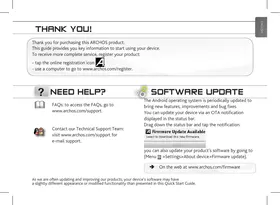


| Product type | DECT cordless phone with touchscreen and smart home functions |
| Brand | ARCHOS |
| Model | 35 SMART HOME |
| Approximate dimensions (handset) | 120 x 60 x 20 mm |
| Approximate weight (handset) | 150 g |
| Screen | 3.5-inch color touchscreen |
| Power supply | DECT base power adapter: 5V DC; Charging station power adapter: 5V DC via USB |
| Battery | Built-in rechargeable lithium-ion |
| Standby time | Approximately 200 hours |
| Talk time | Approximately 10 hours |
| Network | DECT (telephony) + Wi-Fi 802.11 b/g/n (Internet and app connectivity) |
| Main functions | DECT phone calls, intercom between handsets, phonebook, speakerphone, messaging, Internet access, Android apps, AppsLib, media player, camera |
| Connections | Micro USB port (file transfer), 3.5 mm headphone jack, DECT base connection (wireless) |
| Box contents | ARCHOS handset, docking/charging station, DECT base, DECT base power adapter, phone cable, 2m USB cable, USB power adapter for station |
| Care and cleaning | Clean with a soft, dry cloth. Do not use solvents or abrasive products. Protect from moisture and extreme temperatures. |
| Safety | Do not puncture, open, or expose battery to temperatures above 60°C. Keep out of reach of children. Use only ARCHOS-approved accessories. |
| Spare parts and repairability | Built-in battery not user-replaceable. Repairs by qualified technician only. Limited 1-year warranty (hardware). |
| General information | Manufacturer: ARCHOS SA, 12 rue Ampère, 91430 Igny, France. www.archos.com |
Frequently Asked Questions - 35 SMART HOME ARCHOS
User questions about 35 SMART HOME ARCHOS
0 question about this device. Answer the ones you know or ask your own.
Ask a new question about this device
Download the instructions for your Smart Home in PDF format for free! Find your manual 35 SMART HOME - ARCHOS and take your electronic device back in hand. On this page are published all the documents necessary for the use of your device. 35 SMART HOME by ARCHOS.
USER MANUAL 35 SMART HOME ARCHOS
Thank you for purchasing this ARCHOS product.
This guide provides you key information to start using your device.
To receive more complete service, register your product:
- tap the online registration icon A
- use a computer to go to www.archos.com/register.
NEED HELP?

FAQs: to access the FAQs, go to www.archos.com/support.

Contact our Technical Support Team: visit www.archos.com/support for e-mail support.

SOFTWARE UPDATE
The Android operating system is periodically updated to bring new features, improvements and bug fixes.
You can update your device via an OTA notification displayed in the status bar.
Drag down the status bar and tap the notification.

Firmware Update Available
Select to download this new firmware.

You can also update your product's software by going to (Menu > Settings > About device > Firmware update).

On the web at www.archos.com/firmware
BOX CONTENTS
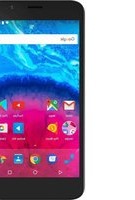
ARCHOS handset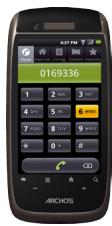
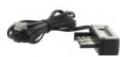
Docking station/ Charging station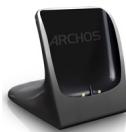
ARCHOS DECT base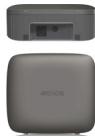
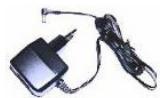
DECT base AC adapter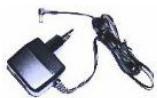
Telephone cable (Different for each country)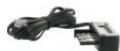
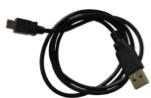
USB cable (2 meters)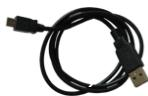
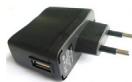
USB AC adapter for charging station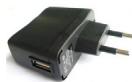
DESCRIBING THE ARCHOS HANDSET
1 Power Button: press and hold to switch on/off. Press the Power button once to put your device in standby mode. When you press and hold on the Power button, a window appears with a list of options. Tap "Power Off" > "Power Off" to fully shut down your ARCHOS
Charging indicator
- Light on: battery charging
- Blinking: battery charged
Headphones input
Micro-USB port: to transfer files using the USB cable
- From your computer to your ARCHOS
- From your ARCHOS to your computer
Micro-SD card slot
Back icon - returns to the previous screen.
Volume buttons
Menu icon - gives menu options according to the current screen.
Home icon
- Short press: return to the Home screen.
- Hold: it displays the recent applications.
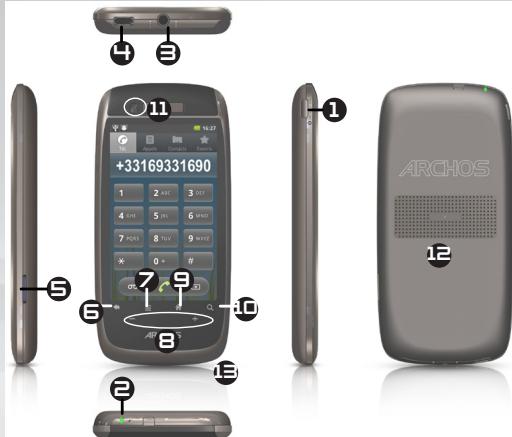
Search icon - allows you to search for a contact or an item on the device or on Internet.
Camera
Loudspeaker
Microphone
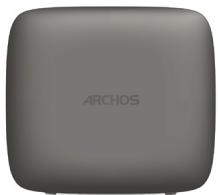
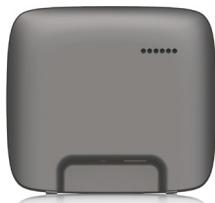
DESCRIBING THE ARCHOS DECT BASE
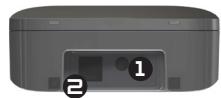
Power connector: to connect the DECT base AC adapter. Telephone plug: to connect the phone cable.
STARTING UP
Connecting
Follow exactly the procedure. You must plug in the ARCHOS DECT base before turning on the ARCHOS handset.
- Connect the DECT base AC adapter to the ARCHOS DECT base and plug it into a wall outlet.
- Connect the telephone cable to the ARCHOS DECT base and to your telephone outlet.
- Connect the supplied USB cable to the USB AC adapter and to the docking station.
- Plug the USB AC adapter into a wall outlet.
- Place the ARCHOS handset on the docking station.
Charging
When the ARCHOS handset is placed on the docking station, the device starts charging.
Notes:
If the device is turned off, the charging indicator is off during the charging process.
To see the charging process, turn on the device.
On the upper right corner, a battery icon is displayed with a filling action. When the device is on and fully charged, the charging indicator starts blinking.
Touchscreen actions
To scroll up/ to scroll down: place your fingertip on the screen and move it quickly up/move it quickly down
Touch to activate an item: touch with your fingertip.
Touch and hold for an alternate action: to touch and hold an item, touch the item and do not lift your fingertip until the action occurs.
Drag an item to change its position: to drag an item, touch and hold it for a moment, then without lifting your fingertip, move your fingertip on the screen until the item reaches its destination.
Swipe left/right to change the view: to swipe, touch the screen and then quickly move your fingertips across the screen without lifting your fingertip. Do not pause on the screen with your fingertips at the initial point of contact or you may drag an item.
Double-tap: quickly tap the screen twice on a webpage or other application screen to zoom.
STARTING UP
Going through the wizard
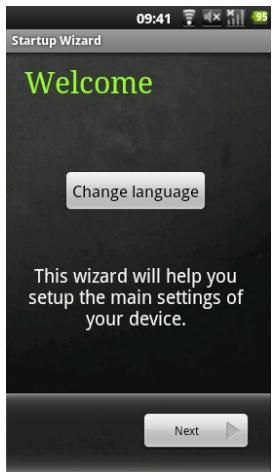
The first time you turn on your ARCHOS, you will calibrate your touchscreen. Then you will go through a setup wizard that helps define the parameters of your device main settings.
The different screens you will go through:
- The Welcome screen: select your language.
- The Legal and Safety notices screen: read the provided ARCHOS Warranty, Legal & Safety
- The Date and Time screen: select your time zone and set the clock and the date
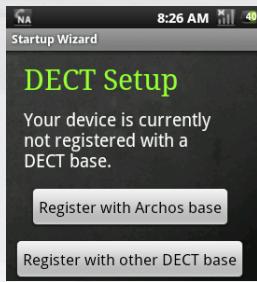
- The DECT Setup screen: to register your handset with an ARCHOS DECT base or another DECT base. Note: the handset purchased with a DECT base is by default registered.
- The Dial Rules screen: to set up the dialling parameters.
- The Wifi connection screen: to connect to available Wifi networks.
- The Third party applications screen: to choose between installing or not installing preloaded applications.
- The Accelerometer calibration screen: calibrate the accelerometer.
- The In-store demo mode (only for retailer).
DESCRIBING THE HOME SCREEN
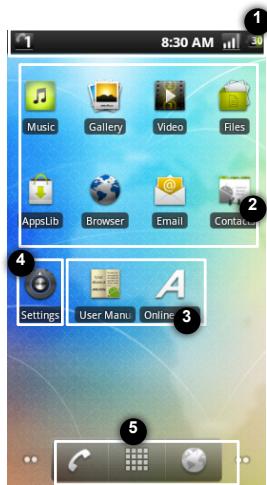
- The status bar displays:
- the battery level,
- the WiFi icon,
- the current time,
- the ARCHOS handset number.
- The default Android applications and the application library AppsLib
- Add contacts
- Download different types of applications from AppsLib
- Play your music, photo and video files
- Surf the Web
- The User manual and the Online Registration applications
- Access more detailed information about your product functioning and characteristics
- Register your product to benefit from the ARCHOS technical support
- The Settings application
- Access the Phone settings, the Account & sync settings, the Display settings, ...
- The Telephone button: access the telephone menu. The Application button: tap this icon to reveal all the Android™ applications installed on your ARCHOS (games, various tools, etc.). You can copy them onto the Home screen. You can get more Android™ applications from the AppsLib. The Web browser shortcut: to open Web pages.
DESCRIBING THE TELEPHONE MENU
The Telephone menu includes five tabs: the Phone tab, the Intercom tab, the Call log tab, the Contacts tab and the Favorites tab.
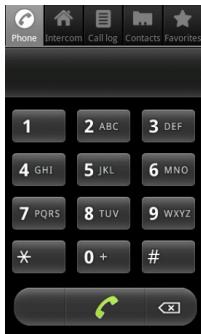
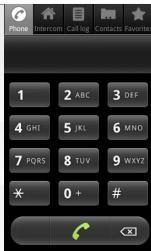
The Phone tab allows to dial and make calls.
While dialling, press the Menu button to display the options available.
You can access other menus while making a call.
The phone icon is then displayed in the status bar.

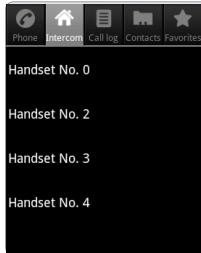
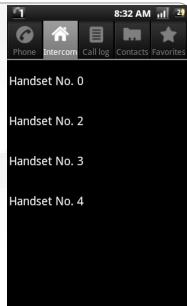
The Intercom tab displays handset numbers.
Each handset number corresponds to a handset connected to your ARCHOS DECT base.
For each ARCHOS handset, the handset number is displayed in the status bar.
DESCRIBING THE TELEPHONE MENU
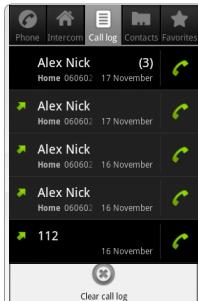
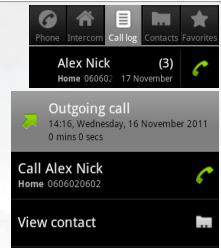
The Call log tab
It displays:
- list of incoming calls,
- list of outgoing calls.
Press the Menu button and select Clear log to erase the call history.
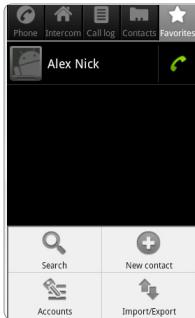
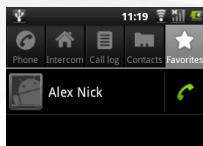
The Favorites tab
It displays:
- a list of your favorites
- a list of your contacts called frequently
To add a contact to your favorites
- In the Contacts tab, touch and hold the selected contact.
- Tap Add to favorites.
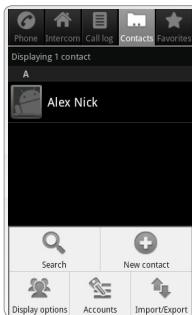
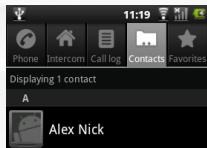
The Contacts tab
It displays the list of contacts saved on your handset.
Each contact information can be detailed.
You can also access your contacts via the Contacts application.
In the Contacts tab, press the Menu button to display available options:
- Search new
- New contact
- Display options
- Accounts
- Import/export
From the Phone tab
- On the home screen of your handset, tap the Telephone button.
- If the Phone tab is not displayed, tap it.
- Dial the number to call and tap the call button.
OR
Tap the call button and dial the number to call.
From the Favorites tab
- On the home screen of your handset, tap the Telephone button.
- If the Favorites tab is not displayed, tap it.
- Tap the telephone icon next to the contact you want to call.
Note: tap the contact name to display details.
From the Contacts tab
- On the home screen of your handset, tap the Telephone button.
- If the Contacts tab is not displayed, tap it.
- Tap the contact name. The contact details are displayed.
- Tap the telephone icon.

From the Call log tab
- On the home screen of your handset, tap the Telephone button.
- If the Call log tab is not displayed, tap it. The incoming and outgoing calls are displayed.
- Tap the telephone icon next to the contact you want to call.
- Tap the telephone number or the contact name to display details.
Making an Intercom call
Note: the handsets need to be connected to the same ARCHOS DECT Base.
- On the home screen of your handset, tap the Telephone button.
- In the telephone menu, tap the Intercom tab. A list of handset numbers is displayed.
IMPORTANT: every handset registered with your ARCHOS DECT base has its number. For each handset, the number is displayed in the status bar.
- Tap the number corresponding to the handset you want to call.
CONTACTS
Accessing your contacts
You have two ways to access your contacts - from the Contacts application,

Contacts
- from the Contacts tab in the Telephone menu.
Synchronizing your contacts
You can add email accounts to synchronize your contacts and store them on your handset. To add an account:
- From the Telephone menu, in the Contacts tab, tap the Menu button.
- In the options displayed, tap Accounts.
- Tap Add account. The Add an Exchange account page is displayed.
- For a Google account, type in your email address and the corresponding password, then tap Next.
- In the server settings: Domain\Username: (user) @ gmail.com Password: your password Server: m.google.com
- Tap Next. Note: to add another type of account, make sure to have the required information.
Creating a shortcut for a contact
- Touch and hold an empty part of your homescreen. An Add to Home screen window is displayed.
- Tap Shortcuts.
- Select Contact.
- Choose a contact to create a shortcut.
Selecting a photo for a contact
- From the device home screen, tap Gallery.
- Select an album, then select a photo.
- Tap Menu, then tap More.
- Tap Set as and select Contact icon.
- Select the desired contact.
- Adjust the photo and tap Save.
You can connect another ARCHOS handset to your ARCHOS DECT base.
Registering an ARCHOS handset with an ARCHOS DECT base during the startup wizard
If your ARCHOS handset is not connected to an ARCHOS DECT base, you will have the option to connect it during the startup wizard.
When you reach the DECT Setup step:
- Plug out the DECT base AC adapter from the wall outlet.
- On your ARCHOS handset, tap Register with ARCHOS base.
- Tap Register and plug in right after the DECT base AC adapter.
The device attempts to connect to the ARCHOS DECT base.
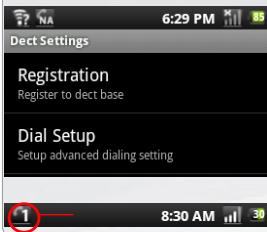
When the registration is successful, the ARCHOS handset number is displayed in the status bar.
Registering an ARCHOS handset with an ARCHOS DECT base from the settings
- Plug out the DECT base AC adapter from the wall outlet.
- On your handset home screen, tap Settings > Phone > Registration. For the requested pin number, you do not need to enter anything.
- Tap directly Register and plug in right after the DECT base AC adapter.
The device attempts to connect to the ARCHOS DECT base.
When the registration is successful, the handset number is displayed in the Status bar.
Registering an ARCHOS handset with another type of DECT base
You can use your ARCHOS handset with another type of DECT base.
To do so, you need to refer to the DECT base user manual to learn the registration procedure.
Each type of DECT base has a specific registration procedure to secure the registration of handsets.
Note: To access the registration menu on your ARCHOS handset:
On the device home screen, tap Settings > Phone > Registration.
Registering another type of handset with the ARCHOS DECT base:
Before starting any registration, consult the user manual of your handset.
- Unplug the DECT base AC adapter from the wall outlet, then plug it back in.
You have one minute to register your handset. During that minute, the ARCHOS DECT base is in registration mode.
Note: PIN number
During the registration process, on your handset, type "0000" for the requested PIN number.

For this procedure to work, you need to be in a WiFi zone that allows you to connect to it. Every time the ARCHOS is in range of a network that you have already configured once, it will attempt to make a connection.
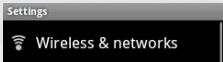
- To configure a new WiFi network, go to the Home screen, tap on the Menu icon, then select Settings.
- In the Settings screen, select Wireless & networks.
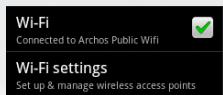
- If WiFi is off, tap on the WiFi line to turn it on.
- Select WiFi settings. The ARCHOS will scan for available WiFi networks and display them in the WiFi network section.
- Tap the network you want to connect to.
- Tap inside the Wireless password field to make the virtual keyboard appear. We recommend that you select Show password, to be able to see the characters you are typing.
- Enter the required network information* and tap Done.
- Tap Connect. Your ARCHOS will now attempt to establish a connection to that WiFi access point with the network parameters you entered.
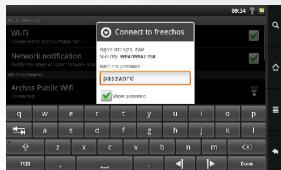
- For free access WiFi points, there is no need to enter any special information. For secured networks, you will need a key (a series of numbers and/or letters) of the type WEP, WPA, or WPA2. Check with the Internet service provider to obtain the exact connection parameters required.
More with my device
Transferring files
- Connect the supplied USB cable to the ARCHOS and to a running computer. The ARCHOS will turn on and ask you if you want to connect it.
- Tap Mount to connect it. Within a few seconds the ARCHOS will appear as an icon on your computer.
- Transfer your media files to the ARCHOS by copy/pasting them into the respective folders using Windows Explorer (or the Finder on a Mac®).
- Once all your file transfers are finished, close Windows Explorer and any other program that may have read or written to the ARCHOS.
- Click on the 'safely remove' icon in the system tray, next to the clock. You can now unplug the USB cable.
Downloading applications
AppsLib is the application marketplace for Android devices. Thousands of apps available to download straight to your Android device. Check out the best in free and paid-for applications.
- Tap the AppsLib icon.
- Search in the different directories Categories, Top 50, Selection or type key words on the search bar.
Note: you can download AppsLib at www.appslib.com if necessary.
Troubleshooting
Touchscreen calibration: If the touchscreen functioning is impaired, carry out a calibration.
- Tap the Settings application or from the Home screen, tap the Menu icon > Settings.
- Down the list, tap Repair&formatting > Touchscreen calibration.
- Follow the on-screen instructions.
Hardware Reset: In the event that your ARCHOS freezes operation, you can force the device to shut down by holding the button for 10 seconds.
LEGAL AND SAFETY NOTICES
WARRANTY AND LIMITED LIABILITY
This product is sold with a limited warranty and specific remedies are available to the original purchaser in the event the product fails to conform to the limited warranty. Manufacturer's liability may be further limited in accordance with its sales contract.
In general, and in a non-limited manner, the manufacturer shall not be responsible for product damages caused by natural disasters, fire, static discharge, misuse, abuse, neglect, improper handling or installation, unauthorized repair, alteration or accident. In no event shall the manufacturer be liable for loss of data stored on disk media.
MANUFACTURER SHALL NOT BE LIABLE FOR ANY SPECIAL, INCIDENTAL OR CONSEQUENTIAL DAMAGES. EVEN IF INFORMED OF THE POSSIBILITY THEREOF IN ADVANCE.
ARCHOS licensor(s) makes no warranties, express or implied, including, without limitation, the implied warranties of merchantability and fitness for a particular purpose, regarding the licensed materials. ARCHOS' licensor(s) does not warrant, guarantee or make any representations regarding the use or the results of the use of the licensed materials in terms of its correctness, accuracy, reliability, correctness or otherwise. The entire risk as to the results and performance of the licensed materials is assumed by you. The exclusion of implied warranties is not permitted by some jurisdictions. The above exclusion may not apply to you.
In no event will ARCHOS' licensor(s), and their directors, officers, employees or agents (collectively ARCHOS' licensor) be liable to you for any consequential, incidental or indirect damages (including damages for loss of business profits, business interruption, loss of business information, and the like) arising out of the use of inability to use the licensed materials even if ARCHOS' licensor has been advised of the possibility of such damages. Because some jurisdiction do not allow the exclusion or limitation of liability for consequential or incidental damages, the above limitations may not apply to you.
Please see your sales contract for a complete statement of warranty rights, remedies and limitation of liability.
Furthermore, warranty does not apply to:
- Damages or problems resulting from misuse, abuse, accident, alteration or incorrect electrical current or voltage.
- Any product tampered with or damaged warranty seal or serial number label.
- Any product without a warranty or serial number label.
- Batteries and any consumable items delivered with or in the equipment.
The end user is required to use this product only in conformity with its original purpose and is strictly forbidden to make any technical modifications that could potentially impinge on the rights of third parties. Any modification to the hardware, software, or physical enclosure of the product must be approved in writing by ARCHOS. Non approved modified products are subject to the withdrawal of any or all guarantee clauses.
As part of the contractual agreement of its products, ARCHOS is committed to ensure the availability of parts and components that are essential to the use and proper working conditions of its products. This availability will be guaranteed for a period of two years, as of the first retail release for customers.

LITHIUM-ION BATTERY CAUTION
This product is equipped with a Lithium-ion battery. Do not pierce, open, disassemble it, or use it in a humid and/or corrosive environment. Do not put, store or leave your product in or near sources of heat, in direct strong sunlight, in a high temperature location, in a pressurized container or in a microwave oven. Do not expose it to temperatures over 60°C (140°F). If the battery leaks and you come into contact with the leaked fluids, rinse thoroughly with water and seek medical attention immediately. Failure to follow these instructions could cause the Lithium-ion battery to leak acid, become hot, explode or ignite and cause injury and/or damage.
OPTIMISING BATTERY PERFORMANCE
- Do not leave your battery charging for more than one week. Doing so runs the risk of overcharging the battery and shortening its total life span.
- If the device is not used for an extended period of time, the battery will slowly discharge and the device will need to be recharged before using again.
- Unplug the charger from the wall when it is not being used.
- Use only an ARCHOS battery in the device.
WARNING AND SAFETY INSTRUCTIONS
CAUTION
To prevent risks of electric shock, this unit must only be opened by qualified service personnel. Power off and disconnect the power supply cable before opening the unit.
WARNING
To prevent fire or shock hazard, do not expose the unit to rain or moisture.
Use of this product is for personal use only. Copying CDs or loading music, video, or picture files for sale or other business purposes is or may be a violation of copyright law. Copyrighted materials, works of art, and/or presentations may require authorization to be fully or partially recorded. Please be aware of all such applicable laws concerning the recording and use of such for your country and jurisdiction.
SAFETY
For driving safety, only a passenger should operate the device when the car is in motion and not the driver. Laws governing the usage of electronic devices by the driver may be applicable in your jurisdiction and/or country.
Install your ARCHOS carefully
Make sure your ARCHOS and its accessories are solidly secured when you are using them in a car. Avoiding mounting your ARCHOS device and its accessories near the airbag opening areas. Equipment that is not securely fixed in a car could result in serious injury when the airbag activates.
Handle the batteries and charger with care and respect the recycling instructions
- Use only ARCHOS certified batteries and charger for your ARCHOS product. Using batteries or a charger that is not certified by ARCHOS can result in serious injury or damage your product.
- Never throw a battery into a fire. See your current local regulations for information on battery recycling.
- Never put your ARCHOS device inside of, or on top of, a heating device such as microwave oven, toaster oven, or heater. When batteries heat up, there is a risk of explosion.
- Be careful to never crush or perforate the battery. Avoid exposing the battery to high external pressure which could provoke an internal short-circuit and overheating.
Use only accessories that are ARCHOS branded or certified by ARCHOS
The use of incompatible accessories with the ARCHOS can cause injury.
Handle your ARCHOS with care
- Keep your product away from any sources of humidity. This can seriously damage the device. Do not manipulate your ARCHOS device with wet hands. Any damage done to the device due to its contact with water voids your guaranty.
- Do not use or store your product in an area that is dusty or dirty. This can deteriorate the components in your device.
- Your ARCHOS device is a complex electronic product. Keep it protected from falls and physical shock. Do not subject it to violent movements.
- Do not paint your product. Doing so could make movable parts unusable and reduce or limit its functionality.
- Other products that create a magnetic field could hamper the functionality of your ARCHOS. Do not use protective covers or cases that have magnetic closures. Do not allow your ARCHOS device to stay in prolonged contact with electromagnetic fields. Only ARCHOS certified technicians are qualified to repair your ARCHOS device In calling upon non qualified persons to repair your ARCHOS product, you run the risk of damaging your device and voiding your guaranty.
Avoid interference with other electronic products
Your ARCHOS device radiates radio frequency (RF) signals that could interfere with the functioning of other electronic devices that are insufficiently or incorrectly protected from RF energy, such as pacemakers, hearing aids, medical devices, or any other electronic device found in your home or car. Contact the maker of the equipment to resolve any possible interference problems.
Other Security Instructions
- Always handle your ARCHOS device with care. Keep it in a clean environment away from dust.
- Do not expose the device to extreme temperatures.
- Do not drop or throw the device.
- Do not allow the device to come in close contact with a flame.
- CHILD PROTECTION: Keep the device away from children. Do not allow children to play with this device. They can hurt themselves or others with this device as well as damage it. Besides, little kids would much prefer their parents play with them than pass them an electronic device. Really, this is true.
FCC COMPLIANCE STATEMENT
This equipment has been tested and found to comply with the limits for a Class B digital device, pursuant to Part 15 of the FCC Rules. These limits are designed to provide reasonable protection against harmful interference in a residential installation. This equipment generates, uses, and can radiate radio frequency energy and, if not installed and used in accordance with the instructions, may cause harmful interference to radio communications. However, there is no guarantee that interference will not occur in a particular installation. If this equipment does cause harmful interference to radio or television reception, which can be determined by turning the equipment off and on, the user is encouraged to try to correct the interference by one or more of the following measures:
Reorient or relocate the receiving antenna. - Increase the separation between the equipment and receiver. - Connect the equipment into an outlet on a circuit different from that to which the receiver is connected. - Consult the dealer or an experienced radio/TV technician for help.
To assure continued compliance, any changes or modifications not expressly approved by the party responsible for compliance could void the user's authority to operate this equipment. (Example - use only shielded interface cables when connecting to computer or peripheral devices).
USA: - This device complies with Part 15 of the FCC Rules. Operation is subject to the following two conditions: (1) this device may not cause
harmful interference, and (2) this device must accept any interference received, including interference that may cause undesired operation.
- FCC Radiation Exposure Statement: This equipment complies with FCC RF radiation exposure limits set forth for an uncontrolled environment. This transmitter must not be co-located or operating in conjunction with any other antenna or transmitter.
Canada: - Operation is subject to the following two conditions: (1) this device may not cause interference, and (2) this device must accept any interference, including interference that may cause undesired operation of the device.
ELECTROSTATIC DISCHARGE (ESD)
Normal functioning of the product may be disturbed by ESD. If so, simply reset the product to resume normal operation by following the instruction manual. During file transmission, please handle with care and operate in a static-free environment.
AVOIDING HEARING DAMAGE
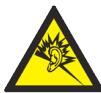
This product respects the current regulations for limiting the output volume of consumer audio devices to a safe level. It must be only used with earphones complying with the EN 50332 norm. By listening to your device with headphones or earbuds at high volumes, you run the risk of permanent damage to your ears. Even if you get used to listening at high volumes and it seems normal to you, you still risk the possibility of damaging your hearing. Reduce the volume of your device to a reasonable level to avoid permanent hearing damage. If you hear ringing in your ears, reduce the volume or shut off your device and go to see a doctor.
ENVIRONMENTAL CONSIDERATIONS
Protection of the environment is an important concern to ARCHOS. In order to put this concern into tangible actions, ARCHOS has consciously included a set of methods that favor a respect for the environment into the entire cycle of its products; from fabrication to consumer usage, to final disposal.
Batteries: If your product contains a detachable battery pack, you should only dispose of it in a designated collection point for used batteries.
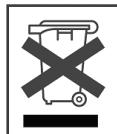
The Product: The crossed-out garbage can symbol on your product signifies that it falls into the category of electric/electronic equipment. Products of this type contain substances that are potentially dangerous to the environment and to human health. Therefore, you should not dispose of the ARCHOS electronic device in a regular trash. As such, the current European directives ask that this device be collected:
- At places of distribution in the case of a purchase of a similar electronic product.
- At locally created disposal areas (waste disposal centers, sorted trash system, etc.)
By doing this, you are actively participating in the reuse and recycling of disposed electronic and electric equipment that could have potential effects on the environment and human health.
COPYRIGHT NOTICE
Copyright ARCHOS © 2011. All rights reserved.
This document may not, in whole or part, be copied, photocopied, reproduced or reduced to any electronic medium or machine-readable form without prior consent, in writing, from ARCHOS. All brands and products names are registered trademarks and the property of their respective owners. Specifications are subject to change without notification. Errors and omissions accepted. Images and illustrations may not always match contents.
Disclaimer of warranty: to the extent allowed by applicable law, representations and warranties of non-infringement of copyrights or other intellectual property rights resulting from the use of the product under conditions other than as here above specified, are hereby excluded.
END USER LICENSE AGREEMENT FOR ARCHOS SOFTWARE
PLEASE CAREFULLY READ THE BELOW TERMS AND CONDITIONS OF THE END USER LICENSE AGREEMENT (EULA) BEFORE USING YOUR ARCHOS PRODUCT. THE "ARCHOS SOFTWARE" (all software distributed within the ARCHOS hardware product) ON THIS DEVICE IS LICENSED TO YOU, YOU DO NOT OWN IT.
BY USING THE SOFTWARE ON THE DEVICE, YOU ARE THUS GIVING YOUR CONSENT TO BE BOUND BY THIS AGREEMENT. IF YOU DO NOT AGREE WITH ANY PART OF THIS EULA, ARCHOS WILL NOT LICENSE THE SOFTWARE TO YOU. IN SUCH A CASE, PROMPTLY SEE YOUR VENDOR OR CONTACT ARCHOS DIRECTLY in order to FIND an adequate solution to this disagreement.
- GRANT OF LICENSE - Subject to the terms and conditions of this license, ARCHOS grants you the nonexclusive right to use the software within the ARCHOS hardware product. The ARCHOS SOFTWARE can only be used on the ARCHOS manufactured product that it is delivered with.
- TITLE - You have no title, ownership rights, rights to trade secrets, or intellectual rights to the ARCHOS SOFTWARE.
- LIMITATIONS - You may not alter, decrypt, disassemble, decompile, or reverse engineer in part or in whole the ARCHOS SOFTWARE, except as permitted by mandatory applicable law.
- Copyright / INTELLECTUAL RIGHTS - The ARCHOS SOFTWARE is protected by United States and International Copyright laws and treaties as well as by international intellectual property laws.
- NO WARRANTY / LIMITED LIABILITY
A. ARCHOS SOFTWARE is licensed to you "as is" and your use of such is at your sole risk.
B. ARCHOS makes no guarantees, either expressed or implied, as to the correctness, accuracy, reliability, fitness for a particular purpose, or otherwise of its SOFTWARE.
C. If ARCHOS SOFTWARE proves to be defective, YOU and not ARCHOS bear any financial or other liability for returning the product to its original functional state or any other liability arising out of such an event.
D. In no event will ARCHOS, its subsidiaries, officers, or employees be liable for any damages, including but not limited to, any loss, or other incidental, indirect or consequential damages due to the use of the ARCHOS SOFTWARE, even if ARCHOS has been advised of the possibility of such damages. Because certain jurisdictions do not allow the exclusion or limitation of liability for certain damages, the above limitations may not apply to you.
- LICENSED COMPONENTS - Within the ARCHOS SOFTWARE are components licensed to ARCHOS and such licensors reserve rights that may not be expressed herein. ARCHOS licensor(s) makes no warranties, express or implied, including, without limitation, the implied warranties of merchantability and fitness for a particular purpose, regarding the licensed materials. ARCHOS' licensor(s) does not warrant, guarantee or make any representations regarding the use or the results of the use of the licensed materials in terms of its correctness, accuracy, reliability, or otherwise. You assume the entire risk as to the results and performance of the licensed materials. The exclusion of implied warranties is not permitted by some jurisdictions. The above exclusion may not apply to you. In no event will ARCHOS' licensor(s), and their directors, officers, employees or agents (collectively ARCHOS' licensor) be liable to you for any consequential, incidental or indirect damages (including damages for loss of business profits, business interruption, loss of business information, and the like) arising out of the use of inability to use the licensed materials even if ARCHOS' licensor has been advised of the possibility of such damages. Because some jurisdictions do not allow the exclusion or limitation of liability for consequential or incidental damages, the above limitations may not apply to you.
- ILLEGAL USE - You cannot use the ARCHOS SOFTWARE to engage in illegal activities including the reproduction, storage and/or distribution of copyrighted materials that you do not have the express written consent to.
- TRANSFER – You can permanently transfer your rights to the ARCHOS SOFTWARE through the transfer or the sale of your ARCHOS hardware product to a second party. You must not retain any copy of the software, upgrades, versions, or documentation, and the party to whom you transfer the agreement must make written notice that he accepts the conditions of this EULA.
- TERMINATION – You may terminate this agreement at any time, at which point you cannot use the ARCHOS SOFTWARE. To do so, you must destroy all originals and copies of the ARCHOS Software and all documentation. You can write to ARCHOS for instructions on having the software removed from your device. This license will terminate automatically (without notice from ARCHOS) if any part of this license agreement is violated.
- SEVERABILITY - If any part or condition of this agreement is held by governing law to be invalid or unenforceable, such part will be enforceable to the extent allowed by law and will have no effect on any other sections of this agreement.
GOVERNING LAW - This license is governed by the laws of France. If you have any questions about this End User License Agreement, please write to: ARCHOS SA., Legal Department, 12 rue Ampère, 91430 Igny, France.
This information is subject to be updated periodically. Please check the official Archos web site.
FOR U.S. AND CANADIAN CUSTOMERS ONLY IMPORTANT WARRANTY INFORMATION
Archos Limited Warranty obligations for hardware products and software are limited to the terms set forth below:
A. EXTENT OF LIMITED WARRANTY
- Archos warrants hardware products against defects in materials and workmanship for a period of one year from date of purchase ("Warranty Period"). The customer is responsible for keeping all original proof of purchase documents during this time. Archos will only accept purchase receipts from authorized resellers as proof of purchase. Receipts coming from credit card processing companies, including but not limited to PayPal, Authorizenet.com, Visa, Mastercard, Amex and Discovery, will not be accepted as proof of purchase.
- Concerning software products, Archos Limited Warranty applies only to a failure to execute programming instructions. Archos does not guarantee the operation of any product will be uninterrupted or error free.
- Archos Limited Warranty covers only those defects which arise as a result of normal use of the product, and does not apply to i. Improper or inadequate maintenance or modification; ii. Software, interfacing, media, parts and supplies not provided or supported by Archos; or iii. Operation outside the product's specifications.
- If Archos receives, during the applicable Warranty Period, notice of a defect in any hardware product covered by Archos' warranty, Archos will either repair the product using new or refurbished replacement parts or replace the defective product with new or like-new product of the same model with the same functionality as the original unit. If Archos is unable to repair or replace the defective product, the customer will either be offered a comparable model (if available) or will be refunded the purchase price of the defective product. When a product is exchanged, any replacement item becomes the property of the customer and the replaced item becomes Archos' property (whose functionality is at least equal to that of the product being replaced).
- Archos shall have no obligation to replace or refund a defective product until the customer returns the defective product to Archos.
- Archos is not responsible (i) for any data stored on returned products. Customers should backup his/her data prior to shipping the unit back to Archos. Hard drives and devices which include a hard disk or other memory storage system will be reformatted during the repair process (even if the repair is not related to the hard drive itself) and will not include the customer's data when it is returned. (ii) for protecting the confidentiality of any data on a product sent in for repair.
- Archos' limited warranty is only valid in the country of purchase.
- The Archos limited warranty is non-transferable. Archos will not validate purchases made via trade, barter or auctions. This pertains to trade, barter or auction between individuals or between resellers and individuals on sites including but not limited to E-Bay and Ubid where trade, barter or auction transactions are facilitated.
- Archos does not warrant against damages incurred to the LCD screen. Devices returned with broken LCD screens will be evaluated by an Archos technician who will determine if such damage falls within the scope of product neglect or misuse and hence whether or not it is guaranteed. Neither Archos nor its third party suppliers make any other warranty or condition of any kind, whether expressed or implied, with respect to the Archos products, and specifically disclaim the implied warranties of conditions of merchantability, satisfactory quality, and fitness for a particular purpose.
- The batteries in ARCHOS products have a finite number of charge cycles and thus over its life span, the autonomy will slowly decrease. Archos does not guaranty a specific battery charge retention time scale as degradation of battery autonomy includes variables beyond the control of Archos, such as, but not limited to, how often you deplete and charge it, the temperature the device is used and/
or charged at, and the amount of time that the device is used or not used between charges.
- The LCD screens on ARCHOS products may display pixel failures immediately or over time. Please refer to the full PDF user manual of your product for information on your rights for replacement of a screen with multiple defective pixels.
B. LIMITATIONS OF WARRANTY
To the extent allowed by local law, neither Archos
C. LIMITATIONS OF LIABILITY
To the extent allowed by local law, the remedies provided in this Warranty Statement are the customer's sole and exclusive remedies. To the extent allowed by local law, except for the obligations specifically set forth in this warranty statement, in no event shall Archos or its third party suppliers be liable for direct, indirect, special, incidental, or consequential damages, whether based on contract, tort, or any other legal theory and whether advised of the possibility of such damages.
D. LOCAL LAW
This Warranty Statement gives the customer specific legal rights. The customer may also have other rights that vary from state to state in the United States, from province to province in Canada. To the extent that this Warranty Statement is inconsistent with local law, this Warranty Statement shall be deemed modified to be consistent with such local law. Under such local law, certain disclaimers and limitations of this Warranty Statement may not apply to the customer. For example, some states in the United States as well as Canada may: preclude the disclaimers and limitations in this Warranty
Statement from limiting the statutory rights of a consumer; restrict the ability of a manufacturer to enforce such disclaimers or limitations; or grant the customer additional warranty rights, specify the duration of implied warranties which the manufacturer cannot disclaim, or not allow limitations on the duration of implied warranties.
RETURNS POLICY and SUPPORT INFORMATION
- 'No Questions Asked' 7 day return policy (Purchases made directly from Archos) a. ALL RETURNS REQUIRE A RETURN MERCHANDISE AUTHORIZATION (RMA). You have the right to return a non-defective product to Archos if you initiate an RMA process within seven days of the receipt of your product. You can call our technical support for RMA authorization or use our automated RMA request page on our website (located under 'Product Returns'). If the product does not include all original materials or is not in original condition (no scratches or handling marks) or not properly working, Archos may choose not to accept the product for a refund. b. Archos will send you an RMA number and shipping instructions within 48 hours (weekends not included). c. This non-defective product must be received by Archos within 14 days from the date that the RMA number was issued. Any products received after this date will not be processed for refund and will be returned to you at your cost. A 15% restocking fee is charged on all returned products.
- Thirty-day defective product return policy (purchases made directly from Archos) a. If your product ceases to function correctly within the first 30 days of ownership, Archos will replace your product with a new one or issue you a credit (at your request). b. Archos reserves the right to determine if a returned product is defective and falls within the warranty guidelines prior to any credit being issued or replacement with a new unit being made. c. ALL RETURNS REQUIRE A RETURN MERCHANDISE AUTHORIZATION (RMA). You can call our technical support for RMA authorization or use our automated RMA request page on our website, located under 'Product Returns'. You must submit a Request for RMA (Return Merchandise Authorization) form or contact our support team within 30 calendar days from the day you received the product. d. The product must be received by Archos within 14 days from the date that the RMA number is issued. Any products received after this date will not be processed for return. After the 14 days have expired, you will need to contact Archos for a new RMA number if you are still within the 30 calendar days following the reception of the product.
- Returns within the one year Warranty Period a. Archos reserves the right to determine if the returned product has been rendered non-functional due to user misuse or improper handling. b. ALL RETURNS REQUIRE A RETURN MERCHANDISE AUTHORIZATION (RMA). You can call our technical support for RMA authorization or use our automated RMA request page on our website (located under 'Product Returns') to initiate the return and repair process. Archos will work within a 'best effort' framework to send out your repaired product within 10 working days from the reception of your product at its repair center.
- Shipping Costs: The customer is responsible for shipping charges to Archos. Archos will cover the charges for return shipping. Archos is not responsible for import fees, customs duties, or optional shipping insurance. 5. Archos is not responsible a. for any data stored on returned products. Customers should backup his/her data prior to shipping the unit back to Archos. Hard drives and devices which include a hard disk or other memory storage system will be reformatted during the repair process (even if the repair is not related to the hard drive itself) and will not include the customer's data when it is returned. b. for protecting the confidentiality of any data on a product sent in for repair.
- All returns must be returned in the manufacturer's original packaging with the product. Make sure to include all cables, software, manuals and other items originally delivered in the package.
- All returns must have an RMA number clearly displayed on the outside of the returned package. If a return does not have an Archos-issued RMA number, the package will be refused for delivery.
- All returns must be sent by USPS, Fedex or UPS service. If you receive goods in a damaged condition please inform the carrier (Post Office, UPS or FEDEX agent) immediately.
- All 'OUT OF WARRANTY' repairs may be subject to a nominal repair fee. Please contact Archos for current charges.
Thank you!
Firmware Update Available
Select to download this new firmware.

4 Firmware Update Available Select to download this new firmware.
Docking station/Charging station
ARCHOS DECT-Station
Firmware Update Available
Select to download this new firmware.

National restrictions
This device is intended for home and office use in all EU countries (and other countries following the EU directive 1999/5/EC) without any limitation except for the countries mentioned below:
| Country | Restriction | Reason/remark |
| Bulgaria | None | General authorization required for outdoor use and public service |
| France | Outdoor use limited to 10 mW e.i.r.p. within the band 2454-2483.5 MHz | Military Radiolocation use. Refarming of the 2.4 GHz band has been ongoing in recent years to allow current relaxed regulation. Full implementation planned 2012 |
| Italy | None | If used outside of own premises, general authorization is required. |
| Luxembourg | None | General authorization required for network and service supply (not for spectrum) |
| Norway | Implemented | This subsection does not apply for the geographical aera within a radius of 20 km from the centre of Ny-Alesund |
| Russian Federation | None | Only for indoor applications |
Note: Frequency 2454-2483.5 MHz is restricted to indoor use in France.
Consult the declaration of conformity at http://www.archos.com/products/declaration_conformity.html


- NEED HELP
- SOFTWARE UPDATE
- FIRMWARE UPDATE AVAILABLE
- BOX CONTENTS
- DESCRIBING THE ARCHOS HANDSET
- CHARGING INDICATOR
- HEADPHONES INPUT
- MICRO-USB PORT: TO TRANSFER FILES USING THE USB CABLE
- MICRO-SD CARD SLOT
- BACK ICON - RETURNS TO THE PREVIOUS SCREEN
- VOLUME BUTTONS
- MENU ICON - GIVES MENU OPTIONS ACCORDING TO THE CURRENT SCREEN
- HOME ICON
- CAMERA
- LOUDSPEAKER
- MICROPHONE
- DESCRIBING THE ARCHOS DECT BASE
- STARTING UP
- CONNECTING
- CHARGING
- TOUCHSCREEN ACTIONS
- GOING THROUGH THE WIZARD
- DESCRIBING THE HOME SCREEN
- DESCRIBING THE TELEPHONE MENU
- THE CALL LOG TAB
- THE FAVORITES TAB
- TO ADD A CONTACT TO YOUR FAVORITES
- THE CONTACTS TAB
- FROM THE PHONE TAB
- FROM THE FAVORITES TAB
- FROM THE CONTACTS TAB
- FROM THE CALL LOG TAB
- MAKING AN INTERCOM CALL
- CONTACTS
- ACCESSING YOUR CONTACTS
- SYNCHRONIZING YOUR CONTACTS
- CREATING A SHORTCUT FOR A CONTACT
- SELECTING A PHOTO FOR A CONTACT
- REGISTERING AN ARCHOS HANDSET WITH AN ARCHOS DECT BASE DURING THE STARTUP WIZARD
- REGISTERING AN ARCHOS HANDSET WITH AN ARCHOS DECT BASE FROM THE SETTINGS
- REGISTERING AN ARCHOS HANDSET WITH ANOTHER TYPE OF DECT BASE
- REGISTERING ANOTHER TYPE OF HANDSET WITH THE ARCHOS DECT BASE
- MORE WITH MY DEVICE
- TRANSFERRING FILES
- DOWNLOADING APPLICATIONS
- TROUBLESHOOTING
- LEGAL AND SAFETY NOTICES
- WARRANTY AND LIMITED LIABILITY
- LITHIUM-ION BATTERY CAUTION
- OPTIMISING BATTERY PERFORMANCE
- WARNING AND SAFETY INSTRUCTIONS
- CAUTION
- WARNING
- SAFETY
- FCC COMPLIANCE STATEMENT
- ELECTROSTATIC DISCHARGE (ESD)
- AVOIDING HEARING DAMAGE
- ENVIRONMENTAL CONSIDERATIONS
- COPYRIGHT NOTICE
- END USER LICENSE AGREEMENT FOR ARCHOS SOFTWARE
- FOR U.S. AND CANADIAN CUSTOMERS ONLY IMPORTANT WARRANTY INFORMATION
- THANK YOU
- NATIONAL RESTRICTIONS
Brand : ARCHOS
Model : 35 SMART HOME
Category : Smart Home