CCDS 6172FWHN - CCDS 6172FXHN - CCDS 6172FWHN - Dishwasher CANDY - Free user manual and instructions
Find the device manual for free CCDS 6172FWHN - CCDS 6172FXHN - CCDS 6172FWHN CANDY in PDF.
Download the instructions for your Dishwasher in PDF format for free! Find your manual CCDS 6172FWHN - CCDS 6172FXHN - CCDS 6172FWHN - CANDY and take your electronic device back in hand. On this page are published all the documents necessary for the use of your device. CCDS 6172FWHN - CCDS 6172FXHN - CCDS 6172FWHN by CANDY.
USER MANUAL CCDS 6172FWHN - CCDS 6172FXHN - CCDS 6172FWHN CANDY
“FOR a free standing appliance: this refrigerating appliance is not intended to be used as a built-in appliance”
•It’s suggested to set the temperature at 4°C in the fridge compartment, and, whethe possible, at -18°C in the freezer compartment.
•For most food categories, the longest storage time in the fridge compartment i achieved with colder temperatures. Since some particular products (as fresh fruits and vegetables) may be damaged with colder temperatures, it is suggested to keep them in the crisper drawers, whenever present. If not present, maintain an average setting of the thermostat. •For frozen food, refer to the storage time written on the food packaging. This storag time is achieved whenever the setting respects the reference temperatures of the compartment (one-star -6°C, two stars -12°C, three stars -18°C)
17GB Temperature setting recommendation
7HPSHUDWXUH6HWWLQJ5HFRPPHQGDWLRQ Winter
· Information above give users recommendation of temperature setting.
- extended temperate (SN): ‘this refrigerating appliance is intended to be used at ambient temperatures ranging from 10 °C to 32 °C’;
- temperate (N): ‘this refrigerating appliance is intended to be used at ambient temperatures ranging from 16 °C to 32 °C’; - subtropical (ST): ‘this refrigerating appliance is intended to be used at ambient temperatures ranging from 16 °C to 38 °C’; - tropical (T): ‘this refrigerating appliance is intended to be used at ambient temperatures ranging from 16 °C to 43 °C’;
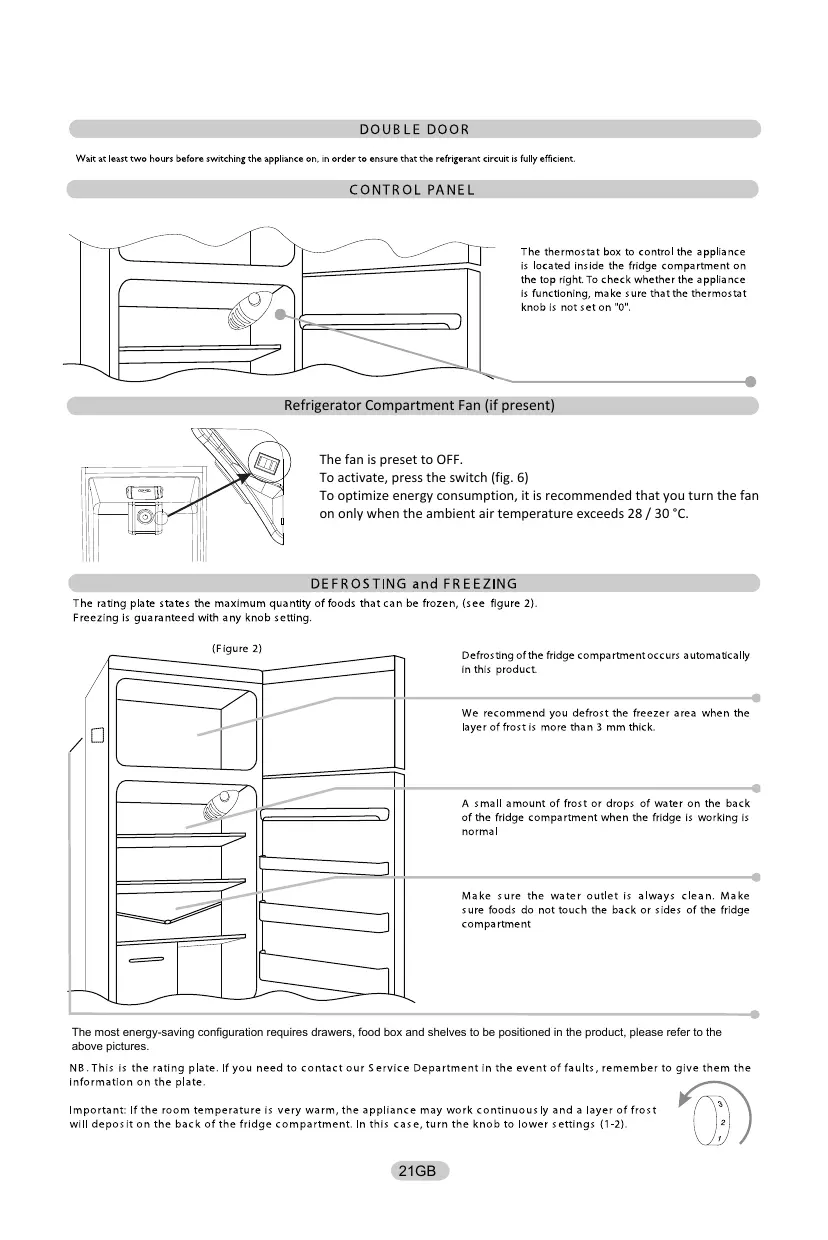
20GB Refrigerator Compartment Fan (if present)
The fan is preset to OFF. To activate, press the switch (fig. 6) To optimize energy consumption, it is recommended that you turn the fan on only when the ambient air temperature exceeds 28 / 30 °C.
The most energy-saving configuration requires drawers, food box and shelves to be positioned in the product, please refer to the above pictures.
21GB REVERSING THE OPENING OF THE DOORS In order to reverse the opening of the doors, follow the indications in relation to insert and hinge type your product is
Place or tilt the fridge at a 45° angle, since
Remove the bottom hinge by removing the Remove the middle screw and remove the it’s necessary to work on the bottom of the
then remove screws, the plug and washers, top door. appliance. the door.
Remove the plug on the left-hand side and insert it on the right hand-side of the door.
Unscrew the right hinge.
Before reassemble the hinge to the left side, reverse the direction of the hinge.
Reassemble the hinges and doors working from the bottom to the top, 1 , 2 , 3 .
Reassemble the cover .
22GB This symbol below indicates the location of the coldest area of the refrigerator. This area is bounded near the fan and above it by the icon or shelf positioned at the same level.
To maintain temperatures in this area, be careful not to move this shelf.
INSTALLING THE TEMPERATURE GAUGE To help you set up your fridge correctly, it features a temperature gauge that allows you to monitor the average temperature in the coldest area.WARNING: This ad is only intended for use with the refrigerator.
Be careful not to use it in another refrigerator (in fact the coldest area is not the same) or for another use.
Temperature control in the coldest area
Once the installation of the temperature gauge is complete, it is possible You can periodically check that the temperature of the coldest zone is correct. If necessary, adjust the thermostat accordingly. The internal temperature of the refrigerator is influenced by several factors such as: B. the ambient temperature in the room, the amount of food stored and the frequency with which the door is opened. Consider these factors when setting the temperature. Be careful to properly store food in the refrigerator and especially in the coldest area. Make sure the temperature display indicates "OK".
If “OK” does not appear, the temperature of the zone is too high. Set the thermostat to a higher position. Wait at least
12 hours before resetting the thermostat. After loading fresh food into the appliance or opening the door again (or for a long time), it is normal for the "OK" indicator not to appear on the temperature display.
23GB GUARANTEE Minimum guarantee is: 2 years for EU Countries, 3 years for Turkey, 1 year for UK, 1 year for Russia, 3 years for Sweden, 2 years for Serbia, 5 years for Norway, 1 year for Morocco, 6 months for Algeria, Tunisia no legal warranty required.
AVAILABILITY OF SPARE PARTS “Thermostats, temperature sensors, printed circuit boards and light sources are available for a minimum period of seven years after placing the last unit of the model on the market. Door handles, door hinges, trays and baskets for a minimum period of seven years and door gaskets for a minimum period of 10 year, after placing the last unit of the model on the market”. For further information about the product, please consult https:// eprel.ec.europa.eu/ or scan the QR on the energy label supplied with the appliance To contact the technical assistance, visit our website: https:// corporate.haier-europe.com/en/ Under the section “website”, choose the brand of your product and your country. You will be redirected to the specific website where you can find the telephone number and form to contact the technical assistance.
DØRHÆNGSLING I MODSAT SIDE Vrata ali police hladilnika
XF\Q\Q\ C`[LQ\^`F
[`QX_J[[Q\ [ L\Q\ QFCL XJFCF]QCF L Y]\¨[ XLCJ[.
[JQ QXYCL ]L Y]\ ]L^\ FQ XJ [QF`[J `L QF^[`L [^[ XJL ^`\CL C\Q^[`L.
®L`\Q\ X\]`[Q\ C[`QFC\ [ CL^\Q\ qFX`LQL CXLQL.
X\\Q\Q\ L`Q[Q\ FQ ]`FQF,JLQF XLC[\Q\ C[ `QFC\Q\, QL[Q\ [ LY[Q\,
^\] QFCL CL^\Q\ ]F^`LQL CXLQ LQL.
ManualGo.com