
BUDDY - Bluetooth audio accessory SUPERTOOTH - Free user manual and instructions
Find the device manual for free BUDDY SUPERTOOTH in PDF.



| Product type | Bluetooth Handsfree Kit |
| Brand | SUPERTOOTH |
| Model | BUDDY |
| Dimensions | 14.6 x 49 x 129 mm |
| Weight | 64 g |
| Power supply | Rechargeable Lithium Ion battery, charges via outlet or PC (USB cable) |
| Charging time | 3 hours |
| Talk time | Up to 20 hours |
| Standby time | Up to 1000 hours (40 days) |
| Bluetooth range | Up to 10 meters |
| Frequency | 2.4 GHz |
| Compatibility | Bluetooth phones with headset or handsfree profiles |
| Main features | Voice dialing, last number redial, call rejection, call waiting management, multi-point (2 simultaneous phones), pairing up to 8 phones, digital volume control, echo and noise reduction |
| Installation | Quick mounting via magnetic clip on sun visor |
| Maintenance and cleaning | Clean with a soft dry cloth, do not use chemical products |
| Safety | Do not expose to moisture or extreme temperatures; comply with local regulations on use while driving |
| Spare parts and repairability | USB charger and magnetic clip available; battery not replaceable |
| General information | Compliant with directive 1999/5/EC; recycling via selective collection |
Frequently Asked Questions - BUDDY SUPERTOOTH
User questions about BUDDY SUPERTOOTH
0 question about this device. Answer the ones you know or ask your own.
Ask a new question about this device
Download the instructions for your Bluetooth audio accessory in PDF format for free! Find your manual BUDDY - SUPERTOOTH and take your electronic device back in hand. On this page are published all the documents necessary for the use of your device. BUDDY by SUPERTOOTH.
USER MANUAL BUDDY SUPERTOOTH
Bluetooth Freihand-Kit
A. Product Description
SUPERTOOTH BUDDY is a Bluetooth® handsfree kit that supports headset and handsfree profile phones. It is designed for easy handsfree operation with superior performance.
Don't forget: Drive safely and within the law.
Check if the national or local legislation in force in your country does not limit the use of mobile phones while driving. It is up to the user of this product to respect the said legislation in the area where he/she lives.
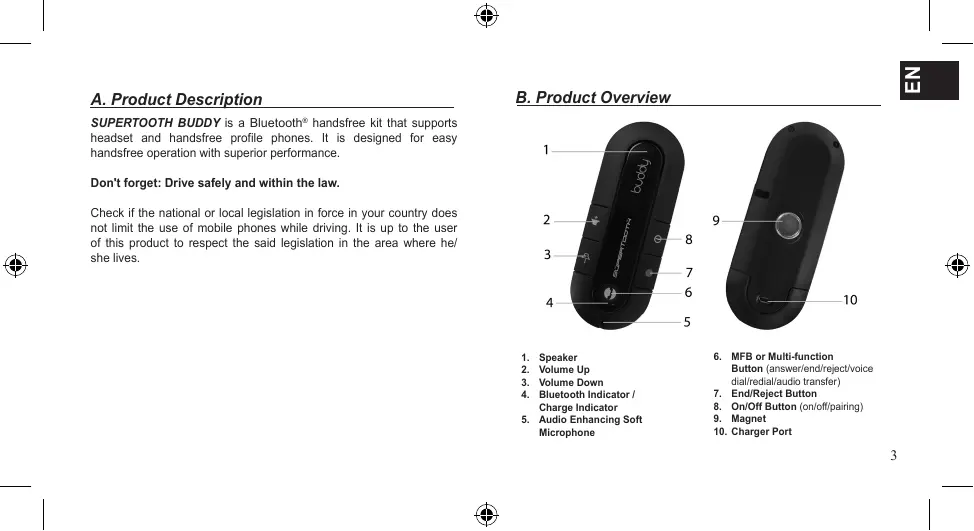
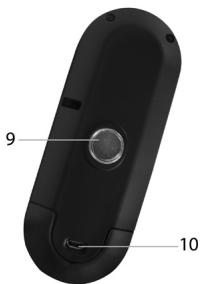
B. Product Overview
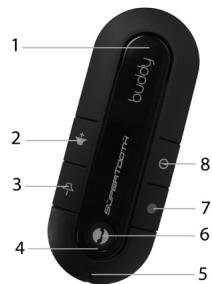
- Speaker
- Volume Up
- Volume Down
- Bluetooth Indicator / Charge Indicator
-
Audio Enhancing Soft Microphone
-
MFB or Multi-function Button (answer/end/reject/voice dial/redial/audio transfer)
- End/Reject Button
- On/Off Button (on/off/pairing)
- Magnet
- Charger Port

C. Charging
- Connect the charger's plug to the Charger Port (10) of the SUPERTOOTH BUDDY. Connect the charger to an external power source.
Charge Indicator (4) Status:
Steady Red:
Battery Low
Steady Orange:
Charging
Steady Green:
Battery Full
- When fully charged, disconnect the charger.
D. Power On/Off
Power On: Press the On/Off (8) button for 1 second, the Bluetooth Indicator (4) turns blinking blue. A beep will be heard.
Power Off: Press and hold the On/Off (8) button for 3 seconds, until the Bluetooth Indicator (4) turns red. A beep will be heard.
E. Pairing to your Bluetooth Mobile Phone
Pair the SUPERTOOTH BUDDY to your Bluetooth mobile phone to create the link or audio connection between the two. The pairing process is required only once for each phone.
Full Auto Pairing Procedure*:
IMPORTANT: Please check if your phone's Bluetooth is enabled and discoverable. Then place your phone and the handsfree kit close to each other.
-
From OFF, press and hold the On/Off (8) button of the handsfree kit until the Bluetooth Indicator (4) turns blinking red/blue. Then press the MFB (6) button to search your phone. Note: The handsfree kit will search only for 1 minute. If your phone is not found, press the MFB (6) button again.
-
When the handsfree kit finds the phone, accept any connection or pairing prompts on your phone. The handsfree kit is now paired and ready to use. Note: Older phones will ask for the password/pin code. Enter 0000 and press OK. The handsfree kit is now paired and ready to use.
-
Only for Bluetooth 2.1 phones


Normal Pairing Procedure:
- From OFF, press and hold the On/Off (8) button until the Bluetooth Indicator (4) turns blinking red/blue. The handsfree kit is now in pairing mode.
- While the handsfree kit is in pairing mode, access the Bluetooth menu of your phone. Turn on the Bluetooth function and execute a Bluetooth search. (See your phone's manual.)
- When the phone displays the list of Bluetooth devices, select ST BUDDY.
- If the phone asks for the password/pin code, enter 0000 and press OK.
- The handsfree kit is now ready to use.

F. Installation
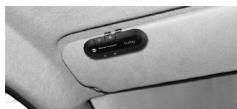
- Fix the metal clip of the SUPERTOOTH BUDDY on the sun visor.
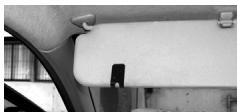
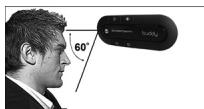
- Attach the magnetic (9) back of the SUPERTOOTH BUDDY to the fixed metal clip. The SUPERTOOTH BUDDY must be placed in such way that its microphone (5) is directed to the mouth of the user.

G. Basic Operations
IMPORTANT:
The handsfree kit needs to be 'paired' to your Bluetooth mobile phone, before you can use the following functions. See "Pairing to your Bluetooth Mobile Phone in Section E".
Make a Call (Normal Dial):
Dial the number on your phone. Audio will automatically be heard through the handsfree kit. During an ongoing call, the Bluetooth Indicator (4) will turn steady blue.
Note: With some phones, audio is always on the phone during an outgoing call. You will need to press the MFB (6) button for 1 second to transfer the audio to your handsfree kit.
Answer a Call:
To answer a call, simply press the MFB (6) button for 1 second, the Bluetooth Indicator (4) will turn steady blue.
End a Call:
Press the MFB (6) button or the End/Reject (7) button for 1 second to end the call.

Voice Dial:
Note: Before using this feature, make sure that the voice dialing function of your phone is activated. Some phones need to have at least one voice tag recorded in the phone's memory, not on the SIM card! (Kindly refer to your phone's manual.)
- Press the MFB (6) button for 1 second.
- A voice dial beep will be heard on the handsfree kit prompting you to say the voice tag of the contact to call and the Bluetooth Indicator (4) will turn steady blue.
- Say the voice tag exactly as how you recorded it.
- The voice tag will be played back to you and then the phone will dial the number automatically.
Redial (For Handsfree Profile Phones only):
Press the MFB (6) button for 3 seconds. The last dialed number will be redialed.
Reject a Call (For Handsfree Profile Phones only):
During the ring tone, press and hold the MFB (6) button for 3 seconds or short press the End/Reject (7) button. The incoming call will be rejected.


Volume Setting:
Increase or decrease the volume by pressing the Volume Up (2) or Volume Down (3) button. Press repeatedly until the desired level is reached. A beep will be heard as lowest and highest levels are reached.
To transfer Audio from the Handsfree kit to the Phone:
Simply turn off the handsfree kit by pressing the On/Off (8) button for 3 seconds and the audio will automatically be transferred to the phone.
To Transfer Audio from the Phone to the Handsfree kit:
Press the MFB (6) for 1 second and the audio will automatically be transferred to the handsfree kit.
Note: For some phones, you may need to accept a connection prompt on the phone before automatic transfer takes place.
H. Advanced Functions
a. Call waiting
Important: Before using this feature, make sure that your phone and the phone network both support call waiting.
If there's a second incoming call, a beep will be heard from the SUPERTOOTH BUDDY.

To end the current call and accept the second incoming call
Short press the MFB (6) button will end the current call and accept the second call. The audio for the second call will automatically be heard through the handsfree kit.
Note: Call waiting is not available if two phones are connected (MultiPoint).
b. Multi-Point Function
The SUPERTOOTH BUDDY can simultaneously connect to 2 Bluetooth devices. The SUPERTOOTH BUDDY is active on both mobile phones. User actions (voice dial, radial) will control the primary phone, but an incoming call on any of the two phones can be accepted or rejected from the SUPERTOOTH BUDDY.
Multi-Point Activation:
From pairing mode or standby mode, press and hold the Volume Up (2). A beep will be heard on kit.
Multi-Point Deactivation:
From pairing mode or standby mode, press and hold the Volume Down (3). A beep will be heard on kit.


Multi-Point Pairing Procedure:
- Turn off the handsfree kit by pressing and holding the On/Off (8) button until the LED flashes red.
- Pair the additional phone as explained in "Pairing to your Bluetooth Mobile Phone on section E". This phone will now be the primary phone.
- Connect the 1st phone paired manually or turn the kit Off then On to connect both phones automatically.
Using Multi-Point:
Refer to "BASIC OPERATION on section G".
Notes:
Voice dial and re-dial will be done using the primary phone only.
- You can accept or reject calls from any of the two phones.
When you already have an ongoing call on the 1st phone, if you receive a call on the 2nd phone, you will hear a special ringtone on the handsfree kit while the ongoing communication continues.
To end the 1st phone call and accept the 2nd phone call:
Short press the MFB (6) button will automatically end the 1st phone call and accept the 2nd phone call (audio will automatically be heard through the handfree kit).
Note: Call waiting is not available if two phones are connected (MultiPoint).
c. Switching Connections Between Paired Phones
The SUPERTOOTH BUDDY always maintains a maximum of 8 phones in its memory. An additional pairing will automatically delete the phone that has not been used for the longest time. This phone needs to be paired again before it can be used.
You can easily switch to any of the paired phones by:
- Connecting one of the 2 connected phones using the "Active devices" in the Bluetooth menu of that phone.
- Connecting the handsfree kit to the desired phone by using the "Paired devices" in the Bluetooth menu of that phone.
Note: Reconnection to a paired phone can also be done by pressing the MFB (6) button. However, the SUPERTOOTH BUDDY will attempt to connect to the last used phone only. Therefore, it is recommended to connect to another paired phone using the phone menu.

I. Special Features
a. Automatic Reconnection:
If the handsfree kit is left ON, it will automatically reconnect to your phone when you get back in your car.
Note: This automatic reconnection can take few seconds after getting back in range.
b. Reset Pairings:
During pairing mode, press and hold the End/Reject (7) button for 5 seconds. A beep will be heard on kit. Now all phones paired to handsfree kit are deleted.
c. Audio Enhancing Soft Microphone:
Specially designed to absorb noise and vibrations, this microphone will enhance the sound quality.
J. SUPERTOOTH BUDDY Specifications
Bluetooth Compliance: Bluetooth version 2.1
Supported Bluetooth Profiles: Supports headset and handsfree profiles
Operating Range: Up to 10 meters
Frequency: 2.4 GHz
Talk Time: Up to 20 hours
Stand-by time: Up to 1000 hours (40 days)
Charging Time: 3 hours
Battery Type: Rechargeable Lithium Ion
Special Features:
Full Duplex
Full DSP Echo Cancellation / Double Noise Canceller
Audio Enhancing Soft Microphone
Full Automatic Reconnection
Digital Volume Control
Call Waiting
Full Auto Pairing* / Normal Pairing
Voice Recognition
Last Call Redial
Reject Incoming Call
Dedicated power switch
- Can also be charged from a PC via USB Cable
- Compact Size
Multipoint:
Installation:
Dimensions:
Weight:
*Only for Bluetooth 2.1 phones
8 devices can be paired
Maximum 2 phones monitored
Quick magnet fixation on sun visor
14.6×49×129mm
64g


A.Description
C. Charger le Supertooth BUDDY
c. Microphone couple anti-echo:
J. SUPERTOOTH BUDDY Specifications
Protocole Bluetooth: Bluetooth version 2.1
Profiles Bluetooth supportés: Casque et mains-libres
Greatest care has been taken to provide accurate and complete information in this manual. The manufacturer is not liable for errors and missing information.
The manufacturer reserves the right to change and improve functions and specifications of the product and to make any changes or modifications to the transmission of part or all of this manual without consent of the manufacturer is prohibited. All rights reserved.
The Bluetooth® word mark and logos are registered trademarks owned by Bluetooth SIG, Inc. and any other trade names by Euro-CB is under license. Other trademarks and trade names are those of their respective owners.
Correct Disposal of This Product
(Waste Electrical & Electronic Equipment)

(Applicable in the European Union and other European countries with separate collection systems) This marking shown on the product or littermate, indicates that it should not be disposed with other household wastes at the end of its working life. To prevent possible harm to the environment or human health from uncontrolled waste disposal, please separate this from other types of wastes and recycle it responsibly to promote the sustainable reuse of material resources.
Household users should contact either the retailer where they purchased this product, or their local government office, for details of where and how they can take this item for environmentally safe recycling.
Business users should contact their supplier and check the terms and conditions of the purchase contract. This product should not be mixed with other commercial wastes for disposal.
This product has an embedded, non-replaceable battery, do not attempt to open the product or remove the battery as this may cause injury and damage the product. Please contact the local recycling facility for removal of the battery. The embedded, non-replaceable battery is designed to last the life time of the product.
(Equipment electrolyte et electronique usage)

Herby, EURO COMMUNICATION EQUIPMENTS, represented by Michel MARCHANT, CEO, declares that the SUPERTOOTH BUDDY MODEL BTBDY6, is in compliance with the essential requirements and other relevant provisions of Directive 1999/5/EC of the European Parliament and of the Council of 9 March 1999 on radio equipment and telecommunications terminal equipment and the mutual recognition of their conformity.
Français
Federal Communications Commission (FCC) Statement Industry Canada (IC) Statement
15.21
You are cautioned that changes or modifications not expressly approved by the part responsible for compliance could void the user's authority to operate the equipment.
15.105(b)
This equipment has been tested and found to comply with the limits for a Class B digital device, pursuant to part 15 of the FCC/IC rules. These limits are designed to provide reasonable protection against harmful interference in a residential installation. This equipment generates, uses and can radiate radio frequency energy and, if not installed and used in accordance with the instructions, may cause harmful interference to radio communications. However, there is no evidence that the use of this equipment will not occur in a particular installation. If this equipment does cause harmful interference to radio or television reception, which can be determined by turning the equipment off and on, the user is encouraged to try to correct the interference by one or more of the following measures:
-Reorient or relocate the receiving antenna.
-Increase the separation between the equipment and receiver.
-Connect the equipment into an outlet on a circuit different from that to which the receiver is connected.
-Consult the dealer or an experienced radio/TV technician for help.
Operation is subject to the following two conditions :
1)This device may not cause interference and
2)This device must accept any interference, including interference that may cause undesired operation of the device.
FCC/IC RF Radiation Exposure Statement :
This equipment complies with FCC/CIC radiation exposure limits set forth for an uncontrolled environment. End users must follow the specific operating instructions for satisfying RF exposure compliance. This transmitter must not be co-located or operating in conjunction with any other antenna or transmitter.


PAIRINGCODE:0000
We did our best to make this user guide as complete as possible. Inspite of all our efforts, if you have any problem or question regarding the SUPERTOOTH BUDDY, please see
http://www.supertooth.net
select SUPERTOOTH BUDDY and go to help service.
Feel free to contact us at service@supertooth.net. We will be glad to help you