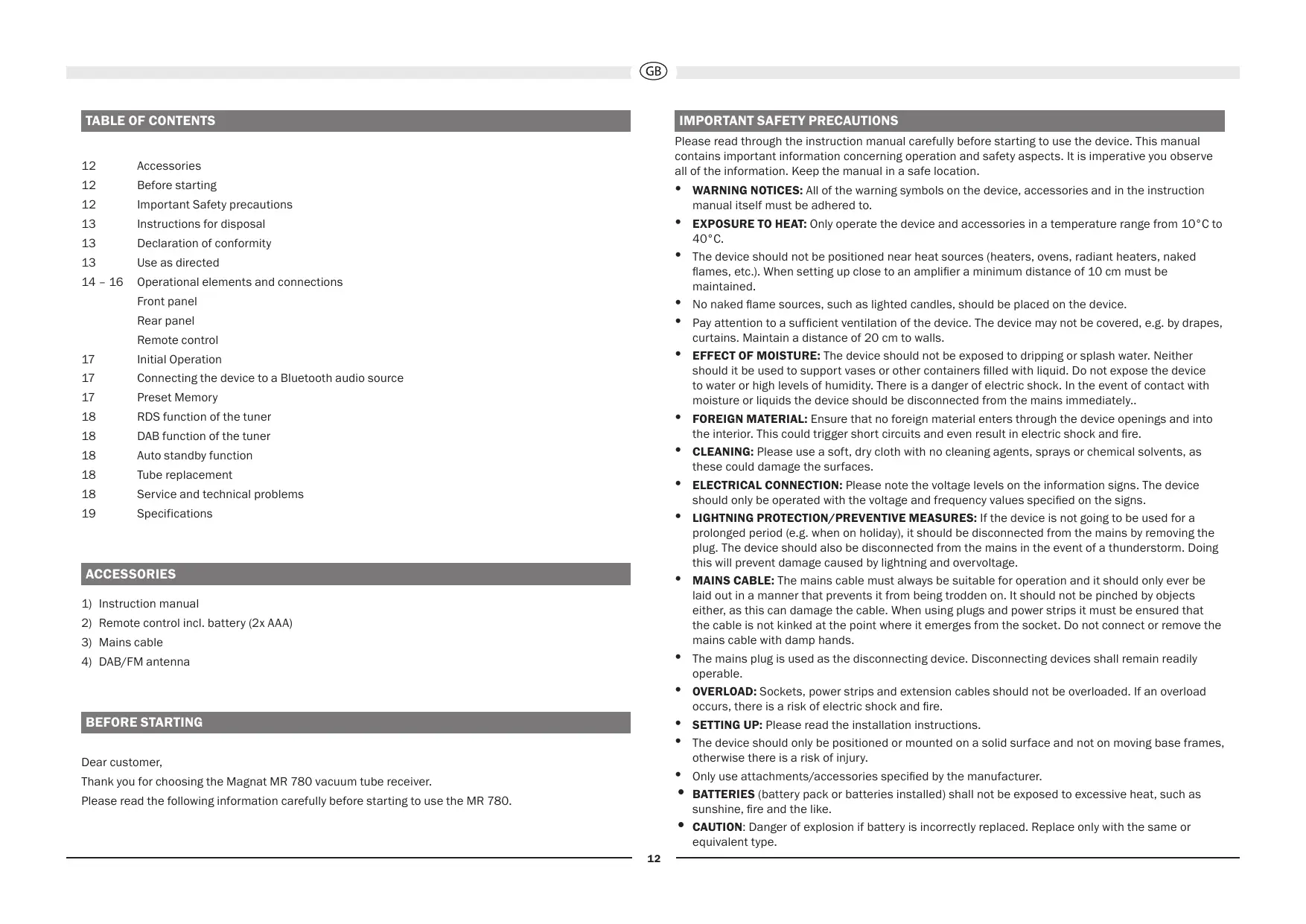
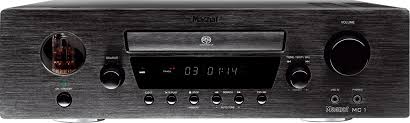
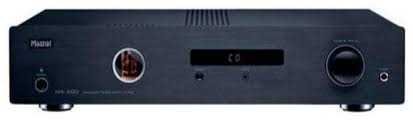
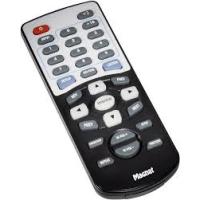
USER MANUAL MR 780 MAGNAT
Important notes for installation / warranty card
The Bluetooth® word mark and logos are registered trademarks owned by Bluetooth SIG, Inc. and any use of such marks by Magnat Audio-Produkte GmbH is under license. Other trademarks and trade names are those of their respective owners.
Qualcomm aptX

Qualcomm is a trademark of Qualcomm Incorporated, registered in the United States and other countries, used with permission. aptX is a trademark of Qualcomm Technologies International, Ltd., registered in the United States and other countries, used with permission. aptX is a product of Qualcomm Technologies International, Ltd.

At the end of the product's useful life, please dispose of it at appropriate collection points provided in your country.
DIGITAL OPT 1/2, DIGITAL COAX 1/2:
13, 14 DIGITAL IN OPT1/2, COAX 1/2
12 Accessories
12 Before starting
12 Important Safety precautions
13 Instructions for disposal
13 Declaration of conformity
13 Use as directed
14-16 Operational elements and connections
Front panel
Rear panel
Remote control
17 Initial Operation
17 Connecting the device to a Bluetooth audio source
17 Preset Memory
18 RDS function of the tuner
18 DAB function of the tuner
18 Auto standby function
18 Tube replacement
18 Service and technical problems
19 Specifications
ACCESSORIES
1) Instruction manual
2) Remote control incl. battery (2x AAA)
3) Mains cable
4) DAB/FM antenna
BEFORE STARTING
Dear customer,
Thank you for choosing the Magnat MR 780 vacuum tube receiver.
Please read the following information carefully before starting to use the MR 780.
IMPORTANT SAFETY PRECAUTIONS
Please read through the instruction manual carefully before starting to use the device. This manual contains important information concerning operation and safety aspects. It is imperative you observe all of the information. Keep the manual in a safe location.
- WARNING NOTICEs: All of the warning symbols on the device, accessories and in the instruction manual itself must be adhered to.
- EXPOSURE TO HEAT: Only operate the device and accessories in a temperature range from 10^ to 40^ .
- The device should not be positioned near heat sources (heaters, ovens, radiant heaters, naked flames, etc.). When setting up close to an amplifier a minimum distance of 10cm must be maintained.
- No naked flame sources, such as lighted candles, should be placed on the device.
- Pay attention to a sufficient ventilation of the device. The device may not be covered, e.g. by drapes, curtains. Maintain a distance of 20~cm to walls.
- EFFECT OF MOISTURE: The device should not be exposed to dripping or splash water. Neither should it be used to support vases or other containers filled with liquid. Do not expose the device to water or high levels of humidity. There is a danger of electric shock. In the event of contact with moisture or liquids the device should be disconnected from the mains immediately..
- FOREIGN MATERIAL: Ensure that no foreign material enters through the device openings and into the interior. This could trigger short circuits and even result in electric shock and fire.
- CLEANING: Please use a soft, dry cloth with no cleaning agents, sprays or chemical solvents, as these could damage the surfaces.
- ELECTRICAL CONNECTION: Please note the voltage levels on the information signs. The device should only be operated with the voltage and frequency values specified on the signs.
- LIGHTNING PROTECTION/PREVENTIVE MEASURES: If the device is not going to be used for a prolonged period (e.g. when on holiday), it should be disconnected from the mains by removing the plug. The device should also be disconnected from the mains in the event of a thunderstorm. Doing this will prevent damage caused by lightning and overvoltage.
- MAINS CABLE: The mains cable must always be suitable for operation and it should only ever be laid out in a manner that prevents it from being trodden on. It should not be pinched by objects either, as this can damage the cable. When using plugs and power strips it must be ensured that the cable is not kinked at the point where it emerges from the socket. Do not connect or remove the mains cable with damp hands.
- The mains plug is used as the disconnecting device. Disconnecting devices shall remain readily operable.
- OVERLOAD: Sockets, power strips and extension cables should not be overloaded. If an overload occurs, there is a risk of electric shock and fire.
- SETTING UP: Please read the installation instructions.
- The device should only be positioned or mounted on a solid surface and not on moving base frames, otherwise there is a risk of injury.
- Only use attachments/accessories specified by the manufacturer.
- BATTERIES (battery pack or batteries installed) shall not be exposed to excessive heat, such as sunshine, fire and the like.
- CAUTION: Danger of explosion if battery is incorrectly replaced. Replace only with the same or equivalent type.
RISK OF SWALLOWING BATTERIES!
- The product/remote control may contain a coin/buTton type battery, which can be swallowed. Keep the battery out of reach of children at all times! If swallowed, the battery can cause serious injury or death. Severe internal burns can occur within two hours of ingestion.
- If you suspect that a battery has been swallowed or placed inside any part of the body, seek immediate medical attention.
- When you change the batteries, always keep all new and used batteries out of reach of children. Ensure that the battery compartment is completely secure after you replace the battery.
- If the battery compartment cannot be completely secured, discontinue use of the product. Keep out of reach of children and contact the manufacturer.
DAMAGE THAT MUST BE RECTIFIED BY A SPECIALIST:
If any of the following damage occurs, disconnect the device from the mains immediately and contact a specialist to conduct the repair work:
- The device should not continue to be operated if there is visible damage to the mains cable. A damaged cable should not be repaired, but must be replaced.
- Damage to the mains socket at the device.
- If moisture or water has entered the device or foreign objects have fallen into the device.
- If the device has fallen and the housing is damaged.
- If the device does not work properly, even though all of the information in the instruction manual has been observed.
Only those subsequent alterations approved by the manufacturer may be conducted.
Only original spare parts should be used for repair.
After conducting any repairs the safety of device should be checked to ensure it is functioning correctly and safely.
Repairs must always be conducted by qualified specialists, as you might otherwise be exposed to dangerous high voltage levels or other hazards.

This symbol warns the user that high voltage is used within the device which can result in electric shock.

This symbol makes the user aware that there are important notes in the enclosed instruction manual which must be observed.

WARNING:DO NOT OPEN! RISK OF ELECTRIC SHOCK! To reduce the risk of fire or electric shock, do not expose this unit to rain or moisture.

This is Class II apparatus with double insulation, and no protective earth provided.
INSTRUCTIONS FOR DISPOSAL
In accordance with European Directive 2012/19/EU all electrical and electronic appliances must be disposed of separately via local collection points. Please observe the local regulations and do not dispose of your old appliances with normal household waste.
Battery disposal
Old batteries are hazardous waste and must be disposed of in accordance with current regulations.

Hereby, Magnat Audio-Produkte GmbH declares that the device Magnat MR 780 is in compliance with the essential requirements and other relevant provisions of directive 2014/53/EU. The Declaration of Conformity can be found at www.mac-audio.de in the download area of the device.
USE AS DIRECTED
This device is designed for indoor use only.
OPERATIONAL ELEMENTS AND CONNECTIONS - FRONT PANEL
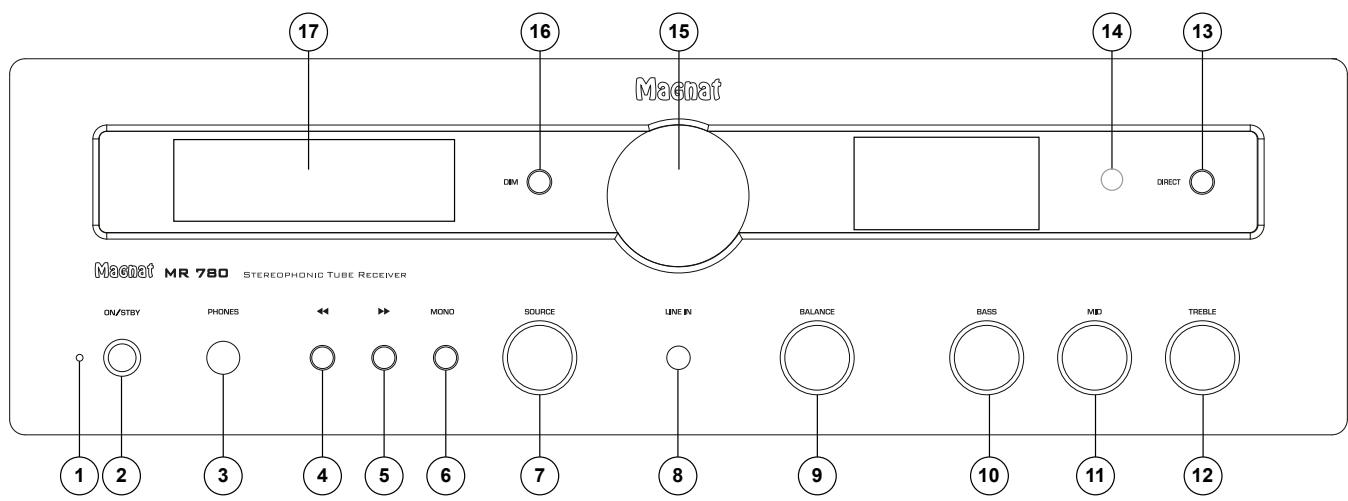
1 LED STATUS INDICATION
This illuminated display indicates the MR 780's 2 possible states:
- LED is illuminated green: The MR 780 is switched on. The device is ready for use.
- LED is illuminated red: The MR 780 is in the standby mode.
2 ON/STBY
Switches the device on when it is in the standby mode. If the LED does not illuminate, actuate the power switch located on the rear of the device. Conversely the device can be switched from power operation to the standby mode.
3 HEADPHONES
6.3 mm stereo output jack for headphones. The speakers are deactivated when this jack is used. Set the volume to a low level before connecting headphones.
4.5 ,
FM mode:
DAB mode:
- Selects the next or previous station in the DAB band.
6 MONO (IN FM MODE ONLY)
Switches between FM-Stereo and FM-Mono for FM stations.
In stereo mode, the system will automatically switch to mono reception when the signal is weak in order to improve signal-to-noise ratios.
Switches between the different audio sources:
- PHONO: Record players with a magnet system (MM).
- CD: CD player.
DVD: DVD/BD player
- AUX 1/2: Other audio devices.
- TAPE: Tape or cassette recorder.
LINE IN: Front input for portable devices
- FM INPUT: Selection of the FM tuner
-
DAB INPUT: Selection of the DAB/DAB+ tuner
-
DIGITAL OPT 1/2, DIGITAL COAX 1/2: Connecting to digital audio sources.
- USB: Connecting to a computer with a USB port
- BT: Connection to a Bluetooth device
8 LINE IN
3.5 mm stereo input jack for an auxiliary audio device (e.g. MP3 player, etc.).
9 BALANCE
For adjusting the stereo balance between the speakers to the right or to the left.
10, 11, 12 EQUALISATION: BASS / MID / TREBLE
The bass, mid-range and treble reproduction can be set individually with these controls.
13 DIRECT
The device is switched to the linear mode.
The TREBLE, MID and BASS levels cannot be adjusted in this mode. DIRECT ON appears in the display.
14 SENSOR FOR THE REMOTE CONTROL
Please aim at this sensor when using the remote control.
15 VOLUME
For adjusting the overall volume of the music.
16 DIM
This button can be used to adjust the brightness of the display (3 levels).
17 DISPLAY
The following information is indicated in the display:
Heating phase of the tube.
This lasts for around 30 seconds after the device has been switched on.
- Selected audio input
Volume information
- Station and reception information in FM and DAB mode. See also the INFO button on the remote control in this regard.
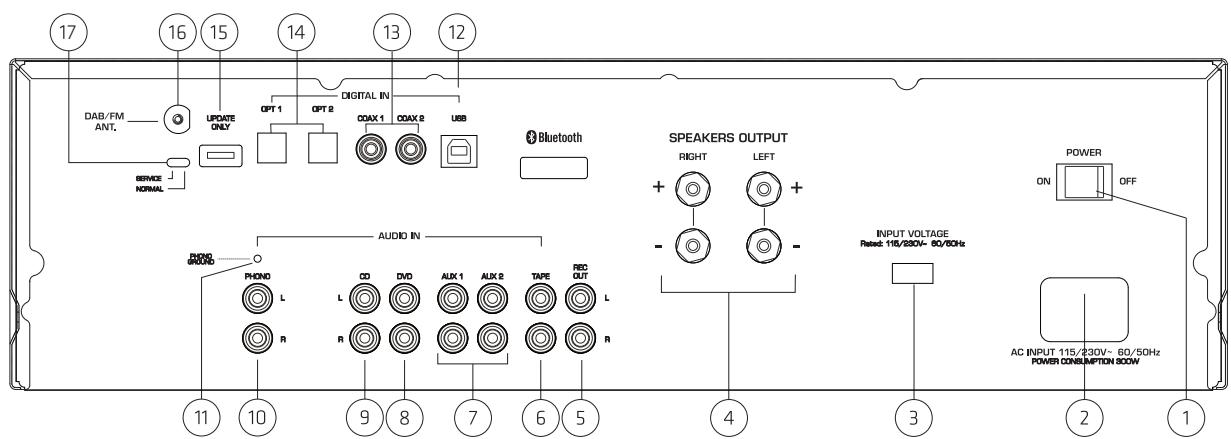
OPERATIONAL ELEMENTS AND CONNECTIONS - REAR PANEL
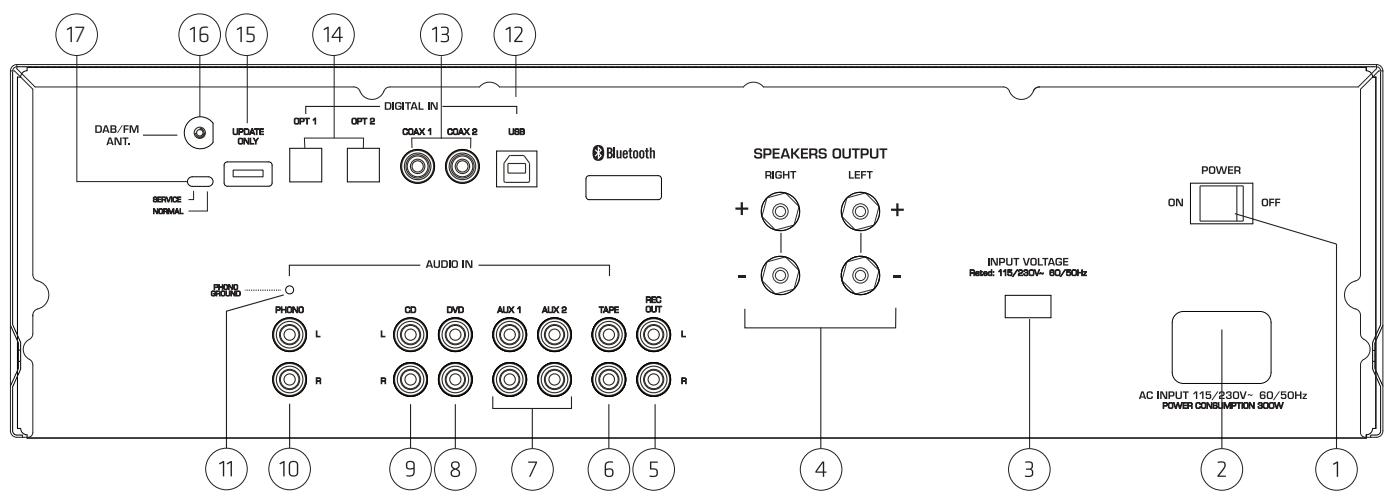
1 POWER SWITCH
Switches the device on and sets it in the standby mode. If the switch is set to the "OFF" position, the device is disconnected from the mains supply.
2 MAINS CONNECTION
For connecting the supplied mains cable. The safety fuse should only be changed by qualified service personnel.
3 115/230V(VOLTAGE SELECTOR)
The voltage selector has been set at the factory to 230V for operation in Europe.
Warning: Connecting the device to a 230 V mains outlet while the voltage selector is set to 115 V will lead to immediate destruction of the amplifier!
4 SPEAKER TERMINALS
For the connection of stereo speakers with an impedance rating of 4-8 ohms (the correct polarity must be taken into account). (See also INITIAL OPERATION).
ANALOGUE RCA CONNECTIONS (5-11)
For connecting analogue audio sources. Please observe the coloured marking of the sockets and connectors. Red is always the right channel.
5RECOUT
For connecting devices for analogue sound recording (e.g. tape recorder). The signal for the selected audio source with fixed level applies for this output, i.e. it is independent of the position of the volume knob.
For the connection of a cassette deck or tape recorder.
Connecting other audio sources (e.g. MP3 or Minidisc player).
Connecting a DVD or Bluray player.
Connection of a CD player.
Connection of a record player with a magnet system (MM) or MC system with high output level (high output MC).
11 PHONO EARTH CONNECTION
Connection of the phono cable's earth wire in order to prevent humming.
12 USB
Connect the active speaker to the USB port on your computer by using a USB cable (type A to type B) When the driver has been installed on your computer, the MR 780 can be selected as a device for audio playback under the operating system settings. The drivers for Windows can be downloaded from the MR 780's download section at http://www.magnat.de.
13.14 DIGITAL IN OPT1/2, COAX 1/2
Connect the MR 780 to the digital output on your CD player/computer/games console/network player, etc. by using an optical or coaxial digital audio cable.
15 UPDATE
This connection is intended exclusively for system updates.
CAUTION: Switch (17) must always be in the NORMAL position during operation!
16 DAB/FM ANTENNA CONNECTION
For connecting the supplied DAB/FM antenna or a house antenna.
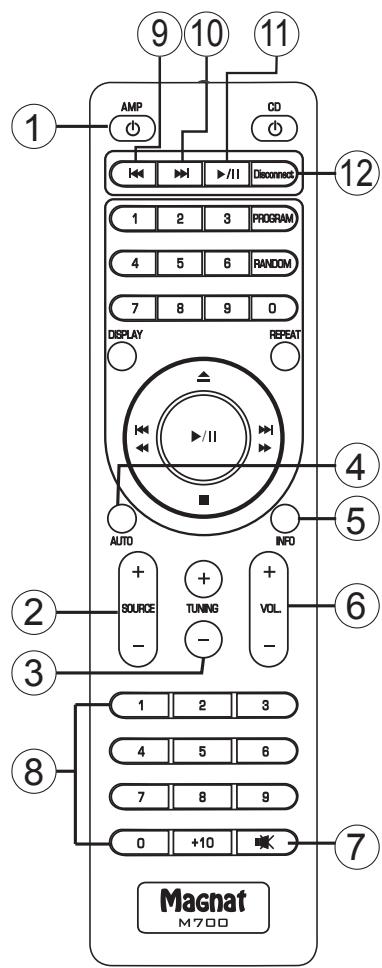
OPERATIONAL ELEMENTS AND CONNECTIONS - REMOTE CONTROL
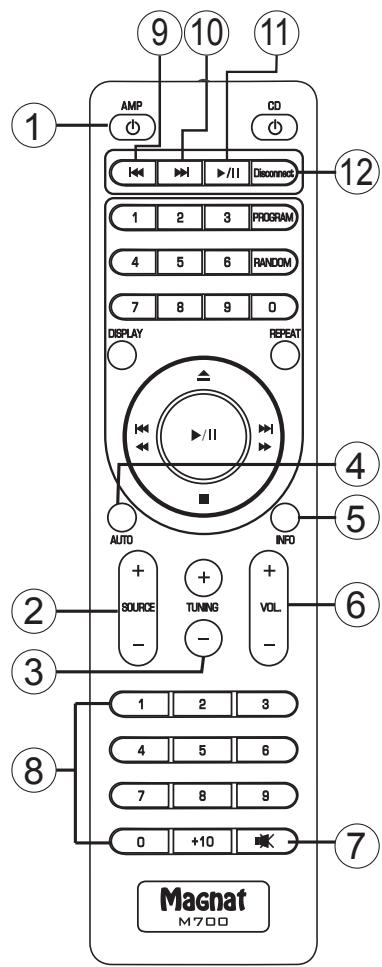
- Before using the remote control the supplied batteries must be inserted into the battery compartment located at the rear of the remote control.
- If the batteries have run out after prolonged use, please replace them (type AAA).
- To prevent causing damage to the remote control please remove the batteries if the device is not going to be used for a prolonged period.
1 AMP
Switches the device on when it is in the standby mode. If the LED does not illuminate, actuate the power switch located on the rear of the device. Conversely the device can be switched from power operation to the standby mode.
Switches between the different audio sources: (see also FRONT PANEL, Pos. 7). The active input is indicated in the display..
3 TUNING
FM mode:
- Brief press: Changes the receiving frequency in 50kHz increments (FM) (manual station search).
- Press and hold: Searches for the next station (automatic station search).
DAB mode:
- Selects the next or previous station in the DAB band.
4 AUTO (DAB MODE)
This function scans the DAB frequency range (band III) for stations. These can then be accesses via the TUNING buttons.
5 INFO
FM mode:
Retrieving RDS information (if supported by the station).
Further details about the RDS station information can be found in the "RDS functions of the tuner" section.
DAB mode:
Retrieving DAB station information (if supported by the station).
Further details about the DAB station information can be found in the "DAB functions of the tuner" section.
USB/Bluetooth mode:
The display shows the device ID of the paired device, the data rate and the ID3 tag information of the current title.
Pressing this button displays the individual ID3 tag information items in the following order:
Title - performer - album - no display
The display shows the data rate of the current title for around 5 seconds.
6 VOLUME
Increases () or decreases () the volume.
7 MUTE
Switches the sound on and off.
Pressing this once starts the track currently being played on a Bluetooth/USB source device from the beginning. Repeatedly pressing the button allows you to skip to previous tracks.
10 SKIP TRACK FORWARDS (USB/Bluetooth OPERATION)
Pressing this once starts the track currently being played on a Bluetooth/USB source device from the beginning. Repeatedly pressing the button allows you to skip to subsequent tracks.
11 PLAY/PAUSE (USB/BLUETOOTH OPERATION)
Pauses the current track on a Bluetooth/USB device or resumes playback.
Closes an existing Bluetooth connection and starts the pairing mode
The non-numbered buttons are reserved for operating the Magnat MCD 750 and have no function for the MR 780.
INITIAL OPERATION
- Place the MR 780 on an even surface. Observe the relevant clearance gaps as specified under "Important safety instructions".
IMPORTANT: Do not place any objects on top of the device (magazines, CD/record cases, etc.). The ventilation slots located on top of the device must be unobstructed at all times!
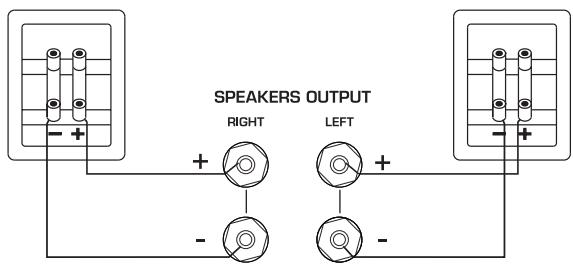
The stereo speakers (impedance of 4 to 8 ohms) are connected to the rear as follows:
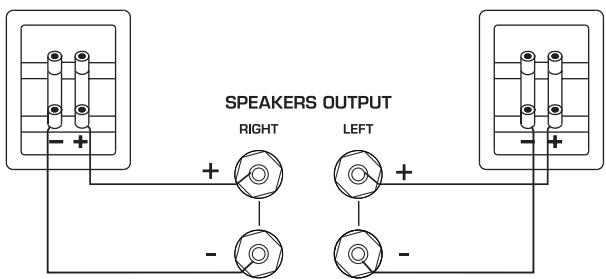
Only use high-quality audio speaker cables with a conductor cross section of min. 1.5 - 2.5mm^2 . Strip approx. 10mm from the cables and twist the ends. Loosen the terminal screws one after the other and insert the stripped ends into the holes. Re-tighten the terminal screws. Make sure you pay attention to the correct polarity.
You can also use prefabricated cables with 4mm banana plugs or forked fittings.
Also observe the operating instructions for the speakers you are using.
- Connect your audio sources.
- Connect the DAB/FM antenna to the antenna connection point at the rear of the device. For later operation, the position of the antenna should then be determined according to where the best reception is. The end of antenna should then be secured in the appropriate position, e.g. using a drawing pin.
Reception can be improved by a suitable indoor or outdoor household antenna if the reception is not so good.
- Connect the supplied mains cable to the rear and then insert the other end into a 230V socket.
- Actuate the on/off switch on the rear side, the device is now in the standby mode.
- Now switch on the device using the remote control or with the ON/STBY key on the front.
- When the tube has heated up the device is ready for use.
- Select your desired audio source using the input selector switch.
CONNECTING THE DEVICE TO A BLUETOOTH AUDIO SOURCE
Select Bluetooth input. If you have previously connected a Bluetooth device, the MR 780 will automatically attempt to re-establish a connection with this device. If this is the case, you may be required to manually reconfirm the connection on the source device.
If a connection has not already been made or the connection cannot be re-established, the MR 780 will automatically activate the ,pairing mode'. „BT" will flash on the display.
Now activate the Bluetooth mode on your source device. The MR 780 will appear in the list of Bluetooth devices as „MR 780“. If it is not displayed in the list, set your source device to search for Bluetooth devices manually and make sure that the MR 780 has been switched to the pairing mode.
Depending on the source device, you may be asked whether the password is to be accepted during the pairing procedure. You can confirm this by simply pressing "Accept". If you are still asked for a password, use the default passwords "0000" or "1234". If you are asked if you want to establish a connection after pairing, please select "Yes". When the device has been paired and connected successfully the "BT" indicator will illuminate continuously.
The MR 780 supports the „Qualcomm® aptX™“ high quality audio transmission standard. If your source device also supports this standard, „Qualcomm® aptX™“ will be selected automatically as the transfer mode when establishing a Bluetooth connection.
PRESET MEMORY
The device is equipped with two independent PRESET memories for FM and DAB stations. Each memory can store up to 40 stations.
Storing stations:
Set the desired DAB or FM stations using the TUNING buttons on the unit or via the remote control.
- Select the desired storage location by holding down the corresponding key on the numeric keypad.
- In the case of two-digit storage location numbers (10 - 40), the +10 key first has to be pressed for a longer time and the desired digits then entered.
- Successful storage is confirmed on the display with the appearance of STORED PRESET. In the first line, the storage location number is played permanently before the station frequency.
Select a station from the list of stations:
Select the desired storage location via the numerical keyboard (by pressing briefly).
RDS (RADIO DATA SYSTEM)-FUNCTION OF THE TUNER (FM ONLY)
RDS is a system which provides information about FM stations that is broadcast together with the station's signal. The MT 520 can present this information (about the station, broadcast, etc.) in the display.
The RDS information can be retrieved by repeatedly pressing the INFO button (remote control) in the following order:
- PS (Program Service Name): Displays the name of the programme.
- RT (Radio Text): Shows station information and messages.
- PTY (Program Type): Displays the type of programme.
Time/Date
If one of these functions is not supported despite reception of an RDS signal, N / A^u will appear in the display.
DAB FUNCTIONS OF THE TUNERS (DAB ONLY)
The DAB transmission system provides further data and information that can be accessed via the INFO button (remote control) in the following order:
Station name
- DLS (Dynamic Label Segment): Shows station information and messages (e.g. title and artist of the current song, news messages, other information about the current programme or station)
Programme type (e.g. pop, news, classical)
DAB multiplex number and frequency of the current station
Time/Date
- Bit rate of the current audio signal
DAB multiplex name
AUTO STANDBY FUNCTION
The unit has an auto standby function that automatically switches the device to standby mode around 3 1/2 hours after the last time it was operated (via the controls on the unit or via the remote control). This function implements an EU energy-saving regulation (1275/2008 EC), reducing power consumption if the device is accidentally left turned on after use.
This function can be deactivated as follows:
Press the DIM button on the device for around 5 seconds. APO MODE OFF appears in the display. Pressing the button again for around 5 seconds activates the function again. APO MODE ON then appears in the display.
TUBE REPLACEMENT
The device has a high-quality preamplifier stage fitted with two tubes. The tubes have a very long service life when used under normal operating conditions (min. 20,000-50,000 hours). If it is necessary to replace the tubes, please refer to a specialist dealer.
SERVICE AND TECHNICAL PROBLEMS
If you should encounter any technical problems, please contact your specialist dealer or Magnat Audio-Produkte GmbH, Tel.: 02234807-0.
SPECIFICATIONS
| FM Tuner | Electricity consumption: | Max. 300 W Standby <0.5 W |
| Frequency range: | FM: 87.5 - 108 MHz DAB/DAB+: 174.928 - 239.200 MHz (Band III) | |
| Sensitivity | FM: -108 dBm DAB/DAB+: -100 dBm | Fitted with:
Phono Preamplifier: | 2 x ECC 81 / 12AT7 |
| Amplifier | Dimensions (wхxhd):
Main device: | 433 x 132 x 317 mm |
| Power output: | Main device incl. operational elements/connecting terminals: | 433 x 132 x 360 mm |
| Rated power | 20 Hz - 20 kHz, THD < 1.0%, 4 ohm | 2 x 100 W | | 45 x 175 x 20 mm |
| 20 Hz - 20 kHz, THD < 1.0%, 8 ohm | 2 x 75 W | |
| Peak power: | 1 kHz, 4 ohm | 2 x 180 W | |
| Frequency response: | Weight: | 8.9 kg |
| CD/Tuner/Aux/Line/Tape | 6 Hz - 90 kHz (-3 dB) | | |
| 20 Hz - 20 kHz (+/- 0,3 dB) | Subject to technical change. | |
| Phono | 20 Hz - 20 kHz (+/- 0,8 dB) | | |
| Subsonic filter: | 16 Hz, 18 dB/octave | For further information please visit our website: http://www.magnat.de. |
| Signal to noise ratio: | | |
| CD/Tuner/Aux/Line/Tape | 104 dB | | |
| Phono | 82 dB | | |
| Input sensitivity/impedance: | | |
| CD/Tuner/Aux/Line/Tape | 470 mV / 100 kohm | | |
| Phono MM | 5 mV / 47 kohm | | |
| Digital inputs | 1x USB 2.0, type B connector | | |
| 2x optical (Toslink™) | | |
| 2x coaxial (cinch) | | |
| Supported sampling frequencies: | 44.1/48/88.2/96/176.4/192kHz | | |
| Supported bit depths: | 16/24bits | | |
| Bluetooth® input | Bluetooth® 4.0 / Qualcomm® aptX™ | | |
| Operating frequency: | 2402 - 2480 MHz | | |
| Maximum emitted power according to EN 62479: | 1.77 dBm | | |
SOMMAIRE
RISQUE D'INGESTION DES PILES!
INSTRUCTIONS POUR LA MISE AU REBUT
7 SOURCE (SELECTIONUR D'ENTREE)
REPLACEMENT DES TUBES
13, 14 DIGITAL IN OPT1/2, COAX 1/2
45 HAdExjaaeeHcnoB3OBaHne
46-48 ΘeMeHtby npaBHeHn npaBeMbI
IpeaHnaHeB
3aHnra CToPOHa
IyntdNCTaHcHOnHO ynpabEHH
49 BkIIOUeHne
49 CoeAnHeHne yCtpoiCTBa c aydNoIcTouHnKOM Bluetooth
49 3aONMHaIOOee yCTpoNCTBO dAЯ CTaHcN
50 RDS yHKuIN TIOhepa
50 DAByHKcUN TIOhepa
50 ΦyHKUABTOMaTHueCKOTo OXnDaHn
50 3aMeHa aamn
50 CepBnC nTexHnueckne npo6Aembl
51 TexHnueckne daHHbIe
PPIHADAEKHOCTN
1)PyKOBoDCTBO nO 3KcPnAtaaun
2) Akkymnyatopnbie 6aTapen IyIyIbTa dNCTaHOnHOHor ynpabHeHn (2x AAA)
3) ceteBOMKa6eAe
4) AHTeHHa DAB/FM
BKAIOUOUEHEM
Ybaxaemblnokynatae!
CtapbIe 6aTapeiKNI OTHOCYTCK OOCbIM OTXODAM IN POAnExkAT YTNn3aun COIaCHO DeIcTByOuMnpedncaHnM.
DEKLAAPAUZCOOTBETCTBNA

1 CDA INHANKAUIN COCTOHN
3TOT INHdNkATOp NOKa3bIbaeT 2 COCTOHHNIA, B KOTOpbl MX MoKet HAXoDnTbCBA BKAIoueHHbl MR 780:
CINADorpnt3eAenbIMZBETOM:MR780BkLIOueH. YcTpoiCTBO ROTOBK3KcIyatauHn.
- CnA ropnt KpaChbIM UBeTom: MR 780 HaxoDITcB VpeKIme OxndaHna.
2 ON/STBY
Bkluoayet yctpoiCTBO,ecn OHO haoaOnTCB pejHMe oXuHaHn. Ecun CBeTOAnOHe rOpNT, HJxHO BkUOHTb CeTeBOB bIKUoAteIb Ha 3aDHe cTOpOE yctpoiCTBa. Hao6opot, yctpoiCTBO MOxHO nepeKluoHTb n3 pejHMa Power B pexm OxuaHn.
3 HAYUHNIKU
BbIXoIaKoTHrO 6,3 MM Ctepeo OT HayuHKnOB. Pn IcNoA3ObaHnn HayuHKnOB dHaAMKn CaMOCToTeNbHO OKAIOUaOTcE. EcIb Bbl IOkAIOuaTe HayuHKn, yctAHOBnte rPOMKoCTb Ha Hn3Kn ypOBeHb.
4.5 ,
Pekum FM:
Pexum DAB:
- BbIbIpaET cIeAduOuIyIu IaI npEdbIaUyIO CTAHUIOB Dnana3oHe DAB.
6STEREO/MONO (TOΛbKO B PEXHME FM)
IpeekluoayctpnpnpemeYKBmexdy pexkmaFM-CTepeo FM-MHO. Ipn cIa6bOMcHnAe npema yctpoictBO aBTOMATueckn peekluoayet CteopejxIM B MOhopexkM,HTO6byyUyUHTbOTHOWeHne CnHa/7ym.
7 SOURCE (IePEKIAOUATEb BXOAHbIX HCTOUYIKOB)
ПразиЗВОДИТпелеклIoЧене мени ра3ныМуадиСТОУнКAMИ:
PHONO:ПоигрьВаTeьпаactнOK МагнHTHСИCTeMoI (MM).
- CD:ПрогрьВатael CD.
DVD:ПоигрьВаTeMbDVD.
AUX1/2:Eune oDHN ayDnO npn6op.
- TAPE: ΛεHTOчьн ИΛΝΚΑССЕТьМΑΓΗΝΤΟΦΗ.
LINE IN: IpeaHn BxOa AAn IpeHoCbIX yCTpoiCTB.
FM INPUT: Bb6op FM TIOhepa.
- DAB INPUT: BbI6Op DAB/DAB+ TIOhepa.
- DIGITAL OPT 1/2, DIGITAL COAX 1/2:
IopKluoyeHne KUΦpOBbIM aydnoCTOHHkAm
USB:ПОДКИЮЧЕНЕ K KOMПьHTepy c USB- nOPTOM
- BT: Coéánhénhe yctpoCTBa c aydnoctouhikom Bluetooth:
8 LINE-IN
BxodAIA KOHTaKTHOro uTekepa 3,5 MM Ctepeo AIA DOIOnAHNTEbHOrO ayAnOnCTouHnKa MP3- npOnrpbIBaTeb N.T.I.
9 PEGYJTOPBAANAHCA
AJIpepeMeueHnCTepe06a3bI MeJy DNHAMKAMn HappaBO Hn HaEBO.
10,11,12 HACTPOIKA 3BYUHINIA: BASS/MID/TREBLE
C nOMOuBIO 3THX peRyIaTOPOB INHANBUNyaIbHO HACTpaINBaHTcR 6aCbI, CpeADHe IAN BbICOKne yACTOTbl.
13 DIRECT
YctpoCTBOpeKIAOaETCBANHeHbIpeXIM. PeryInpOBaHnE 3ByaHnC nOMoUbTO TREBLE, MID IN BASS HeB03MOxHo. Ha dncnnee BbIOaNTcR DIRECT ON.
14 DATYHK DIA DNCTAHUHOHORO UYPABVAEHNA
YTO6bI INCNOA3OBaTb NtB T DnCTaHcNHOHOrO ynpabAeHn, CteBTEcb Nm B 3Ty TOky.
15 VOLUME
AЯperyu npobavnna o6eJrpoMkoCTN BOCnpon3BVeDEHnMy3bIKN.
16 DIM
3Ty KHOJky MOXH0 NcIIOb3OBA Tb A pyeYInpOBKn npKoCTn DcNIIeR (3 ypOBH).
17 DISPLAY
Ha dncnnee oTo6paXaetcS cLeaHouzae HNΦOpMaun:
- Φa3a HarpeBa λamπbI.
3TaΦa3a NocLe BkHoueHn ycTpoiCTBa npoOAnkaetcB TeueHne npimepHo 30 ckyHd.
- BbIbpaHbIyauNIOBXOa.
-Инфорmaцяоьуровгрмкocт.
-Перетатуки CBeEDENHЯ O npieme B pexnme FM n DAB.ДЯ 3TOrO BOCNoIb3yTeCb KHOJIKOI INFO duCTaHUnOHOro ynpabAEHnY.
3AEMEHTbI YIPABAHENH NPA3bEMbl - 3ADHRA CTPOHA
1 CETEBOB BbIKIOUATEAb
BkIIOaETyCTPOICTBO INpeBoADIT erO BpeJIM OxNAdHЯ. EcIbIKIOUaTeAeHaxOaNTcB NIOLOXeHN "OFF", yCTPOICTBO OTdEJIeHOOT cETH.
2 NOOKIAIOUOHEHNEK CETN
AIAIPODKAUOCHHINBXOADJUeROB KOMNJIeKT CTeBOro Ka6eA.IIpeOxpaHNTeIb DOJKeH MEHTb TOIbKO KBaUNΦHIpOBAHHbI CEPBNCbI TEXHNK.
3 115/230V (NEPEKIAOYATEMb BbIbOPACETEBORHOHANPRXEHN)
IpeekluoyateIb ceteBoro HnnpjxHeHna 3aBoe-ntoBHTeHa 230 B IpImeHnB EbponecknxCTpaHax.
OueHb BaxHo: EcAn yCTpoiCTBO BIOAOxehn 115V nOaKIAUoaeTcK cTeN 230V,3TO HEN36ExHO pINBEeT K BbIXOy I3 CTPOB BCTPOEHORo YCNNTeA!
4 PA3bEMbl IALI IOAKLIOUCHNIAHAMIKOB
13, 14 DIGITAL IN OPT1/2, COAX 1/2
IpoCoeAnHnTe MR 780 c nOmoBIO ONTnueckOro
mKoakCnAaHoro znΦpOBoAaynokabeLk
znΦpOBOMy BbIXOy npOnrpbBaTeLA KOMnAKT-
dNCKOB/KOMNbIoTepa/InrpoBoi pnpCTaBKn/
cTeBOrO npOnrpbBaTeLA.
15 UPDATE
3ToT pa3bem npeycmOTpeH NCKHOHTeBHO DIA 06HOBaeHH CNTEmbl.
BHHMaHHe: IpeKAnOuATEb (17) Bo BvEmr pa6oTbI BcERda DOAnKeH 6bITb yCTaHOBAnE H noLoXeHne NORMAL!
16 AHTEHbI BBOd DAB/FM
AⅡI IOKJIIOUeHnI pINlaIaEMOI aHTeHHbI DAB/ FM IAN DOMOBO aHTeHHoYcTahOBKn.
3ΛEMENTbI UYPABVAHNY PA3bEMbl - NYbT dY
-Перед ИспоьзовимпьтАнCTанциногу уралвелени IMeHOnueceВКOMПЯкTe 3AmEHTbI ПТаHRСLEdYETBCTaBtB BOTdEhenHeДЯбTaapeek,pacnoLOXeHHoe Ha TlbHON CTOpOHe ПьБТa.
Ecn6aTapeeKn nocle npoDoXkTeIbHOrO nCNoB3OBAHnIcAyt, INx HJxHo 6yDeT 3aMeHnTb (TNn AAA).
BueJx npedotbpaueHnnpuynbTa DuctaunOHNOy npabAeHn BbyHmMaTe 3aementbI nTahnN3 yctpOCTBa,ecn He PAnHpyte NcnoA3OBaTb eO dnteBHOe Bpemr.
1 AMP
BkIouaETyCTpoIcTBO,ecnOHO haxoNTcBpeKIme OXuHaHn. Ecn CBetOAnoHe rOpnt, HJxHO BkUChTb CTeBOB BbIKluOaTeBa H3a3He CTOpOE yCTpoIcTba.I Haobopot, yCTpoIcTBo MOxHO nepeKluOHTb n3 peKImaPowerBpeKIM OXuHaHn.
2 SOURCE (BbIbOP BXO4A)
OTKIOUOaET N CHOBA BKIOUOaET 3ByK.
8 KHOPIKNCUΦPAMN
9 IPEPEXOHA TPEK HA3AAD (PEXIM USB/ BLUETOOTH)
OdHOKpaTHoe HaxaTne HauHnaet npOnrpbIbAtb npOnrpbIbAembI TpeK yCTpoiCTBa-NCToHnKa Bluetooth/USBcHaHaA.PnpMHOrkpaTHom HaxaTmN yCTpoiCTBO-NCToHnK nepExoAnT K npdeBldyUeMy TpeKy.
10 EPEXOA HAT PEEK BIIPEEA (PEKIM USB/ BLUETOOTH)
OdHokpaTHoe HaxaTne HauHnaet npOnrpbBaTb npOnrpbBaemb Tpek yCTpoiCTBa-NCToCHNka Bluetooth/USB c hauHa. PnM MHOKpaTHom Haxatmnu CTpoiCTBO-NCToCHNk nepexoNT K CLeEyOuSeMy TpeKy.
11 PLAY/PAUSE (PEKUM USB/BLUETOOTH)
OctaHaBnBaet npOnrPbIbAembI TpeK yCtpoiCTBa-ntOChNkA Bluteoth/USB nI npDoAnKaeT BocnPon3BeDeHne.
12 DISCONNECT (PEXKIM BLUETOOTH)
OTKLOUHTe cyuueCTBvUoUee coeHNHeHne Bluetooth n3aynctTe pexnM Pairin
HenpohymepoBaHHbIe KhoNk3ape3epBnpoBaHbI
AaYnpaBLeHnraMgnat MCD 750 n He
3aDeiCTBoBaHbI HaPieepe MR 780.
BKNIOUeyHNE
- UctahOBHTe MR 780 ha poBHOM MecTe. Co6IouaIte pacCToHnI, KOtOpbIe yKa3aHbI B «BaXhblx yka3aHnIX nO 6e3oNaChOCTn".
OuHbBaxHo:He pa3MeaIte HnKaKIN pIeMToB (xypHaOB, Kopo6oK c KomnakT-DnCKAMn nII IAACTINKAMN n T. n.) CBepxHy Ha yCTpoiCTBe. Hn B Koem Cnyae HeIb3r nepeKpbIbAtb DOCTyI B03dyXa Uepe3 BeHTnIAUIOHHbIe OTBepCTnA, paCNOLOKeHHbIe B erO BePxHeJ uactn!
-ПОДКАLOЧИТЕДИНAMнК:
CtepeoAnHAMnK (IIMneaHc ot 4 do 8 OM) IOnkIoUaHOTcra Ha 3aHNe CTOpOHe yctpoiCTBa CLeyUoIm O6pa3OM:
IcnoB3yntoIbKO kaueCTBeHHbIe aydNOka6eHnAIAHAMNKOB C ceeyHem MHNHMYM 1,5-2,5 MM². 3aunCTte I3OlaIIO HA Ka6eAIX Ha yuaCTke npImepHO B 10 MM nCKpyTne KOHbI. OcA6bTe NO OcepeHn 3aXmHbIe BNHTbI N BCTaBtE KOHbI 6e3 I3OlaIIN B OTBepCTnI NO 6OKam. ChOba 3aTaNITE 3aXmHbIe BNHTbI. O6ra3aTeNbHO cIeADTE 3a npaBnHbOH IOANOCHOJIO.
Bb taKke moKeTe BocnoIb3ObaTbCra 3apaHee pa3deIaHHbIM ka6eIem C 6aHaHObbl m TeKePOM Ha 4 MM nn 3axnMaMn.
Co6IaTe TaKke pyKOBOCTBO NO 3Knpyataun INCnOa3yEmbIX DNHaMKOB.
- IoAKnIOUHTe ayDnONCTOuHNKn.
- PtoKluOHTe aHTENHy DAB/FM K aHTENHOMy BxOdy Ha o6paTHoI CTOpOE yCTPOIcTBA. PnINocAeUOSei paOBeTo dOAnXHa 6bITb OpeDeLeHa PO3uNIA aHTENHb, PnKOTopoB 6yDet HauLyuNIPnEM. 3aTe M KOHeU aHTENHbIOJKeH 6bITb ZAKPePNLEB CooTBETCTByOUsE IO3uNIN, HapPIMep, c NOMOsbIO KaHcJIeARpCKoI KHOPIK.
CoOTBETCTBYUOaJ DOMaSHJa AHTeHHa IAN BHeuHja aHTeHHa MOrTy PnI He6laROpnraTHbIX yCLOBnX yUHyUHTb PnHem.
- ПОДКИLOЧЕ сеТЕВОй КаБЕЛК 3aДнEД CTОРОЕ yCTPОИСТВА, a 3aTeM BCTaBbTe erO B cTeByIO pO3eTKy ha 230 B.
- Дяпегеведеня пибopa в ржим охаданя поеведite ВыкюаTeьл ektpoNTaHЯ на erо Тынов сторе в поожени "ВК".
BkHouHte yctpoiCTBO uee3 nylbT dncTaHcHNOHOrO ynpabHeHnI c n oMOuBIO KhoNKn ON/STBY Na nepeAne IaHeI.
- Посамааьл рогреваньл amпы устpo�сво ГOTOВК Экпayataци.
- Bыберптуньу Bam aydnoHCTOчнк сnomoшью pepeKluOyateЯ.
COEДИСЕНDE YCTPOICTBA C AYDNONICTOUYHINKOM BLUETOOTH
Bb6epnte npkluueHne no Bluetooth. EcIpaNbIe cB3b c 3Tm yCTpoiCTBom Bluetooth yJce yCTaHaBaIbIaIacb, npEApnHMaEtCABTOMaTHUeCKa NpblTKa BOCCTaHOBLeHna COeHNHeHn. PpN 3TOM MOKET nOtp6oBaTbCBApyHyIOoTBePdHTB BOCCTaHOBLeHn CoeHNHeHn Ha yCTpoiCTBe- hCTOHNke.
Ecn paHbIe coeHHe He yCTaHaBnBaLoCb Hn OHO He MoKet 6bIT BocTaHOBHeO, MR 780 ABTomatueckn BKIOUoAe t pexm CoeHHeN, KOtOpbI TAKKe Ha3bIbaETcR pexmOM cnapBaHn. HdncPiee 6ydt Mrrb HndkAtop «BT
Tenepb BKIOUHTe peXIM Bluetooth yCTPOINCTBA-ICTOHnKa. MR 780 BbIOADITcB CnICKe yCTPOINCTBBluetooth ka,MR 780".Ean OH He BBIOADITcB CnICKe yCTPOINCTB,AKTNIBpyTe BpyHyIO NOIckyCTPOINCTB Bluetooth Ha yCTPOINCTBE-ICTOHnKe I npOBepBe, BKIOUeHnHa MR 780 peximcnapHBaHHJ.
B 3aBnCmOCTN O tycpoiCTBa-ntOchHnKa BO BpeM npocecca yctaHOBLeHnRA CoeHNHeHnMAoKet 6bIb 3aAan BOpoc, cAeYET An pInnHraTb napoA. OTBeTHTb H a BOpoc MoXHO npocTo haxaTne M KhoKN ,PpHnTb". EcAn BOpoc O npaole NoBtOpNTcra, nCNoB3yJte CtaHaprTHbe npao,,0000" nn ,1234". EcAn CoeHNHeHnE yCTaHaBnBaLoCb paAee, MoKet 3aDaBaTbc BOpoc, XOTNe A N Bbl YcTaHOBnTb coeHNHeHnE. Ha Hero TaKxe O tBeauAite ,A". PocAe ycneHoro yCTaHOBLeHnRA CoeHNHeHnRA 3aRopaeTcra INdNKatop ,BT' Na dncnAee n ropit, He mIrra.
MR 780 noДeprxHbAeT oO6o KaueCTBeHbI CTaHdApT nepeDaun ayAnO „Qualcomm® aptXTM".EcAnyctpoIcTBо-NTOCHNtakKe noDaeprxHbAeT 3Ty TexHOLOrIO, npu yCTaHOBLeHN coeINHeHNy BluetoothB KaueCTBe peKIma nepeDaUn ABToMaTnueCeKn BblbpaetcR „Qualcomm® aptXTM".
3ANOMHHAIOUEE YCTPOIcTBO DIA CTAHUCI
UcTpoCTBO O6OpyDoBaHO DByM He3aBnCmMbIMn Dpyr O T Apyra 3aONOMHaOuImn UcTPOICTBaMn dA tAnu FM n DAB. KaKdoe 3aONOMHaOuEe ycTPOICTBO MoKeT BMeuaTb do 40 cTaNi.
CoxpaHeHne cTaHn:
YctaHOBITE XeIaEMyIO CTaHcIIO DAB IIM FM c NOMOcIIO KHOIpK TUNING Ha yCTpoIcTBe IIM C NOMObIO dCTaHcIOHHOrO ynpabAeHn.
BbIbepeTe JeaemyO ryeKy DOaHm HaxaTHeM Ha COOTBeTCTByOuY KHOKNy UofoBOn KlaBnAtypbl.
- Пи nДузHaЧьх Homepaхяeйк (10 - 40) Heo6xOaHMo Chaаа NaJaTa b u YdpeKuBaT b KhoNky +10, a 3aTeM BBecTHn JeaAeMbIe cHΦpbl.
- UcneuHoe coxpanenHe nOaTBePckdaetcHa hncnlee noBHeHem HaIIncN STORED PRESET. B nepBOv cTPOKe neped aCtToTO StAHUIN NOCToAHNO OTPaKaETcHOMep rueKn.
Bb6op cTahnH n3 CnNcKa cTahn:
Bb6epTe Jeaemyo YeeyKe3 uHpOByIO KlaBnAtpy (KopoTkoE HaxaTne).
ФУHKЦИN RDS (RADIO DATA SERVICE) TIOHEPA (TOΛbKO FM)
RDS - 3TO cIcTeMa, C nOMOJIbIO KOtOpoi BO BVpeM IpePeaU B dHaIa3OHe YKB BMeCTe C cnHAlOM CTaHUn IpePeaETc DOIOnAHInTeMbHa NΦOpMaua. Ha MT 420 3Ta INΦOpMaua (o cTaNUn, IpePeaue T.A.) MOKET BBIOBnTbCRA Ha DnCnAe.
RDS INHΦopMaζη MoKet 6bIb BbIbBaHa NOBtOpHbIM HaxaTHeM KHOπKn INFO (AnctaHcnoHhOe ynpaBæHne) B cLédyUoεm nopAke:
- PS (Program Service Name): Пokedаьовет назване стати.
- RT (Radio Text): Показьов Тинфорmaцию сообшенистанци.
- PTY (Program Type): Пokedуов.Tип поедачи.
BpeMa/daTa
DAB ΦΥΗΚΙΝΟ ΘΙΟΗΕΡΑ (ΤΟλΒΚΟ DAB)
CnCTema npepaDn DAB coepknt roTOBbIe daHbIe I INHOpMaunIO, KOtOpbie MOrY 6bIT bIb3BaHbIKhONKoI INFO (AnctaHOnHOHe ynpabAenHe) B CLeyUoem nopRdKe:
Ha3BaHne cTaHcN
- DLS (Динамческий сerment MeTK): Показыает Инфорmaцю И сообшени CTанци (Haprimep, Na3BaHne И NCПОЛНТeь TeKUSeIero MY3bIkaIbIHOг ПОИЗБeDEнн, HOBOCTHbie COO6шени, NOdpo6ная Инфорmaцю O HOBOCTx ДЯ ИИ CTanци)
TnporpamM (Hanpimep, non, HOBOCTN, Klaaccnka)
- MybTnIIeKChbI HOMep DAB u cactota Tekyuei CtaHun
Bpem/daTa
- Ckopoctb nepedaunB 6ntax Tekyuero aydnocnHa
- MyaTnIeKCHOe nMa DAB
ФУHKЦАN ABTOMATUECHKOTO OXINDAHIN
UcTpoCTBO cIa6JxHcOyHKuJeA bOMaTHueCKo OXnHaHnKOTOpaABOMaTHueCKnpeKeLIOuae T yctPoCTBO pIIMepHO uee3 3,5 uaca B cLyae oTCyTCTBn KOMaHD (C nOMoUsbHO 3LeMeHTOB UnpaBAeHnHa yCTpOcTBe Hn C nOMoUsbHO dIcTaHnOHHOro UnpaBAeHnB B pExm OXnDAHn. 3Ta FynKcNcooTBeTCTByET PpeDnscAnHcEO EC o6 3HePrc6epeXeHN (1275/2008 EG) n UymeHbShaet IOTpe6LeHne 3AEkTpO3Heprn, B cLyae eCAn YcTpoCTBO He OTKluoyeHO n HeDOcmOTpy Nocle NCNoB3OBAHn.
3Ta yHKZMA MoKet 6bItb OTKIAOHeHa CLEyIOUM O6pa3OM:
HaKMTe Ha KhoNky DIM Ha yctpoiCtBe npImepHo Ha 5 cekyH. Ha dncnnee IoRbntcra HAdnncb APO MODE OFF.
Пи NOВTOPHOM Haxattn Ha KhoNKpynpMepHO Ha 5cekydФункця CHOBa BKLOUHTcTc.
3aTeM IoRbTcHaIINCb APO MODE ON.
3AMEHA AAMI
UcTpoCTBO OCHaIeHO BbICOKoKaueCTBeHbIM PpeBaPnTeHbIM ycHNTeMe, C6paHHbIM Ha DByX lampax. Ppi 3KcPnAyaTaunB HOpMaIbHbIX ycOIBnx cPoK Clyx6bl Iamn OueHb IpOdoLnXtKeH (MmH. 20 000-50 000 yacob).
Ecn Heo6xOaHMo 3aMeHHTb AAMny, O6paTntEcB CpeuHaun3IPOBaHbMy MaRa3IN.
CEPBNC IN TEXHNUECKNE IPIOBAMEbl
EcnB O3NHNKHyT TexHnueCkne npo6IeMbI, o6paTntEcB CnEuaN3npoBaHHbMaRa3nH Ha nHa fnpMy Magnat Audio-Produkte GmbH, TeL.: 02234807-0.
TEXHNUECKHEXAPAKTEPUCTUKN
Congratulations! You have made a wise selection in becoming the owner of a MAGNAT HiFi equipment.
The equipments are checked and tested continuously during the entire production process. In case you have problems with your MAGNAT HiFi equipment, kindly observe the following:
- The warranty period commences with the purchase of the component and is applicable only to the original owner.
- During the warranty period we will rectify any defects due to faulty material or workmanship by replacing or repairing the defective part at our discretion. Further claims, and in particular those for price reduction, cancellation of sale, compensation for damages or subsequent damages, are excluded.
- Unauthorized tampering with the equipment will invalidate this warranty.
- Consult your authorized dealer first, if warranty service is needed. Should it prove necessary to return the component to the factory, please insure that the component is packed in original factory packing in good condition your enclose your receipt as proof of purchase.
- Exclued from the warranty are: Illuminates · Valves · Batteries · Wear parts · Shipping damages, either readily apparent or concealed (claims for such damages must be lodged immediately with forwarding agent, the railway express office or post office).
- Scratches in cases, metal components, front panels, etc. (You must notify your dealer directly of such defects within three days of purchase.) - Defects caused by incorrect installation or connection, by operation errors (see operating instructions), by overloading or external force. Equipments which have been repaired incorrectly or modified or where the case has been opened by persons other than us. Consequential damages to other equipments. Reimbursement of cools, without our prior consent, when repairing damages by third parties.

Toutes nos félicitations!
No warranty without receipt!
Magnat®