YOO DIGITAL PICKYOO - Coffee machine

PICKYOO - Coffee machine YOO DIGITAL - Free user manual and instructions

Find the device manual for free PICKYOO YOO DIGITAL in PDF.

📄 40 pages English EN Download 💬 AI Question 11 questions ⚙️ Specs
Notice YOO DIGITAL PICKYOO - page 5
View the manual : Français FR Deutsch DE English EN Nederlands NL
Pick your language and provide your email: we'll send you a specifically translated version.
Brand YOO DIGITAL
Model PICKYOO
Product type Espresso machine
Coffee type Soft pods (diameter 55-60 mm, thickness 6 mm)
Pressure 3 bars
Water tank capacity 1 L
Cup volume Small cup: 100 ml, Large cup: 200 ml
Functions Preheating, automatic shut-off after 1 hour, anti-pressure safety, smart temperature test
Cleaning and maintenance Automatic rinse cycle, descaling recommended every 3 months
Removable parts Water tank, capsule holder, spout, cup tray, drip tray
Safety Lever locking, protection against hot water splashes, automatic shut-off
Power supply Mains plug with grounding (check voltage before use)
Dimensions Not specified in the manual
Weight Not specified in the manual

Frequently Asked Questions - PICKYOO YOO DIGITAL

What type of pods to use with the PICKYOO machine?
Use soft coffee pods with a diameter of 55 to 60 mm and a thickness of 6 mm, with a weight of 6-7 g for a small cup or 12-14 g for a large cup. Avoid rigid or incompatible pods.
How to prepare the machine for first use?
Fill the water tank with cold water to the MAX mark, place a bowl under the spout, then run two rinse cycles without a pod by pressing the Single cup/Double cup button. This cleans the internal system and preheats the machine.
Why is my coffee not hot enough?
Make sure the machine has preheated properly (the ON/OFF button lights up). Use water between 15 and 30 °C. If the problem persists, perform descaling.
How to descale the PICKYOO machine?
Every 3 months (or depending on water hardness), mix a descaling agent with water in the tank (1L max). Run several 1-minute cycles until empty, then rinse with clean water repeating the operation until the water is clean and odorless.
What to do if the machine does not turn on?
Check the power outlet and power cord. Make sure the voltage matches your installation. If the problem persists, contact customer service.
Can I use reusable pods?
The manual specifies using soft pods of specific dimensions. Reusable pods may not be compatible and could damage the machine. Preferably use recommended disposable pods.
How to clean the pod holder?
Remove the holder after each use and wash it with warm water and a little dish soap. Do not put it in the dishwasher and never immerse it in water. Dry it before putting it back.
Why is the coffee flowing slowly?
This may be due to limescale buildup or coffee residue. Run a cleaning cycle without a pod and then descale. Also check that the pod is not clogged.
The machine turns off by itself, is this normal?
Yes, the machine has an automatic shut-off after one hour of inactivity to save energy. Simply press the ON/OFF button to restart.
What to do if the lever does not lock?
Make sure the pod holder is properly inserted and the pod is centered. If the blockage persists, do not force it and contact customer service.

User questions about PICKYOO YOO DIGITAL

1 question about this device. Answer the ones you know or ask your own.

Ask a new question about this device

The email remains private: it is only used to notify you if someone responds to your question.

How to use the PICKYOO coffee machine?
Frequently Asked Questions - 10/05/2026
Response Notice-Facile

Here are the steps to use your PICKYOO machine:

Before first use, clean the machine, especially the capsule holder and the water tank. Fill the tank with cold water at room temperature (15-30°C), place the capsule holder in the machine without a capsule, then press the Single cup or Double cup button twice. This preparation fills the hot water system and preheats the machine to achieve the right extraction temperature.

To prepare a cup of coffee, remove the water tank and fill it with cold water up to the MAX mark (capacity: 1 liter). Press the ON/OFF button to preheat the machine (wait a few minutes). Lift the locking lever to release the capsule holder, then place your capsule (or 2 capsules for a double cup) in the center of the holder. The capsules should have a diameter of 55-60 mm and a thickness of 6 mm, with a capacity of 6-7 g for a small cup (100 ml) or 12-14 g for a large cup (200 ml).

Replace the capsule holder in the machine and lock the lever. Place a clean cup under the spout, then press the Single cup or Double cup button according to the desired volume. The preparation stops automatically once the volume is reached (100 ml or 200 ml). Wait 10 seconds after stopping before lifting the lever, then remove the capsule holder and empty it to dispose of the used capsule. Capsules should never be reused.

Regular maintenance, an automatic rinse cycle (without a capsule) regularly cleans the system. Replace the capsule holder in the machine and start a preparation cycle to clean the inside. The drip tray is removable and can be cleaned by rinsing it under water, preferably with a little dish soap if necessary. After each preparation, immediately remove the used capsule to avoid any blockage of the holder.

Descaling, regular descaling extends the life of your machine and ensures optimal coffee quality. The recommended frequency depends on the hardness of the water in your area: every 6 months for soft water (0-7°dH), every 3 months for medium hardness water (7-14°dH), every 6 weeks for hard water (14-21°dH), and every 4 weeks for very hard water (beyond 21°dH). To descale, fill the tank up to the MAX mark with an appropriate descaling product, place a bowl under the spout, plug in the machine, press ON/OFF, then run cycles for about 1 minute by alternately pressing Single cup and Double cup. Repeat until the tank is empty, then start again with clean water until the water that flows out is clear and odorless.

Important safety points: the machine has an automatic shut-off after 1 hour of inactivity to save energy (just press ON/OFF to restart it). Never lift the lever immediately after preparation to avoid splashes of hot water. Always ensure that the lever is locked before starting a preparation. The machine does not operate at altitudes above 1500 meters and should never be immersed in water or placed in the dishwasher.

Respond (be the first)

Download the instructions for your Coffee machine in PDF format for free! Find your manual PICKYOO - YOO DIGITAL and take your electronic device back in hand. On this page are published all the documents necessary for the use of your device. PICKYOO by YOO DIGITAL.

USER MANUAL PICKYOO YOO DIGITAL

pickyoEXPRESSOMACHINE
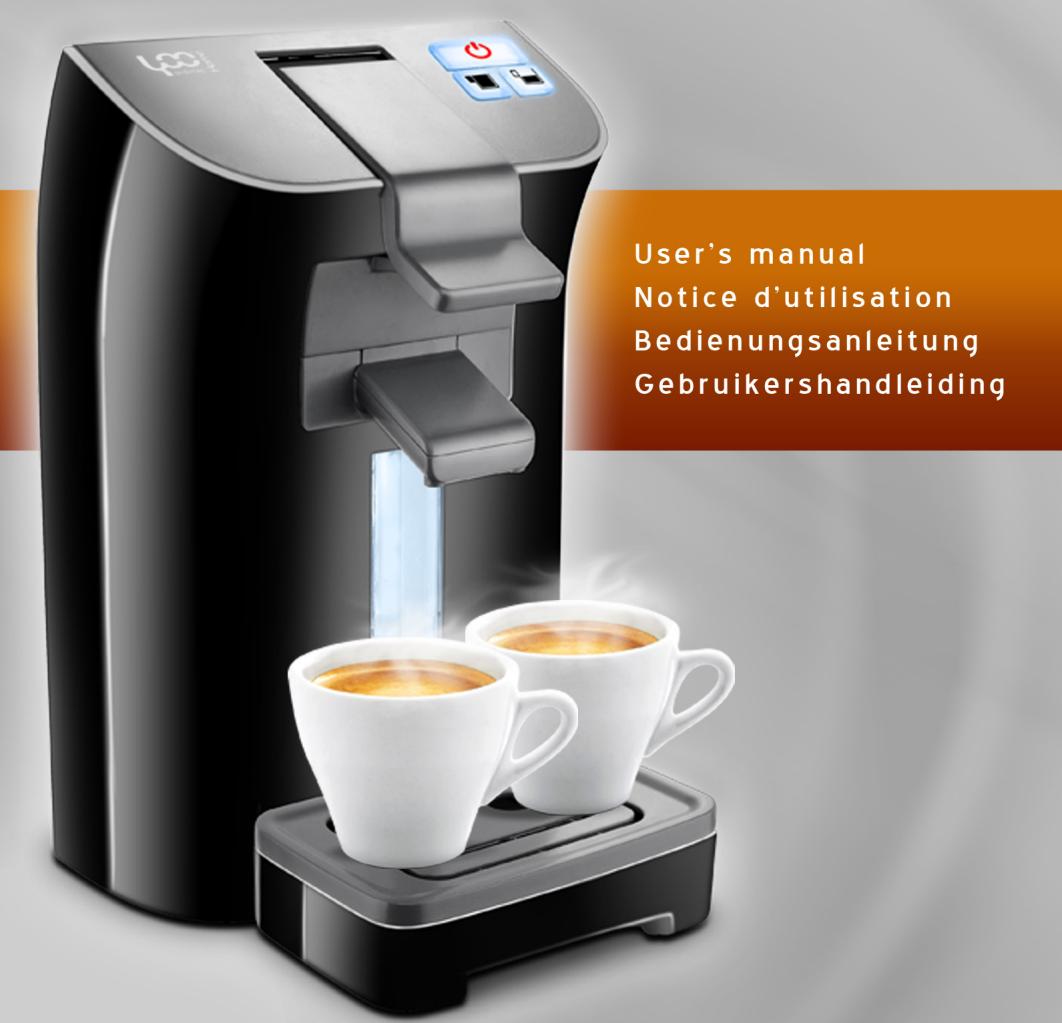
YOO DIGITAL PICKYOO - pickyoEXPRESSOMACHINE - 1

  • Before using the appliance, please read the instructions for use and the safety instructions carefully.
  • Before plug in to socket, check the rating information on product, which should match with your local supply Voltage.
  • Do not operate this appliance with a power adapter, damages cord or plug, or after the appliance malfunctions or has been damaged in any manner.
  • Your supply socket must be properly earth.
  • The appliance should only be placed on horizontal flat surface please do not put the appliance at inclined or unstable surface to prevent safety hazard.
  • For the first using, clean the appliance, especially the pad holder and water reservoir.
  • During usage, please put the appliance in which out of children's reach.
  • Before brewing, make sure the lever is closed to avoid injury by spillage of hot water.
  • Do not lift the lever immediately after brewing. You should lift it after the brewing indicator light off.
  • Do not leave the appliance unattended while operating.
  • The appliance does not work at an altitude of more than 1500 meters.
  • Brewed with the ≥ 10 water for the quality of coffee.
  • This appliance is not intended for use by persons (including children) with reduced physical sensory or mental capabilities, or lack of experience and knowledge, unless they have been given supervision or instruction concerning use of the appliance by a person responsible for their safety.
    Children should be supervised to ensure that they do not play with the appliance
  • If the supply cord is damaged, it must be replaced by the manufacturer, its service agent or similarly qualified persons in order to avoid a hazard.

Description of the coffee machine

With the Midea pad coffee machine you can enjoy perfect coffee with a rich frothy coffee layer and smooth taste.

To optimize the taste of the coffee, you should keep the following aspects in mind:

COFFEE PADS

In order to avoid damage, use only the soft coffee pad in the size of 55· 60 ~mm diameter. 6mm thickness: 6-7g for small cup or 12-14g for large cup.

Use the coffee pads in fine quality and store them with closed package or in a storage container for keeping fresh after use.

FRESH WATER

Use the 15^30^ fresh water every day. Before using for the first time or if you have not used the machine for some time, rinse the pad holder water reservoir and any other washable parts, fill it with fresh water and flush the machine before you begin brewing coffee (see 'Preparing the machine for use')

A CLEAN MACHINE

Clean and descale your coffee machine regularly, especially the pad holder and water reservoir. Remove used coffee pad after brewing. Avoid leaving the used coffee pad in the coffee machine for a long time.
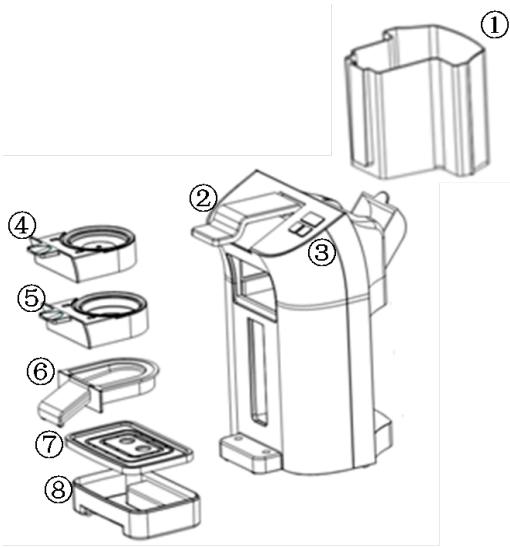
YOO DIGITAL PICKYOO - A CLEAN MACHINE - 1

1 water reservoir
2 locking lever
3 Button (ON/OFF, small, larger)
41 coffee pod holder

5 2 coffee pod holder
6 Removable coffee spout
7 Removable cup tray
8 Removable drip tray

FEATURES

  1. 3 bar. Patented brewing system
  2. Brewing coffee with soft coffee pad.
  3. Preheating function before brewing for certain quality coffee
  4. Removable cup tray. drip tray
  5. 1L removable water reservoir with easy-filling design
  6. Safe function of rapidly releasing pressure protection.
  7. Intelligence test the coffee temperature: the brewing does not start until the coffee reach at a certain temperature
  8. Auto-off Function: After 1h from the last brewing, the machine enters into energy-safe mode; the On/Off indicator light turns off. Press the On/Off button for restarting.

Clean and preheat the appliance before brewing, especially the pad holder and water reservoir.

Fill the water reservoir with cold water .put pad holder in the machine without any coffee pads, then press Single/Double cup button and let the machine operate for two times.

The pre-clean process can fill the whole system with hot water and the preheating make the brew coffee at a right temperature.

OPERATION

  1. Remove the water reservoir and fill with cold water up to Max indication and put it back into the machine.
  2. Press the on/off button to preheat the machine.
  3. Lift the lever to release the pad holder, then place coffee pad (s) in the center (1 pad for single cup holder; 2 pads for double cup holder.)
  4. Put the pad holder back into the machine and lock the lever. the stand-by status
  5. Put a cup under the outflow opening, press the single/double cup button to starting brewing.
  6. The brewing process will auto-stop (or you can press the ON/OFF button if need to make a pause), the button light will turn-off. Lift the lever after 10s, then remove and discard the coffee pad(s) by pull the pad holder out of the coffee machine and emptying it. Coffee pad(s) should not be used more than one time.
  7. Put the coffee holder into the machine again, and operate a brew process to clean the internal brew system. Then pull out the holder (under the guide 6) and clean it in water.

BREW VOLUME

The double cup volume is default at 200ml; the single cup volume is default at 100ml.

To keep the operation and coffee quality, clean your coffee machine regularly for clearing remaining coffee oil in the machine. The simply clean method: operate a brew process to clean the internal brew system.

Remark:

  1. Do not clean the whole machine in a dishwasher and never immerse it in water or any other liquid.
  2. After certain times brewing, the drip tray will be filled with water, remove it and clean in water, if necessary with some dish soap.
  3. Clean the coffee pad holders in hot water, if necessary with some dish soap.
  4. After brewing, do not leave any used coffee pads in the holder to prevent blocking.
  5. Do not operate the appliance if the pad holder has already been blocking. It needs a new pad holder or reparation.

DESCALING

Regular descending will prolong the life of your coffee machine and ensure optimal results for a long time. We recommend that you descale the machine every 3 months.

Limestone and calcium deposits can lead to an energy loss of your machine, but also shorten the life of your device.

The machine turns off prematurely if the deposit is excessive. It is very difficult to remove.

We recommend that you descale the machine regularly, but as soon as the infusion time increases significantly or there is more noise during the brewing process.

The following values are purely illustrative and are based on daily use:

Hardness RangeHardnessDécalcification
1 Soft0·7° dHevery 6 moth
2 Medium7·14° dHevery 3 months
3 Hard14·21° dHevery 6 weeks
4 Very Hard21° dHevery 4 weeks

Remark:

  1. 1^ corresponds to approximately 0.18 mmol/l Ca and Mg ions
  2. You can obtain details of the water hardness range in your residential area.

Opening :

Pull out the coffee pad holder before descending then following:

Manual assistant
Powered by Anthropic
Waiting for your message
Product information

Brand : YOO DIGITAL

Model : PICKYOO

Category : Coffee machine