
PICKYOO - Coffee machine YOO DIGITAL - Free user manual and instructions
Find the device manual for free PICKYOO YOO DIGITAL in PDF.



| Product type | Espresso coffee machine with soft capsule system |
| Brand | YOO DIGITAL |
| Model | PICKYOO |
| Water tank capacity | 5.1 L |
| Maximum pressure | 3 bars |
| Dimensions (approx.) | 35 x 25 x 30 cm |
| Weight (approx.) | 4.5 kg |
| Power supply | 220-240 V ~ 50/60 Hz |
| Power | 1450 W |
| Coffee type | Soft capsules with diameter 55-60 mm, thickness 6 mm |
| Cup volume | Single: 100 ml, Double: 200 ml |
| Main functions | Preheating, automatic shut-off after 1 h, intelligent temperature test |
| Safety | Lockable lever, automatic shut-off, pressure release function |
| Maintenance and cleaning | Regular cleaning of the capsule holder, descaling every 3 months recommended |
| Spare parts and repairability | Pouring spout, cup grate and drip tray removable; capsule holder replaceable |
| Included accessories | Capsule holder, pouring spout, cup grate, drip tray |
| Recommended water temperature | 15-30 °C |
| Recommended water hardness | ≥ 10 °fH |
| Use at altitude | Do not use above 1500 m |
| Warranty | 2 years (subject to general terms and conditions) |
Frequently Asked Questions - PICKYOO YOO DIGITAL
User questions about PICKYOO YOO DIGITAL
0 question about this device. Answer the ones you know or ask your own.
Ask a new question about this device
Download the instructions for your Coffee machine in PDF format for free! Find your manual PICKYOO - YOO DIGITAL and take your electronic device back in hand. On this page are published all the documents necessary for the use of your device. PICKYOO by YOO DIGITAL.
USER MANUAL PICKYOO YOO DIGITAL
pickyoEXPRESSOMACHINE
- Before using the appliance, please read the instructions for use and the safety instructions carefully.
- Before plug in to socket, check the rating information on product, which should match with your local supply Voltage.
- Do not operate this appliance with a power adapter, damages cord or plug, or after the appliance malfunctions or has been damaged in any manner.
- Your supply socket must be properly earth.
- The appliance should only be placed on horizontal flat surface please do not put the appliance at inclined or unstable surface to prevent safety hazard.
- For the first using, clean the appliance, especially the pad holder and water reservoir.
- During usage, please put the appliance in which out of children's reach.
- Before brewing, make sure the lever is closed to avoid injury by spillage of hot water.
- Do not lift the lever immediately after brewing. You should lift it after the brewing indicator light off.
- Do not leave the appliance unattended while operating.
- The appliance does not work at an altitude of more than 1500 meters.
- Brewed with the ≥ 10 water for the quality of coffee.
- This appliance is not intended for use by persons (including children) with reduced physical sensory or mental capabilities, or lack of experience and knowledge, unless they have been given supervision or instruction concerning use of the appliance by a person responsible for their safety.
Children should be supervised to ensure that they do not play with the appliance - If the supply cord is damaged, it must be replaced by the manufacturer, its service agent or similarly qualified persons in order to avoid a hazard.
Description of the coffee machine
With the Midea pad coffee machine you can enjoy perfect coffee with a rich frothy coffee layer and smooth taste.
To optimize the taste of the coffee, you should keep the following aspects in mind:
COFFEE PADS
In order to avoid damage, use only the soft coffee pad in the size of 55· 60 ~mm diameter. 6mm thickness: 6-7g for small cup or 12-14g for large cup.
Use the coffee pads in fine quality and store them with closed package or in a storage container for keeping fresh after use.
FRESH WATER
Use the 15^30^ fresh water every day. Before using for the first time or if you have not used the machine for some time, rinse the pad holder water reservoir and any other washable parts, fill it with fresh water and flush the machine before you begin brewing coffee (see 'Preparing the machine for use')
A CLEAN MACHINE
Clean and descale your coffee machine regularly, especially the pad holder and water reservoir. Remove used coffee pad after brewing. Avoid leaving the used coffee pad in the coffee machine for a long time.
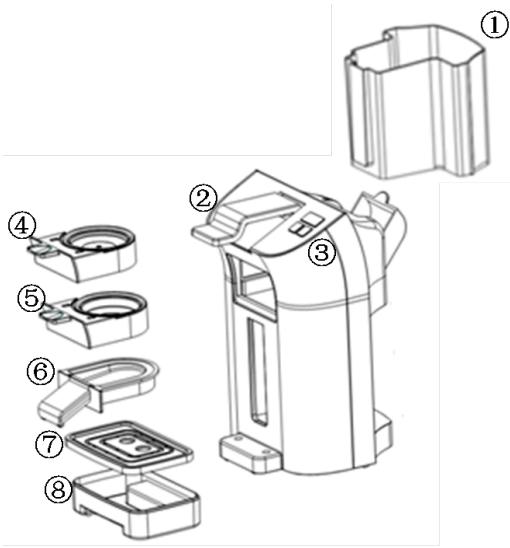
1 water reservoir
2 locking lever
3 Button (ON/OFF, small, larger)
41 coffee pod holder
5 2 coffee pod holder
6 Removable coffee spout
7 Removable cup tray
8 Removable drip tray
FEATURES
- 3 bar. Patented brewing system
- Brewing coffee with soft coffee pad.
- Preheating function before brewing for certain quality coffee
- Removable cup tray. drip tray
- 1L removable water reservoir with easy-filling design
- Safe function of rapidly releasing pressure protection.
- Intelligence test the coffee temperature: the brewing does not start until the coffee reach at a certain temperature
- Auto-off Function: After 1h from the last brewing, the machine enters into energy-safe mode; the On/Off indicator light turns off. Press the On/Off button for restarting.
Clean and preheat the appliance before brewing, especially the pad holder and water reservoir.
Fill the water reservoir with cold water .put pad holder in the machine without any coffee pads, then press Single/Double cup button and let the machine operate for two times.
The pre-clean process can fill the whole system with hot water and the preheating make the brew coffee at a right temperature.
OPERATION
- Remove the water reservoir and fill with cold water up to Max indication and put it back into the machine.
- Press the on/off button to preheat the machine.
- Lift the lever to release the pad holder, then place coffee pad (s) in the center (1 pad for single cup holder; 2 pads for double cup holder.)
- Put the pad holder back into the machine and lock the lever. the stand-by status
- Put a cup under the outflow opening, press the single/double cup button to starting brewing.
- The brewing process will auto-stop (or you can press the ON/OFF button if need to make a pause), the button light will turn-off. Lift the lever after 10s, then remove and discard the coffee pad(s) by pull the pad holder out of the coffee machine and emptying it. Coffee pad(s) should not be used more than one time.
- Put the coffee holder into the machine again, and operate a brew process to clean the internal brew system. Then pull out the holder (under the guide 6) and clean it in water.
BREW VOLUME
The double cup volume is default at 200ml; the single cup volume is default at 100ml.
To keep the operation and coffee quality, clean your coffee machine regularly for clearing remaining coffee oil in the machine. The simply clean method: operate a brew process to clean the internal brew system.
Remark:
- Do not clean the whole machine in a dishwasher and never immerse it in water or any other liquid.
- After certain times brewing, the drip tray will be filled with water, remove it and clean in water, if necessary with some dish soap.
- Clean the coffee pad holders in hot water, if necessary with some dish soap.
- After brewing, do not leave any used coffee pads in the holder to prevent blocking.
- Do not operate the appliance if the pad holder has already been blocking. It needs a new pad holder or reparation.
DESCALING
Regular descending will prolong the life of your coffee machine and ensure optimal results for a long time. We recommend that you descale the machine every 3 months.
Limestone and calcium deposits can lead to an energy loss of your machine, but also shorten the life of your device.
The machine turns off prematurely if the deposit is excessive. It is very difficult to remove.
We recommend that you descale the machine regularly, but as soon as the infusion time increases significantly or there is more noise during the brewing process.
The following values are purely illustrative and are based on daily use:
| Hardness Range | Hardness | Décalcification |
| 1 Soft | 0-7° dH | every 6 moth |
| 2 Medium | 7-14° dH | every 3 months |
| 3 Hard | 14-21° dH | every 6 weeks |
| 4 Very Hard | 21° dH | every 4 weeks |
Remark:
- 1^ corresponds to approximately 0.18 mmol/l Ca and Mg ions
- You can obtain details of the water hardness range in your residential area.
Opening :
Pull out the coffee pad holder before descending then following:

Brand : YOO DIGITAL
Model : PICKYOO
Category : Coffee machine