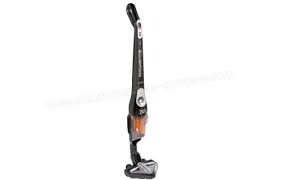
RH8829WO CIGARILLO - Hand vacuum cleaner ROWENTA - Free user manual and instructions
Find the device manual for free RH8829WO CIGARILLO ROWENTA in PDF.


| Vacuum cleaner type | Cordless stick handheld vacuum |
| Brand | ROWENTA |
| Model | RH8829WO CIGARILLO |
| Battery type | Lithium-ion (Li-Ion) |
| Available voltages | 14.4 V / 18.0 V / 25.2 V |
| Dust bin capacity | 0.5 L |
| Runtime (depending on speed and battery) | From 20 min (Turbo) to 55 min (Min) |
| Charging time | Approximately 6 hours |
| Motor filter | Washable foam filter (replacement included) |
| Motorized brush | Integrated electrobrush (detachable for cleaning) |
| Power levels | 3 (Min, Medium, Turbo) |
| Included accessories | Li-Ion charger, cleaning tool |
| Usage | Hard floors, rugs, carpets |
| Safety | Automatic shut-off in case of overheating, motor protection |
| Maintenance | Regular cleaning of filter and brush |
| Warranty | Manufacturer's warranty (see conditions) |
Frequently Asked Questions - RH8829WO CIGARILLO ROWENTA
User questions about RH8829WO CIGARILLO ROWENTA
0 question about this device. Answer the ones you know or ask your own.
Ask a new question about this device
Download the instructions for your Hand vacuum cleaner in PDF format for free! Find your manual RH8829WO CIGARILLO - ROWENTA and take your electronic device back in hand. On this page are published all the documents necessary for the use of your device. RH8829WO CIGARILLO by ROWENTA.
USER MANUAL RH8829WO CIGARILLO ROWENTA
| Niveau de charge restante | ||
| 100% charge | 66% charge | 33% charge |
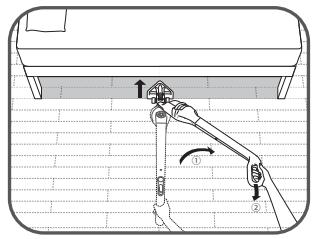
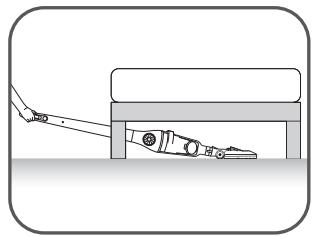
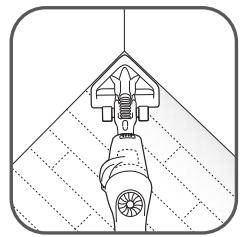
UTILISATION DE L'ÉLECTROBROSSE
- Precautions before use 13
- Electric power source 14
3.Repairs 14
DESCRIPTION 14
BEFORE FIRST USE 14
- How to assemble the appliance 14
- Charging the battery 15
- Turning on the appliance 15
4.Storage 17
CLEANING AND MAINTENANCE 18
- Cleaning the dust tray 18
- Cleaning the foam rubber motor protection filter 18
- Vacuum cleaner care and maintenance 18
BATTERIES 19
- Battery replacement 19
- Throwing away the appliance 19
ENVIRONMENT 19
REPAIRS 20
GUARANTEE 20
SECURITY ADVICE
For your safety, this appliance complies with applicable rules and regulations (Low Tension Guidelines, Electromagnetic Compatibility, Environmental Regulations...).
This appliance is not designed to be used by individuals (including children) with reduced physical, sensory or mental capacities, nor by individuals lacking experience or knowledge in the use of the appliance, unless they have the benefit of being under the surveillance of a responsible person, or of having received proper instructions. It is advisable to keep an eye on children in order to make sure that they do not use the appliance as a toy.
This appliance may be used by children over eight (8) years old and by individuals with reduced physical, sensory or mental capacities, or lacking experience or knowledge, as long as they are properly supervised by a responsible person, as long as they have received instruction concerning the safe use of the appliance, and as long as all possible risks have been addressed.
Children should not play with the appliance. User cleaning and care should not be carried out by children unless they are aged 8 years and over and supervised.
Keep the appliance and its lead out of reach of children under 8 years of age.
1 · Precautions before use
Read the instructions carefully and then store them safely.
- Your vacuum cleaner is an electric appliance: it must always be used under normal conditions. Use and store the appliance away from children's reach. Never leave the appliance on and unattended. Never hold the end of the vacuum tube near your eyes or ears.
- Never vacuum wet surfaces or liquids, no matter what their nature; hot substances; ultra-fine substances such as plaster, cement or ashes; large cutting waste materials such as glass; toxic products such as solvents or paint strippers; aggressive products such as acids or strong cleaners; or gasoline or alcohol-based flammable or explosive materials.
- Never submerge the product or charge it under water or under any other liquid. Never spray water on the appliance or on the charger.
- Do not store the appliance outdoors and keep it in a cool, dry place at all times.
- Do not place the appliance near a heat source (ovens, electric heaters or hot radiators).
- Do not expose the batteries to a room temperature above 104^ (40^) .
- Do not take the vacuum cleaner apart while it is on.
- Never use your vacuum cleaner without the dust tray and the foam rubber motor protection filter.
- Do not use the appliance:
- If it fell and shows visible signs of deterioration or functional anomalies.
- If the charger or the charger cable are damaged.
In any of these cases, do not try to take the appliance apart. Rather, take it to the authorized Rowenta Service Center nearest to your home, because special tools will be needed in order to safely carry out any repairs.
-
Repairs must only be carried out by specialists using original replacement parts.
-
To attempt the repair of an electronic appliance at home may be hazardous to the user.
- Only use original, guaranteed Rowenta replacement parts (filters, batteries...).
- This appliance is intended for domestic use only. In case it is used inappropriately, not following the given instructions, Rowenta will not be subject to any liabilities whatsoever.
- The vacuuming tube located at the height of the vacuum head must be checked regularly. If it is damaged, the appliance should not be used.
EN
2 • Electric power source
- Make sure that the voltage indicated on the rating plate of the charger corresponds to that of your power source.
- Never unplug the charger by pulling the electric cord.
- If the charger cord is damaged or if the charger itself does not function properly, do not use any other charger, different from the model provided by the manufacturer, and contact the Rowenta Consumer Service or go to the authorized Service Center nearest to your home.
3 Repairs
Repairs must only be carried out by specialists using original replacement parts. To attempt the repair of an electronic appliance at home may be hazardous to the user, and will invalidate the guarantee.
DESCRIPTION
- Ergonomic handle
- Stop/Start button
2.a Stop position
- Light speed signals
-
Light charge signals (mini, medium, max)
-
Neck
- Main body
- Locking screw
- Air outlet grill
- Dust tray
9.a Dust receiver (0,5L)
9.b Dust separator
9.c Foam rubber motor protection filter
9.d Lid
- Connection tube
- Delta vacuum head with integrated electro-brush
11.a Electro-brush
11.b LED
11.c Latches
11.d Trap
12.Wheels
-
Charger
-
14.4V, 18,0V and 25.2V: ref. RS-RH5275*
-
Batteries
-
14.4V:ref.RS-RH5272*
- 18.0V:ref.RS-RH5273*
-
25.2V : ref. RS-RH5274*
-
Tool
BEFORE FIRST USE
1· How to assemble the Appliance
Unpack your appliance and throw away any tags attached. Make sure to keep your guarantee and read the instructions carefully before using the appliance for the first time.
- Remove the screw from the neck and leave the nut in its place.
Fix the neck by carefully inserting it in the upper portion of the main body (fig.1). - Insert the locking screw (7) into the neck and screw it tightly using the tool provided with the appliance (fig.2).
Fix the Delta vacuum head (11) by locking it into place in the lower portion of the main body (fig.3).
Fix the dust tray on the main body of the appliance (fig 19).
Please note : In order to detach the Delta vacuum head, press the ejection button located at the back of the main body (fig.4) and pull to remove.
2 • Charging the battery
IMPORTANT: Use only the original charger provided with the appliance. Do not charge the appliance at temperatures lower than 32^ (0^) or higher than 104^ (40^) . Using a universal charger will automatically invalidate the guarantee.
Before you use your vacuum cleaner for the first time, you must charge the battery completely (for 6 hours maximum).
While the battery is being charged, the Stop/Start button must be in the Stop position (2.a)
- Place the vacuum cleaner near an electric power point.
- Plug the charger in and connect it to the vacuum cleaner using the socket located at the back of the neck (fig.5).
- The light charge signals (4) located at the front will flash in blue, in the form of a wave.
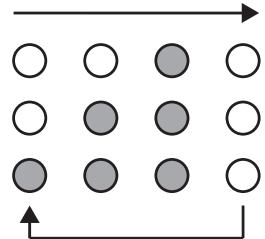
Leave the vacuum cleaner to charge.
While the vacuum cleaner is being charged, the light charge signals (4) will turn on and off one after the other. Once the charge is complete, the light charge signals will remain all on simultaneously for about 10 seconds, and then turn off.
The charging time will depend on how discharged the battery is.
While the appliance is being charged, all its other functions will remain reactivated.
Once the charge is complete, unplug the charger from the mains, and then the appliance cord.
Once you unplug the charger, the light charge signals (4) will indicate the charge level of the battery for about 10 seconds, then turn off.
The vacuum cleaner can stay connected to the charger permanently, without any hazard. Keep in mind, however, that if you decide to keep the charger connected it might become slightly hot. This would be a completely normal phenomenon.
It is advisable to charge the vacuum cleaner immediately after each use in order to always have it available with a fully charged battery. Thus, you will gain the maximum benefit from its cleaning and autonomous performance functions. However, in case you plan to be absent for a long period of time (on vacation, for example), it is advisable to unplug the charger. Otherwise, the autonomous performance function could be diminished due to automatic power loss.
3·Turning on the appliance
Unplug the charger cord from the vacuum cleaner. If the charger remains connected to both the power point and to the appliance, the latter will not function.
Hold the vacuum cleaner by the handle and slide the Stop/Start button downwards, towards one of the following three speeds (fig.6):
- "Minimum": Used to vacuum clean thick or delicate rugs and carpets (3.a), as well as fragile surfaces.
Please note: always make sure that the wheels located at the back of the base are clean.
- "Medium": Used for better vacuuming of all floor types, and in case of light dirt marks (3.b).
- "Turbo": Used for optimum vacuum performance on all floor types, and in case of strong dirt marks (3.c).
Vacuum cleaner running times* for each usage speed (with a fully charged battery):

Functioning of the light charge signal (4)
The light charge signals (4) will turn on when you press the Stop/Start button (d), and the signal changes during the course of use, depending on the charge level of the battery.
When the battery charge level becomes too low, the "mini" light charge signal flashes.
When the battery is fully discharged, the appliance turns off and the "mini" light charge signal (4) continues to flash for about 10 seconds. It will then be necessary to recharge the appliance.
- The vacuum cleaner must be recharged for at least 10 minutes before it can be used again.
- If the appliance does not turn on and the « mini » light charge signal continues to flash in blue, it means that the battery is discharged. You must then charge the appliance fully.
| Charge left | ||
| 100% charged | 66% charged | 33% charged |
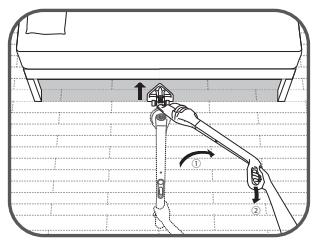
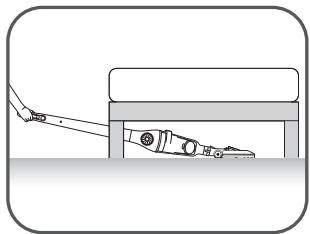
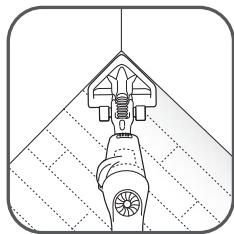
USING THE ELECTRO-BRUSH
The electro-brush is a rotating, motorized brush that guarantees maximum cleaning effectiveness by allowing the appliance to suck up dirt and clean in depth. The bristles, located all along the brush, remove threads, hair and fur that might be caught on the surface of rugs and carpets.
Please note: If the vacuum head adheres too closely to the surface you are cleaning, change the speed to « Minimum ».
ATTENTION: Do not vacuum large fragments of broken objects, as they could block and damage the brush. Do not use the electro-brush on long hair carpets, on animal fur, or on fringes.
REMOVING AND CLEANING THE ELECTRO-BRUSH
ATTENTION: Always turn off the appliance and unplug it before storing or cleaning.
Using the tool provided with the appliance (15), press in the two latches located on each side of the lower side of the Delta head (fig.7). Lift the trap located on top of the electro-brush (fig.8). Remove the electro-brush and its lateral bearing in order to clean them (fig.9). Carefully remove any threads, hair, fur, etc. from the electro-brush (fig.10). Once clean, replace the electro-brush and its lateral bearing (fig.11), then replace the trap over it (fig.12). Finally, using the tool provided with the appliance, close both latches (fig.13).
FOR YOUR SAFETY
- Do not touch any rotating parts before you turn off and unplug the vacuum cleaner.
- Do not use the appliance on wet surfaces.
- Do not immerse the appliance in water.
ELECTRO-BRUSH MALFUNCTION
The electro-brush does not function properly or makes an unusual sound
- Either the rotating brush or the axis is blocked: turn off the appliance and clean them.
- The brush is worn out: visit an authorized Service Center in order to have the brush changed.
- The belt is worn out: if the belt makes noise, it means that it is slipping because it's worn out. Visit an authorized Service Center in order to have the belt changed.
The electro-brush stops while you are vacuuming
- The thermal security feature has been activated: Turn off the vacuum cleaner by moving the Stop/Start button to the Stop position (2.a) and unplug it. Check to see if any solid object is blocking the rotation of the brush. If this is the case, remove the object and clean the electro-brush (fig.10), then you may keep using the vacuum cleaner.
The electro-brush moves with difficulty
If you find that your vacuum cleaner slides with difficulty along surfaces, progressively reduce the speed until you reach the « Minimum » position (3.a). If the problem persists, take your appliance to the authorized Rowenta Service Center nearest to your home.
See the list of authorized Rowenta Service Centers or contact the Rowenta Consumer Service department.
Cleaning the wheels
If you need to clean the wheels or if an object gets trapped between them, remove them carefully using a flat screwdriver.
Clean the wheel rods and then place them back on following an inverse procedure.
4 • Storage
After use, turn off your vacuum cleaner by moving the Stop/Start button to the Stop position (2a). Now you may store your appliance vertically wherever you like, thanks to the parking position.
To place the vacuum cleaner in the parking position: Place the neck vertically in order to block the appliance.
To continue using the vacuum cleaner: Take it by the handle and make it swing backwards in order to unblock it and leave the parking position.
IMPORTANT: Always turn off the appliance and unplug it before storing or cleaning.
1 • Cleaning the dust tray (9)
1.a Fast emptying
Whenever the dust tray is full, empty it as follows: remove the tray by sliding it downwards (fig.14), place it over a bin and press the "Push" button in order to open the trap and empty the tray's contents (fig.15). Close the trap (fig.16) and replace the dust tray on the main body of your appliance (fig.19).
1.b Complete cleaning procedure
It is advisable to clean the dust tray regularly.
- Remove the dust tray (fig.14), then separate each of its components (9).
- Remove the foam rubber motor protection filter (9c).
- Place the dust receiver (9a), the dust filter (9b) and the lid (9d) under warm water (fig.20); then let them stand to dry or dry them with a dry cloth.
- Wash the foam rubber motor protection filter (see paragraph 2).
- Once the components of the dust tray are all dry, reassemble them; do the same with the extra foam rubber motor protection filter (9c) provided as a supplement with your appliance.
- Close the dust tray and reposition it on the main body of your appliance (fig.19).
2 • Cleaning the foam rubber motor protection filter (9c)
ATTENTION: Never use your vacuum cleaner without the foam rubber motor protection filter.
In order to maintain the high performance level of your appliance, do not vacuum ultra-fine substances such as plaster, cement or ashes, and clean the foam rubber motor protection filter at least once a month. If you perceive that your vacuum cleaner is performing under regular average level, we recommend that you clean the foam rubber motor protection filter more frequently.
- Remove the dust tray lid (9d) and then remove the foam rubber motor protection filter (9c) (fig.21).
- Clean the foam rubber motor protection filter (9c) with warm, soapy water.
Rinse and let dry for at least 12 hours before replacing the filter on the appliance (fig.22).
IMPORTANT: In order to assure optimal motor protection, make sure that the foam rubber filter is completely dry before replacing it on the appliance. You will need to let it dry for at least 12 hours before reinserting it into the dust tray. An extra foam rubber motor protection filter is provided with your vacuum cleaner so that you may use the appliance while the first filter is still drying.
ATTENTION: Never place the dust tray components or the foam rubber motor protection filter in an automatic dishwasher.
3 • Vacuum cleaner care and maintenance
Wipe the main body of the appliance with a soft, damp cloth; then dry it with a dry cloth (fig.23).
IMPORTANT: Do not use detergents, or aggressive or abrasive products. The transparent color of the dust tray and/or of the separator lid may change with time; however, this will not modify the performance of the appliance.
BATTERIES
1·Battery replacement
This appliance contains Lithium-iron accumulators which are, for safety reasons, only accessible to professional engineers. When the battery is no longer capable of retaining its charge, the Li-iron block must be removed. In order to replace the accumulators, please visit the authorized Service Centre nearest to your home.
2 • Throwing away the appliance
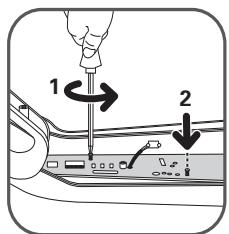
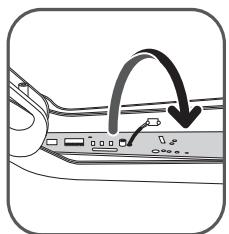
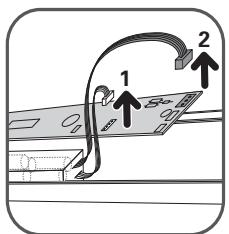
It is important that you remove the batteries before throwing away your appliance. In order to do this, visit an authorized Service Center or proceed as follows: disconnect the appliance from the electricity network, dismount the neck from the main body removing the central screw, and then remove the five (5) assembly screws located at the back of the neck (fig.24). Carefully lift the upper cover of the neck and unscrew the two electric circuit screws, then unplug the battery block by pulling the plug (fig.25-26-27). Do not throw the battery bloc into the waste bin; take it to the authorized Rowenta Service Center nearest to your home or to a place specially designated to process such type of waste.
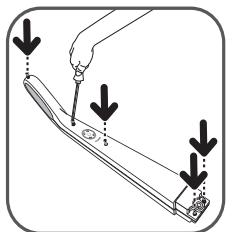
24
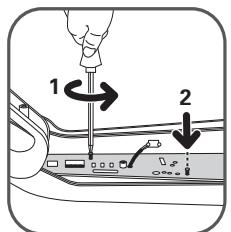
25
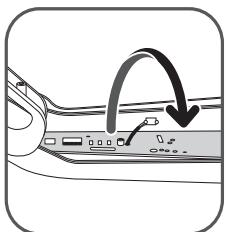
26

27
ENVIRONMENT
- According to current regulation, any appliance that is out of service must be taken to an authorized Service Center, where it will be safely disposed of.
- Environment: Regulation 2002/95/CE
Warning
Do not place a block of rechargeable batteries with non-rechargeable batteries.
If you wish to change the batteries, visit an authorized Service Center.
The batteries are designed to be used indoors only. Do not immerse them in water. Handle the batteries with care. Do not place the batteries in your mouth. Do not let the batteries come in contact with other metal objects such as rings, nails or screws. Be careful not to provoke internal short-circuits in the batteries by inserting metal objects through their extremities. If a short-circuit does occur, the temperature of the batteries could rise dangerously, causing serious burns or even catching fire. If the batteries start leaking, do not rub your eyes or mucous membranes. Wash your hands and rinse your eyes with clean water. If irritation persists, consult your physician.
Let's help protect the environment!

① Your appliance contains numerous useful or recyclable materials.
Take the appliance to a collection spot so that it can be disposed of properly.
IMPORTANT: If you notice that your vacuum cleaner is not functioning properly, before any revision, turn it off by placing the Stop/Start button in the Stop position.
EN
Repairs should only be carried out by specialists using original replacement parts. To attempt the repair of an electronic appliance at home may be hazardous to the user.
If your vacuum cleaner does not start
Make sure that the charger is completely unplugged from the appliance. If it is, it means that the appliance is not charged, so proceed to charge it.
If the 3 blue light charge signals start to flicker simultaneously and very rapidly when you plug the charger to the vacuum cleaner, it means that you are not using the appropriate charger or that the one you are using is faulty.
If your appliance does not vacuum
- The electro-brush is dirty: clean it.
- The separator is clogged up: remove the dust tray and clean the separator.
If your vacuum cleaner seems less efficient, makes noise or whistles
- The tube or the hose are partially clogged up: unclog them.
- The dust receiver is full: empty and clean it.
- The dust tray is not well positioned: place it correctly.
- The Delta vacuum head is dirty: demount the electro-brush and clean it.
- The foam rubber motor protection filter is saturated: clean it.
If the separator gets filled with dust
- The separator sometimes accumulates dust. Make sure that nothing is blocking the duct between the separator and the dust tray.
- The dust tray opening is blocked: Remove the dust tray, empty it and clean the opening.
The vacuum head moves with difficulty
Lower the vacuum speed by moving the appropriate switch button.
If the problem persists, take your vacuum cleaner to the authorized Rowenta Service Center nearest to your home. See the list of authorized Rowenta Service Centers or contact the Rowenta Consumer Service department.
If your appliance gets overheated
The safety feature will turn on automatically. If the vacuum cleaner is being charged, the charge stops. If the vacuum cleaner is being used, the motors stop and the 3 light battery charge signals flash simultaneously and very rapidly.
In this case:
- turn off the appliance if it is on (set the Stop/Start button to Stop)
- or stop charging if the appliance is being charged (disconnect the charger)
- and let the appliance cool off for at least 1 hour.
GUARANTEE
This appliance is intended for domestic use only. In case it is used inappropriately, not following the given instructions, Rowenta will not be subject to any liabilities whatsoever and the guarantee will be invalidated.
Read the instructions before using the appliance for the first time: using the appliance in any way different from the one indicated here would free Rowenta of all liabilities.
CONTENIDO
Pagina
LIMPEZA E MANUTENCAO 36
- CBeTOBbIe CNrHaJIb IHTeHCNBHOCTN
3.aI03nUyra(MNH)
3.b POnzunra «cpeDnH» pejxum
3.cПозиця«Турбо»
- CBeToBbIe HnDnKaTOpbl yPoBnHa 3apJa da aKKyMylTOpa (MnHmMaJIbHbI, cpeHn, MaKcImMaJIbHbI)
- Šěčka
- OchOBHOn KOpNyc
- CTOnOpHbI BnHT
8.Bo3dyxObIyncKaHpeWetKa - KoHTeINHeP dIa IbIa
9.aHaKoNtTeNbPiBn(0,5π)
9.b PacnpedeJeInTeIb nbJln
9.cIopolHObBiΦnJIbTp DЯ3aUHTBI MOTOPa
9.d Kpbioka
- CoeunHntelbna Tpy6a
11.ДeльТовиДная НаcaДКа nbIJIecOca C nHTerPnpOBaHHо 3NeKTpOuSeTkoJ
11.a 3JIeKTpOuTeKa
11.b CBeToIONoD
11.c 3auejka
11.d 3aedepeKwBaHouoJnΦnIbTp
- Koneca
-
3apdHoe yCTpoNCTBO
-
14.4B, 18.0B u 25.2B: cM. RS-RH5275*
-
AkkymyIaTOpbl
-
14.4B: CM. RS-RH5272*
-
18.0B: CM. RS-RH5273*
-25.2B:CM.RS-RH5274* -
VHCTpymehT
Ecnn nbilecoc He BkIouaetc
Y6eDntecb, yTo 3apdHoe yCtpoCTBO nOIOHcTbIO OTOcoEINHeO OT PbIeNocA. Ecn OTKIouHeO, 3aHT, aKKymJyTOp pa3pJKeH. 3apdTe aKKymJyTOp.
Ecn Tprn CBeTObIe HndIkataOpb3aepda NaHuaHOT OndHOBpeMeHHO ueHb 6bICTPO MIRaTc HINIM ZCBetOM, KOrDa Bbl POnkIouyInn 3apArdHoe yCTpoNCTBO Do nbJeCocA, 3To 3NaHT, 7To Bbl NcNoJIb3yeTe HENpaBnIbHoe 3apArdHoe yCTpoNCTBO, nIn yCTpoNCTBO, KOtOpoe Bbl NcNoJIb3yeTe HEncnpabHoe.
Ecn nblecoc He nbleecocnt
- 3ЛeКТрошЕТka 3aCOpиlaСь: npOuHCTnTe ee.
PacnpedeJnteB 3a6nt:BbTaNHTe KOHTeHep IaIc6opa bIINn OOHTe pacnpedeJInteB
Ecn nblieoc pa6oTaETnloxo, Bbdaet CBCTnnn yum
Tpy6kn nnIuHaHn qaCtNHy 3acopeHbI: npOunCTne ux.
- HakonnteJIb nbIIN 3aONJIHeN: onOpOxHnTe n OChCTnte erO.
- KoHTeHep dIa c6Opa nbln nIIOxo yCTaHOBJIeH: NOMeCTInTe erO npabNJIbHO.
-ДeльТовидна Habacдka nbIlecoа 3aRpyaHe: demOHtPyuTe элКТpoUeTky OOnCTnTe ee.
- NopoloHObbl ΦnIbTp 3aunTb I dBnraTeJla 3aqrpaHnlc: oynctnte ero.
Ecnn paacnpedeHntTeB 3aqr3HNlrc
PacnpedeJIteIbHnOgda HakapanBaet nbIb. Y6eIITecb, yTO HnUTo He 6loKpuyTe KaHaJ MekJy pacnpedeJIteIem N KOHTeHepom dIc6opa nbIi.
3a6IOKIpObaHO OTKpbITNe KOHTeHepa IJIy IIbIIN: BbITAHnTe KOHTeHep, ONOPOXHnTe IN OUYCTte erO.
TOnOBKa NbIeCoca DnKKeTcA Tpydom
Y6aBbTe INTEHCNBHOCTb PbIeCOCA C NOMOuBc COOTBeTCTByUoJeu KHOJIKN.
Ecnn npo6nema He 6ydt yctpaheha, OTHeCtne nbIeNcOc Rowenta B 6nJkaIshn aBTOpN3OBaHHbI cepBnCHbI ueHtp. Cm. cnICOK aBTOpN3OBaHHbIX cepBnCHbIX ueHTpoB Rowenta nn O6paTntecb B OTdE o6cnykBaHna KIneHTOB Rowenta.
Ecn yctpoictbo neperpbaetc
B npnbopa cpa6a7b1Baet 3auuTHa yHKUa: ecn OH 3apjkaeTc, TO 3apJka npekpauaetc, ecn OH pa6oTaET, TO octHaHbIbNAeTc DnraTeJI b 3 CBeTObIX INDnKaTopa 3apJa aKKyMylrTopa OndHOBpemHNO H6bCTPO MmraIoT.
B clyuae HencnpaBHOCTN:
- OctahOBInTe npn6Op, ecn OH pa6oTaET (KHOJNa BbIKIOuHTb)
- IJn npekpatnte 3apAky, ecIn yCTpoiCTBO 3apjXaeTc8 (OTKJIOnHte 3apJHOe yCTpoiCTBO)
- I daiTe eMy OCTbITb B TeueHne He MeHee 1 yaca.
TAPAHNTY
UcTpoiCTBO npEJaHa3NayeHO ToIbKO IJy INCNoJIb3OBAHnB V DOMaunHX yCIOBnX. KOMpaHnR Rowenta He HecET OTBeTCTBeHHOCTN 3a ycTpoiCTBO B CInyae HEnpAbIbHOrO INCNoJIb3OBAHnA, KOtOpoe IpOTNbOpeuHT DaHHo IHCTpyKcUn.
Почи Te nHCTpyKUIO nepeД nepBbIM nCNoIb3OBAHnEM nbJIeCoca: nCNoIb3OBAHne yCTpoIcTBA B IHO6bIX dpyrIx cIeJx, KpOM KAK yKa3aHHbIX 3deCb, OCBO6OJkaET KOMpaHnIO Rowenta OТ кakON-JIN60 OTBeTCTBeHHOCTN.
3MICT
CTopiHka
IOPADNI 36E3NEKN 76
- 3anobixhhi 3axoynpeepBVKOpncTaHHm 76
2.Джерело eelenKtroeheprii 77 - PemOHr 77
OINCS 77
PEPeI PEPuIM BnKOpNCTAHHrM 77
- k cknactn npnctriin 77
- 3apdka akymyITopa 78
- BBimKHeHH npicToIO 78
- 36epiranna 80
OuHsEHrI TEXHlYHe OBCJyTOBvBAHHra 81
- OunuHnKoHTeHepa dIy 81
- OunuHnna nopoloHOBOro fIbTpa Ia 3axuCTy DnBryHa 81
3.Доглд i texhihe o6cnyrobyBaHHn noPoXoTgra 81
AKUMYJIaTOPN 82
- 3amHa akymyIaTopa 82
- Ytni3aia npictpoio 82
OXOPOHA IOBKIIJIJI 82
PEMOHT 83
「APAHTI 83
ДяВашоi 6e3neки,цe npictpri BiDnOBiJae DiOuHm npaBnIam Ta nIoLoXeHHaM (IHCTpyKci 3 Hn3bKOI HanpyrN,EnktpomarHITHOI cyMICHOCTI,ПрpoDOoOxopoHOMy 3aKOHoDAcTBy...).
Ппсстрин He пиз hauehenДя ВИКОристань OCo6amn (ВКЛIOчо 3 DiTbMn) 3ObmexeHIMN φi3nUHIMN, ceHCOPHIMN qN pO3yMOBIMN 3di6HOCTaMn, a TaKoX TUMN, B KOrO HemaE DoCBiDy qN Heo6xIDHnx 3HaHb CTOCOBHO BVIKOpIstahHЯ ПпСТЮЮ, KpIM BUNaIkIB, KOJN BOHN 3HaxOJaTBcЯпд HaIgIaOM BiINOBiDaJIbHoi OCo6n a60 6yIn nPoIHCTpyKTOBaHI HaJIeKHNm YHOM.
Ley npncpti moke BnKOpNCTOBvBaTnCra diTbMn, kIM BnOBHIOcBicim (8) pokib Ta ocobamn 3 o6mxeHnMn fiznHnMn, ceHCOPHnMn qno3yMOBnMn 3di6HOCTaMn, a TaKoX TnMn, B KOrO HeMaE DOCBiDy TaHeo6XiHNx 3HaHb CTOCOBHO BnKOpNCtAHNr npncTpoHPiBIDNOBIDHM HaIgIaOM BiIDNoBIdaJIbHOi, a6o JkIo BOHn 6yDyTbnPOIHCTpyKTOBaHI HaleXHm YINHom.
He cIiD IO3BOJATN DIITAM 6aBHTNCb 3 npnCTPOeM. YnCTky i OBCnyROyBaHHaMOxytb npoBOJNTN LIWe DIITN BIKOM BiD BOcBMn POKIB i CTAPwe i iID HargJaDM. 36epiraTe npnCTpi i eJeKTPnuHn shHyp BiD HbOro B MlCi HeNoCTynHOMy dIra DIte MoLOdme BOcBMn POKiB.

1·3an06iXnH 3axoDi nepeD BnKOpNCTaHHaM
Ybaxho npouHTaTe iHCTpyKcIoo i 36epexitb ii B 6e3neuHOMy micui.
Baw npoxotg - eektpnHn npctpi: noo Heo6xidno 36epiraB Hopmahnx yMObax. Binkocntobyute i 36epiraTe npctpiB HeooCTynHomy dJe diteMiCi. Hiokoi He 3aIIwaTe npctpi BBIMKHeHm 6e3 HaJny. He nioHocte KineCb Tpyb npoxotra do ouei cy Byx.
Hikon He npoxoTKe BOIory p iDnOy nu piHN, He 3aJIeKHO BiD iXhBOrO IOxOJKeHHrapeu peOBuHN; HADToHKi peOBuHN, Taki k Rinc, ZemeHT u 3OJa; MacNBHi BiDxOuN, RaHapnKnlaD CKNo; TOKcUHl peOBuHN, Taki k POzHHNkTu P0zHIn DN BuaJeHHaFap6n; arpeCBHPeOBuHN, Taiki KNCLOTu cunbHMI MOnOci 3acObu; NaINBO, 3aIMnCTi Ta Bu6yXone63neuHl peOBuHN Ha OCHOBi CnnpTy.
Hikoln He 3aHypOte i He 3apAJaAte npncpti nID BOIOU nn IHsHMn piHaMn. He po3npncKyTe BODy Ha nopoxOTg YN 3apAHN npncpti.
- He 36epiTaIe npicTpii Ha BiKpntOMy nobiTpi, a 3aBXdN TpMaJTe Ioro B npoxoIoHOMy, cyxomy Micci.
- He 3aIIwaIte npictriip 6iJa IxkepeIa Tepla (dYXOBOK, eJeKTPnHINx oBirpIbAivcH paiaTOpIb).
- He 36epirataTe akymylaTOp npi KIMHaTHi TeMnepaTypi Bnue 104^ F (40^)
- He po36npaaiTe npoxoTaj, KOJIi BIn BBiMKeHEni.
- He BnKOpNCTOBuYTe nopoXOTaR 6e3 KOHTeHepa dIy pIy nu npOIoHOBOrO fIbTpA dJIa 3axNcty MOTopa.
- He BUKOPINCTOBYte npunctpi:
- kKIO BIn Bnab i E NaBHi BnDmI O3NaKu yUkOJKeHb a6o fYHKUHOHaJIbHi aHomaii.
- kkuo 3apdHn npictpiy nu noTo ka6ebb ynn nookjxeni.
B 6yDb-akomy 3 unx BnnaKIB He npo6yIte po3i6paTn pnucTpiH ha qactHH. BiDheCtB moro do Hau6JIHKQTO cepBicHO cHTpy Rowenta, ockinKn dIpeMOHTy Heo6xDiHi CneuaJIbHi IHCTpymEnTH.
- Pemont NOBHHI po6nTu Iiue KBaIIiKOBaHc CneuaIciTn 3 BkOpNCtAHnM opriHaJIbHx 3aIyactnH.
Cnpo6a BiDpeMoHTyBaTn eJIeKtpuHn npucTpI B DoMaunix yMObax MoKe 6ytN He6e3neuHOIO JIA KOpNCtYBaHa.
BukopncToByuTe Iiue opnirHbHi Detani Rowenta (fIbtpn, akymyIaTOpn...), Ha kki PooHpOeTbcra rapaHTi.
PpncTpi npn3naeHnn Iiue dIy BnKOpNCTaHnB Domauhix yMObax. KompaHia Rowenta He Hece BiIDIOdaJIbHOCTI 3a npncTpi y BnPaNky HneipabINbHoro BnKOpNCTaHn, kye CypeuHTb iinCTpykii.
- BCMOKTyUOHy mIaHr, po3aIIOBaHN Ha BCMOKTyUOoi roJIbci, NOBHeH peYIrpHO nepeBipTncs, i kIo BIn PNOKoJKeHn, npIaId He NOBHeH BIKOPNCOTBOyBaTncs.
OuictiB ctepkeHb KOic i BCTaBe ix Ha MiCue, HATnCKaOHu Ha ix PO3aUyBaHHA.
4·36epiraHHa
Picra BnKOpncTahn, BmKhHtB npoxoTg, nepeMictuB uKNkny BBIMKHyTu/BmKHyTu Do KInzra (2a). Tenep Bu moke Te 3abroDHO 36epiratu npctpi 3a donomoro UBPTKaJIbHO npkyBaIbHO noLoXeHH. 06 noCTabNTu npoxoTg B napkyBaIbHe noLoXeHH: noCTABTe uNkUy BPTKaJIbHO, uO6 3a6NoKyBaTI npCTpi. 06 npdoBxHTu BnKOpncTahnn npoxoTgA: Bi3bMtBuNOro 3a pykU i XnTHiB Hm Ha3ad, 06 po36NoKyBaTI i BmTu 3 npkyBaJIbHO noLoXeHH.
YBATA: 3aJxN BmNkaIte i BiKJIouHtB npIcTpiB iD JxNbHeHnA nepeD 36epiraHHa m aO OHneHHaM.
1•OuHcHHeN KOnTeHepa Iy (9)
1.a Wbnuke BnnpoxHeHHa KOHTeHepa
KoJHOrO pa3y, KOJI N KOnTeHep DnI I NIIy HAnOBHIOETCBc i IOcraAe MakCmMa B H O R pIBeHr, BInOpOxHtB IHO NaCTynHM YNHOM: 3HIMITb KOnTeHep, NotarHyBUn NORO DOHN3y (fig.14), NOMICTb IORo HaD CMITHKOM I HATNCHITb KHONky "Push", II6 BiIDKnPTu 3aTpMByBaIbHn IINbTp Ta BKNHyTN BMICT KOHeHepa (fig.15). 3aKpnIte fIbTp (fig.16) i NOMICTb KOnTeHep Ha Mlce B OCHOBHOMy Kopnyci IopoXOTra (fig.19).
1.bIpoeUpa nobHoro oUHHeHH
PekomeHdyctcpepyarpoOuNcyBaTn KOHTeHep IJIyIy.
- BntarHtB KOHTeHep dIy nIy (fig.14), notim po36epitb Ioro Ha qactnHi (9).
- BuitarHitb npopoHOBn φiNbTp 3axNCTy DmRgamma (9c).
3aHypTe nno36ipnK (9a), po3noiinobau nny (9b) i KpnuB Te npy Body (fig.20); daTe im BucOxHytn a6o BVtpiTb ix CyxoTO kAHHOIO; - PpomnTe npoHOOBm fJbTp 3axnty DvBryHa (DnB. po3d12).
-Яктільки КOTteинега ДдпИУ BINOxOHyt b,36eipi bix;Зрбіт b TeЖcame 3doaTkoBUM nopoLoHOBMФльтом зхИCTу dВuIyHa (9c),як immocTauaetbCBy kOcoTi do DaTky Do BaUoro noPoXOTra. - 3aKpInTe KOHTeHep IaI pNly i nOCTaBe NOrO Ha MicSe B OCHOBHn KOpNyc nopoxoTgA (fig.19).
2•OuHueHHa nopolHOBOrO fIbTpA dJa 3axncty DnBnrgHa (9c)
YBAGA: Hikon He BUKOPINCTOByTe nopoXoTg 6e3 nopONHOBOr o jIbTpda Ia3axncty DBNyHa.
Дя того, i6o6 ni4tpmmybatn BvcoKni pibeH npOdykTnBHOCTi nopoXOTra, He np6paTe yIbTa-TOHKe 3a6pydHeHH, Take k rinc, cemeHT u nonil, i npOboJte OuNtceHH npOLOHOBOr o jlbTpra dny3axNCTy DVBryHa 70haMmeHwe, pa3 B mci. KaIO Bu BBaxaTe, zo BaW npOxOTar npaioE HnKue HopMaIbHOro cepedhboro pIBH, Mn peKOMeHdyEmo Bam ouNzbyatn npOLOHOBN o jlbTp dny3axNCTy DVBryHa qactiwe.
- 3HIMITb KpNiShky KOHTeHepa dIy (9d), a ToDi BNTaRHiTb nopOIOHOBn fIbTp dIy 3axNCTy DBNrHa (9c) (fig.21).
- OunctiB npoIHOHbI pIbTp IaI 3axnCTy DnIgYHa (9c) TeIIO MInbHO IO BOIO.
Ipomnte i daIte BnCOxHyTN BnpOdBx, 0OnaMHe 12 roHN, nepwe HIX CTaBtN fIbTp Ha Micse (fig.22).
BAXJIINBO:ДлTORO,лб63a6e3neHTN ONTMMalbHn 3axIcT dBNrHa,pepeKoHaTeCb,so NOPOLHOBm ФiNbTp NOBHCTNO BWCoxHyB, nepHI Kx CTaBHT NOrO Ha MicSe.ДaIte My BWCoxHyTN BnpoDobX ZOHaMEnHe 12 rOHN,ToDI BCTaBTe NOro B KOHTeHep DnI Ny.3 BaUM NOPOXOTaRGM B KOMJIeKT BXODITb DoDAtKOBn NOPIoHOBn ΦIbTp DnI 3axIcTy DBrHyA, TOM By MoKeTe KOpNCtBuTaNcB PONOXOTaRGM ToI,Япрши ФiNbTp BCE ue coXHe.
YBAGA: Hikon He CTaBte DeTani KOHTeHepa Dnla Nnly Nn nopOLOHObN φilbtp Dnla 3axncty DnBnHyNa Do nocydomnHOi Maunn.
3·OuichiHnI iTexHicHe 06CnyroByBaHHa
ПоТРИТь OCHOВик KОрпсnpсmpстpoM'якоH BOLOrOIO TkaHnHO, a ToDi BnTpIb cyXoHIO TkaHnHO (fig.23).
BAXJIINBO: He BnKOpNCtOByTe MmOChi 3ac06n Ta aIrpceNBHi YH a6pa3NBHI 3ac06n. IpO3OpN KoJIp KOHTeHepa dIy PnLy i/Un Po3diIIOBaIbHOi KpnIK MoKe 3MInHTncs 3 YaCOM; IpOTe, Ie He BnJIInHe Ha kICTb po6OTn NopoXoTara.
AKYMYJATOPN
1·3amihaakymyITopa
Ley npictpi Micntb liti-iioHHi (Li-ion) akymyIaTOPn, kci, 3 mipkyBaHb 6e3neKn, doctynHl nIwe InpocecioHaBnix iJxheepib. KOn 6atape Bxhe 3daTHa 36epiratn 3apd, 6Iok Li-ion akymyIaTOPiB Heo6XiIdHO 3amHInn. DnToro, 06 3amHInn akymyIaTOPn, 6ydNb Iacka, 3BepHItbcrdo Hau6bnKqHoro ABTOPn3ObaHOro cepbichoro uehtpy.
2·Ytunlizauia npucrtpo
Baxnbo, 06 Bn BntrHnyn akymyIaTOpN, nepw hix BnKndaTn pncTpi. Dna toro, 06 ce 3pObTu, 3BepHtbcra do aBtropn3ObaHoro cepBicHoro uehtpy a6o BnKoHaTe hactyn hi i: BiDknHouItb nopoxotg BiEeKtpnuHoi Mepex, dEmOHTyne TseuKy BiD OCHOBHoro KOpNyca, BnTARHyBuNc HETPaNbHn rBNHT, a ToDi BiKpyiTb P'ay (5) KpinlNbHnx rBNHTiB, 0o 3NaXoJaTcB CBa 3aDniy ChAtnHi WmKn (fig.24). 06epexHo NiHimitb BepxHIO KpnuKy wunki i BiKpyiTb DaBA rBNHTe eKeTpnuHoro IaHcUora, BiD'edHaite 6lok akymyIaTOpB, notarhyBnu 3a zacBy (fig.25-26-27). He BnKndaTe 6nok akymyIaTOpB in CBmtNik, BiHeCtB no Do nai6nKHO aBtropn3ObaHoro cepBicHoro uehtpy Rowenta a6o Micue, cneuaIbNo BIDeBeDehe dJe 6obp6Kn Taknx BiXdoiB.
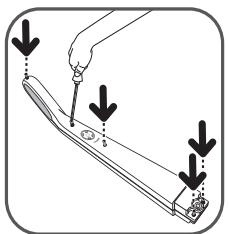
24
25
26
27

OXOPOHA IOBKIIJIJI
BiiNobiHDo dio iIOUOro noloxhen, 6yIb-kyn npicptpi, 0o BNIWOB 3 naDy Heo6xIDHO BiHeCTn do aTOpN3OBaHOrO cepBicHOrO ueHTpy, Noro 6e3neuHO yTuNi3yIoTb.
-Довкілія:Положенні 2002/95/CE
3acTepeKeHHa
He BCTaHOBJIIOHTe 6IOK 3apAaHINx aKymyIaTOpIB 3 He3apAaHIMn aKymyIaTOpAMN.
JaKo Bn XoHTe 3aMHIn7 6aTapeKn, BiDbdaTe aBTOpN3ObaHn CepBicHn ceHTp.
Baapei npn3haeH iIne IaBnKOpNCTaHH B npnMIeHHi. He 3aHypioTe ix B BODY. NIOBObTec3 akyMylTopamn o6epexHo. He 6epiB 6atapeyn B pot. He 03BoJyTe, 1o6 akymylatopn BCTynai n B KOtakT 3 iHIMM MeTaJIeBMn PpeMeTAM, TAKIMN Jk nepCHi, CBxN uN wpyuN. BybTe ObepeKhi, 1o6 He CnpOBOKyBaTN BHyTpIwHc KOPOTke 3aMknAHn B akyMylTopax, PpITyINBm MeTaneBi ppeMeTn do ix KInCIBok. KaTO KOPOTke 3aMknAHn BCE-TaKN TpaINIOsc, Tempepatya 6ataei MoKE 3pOCTn Do He6e3NeHOro pIBH, CNpuHNHBs cepNo3Hi OnIKu Nn HabiT 3aRopAnH. JaKIO akyMylTopn NoUHaIoTB TeKTn, He TpiTb OUY Ni CNI3OBI o6OLOHKn. POMNIte pyKn i PpOMNIte OUY NCTOHO BOIO. JaKIO NOpa3HeHHn He 3HnKaE, 3BepHtbcra do Nikapra.

DOnomoximo 3axnCTHTIOBkInJlA!
① Baus nopoxoTg Micntb 6aTaTo KOpncnX MaTepiainiB, a TaKoX TaKnx, kKi MoKHa nepepo6uTu
BiDheCITb npnCTpiB nyHKT pniOMy dIyTuNl3auii.
BAXJIIMBO:Якwo Bn nomitni,zo BaW npoxotar He npaioe HalexHm YHOM,peew hix npoBoiHTn kkyHe6ydb neepBipKy, BmKHiTb Ioro, noCTabBmBwN KONk Ky BBIMKHyTN/BmKHyTN BnoJoxehn BmKHyTN.
Pemont MoKytb pO6bTu IiSe cneuaIcTn, 10 BIKOpncTOBHyToB opurihalbHi 3aunactHH. Cnpo6a BiDpeMOHTyBaTu eJeKTPuHn PnCtpr BDomA MoKe 6TyN He6e3NeuHOJ.
JaKuo npoxoTg He BMKaetbca
IpekoHaTeCb, 30 3apAHHn pnpCTPII NOBHCIO BID'EDHn BID nopoXOTra. RaIO TAK, ce CbIDHTb npo Te, 10 akyMylTOp pO3PdJKeHn. 3apAITb akyMylTOp.
Kkio Tpnc BcITIOI INnKaTOpn 3apy AnyoHauOb OndOuacHO dyxue WbNko 6JIMaTu CnHIM KOJIbOpOM, KOnBn BniiknouaTe 3apdHn npctpi Do npoxotra, ue 03haua, 0 Bu BN bKOpucTOBye He npabHn 3apdHn pncptri, a6o npctpi, kN Bu BNbKOpucTOBye HecnPabHn.
JaKuo npoxoTg He npoxoTgXnTb
- Enejtrooitka 3a6nla: npouncitb ii.
- P03noDinHoba 3a6ntn: BNTaHriTb KOHTeHep IaI nnI yIOCTITb po3noDiIOBau.