
BP 2550 - Sphygmomanometer KAZ - Free user manual and instructions
Find the device manual for free BP 2550 KAZ in PDF.



| Product type | Electronic wrist blood pressure monitor |
| Model | BP 2550 |
| Brand | KAZ |
| Measurement method | Oscillometric |
| Display | Liquid crystal display (LCD) |
| Pressure measurement range | 0 to 300 mmHg (cuff pressure) |
| Pulse measurement range | 40 to 160 beats/min |
| Pressure accuracy | ±3 mmHg |
| Pulse accuracy | ±5% |
| Inflation | Automatic |
| Deflation | Electronically controlled valve |
| Memory capacity | 2 x 30 measurements (users A and B) |
| Power supply | 2 LR03 (AAA) alkaline batteries |
| Battery life | Approximately 300 measurements with new alkaline batteries |
| Compatible wrist circumference | 13.5 to 20 cm |
| Positioning system | Active guidance by arrows and audible signal |
| Additional functions | Statistical mode (average), measurement timestamp |
| Cleaning | Soft damp cloth for the housing; do not wash the cuff |
| Storage conditions | Temperature: -20°C to +60°C; humidity ≤85% RH |
| Warranty | 2 years (domestic use only) |
| Manufacture | Made in Germany |
| Technical support number | 1-888-848-2572 (Braun) |
Frequently Asked Questions - BP 2550 KAZ
User questions about BP 2550 KAZ
0 question about this device. Answer the ones you know or ask your own.
Ask a new question about this device
Download the instructions for your Sphygmomanometer in PDF format for free! Find your manual BP 2550 - KAZ and take your electronic device back in hand. On this page are published all the documents necessary for the use of your device. BP 2550 by KAZ.
USER MANUAL BP 2550 KAZ
Thank you for purchasing a Braun product. We hope you are completely satisfied with your new Braun PrecisionSensorTM. If you have any questions, please call: 1-888-848-2572
Français 14
Braun PrecisionSensor™ is a blood pressure monitor that has been developed for easy and accurate blood pressure measurements at the wrist.
The measuring accuracy of the product has been tested at the time of manufacture.
Blood pressure monitors should always be positioned at an appropriate measuring position close to the heart for reliable measurements.
The Braun PrecisionSensor™ has an active positioning system that guides your arm via arrows on its display to the medically recommended measuring position close to the heart.

However, to ensure accurate results, carefully read these instructions.
What you should know about blood pressure
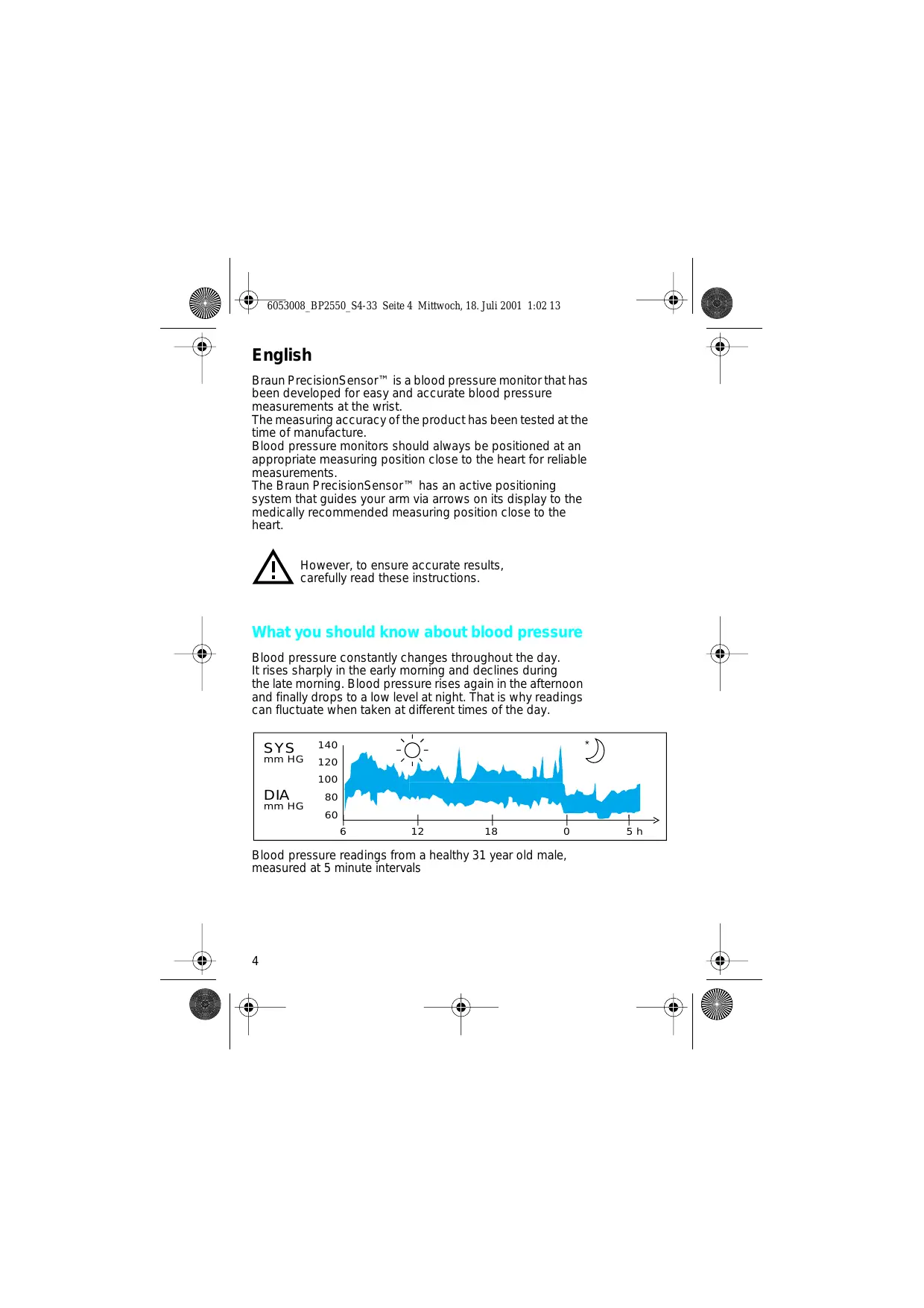
Blood pressure constantly changes throughout the day. It rises sharply in the early morning and declines during the late morning. Blood pressure rises again in the afternoon and finally drops to a low level at night. That is why readings can fluctuate when taken at different times of the day.

Blood pressure readings from a healthy 31 year old male, measured at 5 minute intervals
Blood pressure measured in a doctor's office provides only a momentary value. Repeated measurements at home may be useful when monitoring one's actual blood pressure values.
Many people may have a different blood pressure reading when they measure at home, because they tend to be more relaxed than when in the doctor's office.
Regular blood pressure measurements taken at home may provide your doctor with useful information on your «everyday» values.
The World Health Organisation (WHO) has set up the following standard blood pressure values when measured at resting pulse.
| Blood pressure (mm Hg) | Normal values | Mild hypertension | Severe hypertension |
| SYS = systolic = upper value | up to 140 | 140 – 180 | over 180 |
| DIA = diastolic = lower value | up to 90 | 90 – 110 | over 110 |
Important
- This product is intended for household use only. Keep product and batteries away from children.
- People suffering from cardiac arrhythmia, vascular constriction, arteriosclerosis in extremeties, diabetes or users of cardiac pacemakers should consult their doctor before measuring their blood pressure themselves, because deviations in blood pressure values may occur in such cases.
- The active positioning system was developed based on anthropological studies conducted in Europe and is applicable for populations with comparable conditions. The system guides the user for repeatable measuring positions.
If you are under medical treatment or receiving medication, please consult your doctor. - The use of this blood pressure monitor is not intended as a substitute for consultation with your doctor.
- Do not spill liquids on this device.
Product description
A Display (LCD)
B Memory button
C I/O (on/off) button
D Select button (date, time, position sensor, average mode)
E Battery compartment
F Battery compartment cover
G Cuff
Inserting batteries
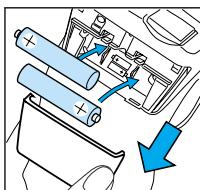

- Use only alkaline batteries of the type LR 03 (AAA) (e.g. Duracell-Ultra) as supplied with this product.
- Remove the battery cover (F) and insert two batteries with correct polarity (see symbol in the battery compartment (E)).
- New batteries (e.g. Duracell-Ultra) will provide approximately 300 measurements.
- Only discard dead batteries. They should not be disposed of in household waste, but at appropriate collection sites.
Key rules for accurate blood pressure measurement
Always take readings at the same time of day, ideally in the morning, under the same conditions.
- Wait at least 30 minutes after smoking or after coffee or tea consumption before measuring.
While taking a measurement, sit down, relax, keep still, do not move or speak.
- Hold the monitor at heart level.
- Wait at least 3 minutes before repeating a measurement.
Measuring
For blood pressure measurements at the wrist an appropriate measuring position close to heart level is essential for accurate results.

- Fasten the monitor on your left arm on top of the slim side of your forearm (see illustration). Make sure the cuff (G) fits tight.
Press the I/O button (C). For the first few seconds, the display (A) shows time/date and the memory setting.
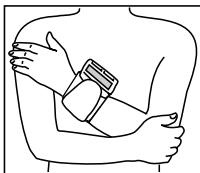
- Take the measuring position as shown. Your arms should remain close to your body. Make sure the monitor is approximately at heart level.

3a. When the monitor is at the appropriate measuring level, an acoustic signal will sound and the display will show a heart symbol. Both indicate that you have reached the appropriate measuring position. The measurement now starts automatically.
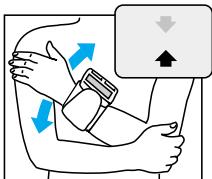
3b. If you have not assumed the appropriate measuring position right away, the monitor will guide you via an arrow on the display. Your arms should remain close to your body, resting comfortably. Move your forearm up or down (see illustration) in the direction of the arrow, until a signal sounds and the heart symbol appears.
Once you have reached an appropriate measuring position the measurement will start automatically.
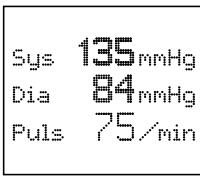
When the measurement is complete, an acoustic signal will sound again, and the reading will be displayed.
Upper (systolic) value Lower (diastolic) value Pulse
Important
15 seconds after switching on the device the measuring process will begin automatically, even if the appropriate measuring position has not been reached.
If at any time you want to discontinue the measurement, press the I/O button.
Memory
Depending on your memory setting, your blood pressure monitor can store readings separately for up to two users («a» or «b»). After you have turned on the monitor, the display shows in the lower right corner
memory for user «a»,
memory for user «b» or
measuring without saving to memory «-».
Changing the memory setting
Turn on the monitor. Press the memory button (B), until the display shows the memory setting you want ( a , b or -) . If you do not want to take a measurement now, turn the monitor off.
If you have chosen memory «a» or «b», readings will be saved automatically after each measurement. Each memory «a» or «b» can hold up to 30 readings.
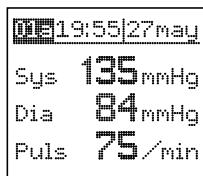
Recalling stored readings
To recall stored readings, press the memory button. Repeatedly pressing the memory button will call up one by one all stored readings (including time and date). The number in the upper left corner of the display gives the memory position (01 being the oldest, 30 the most recent) and user «a» or «b».
Holding down the memory button for more than a second will take you from memory «a» to «b» or back.

Turning off the product
Press the I/O button to turn the product off. Otherwise the product will turn off automatically after 2 minutes.
Pre-settings
You can adjust some of the settings of your blood pressure monitor. You probably will not wish to change settings often. Therefore the necessary select button (D) is placed underneath the battery compartment cover.
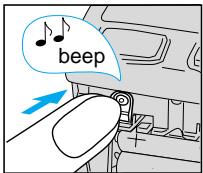
First turn off the product. Keep the select button pressed, until an acoustic signal sounds. The display shows an image of all modes: time/date, position sensor, statistics mode (see below).
If you have made changes and wish to save them, press the memory button. If you want the pre- settings to remain unchanged, keep pressing the select button until the display goes out, or simply wait 2 minutes.
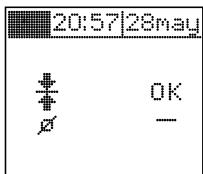
Setting the time
Repeatedly press the select button briefly until the hour in the time/date line is flashing. With the I/O button you can change the hour. Briefly pressing the select button takes you to minute, day or month, which you can each change with the I/O button.
Activating/de-activating the active positioning system
Repeatedly press the select button briefly until the «OK» next to symbol of the position sensor « 1/2 » is flashing. With the I/O button you can now switch from «OK» (activated) to «-» (de-activated).
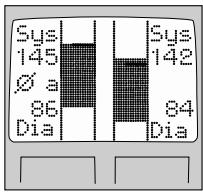
Activating/de-activating the statistics mode
Repeatedly press the select button briefly until the present status of the statistics mode is flashing. With the I/0 button you can now switch from «OK» (activated) to «-» (de-activated).
If the statistics mode is activated («Ø»), it can be called up with the memory button (monitor must be turned off before). It will display a graphic comparison of the most recent reading versus the average value of all saved readings. Pressing the memory button again will call up the individual stored readings. Prolonged pressing of the memory button will switch from memory «a» to «b» or vice versa.
Storage and cleaning
Clean the housing of the product with a damp, soft cloth. Stains on the cuff (G) can be carefully removed with a damp cloth. Do not wash or dry clean the cuff. Do not store the product in a place exposed to direct sunlight or high humidity. Do not submerge in water and do not spill liquids on the device.
Calibration
This product has been calibrated at the time of manufacture. If used according to the use instructions, periodic re-calibration is not required. If at any time you question the measuring accuracy, please call at 1-888-848-2572.
Manufacturing date is given by the LOT number on the back of the product. The first number after LOT represents the last digit of the year of manufacture. The next three digits give the day of the year of manufacture. An example: LOT 0116 xx xx - this product has been manufactured on the 116th day of the year 2000.
What to do if ...
Problem




Situation
Batteries are weak. Measurements still possible.
Batteries are dead. Memory readings can be called up but measurements not possible.
Cuff is too loose or cannot be pressurized.
Error message with a number equal to or higher than 64
Solution
Battery replacement required soon.
Replace batteries.
Refit the cuff tightly.
Refit cuff tightly, take new measurement.
If an error message with a number lower than 64 appears, or if any other errors persist, or if you have further questions, call the Braun Infoline on 1-888-848-2572.
Specifications
Model: BP 2550
Operating principle: Oscillometric method
Indicator: Liquid Crystal Display
Measuring range: 0 - 300 mm Hg (cuff pressure) 40 - 160 / min (pulse rate)
Blood pressure measurement: 50 mm Hg (minimal diastolic value) 250 mm Hg (maximum systolic value)
Accuracy: ± 3 mm Hg (cuff pressure) ± 5% (pulse rate)
Inflation: Automatic
Deflation: Electronic control valve
Power supply: 2 alkaline batteries type LR 03 (AAA) (e.g. Duracell-Ultra)
Operating temperature: +10°C to +40°C (50 to 104°F )
Storage temperature: - 20°C to +60°C (4 to 140°F )
Humidity: 85% RH or below
Cuff: Suitable for wrist circumference 5.3 to 7.8 inches or 13.5 to 20 cm

Type BF equipment
Blood pressure measurements determined with this device are equivalent to those obtained by a trained observer using cuff/stethoscope auscultation method, within the limits prescribed by the American National Standard, Electronic or automated sphygmomanometers.
Subject to change without notice.
Manufactured by Braun Made in Germany
Limited two-year warranty
Braun warrants this product against any defects that are due to faulty material or workmanships for a time of two years from the original date of consumer purchase. This warranty applies when used for normal household use in accordance with the use instructions and excludes the battery and damage to the product resulting from accident or misuse. This product is not warranted when used in a professional environment.
In no event shall Braun be liable for any special, incidental, indirect or consequential damages in connection with the purchase or use of this product or costs over the original cost of the product.
If the product should develop a persistent problem within the warranty period, contact Braun's Technical Support Center at 1-888-848-2572 for repair or replacement at no charge. Braun reserves the right to replace your product with the most comparable product currently available.
While this warranty gives you specific legal rights, you may also have other rights which vary from state to state.
François
(p. ex. Duracell-Ultra)
Température de
fonctionnement :
+10°C- +40°C(50°F-104°F)
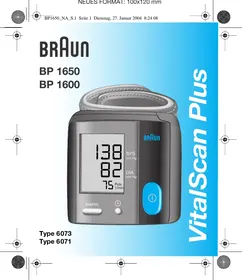
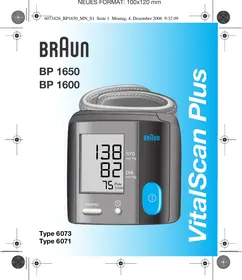

- WHAT YOU SHOULD KNOW ABOUT BLOOD PRESSURE
- IMPORTANT
- PRODUCT DESCRIPTION
- INSERTING BATTERIES
- KEY RULES FOR ACCURATE BLOOD PRESSURE MEASUREMENT
- MEASURING
- MEMORY
- CHANGING THE MEMORY SETTING
- RECALLING STORED READINGS
- TURNING OFF THE PRODUCT
- PRE-SETTINGS
- SETTING THE TIME
- ACTIVATING/DE-ACTIVATING THE ACTIVE POSITIONING SYSTEM
- ACTIVATING/DE-ACTIVATING THE STATISTICS MODE
- STORAGE AND CLEANING
- CALIBRATION
- WHAT TO DO IF
- PROBLEM
- SITUATION
- SOLUTION
- SPECIFICATIONS
- TYPE BF EQUIPMENT
- LIMITED TWO-YEAR WARRANTY
- FRANÇOIS
Brand : KAZ
Model : BP 2550
Category : Sphygmomanometer