
NB300 - Video camera GENUIS - Free user manual and instructions
Find the device manual for free NB300 GENUIS in PDF.


| Product type | USB video camera (Webcam) |
| Brand | GENUIS |
| Model | NB300 (VideoCAM NB 300) |
| Dimensions (approx.) | 80 x 30 x 30 mm |
| Weight | 50 g |
| Power supply | USB port (5 V) |
| Interface | USB 2.0 |
| Sensor | CMOS |
| Video resolution | 640 x 480 pixels (VGA) |
| Maximum frame rate | 30 frames per second |
| Main functions | Video capture, photo, videoconferencing, surveillance system, email sending |
| Provided software | Control software and drivers, DirectX |
| Capture button | Yes, for still image capture |
| Focus | Rotation of the lens cap |
| Supported operating system | Windows (98, ME, 2000, XP) |
| Maintenance and cleaning | Clean the lens with a soft, dry cloth |
| Safety | Not suitable for outdoor use without protection |
| Spare parts | USB cable provided, no spare parts available |
| Repairability | Not user-serviceable, contact customer service |
Frequently Asked Questions - NB300 GENUIS
User questions about NB300 GENUIS
0 question about this device. Answer the ones you know or ask your own.
Ask a new question about this device
Download the instructions for your Video camera in PDF format for free! Find your manual NB300 - GENUIS and take your electronic device back in hand. On this page are published all the documents necessary for the use of your device. NB300 by GENUIS.
USER MANUAL NB300 GENUIS
Please install the driver first and then connect VideoCAM NB 300 to the USB port.
Please read the important notice before the installation.
1. Installing VideoCAM NB 300 software
A. Insert the VideoCAM NB 300 software CD into CD-ROM drive.
B. After few seconds, the setup screen will show the picture of VideoCAM NB 300. Click the "Utility Driver" then simply follow the on-screen instructions.
C. Please remember to install DirectX of the CD-ROM.
Notice:
If the setup screen doesn't show the picture of VideoCAM NB 300, please proceed the following installation:
- Go to the taskbar and click Start then Execute.
- Type D : \SETUP.EXE , then click Enter key.
(Suppose your CD-ROM is in Drive D)
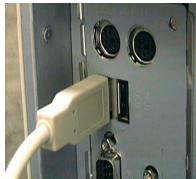
USB Port
2. Connect the VideoCAM NB 300 to your computer.
Connect the VideoCAM NB 300 to the USB port as shown on the right drawing.
- To get rid of driver installation, please go to the taskbar and follow "Start Program VideoCAM NB 300 VideoCAM NB 300 Uninstall, then follow the on-screen instruction to remove the installation.
- You can install the recognize software for video conferencing or chat with your friends.
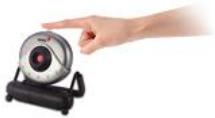
You can use snapshot button to capture still image or rotate the lens cover to adjust the focus.
5. Function description for the major icon
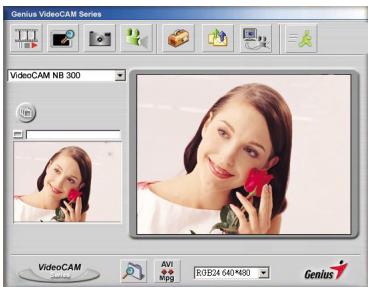
A.

Play the .avi file.
B.

Preview the video image.
C.

Capture image with full motion video.
D.

Take a picture.
E.

Send photo through e-mail.
F.

Use PC camera as a security monitoring system.
G.

Exit the Genius VideoCAM Series UI.
H.

Convert AVI files into MPEG format

NOTE
- Make sure to install the USB driver before connecting the device otherwise unable to install properly. If you encounter problems, uninstall the driver and software then follow the proper installation.
- Should you need the device under high luminance environment, please follow the steps as below:

Camera Control Control Exposure
- Function description for the security monitoring system icon.
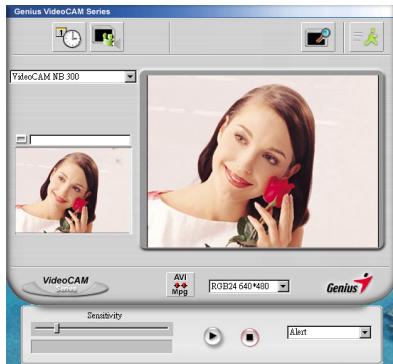
You can record any movements that appear in front of your monitor automatically. It can also record anytime until the HD is full. If there's no movement, it will shut down automatically after four seconds or until there is new movement. It's a great security monitoring system and you can set the software so it works at times when you're not around.
A.

Setup time of the security monitoring system.
When you start to record video, please press the play button.

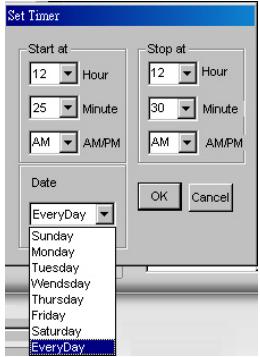

NOTE
- The recording file will be retained in C:\WINDOWS\Album.