
ASD 12U - Air conditioner DAITSU - Free user manual and instructions
Find the device manual for free ASD 12U DAITSU in PDF.



| Product Type | Wall-mounted split air conditioner |
| Brand | DAITSU |
| Model | ASD 12U |
| Approximate Capacity | 12 000 BTU/h |
| Power Supply | 220-240 V ~ 50 Hz (deduced) |
| Operating Modes | Auto, Cool, Dry, Heat (depending on model), Fan only |
| Fan Speed | Auto, Low, Med, High |
| Temperature Range (cool) | 17°C to 32°C |
| Temperature Range (heat) | 0°C to 30°C |
| Air Filter | Washable, cleaning recommended every 2 weeks |
| Remote Control | Infrared with functions: On/Off, Mode, Temperature, Timer, Lock, Reset, Eco, Swing |
| Indoor Unit Display | Indicators: Operation, Timer, Pre-defrost, Auto, Eco |
| Special Features | Eco mode, Auto restart after power failure, Auto defrost, Cold protection (heat models) |
| Safety | 3-minute compressor protection, mandatory grounding, dedicated circuit breaker |
| Installation | To be performed by a certified installer, in compliance with national wiring standards |
| Maintenance | Clean the filter regularly, do not use water for the interior, use a dry cloth |
| Available Spare Parts | Air filter, remote control, batteries (R03/LR03) |
| Repairability | Service by a certified technician only |
| General Information | 90-page manual available as PDF at notice-facile.com |
Frequently Asked Questions - ASD 12U DAITSU
User questions about ASD 12U DAITSU
0 question about this device. Answer the ones you know or ask your own.
Ask a new question about this device
Download the instructions for your Air conditioner in PDF format for free! Find your manual ASD 12U - DAITSU and take your electronic device back in hand. On this page are published all the documents necessary for the use of your device. ASD 12U by DAITSU.
USER MANUAL ASD 12U DAITSU
CLIMATISEUR TYPE SPLIT
AIR CONDITIONER SPLIT TYPE ROOM
MODELO
ASD 7U (DS-7UM DOS-7UM)
ASD 9U (DS-9UM DOS-9UM)
ASD 12U (DS-12UM DOS-12UM)
ASD 18U (DS-18UM DOS-18UM)
Manual de funciona Manual de funciona Manuel d'instructions Operation manual
LEER ESTE MANUAL DE FUNCIONAMENTO ANTES DE UTILizar EL APARATO DE AIRE ACONDICIONADO.
LER ESTE MANUAL DE FUNCIONAMENTO ANTES DE UTILizar O APARELHO DE AR CONDICIONADO.
VEUILLEZ LIRE CE MANUEL D'UTILISATION AVANT D'UTILISER LE CONDITIONNEUR D'AIR.
PLEASE READ THIS OPERATION MANUAL BEFORE USING THE AIR CONDITIONER.
CONTENIDOS
3- Low noise of the air conditioner
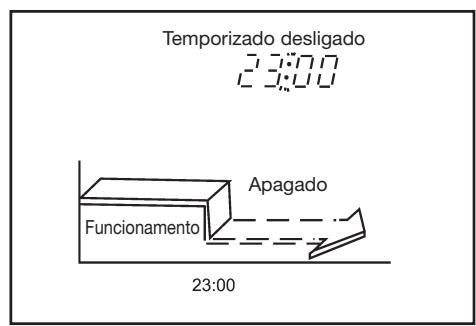
Para desligar o ar condicionado as 23:00.
1- Premir a tecla TIMER OFF.
2- Utilizar a tecla TIME ADJUST paraETHER "23:00" no indicator OFF timer.
3- Premir a tecla OK.
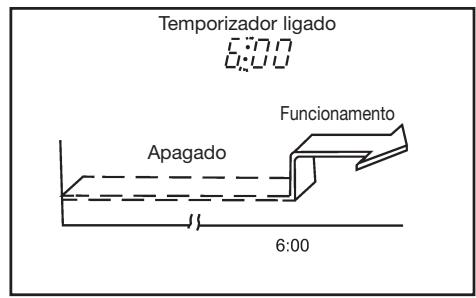
Para起初 or ar condicionado as 6:00.
1- Premir a tecla TIMER ON.
2- Utilizar a tecla TIME ADJUST paraETHER "6:00" no indicator do temporizador do controlo remot.
3- Premir a tecla OK.
TEMPORIZACAO COMBINADA (Programacao dos
FONCTIONNEMENT MANUEL
FONCTIONNEMENT OPTIMAL
Safety precautions .68-69
Parts names. 70
Operating temperature 71
Manual operation. 71
Adjusting air flow direction 72
How the air conditioner works 73
Optimal operation 73
Maintenance. 74-75
Operation tips 76
Troubleshooting tips 77
Remote controls and their functions 78-79
Names and functions of indicators on remote controller 80
Handling the remote controller 81
Setting the clock 82
Lock and reset button function 83
Automatic operation 84
Cooling/fan only operation 85
Drying operation 86
Timer operation 87
Example of timer setting 88
Read This Manual
Inside you will find many helpful hints on how to use and maintain your air conditioner properly. Just a little preventative care on your part can save you a great deal of time and money over the life of your air conditioner.
You'll find many answers to common problems in the chart of troubleshooting tips. If you review the chart of Troubleshooting Tips first, you may not need to call for service.

CAUTIONS
- Contact an authorised service technician for repair or maintenance of this unit.
- Contact the installer for installation of this unit.
- The air conditioner is not intended for use by young children or invalids without supervision.
- Young children should be supervised to ensure that they do not play with the air conditioner.
- If the power cord is to be replaced, replacement work shall be performed by authorised personnel only.
- Installation work must be performed in accordance with the national wiring standards by authorised personnel only.
SAFETY PRECAUTIONS
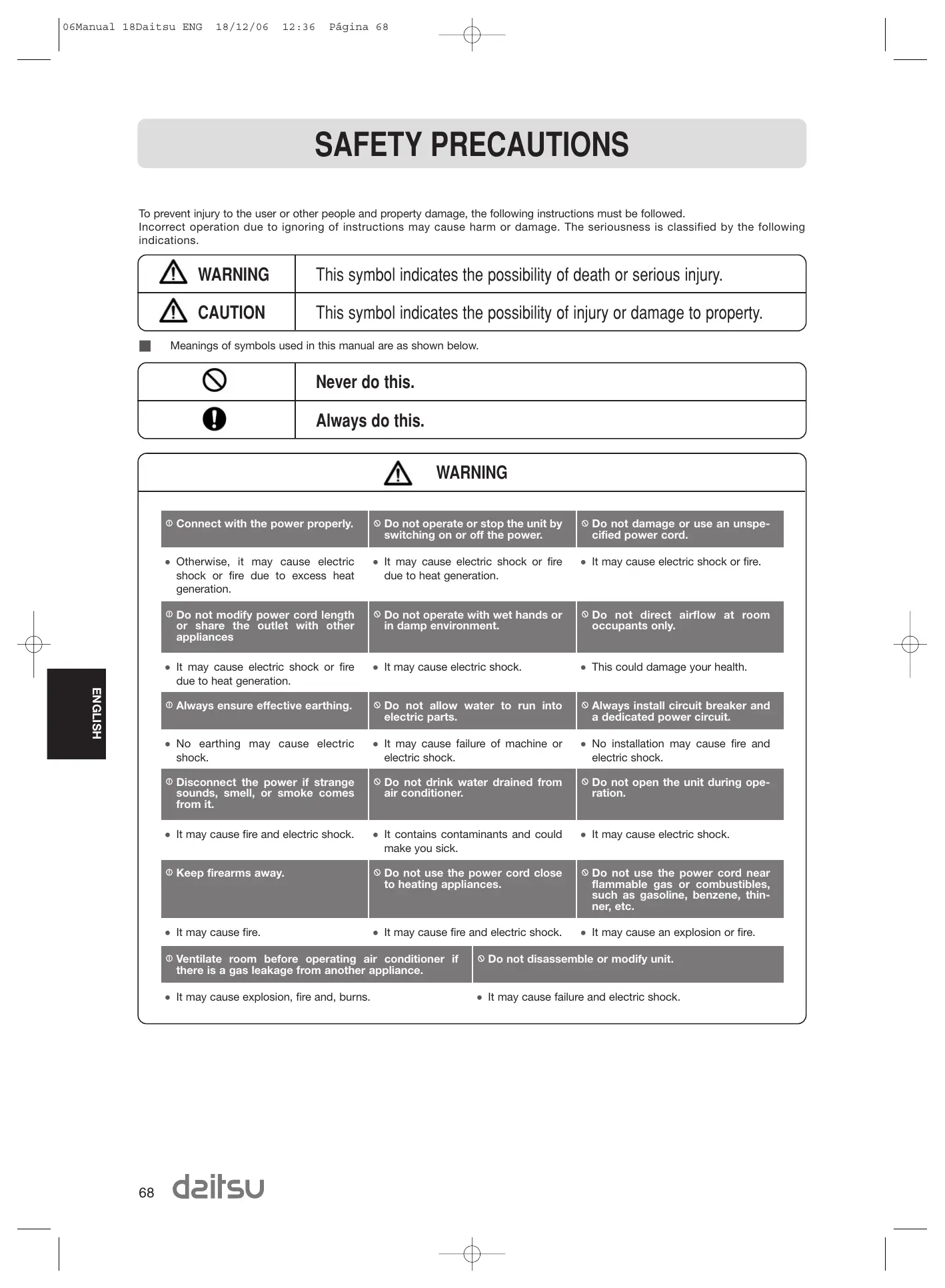
To prevent injury to the user or other people and property damage, the following instructions must be followed. Incorrect operation due to ignoring of instructions may cause harm or damage. The seriousness is classified by the following indications.
| WARNING | This symbol indicates the possibility of death or serious injury. |
| CAUTION | This symbol indicates the possibility of injury or damage to property. |
Meanings of symbols used in this manual are as shown below.
| ⊗ | Never do this. |
| ⊕ | Always do this. |

WARNING
① Connect with the power properly.
- Otherwise, it may cause electric shock or fire due to excess heat generation.
Do not modify power cord length or share the outlet with other appliances
- It may cause electric shock or fire due to heat generation.
Always ensure effective earthing.
- No earthing may cause electric shock.
① Disconnect the power if strange sounds, smell, or smoke comes from it.
- It may cause fire and electric shock.
① Keep firearms away.
It may cause fire.
① Ventilate room before operating air conditioner if there is a gas leakage from another appliance.
- It may cause explosion, fire and, burns.
Do not operate or stop the unit by switching on or off the power.
- It may cause electric shock or fire due to heat generation.
Do not operate with wet hands or in damp environment.
It may cause electric shock.
Do not allow water to run into electric parts.
- It may cause failure of machine or electric shock.
Do not drink water drained from air conditioner.
-
It contains contaminants and could make you sick.
Do not use the power cord close to heating appliances. -
It may cause fire and electric shock.
r conditioner if Do not disassemble or modify unit.
- It may cause failure and electric shock.
SAFETY PRECAUTIONS

CAUTION
When the air filter is to be removed, do not touch the metal parts of the unit.
It may cause an injury.
Do not clean the air conditioner with water.
Water may enter the unit and degrade the insulation. It may cause an electric shock.
Ventilate the room well when used together with a stove, etc.
- An oxygen shortage may occur.
① When the unit is to be cleaned, switch off, and turn off the circuit breaker.
- Do not clean unit when power is on as it may cause fire and electric shock, it may cause an injury.
Do not put a pet or house plant where it will be exposed to direct air flow.
- This could injure the pet or plant.
Do not use for special purposes.
- Do not use this air conditioner to preserve precision devices, food, pets, plants, and art objects. It may cause deterioration of quality, etc.
① Stop operation and close the window in storm or hurricane.
Operation with windows opened may cause wetting of indoor and soaking of household furniture.
Do not place obstacles around air-inlets or inside of air-outlet.
- It may cause failure of appliance or accident.
Turn off the main power switch when not using the unit for a long time.
- It may cause failure of product or fire.
Do not use strong detergent such as wax or thinner. Use a soft cloth for cleaning.
- Appearance may be deteriorated due to change of product color or scratching of its surface.
Ensure that the installation bracket of the outdoor appliance is not damaged due to prolonged exposure.
- If bracket is damaged, there is concern of damage due to falling of unit.
Always insert the filters securely. Clean filter once every two weeks.
Operation without filters may cause failure.
Do not place heavy object on the power cord and take care so that the cord is not compressed.
- There is danger of fire or electric shock.
Use caution when unpacking and installing. Sharp edges could cause injury.
If water enters the unit, turn the unit off and disconnect the power, contact a qualified service technician.
PARTS NAMES
Indoor unit
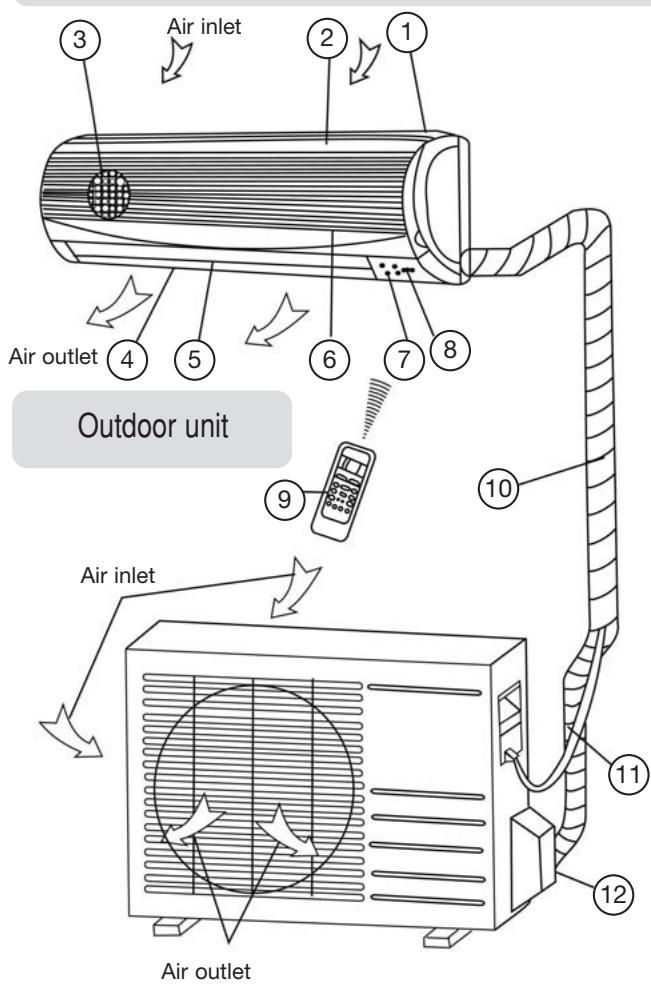
1- Front panel frame
2- Front panel
3- Air filter
4- Horizontal air flow grille
5- Vertical air flow louver
6- Room temperature sensor
7- Display panel
8- Infrared signal receiver
9- Remote controller
10- Drain hose, refrigerant connecting pipe
11- Connective cable
12- Stop valve
Display panel
Note: The display panel on the indoor unit would look like one of following:
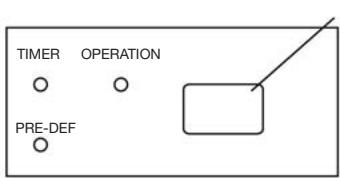
Infrared signal receptor
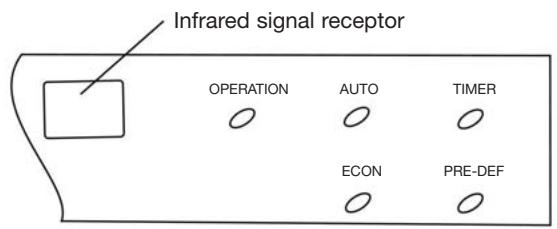
OPERATION indicator:
The indicator flashes once every second after power is on and illuminates when the air conditioner is in operation.
TIMER indicator:
The indicator illuminates when TIMER is set ON.
PRE-DEF. Indicator (For cooling& heating model only):
The air conditioner starts defrosting automatically if outdoor unit frosts in heating operating.
At this time, PRE.-DEF. Indicator illuminates.
AUTO indicator:
This indicator flashes when the air conditioner is in AUTO operation.
ECON indicator:
This indicator illuminates while the air conditioner is in economic operation.
Note:
All the pictures in this manual are for explanation purpose only. They may be slightly different from the air conditioner you purchased. The actual shape shall prevail.
| Mode Temperature | Cooling operation | Heating operation | Drying operation |
| Room temperature | 17°C ~ 32°C | 0°C ~ 30°C | 17°C ~ 32°C |
| Outdoor temperature | 18°C 43°C (-5°C ~ 43°C:For the models with low temperature cooling system) | -7°C ~ 24°C | 11°C ~ 43°C |
CAUTION
1- If air conditioner is used outside of the above conditions, certain safety protection features may come into operation and cause the unit to function abnormally.
2- Room relative humidity less than 80% . If the air conditioner operates in excess of this figure, the surface of the air conditioner may attract condensation. Please sets the vertical air flow louver to its maximum angle (vertically to the floor), and set HIGH fan mode.
3- Optimum performance will be achieved within these operating temperature.
MANUAL OPERATION
Manul operation can be used temporarily in case you can not find the remote controller or its batteries are exhausted.
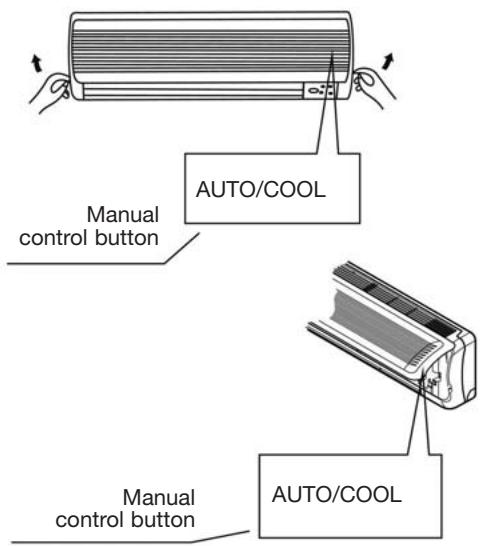
(For < 16000Btu/h Models)
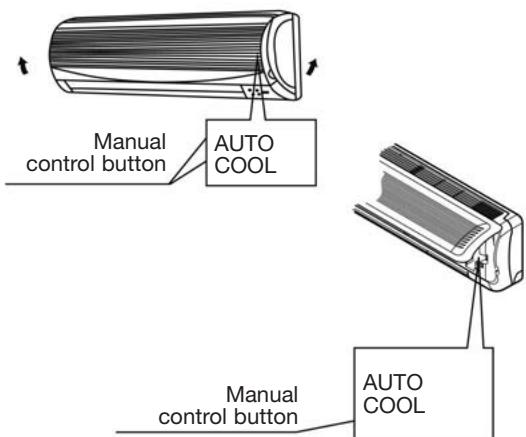
(For ≥ 16000 21000Btu / h Models)
1- Open and lift the front panel up to an angle until it remains fixed with a clicking sound.
2- Push the button until the AUTO indicator is lit, the unit will work in forced AUTO mode (the default setting temperature is 24^ ).
3- Close the panel firmly to its original position.
CAUTION
- Once you push the manual button, the operation mode is shifted in an order as: AUTO, COOL, OFF.
- Push the manual button until the OPERATION indicator flashes rapidly (five times per second), the unit now is operating in forced COOL mode. This is used for testing purposes only, .
- When the OPERATION indicator goes off, the air conditioner is OFF.
- To restore the remote controller operation, use the remote controller directly.
1- Open and lift the front panel up to an angle until it remains fixed with a clicking sound.
2- Push the AUTO button and the air conditioner will run in AUTO mode.
3- Close the panel firmly to its original position.
Note: The "COOL" mode on the control board is only provided for testing purposes.
ADJUSTING AIR FLOW DIRECTION
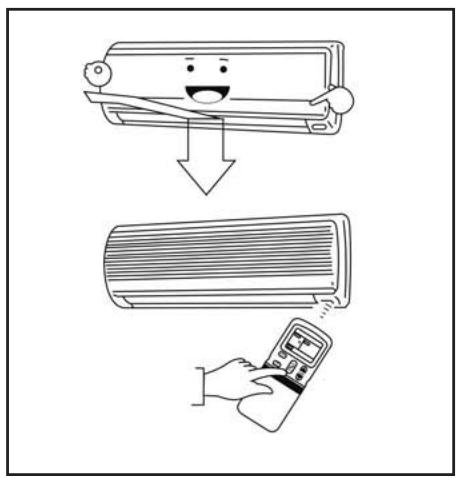
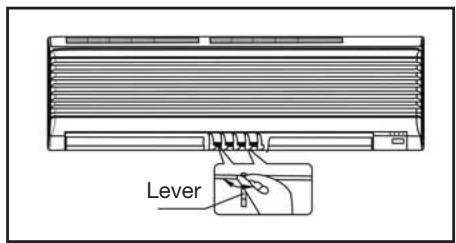
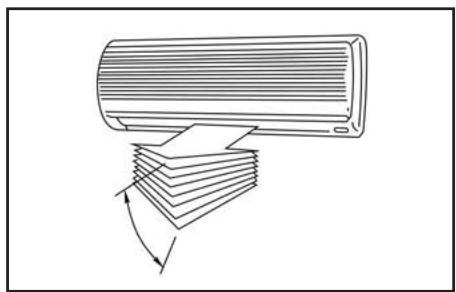
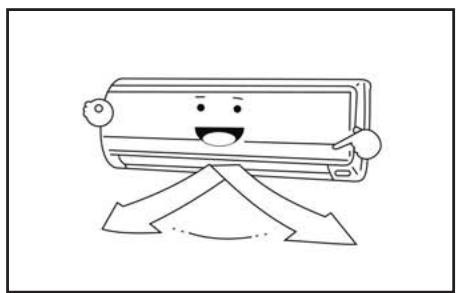
- Adjust the air flow direction properly otherwise, it might cause discomfort or cause uneven room temperatures.
- Adjust the horizontal louver using the remote controller.
- Adjust the vertical louver manually.
Adjusting the Vertical Air Flow Direction (up - down)
The air conditioner automatically adjusts the vertical air flow direction in accordance with the operating mode.
To set the vertical air flow direction
Perform this function while the unit is in operation.
Keep pressing the AIR DIRECTION button on the remote controller to move the louver to the desired direction.
- Adjust the vertical air flow direction to the desired direction.
- In subsequent operations, the vertical air flow is automatically set in the direction to which you adjusted the louver by pressing the AIR DIRECTION button.
To set the horizontal air flow direction (left - right)
Adjust the vertical louver manually using the lever on the left or right side of the vertical louver arm (Depending on model). Take care not to catch fingers on the fan, horizontal louver or to damage vertical lovers. When the air conditioner is in operation and the horizontal louver is in a specific position, move the lever at left (or right, depending on model) end of the air outlet to the desired position.
To automatically swing the air flow direction (up - down)
Perform this function while the air conditioner is in operation.
- Press the SWING button on the remote controller.
To stop the function, press the SWING button again. - Press AIR DIRECTION button to lock louver in desired position.

CAUTION
- The AIR DIRECTION and SWING buttons will be disabled when the air conditioner is not in operation (including when the TIMER ON is set).
- Do not operate the air conditioner for long periods with the air flow direction set downward in cooling or dry mode. Otherwise, condensation may occur on the surface of the horizontal louver causing moisture to drop on to the floor or on furnishings.
- Do not move the horizontal louver manually. Always use the AIR DIRECTION or SWING button. If you move this louver manually, it may malfunction during operation. If the louver malfunctions, stop the air conditioner once and restart it.
- When the air conditioner is started immediately after it was stopped, the horizontal louver might not move for approximately 10 seconds.
- Open angle of the horizontal louver should not be set too small, as COOLING or HEATING performance may be impaired due to too restricted air flow area.
- Do not operate unit with horizontal louver in closed position.
- When the air conditioner is connected to power (initial power), the horizontal louver may generate a sound for 10 seconds, this is a normal operation.
HOW THE AIR CONDITIONER WORKS
Automatic Operation
- When you set the air conditioner in AUTO mode, it will automatically select cooling, heating(cooling/heating models only), or fan only operation depending on what temperature you have selected and the room temperature.
- The air conditioner will control room temperature automatically round the temperature point set by you.
- If the AUTO mode is uncomfortable, you can select desired conditions manually.
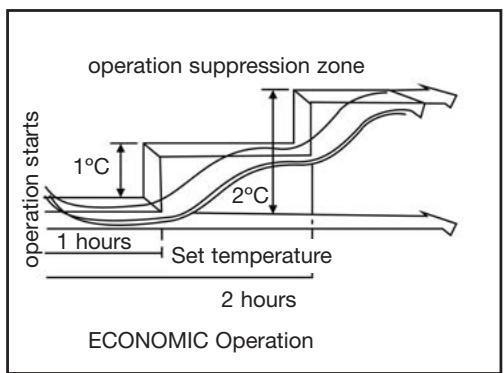
Economic Operation
When you push ECONO button during cooling, heating (cooling only type without), or AUTO operation, the air conditioner will start following operation. The fan speed will be automatically controlled. In the operation suppression zone where capacity is kept to the minimum, overcooling is prevented by raising the temperature setting by 1^ after 1 hour and by 2^ after 2 hours of operation. The room temperature is thus regulated between the operation suppression zone and the set temperature. (It depends on the outdoor temperature.)
Drying Operation
- The dry mode will automatically select the drying operation based on the difference between the set temperature and the actual room temperature.
- The temperature is regulated while dehumidifying by repeating turning on and off of the cooling operation or fan only. The fan speed indicator will display AUTO and low speed will be used.
OPTIMAL OPERATION
To achieve optimal performance, please note the following:
- Adjust the air flow direction correctly so that it is not directed on people.
- Adjust the temperature to achieve the highest comfort level. Do not adjust the unit to excessive temperature levels.
- Close doors and windows on COOL or HEAT modes, or performance may be reduced.
- Use TIMER ON button on the remote controller to select a time you want to start your air conditioner.
- Do not put any object near air inlet or air outlet, as the efficiency of the air conditioner may be reduced and the air conditioner may stop running.
- Clean the air filter periodically, otherwise cooling or heating performance may be reduced.
- Do not operate unit with horizontal louvre in closed position.
MAINTENANCE
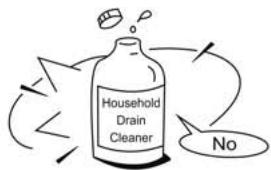

WARNING
It is necessary to stop the air conditioner and disconnect the power supply before cleaning.
Cleaning the indoor unit and remote controller

CAUTIONS
- Use a dry cloth to wipe the indoor unit and remote controller.
- A cloth dampened with cold water may be used on the indoor unit if it is very dirty.
- The front panel of the indoor unit can be removed and cleaned with water. Then wipe it with a dry cloth.
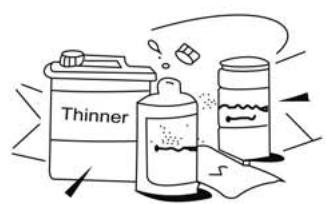
- Do not use a chemically treated cloth or duster to clean the unit.
- Do not use benzine, thinner, polishing powder, or similar solvents for cleaning. These may cause the plastic surface to crack or deform.
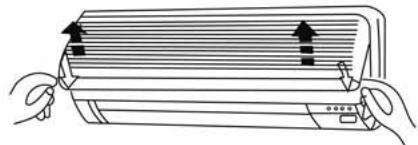
Cleaning the Air Filter
A clogged air filter reduces the cooling efficiency of this unit. Please clean the filter once every 2 weeks.
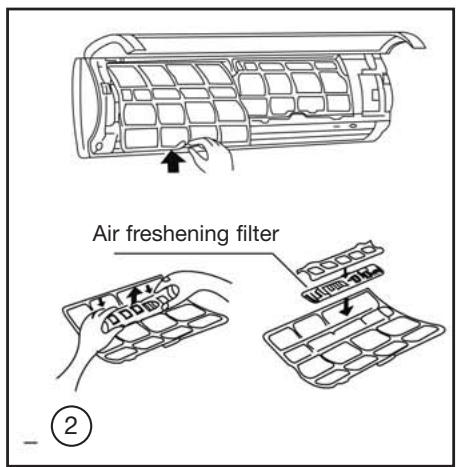
1- Lift the indoor unit panel up to an angle until it stops with a clicking sound.
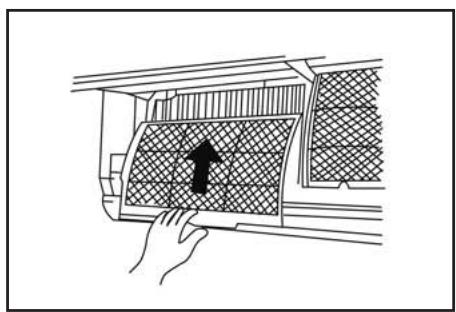
2- Take hold of the handle of the air filter and lift it up slightly to take it out from the filter holder, then pull it downwards.
3- Remove the AIR FILTER from the indoor unit.
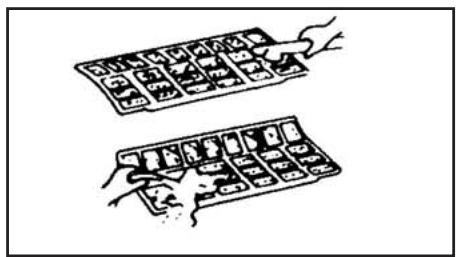
- Clean the AIR FILTER once two weeks.
- Clean the AIR FILTER with a vacuum cleaner or water, then dry it up in cool place.
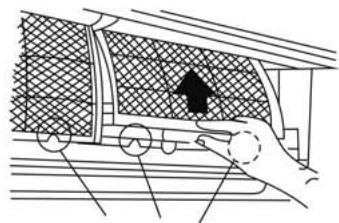
Filter Handle
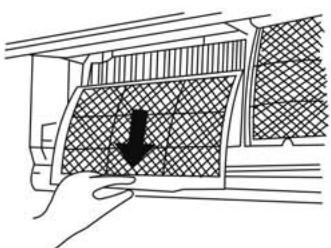
MAINTENANCE
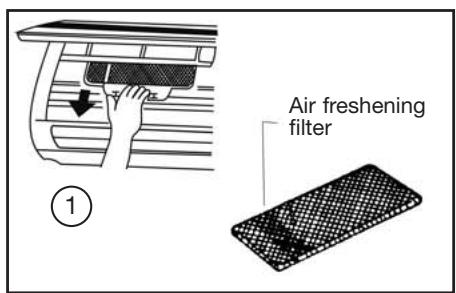
4- Remove the air freshening filter from its support frame
(The installation and removing method of the air freshening filter is different depending on the models, see the pictures marked and on the left. .
- Clean the air freshening filter at least once a month, and replace it every 4-5 months.
- Clean it with vacuum cleaner, then dry it in cool place.
5- Install the air freshening filter back into position.
6- Insert the upper portion of air filter back into the unit taking care that the left and right edges line up correctly and place filter into position.
Maintenance
If you plan to idle the unit for a long time, perform the following:
(1) Operate the fan for about half a day to dry the inside of the unit.
(2) Stop the air conditioner and disconnect power.
Remove the batteries from the remote controller.
(3) The outdoor unit requires periodic maintenance and cleaning. Do not attempt to do this yourself.
Contact your dealer or servicer.
Checks before operation
- Check that the wiring is not broken off or disconnected.
- Check that the air filter is installed.
- Check if the air outlet or inlet is blocked after the air conditioner has not been used for a long time.

CAUTIONS
- Do not touch the metal parts of the unit when removing the filter. Injuries can occur when handling sharp metal edges.
- Do not use water to clean inside the air conditioner. Exposure to water can destroy the insulation, leading to possible electric shock.
- When cleaning the unit, first make sure that the power and circuit breaker are turned off.
OPERATION TIPS
The following events may occur during normal operation.
1- Protection of the air conditioner Compressor protection
- The compressor can't restart for 3 minutes after it stops. Anti-cold air (Cooling and heating models only)
- The unit is designed not to blow cold air on HEAT mode, when the indoor heat exchanger is in one of the following three situations and the set temperature has not been reached.
A) When heating has just starting.
B) Defrosting.
C) Low temperature heating.
- The indoor or outdoor fan stop running when defrosting (Cooling and heating models only). Defrosting (Cooling and heating models only)
- Frost may be generated on the outdoor unit during heat cycle when outdoor temperature is low and humidity is high resulting in lower heating efficiency of the air conditioner.
- During this condition air conditioner will stop heating operation and start defrosting automatically.
- The time to defrost may vary from 4 to 10 minutes according to the outdoor temperature and the amount of frost buildup on the outdoor unit.
2- A white mist coming out from the indoor unit
- A white mist may generate due to a large temperature difference between air inlet and air outlet on COOL mode in an indoor environment that has a high relative humidity.
- A white mist may generate due to moisture generated from defrosting process when the air conditioner restarts in HEAT mode operation after defrosting.
3- Low noise of the air conditioner
- You may hear a low hissing sound when the compressor is running or has just stopped running. This sound is the sound of the refrigerant flowing or coming to a stop.
- You can also hear a low "squeak" sound when the compressor is running or has just stopped running. This is caused by heat expansion and cold contraction of the plastic parts in the unit when the temperature is changing.
A noise may be heard due to Louver restoring to its original position when power is first turned on.
4- Dust is blown out from the indoor unit
This is a normal condition when the air conditioner has not been used for a long time or during first use of the unit.
5- A peculiar smell comes out from the indoor unit
This is caused by the indoor unit giving off smells permeated from building material, from furniture, or smoke.
6- The air conditioner turns to FAN only mode from COOL or HEAT (For cooling and heating models only) mode
When indoor temperature reaches the temperature setting on air conditioner, the compressor will stop automatically, and the air conditioner turns to FAN only mode. The compressor will start again when the indoor temperature rises on COOL mode or falls on HEAT mode (For cooling and heating models only) to the set point.
7- Dripping water may generate on the surface of the indoor unit when cooling in a high relatively humidity (relative humidity higher than 80% ). Adjust the horizontal louver to the maximum air outlet position and select HIGH fan speed
8- Heating mode (For cooling and heating models only)
The air conditioner draws in heat from the outdoor unit and releases it via the indoor unit during heating operation. When the outdoor temperature falls, heat drawn in by the air conditioner decreases accordingly. At the same time, heat loading of the air conditioner increases due to larger difference between indoor and outdoor temperature. If a comfortable temperature can't be achieved by the air conditioner, we suggest you use a supplementary heating device.
9- Auto_restart function
Power failure during operation will stop the unit completely. For the unit without Auto_restart feature, when the power restores, the OPERATION indicator on the indoor unit starts flashing. To restart the operation, push the ON/OFF button on the remote controller. For the unit with Auto_restart feature, when the power restores, the unit restarts automatically with all the previous settings preserved by the memory function.
10- Lightning or a car wireless telephone operating nearby may cause the unit to malfunction.
Disconnect the unit with power and then re-connect the unit with power again. Push the ON/OFF button on the remote controller to restart operation.
TROUBLESHOOTING TIPS

Malfunctions and Solutions
| Stop the air conditioner immediately if one of the following faults occur. Disconnect the power and contact the nearest customer service center. | |
| Trouble | RUNNING indicator or other indicators flash rapidly (5 times every second) and this flash can't be fixed by disconnecting the power, and then connect it in again. |
| Fuse blows frequently or circuit breaker trips frequently. | |
| Other objects or water penetrate the air conditioner. | |
| The remote controller won't work or works abnormally. | |
| Other abnormal situations. | |
| Malfunctions | Cause | What should be done? |
| Unit does not start. | Power cut. | Wait for power to be restored. |
| Unit may have become unplugged. | Check that plug is securely in wall receptacle. | |
| Fuse may have blown. | Replace the fuse. | |
| Battery in Remote controller may have been exhausted. | Replace the battery. | |
| The time you have set with timer is incorrect. | Wait or cancel timer setting. | |
| Unit not cooling or heating (Cooling/heating models only) room very well while air flowing out from the air conditioner. | Inappropriate temperature setting. | Set temperature correctly. For detailed method please refer to "Using remote control" section. |
| Air filter is blocked. | Clean the air filter. | |
| Doors or Windows are open. | Close the doors or windows. | |
| Air inlet or outlet of indoor or outdoor unit has been blocked. | Clear obstructions away first, then restart the unit. | |
| Compressor 3 minutes protection has been activated. | Wait. | |
| If the trouble has not been corrected, please contact a local dealer or the nearest customer service center. Be sure to inform them of the detailed malfunctions and unit model. | ||
Notes: Do not attempt to repair the unit yourself. Always consult an authorised service prov
REMOTE CONTROLS AND THEIR FUNCTIONS
Remote control
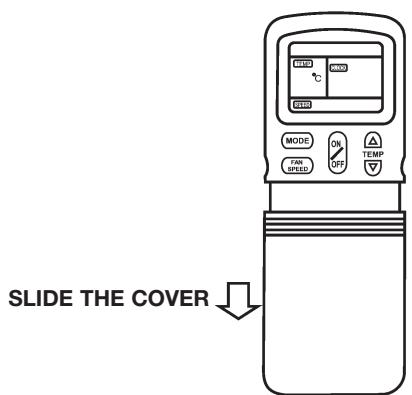
REMOTE CONTROLS AND THEIR FUNCTIONS
Remote control
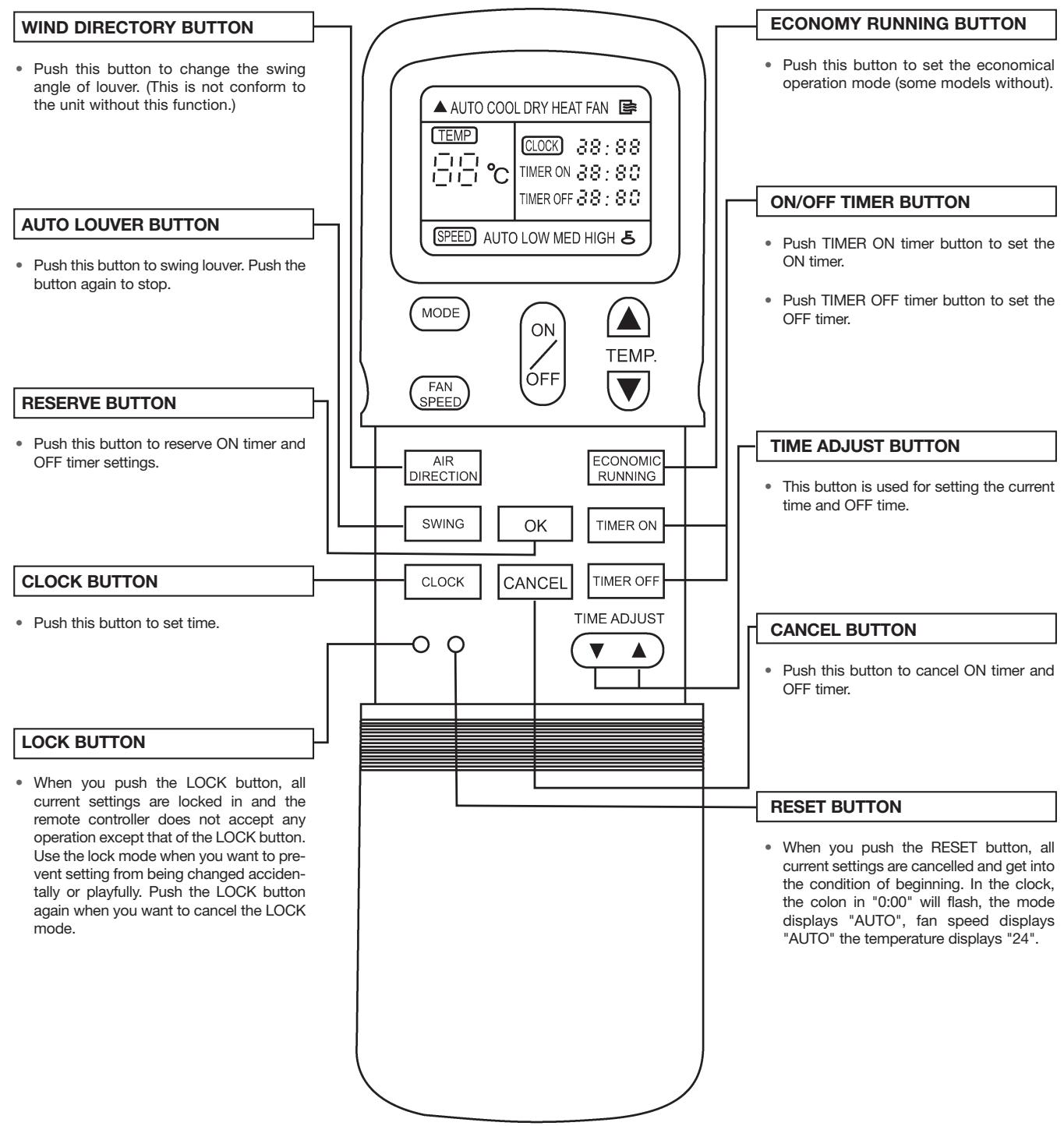
- The remote controller above drawing may have some differences from the one that you purchase.
NAMES AND FUNCTIONS OF INDICATORS ON REMOTE CONTROLLER

TRANSMISSION INDICATOR
This transmission indicator lights when remote controller transmits signals to the indoor unit.
MODE DISPLAY
Displays the current operation mode. Including AUTO, COOL, DRY, HEAT(cooling only type without), FAN ONLY and back to AUTO.
ON/OFF DISPLAY
Displayed by pushing the ON/OFF button.
Push the ON/OFF button again to disappear.
TEMP.DISPLAY
Displays the temperature setting (17°C to 30°C) When you set the operating mode to FAN ONLY, no temperature setting is displayed.
CLOCK DISPLAY
The current time is indicated.(0 24 hours)
TIMER DISPLAY
The time set for timer operation is indicated. (0 24 hours)
LOCK DISPLAY
Displayed by pushing the Lock button.
Push the Lock button again to disappear.
FAN SPEED DISPLAY
Displays the selected fan speed, AUTO and three fan speed levels "LOW" "MED" "HIGH" can be indicated. Displays AUTO when the operating mode is either AUTO or DRY.
ECONO. DISPLAY
(Some models without)
Display by pushing the ECONO. button.
Push the ECONO. Button again to disappear.
- In the illustration, all displays are indicated for the sake of clarity. During operation, only the relevant displays will be shown on the remote controller.
HANDLING THE REMOTE CONTROLLER
Location of the remote controller
- Keep the remote controller where its signals can reach the receiver of the indoor unit. (a distance of 8m is allowed).
- When you select the timer operation, the remote controller automatically transmits a signal to the indoor unit at the specified time. If you keep the remote controller in a position that hinders proper signal transmission, a time lag of up to 15 minutes may occur.

CAUTIONS
- The air conditioner will not operate if curtains, doors or other materials block the signals from the remote controller to the indoor unit.
- Prevent any liquid from falling into the remote controller. Do not expose the remote controller to direct sunlight or heat.
- If the infrared signal receiver on the indoor unit is exposed to direct sunlight, the air conditioner may not function properly. Use curtains to prevent the sunlight from falling on the receiver.
- If other electrical appliances react to the remote controller, either move these appliances or consult your local dealer.
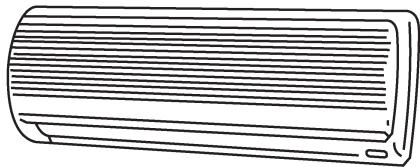
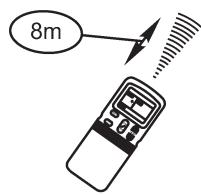
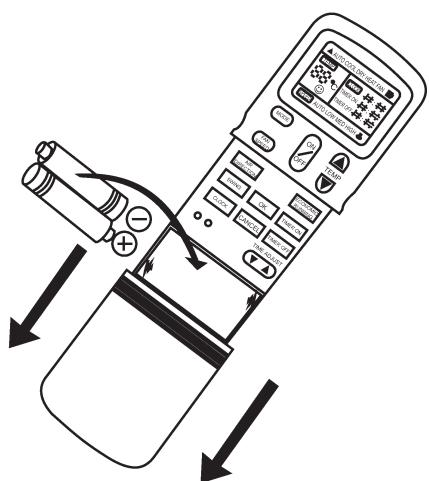
Replacing batteries
The remote controller uses two alkaline dry batteries (R03/LR03X2)
(1) Slide the cover of the battery compartment, then replace the old batteries with new ones.
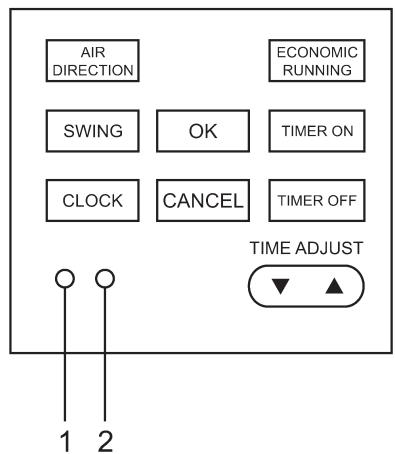
(2) After step (1) is done, push the RESET button.
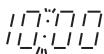
(3) Before replacing the battery compartment cover, confirm that the display screen on the remote controller displays "0:00" and that the colon is flashing.
- After replacing batteries, set the remote controller clock.

NOTES
- When replacing batteries, do not use old batteries or different type batteries. Otherwise it may cause the remote controller to malfunction.
- If you do not use the remote controller for a few weeks or more, remove the batteries. Otherwise, battery leakage may damage the remote controller.
- The average battery life during normal use is approximately half a year. Replace the batteries when there is no receiving beep from the indoor unit or if the transmission indicator on the remote controller fails to light.
SETTING THE CLOCK
Before you start operating the air conditioner, set the clock of the remote controller using the procedures given in this section. The clock panel on the remote controller will display the time regardless of whether the air conditioner is in use or not.
Initial Setting or the Clock
When batteries are inserted in the remote controller, the clock panel will display "0:00" and the colon will flash.
(1) Initial Setting or the Clock
- Push this button to set time.
Forward.
Backward.
Each time you push the button, the time moves forward or backward by one minute depending on which side you Push. The time alters as quickly as you push the button.
(2) OK button
- When you push the OK button, the clock time display stops flashing and the clock starts operating.
(3) Readjusting the Clock
-
Push the CLOCK button in the battery compartment, the colon in the clock display will start to flash. To set the new time, follow 1 and 2 of "Initial Setting of the Clock".
-
Clock accuracy is within 10 seconds per day.
Clock

CAUTIONS
Static electricity or other factors (in case of extremely high voltage) can cause remote controller clock initialize. If your remote controller is initialized (flashing of the colon in "0:00"), readjust the clock before you start operation.
LOCK AND RESET BUTTON FUNCTION
(1) When you push the LOCK button, all current settings are locked in and the remote controller does not accept any operation except that of the LOCK button. Use the lock mode when you want to prevent settings from being changed accidentally or playfully. Push the LOCK button again when you want to cancel the LOCK mode.
(2) When you push the RESET button, all current settings are cancelled and get into the condition of beginning. In the clock, the colon in "0:00" will flash, the mode displays "Auto", fan speed displays "Auto", the temperature displays "24".
AUTOMATIC OPERATION
When you set the air conditioner in AUTO mode, it will automatically select cooling, heating (cooling only type without), or fan only operation depending on the room temperature.
Once you select the operating mode, the operating conditions are saved in the unit's microcomputer memory.
Thereafter, the air conditioner will start operating under the same conditions when you simply push the ON/OFF button of the remote controller.
Start
The OPERATION lamp on the display panel of the indoor unit starts flashing.
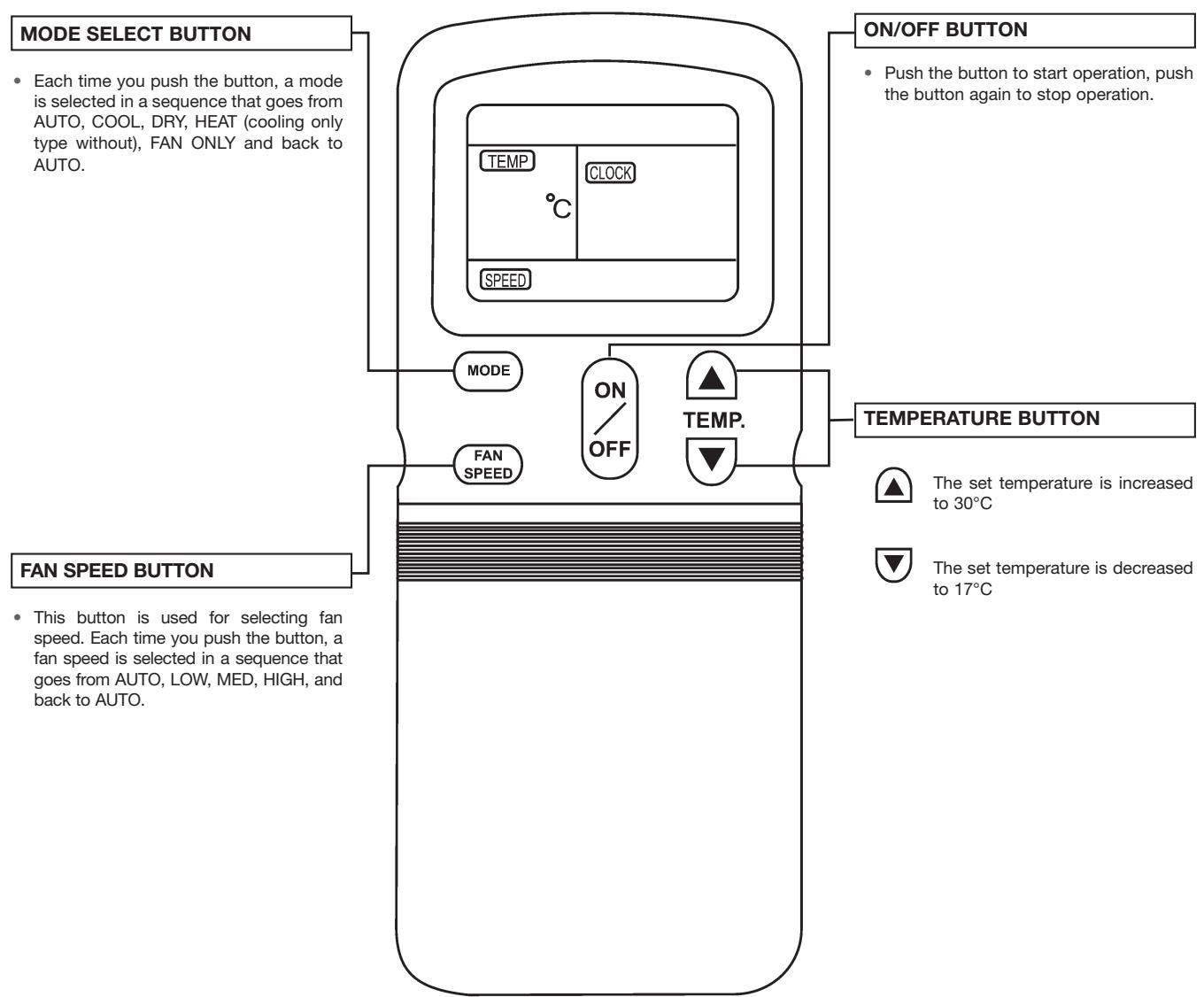
(1) Mode select button (MODE)
Select AUTO.
(2) Temperature button (TEMP)
Set the desired temperature. Normally, set it between 21^ to 28^
(3) ON/OFF button
Push this button to start the air conditioner. The OPERATION lamp on the display panel of the indoor unit lights. The operating mode is selected in accordance with the room temperature and operation starts after approximately 3 minutes.
Stop
ON/OFF button
Push this button again to stop the air conditioner.
If the AUTO mode is uncomfortable, you can select the desired conditions manually.
When you select the AUTO mode, you do not have to set the fan speed. The FAN speed display will show AUTO and the fan speed will be automatically controlled.
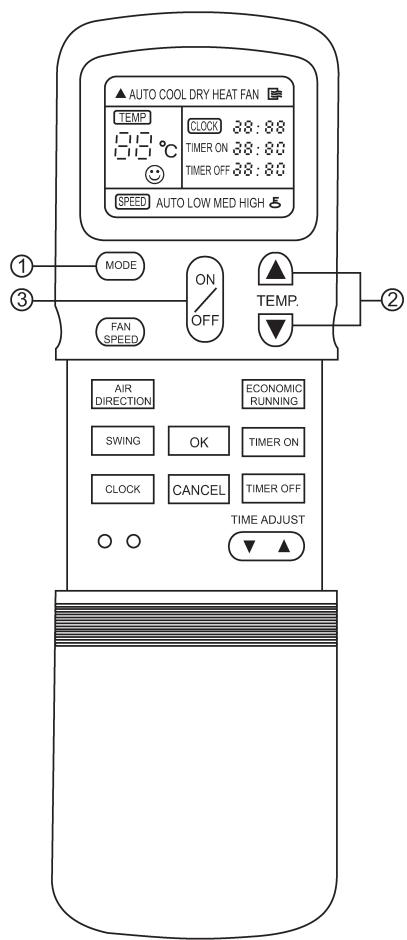
Connect the unit with the power.
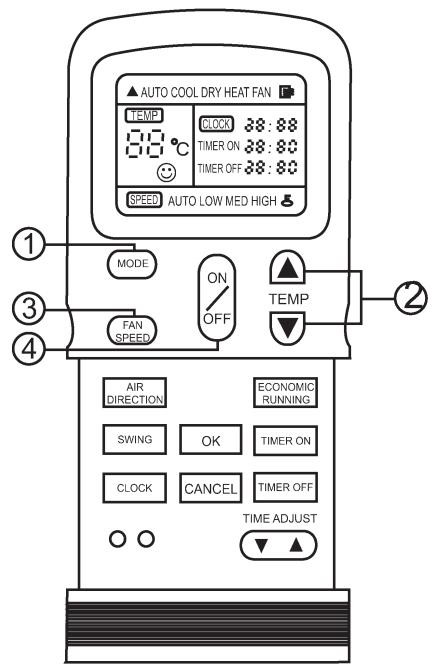
The OPERATION lamp on the display panel of the indoor unit starts flashing.
(1) Mode select button (MODE)
Select COOL, HEAT (cooling only type without), or FAN ONLY.
(2) Temperature button (TEMP)
Set the desired temperature.
Cooling 21^ or higher
Heating 28^ or lower
(3) Fan speed button (FAN SPED)
Select any of the "AUTO" "LOW", "MED" and "HIGH".
(4) ON/OFF button
Push this button to start the air conditioner.
The OPERATION lamp on the display panel of the indoor unit lights. The operating mode is selected in accordance with the room temperature and operation starts after approximately 3 minutes (If you select FAN ONLY mode, the unit will start immediately.)
Stop
ON/OFF button
Push this button again to stop the air conditioner.
The FAN ONLY mode does not control temperature.
Therefore, perform only steps 1,3, and 4 to select this mode.
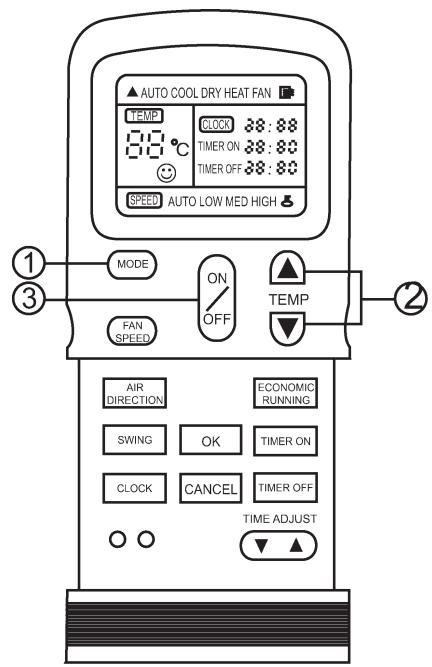
DRYING OPERATION
Start
Connect the unit with the power.
The OPERATION lamp on the display panel of the indoor unit starts flashing.
(1) Mode select button (MODE)
Select DRY.
(2) Temperature button (TEMP)
Push the "TEMP." Button.
The fan speed indicator displays AUTO. The indoor fan speed will be automatically selected LOW.
(3) ON/OFF button
Push this button to start the air conditioner.
The OPERATION lamp on the display panel of the indoor unit lights, and operation starts after approximately 3 minutes.
Stop
ON/OFF button
Push this button again to stop the air conditioner.
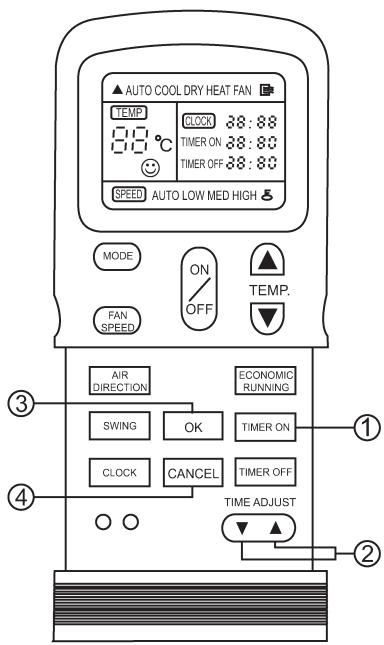
TIMER OPERATION
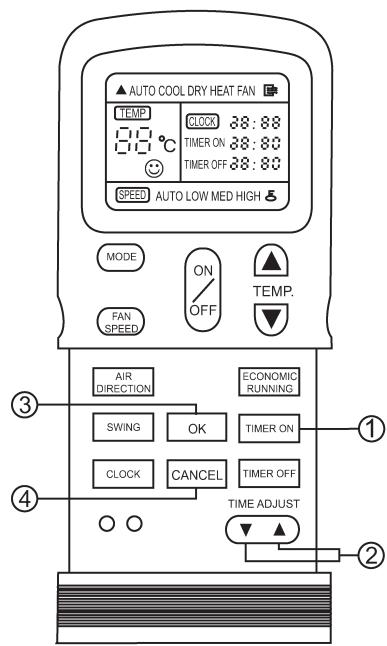
(1) ON / OFF TIMER button
Push the ON or OFF TIMER button as required.
The current timer setting is displayed along with ON/OFF TIMER indicator, and the colon in the timer setting will flash.
(2) Time adjust button (TIME ADJUST)
Push to set the desired time.

Forward.

Backward.
Each time you push the button the time moves forward or backward by 10 minutes depending on which one you push. The time alters as quickly as you push the button.
(3) Reserve button (OK)
Push this button. Check the TIMER lamp on the display panel of the indoor unit is lit.
CANCELING
(4) Cancel button(CANCEL)
Push the CANCEL button to cancel the timer setting.
CHANGING
Preform steps 1, 2 and 3 to change the setting.

CAUTIONS
- When you select the timer operation, the remote controller automatically transmits the timer signal to the indoor unit at the specified time. Therefore, keep the remote controller in a location from which it can transmit the signal to the indoor unit properly.
- The effective operation time set by remote controller is limited in 24 hours.
EXAMPLE OF TIMER SETTING
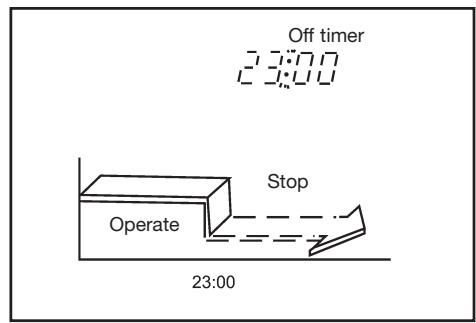
OFF timer
(Operation Stop)
The OFF timer feature is useful when you go to sleep. The air conditioner will stop automatically at the time set.
Example:
To stop the air conditioner at 23:00 p.m.
1- Push the TIMER OFF button.
2- Use the TIME ADJUST button to display "23:00" on the OFF timer indicator.
3- Push the OK button.
ON timer
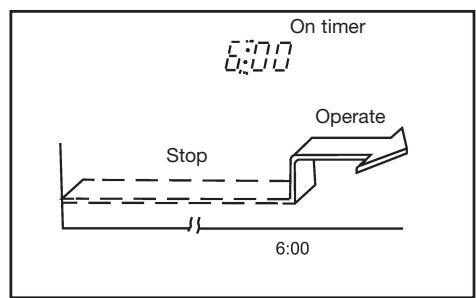
(Stop Operation)
The ON timer feature is useful when you wake up in the morning or when you return home.
The air conditioner will automatically start operating at the time set.
Example:
To start the air conditioner at 6:00.
1- Push the TIMER ON button.
2- Use the TIME ADJUST button to display "6:00" on the ON timer indicator of the remote controller.
3- Push the OK button.
COMBINED TIMER (Setting both ON and OFF timers simultaneously)
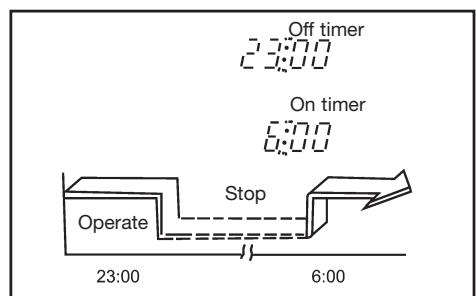
OFF timer ON timer
(Operation Stop Operation)
This feature is useful when you want to stop the air conditioner after you go to sleep, and start it again in the morning when you wake up or you return home.
Example:
To stop the air conditioner at 23:00 and start it again next morning at 6:00.
1- Push the TIMER OFF button.
2- Use the TIME ADJUST button to display "23:00" on the OFF timer indicator.
3- Push the TIMER ON button.
4- Use the TIME ADJUST button to display "6:00" on the ON timer indicator.
5- Push the OK button.
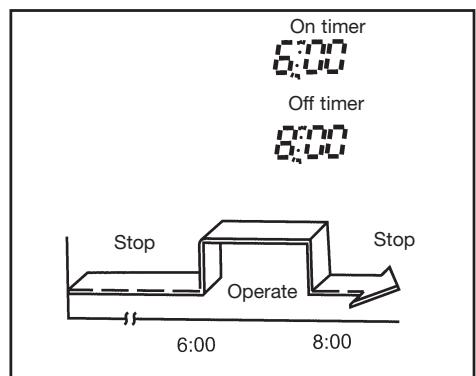
On timer OFF timer
(Stop Operation Stop)
You can use this setting to start the air conditioner when you wake up and stop it when you leave the house.
Example:
To start the air conditioner at 6:00 nest morning, and stop it at 8:00.
1- Push the TIMER ON button.
2- Use the TIME ADJUST button to display "6:00" on the ON timer indicator of the remote controller.
3- Push the TIMER OFF button.
4- Use the TIME ADJUST button to display "8:00" on the OFF timer indicator.
5- Push the OK button.
- The timer function (ON or OFF) which in time is closest to the actual time will be activated first.
- If the same time is set for both ON and OFF timers, no timer operation is performed. Also, the air conditioner may stop operating.

- MODELO
- CONTENIDOS
- 3- Low noise of the air conditioner
- TEMPORIZACAO COMBINADA (Programacao dos
- FONCTIONNEMENT MANUEL
- FONCTIONNEMENT OPTIMAL
- Read This Manual
- CAUTIONS
- SAFETY PRECAUTIONS
- WARNING
- CAUTION
- PARTS NAMES
- Indoor unit
- Display panel
- OPERATION indicator:
- TIMER indicator:
- AUTO indicator:
- ECON indicator:
- Note:
- MANUAL OPERATION
- ADJUSTING AIR FLOW DIRECTION
- Adjusting the Vertical Air Flow Direction (up - down)
- To set the vertical air flow direction
- To set the horizontal air flow direction (left - right)
- To automatically swing the air flow direction (up - down)
- HOW THE AIR CONDITIONER WORKS
- Automatic Operation
- Economic Operation
- Drying Operation
- OPTIMAL OPERATION
- MAINTENANCE
- Cleaning the indoor unit and remote controller
- Cleaning the Air Filter
- Checks before operation
- OPERATION TIPS
- 1- Protection of the air conditioner Compressor protection
- 2- A white mist coming out from the indoor unit
- 4- Dust is blown out from the indoor unit
- 5- A peculiar smell comes out from the indoor unit
- 6- The air conditioner turns to FAN only mode from COOL or HEAT (For cooling and heating models only) mode
- 8- Heating mode (For cooling and heating models only)
- 9- Auto_restart function
- TROUBLESHOOTING TIPS
- Malfunctions and Solutions
- REMOTE CONTROLS AND THEIR FUNCTIONS
- Remote control
- NAMES AND FUNCTIONS OF INDICATORS ON REMOTE CONTROLLER
- TRANSMISSION INDICATOR
- MODE DISPLAY
- ON/OFF DISPLAY
- TEMP.DISPLAY
- CLOCK DISPLAY
- TIMER DISPLAY
- LOCK DISPLAY
- FAN SPEED DISPLAY
- ECONO. DISPLAY
- (Some models without)
- HANDLING THE REMOTE CONTROLLER
- Location of the remote controller
- Replacing batteries
- NOTES
- SETTING THE CLOCK
- Initial Setting or the Clock
- Initial Setting or the Clock
- OK button
- Readjusting the Clock
- LOCK AND RESET BUTTON FUNCTION
- Start
- Stop
- ON/OFF button
- TIMER OPERATION
- ON / OFF TIMER button
- Time adjust button (TIME ADJUST)
- Reserve button (OK)
- CANCELING
- Cancel button(CANCEL)
- CHANGING
- EXAMPLE OF TIMER SETTING
- OFF timer
- ON timer
- COMBINED TIMER (Setting both ON and OFF timers simultaneously)
Brand : DAITSU
Model : ASD 12U
Category : Air conditioner