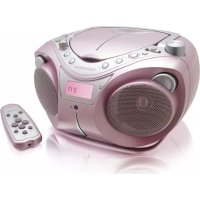
RK300CDU - CD Player THOMSON - Free user manual and instructions
Find the device manual for free RK300CDU THOMSON in PDF.



| Product type | CD player |
| Brand | THOMSON |
| Model | RK300CDU |
| Mains power supply | 230 V ~ 50 Hz |
| Battery power supply | 8 LR14 (C) 1.5 V batteries (not included) |
| Power consumption | 17 W |
| Compatible disc formats | CD, CD-R, CD-RW, MP3 (via CD or USB) |
| Radio | FM (88 - 108 MHz) and MW (540 - 1600 kHz) |
| Playback functions | CD, cassette, USB, AUX IN |
| Cassette recording | From radio or CD |
| Controls | Play/Pause, Stop, Next/Previous track, Programming (up to 32 tracks), Repeat modes, Random |
| Headphone jack | 3.5 mm jack (not included) |
| USB port | MP3 file playback, max capacity 4 GB |
| Antenna | FM telescopic |
| Speakers | Built-in |
| Display | LCD |
| Maintenance | Soft cloth slightly damp, do not use solvents |
| Safety | Class 1 laser product, do not open the casing |
Frequently Asked Questions - RK300CDU THOMSON
User questions about RK300CDU THOMSON
0 question about this device. Answer the ones you know or ask your own.
Ask a new question about this device
Download the instructions for your CD Player in PDF format for free! Find your manual RK300CDU - THOMSON and take your electronic device back in hand. On this page are published all the documents necessary for the use of your device. RK300CDU by THOMSON.
USER MANUAL RK300CDU THOMSON
CLASS 1 LASER PRODUCT
INFORMATIONS CONCERNANT LES PILES (non fournies)
Carefully read the instructions of this manual, respecting recommendations for use and safety. Keep this document and tell potential users about it.
This appliance has been designed solely for domestic use; the manufacturer's liability shall not be engaged in the event of any professional use, any misuse or any use not complying with the operating instructions.

This symbol, representing a lightning bolt inside an equilateral triangle, is intended to alert the user to the presence of uninsulated, dangerous voltage in the product's enclosure that is high enough to present a risk of electrical shock.

This symbol, representing an exclamation mark inside an equilateral triangle, is intended to alert the user to the presence of operating and maintenance instructions in the documentation accompanying the product.

This appliance complies with the standards in force for this type of product.
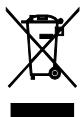
Disposing of the appliance at the end of its life
This appliance bears the WEEE mark (Waste of Electric and Electronic
Equipment) signifying that, at the end of its life cycle, it should not be disposed of with household waste, but at a recycling centre.
The recycling of waste contributes to the conservation of our environment.

Disposing of batteries at the end of their life
In order to respect the environment, do not throw used batteries out with household waste.
Dispose of them at your nearest recycling centre or at a used battery collection point.
CLASS 1 LASER PRODUCT
ATTENTION: This symbol indicates that this appliance is a Class 1 Laser product.
- Do not try to open the cover or look at the laser beam.
- Never touch the laser lens inside the compartment.
WARNING CONCERNING USE AND INSTALLATION
ATTENTION: To avoid all risk of fire or electrical shock, do not expose the appliance to rain or humidity. Therefore, the appliance should not be used near a water supply point or in a humid location (bathroom, swimming pool, sink, etc).
ATTENTION: Never immerse the appliance in water or in any liquid whatsoever.
-
Do not place any object containing water (e.g. vases, etc.) on the appliance.
-
Do not place the appliance in full sunlight, close to heating equipment or any heat source, or in a location subject to excessive dust or mechanical shocks.
-
Do not expose the appliance to extreme temperatures. The appliance is designed for use in moderate climates.
-
Do not place any object that produces heat (candle, ash tray, etc.) close to the appliance.
-
Place the appliance on a surface that is flat, rigid and stable.
-
Do not install the appliance in an inclined position. It is designed to work solely in a horizontal position.
-
Install the appliance in a location with sufficient ventilation to avoid internal overheating. Avoid restricted spaces such as bookcases, cabinets, etc.
-
Do not obstruct the appliance's ventilation openings.
-
Do not install the appliance on a soft surface, such as a carpet or blanket, that might block the ventilation openings.
-
Do not place heavy objects on the appliance.
-
This appliance is not a toy; do not allow children to use it unsupervised.
-
Never let children insert foreign objects into the appliance.
-
Due to the effect of electrostatic and/or fast electrical transient phenomena, the product may not operate properly and will need to be reset by the user.
-
The mains plug is used as the disconnect device and it must remain readily operable. For the appliance to be completely disconnected from the electrical power supply, the mains plug of the apparatus must be unplugged completely from the wall socket.
-
Disconnect the appliance from the power source:
-
If it is not going to be used for a long time,
- If there is a thunderstorm,
-
If it isn't working properly.
-
If the cable is damaged, it must be replaced by the manufacturer, the manufacturer's after-sales service department or a similarly qualified person, in order to avoid any danger.
SAFETY REGULATIONS
POWER SUPPLY
INFORMATION ABOUT BATTERIES (not supplied)
- The appliance must be equipped with the appropriate batteries in order to function properly.
- Only recommended batteries should be used.
- Polarity must be respected when inserting batteries.
- The batteries should be inserted in such a way as to avoid any short circuit.
- Do not mix used and new batteries.
- Do not mix alkaline, standard (carbon-zinc) and rechargeable (nickel-cadmium) batteries.
- Do not recharge or try to open the batteries. Do not throw the batteries in the fire.
- Replace all batteries at the same time with identical batteries.
- Remove the batteries when unused for a long time.
- If the liquid contained in the batteries comes in contact with eyes or skin, wash the area immediately and carefully with clear water and consult a doctor.
- Battery shall not be exposed to excessive heat such as sunshine, fire or the like.
ATTENTION: Danger of explosion if batteries are not inserted correctly.
ABOUT THE DISKS

Handling
Do not touch the playback side of disks.
Hold disks by the edges to avoid leaving fingerprints on the surface.
Any dust, fingerprints or scratches may cause a malfunction.
Never attach a label or sticky tape to the disk.

Storage
Put disks back in their case after playing them. Never expose disks to direct sunlight or heat sources. Never leave disks inside a car parked in full sunlight.
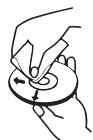
Cleaning
Use a clean soft lint-free cloth to clean the disk, working from the centre outwards in a straight line. Do not use solvents such as petrol, thinners, commercially available cleaners or antistatic sprays for vinyl disks.
This appliance can operate on batteries or on mains power supply.
Mains power supply
Verify that the appliance is switched off.
Connect the power cable to the AC socket on the back and then plug the other end to the wall socket.
Note: If the power supply cable is connected, the batteries will not feed the appliance. It is preferable to remove the batteries if the cable is connected to the power supply in order to avoid their being damaged.
Battery power supply
- Lift the cover of the battery compartment on the back of the appliance by pressing its flaps.
- Insert 8 LR14 (C) 1.5V batteries (not supplied) taking care to observe the indicated polarity.
- Close the cover of the battery compartment.
Note: The power cable must be disconnected from the socket on the back of the appliance or from the wall socket in order for the appliance to be fed by the batteries.
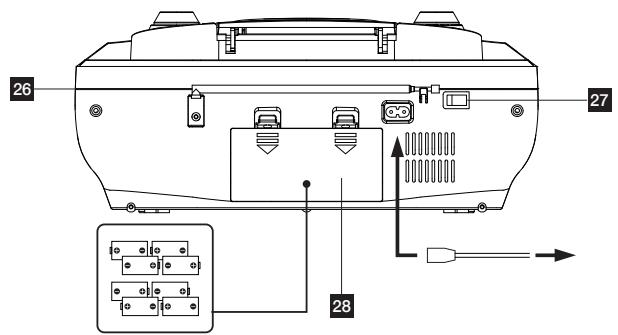

DESCRIPTION OF THE COMMANDS
| 1 | PHONES | Earphone jack |
| 2 | FUNCTION | Function selector |
| 3 | VOLUME | Set the volume |
| 4 | Handle | |
| 5 | CD compartment | |
| 6 | TUNING | Choose the radio frequency |
| 7 | USB port | |
| 8 | AUX IN | Lets you play an external device by connecting to the device's microphone jack using an audio cable with a dual jack plug 29 (cable not supplied). |
| 9 | Speakers | |
| 10 | ▶II | Play or pause button - CD/USB |
| 11 | ▶I | Next track button - CD/USB |
| 12 | ■ | Stop - CD/USB |
| 13 | ▲ | Previous track button - CD/USB |
| 14 | ● | Cassette recording button |
| 15 | ▲ | Cassette play button |
| 16 | ▶ | Cassette fast rewind button |
| 17 | ▲ | Cassette fast forward button |
| 18 | ■/▲ | Stop/Open cassette compartment button |
| 19 | II | Cassette pause button |
| 20 | Cassette compartment | |
| 21 | PLAY MODE | Playback mode |
| 22 | PROG | Program mode |
| 23 | FOLDER UP | File + |
| 24 | LCD screen |
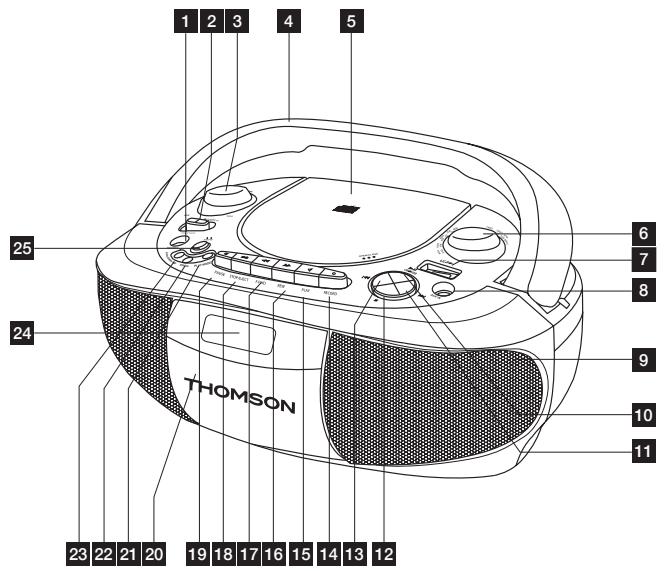
| 25 | Frequency band selector (FM/MW) | |
| 26 | FM wire aerial | |
| 27 | ON/OFF | On/Off |
| 28 | Battery compartment |
USING THE RADIO
USING THE CD PLAYER
- Set the FUNCTION selector to RADIO.
- Select the frequency band you want by pressing MW/FM.
- Select the required radio station by turning the radio frequency selector, TUNING.
- Adjust the volume with the volume set knob (3).
- Unfold the telescopic aerial (26) when listening to FM stations.
In MW mode, an aerial is integrated in the radio.
To improve radio reception, turn the radio to orient the internal aerial and get the best possible reception.
- To switch the radio off, set the ON/OFF switch (27) to OFF. Then unplug the electrical cable.
USING THE CD PLAYER
Playing a CD
Note: Before using the appliance for the first time, remove the cardboard protecting the lens located inside the CD compartment (5). To open the CD compartment, press .
- Set the FUNCTION selector (2) to CD / USB: the LCD screen (24) lights up.
- Open the CD compartment (5) by pressing .
- Place an audio CD in the compartment, labelled surface up. Close the CD compartment by pressing .
- The total number of tracks is displayed on the LCD screen (24). Press to play the disk. The disk starts playing from the first track.
- Adjust the volume with the volume set button (3).
- To pause, press the indicator blinks. Press this button again to resume playing the disk.
- To stop playing the disk, press .
- In STOP mode, for CDs and MP3 files, and only when there are several albums: press FOLDER UP to select the album you want, followed by II.
Notes:
- This appliance can play audio CD disks and MP3 files.
- The CD player cannot play a disk that is dirty, damaged or not correctly inserted.
- To avoid damaging disks, never open the CD compartment while a disk is being played. Wait until the disk has stopped.
- Never move the appliance while a CD is being played.
- This appliance must be on a flat surface.
Skipping a track / Finding a specific piece
While a disk is being played, or when it is stopped, you can use the or to select a track, and then press the
- While a CD is playing press the to go to the next track. Press once to go back to the beginning of the track being played. Press this button twice to go back to the previous track.
Repeat mode
During playback, press the PLAY MODE (21) button successively; the screen displays:
REPEAT REPEAT ALL ALBUM RANDOM
- REPEAT: repeat a track.
- REPEAT ALL: repeat all the tracks.
- ALBUM: repeat an album.
- RANDOM: play in a random order.
Programmed playback
Programming up to 32 tracks in a specified order:
- Press PROG: "P01" blinks on the screen.
- Press or to select a track.
- Press PROG to store each track (maximum of 32).
- Press the appliance plays the tracks in the programmed order.
- To stop the programmed playback, press once.
- To cancel the programmed playback, press twice.
USING THE CASSETTE PLAYER
USING A USB KEY (not supplied)
Playing cassettes
- Set the FUNCTION selector to TAPE.
To open the cassette compartment (20), press - Insert an audio cassette in the compartment, tape side up, with the side to be played in the forward direction (rewound side on the right). Close the cassette compartment (20).
To play the cassette, press (15). - To stop playback, press / .
- If necessary wind the tape forward or back by pressing or . Press to stop the tape winding.
Note: To avoid damaging the appliance or the tape always press / before changing the tape winding direction.
- To stop playback for a short time, press II. Press this button again to resume playing the tape.
- Set the volume.
- During playback, press / once to stop playback, then press it again to open the cassette compartment door.
Recording cassettes
- Insert a blank audio cassette in the cassette compartment, with the side to be recorded in the forward direction (full spool on the right). Make sure that the cassette is not write-protected (the protection strip on the cassette must not be broken).
- Use the FUNCTION selector to select the recording source:
- To record from the radio, set the function selector to RADIO then set the required radio station.
- To record from a CD, put a CD in the CD compartment. Set the FUNCTION selector to CD and select the required track.
- Press to start playback. The recording level is controlled automatically. Changing the volume has no effect on the recording.
- Press the recording button. Recording begins.
Note: If the cassette is not blank any previous recordings will be automatically overwritten.
To completely stop recording, press /
The appliance is equipped with a USB port (7), so you can play music files from a USB key.
- The appliance must not be in the process of playing a disk.
- Set the FUNCTION selector to CD/USB.
- Insert a USB key into the appliance's USB port (7).
- Press and hold the CD/USB selector's to play the contents of the USB key.
The playback functions are identical to the CD playback functions.
Note:
- Do not remove the USB key while the files are being played as this could damage them.
- You are recommended to save the key's contents in order to avoid losing data.
- ATTENTION: Maximum capacity 4 GB. The player does not handle all USB devices (e.g. external hard disk, etc).
EARPHONE SOCKET (not supplied)
Earphones (not supplied), with a 3.5mm Ø earphone jack and not exceeding 100dB, can be connected to the appliance.
- Plug the earphones into the jack PHONES.
Note: When the earphones are connected the speakers are automatically inactive. Use the appliance at a comfortable sound level to preserve the user's health.
AUXILIARY FUNCTION
- Connect an audio device to the AUX IN jack, using an audio cable (29) (not supplied).
- Switch the appliance on.
- Set the FUNCTION selector to AUX IN.
- Use the device's controls directly.
REPAIR AND MAINTENANCE
Consult the following table if there is a problem with the appliance.
| Problems | Solution |
| The CD cannot be played. | ·Check that the disk's labelled surface is on top. |
| ·Check that the batteries are not dead and the appliance's electrical cable is plugged in correctly. | |
| ·Check that the appliance's electrical cable is plugged in correctly. | |
| The CD skips during playback. | ·Check that the CD is inserted correctly and is not dirty or damaged. |
| ·Clean the disk with a soft cloth, from the centre to the outside edge. | |
| ·Clean the lens with a cleaning CD (not supplied). | |
| The cassette runs at slow speed. | ·Check that the batteries are not dead. |
| Poor sound from the cassette. | ·Clean the tape head with a cleaning cassette (not supplied). |
| Unable to record. | ·Check that the strip is not broken. |
MAINTENANCE AND CLEANING
- Unplug the appliance before cleaning it.
- Remove fingerprints and dust with a soft and slightly damp cloth. Do not use abrasive products or solvents that may damage the appliance's surface.
ATTENTION: Never immerse the appliance in water or in any liquid whatsoever. - If it is not used for a long time, unplug the appliance and remove the batteries.
TECHNICAL SPECIFICATIONS
- Power supply: 230V 50Hz or 8 LR14 (C) 1.5V batteries (not supplied)
Power consumption: 17W
FM frequency range: 88 - 108.0 MHz - MW frequency range: 540 - 1600 kHz
Compatible disks and formats
CD / CD-R / CD-RW / USB and MP3.
THOMSON is a trademark of TECHNICOLOR S.A. used under license by:
Parsons International France - 19 Boulevard Albert Einstein
Monday to Thursday (from 9 am to 18 pm) and Friday (9 am to 3:30 p.m.)
www.thomsonaudiovideo.eu
According To Rate Bediernruf
CLASS 1 LASER PRODUCT