
IGROOVE SXT - Audio Dock KLIPSCH - Free user manual and instructions
Find the device manual for free IGROOVE SXT KLIPSCH in PDF.



| Brand | Klipsch |
| Model | iGroove SXT |
| Product Type | Audio docking station for iPod |
| Speakers | 2 × long-throw 6.4 cm woofers, 2 × horn-loaded tweeters |
| Power | Not specified |
| Power Supply | AC adapter: 100-240 V~, 50/60 Hz; Unit: 15 V =, 3 A |
| Connectivity | 30-pin dock for iPod, auxiliary input (3.5 mm mini-jack), S-Video output |
| Remote Control | Infrared, CR2032 battery included |
| Dimensions (approx.) | Approximately 30 cm wide, 18 cm deep, 12 cm high (estimation) |
| Weight (approx.) | Approximately 2 kg (estimation) |
| Warranty | 1 year (United States and Canada) |
| Standards | Class B (FCC, ICES-003) |
| Ambient temperature | 35 °C max. |
| Cleaning | Dry cloth only |
| Safety | Do not expose to water or open flames |
Frequently Asked Questions - IGROOVE SXT KLIPSCH
User questions about IGROOVE SXT KLIPSCH
0 question about this device. Answer the ones you know or ask your own.
Ask a new question about this device
Download the instructions for your Audio Dock in PDF format for free! Find your manual IGROOVE SXT - KLIPSCH and take your electronic device back in hand. On this page are published all the documents necessary for the use of your device. IGROOVE SXT by KLIPSCH.
USER MANUAL IGROOVE SXT KLIPSCH
- READ these instructions.
- KEEP these instructions.
- HEED all warnings.
- FOLLOW all instructions.
- DO NOT use this apparatus near water.
- CLEAN ONLY with dry cloth.
- DO NOT block any ventilation openings. Install in accordance with the manufacturer's instructions.
- DO NOT install near any heat sources such as radiators, heat registers, stoves, or other apparatus (including amplifiers) that produce heat.
- DO NOT defeat the safety purpose of the polarized or grounding type plug. A polarized plug has two blades with one wider than the other. A grounding type plug has two blades and a third grounding prong. The wider blade or the third prong is provided for your safety. If the provided plug does not fit into your outlet, consult an electrician for replacement of the obsolete outlet.
- PROTECT the power cord from being walked on or pinched, particularly at plugs, convenience receptacles, and the point where they exit from the apparatus.
- ONLY USE attachments/accessories specified by the manufacturer.
- USE only with a cart, stand, tripod, bracket, or table specified by the manufacturer, or sold with the apparatus. When a cart is used, use caution when moving the cart/apparatus combination to avoid injury from tip-over.
- UNPLUG this apparatus during lightning storms or when unused for long periods of time.
- REFER all servicing to qualified service personnel. Servicing is required when the apparatus has been damaged in any way, such as power-supply cord or plug is damaged, liquid has been spilled, objects have fallen into the apparatus, the apparatus has been exposed to rain or moisture, does not operate normally, or has been dropped.
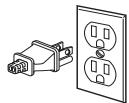
Note: This picture is for illustration, the plug may be different from country to country depending on the country's main supply.
For Your Safety: The AC power plug is polarized (one blade is wider than the other) and only fits into an AC power outlet one way. If the plug won't go into the outlet completely, turn the plug over and try to insert it the other way. If it still won't fit, contact a qualified electrician to change the outlet, or use a different one. Do not attempt to bypass this safety feature.
- DO NOT expose this apparatus to dripping or splashing and ensure that no objects filled with liquids, such as vases, are placed on the apparatus.
- To completely disconnect this apparatus from the AC mains, disconnect the power supply cord plug from the AC receptacle.
- The mains plug of the power supply cord shall remain readily operable.

The exclamation point, within an equilateral triangle, is intended to alert the user to the presence of important operating and maintenance (servicing) instructions in the literature accompanying the product.

The lightning flash with arrowhead symbol within an equilateral triangle, is intended to alert the user to the presence of uninsulated "dangerous voltage" within the product's enclosure that may be of sufficient magnitude to constitute a risk of electrical shock to persons.
WARNING: To reduce the risk of fire or electrical shock, do not expose this apparatus to rain or moisture.
WARNING: Batteries (battery pack or batteries installed) shall not be exposed to excessive heat such as sunshine, fire or the like.
CAUTION: Danger of explosion if remote control battery is incorrectly replaced. Replace only with CR2032 lithium battery.
WARNING: No naked flame sources - such as candles - should be placed on the product.

WARNING
RISK OF ELECTRIC SHOCK. DO NOT OPEN.

WARNING: Do Not Open! Risk of Electrical Shock. Voltages in this equipment are hazardous to life. No user-serviceable parts inside. Refer all servicing to qualified service personnel.
WARNING: This product is intended to be operated ONLY from the AC Voltages listed on the back panel or included power supply of the product. Operation from voltages other than those indicated may cause irreversible damage to the product and void the products warranty. The use of AC Plug Adapters is cautioned because it can allow the product to be plugged into voltages in which the product was not designed to operate. If the product is equipped with a detachable power cord, use only the type provided with your product or by your local distributor and/or retailer. If you are unsure of the correct operational voltage, please contact your local distributor and/or retailer.
CAUTION: Place the equipment near a main power supply outlet and make sure that you can easily access the power breaker switch.
Power Supply: ADS-48W-12-2-1545
Adaptor I/P: 100-240VAC, 50/60Hz
Unit I/P: 15VDC, 3A
Ambient Temperature: 35^
Thank You
Congratulations on your purchase of the Klipsch iGroove™ SXT music system. The iGroove SXT is designed to allow you to share the contents of your iPod with the world around you. The iGroove SXT is a true two-way, stereo sound system incorporating two long-throw 2.5" (6.4cm) woofers in a ported enclosure and two horn-loaded tweeters. This system provides the accuracy, detail and output that will bring your music to life as only Klipsch can.
Unpack the Box
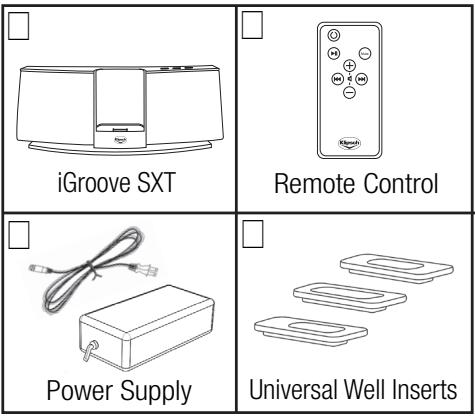
Unpack the entire contents of the shipping box and make sure you have the following items.
System Setup
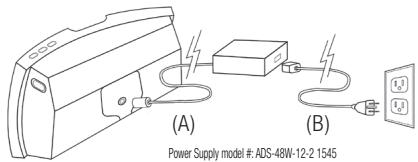
Place the iGroove SXT on a sturdy surface. Plug the power supply (A) into the rear of the iGroove SXT. Plug the AC power cord (B) into the power supply and then into a standard wall outlet.
The iGroove SXT is intelligently designed to easily accommodate all iPods using the Apple 30-pin connector. To configure the iGroove SXT for your specific iPod size, simply place the appropriate dock insert into the dock area as shown below. Use the universal well insert that came with your iPod, or choose one of the three inserts provided.
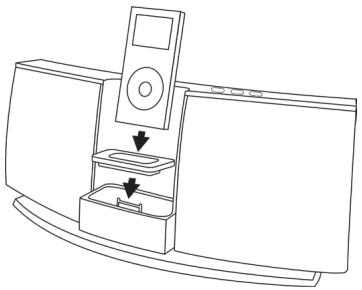
Now you are ready to dock your iPod. While your iPod is docked, its battery is charging (until it is fully charged).
System Operation
The Dock
Your iGroove SXT system is ready to perform as soon as you plug it in and dock an iPod. The Power button located on the top right of the iGroove SXT will light up "Red" in "Standby/Off" mode and "Blue" in "On" mode. The volume up and down buttons are located to the left of the Power button on the top right of the iGroove SXT.
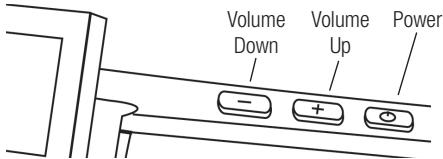
Note: When the iPod is docked and its headphone mini-jack is in use, audio will play through the headphones as well as the iGroove SXT. The iPod's volume control will adjust the headphone level only and will not have any effect on the volume of the iGroove SXT.
The Remote
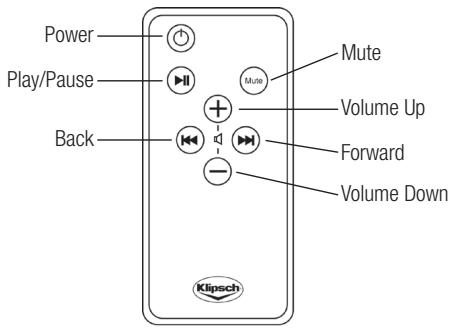
The wireless remote control operates the iGroove SXT as well as the iPod.
Note: The remote must be pointed at the iGroove SXT to guarantee proper interaction.
Remote Buttons
- Power - Press to turn the iGroove SXT "On"; press again to put the iGroove SXT in "Standby/Off." This will also turn the iPod "Off."
- Play/Pause - Press once to "Pause" play; press again to resume play.
- Track Selection - Press and to move to the previous or next track; press and hold to reverse or fast-forward through the current track.
Volume - Press + or - to increase or decrease the system volume level. - Mute - Press to mute the volume. Press again to restore the volume, or press a volume key.
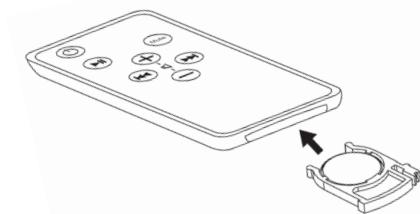
Changing the Remote Control Battery
The remote battery will need to be changed when it stops working or when its performance is noticeably reduced. To remove the battery, simply pull the battery housing tab from the remote control (as shown in the diagram) and remove the battery. Replace only with a 3-volt CR2032 lithium battery.
Note: Lighting and other room conditions can reduce remote performance.
S-Video Output
The iGroove SXT has an S-video output on the rear of the unit. This output can be used to send the iPod's video content to an external screen. An S-video cable (not included) must be used in this output. To view a photo, use the slideshow feature of the iPod, which will send video to the S-video cable.
Aux Input
The Aux input located on the rear of the iGroove SXT allows you to connect other audio devices to the system. Simply connect the audio out (headphone) of the source to the Aux input of the iGroove SXT. A 3.5mm stereo mini cable (not included) must be used for proper operation.
Warranty - U.S. and Canada
Klipsch warrants to the original retail purchaser that this product is to be free from defective materials and workmanship for a period of one (1) year, from the date of purchase, if it is properly used and maintained. If this product proves defective in either material or workmanship, Klipsch, at its option, will (a) repair the product, or (b) replace the product, at no charge for parts or labor. If the product model is no longer available and cannot be repaired effectively or replaced with an identical model, Klipsch at its sole option may replace the unit with a current model of equal or greater value. In some cases, modification to the mounting surface may be required where a new model is substituted. Klipsch assumes no responsibility or liability for such modification. To obtain a repair or replacement under the terms of this warranty, please contact our customer service group at 1-800-KLIPSCH. You will be required to submit a copy of the original receipt via fax or email. The receipt must reflect that you are the original purchaser, the product was bought from an authorized Klipsch retailer, and the product is still within warranty. You will be issued a return authorization number (RA#) and asked to ship the defective product, together with proof of purchase and RA#, prepaid insured to the address set forth Klipsch 137 Heampstead #278 Hope, AR 71801. Freight collect shipments will be refused. Risk of loss or damage in transit is to be borne by the purchaser. Once Klipsch receives the defective product, a repair or replacement order will be initiated.
Limitations:
- This limited warranty does not cover failure of the product resulting from improper installation, misuse, abuse, accident, neglect, mishandling, or wear from ordinary use or environmental deterioration.
- This limited warranty does not cover cosmetic damage, including paint damage, or consequential damage to other components or premises which may result for any reason from the failure of the product.
- This limited warranty is null and void for products not used in accordance with Klipsch's instructions.
- This limited warranty is null and void for products with altered or missing serial numbers and for products not purchased from an authorized dealer.
This limited warranty terminates if you sell or otherwise transfer this product to another party.
THIS WARRANTY GIVES YOU SPECIFIC LEGAL RIGHTS, AND YOU MAY ALSO HAVE OTHER RIGHTS WHICH VARY FROM STATE TO STATE, JURISDICTION TO JURISDICTION OR COUNTRY TO COUNTRY. KLIPSCH'S RESPONSIBILITY FOR MALFUNCTIONS AND DEFECTS IN HARDWARE IS LIMITED TO REPLACEMENT OR REPAIR AS SET FORTH IN THIS WARRANTY STATEMENT. FOR CANADIAN CUSTOMERS, KLIPSCH DISCLAIMS ALL. OTHER WARRANTYES AND CONDITIONS, EXPRESS OR IMPLIED, STATUTORY OR OTHERWISE, FOR THE PRODUCT. FOR U.S. CUSTOMERS, ALL EXPRESS AND IMPLIED WARRANTYES FOR THE PRODUCT, INCLUDING BUT NOT LIMITED TO ANY IMPLIED WARRANTYES OF MERCHANTABILITY AND FITNESS FOR A PARTICULAR PURPOSE ARE LIMITED IN TIME TO THE TERM OF THIS WARRANTY. SOME STATES, JURISDICTIONS OR COUNTRIES DO NOT ALLOW THE EXCLUSION OF CERTAIN IMPLIED WARRANTYES OR CONDITIONS, OR LIMITATIONS ON HOW LONG AN IMPLIED WARRANTY OR CONDITIONS LASTS, SO THIS LIMITATION MAY NOT APPLY TO YOU. KLIPSCH DOES NOT ACCEPT LIABILITY FOR SPECIAL, INDIRECT, CONSEQUENTIAL OR INCIDENTIAL DAMAGE, INCLUDING WITHOUT LIMITATION, ANY LIABILITY FOR THIRD PARTY CLAIMS AGAINST YOU FOR DAMAGE OR FOR PRODUCTS NOT BEING AVAILABLE FOR USE. THE MAXIMUM LIABILITY FOR WHICH KLIPSCH MAY BE RESPONSIBLE WILL BE NO MORE THAN THE AMOUNT YOU PAID FOR THE PRODUCT THAT IS THE SUBJECT OF THE CLAIM. SOME STATES, JURISDICTIONS OR COUNTRIES DO NOT ALLOW THE EXCLUSION OR LIMITATION OF SPECIAL, INDIRECT, INCIDENTAL OR CONSEQUENTIAL DAMAGES, SO THE ABOVE LIMITATION OR EXCLUSION MAY NOT APPLY TO YOU.
Warranty Outside the U.S. and Canada
The Warranty on this product if it is sold to a consumer outside of the United States and Canada shall comply with applicable law. To obtain any applicable warranty service, please contact the dealer from which you purchased this product, or the distributor that supplied this product.
FCC Information
This device complies with Part 15 of the FCC Rules. Operation is subject to the following two: (1) This device may not cause harmful interference, and (2) this device must accept any interference received, including interference that may cause undesired operation.
This equipment has been tested and found to comply with the limits for a Class B digital device, pursuant to Part 15 of the FCC Rules. These limits are designed to provide reasonable protection against harmful interference in a residential installation. This equipment generates, uses and radiates radio frequency energy and, if not installed and used in accordance with the instruction, may cause harmful interference to radio communications. However, there is no guarantee that interference will not occur in a particular installation.
In accordance with FCC requirements, changes or modifications not expressly approved by Klipsch could void the user's authority to operate this product.
This device generates and uses radio frequency (RF) energy, and if not installed and used properly, this equipment may cause interference to radio and television reception.
If this equipment does cause interference to radio or television reception (which you can determine by unplugging the unit), try to correct the interference by one or more of the following measures:
- Re-orient the receiving antenna (that is, the antenna for the radio or television that is "receiving" the interference).
- Move the unit away from the equipment that is receiving interference.
- Plug the unit into a different wall outlet so that the unit and the equipment receiving interference are on different branch circuits.
If these measures do not eliminate the interference, please consult your dealer or an experienced radio/television technician for additional suggestions.
Also, the Federal Communications Commission has prepared a helpful booklet, "How To Identify and Resolve Radio TV Interference Problems." This booklet is available from the U.S. Government Printing Office, Washington, DC 20402. Please specify stock number 004-000-00345-4 when ordering copies.
This product complies with DHHS Rules 21 CFR Subchapter J. Applicable at the date of manufacture.
Note: Whenever you want to use the ovo, you should use the ovo for the oviduct. Note: Whenever you want to use the oviduct for the oviduct, you should use the oviduct for the oviduct.
Controle remoto
For over 60 years, we've made speakers for people who are as passionate about great sound as we are. That's why every Klipsch speaker is horn-loaded to create a remarkably accurate listening experience for your music and movies. From our smallest satellites to our acclaimed professional theater installations, our speakers deliver sound that's so lifelike, you have to feel it to believe it.