EasyManual
6850 - Vacuum Cleaner BISSELL - Free user manual and instructions
Find the device manual for free 6850 BISSELL in PDF.


Questions des utilisateurs sur 6850 BISSELL
0 question sur cet appareil. Repondez a celles que vous connaissez ou posez la votre.
Poser une nouvelle question sur cet appareil
Download the instructions for your Vacuum Cleaner in PDF format for free! Find your manual 6850 - BISSELL and take your electronic device back in hand. On this page are published all the documents necessary for the use of your device. 6850 by BISSELL.
USER MANUAL 6850 BISSELL
3 Safety Instructions
4 Product Diagram
4-6 Assembly Instructions
6-9 Operation / Special Tools
10-13 Maintenance
14 Troubleshooting
15 Replacement Parts
15 Consumer Services
Thanks For Buying A BISSELL Lift-Off™ Revolution™
We're glad you purchased a BISSELL Vacuum. Everything we know about floor care went into the design and construction of this powerful, high-tech home vacuuming system.
Your BISSELL Vacuum is well made, and we back it with a limited comprehensive one-year warranty. We also stand behind it with a knowledgeable, dedicated Consumer Services department, so, should you ever have a problem, you'll receive fast, considerate assistance.
My great-grandfather invented the floor sweeper in 1876. Today, BISSELL is a global leader in the design, manufacture, and service of high quality homecare products like your BISSELL Vacuum.
Thanks again, from all of us at BISSELL.
mair 1.3 mle0
Mark J. Bissell
President and Chief Executive Officer
IMPORTANT SAFETY INSTRUCTIONS
When using an electrical appliance, basic precautions should be observed, including the following:
READ ALL INSTRUCTIONS BEFORE USING YOUR UPRIGHT VACUUM.
Always connect to a polarized outlet (left slot is wider than right). Unplug from outlet when not in use and before conducting maintenance.
WARNING: To reduce the risk of fire, electric shock, or injury:
- Do not modify the polarized plug to fit a non-polarized outlet or extension cord.
Do not leave vacuum cleaner unattended when it is plugged in.
Unplug from outlet when not in use and before servicing.
Do not use outdoors or on wet surfaces.
Do not allow children to operate vacuum cleaner or use as a toy. - Close attention is necessary when used by or near children.
Do not use for any purpose other than described in this User's Guide.
Use only manufacturer's recommended attachments. - Do not use with damaged cord or plug.
If appliance is not working as it should, has been dropped, damaged, left outdoors, or dropped into water, have it repaired at an authorized service centre. - Do not pull or carry by cord, use cord as a handle, close a door on cord, or pull cord around sharp edges or corners. Do not run appliance over cord. Keep cord away from heated surfaces.
- Do not unplug by pulling on cord. To unplug, grasp the plug, not the cord.
- Do not handle vacuum cleaner or plug with wet hands.
-
Do not put any object into openings. Do not use with any opening blocked; keep openings free of dust, lint, hair, and anything that may reduce air flow.
-
Keep hair, loose clothing, fingers, and all parts of body away from openings and moving parts.
Turn off all controls before plugging or unplugging vacuum cleaner.
Use extra care when cleaning stairs.
Unplug before attaching the TurboBrush. - Do not pick up flammable materials (lighter fluid, gasoline, kerosene, etc.) or use in the presence of explosive liquids or vapours.
- Do not pick up toxic material (chlorine bleach, ammonia, drain cleaner, etc.).
- Do not use vacuum cleaner in an enclosed space filled with vapours given off by oil base paint, paint thinner, some moth proofing substances, flammable dust, or other explosive or toxic vapours.
- Do not pick up hard or sharp objects such as glass, nails, screws, coins, etc.
- Do not pick up anything that is burning or smoking, such as cigarettes, matches, or hot ashes.
Do not use without filters in place.
Use only on dry, indoor surfaces. - Keep appliance on a level surface.
SAVE THESE INSTRUCTIONS FOR FUTURE USE
THIS APPLIANCE HAS A POLARIZED PLUG.
To reduce the risk of electric shock, this appliance has a polarized plug (one blade is wider than the other). This plug will fit in a polarized outlet only one way. If the plug does not fit fully in the outlet, reverse the plug. If it still does not fit, contact a qualified electrician to install a proper outlet. Do not change the plug in any way.
This model is for household use only.
CAUTION:
Do not plug in your vacuum cleaner until you are familiar with all instructions and operating procedures.

How To Use This Guide
This User's Guide has been designed to help you get the most satisfaction from your BISSELL Vacuum. You'll find assembly and operating instructions, safety precautions, as well as maintenance and troubleshooting instructions. Please read this Guide thoroughly before assembling your vacuum cleaner.
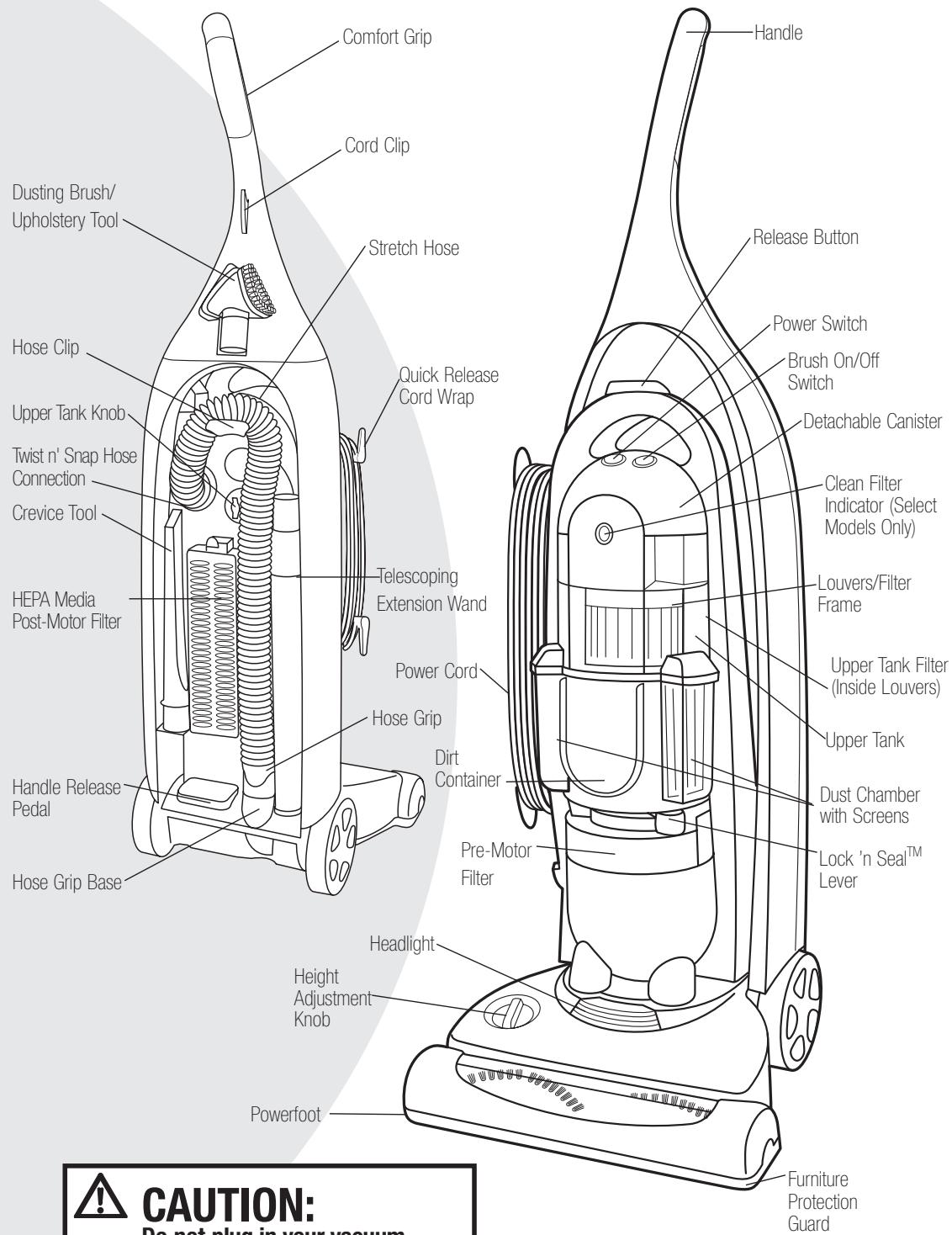
Pay particular attention to the product diagram, assembly instructions, and part names. Locate and organize all parts before assembly. Familiarize yourself with the parts and where they fit. Following this User's Guide will greatly enhance your ability to get the most performance from your BISSELL Vacuum for many years.

WARNING:
Plastic film can be dangerous. To avoid danger of suffocation, keep away from babies and children.

How To Put It Together
The only tool you'll need to assemble your vacuum cleaner is a screwdriver.
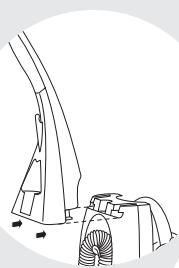
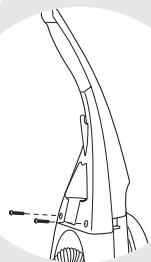
Attach Handle To Vacuum
- Locate the vacuum Handle and remove the screw packet taped to the base of the Handle.
- Stand the vacuum upright and slide the base of the Handle firmly into the grooves at the top of the vacuum body.
3 Check to be sure the Handle is fitted to the vacuum body. If there is a gap in front, continue to push firmly until the Handle is flush. - Insert the two screws from the screw packet into the existing holes. Tighten securely with a screwdriver.
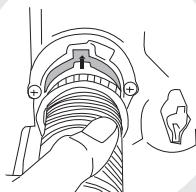
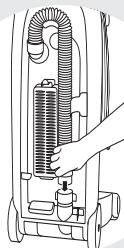
Attach Vacuum Hose and Tools
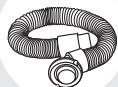
Position the Twist 'n Snap Hose™ assembly on the vacuum and line up the tabs on the base of the hose with the corresponding notches. Turn the Twist 'n Snap Hose to the right to lock into place.
2. Slide the end of the Hose Grip onto the Hose Grip Base. Place the Hose into the Hose Clip.
NOTE: The Powerfoot will not operate effectively unless the Hose is firmly attached to the base.
Attach Vacuum Hose and Tools Continued
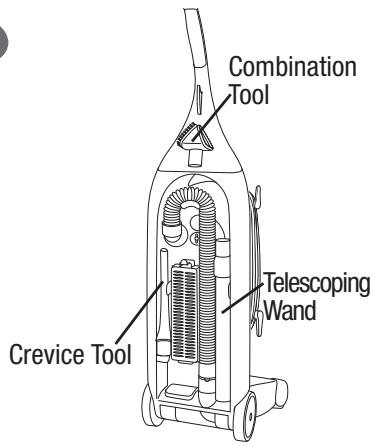
- Snap the Telescoping Extension Wand, Crevice Tool, and Combination Tool into storage clips as shown.
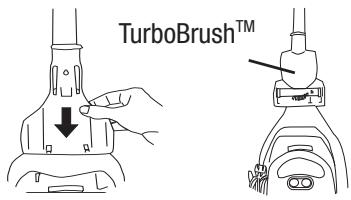
On Board TurboBrush™ (Select Models Only) The TurboBrush Bracket slides onto the Hanger on the front of the Handle. Attach the Bracket by aligning the slots with the rectangular part on the Hanger as shown and pulling down until it is locked into place.
Note: If you do not wish to store the TurboBrush on your Lift-Off vacuum, the Bracket may be hung on a wall for storage and the Hanger may be removed from the vacuum.
Place the TurboBrush in the Bracket by aligning the small holes near the brush roll with the tabs at the bottom of the Bracket and snap the TurboBrush into place.

How To Use Your Vacuum
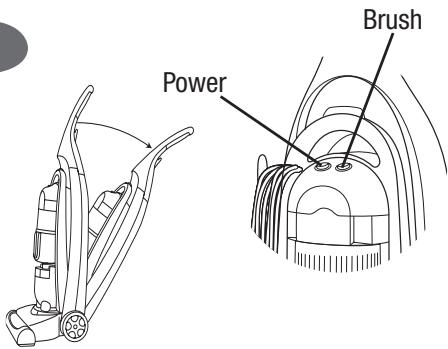
Power Switch/Brush Switch
The Power Switch is located just below the handle on the front of the Detachable Canister. Push the rocker switch "ON" (I) to vacuum, and "OFF" (O) when cleaning is complete.
The Brush Switch is located just below the handle on the front of the Detachable Canister next to the Power Switch. This switch turns the Rotating Brush on and off. The Brush Switch should be in the "ON" (I) position for normal carpet cleaning. You may want to turn the Brush Switch "OFF" (O) for bare floor cleaning or other delicate surfaces.
Note: Your BISSELL Lift-Off Revolution vacuum is equipped with a special internal switch that turns the Rotating Brush off whenever the unit is in the Upright position.

CAUTION:
Before using your vacuum, make sure that the Dirt Container and Upper Tank are in locked position and that all filters (Upper Tank, Pre-Motor and Post-Motor) are in place. Do not operate your vacuum without these filters.
Tip:
Your vacuum features a Quick-Release Cord Wrap. To remove the Power Cord quickly and easily, rotate the Upper Cord Wrap towards floor, and slip Power Cord from Upper and Cord Wraps.
Handle Positions
- Upright - For storage and above floor cleaning with tools.
- Normal Cleaning - Press the Handle Release Pedal with your foot to recline.
Power Height Adjustment
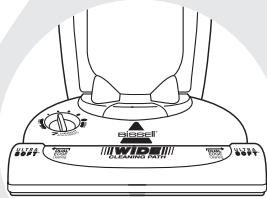
The Powerfoot on your vacuum can be adjusted to clean several floor surfaces.
NOTE: For optimal cleaning performance, adjust to the lowest practical setting. If your cleaner is difficult to push, adjust to the next higher setting.
1 Place Handle in Upright Position.
Turn Height Adjustment Knob to desired setting.
Lowest Setting - For bare floors.
Medium Settings - For short and medium pile carpets.
Highest Setting - For plush pile carpet.
NOTE: You may also adjust the setting while in the Normal Cleaning Position.
Special Tools
Your vacuum is not only a powerful floor vacuum cleaner, it's also a versatile stairs and above floor vacuum when you select one of the special tools.
Note: The tools can be used with the vacuum in the Upright Position or with the Detachable Canister.
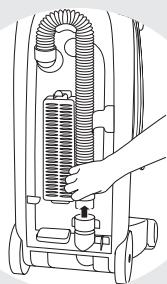
- Detach the Vacuum Hose by grasping the Hose Grip and lifting to separate from the Hose Grip Base.
Attach tools by firmly pushing onto Vacuum Hose or Telescoping Extension Wand.
Combination Dusting Brush/Upholstery Tool:
Two types of cleaning tools are included in one attachment. rotate for desired tool.
Use Brush side to dust furniture, blinds, books, lamps, shelves, and baseboards.
Use Upholstery side for curtains, draperies, cushions, fabrics.
Crevice Tool:
Use in tight narrow spaces.
Telescoping Extension Wand:
Use with desired attachment for a longer reach.
To extend the Wand, twist the collar to "Unlock" position and push away from you. Twist the collar to the "Lock" position to lock into place. To retract, twist to unlock, pull toward you and twist to relock.
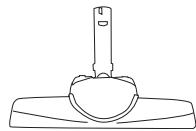
Stair Cleaning Tool (Select Models):
Use for stairs, area rugs, and other small carpeted areas. This tool can also be used for bare floors.
Note: The Stair Cleaning Tool does not store on board.
Tip:
Before cleaning under low furniture, check area first for objects that might harm the unit or block the Vacuum Hose.
CAUTION:
Always place vacuum cleaner on floor in its fully Upright Position and make sure it is locked into place before removing Canister or when using tools. Placing the Lift-Off in its full Upright Position automatically stops the rotating brush.



Special Tools Continued
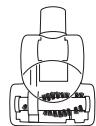
TurboBrush™ (Select Models):
Use rotating brush action for small areas such as stairs and upholstery.
Note: Press gently when using TurboBrush to gain maximum cleaning. Too much pressure could cause the brush to stop rotating.
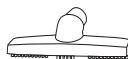
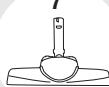
Deluxe Bare Floor Tool (Select Models):
Use for bare floors. Swivel head turns to get into tight spaces and fits under cabinets.
Note: The Deluxe Bare Floor Tool does not store on board.
All items may not be included with your model. More tools are available; to order please refer to page 15.
Cleaning With The Detachable Canister
The Detachable Canister feature makes it possible to easily take the powerful cleaning action of your BISSELL Lift-Off Revolution to stairways, auto interiors, and other hard-to-reach areas of your home.
Before detaching the Canister, your vacuum must be in its fully Upright Position. You do not need to turn off the power first.
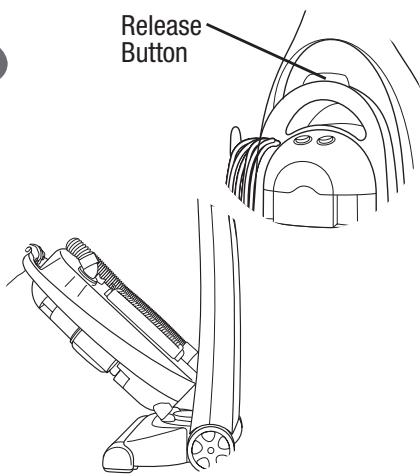
Press the Release Button at the top of the Canister Handle and lift the Canister to remove.
2. Detach the Vacuum Hose from the Hose Grip Base at the back of the Canister.
3. Attach the desired tool(s) to the Hose Grip at the end of the Vacuum Hose.
4. When you're done, remove the tool(s) and reconnect the Hose to the Hose Grip Base.
5. Return the Canister to the Powerfoot by aligning the "feet" on the front with the bumps on the foot of the Upright Vacuum. Push the Canister toward the vacuum frame until it "clicks" into place.
Clean Filter Indicator
Select Models Only
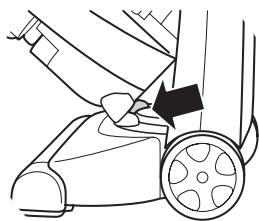
The Clean Filter Indicator tells you when airflow in the vacuum is reduced due to dirty filters or a clog in the hose. The Clean Filter Indicator will remain green until the airflow is reduced. At that time, it begins to change to red. When it is fully red, the airflow is significantly reduced or blocked. Follow the steps on pages 10 -11 to clean your filters. All filters in the vacuum should be cleaned or replaced when the Clean Filter Indicator turns red.
If the indicator remains red after all filters have been cleaned, follow the steps on page 13 to check for and clear clogs.
NOTICE:
While vacuuming, certain carpets and low humidity conditions may generate small static discharges. The discharges are entirely harmless and are not associated in any way with the main power supply.
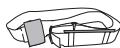
Shoulder Strap
Select Models Only
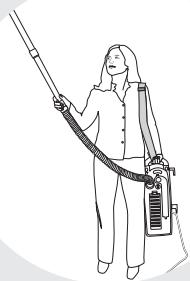
The Shoulder Strap may be used while cleaning with the Detachable Canister.
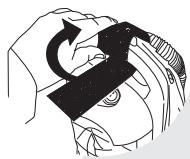
- To attach the Shoulder Strap, wrap the Velcro ends attached to the bottom of the strap securely around the Canister handle as shown. To obtain maximum strength, overlap the loose ends completely and press securely in place.
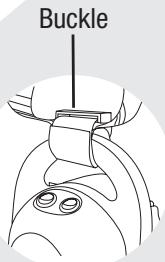
The plastic Buckle must be positioned on top of the canister handle as shown in the illustration. - The length of the strap may be adjusted as required for comfort.

CAUTION:
To reduce the risk of the shoulder strap coming loose in operation follow these instructions.
Power Cord Storage
When you are done using your vacuum, return it to the Upright position and store the Power Cord.
- Turn vacuum cleaner off (0).
2 Unplug Power Cord by grasping the polarized plug (NOT the cord) and disconnect from outlet. - Loop Power Cord around Cord Wraps on side of the Canister.
- Clip moulded plug to Power Cord to secure.

CAUTION:
While the vacuum is in use, warm air is emitted through the Post-Motor Filter on the back of the Canister. The bottom of the Canister may also become warm. When using the shoulder strap, to avoid discomfort, position the Canister so that these parts are not directed towards or touching your body.
Transporting Cleaner
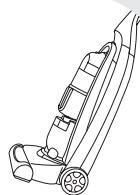
- To move your vacuum cleaner from room to room, put the Handle in the Upright Position, tilt the cleaner back on its rear wheels and push forward.
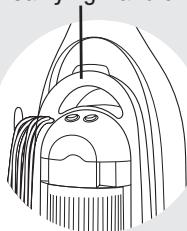
The cleaner can also be moved by using the Carrying Handle on the Detachable Canister.

CAUTION:
Do not press the Release Button while using the Carrying Handle to transport the vacuum cleaner. The Canister could detach causing the rest of the vacuum to fall.
Carrying Handle
To maintain maximum cleaning performance, the following maintenance steps must be performed:
- Empty the Dirt Container when the dirt reaches the "Full" line on the front.
2 Check the Upper Tank and Pre-Motor Filters at least once a month and clean and replace as needed.
3 Replace the HEPA Media Post-Motor Filter every six months.
NOTE: More frequent filter cleaning may be necessary if you are vacuuming new carpet, fine dust, or have allergy concerns.
Follow the instructions on the following pages to perform these simple maintenance steps.
Empty Dirt Container
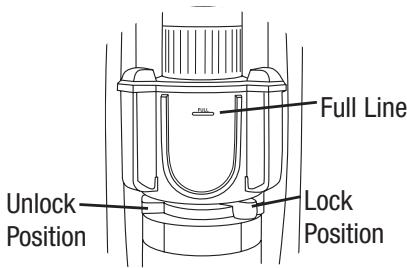
The Dirt Container needs to be emptied when the dirt reaches the "Full" line on the front of the Container.
1 Unplug cleaner from electrical outlet.
2. Slide the Lock 'n Seal Lever to the "Unlock" position.
3. Grasp handle and pull the Dirt Container straight out to remove from vacuum.
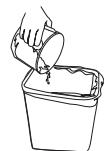
4. Empty dirt into garbage container.
5. Put the Dirt Container back in the vacuum and slide the lever to the "Lock" position.
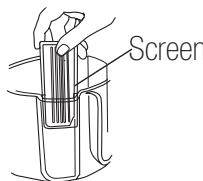
Note: The Screens may also be removed from the side Dust Chambers when you empty or clean the Dirt Container. The Screens are made to fit each Dust Chamber. If they do not slide down completely, try in the opposite Dust Chamber. The Screens will also not fit if there is debris in the track.
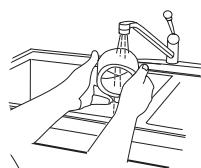
The Dirt Container and Screens may be washed in warm water with a mild detergent. Make sure they are completely dry before replacing.
Cleaning The Upper Tank & Filter
Unplug the cleaner from electrical outlet.
The Upper Tank Filter can be reached by removing the Dirt Container, reaching underneath the Upper Tank and turning the rim of the Filter Frame to unlock. Pull straight down to remove. Brush the dirt off the Louvers and Upper Tank Filter.
The foam Upper Tank Filter may be removed and hand washed in cold water with mild detergent. Rinse well then air dry thoroughly before replacing.
4. The Upper Tank and Louvers may also be wiped clean with a damp cloth.
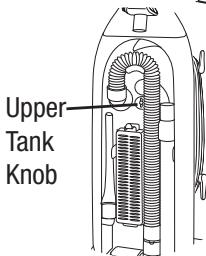
Note: For easier access, the entire Upper Tank may be removed by turning the knob on the back of the cleaner to unlock and pulling the entire tank straight out.

WARNING:
To reduce the risk of electric shock, turn Power Switch OFF and disconnect polarized plug from electrical outlet before performing maintenance or troubleshooting checks.
Tip:
For maximum cleaning performance, check and clean or replace all filters as suggested.
Cleaning The Pre-Motor and Post-Motor Filters Maintenance
- Unplug the cleaner from electrical outlet.
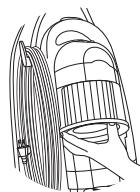
The Pre-Motor Filter protects the motor from dirt particles. It is located in the slide out tray underneath the Dirt Container. If the filter becomes dirty, pull out the tray, lift out the filter and clean. This filter may be hand washed in cold water with mild detergent. Rinse well and air dry thoroughly before replacing.
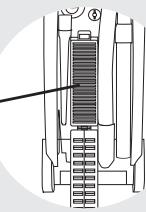
The HEPA Media Post-Motor Filter assists in the filtration process to return clean air to the room. It is located behind the door on the back of the cleaner. If the filter becomes dirty, open the door, remove the filter and replace. The HEPA Media Filter is not washable.
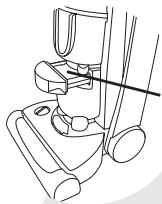
Pre-Motor Filter
HEPA Media
Post-Motor Filter

WARNING:
Do not operate cleaner with damp or wet filters or without all filters in place.
Rotating Brush and Drive Belt Maintenance
Check your vacuum cleaner's Rotating Floor Brush and Drive Belt regularly for debris, wear or damage. Debris can wrap around the brush and hamper its ability to effectively clean your carpet.
Unplug cleaner from electrical outlet.
2. Remove Detachable Canister from vacuum cleaner.
3. Recline Handle and turn vacuum cleaner over so bottom side is up.
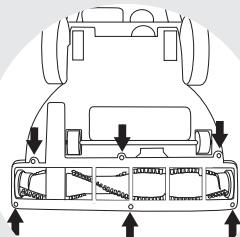
4. Remove the six screws as shown with a Phillips head screwdriver. Lift the Brush Cover off.
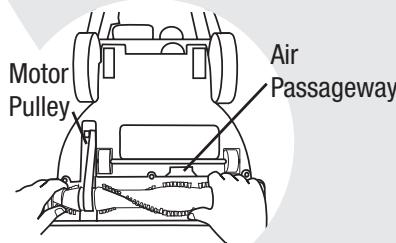
5. Lift the Rotating Floor Brush to remove. Clean strings, hair and other debris from the Brush, paying special attention to the brush ends.
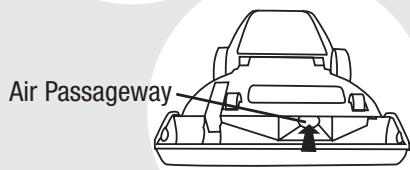
6. Check Air Passageway for Obstructions. Remove any debris from this area.
7. Clean debris from the Motor Pulley and Drive Belt areas.
8. Check Drive Belt carefully for wear, cuts or stressed areas. If any damage is present, discard old Drive Belt and replace.

Caution:
To reduce the risk of injury from moving parts, turn off vacuum cleaner and disconnect Power Plug from electrical outlet.
Rotating Brush and Drive Belt Maintenance Continued
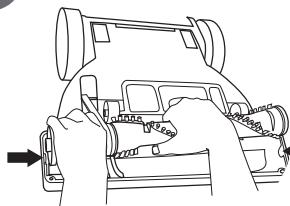
- Place one end of the new Drive Belt over Motor Pulley and the other end over the Brush in the space between the bristles.
- Pull the Brush firmly to stretch the Drive Belt and place ends of Brush down into slots on sides as shown. Turn Brush several times by hand to centre the Drive Belt.
- Reposition Brush Cover and screws. Tighten screws securely.
Replace Light Bulb
Unplug cleaner from electrical outlet.
2. Remove Detachable Canister and recline Handle of vacuum.
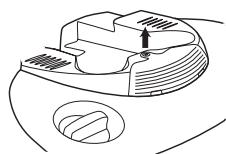
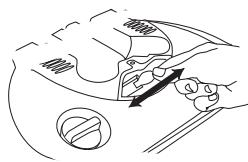
3. Using a screwdriver, remove the one screw as shown and lift off the lens.
4. Remove the bulb from the socket by grasping bulb and pulling straight out. Install the new bulb by pushing it gently into the socket until the bulb snaps into place.
5. Reposition lens and secure with the one screw.
WARNING:
To reduce the risk of electric shock, turn Power Switch OFF and disconnect polarized plug from electrical outlet before performing maintenance or troubleshooting checks.
TurboBrush Maintenance
Select Models Only
The TurboBrush should be checked regularly for clogs or debris wrapping around the brush roll.
Unplug vacuum from electrical outlet.
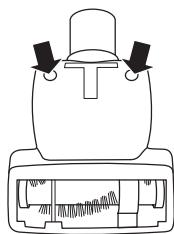
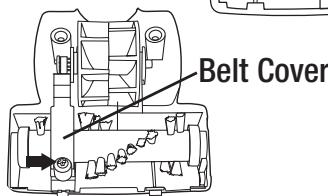
2. If a clog is present or debris is visible, unscrew the two screws on the back of the TurboBrush to remove the faceplate and clear any obstructions.
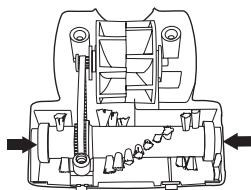
3. To clean debris from the brush roll, remove the screw located on the belt cover. Lift the belt cover. Remove the brush roll from the drive belt and clean debris.
4. Reposition the drive belt on the brush roll. Place ends of brush roll in slots on sides as shown. Reposition belt cover and secure with shorter screw. Reposition faceplate and secure with two longer screws.
Clearing Clogs
Low suction or poor pickup may be due to a clog in the vacuum cleaner. If you notice a change in the sound of the motor or a reduction in the spinning action, check for clogs.
Unplug cleaner from electrical outlet.
2. Empty Dirt Container.
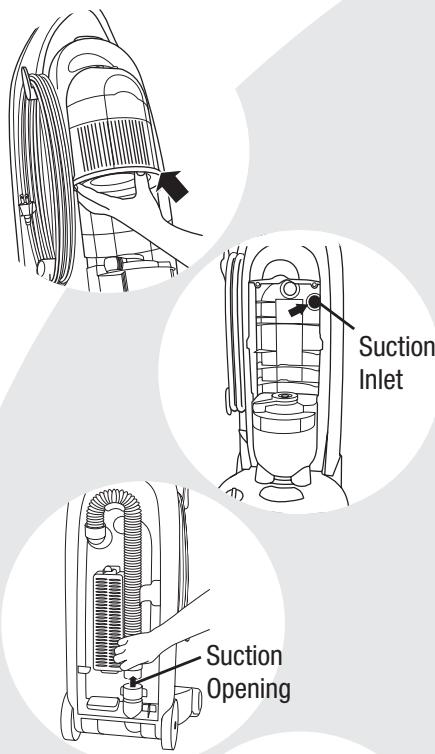
3. Check Upper Tank for build up or clogs.
4. Remove the Upper Tank and check the suction inlet for a clog.
5. Grasp the Hose Grip and lift to separate from the suction opening. Check for a clog in the Base or the Hose.
6. Release the Twist n' Snap hose from the vacuum by turning to the left. Straighten the hose and unclog with a long, narrow object.
7. If the clog persists, follow the instructions for Checking the Rotating Brush on page 11 and inspect the Air Passageway for obstructions.
Thermal Protector
An internal thermal protector has been designed into your cleaner to protect it from overheating. When the thermal protector activates, the main vacuum motor will stop operating. If this happens, proceed as follows:
- Turn the cleaner OFF (0) and unplug from electrical outlet.
2 Check the Upper Tank area, Pre-Motor Filter and Post-Motor Filter for dirt accumulation.
Refer to the "Clearing Clogs" section.
4 When the motor cools for approximately 30 minutes, the thermal protector automatically resets and cleaning may continue. If the thermal protector continues to activate after following the above steps, your cleaner may need servicing. Call BISSELL Consumer Services, or visit the website.
Note: The thermal protector controls the main vacuum motor only, not the brush motor. If the thermal protector activates, the brush will continue to operate normally; however, there will be no suction.

Caution:
To reduce the risk of injury from moving parts, turn off vacuum cleaner and disconnect Power Plug from electrical outlet.
Vacuum cleaner won't run Possible Causes
Power cord not plugged in
Blown fuse/tripped breaker
3 Thermal protector activated
No Power at Rotating Floor Brush Possible Causes
1 Canister is not securely seated
Brush Switch turned to "Off"
3 Vacuum is in upright position
Vacuum cleaner won't pick up dirt Possible Causes
Incorrect Height Adjustment
2 Hose not attached to suction opening
3 Crack or hole in Hose
4 Drive Belt broken, worn or off motor pulley
Rotating Floor Brush bristles worn
6 Rotating Floor Brush jammed
Clog in vacuum
8 Dirt Container full
9 Dirt Container or Upper Tank not installed properly
10 Filters are dirty
Vacuum cleaner is difficult to push Possible Causes
Incorrect Height adjustment
Visible dirt escaping from cleaner
Possible Causes
1 Dirt Container full
Filter missing or installed incorrectly
3 Dirt Container installed incorrectly

WARNING:
To reduce the risk of injury from moving parts and/ or electrical shock, turn Power Switch OFF and disconnect polarized plug from electrical outlet before performing troubleshooting checks.
Remedies
1 Check electrical plug
2 Check/Replace fuse or reset breaker
3 Allow cleaner to cool for 30 minutes, see pg.13
Remedies
1 Remove Canister and replace, making sure that it "clicks" into place
2 Make sure Brush Switch is in "On" position
3 Recline vacuum to operate brush
Remedies
1 Adjust Powerfoot to correct height setting
2 Grasp Hose Grip and firmly push onto the base
3 Check Hose and replace if needed
4 Reposition or replace Drive Belt, see pg. 11-12
5 Replace brush
6 Remove brush and clean debris from brush ends
7 Follow instructions on pg. 13 for clearing clogs
Empty Dirt Container
9 Position correctly and lock in place
10 Check and clean or replace Upper Tank, Pre-Motor and Post-Motor Filters
Remedies
1 Adjust Powerfoot to correct height setting
Remedies
1 Empty Dirt Container
2 Check Upper Tank, Pre-Motor and Post-Motor Filter for correct installation
3 Pull out and re-insert Dirt Container correctly
For information about repairs or replacement parts, or questions about your warranty, call:
BISSELL Consumer Services 1-800-263-2535
Monday - Friday 8 a.m. — 10 p.m. ET
Saturday 9 a.m. — 8 p.m. ET
Or write:
BISSELL Canada Corporation
Box 1003
Niagara Falls, ON L2E 6W2
ATTN: Consumer Services
Or visit the BISSELL website - www.bissell.com
When contacting BISSELL, have model number of unit available.
Please record your Model Number: Please record your Purchase Date:
NOTE: Please keep your original sales receipt. It is your proof of warranty.

Replacement Parts - BISSELL Lift-Off Revolution Series
Replacement parts are available through BISSELL Consumer Services, an authorized BISSELL Service Centre or by visiting our website. To locate an authorized Service Centre or to place an order using Visa or MasterCard call:
BISSELL Consumer Services 1-800-263-2535
Monday - Friday 8 a.m. — 10 p.m. ET
Saturday 9 a.m. — 8 p.m. ET
Or visit our Website - www.bissell.com
Item Part No. Part Name
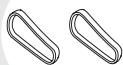
1 3200E
Style 8 Drive Belt (2-Pack)
2 203-1297
Standard Headlight Bulb (Select Models)
3 203-1063
Crevice Tool
4 203-1099
Dusting Brush/Upholstery Tool
5 203-6624
Stair Cleaning Tool (Select Models)
6 203-6625
Telescoping Extension Wand
7 203-2081
Deluxe Bare Floor Tool (Select Models)
8 203-1227
TurboBrush (Select Models)
9 203-2082
Bracket Assembly for TurboBrush (Select Models)
10 203-5542
Shoulder Strap (Select Models)
11 203-2073
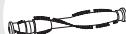
Twist 'n Snap Hose
12 203-2085
Brush Roll - Grey (other colours also available)
13 203-1095
Style 7/8 Upper Tank Filter
14 203-1073
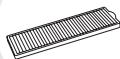
Pre-Motor Filter
15 3091E
Style 8 HEPA Media Post-Motor Filter
1

2

3

4

5

6
7

8

9
10
11
12

13

14
15
If you need additional instruction regarding this warranty or have questions regarding what it may cover, please contact BISSELL Consumer Services by e-mail, telephone, or regular mail as described below.
Limited One Year Warranty
Subject to the *EXCEPTIONS AND EXCLUSIONS identified below, upon receipt of the product, BISSELL Canada Corporation will repair or replace (with new or remanufactured components or products), at BISSELL's option, free of charge from the date of purchase by the original purchaser, for one year any defective or malfunctioning part. See information below on "If your BISSELL product should require service". This warranty applies to product used for personal, and not commercial or rental service. This warranty does not apply to routine maintenance components such as belts or brushes. Damage or malfunction caused by negligence, abuse, or use not in accordance with the User's Guide is not covered.
If your BISSELL product should require service:
Call BISSELL Consumer Services at the number listed below or visit the BISSELL website - www.bissell.com to locate a BISSELL Authorized Service Centre in your area. If there are no authorized BISSELL Service Centres in your area, a BISSELL Representative at canada.custhelp@bissell.com or at the phone number below will issue you a Return Authorization Number and a pre-paid mailing label to return the unit to BISSELL for warranty repair.
The machine should be returned with a photocopy of your proof of purchase. (Your dated sales receipt is your warranty — do not send original.) If you need information about repairs or replacement parts, or if you have questions about your warranty, contact BISSELL Consumer Services.
E-mail: canada.custhelp@bissell.com
Or call: BISSELL Consumer Services
1-800-263-2535
Monday - Friday 8 a.m. - 10 p.m. ET
Saturday 9 a.m. - 8 p.m. ET
Or write: BISSELL Canada Corporation
ATTN: Consumer Services
Box 1003,
Niagara Falls, ON L2E 6W2
BISSELL CANADA CORPORATION IS NOT LIABLE FOR INCIDENTAL OR CONSEQUENTIAL DAMAGES OF ANY NATURE ASSOCIATED WITH THE USE OF THIS PRODUCT. BISSELL'S LIABILITY WILL NOT EXCEED THE PURCHASE PRICE OF THE PRODUCT.
*EXCEPTIONS AND EXCLUSIONS FROM THE TERMS OF THE LIMITED WARRANTY
THIS WARRANTY IS EXCLUSIVE AND IN LIEU OF ANY OTHER WARRANTYES EITHER ORAL OR WRITTEN. ANY IMPLIED WARRANTYES WHICH MAY ARISE BY OPERATION OF LAW, INCLUDING THE IMPLIED WARRANTYES OF MERCHANTABILITY AND FITNESS FOR A PARTICULAR PURPOSE, ARE LIMITED TO THE ONE YEAR DURATION FROM THE DATE OF PURCHASE AS DESCRIBED ABOVE.

©2005 BISSELL Homecare, Inc.
BISSELL Canada Corporation
Niagara Falls, ON L2E 6S5
All rights reserved. Printed in Korea
Part Number 603-5568
Rev 04/05
Visit our website at:
www.bissell.com