
PRO 3000 - Electronic medical thermometer KAZ - Free user manual and instructions
Find the device manual for free PRO 3000 KAZ in PDF.



| Product Type | Electronic Medical Thermometer |
| Brand | KAZ (Braun ThermoScan) |
| Model | PRO 3000 |
| Power Supply | 2 CR2032/DL2032 lithium batteries |
| Displayed Temperature Range | 20 °C to 42.2 °C |
| Operating Ambient Temperature | 10 °C to 40 °C |
| Accuracy (35.5-42.0 °C) | ± 0.2 °C |
| Display Resolution | 0.1 °C or 0.1 °F |
| Measurement Technology | Ear Infrared (8 measurements/second) |
| Display | Backlit LCD Screen |
| Memory Function | Last stored temperature |
| Scale Switching | °C / °F |
| Instructions for Use | Ear: pull ear, insert probe, press read button |
| Care and Cleaning | Clean lens with cotton swab and alcohol; do not immerse |
| Safety | Probe cover mandatory; probe shape prevents deep insertion |
| Included Accessories | Storage case, probe covers (quantity not specified) |
| Available Spare Parts | ThermoScan Braun probe covers |
| Battery Life | Approximately 5000 temperature readings |
| Warranty | 3 years (upon presentation of proof of purchase) |
| Standards | European Directive 93/42/EEC (medical devices) |
Frequently Asked Questions - PRO 3000 KAZ
User questions about PRO 3000 KAZ
0 question about this device. Answer the ones you know or ask your own.
Ask a new question about this device
Download the instructions for your Electronic medical thermometer in PDF format for free! Find your manual PRO 3000 - KAZ and take your electronic device back in hand. On this page are published all the documents necessary for the use of your device. PRO 3000 by KAZ.
USER MANUAL PRO 3000 KAZ
Welch Allyn Customer Service:
UK 0207-36556780,Fax 0207-3659694
France 01-60 09 3366,Fax 01-60 09 6797
Deutschland 07477-9271-0, Fax 07477-9271-90
Espana 091-74 99 357, Fax 091-74 99 361
Portugal 0214-15 42 83, Fax 0214-15 42 86
Italia 0269-68 24 25, Fax 0269-63 36 97
For other European countries, please call 00353-46 67 700 for service in English

11
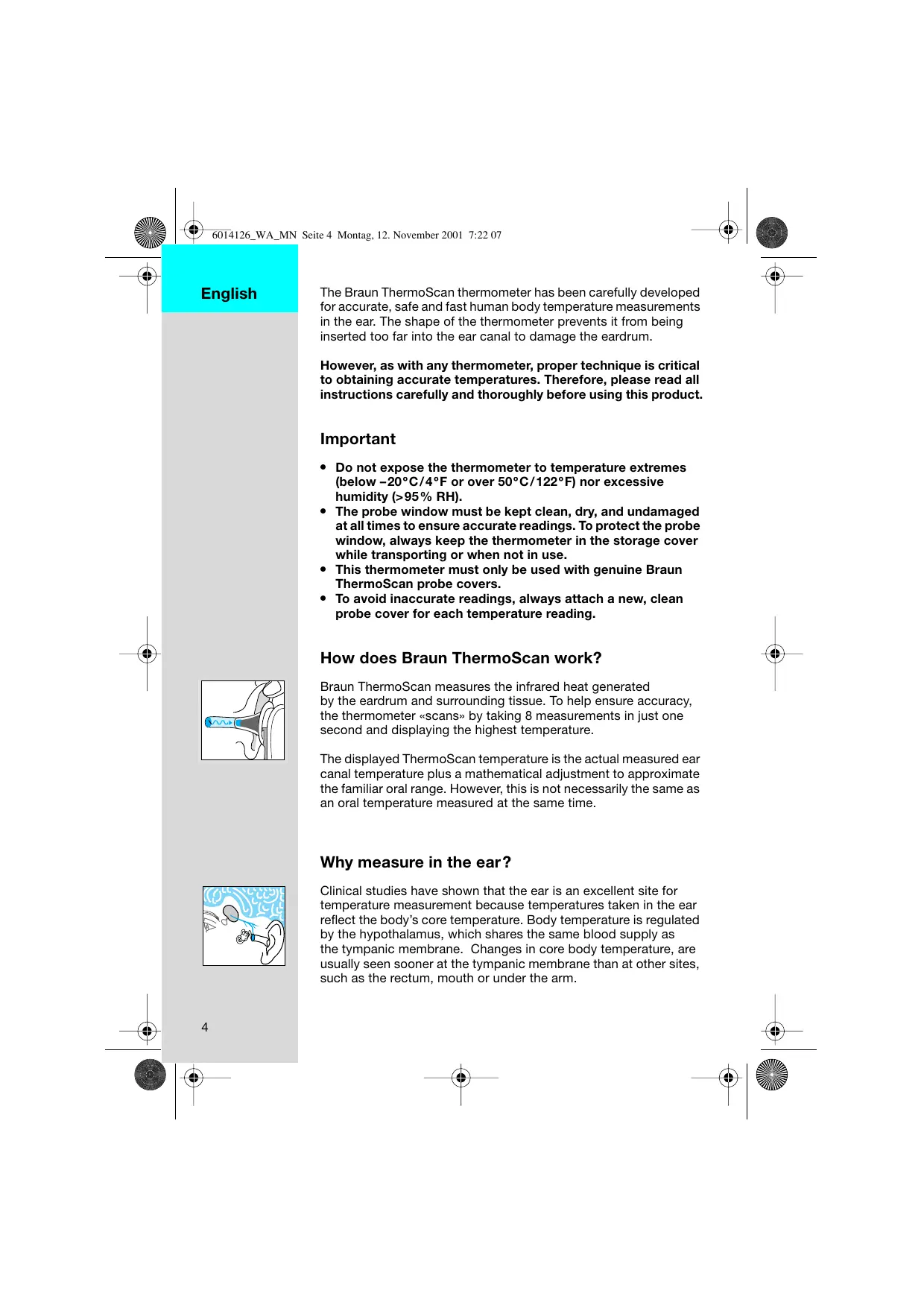
The Braun ThermoScan thermometer has been carefully developed for accurate, safe and fast human body temperature measurements in the ear. The shape of the thermometer prevents it from being inserted too far into the ear canal to damage the eardrum.
However, as with any thermometer, proper technique is critical to obtaining accurate temperatures. Therefore, please read all instructions carefully and thoroughly before using this product.
Important
- Do not expose the thermometer to temperature extremes (below -20°C / 4°F or over 50°C / 122°F ) nor excessive humidity ( >95% RH).
- The probe window must be kept clean, dry, and undamaged at all times to ensure accurate readings. To protect the probe window, always keep the thermometer in the storage cover while transporting or when not in use.
- This thermometer must only be used with genuine Braun ThermoScan probe covers.
- To avoid inaccurate readings, always attach a new, clean probe cover for each temperature reading.
How does Braun ThermoScan work?
Braun ThermoScan measures the infrared heat generated by the eardrum and surrounding tissue. To help ensure accuracy, the thermometer «scans» by taking 8 measurements in just one second and displaying the highest temperature.
The displayed ThermoScan temperature is the actual measured ear canal temperature plus a mathematical adjustment to approximate the familiar oral range. However, this is not necessarily the same as an oral temperature measured at the same time.
Why measure in the ear?
Clinical studies have shown that the ear is an excellent site for temperature measurement because temperatures taken in the ear reflect the body's core temperature. Body temperature is regulated by the hypothalamus, which shares the same blood supply as the tympanic membrane. Changes in core body temperature, are usually seen sooner at the tympanic membrane than at other sites, such as the rectum, mouth or under the arm.
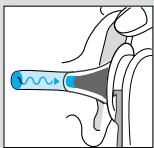
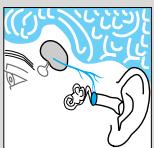
Advantages of taking temperatures at the ear versus traditional sites:
- Axillary temperature readings only reflect skin temperature which may not indicate the internal body temperature.
- Rectal temperatures often lag significantly behind internal body temperature changes, especially at times of rapidly changing temperatures.
- Oral temperatures are often influenced by eating, drinking, thermometer placement, breathing through the mouth, or the inability of the person to close their mouth completely.
Body temperature
Normal body temperature is a range. The following table1 shows that ranges of normal also vary by site. Therefore, readings from different sites, even if taken at the same time, should not be directly compared.
Axillary: 34.7° C - 37.3° C 94.5° F - 99.1° F
Oral: 35.5° C - 37.5° C 95.9° F - 99.5° F
Rectal: 36.6°C - 38.0°C 97.9°F - 100.4°F
ThermoScan2: 35.8° C - 38.0° C 96.4° F - 100.4° F
Also, a person's normal temperature range tends to decrease with age. The following table shows normal ThermoScan ranges by age.
Normal ThermoScan temperature ranges
| 0 - 2 years | 36.4°C - 38.0°C | 97.5°F - 100.4°F |
| 3 - 10 years | 36.1°C - 37.8°C | 97.0°F - 100.0°F |
| 11 - 65 years | 35.9°C - 37.6°C | 96.6°F - 99.7°F |
| > 65 years | 35.8°C - 37.5°C | 96.4°F - 99.5°F |
The range of normal varies from person to person and can be influenced by many factors such as time of day, level of activity, medications and gender.
- Chamberlain, J.M., Terndrup, T.E., New Light on Ear Thermometer Readings, Contemporary Pediatrics, March 1994.
- Chamberlain, J.M., et al., Determination of Normal Ear Temperature with an Infrared Emission Detection Thermometer, Annals of Emergency Medicine, January 1995.
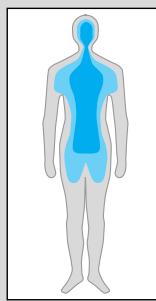
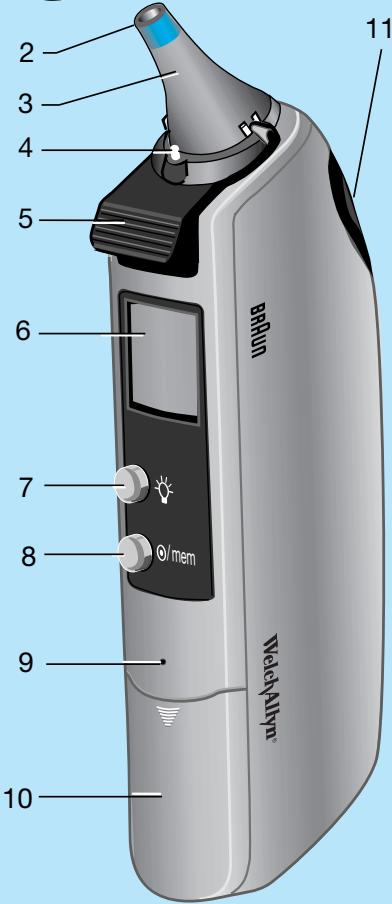
Product description
- Probe cover
- Probe window
- Probe
- Probe cover detector
- Probe cover ejector
- Display (LCD)
- LCD light button
- / mem button (On/memory function)
- Battery door lock
- Battery door
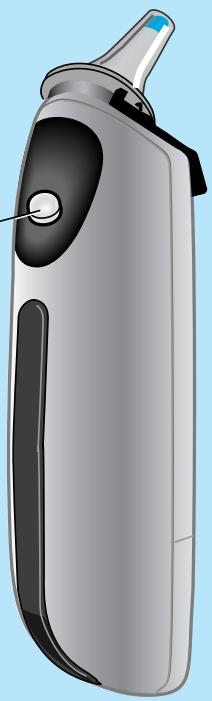
- Activation button
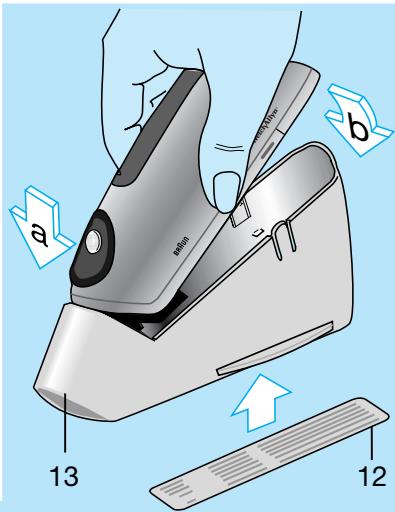
12.Label - Storage cover
How to use Braun ThermoScan
- Always use a new, clean probe cover for each measurement to help ensure an accurate reading.
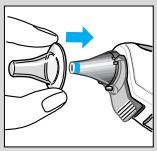
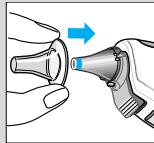
Attach a new, clean probe cover or, if already attached, press the /mem button.
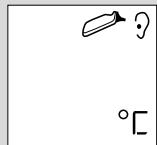
The LCD (liquid crystal display) is activated, showing all segments.
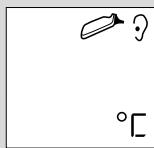
When the ready symbol ⇒ is displayed the thermometer is ready for use.
- Perform an «ear tug» to straighten the ear canal. This gives the thermometer a clear view of the eardrum.
Children under 1 year:
Pull the ear straight back.
Children aged 1 year to adult:
Pull the ear up and back.
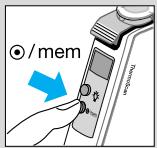
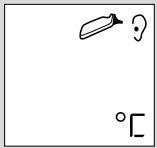
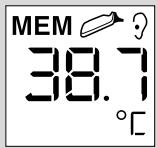
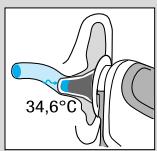
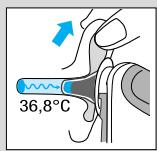
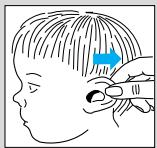

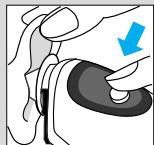
- While tugging the ear, fit the probe snugly into the ear canal as far as possible and press the activation button. Release it when you hear a beep. This is the Temp Beep that confirms the end of measurement.
-
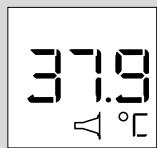
Remove the thermometer from the ear canal. The LCD displays the temperature measured and the probe cover symbol.
-
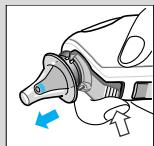
Replace the probe cover after each measurement: Press the ejector button and put on a new, clean probe cover.
Only then, the probe cover symbol disappears from the display. The thermometer is now ready for use again.
- If no button is pressed or no new probe cover is attached within 30 seconds, the thermometer will turn off automatically.
Note: In the following situations, it is recommended that you take three temperatures in the same ear. If they differ, use the highest reading.
- Infants in the first 90 days of life.
Children under three years of age who have a condition such as a compromised immune system and for whom the presence or absence of fever is critical. - When you are first learning to use the ear thermometer until you are comfortable with the technique and are obtaining consistent readings.
Important: As with any type of thermometer, slight temperature variations (± 0.2 - 0.3°C / ± 0.3 - 0.5°F) can occur, if consecutive measurements are taken.
Temperature taking hints
-
The right ear reading may differ from the reading taken at the left ear. Therefore, always take the temperature in the same ear.
-
The ear must be free from obstructions or excess earwax buildup to take an accurate reading.
-
External factors may influence ear temperatures, including when an individual has:
-
been lying on one ear or the other
- had their ears covered
- been exposed to very hot or very cold temperatures, or
- been recently swimming or bathing.
In these cases, remove the individual from the situation and wait 20 minutes prior to taking a temperature.
- For persons wearing hearing aids or ear plugs, remove the device and wait 20 minutes prior to taking a temperature.
- Use the untreated ear if prescription ear drops or other ear medications have been placed in the ear canal.
Memory mode
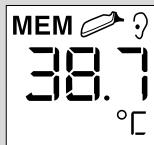
The last temperature taken before the thermometer powers down is stored in memory. To enter the memory mode, press the / mem button.
The last stored temperature is displayed along with the MEM symbol.
Even in memory mode, a new temperature can be taken provided that the ready symbol → is shown.
To quit the memory mode, press the / mem button again.
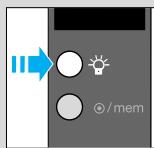
LCD light
for easy nighttime reading
Changing the temperature scale
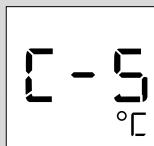
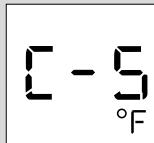
This thermometer is shipped with the Celsius temperature scale activated. If you wish to switch to Fahrenheit (°F), proceed as follows:
- Turn on the thermometer. (If it is already turned on, make sure it is not in memory mode.)
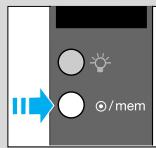
- Press the /mem button and keep it pressed. Then press and release the activation button to switch over to the "change temperature scale" mode.
- By pressing the activation button again, the Fahrenheit scale is activated, «°F» is displayed on the LCD. Each further pressing of the activation button toggles the scale between °C and °F.
- Release the ④ /mem button to return to the ready symbol → ? .
The temperature stored in memory will automatically be converted to the selected scale when displayed on the LCD.
Care and cleaning
Braun ThermoScan probe covers are intended for single use only! To ensure accurate readings, always use Braun ThermoScan disposable probe covers with the Pro 3000 thermometer. Damaged, perforated, or soiled probe covers can lead to inaccurate temperature readings. Additionally, the accuracy of your temperature readings can be affected by damage to the probe window, or the presence of dirt and ear wax on the probe window.
Probe Window
To assure a high level of accuracy, it is very important to keep this window clean, dry and undamaged. Fingerprints, earwax, dust and other soiling compounds reduce transparency of the window and result in lower temperature readings. If the thermometer is accidentally placed in the ear without a probe cover installed, the window must be cleaned immediately. Additionally, the window and/or probe tip area should never be modified, changed, or adjusted. These changes will affect calibration and accuracy of the thermometer.
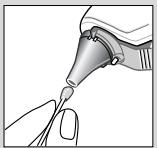
To clean the window, gently wipe its surface with a cotton swab slightly moistened with alcohol and immediately wipe dry with a clean cotton swab. After cleaning, allow at least 5 minutes drying time before taking temperatures. Make sure probe window is clean and dry. Avoid touching the window except when cleaning is required. If the window is damaged, the thermometer must be returned to Welch Allyn for service.
Note: Do not use any chemical other than alcohol to clean the probe window.
Thermometer
Use a soft, cloth slightly moistened with alcohol to clean the thermometer display and exterior. Do not use abrasive cleaners. Never submerge the thermometer in water or any other liquid.
Store thermometer and probe covers in a dry location free from dust and contamination and away from direct sunlight. The ambient temperature at the storage location should remain fairly constant and within the range of 10°C - 40°C ( 50°F to 104°F ).
| Error message | Troubleshooting | |
| Situation | Solution | |
| ( ) | No probe cover is attached and activation button was pressed while probe was in the ear. | Make sure probe window is clean; refer to section «Care and cleaning» if necessary. Attach new, clean probe cover to stop error beeps. |
| E- | Ambient temperature is not within the allowed operating range of 10°C-40°C (50°F to 104°F) or changing too rapidly. | Allow the thermometer to remain in a room for 30 minutes where the temperature is between 10°C and 40°C (50°F to 104°F). |
| H- | Temperature taken is not within displayed temperature range (20°C-42.2°C/68°F-108°F). HI = too high LO = too low | Make sure new, clean probe cover is attached and thermometer is properly inserted. To clear the error message, attach a new, clean probe cover or press the ©/mem button. Then, take a new temperature. |
| L- | Battery is low, but thermometer will still operate correctly. (No light function) | Insert new batteries |
| 38.7 | Battery is too low to take correct temperature readings. | Insert new batteries |
| MEM | System error | Wait 30 seconds until thermometer powers down, then turn on again. ... reset the thermometer by removing the batteries and putting them back in. ...call Welch Allyn Customer Service (see page 2). |
| 188. | If error persists | |
| 190. | If error still persists | |
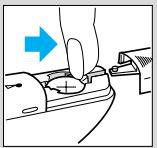
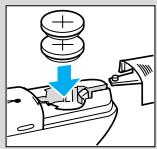
Replacing the batteries
The thermometer is supplied with 2 lithium cells, type CR 2032/ DL 2032. Insert new batteries when the battery symbol → appears on the display.
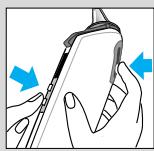
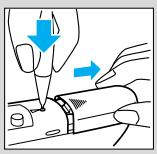
Using the tip of a ball-point pen, press the battery door lock to open the battery compartment.
Using your finger, press the battery release.
Remove the batteries and replace with new batteries, making sure the poles are in the right direction.
Slide battery door back in until it snaps in place.
To protect the environment, dispose of empty batteries at your retail store or at appropriate collections sites according to national or local regulations.
To dispose of the thermometer, please return it to a Welch Allyn Service Centre.

Calibration
The thermometer is initially calibrated at the time of manufacture. If at any time you question the accuracy of measurement or the performance of the thermometer, contact a Welch Allyn Service Centre. To determine the date of manufacture, refer to the Lot number located in the battery compartment. The first digit refers to the last digit in the year of manufacture. The next two digits refer to the calendar week in the year of manufacture.
For example: LOT 842...
This thermometer was manufactured during the 42nd week in 1998.
Product specifications
Displayed temperature range: 20 - 42.2°C (68-108°F)
Operating ambient temperature range: 10 - 40°C (50-104°F)
Display resolution: 0.1°C or °F
Accuracy: 35.5 - 42.0 °C (98.0 - 107.6 °F): ± 0.2 °C
outside this range: ± 0.3°C
Battery life: 5000 measurements

Type BF equipment / Subject to change without notice.
The Braun ThermoScan PRO3000 has been found to be immune to electromagnetic fields and does not produce any measurable RF emissions.
This product conforms to the provisions of the EC directive 93/42/EEC (Medical Device Directive).

Guarantee
This product is guaranteed for 3 years from date of purchase against material and/or workmanship defects. These will be eliminated either by repairing or exchanging the appliance as we may choose. All other claims, including for damages, are excluded. Service under the guarantee does not affect its expiry date.
Claims only valid in countries where product is officially sold and if accompanied by a proof of purchase.
Claims arising out of the sales contract with the vendor are not affected by this guarantee.
- Chamberlain, J.M., Terndrup, T.E., New Light on Ear Thermometer Readings, Contemporary Pediatrics, Marzo 1994.
- Chamberlain, J.M., et al., Determination of Normal Ear Temperature with an Infrared Emission Detection Thermometer, Annals of Emergency Medicine, Enerno 1995.
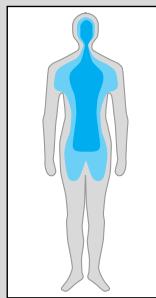
Axillair: 34,7°C - 37,3°C
Oraal: 35,5°C - 37,5°C
- Chamberlain, J.M., Terndrup, T.E., New Light on Ear Thermometer Readings, Contemporary Pediatrics, maart 1994.
- Chamberlain, J.M., et al., Determination of Normal Ear Temperature with an Infrared Emission Detection Thermometer, Annals of Emergency Medicine, jannari 1995.
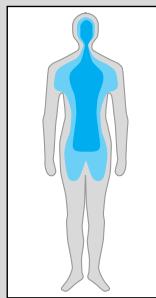
Productomschrijving
Display resolutie: 0,1°C of °F
Nauwkeurigheid: 35,5-42,0°C: ±0,2°C
buiten dit bereik: ± 0,3°C



- WELCH ALLYN CUSTOMER SERVICE
- IMPORTANT
- HOW DOES BRAUN THERMOSCAN WORK
- WHY MEASURE IN THE EAR
- BODY TEMPERATURE
- NORMAL THERMOSCAN TEMPERATURE RANGES
- PRODUCT DESCRIPTION
- HOW TO USE BRAUN THERMOSCAN
- TEMPERATURE TAKING HINTS
- MEMORY MODE
- LCD LIGHT
- CHANGING THE TEMPERATURE SCALE
- CARE AND CLEANING
- PROBE WINDOW
- THERMOMETER
- REPLACING THE BATTERIES
- CALIBRATION
- PRODUCT SPECIFICATIONS
- GUARANTEE
- PRODUCTOMSCHRIJVING
Brand : KAZ
Model : PRO 3000
Category : Electronic medical thermometer