
FALCON - Light projector BEGLEC - Free user manual and instructions
Find the device manual for free FALCON BEGLEC in PDF.


| Product type | Effect light projector (gobo flower) |
| Brand | BEGLEC |
| Model | FALCON |
| Lamp | ELC 250W / 24V |
| Power supply | AC 230V - 250V, 50Hz |
| Fuse | 250V 5A fast blow (20 mm glass) |
| Dimensions | 34 × 32 × 22 cm |
| Weight | 9 kg |
| DMX control | 4 channels (DMX512) |
| DMX connectors | XLR 3-pin male (input) and female (output) |
| Number of gobos | 14 gobos + white (8 uni-color, 4 glass, 1 two-color, 1 four-color) |
| Main functions | Gobo, color, zoom, rotation, strobe, shaking, automatic blackout |
| Internal microphone | Yes (sound-activated) |
| Operating modes | Stand-alone, Master/Slave, DMX |
| Optional controller | CA-8 (functions Standby, Function, Mode) |
| Cooling | Fan + thermal switch |
| Focus | Manually adjustable |
| Lamp protection | Automatic shut-off after 30 seconds in blackout |
| Cleaning external lenses | At least once a month |
| Cleaning internal lenses | At least every 2 months (by qualified personnel recommended) |
| Recommended use | Clubs, pubs, parties, mobile DJs |
Frequently Asked Questions - FALCON BEGLEC
User questions about FALCON BEGLEC
0 question about this device. Answer the ones you know or ask your own.
Ask a new question about this device
Download the instructions for your Light projector in PDF format for free! Find your manual FALCON - BEGLEC and take your electronic device back in hand. On this page are published all the documents necessary for the use of your device. FALCON by BEGLEC.
USER MANUAL FALCON BEGLEC
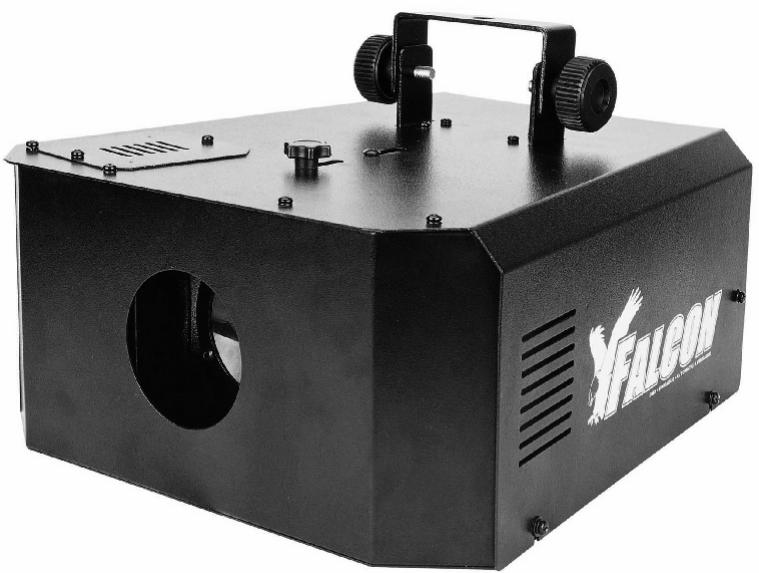
Multifunctional Gobo Flower
Copyright © 2004 by BEGLEC cva.
Reproduction or publication of the content in any manner, without express permission of the publisher, is prohibited.
Version: 1.0
OPERATION MANUAL
Thank you for buying this JB Systems product. To take full advantage of all possibilities, please read these operating instructions very carefully.
FEATURES
- Multifunctional Gobo flower with 250W ELC lamp.
- Equipped with unique contractible reflector for fabulous effects
- Combined color/gobo wheel with 14 Gobos + open:
○8 one color gobos
° 4 glass gobos
1 bi-color gobo
○ 1 four-color gobo
- Internal micro used to trigger the built-in programs
- Can be used in standalone mode with built-in programs
- Can be used in master/slave mode with built-in programs
- Can be used in 4channel DMX512 mode (selectable with DIP-switches)
Zoom
O Rotation
Gobo
Strobe/ gobo shaking
- Adjustable Focus
- Fan cooling and thermal switch for overheat protection.
- Lamp shuts off automatically in blackout mode for extended lamp life.
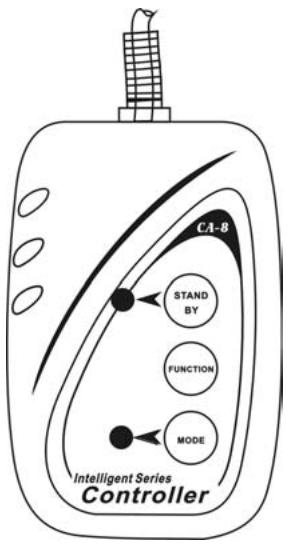
- Optional CA-8 controller available with 3 different functions:
○ STANDBY: switch blackout function on/off
○FUNCTION: “Fast mode” → different strobe modes.
"Slow mode" → gobo selection
° MODE: selection of fast/slow mode.
- Perfect for clubs, pubs, parties and mobile DJs.
BEFORE USE
Check the contents:
Check that the carton contains the following items:
- FALCON light effect unit
- Mains cable
- ELC 250W / 24V lamp
- Metal hanging bracket
- Two big knobs for hanging bracket
- Operating instructions
Some important instructions:
- To protect the environment, please try to recycle the packing material as much as possible.
- Keep this booklet in a safe place for future consultation. If you sell the fixture, be sure to add this user manual.
- To prevent fire or shock hazard, do not expose this appliance to rain or moisture.
- Don't place metal objects or spill liquid inside the unit. Electric shock or malfunction may result. If a foreign object enters the unit, immediately disconnect the mains power.
- Locate the fixture in a well ventilated spot, away from any flammable materials and/or liquids. The fixture must be fixed at about 15cm from surrounding walls.
- Don't cover any ventilation openings as this may result in overheating.
- Prevent use in dusty environments and clean the unit regularly.
- The electrical installation should be carried out by qualified personal.
- This fixture must be earthed to in order comply with safety regulations.
- In order to prevent electric shock, do not open the cover. Apart from the lamp, there are no user serviceable parts inside.
- In the event of serious operating problems, stop using the fixture and contact your dealer immediately.
LAMP (RE)PLACEMENT
- Switch off the unit and unplug the mains cable.
- Wait until the unit has been cooled down.
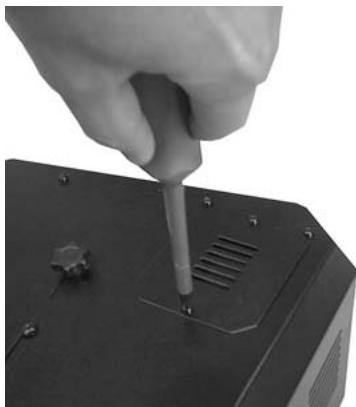
- Use a screwdriver to unscrew the 2 screws that close lamp compartment on the upper side of the fixture. (see photo)
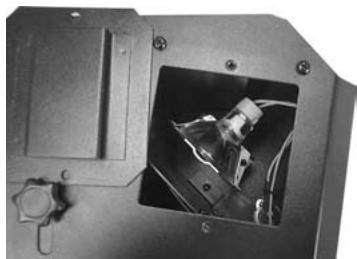
- On the inside you will see the lamp socket. Tear the lamp socket gently out of the lamp compartment.
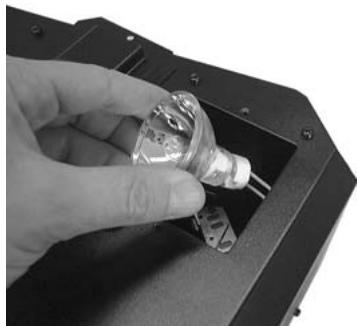
- Unplug the old lamp. Hold the lamp socket while unplugging the lamp instead of pulling the cable!
- Hold the lamp socket while pressing the new ELC250 lamp gently in the socket.
Attention! Don't touch the bulb inside the lamp reflector with bare hands! This will drastically shorten the lifespan of the lamp. If you touched the lamp, clean it with a cloth and a little denatured alcohol. Wipe the lamp off before installing.
- Put the installed lamp back inside the unit as shown on the photo. Be sure that the wires don't touch the lamp reflector.
- Close the lamp compartment with the 2 screws. Done!
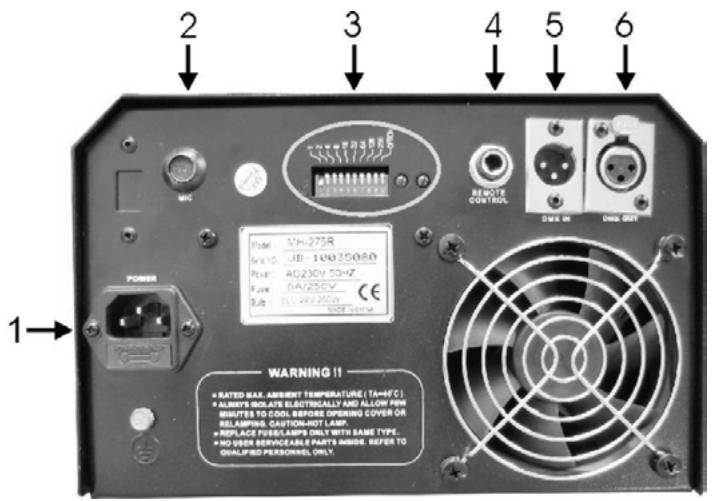
- MAINS INPUT: Used to connect the included mains cable.
- INTERNAL MICRO: Used to trigger the built-in programs to the rhythm of the music.
- DIP SWITCHES: Used to set the DMX-starting address of the unit. See further for more information. With switch n°10 you can inverse the movements. The red led is on when the unit is switched on. The green led blinks in the rhythm of the music.
- JACK INPUT: This 6.3mm jack connector is used to connect the optional CA-8 controller for extra functions. (see further)
- DMX INPUT: 3pin male XLR-connector used to connect universal DMX-cables. This input receives instructions from a DMX-controller or from another Falcon light effect when used in master/slave mode.
- DMX OUTPUT: 3pin female XLR-connector used to connect the Falcon with the next unit in the DMX chain or with another Falcon when used in master/slave mode.
ADJUSTING THE FOCUS:
Use the small knob on top of the Falcon to adjust the focus of the gobos:
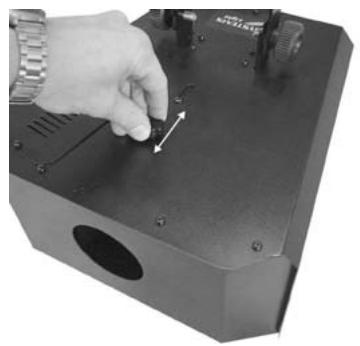
- Switch the lamp of the Falcon on.
- Loosen the knob (see photo) a little until you can move it forward and backward.
- Adjust the focus and fasten the knob again.
CONTROLLING THE FALCON
1. Standalone 1unit:
Just connect the unit to the mains and put on some music. The unit will start working automatically to the rhythm of the music.
2. Two or more units in master/slave setup:
Connect 2 or more units together using good quality balanced XLR microphone cables (like for example JB Systems code 7-0063). The unit that has no cable connected to its input will react as master; the others are the slave units.
You don't have to worry about the settings of the DMX DIP-switches! It is only possible to inverse the behavior of a slave unit by changing the position of DIP-switch n°10 . Just try it and see if the effect becomes better. Changing DIP-switch n°10 on the master has no effect.
3. Connect the optional CA-8 controller for more control:
The CA-8 controller can only be used in standalone or master/slave mode. Connect the controller to the jack input of the first unit (master). Now you can control all the connected units:
- STANDBY BUTTON:
Press this button to start/stop blackout mode on all connected units. The led is ON when the blackout function is active. After about 30sec. blackout, the lamp will be switched off automatically to extend its lifetime.
- MODE: (fast/slow)
When the led is off, the Falcon is in FAST mode. The beam movements and gobo/color wheel are both sound activated. Press the button to switch the led on; now the Falcon is in SLOW mode. The beam movements are sound activated but the gobo/color wheel is static and can be controlled with the FUNCTION-button.
FUNCTION BUTTON: (strobe/next)
Push the FUNCTION button while the Falcon is in FAST mode (MODE led is off) the units will strobe in 3 different ways:
- Strobe with different gobos/colors
- Synchronous strobe in white color
- Two-light strobe in white color
Every time you push the FUNCTION-button while the Falcon is in SLOW mode (MODE led is on) the colors/gobos of the connected units change.
4. Controlled by universal DMX-controller:
The DMX-protocol is a widely used high speed signal to control intelligent light equipment. You need to "daisy chain" your DMX controller and all the connected light effects with a good quality XLR M/F balanced cable (ex. JB Systems ref. 7-0063). To prevent strange behavior of the light effects, due to interferences, you must use a 90Ω to 120Ω terminator at the end of the chain. Never use Y-splitter cables, this simply won't work!
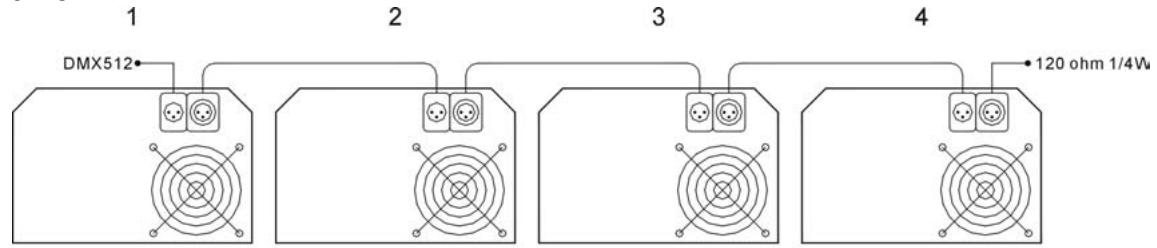

Termination reduces signal errors and to avoid signal transmission problems and interference. It is always advisable to connect a DMX terminal.
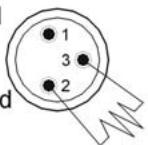
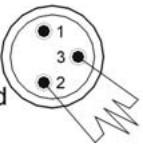
(Resistance 120 ohm 1/4W) between pin2 (DMX-) and pin3 (DMX+) of the last fixture.
Each light effect in the chain needs to have its proper starting address so it knows which commands from the controller it has to decode.
- How to set the DIP-switches to obtain the right starting address:
On the back of the Falcon you will see that each of the first 9 DIP-switches corresponds to certain value:
| Dip | #1 | #2 | #3 | #4 | #5 | #6 | #7 | #8 | #9 |
| Value | 1 | 2 | 4 | 8 | 16 | 32 | 64 | 128 | 256 |
You can combine the values of these switches to become any starting address between 1 and 512:
Begin address = 01
→ switch 1=ON
values: 1
Begin address = 05
→ switch 1 + 3 = ON
values: 1 + 4 = 5
Begin address = 09
→ switch 1 + 4 = ON
values: 1 + 8 = 9
Begin address = 13
→ switch 1 + 3 + 4 = ON
values: 1 + 4 + 8 = 13
Begin address = 62
→ switch 2 + 3 + 4 + 5 + 6 = ON
values: 2 + 4 + 8 + 16 + 32 = 62
- DMX-CONFIGURATION OF FALCON:
| Channel 1 | Channel 2 | Channel 3 | Channel 4 |
| Shutter | Gobos/Colors | Rotation | Zoom |
| 255 Fastest speed | 255 Fastest speed | 246-255 Stop | 255 Fastest speed |
| Gobo Shaking | Rainbow Effect 128 Slowest speed 120-127 Gobo 14 / Yellow 112-119 Gobo 13 / Red 104-111 Gobo 12 / Four-color 096-103 Gobo 11 / Green 088-095 Gobo 10 / Magenta 080-087 Gobo 9 / Yellow 072-079 Gobo 8 / Cyan 064-071 Gobo 7 / Red 056-063 Gobo 6 / Green + Pink 048-055 Gobo 5 / Magenta 040-047 Gobo 4 / Amber 032-039 Gobo 3 / Blue 024-031 Gobo 2 / Orange 016-023 Gobo 1 / Cyan 008-015 Open 000-007 Blackout | 245 135 121-134 Stop 120 010 000-009 Stop | Zoom in/out (continue) 160 Slowest speed 159 Zoom out max. |
| 136 Slowest speed | |||
| 135 Fastest speed | |||
| Strobe | |||
| 016 Slowest speed 000-015 Stop |
DIFFERENT GOBOS:
| 1 | 2 | 3 | 4 | 5 | 6 | 7 | 8 | 9 | 10 | 11 | 12 | 13 | 14 |
MAINTENANCE
The cleaning of internal and external optical lenses and/or mirrors must be carried out periodically to optimize light output. Cleaning frequency depends on the environment in which the fixture operates: damp, smoky or particularly dirty surroundings can cause greater accumulation of dirt on the unit's optics.
- Clean with a soft cloth using normal glass cleaning products.
- Always dry the parts carefully.
- Clean the external optics at least once every 30 days.
- Clean the internal optics at least every 90 days.
We strongly recommend internal cleaning to be carried out by qualified personnel!
SPECIFICATIONS
Mains Input: AC 230V - 250V, 50Hz
Fuse: 250V 5A fast blow (20mm glass)
DMX connections: 3pin XLR male / female
Lamp: ELC 250W - 24V
Size: 34 × 32 × 22 cm
Weight: 9kg
EC Declaration of Conformity
We declare that our products (lighting equipment) comply with the following specification and bears CE mark in accordance with the provision of the Electromagnetic Compatibility (EMC) Directive 89/336/EEC.
EN55014-1: 1993, EN61000-3-2: 1995, EN61000-3-3:1995
EN55014-2: 1997 CATEGORY II
EN61000-4-2: 1995, EN61000-4-3: 1995, EN61000-4-4: 1995
EN61000-4-5: 1995, EN61000-4-6: 1995, EN61000-4-11: 1994
& Harmonized Standard
EN60598-1: 1993
Safety of household and similar electrical appliances
Part 1: General requirements
Following the provisions of the Low Voltage Directive 73/23/EEC and 93/68/EEC.
EC Declaration of Conformity
We declare that our products (Remote Controller) comply with the following specification and bears CE mark in accordance with the provision of the Electromagnetic Compatibility (EMC) Directive 89/336/EEC.
EN55015: 1993
EN50082-1: 1997
EN61000-3-2: 1995
EN61000-3-3: 1995
MODE D'EMPLOI
"Slow mode" (selection gobo
(REM)PLACEMENT DE LA LAMPE
CONTROLS A I'ARRIERE
EC Declaration of Conformity
We declare that our products (lighting equipment) comply with the following specification and bears CE mark in accordance with the provision of the Electromagnetic Compatibility (EMC) Directive 89/336/EEC.
EN55014-1: 1993, EN61000-3-2: 1995, EN61000-3-3:1995
EN55014-2: 1997 CATEGORY II
EN61000-4-2: 1995, EN61000-4-3: 1995, EN61000-4-4:1995
EN61000-4-5: 1995, EN61000-4-6: 1995, EN61000-4-11: 1994
& Harmonized Standard
EN60598-1: 1993
Safety of household and similar electrical appliances
Part 1: General requirements
Following the provisions of the Low Voltage Directive 73/23/EEC and 93/68/EEC.
EC Declaration of Conformity
We declare that our products (Remote Controller) comply with the following specification and bears CE mark in accordance with the provision of the Electromagnetic Compatibility (EMC) Directive 89/336/EEC.
EN55015: 1993
EN50082-1: 1997
EN61000-3-2: 1995
EN61000-3-3: 1995
GEBRUIKSAANWIJZING
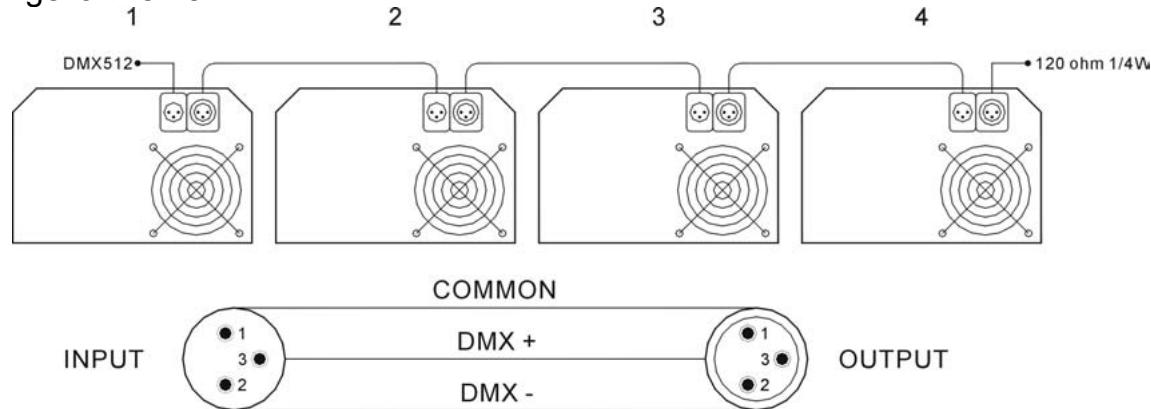
Termination reduces signal errors and to avoid signal transmission problems and interference. It is always advisable to connect a DMX terminal. (Resistance 120 ohm 1/4W) between pin2 (DMX-) and pin3 (DMX+) of the last fixture.
EC Declaration of Conformity
We declare that our products (lighting equipment) comply with the following specification and bears CE mark in accordance with the provision of the Electromagnetic Compatibility (EMC) Directive 89/336/EEC.
EN55014-1: 1993, EN61000-3-2: 1995, EN61000-3-3:1995
EN55014-2: 1997 CATEGORY II
EN61000-4-2: 1995, EN61000-4-3: 1995, EN61000-4-4:1995
EN61000-4-5: 1995, EN61000-4-6: 1995, EN61000-4-11: 1994
& Harmonized Standard
EN60598-1: 1993
Safety of household and similar electrical appliances
Part 1: General requirements
Following the provisions of the Low Voltage Directive 73/23/EEC and 93/68/EEC.
EC Declaration of Conformity
We declare that our products (Remote Controller) comply with the following specification and bears CE mark in accordance with the provision of the Electromagnetic Compatibility (EMC) Directive 89/336/EEC.
EN55015: 1993
EN50082-1: 1997
EN61000-3-2: 1995
EN61000-3-3: 1995
BEDIENUNGSANLEITUNG
EC Declaration of Conformity
We declare that our products (lighting equipment) comply with the following specification and bears CE mark in accordance with the provision of the Electromagnetic Compatibility (EMC) Directive 89/336/EEC.
EN55014-1: 1993, EN61000-3-2: 1995, EN61000-3-3:1995
EN55014-2: 1997 CATEGORY II
EN61000-4-2: 1995, EN61000-4-3: 1995, EN61000-4-4:1995
EN61000-4-5: 1995, EN61000-4-6: 1995, EN61000-4-11: 1994
& Harmonized Standard
EN60598-1:1993
Safety of household and similar electrical appliances
Part 1: General requirements
Following the provisions of the Low Voltage Directive 73/23/EEC and 93/68/EEC.
EC Declaration of Conformity
We declare that our products (Remote Controller) comply with the following specification and bears CE mark in accordance with the provision of the Electromagnetic Compatibility (EMC) Directive 89/336/EEC.
EN55015: 1993
EN50082-1:1997
EN61000-3-2: 1995
EN61000-3-3: 1995
EC Declaration of Conformity
We declare that our products (lighting equipment) comply with the following specification and bears CE mark in accordance with the provision of the Electromagnetic Compatibility (EMC) Directive 89/336/EEC.
EN55014-1: 1993, EN61000-3-2: 1995, EN61000-3-3:1995
EN55014-2: 1997 CATEGORY II
EN61000-4-2: 1995, EN61000-4-3: 1995, EN61000-4-4:1995
EN61000-4-5: 1995, EN61000-4-6: 1995, EN61000-4-11: 1994
& Harmonized Standard
EN60598-1: 1993
Safety of household and similar electrical appliances
Part 1: General requirements
Following the provisions of the Low Voltage Directive 73/23/EEC and 93/68/EEC.
EC Declaration of Conformity
We declare that our products (Remote Controller) comply with the following specification and bears CE mark in accordance with the provision of the Electromagnetic Compatibility (EMC) Directive 89/336/EEC.
EN55015: 1993
EN50082-1: 1997
EN61000-3-2: 1995
EN61000-3-3: 1995

- OPERATION MANUAL
- FEATURES
- BEFORE USE
- CHECK THE CONTENTS
- SOME IMPORTANT INSTRUCTIONS
- LAMP (RE)PLACEMENT
- ADJUSTING THE FOCUS
- CONTROLLING THE FALCON
- STANDALONE 1UNIT
- TWO OR MORE UNITS IN MASTER/SLAVE SETUP
- CONNECT THE OPTIONAL CA-8 CONTROLLER FOR MORE CONTROL
- STANDBY BUTTON
- MODE: (FAST/SLOW)
- FUNCTION BUTTON: (STROBE/NEXT)
- CONTROLLED BY UNIVERSAL DMX-CONTROLLER
- HOW TO SET THE DIP-SWITCHES TO OBTAIN THE RIGHT STARTING ADDRESS
- DMX-CONFIGURATION OF FALCON
- DIFFERENT GOBOS
- MAINTENANCE
- SPECIFICATIONS
- EC DECLARATION OF CONFORMITY
- MODE D'EMPLOI
- (REM)PLACEMENT DE LA LAMPE
- CONTROLS A I'ARRIERE
- GEBRUIKSAANWIJZING
- BEDIENUNGSANLEITUNG
Brand : BEGLEC
Model : FALCON
Category : Light projector