
AKB04FR - Keyboard TARGUS - Free user manual and instructions
Find the device manual for free AKB04FR TARGUS in PDF.



| Product type | Flat USB keyboard with multimedia and Internet functions |
| Brand | TARGUS |
| Model | AKB04FR |
| Interface | USB 1.1 or 2.0 |
| Compatible operating systems | Windows 98SE, Me, 2000, XP |
| Dimensions (estimated) | Approximately 440 x 140 x 20 mm |
| Weight (estimated) | Approximately 500 g |
| Cable length (estimated) | Approximately 1.5 m |
| Power supply | <>Power via USB port|
| Design | Flat, reduced spacing between keys to reduce finger fatigue |
| Internet shortcuts | Previous page, next page, stop, refresh, browser, email, search, favorites, Media Player, calculator, My Computer |
| Media shortcuts | Play/Pause, previous track, next track, stop, volume +/-, mute |
| Status indicators | Num Lock, Caps Lock, Scroll Lock |
| Package contents | Keyboard, installation CD, user manual |
| Warranty | 2 years against any defect in material or workmanship |
| Certifications | FCC Class B, compliant with R&TTE directive |
| Recycling | Bring to an appropriate recycling center according to Targus policy |
| Maintenance | Clean with a soft, dry cloth; avoid liquids |
| Compatibility | PC or laptop with USB port and CD-ROM drive |
| Country of origin | Not specified in the manual |
Frequently Asked Questions - AKB04FR TARGUS
User questions about AKB04FR TARGUS
0 question about this device. Answer the ones you know or ask your own.
Ask a new question about this device
Download the instructions for your Keyboard in PDF format for free! Find your manual AKB04FR - TARGUS and take your electronic device back in hand. On this page are published all the documents necessary for the use of your device. AKB04FR by TARGUS.
USER MANUAL AKB04FR TARGUS
Congratulations on your purchase of the Targus Slim Internet Media USB Keyboard. This keyboard features the latest in keycap technology, which reduces the key travel distance to provide more comfort.
The keyboard offers many features, including:
- A slim profile to reduce tension on the wrist and arm caused by traditional keyboards.
- Low travel distance to reduce the finger fatigue caused by conventional keystrokes.
- A seamless desktop placement for notebook PC users.
- Slim architecture which takes up less space and is a better aesthetic match to LCD monitors and notebooks.
Package Contents
Targus Slim Internet Media USB Keyboard
- Internet and Media software drivers
- User Guide
System Requirements
Hardware
PC or notebook
- USB 1.1 or 2.0 interface
- CD-ROM Drive
Operating System
- Windows® 98SE/2000/ME/XP
Installing the Keyboard and Drivers
To connect the keyboard, plug the standard USB end of the receiver into an available USB port on your PC or laptop. Insert the installation CD and wait for the menu to appear, then click on the USB Keyboard Driver button. Follow the install shield instructions.

NOTE: IF THE SOFTWARE DRIVER IS NOT INSTALLED, THE HOT KEY FUNCTIONS MAY NOT WORK PROPERLY. THIS IS ESPECIALLY TRUE FOR THE OLDER WINDOWS VERSIONS SUCH AS 98SE AND ME.
FOR XP, ALL KEYS WILL FUNCTION WITHOUT THE SOFTWARE DRIVER
Internet Hot Keys
| Key | Function |
| ← | Backward |
| → | Forward |
| + | Stop |
| [ ] | Refresh |
| [ ] | Internet Browser |
| [ ] | |
| [ ] | Search |
| [ ] | My Favorites |
| [ ] | Media Player |
| [ ] | Calculator |
| [ ] | My Computer |
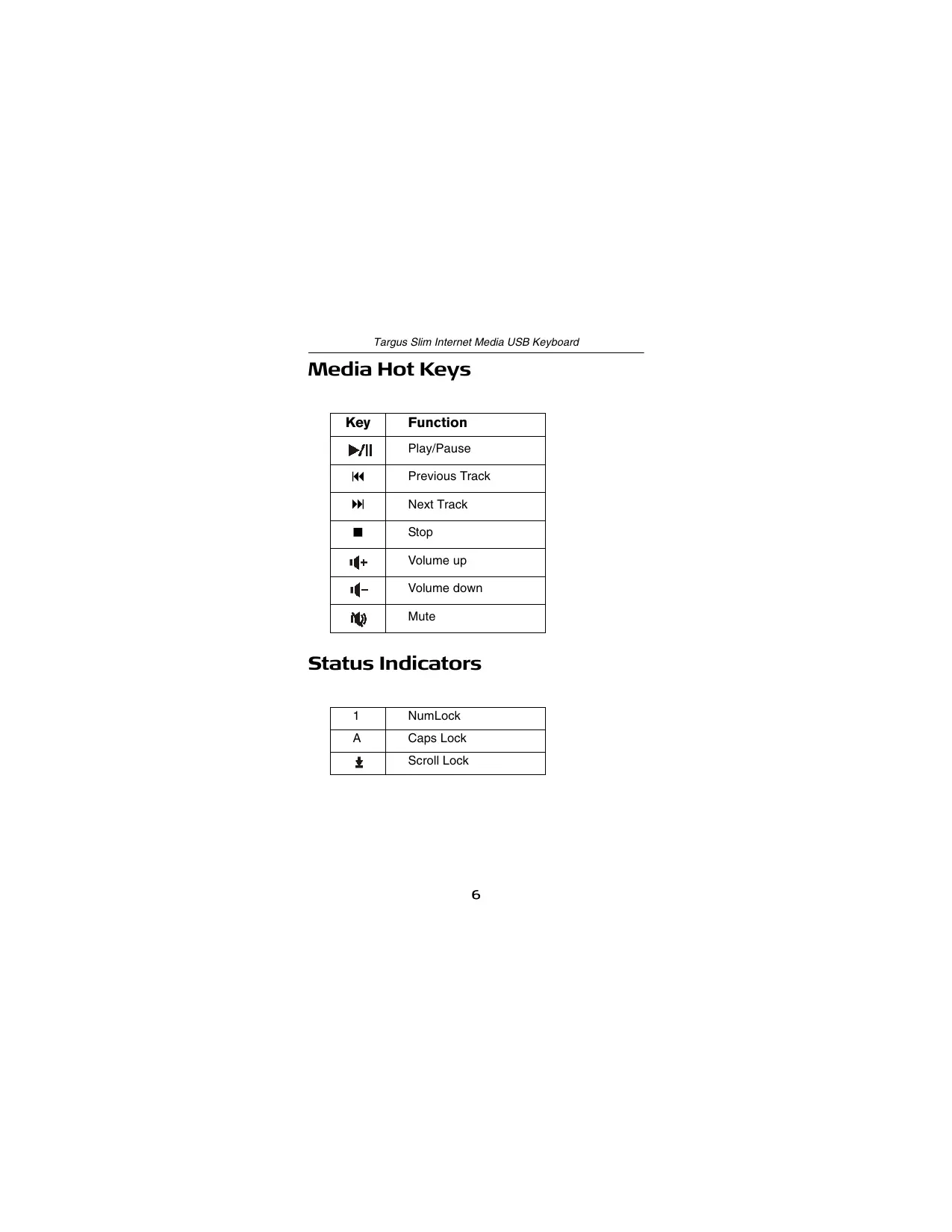
Media Hot Keys
| Key | Function |
| ▶/|| | Play/Pause |
| ← | Previous Track |
| → | Next Track |
| ■ | Stop |
| + | Volume up |
| - | Volume down |
| Mute | |
Status Indicators
| 1 | NumLock |
| A | Caps Lock |
| ↓ | Scroll Lock |
Technical Support
For technical questions, please visit:
Internet: http://www.targus.com/support.asp
Email: English techuk@targus.com
French techfr@targus.com
German techde@targus.com
Spanish teches@targus.com
Italian techit@targus.com
Dutch technl@targus.com
Our knowledgeable staff is also available to answer your questions through one of the following telephone numbers.
Belgium +32 0 02-717-2451
Denmark +45 0 35-25-8751
Finland +358922948016
France +33 0 1-64-53-9151
Germany +49 0 21-16-579-1151
Italy +39 (02) 4827-1151
Netherlands +31 0 2-0504-0671
Norway +4722577729
Portugal +351 21 415 4123
Spain +34 0 91-745-6221
Sweden +46 0 8-751-4058
Switzerland +41 0 1-212-0007
United Kingdom +44 0 20-7744-0330
Eastern Europe & others +31 0 20-5040671
Product Registration
Targus recommends that you register your Targus accessory shortly after purchasing it. To register your Targus accessory, go to: http://www.targus.com/registration.asp
You will need to provide your full name, email address, phone number, and company information (if applicable).
Warranty
Targus warrants this product to be free from defects in materials and workmanship for two years. If your Targus accessory is found to be defective within that time, we will promptly repair or replace it. This warranty does not cover accidental damage, wear and tear, or consequential or incidental loss. Under no conditions is Targus liable for loss of, or damage to a computer; nor loss of, or damage to, programs, records, or data; nor any consequential or incidental damages, even if Targus has been informed of their possibility. This warranty does not affect your statutory rights.
Regulatory Compliance
This device complies with Part 15 of the FCC Rules. Operation is subject to the following two conditions: (1) This device may not cause harmful interference, and (2) This device must accept any interference received, including interference that may cause undesired operation.
FCC Statement
Tested to Comply
This equipment has been tested and found to comply with the limits of a Class B digital device, pursuant to Part 15 of the FCC Rules. These limits are designed to provide reasonable protection against harmful interference in a residential installation. This equipment generates, uses, and can radiate radio frequency energy and if not installed and used in accordance with the
instructions, may cause harmful interference to radio communications. However, there is no guarantee that interference will not occur in a particular installation.
If this equipment does cause harmful interference to radio or television reception, which can be determined by turning the equipment off and on, the user is encouraged to try to correct the interference by one or more of the following measures:
- Reorient or relocate the receiving antenna;
- Increase the separation between the equipment and receiver;
- Connect the equipment into an outlet on a circuit different from that to which the receiver is connected
- Consult the dealer or an experienced radio/TV technician for help.
Targus Recycling Directive
At the end of this product's useful life please dispose at an appropriate recycling collection point provided in your country. Targus recycling policy is available for viewing at: www.targus.com/recycling
Windows is a registered trademark of Microsoft Corporation. All other trademarks are the property of their respective owners. Features and specifications subject to change without notice. © 2006, Targus Group International, Inc. and Targus, Inc., Anaheim, CA 92806 USA.
FLACHE INTERNET & MEDIA USB-TASTATUR VONTARGUS
Einführung
Spanish teches@targus.com
Italian +39 (02) 4827-1151
Niederlande +31-(0) 2-0504-0671
Italian techit@targus.com
Hollandais technl@targus.com
Targus Recycle Policy
Visit our Website at www.targus.com/emea
Features and specifications subject to change without notice.
© 2006 Targus Group International, Inc. and Targus Group (UK) Ltd.
AKB04EU / 410-0150-003A
- Package Contents
- System Requirements
- Hardware
- Operating System
- Installing the Keyboard and Drivers
- Internet Hot Keys
- Media Hot Keys
- Status Indicators
- Technical Support
- Product Registration
- Warranty
- Regulatory Compliance
- FCC Statement
- Tested to Comply
- Targus Recycling Directive
- FLACHE INTERNET & MEDIA USB-TASTATUR VONTARGUS
- Einführung
- Targus Recycle Policy
Brand : TARGUS
Model : AKB04FR
Category : Keyboard