
GX - Audio Amplifier QSC AUDIO - Free user manual and instructions
Find the device manual for free GX QSC AUDIO in PDF.



| Product type | Professional 2-channel audio amplifier |
| Brand | QSC AUDIO |
| Model | GX (GX3 / GX5) |
| Dimensions (H x W x D) | 89 mm x 483 mm x 257 mm (2U) |
| Net weight (GX3 / GX5) | 11.5 kg / 12 kg |
| Power supply | 120 V AC (other voltages per country), variable consumption |
| Output power (GX3: 8 Ω / 4 Ω / 2 Ω) | 300 W / 425 W / 200 W per channel |
| Output power (GX5: 8 Ω / 4 Ω / 2 Ω) | 500 W / 700 W / 350 W per channel |
| Frequency response | 20 Hz - 20 kHz, +0 / -1 dB |
| Total harmonic distortion | <0.05% at 8 Ω, <0.1% at 4 Ω (1 dB below rated power) |
| Signal-to-noise ratio | 100 dB |
| Input sensitivity | 1.2 V (RMS) |
| Voltage gain at 8 Ω (GX3 / GX5) | 32.2 dB / 34.4 dB |
| Input impedance | >20 kΩ (balanced or unbalanced) |
| Input connectors | XLR 3-pin, 6.35 mm TRS (balanced), phono (unbalanced) |
| Output connectors | Speakon®, 6.35 mm plug, binding posts |
| Built-in protections | GuardRail™ (overload, overheating), short circuit, open circuit, RF, thermal protection |
| Passive crossover filter | Built-in, 100 Hz, 3rd order LP / 2nd order HP |
| Controls and indicators | Gain 21 positions, Clip (red), Signal (green), Power (blue) indicators |
| Cooling | Internal fan, left side intake, right side exhaust |
| Rack mounting | 2U standard 19-inch, optional rear supports |
| Maintenance and cleaning | Clean only with a dry cloth. Do not block ventilation openings. |
| Safety instructions | Do not expose to moisture; disconnect before servicing; have repairs performed by qualified personnel. |
| Warranty | Limited 3-year warranty (see manual for details) |
Frequently Asked Questions - GX QSC AUDIO
User questions about GX QSC AUDIO
0 question about this device. Answer the ones you know or ask your own.
Ask a new question about this device
Download the instructions for your Audio Amplifier in PDF format for free! Find your manual GX - QSC AUDIO and take your electronic device back in hand. On this page are published all the documents necessary for the use of your device. GX by QSC AUDIO.
USER MANUAL GX QSC AUDIO
1- Read these instructions.
2- Keep these instructions.
3-Heed all warnings.
4- Follow all instructions.
5- WARNING: To prevent fire or electric shock, do not expose this equipment to rain or moisture. Do not use this apparatus near water.
6-Clean only with a dry cloth.
7- Do not block any ventilation openings. Install in accordance with the manufacturer's instructions.
8- Do not install near any heat sources such as radiators, heat registers, stoves, or other apparatus (including amplifiers) that produce heat.
9- The appliance coupler is the AC mains disconnect and should remain readily operable after installation.
10- Do not defeat the safety purpose of the grounding-type plug. A grounding plug has two blades and a grounding prong. The wide blade or third prong are provided for your safety. If the provided plug does not fit your outlet, consult an electrician for the replacement of the obsolete outlet. This apparatus should be connected to a receptacle with a protective earthing (or ground) connection.
11- Protect the power cord from being walked on or pinched, particularly at plugs, convenience receptacles, and the point where they exit from the apparatus.
12- Use only attachments/accessories specified by QSC Audio Products, LLC
13- Use only with hardware, brackets, stands, and components sold with the apparatus or by QSC Audio Products, LLC
14- Unplug the apparatus during lightning storms or when unused for long periods of time.
15- Refer all servicing to qualified service personnel. Servicing is required when the apparatus has been damaged in any way, such as power supply cord or plug is damaged, liquid has been spilled or objects have fallen into the apparatus, the apparatus has been exposed to rain or moisture, does not operate normally, or has been dropped.

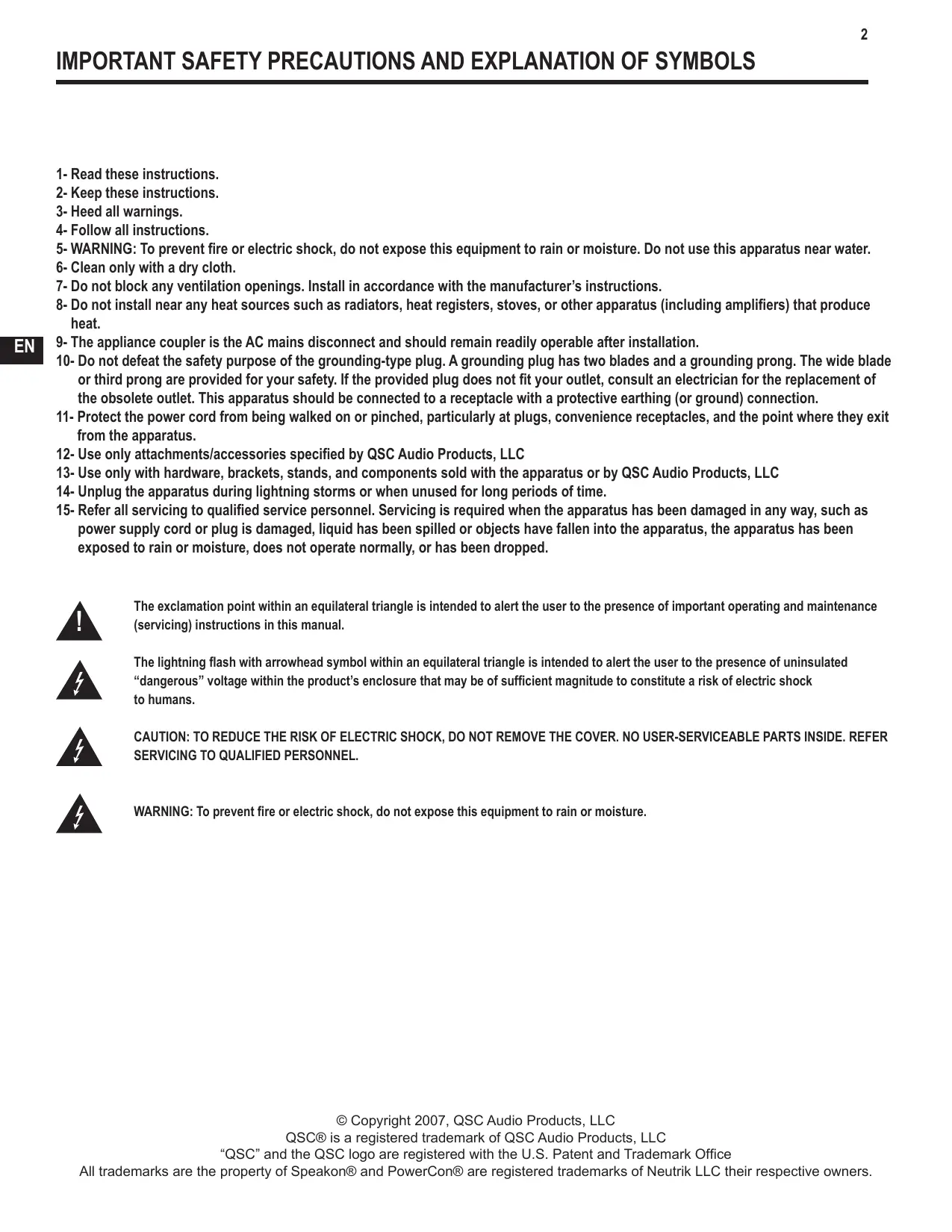
The exclamation point within an equilateral triangle is intended to alert the user to the presence of important operating and maintenance (servicing) instructions in this manual.

The lightning flash with arrowhead symbol within an equilateral triangle is intended to alert the user to the presence of uninsulated "dangerous" voltage within the product's enclosure that may be of sufficient magnitude to constitute a risk of electric shock to humans.

CAUTION: TO REDUCE THE RISK OF ELECTRIC SHOCK, DO NOT REMOVE THE COVER. NO USER-SERVICEABLE PARTS INSIDE. REFER SERVICING TO QUALIFIED PERSONNEL.

WARNING: To prevent fire or electric shock, do not expose this equipment to rain or moisture.
WELCOME
Thank you for purchasing a QSC Audio amplifier. The GX Series is the latest in a long line of hard-working, low cost amplifiers, designed to produce the best possible results for a wide range of users. In most cases, you can plug and play with no surprises, but for best results, we recommend you review the enclosed user guide.
UNPACKING
Confirm that the amplifier has no visible shipping damage. Confirm that amplifier has the correct AC cord and voltage rating for your region (See rear panel, Serial Number plate). It is best to keep the carton in case the amplifier needs to be returned, at least until it has been tested.
SUPPORT AND SERVICE
QSC Audio Products maintains a world-wide network of distributors and service centers. These local agencies will be able to answer your questions and take care of any problems.
QSC WEBSITE
Our website, www.qscaudio.com, is factory-maintained and supported in multiple languages. Visit frequently for new announcements, typical questions, and other user information.
IMPORTANT SAFETY PRECAUTIONS
QSC products are designed for safe operation, and have been certified by recognized product safety agencies to meet all normal standards for this type of product. However, dangerous voltages and power levels exist within the covers of this amplifier. The user is requested to study the precautions in this manual. If the product has been dropped, dented, soaked, or appears to have loose parts inside, the risk of shock is increased. Unplug the AC cord, and take the product to qualified service personnel for inspection and repairs.
POWER RATINGS
Watts at 0.1% clipping, both channels driven
| Model | 8 ohms | 4 ohms | 2 ohms* |
| GX3 | 300 | 425 | 200 |
| GX5 | 500 | 700 | 350 |
*NOTE: 2-ohm loading is not recommended for high power use.
To avoid protective limiting, use only at low levels.


FEATURES
Power levels matched to the most popular speakers used by entertainers.
Optimized for maximum real-world headroom into 4 and 8 speaker systems.
Inputs: XLR, 1/4" TRS and phono input connectors for compatibility with any source.
Outputs: Speakon® combo accepts 1/4 ” (TS) plugs or Speakon 2-pole and 4-pole plugs (connects 2 poles only). Binding posts support all other speaker wiring systems.
Minimum depth chassis (only 10.1" / 257 mm) fits in compact, inexpensive effects racks.
Light weight - less than 26 lbs (12.5 kg).
Detented gain controls for precise setting and matching of sensitivity.
GuardRail automatically protects the amplifier and loudspeakers from damage due to temperature rise or overdrive without shutting down the show.
Front panel LEDs monitor Power, Signal and Clipping.
Subwoofer / Satellite crossover built-in.
ON-OFF SWITCH
Move the rocker switch up to turn on the amplifier.
The blue PWR LED will turn on immediately.
The red CLIP LEDs may trigger for 1-2 seconds until the amp has completed its turn-on cycle. If no lights come on, check the power cord and the AC reset on the rear panel.
MODEL NUMBER
The GX3 and GX5 power ratings are shown in the Specifications page.
COOLING VENTS
The internal fan draws air in from the left side, and exhausts on the right side. Keep vents clear.
The fan speeds up in response to heavy use.

GAIN CONTROLS, CH1, CH2
The markings show attenuation in dB. For normal use, keep the control in the upper half of its range (less than 10 dB of attenuation). If set below half, the source may overload before the amplifier reaches full power.
RACK MOUNTING
Fits standard 19-inch rack, 2RU. Accepts #10 or 6 mm screws, as determined by the rack rails. Add rear support to prevent damage in portable rigs.
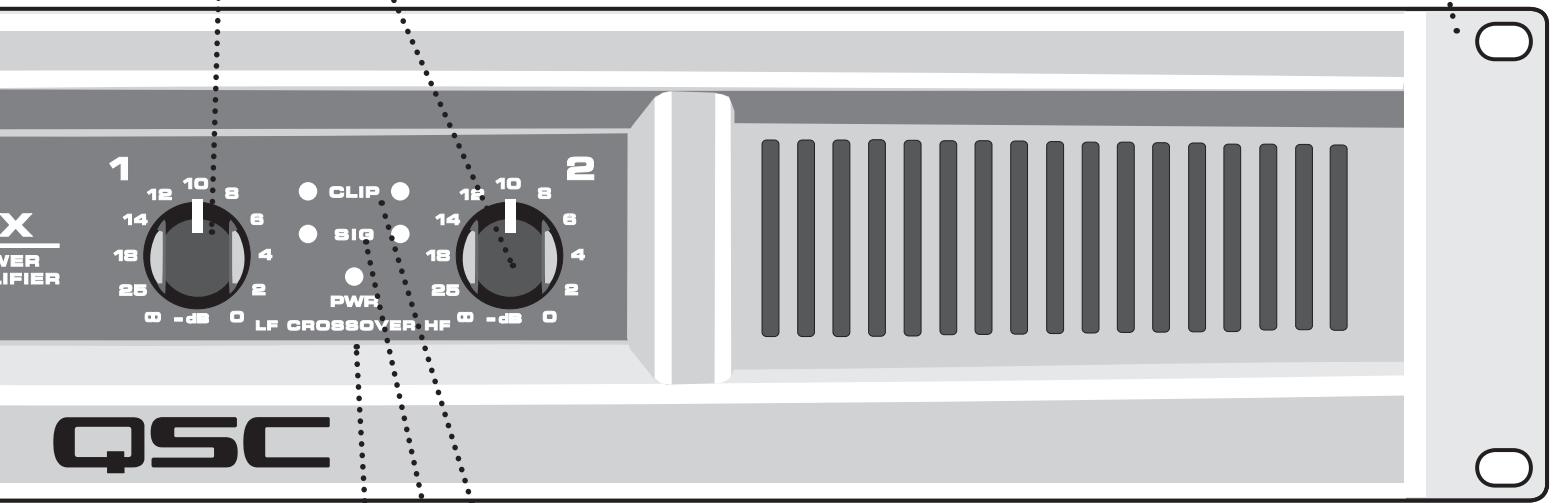
RED CLIP LEDs
Red flashing indicates the amp is being overdriven. Heavy overdrive triggers internal gain reduction, to reduce overload distortion. Normal gain will resume after the signal level returns to normal. See Troubleshooting if the red LED remains on continuously.
GREEN SIGNAL LEDs
The green LED starts flashing on soft signals (-35 dB), and changes to steady green as the signal level increases.
BLUE POWER LED
The blue PWR (POWER) LED indicates that the AC switch is on, and the amp is receiving power. Within two seconds, it is ready to use.
ALTERNATE GAIN MARKING
When the CROSSOVER switch is active (see rear panel),
LF (CH 1) controls low frequencies (subwoofer),
HF (CH 2) controls the high frequencies (mid-high box).
CROSSOVER SWITCH
EXHAUST VENT
Keep vent clear. Install in open-back rack.

CROSSOVER POSITION
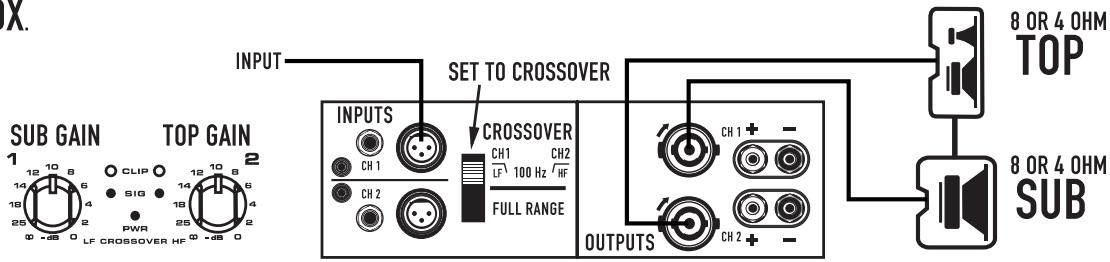
Splits a full-range signal to drive a subwoofer and top box.
CH 1 receives the lows, from 20-100Hz, for the subwoofer.
CH 2 receives 100Hz to 20kHz , to power a full range speaker.
When using CROSSOVER mode, connect signal to CH 1 only.
Use the two Gain controls to balance the LF and HF signals
(see Front Panel).

FULL RANGE POSITION
For normal, 2-channel use with all inputs active.
The crossover is bypassed.
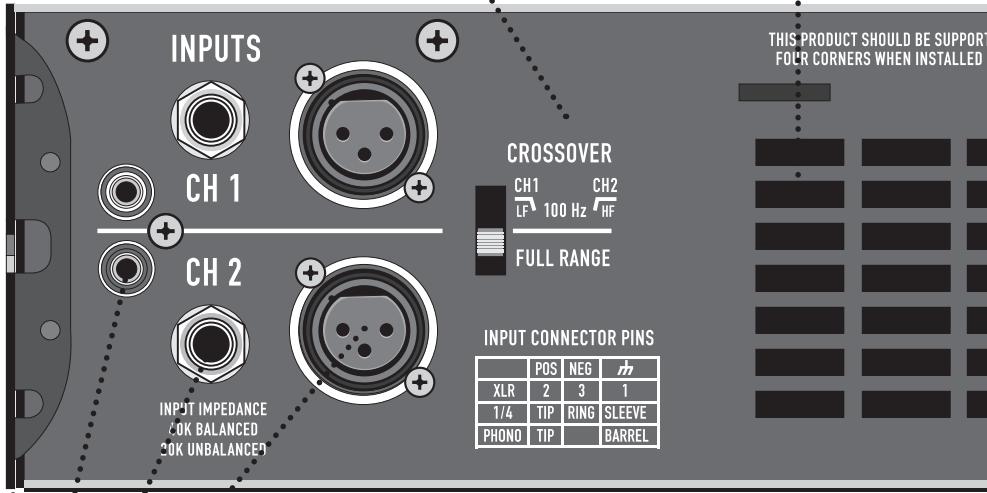
REAR EAR MOUNTING
Rear ears designed for protecting the rear connector wire dressing and supporting the amplifier in a rack. A rear rack support mounting kit (model FG-000031-00 pack of two) is available from QSC Technical Services Group.

INPUT CONNECTIONS
BALANCED XLR INPUTS
Pin 2 Positive, Pin 3 Negative, Pin 1 Shield (Ground). Recommended for long or short runs, either fixed or frequently changed. Each channel's XLR and TRS jacks are connected internally, and provide feed thru to the other connector.
BALANCED 1/4-INCH TRS INPUTS
Tip positive, Ring Negative, Sleeve Shield (Ground). Recommended for long or short runs that are frequently changed.
UNBALANCED 1/4-INCH TS INPUTS
Accepts unbalanced 1/4-inch plugs for short runs. Tip positive, Sleeve Shield (Ground).
UNBALANCED PHONO INPUTS
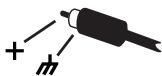
Tip Positive, Barrel Shield (Ground). Recommended for semi-permanent connections to nearby sources, within the same rack. NOTE: when using these inputs, the TRS or XLR inputs should not be used.
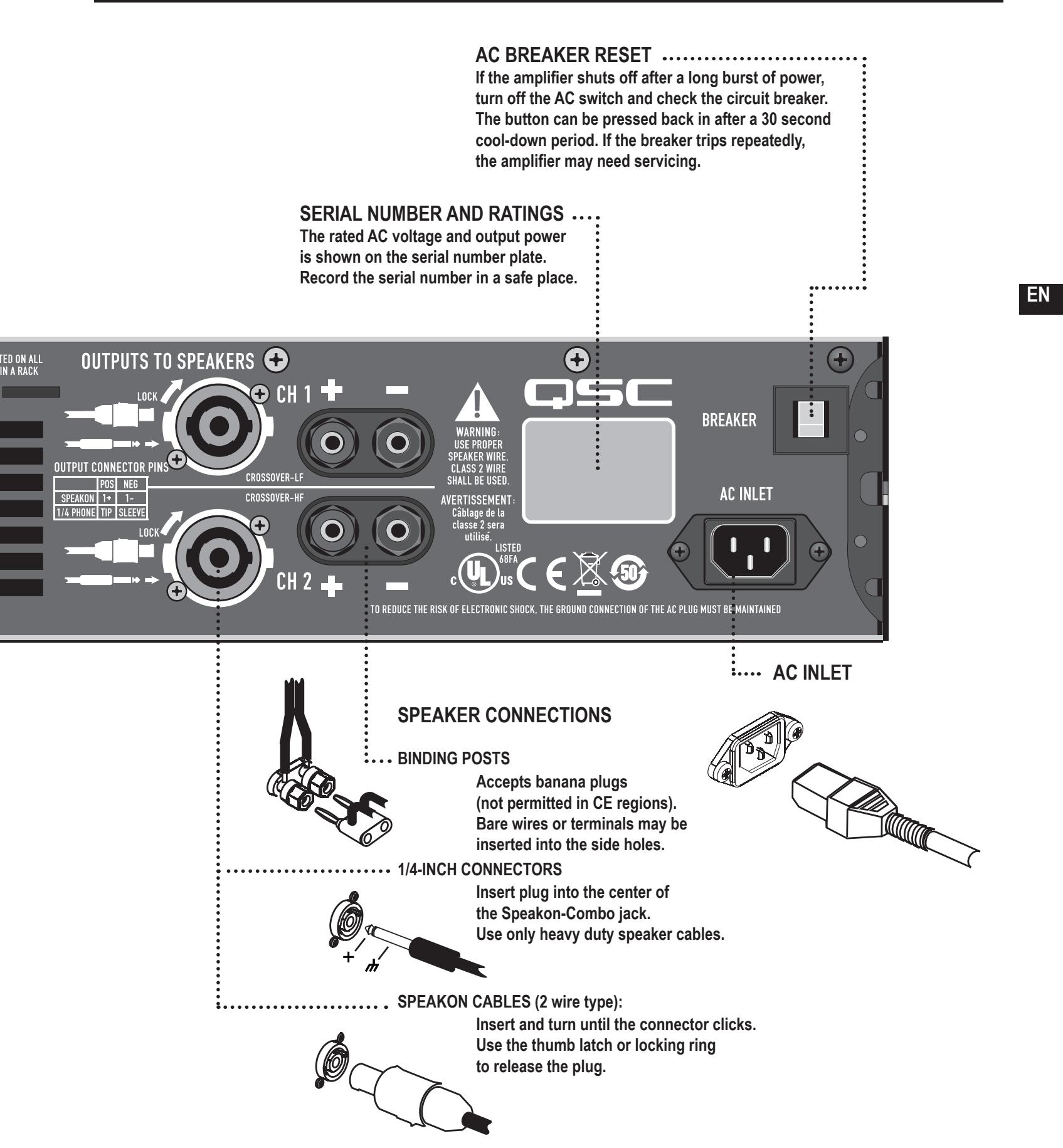

INPUT CONNECTIONS
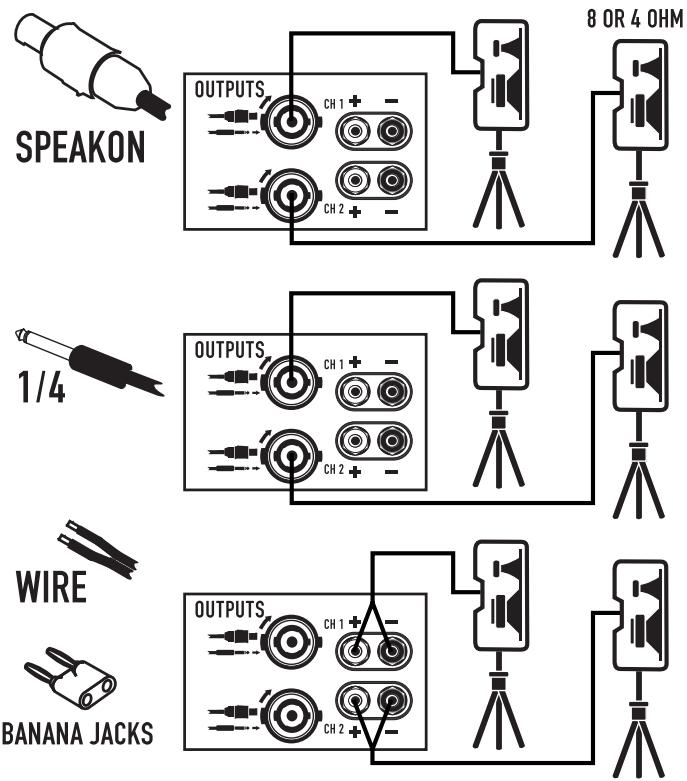
SPEAKER CONNECTIONS
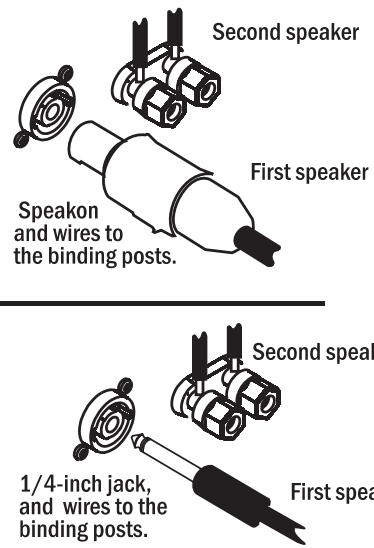
CONNECTING MULTIPLE SPEAKERS
To connect two speakers to one amplifier channel, connect one speaker with Speakon or 1/4-inch jack, and connect the other speaker with a banana plug or wires to the binding posts. It is also possible to use banana plug for one speaker, and binding post wires for the other speaker.

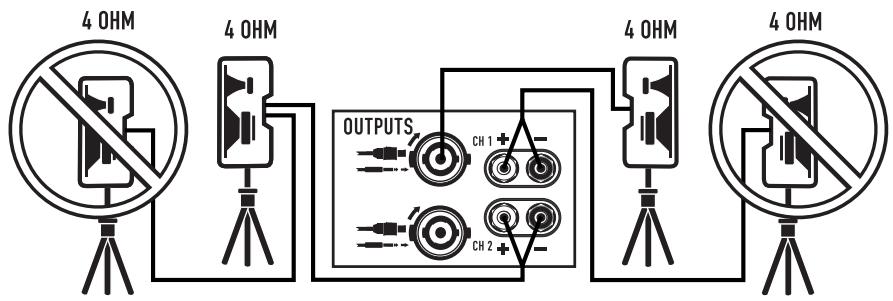
One 4-ohm speaker, or two 8-ohm speakers, may be connected to each channel. If speakers have pass through jacks, do not put more than two in a chain.

SUBWOOFER AND TOP BOX.
Move the CROSSOVER switch to the CROSSOVER position. Connect a single source, into the Ch 1 input.
Connect a subwoofer to the
Ch 1 output and connect a
2-way top box to the Ch 2 output.
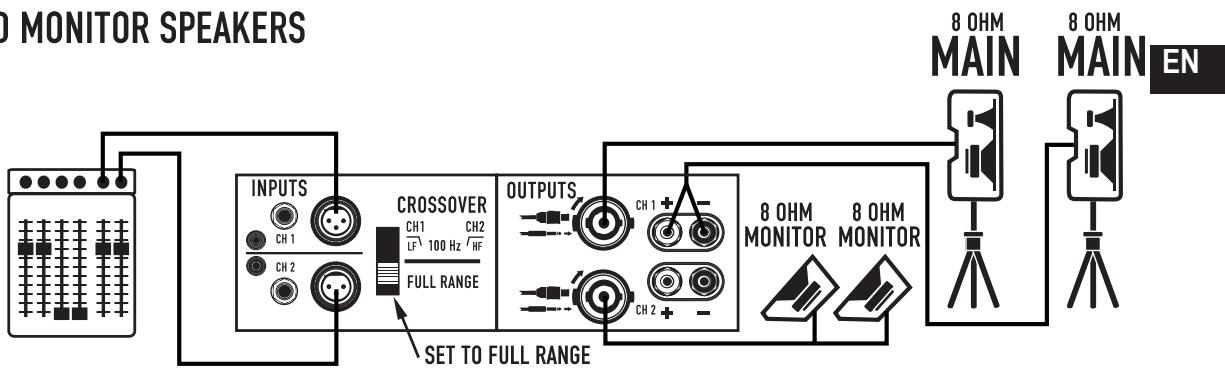
POWERING HOUSE AND MONITOR SPEAKERS
Set the CROSSOVER switch
to the FULL RANGE position.
Use a mixer with Main and
Monitor outputs. Connect cables
into Ch 1 and 2 respectively.
Connect Ch 1 output to
two large speakers.
Connect Ch 2 output to
two floor wedges.
STEREO PLAYBACK
Set the CROSSOVER switch in the
FULL RANGE position. Connect a
Left /Right signal source to channel 1
and channel 2 respectively using
XLR, TRS or PHONO connectors.
Connect a speaker to each channel
using SPEAKON, 1/4" PHONE,
BANANA JACKS or WIRE.

USING BOTH CHANNELS FOR THE SAME SIGNAL
Move the CROSSOVER switch to the
FULL RANGE position. Hook up a single source using Ch 1 XLR input. Install a RTS jumper going between CH 1 and CH 2.
Connect a speaker to each channel.
Each speaker has its own gain
adjustment on the front panel.
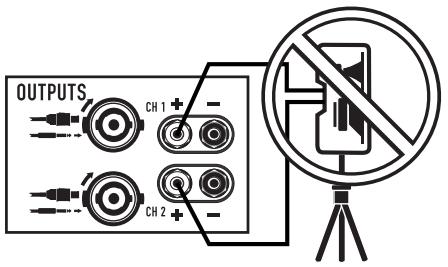
DO NOT connect both channels
into the same speaker.

RTS jumper
between
CH1and CH2.


DO NOT connect both channels into the same speaker.
NO POWER, NO LIGHTS, NO FAN
Confirm that the AC cord is fully seated and connected to a live outlet. Check the AC source by trying another device such as a lamp. Check the BREAKER on the back of the amplifier by pushing in the button. If the breaker trips off quickly, the amplifier needs servicing.
AMPLIFIER LOSES VOLUME
If the amplifier is worked too hard, GuardRail™ will reduce volume to prevent thermal muting. The fan should be running at full speed. Reduce input signal somewhat and the amp should return to normal gain within 1-2 minutes. If the amp feels hot and the fan is not running, it needs to be serviced.
CHANNEL 1 PRODUCES DEEP BASS ONLY.
Check the position of the CROSSOVER switch on the rear panel. Set on FULL RANGE for normal, independent use of each channel.
CHANNEL 2 INPUT SEEMS DEAD.
Check the position of the CROSSOVER switch on the rear panel. Set on FULL RANGE for normal, independent use of each channel.
AMPLIFIER SOUNDSDISTORTED.
If the red CLIP LED is flashing, the amplifier is being played beyond its normal rated power. GuardRail™ circuitry will reduce volume somewhat to prevent severe overdrive, but if the input signal is further increased, the limiter can be overridden, with increased distortion.
If the speakers or speaker cables are shorted or defective, the amplifier may distort at lower-than-normal levels, with increased flashing of the red CLIP LED. This should be checked by trying an alternate speaker and cable.
If too many speakers are connected to each channel (impedance below 4 ohms), the amp will overload more easily and will probably run hot.
If the sound is distorted or garbled without flashing the red CLIP LED, the distortion is not occurring inside the amplifier. Either the speaker is bad or the input signal is distorted.
- Confirm that the speaker is OK by trying a different unit.
- Input overload can occur if the amplifier Gain controls are set too low, and the input source is overdriven to compensate Reduce the source volume until the distortion clears up, and increase amp Gain to reach the desired level. It is generally desirable to keep the amp gains at or near their full, clockwise, position.
- Check all input connections. Do not plug two different sources into the same channel. Use a mixer to blend sources.
NO SOUND, WITH BLUE LED ONLY, NO GREEN OR RED LED
Confirm that the Gain controls are turned up. Confirm that the input cables are correctly installed at both ends. If using 1/4-inch speaker cables, do not confuse with input cables. Confirm that the source is active. If necessary, try another source, or connect another amplifier to the existing source.
NO SOUND, BUT THE GREEN LED IS RESPONDING
The green LED indicates the amp is producing a signal, so sound should be heard if the speaker is connected. Check the speaker connections at both ends, and try a different speaker.
NO SOUND, RED LED ON
The amp mutes briefly when turned on and off to prevent thumps. If the amp overheats severely, it will mute until it cools off. The fan will be running at full speed, and sound should resume in less than a minute. If the amp feels hot and the fan is not running, it needs to be serviced.
BACKGROUND HUM
Balanced XLR or TRS cables are better for long runs. Hum can be a problem when connecting to TV-cable rigs, since the TV cable often creates a ground conflict. Request or install a TV-cable isolator to reduce this problem.
Hum can also occur earlier in the signal chain, depending on the types of connections. It often helps to plug everything into the same AC strip, if the total power consumption is not excessive.
As a last resort, mild hum can sometimes be reduced by lowering the amp gain, and increasing the source gain to compensate, but you must ensure that the source can deliver the extra volume without overload distortion. If this does not reduce hum, it is coming from the source.
AMPLIFIER NEEDS SERVICING
The following conditions indicate possible unsafe conditions that require service before using. If observed, unplug the AC cord from the wall and when safe, remove the amp for servicing.
- If the amplifier emits smoke or burning smells
- If the case is severely dented or deformed
- If the amplifier is soaked with any fluid
- If internal parts sound loose
- If the AC breaker trips when power is applied
- If the amplifier is dropped, carefully inspect for damage or loose parts before attempting to use.
AC POWER CONSUMPTION 1/8 power, ohms (AC Current and Heating, 120Vac)
| SPECIFICATION SUBJECT TO CHANGE WITHOUT NOTICE. OUTPUT POWER, 1 kHz, 0.1 % clipping | ||
| GX3 | GX5 | |
| 8Ω, both channels driven | 300 W | 500 W |
| 8Ω, single channel driven | 350 W | 600 W |
| 4Ω, both channels driven | 425 W | 700 W |
| 4Ω, single channel driven | 500 W | 850 W |
| 2Ω, both channels driven, 1% clipping | 200 W | 350 W |
| SIGNAL TO NOISE (20 Hz - 20 kHz) | 100 dB | |
| INPUT SENSITIVITY | 1.2 Vrms | |
| VOLTAGE GAIN AT 8Ω | 32.2 dB | 34.4 dB |
| OUTPUT CIRCUITRY | Class B | 2-tier Class H |
| POWER REQUIREMENTS (1/8 power, pink noise at 4Ω 120 V AC) | 6.3 A | 6 A |
| DISTORTION (1 dB below rated power, 20 - 20 kHz) | 8Ω, less than 0.05%4Ω, less than 0.1% | |
| FREQUENCY RESPONSE | 20 - 20kHz, +0, -1dB | |
| DYNAMIC HEADROOM, 4Ω | 2dB | |
| DAMPING FACTOR | 100 | |
| INPUT IMPEDANCE | Greater than 20K ohms (balanced or unbalanced) | |
| MAXIMUM INPUT LEVEL | +24 dB (16 Vrms) | |
| INPUT CONNECTORS, each channel | 3-pin XLR and 1/4" TRS, balanced, parallel Phono, unbalanced | |
| OUTPUT CONNECTORS, each channel | Speakon®, 1/4", Binding Posts | |
| AMPLIFIER AND LOAD PROTECTION | Short circuit, open circuit, thermal, RF protection Load protected against DC faults | |
| CONTROLS AND INDICATORS, FRONT PANEL | Gain controls, 21 detentsRed Clip LEDs, proportional, 0.1% THD threshold.Green Signal LEDs, threshold -35 dBBlue Power LED, AC-on. | |
| CONTROLS, REAR PANEL | Full Range / Crossover switch100 Hz, 3rd order LP (sub), 2nd order HP (top). | |
| DIMENSIONS (HWD) | 3.5" (2RU) x 19" x 10.1" (89 mm x 483 mm x 257 mm) | |
| WEIGHT - Shipping / Net | 30 / 25 lbs (13.5 / 11.5 kg) | 31 / 26 lbs (14 / 12 kg) |
| AGENCY APPROVALS | UL, CE, RoHS / WEEE compliant | |
GX3
GX5
| Operating Condition | AC amps | BTU / hr | AC amps | BTU / hr |
| Idle | 0.2 | 44 | 0.3 | 60 |
| 8 + 8 ohms, 1/8 power (1) | 4.1 | 904 | 3.3 | 734 |
| 8 + 8 ohms, 1/3 power (2) | 6.1 | 1160 | 8.5 | 1456 |
| 8 + 8 ohms, full power (3) | 9.75 | 1109 | 16.2 | 1891 |
| 4 + 4 ohms, 1/8 power (1) | 6.3 | 1515 | 5.8 | 1160 |
| 4 + 4 ohms, 1/3 power (2) | 9.4 | 2105 | 11.2 | 2162 |
| 4 + 4 ohms, full power (3) | 15.0 | 2297 | 24.5 | 3754 |
(1) 1/8 power represents typical operating conditions.
(3) Full power is breaker limited to short periods.
(2) 1/3 power represents peak program levels.
(4) For 230V , multiply AC current by 0.5. For 100V , multiply AC current by 1.25.
(USA only; other countries, see your dealer or distributor)
Disclaimer
QSC Audio Products, LLC is not liable for any damage to amplifiers or any other equipment that is caused by negligence or improper installation and/or use of this loudspeaker product.
QSC Audio Products 3 Year Limited Warranty
QSC Audio Products, LLC ( QSC ) guarantees its products to be free from defective material and / or workmanship for a period of three ( 3) years from date of sale, and will replace defective parts and repair malfunctioning products under this warranty when the defect occurs under normal installation and use - provided the unit is returned to our factory or one of our authorized service stations via prepaid transportation with a copy of proof of purchase (i.e., sales receipt). This warranty provides that the examination of the return product must indicate, in our judgment, a manufacturing defect. This warranty does not extend to any product which has been subjected to misuse, neglect, accident, improper installation, or where the date code has been removed or defaced. QSC shall not be liable for incidental and/or consequential damages. This warranty gives you specific legal rights. This limited warranty is freely transferable during the term of the warranty period. Customer may have additional rights, which vary from state to state.
In the event that this product was manufactured for export and sale outside of the United States or its territories, then this limited warranty shall not apply. Removal of the serial number on this product, or purchase of this product from an unauthorized dealer, will void this limited warranty. Periodically, this warranty is updated. To obtain the most recent version of QSC's warranty statement, please visit www.qscaudio.com. Contact us at 800-854-4079 or visit our website at www.qscaudio.com.
How to Contact QSC Audio Products
Mailing address:
QSC Audio Products, LLC
1675 MacArthur Boulevard
Costa Mesa, CA 92626-1468 USA
Telephone Numbers:
Main Number (714) 754-6175
Sales & Marketing (714) 957-7100 or toll free (USA only) (800) 854-4079
Customer Service (714) 957-7150 or toll free (USA only) (800) 772-2834
Facsimile Numbers:
Sales & Marketing FAX (714) 754-6174
Customer Service FAX (714) 754-6173
World Wide Web:
www.qscaudio.com
E-mail: info@qscaudio.com
service@qscaudio.com


SUBWOOFER Y CAJASUPERIOR
QSC Audio Products, LLC
1675 MacArthur Boulevard
service@qscaudio.com


QSC Audio Products, LLC
1675 MacArthur Boulevard
service@qscaudio.com



QSC Audio Products, LLC
1675 MacArthur Boulevard
Costa Mesa, CA 92626-1468 USA
Telefonnummern:
Zentrale +1 (714) 754-6175
service@qscaudio.com

G X
用户手册
GX3 300 W/通道,8 欧姆
GX5 500 W/通道,8 欧姆
SCH


QSC Audio Products, LLC.
1675 MacArthur Boulevard
Costa Mesa, CA 92626-1468 USA
电话号码:
主要号码:(714)754-6175
service@qscaudio.com
- WELCOME
- UNPACKING
- SUPPORT AND SERVICE
- QSC WEBSITE
- IMPORTANT SAFETY PRECAUTIONS
- POWER RATINGS
- FEATURES
- ON-OFF SWITCH
- MODEL NUMBER
- COOLING VENTS
- GAIN CONTROLS, CH1, CH2
- RACK MOUNTING
- RED CLIP LEDs
- GREEN SIGNAL LEDs
- BLUE POWER LED
- ALTERNATE GAIN MARKING
- CROSSOVER SWITCH
- EXHAUST VENT
- CROSSOVER POSITION
- FULL RANGE POSITION
- REAR EAR MOUNTING
- INPUT CONNECTIONS
- BALANCED XLR INPUTS
- BALANCED 1/4-INCH TRS INPUTS
- UNBALANCED 1/4-INCH TS INPUTS
- UNBALANCED PHONO INPUTS
- CONNECTING MULTIPLE SPEAKERS
- SUBWOOFER AND TOP BOX.
- POWERING HOUSE AND MONITOR SPEAKERS
- STEREO PLAYBACK
- USING BOTH CHANNELS FOR THE SAME SIGNAL
- NO POWER, NO LIGHTS, NO FAN
- AMPLIFIER LOSES VOLUME
- CHANNEL 1 PRODUCES DEEP BASS ONLY.
- CHANNEL 2 INPUT SEEMS DEAD.
- AMPLIFIER SOUNDSDISTORTED.
- NO SOUND, WITH BLUE LED ONLY, NO GREEN OR RED LED
- NO SOUND, BUT THE GREEN LED IS RESPONDING
- NO SOUND, RED LED ON
- BACKGROUND HUM
- AMPLIFIER NEEDS SERVICING
- QSC Audio Products 3 Year Limited Warranty
- How to Contact QSC Audio Products
- Telefonnummern:
- G X
Brand : QSC AUDIO
Model : GX
Category : Audio Amplifier