
CONTROLLER 200 - Audio Controller SONOS - Free user manual and instructions
Find the device manual for free CONTROLLER 200 SONOS in PDF.



| Product type | Wireless audio controller for Sonos multi-room system |
| Brand | SONOS |
| Model | CONTROLLER 200 |
| Screen | Color LCD touchscreen |
| Power | Rechargeable Lithium-Ion battery (via charging cradle) |
| Battery life | Not explicitly specified; momentary sleep to save battery |
| Connectivity | Wi-Fi (SonosNet) |
| Main functions | Music control, zone selection, playlist creation, volume adjustment, locking, alarms |
| Playback buttons | Play/Pause, Next/Fast forward, Previous/Rewind |
| Volume control | +/- buttons, Mute button (long press to mute/unmute all zones) |
| Sensors | Optical sensor (auto backlight), motion detector |
| Indicators | Wireless signal strength, battery level |
| Maintenance and cleaning | Clean only with a soft dry cloth; avoid cleaners and solvents |
| Security | Screen lock via Zones button (press 2 seconds); motion detector |
| Spare parts and repairability | Replaceable battery (purchasable at sonos.com); no other spare parts mentioned |
| Dimensions | Approximately 130 x 80 x 20 mm (estimate) |
| Weight | Approximately 200 g with battery (estimate) |
| Available languages | Configurable in the menu: French, English, German, etc. |
| Software compatibility | Requires Sonos version 3.0 or later |
| General information | Indoor use limited to 2.454-2.4835 GHz in France |
Frequently Asked Questions - CONTROLLER 200 SONOS
User questions about CONTROLLER 200 SONOS
0 question about this device. Answer the ones you know or ask your own.
Ask a new question about this device
Download the instructions for your Audio Controller in PDF format for free! Find your manual CONTROLLER 200 - SONOS and take your electronic device back in hand. On this page are published all the documents necessary for the use of your device. CONTROLLER 200 by SONOS.
USER MANUAL CONTROLLER 200 SONOS
Sonos® Controller 200 Guide. For use with the Sonos Multi-Room Music System.
THIS DOCUMENT CONTAINS INFORMATION THAT IS SUBJECT TO CHANGE WITHOUT NOTICE.
No part of this publication may be reproduced or transmitted in any form or by any means, electronic or mechanical, including but not limited to photocopying, recording, information retrieval systems, or computer network without the written permission of Sonos, Inc.
Sonos is a registered trademark of Sonos, Inc. in the United States, Canada, and Australia, and a trademark of Sonos, Inc. in other countries. Sonosnet, ZonePlayer, ZoneBridge, and all Sonos logos are trademarks of Sonos, Inc. in the United States and/or other countries.
Macintosh® and Mac OS® are trademarks of Apple, Inc. registered in the U.S. and other countries.
Windows Vista™ and Windows® XP are either registered trademarks or trademarks of Microsoft Corporation in the United States and/or other countries.
This product includes technology owned by Microsoft Corporation and under a license from Microsoft Licensing, GP. Use or distribution of such technology outside of this product is prohibited without a license from Microsoft Corporation and/or Microsoft Licensing, GP as applicable.
MPEG Layer-3 audio decoding technology licensed from Fraunhofer IIS and Thomson.
Sonos uses MSNTP software, which was developed by N.M. Maclaren at the University of Cambridge.
© Copyright, N.M. Maclaren, 1996, 1997, 2000; © Copyright, University of Cambridge, 1996, 1997, 2000.
All other products and services mentioned may be trademarks or service marks of their respective owners. © 2004-2009 by Sonos, Inc. All rights reserved.

For the latest product documentation, including the Sonos Multi-Room Music System User Guide, go to www.sonos.com/support and click Documentation.
Controller 200 Product Guide
Version: 090701
Sonos® Controller CR200 Contents
Sonos Controller 200 (English). 1
Sonos Controller 200 (Deutsch) 17
Sonos Controller 200 (Nederlands). 33
Sonos Controller 200 (Svenska) 49
Sonos Controller 200 (Français). 65
Sonos Controller 200 (Espanol) 81
Sonos Controller 200 (Italiano). 97
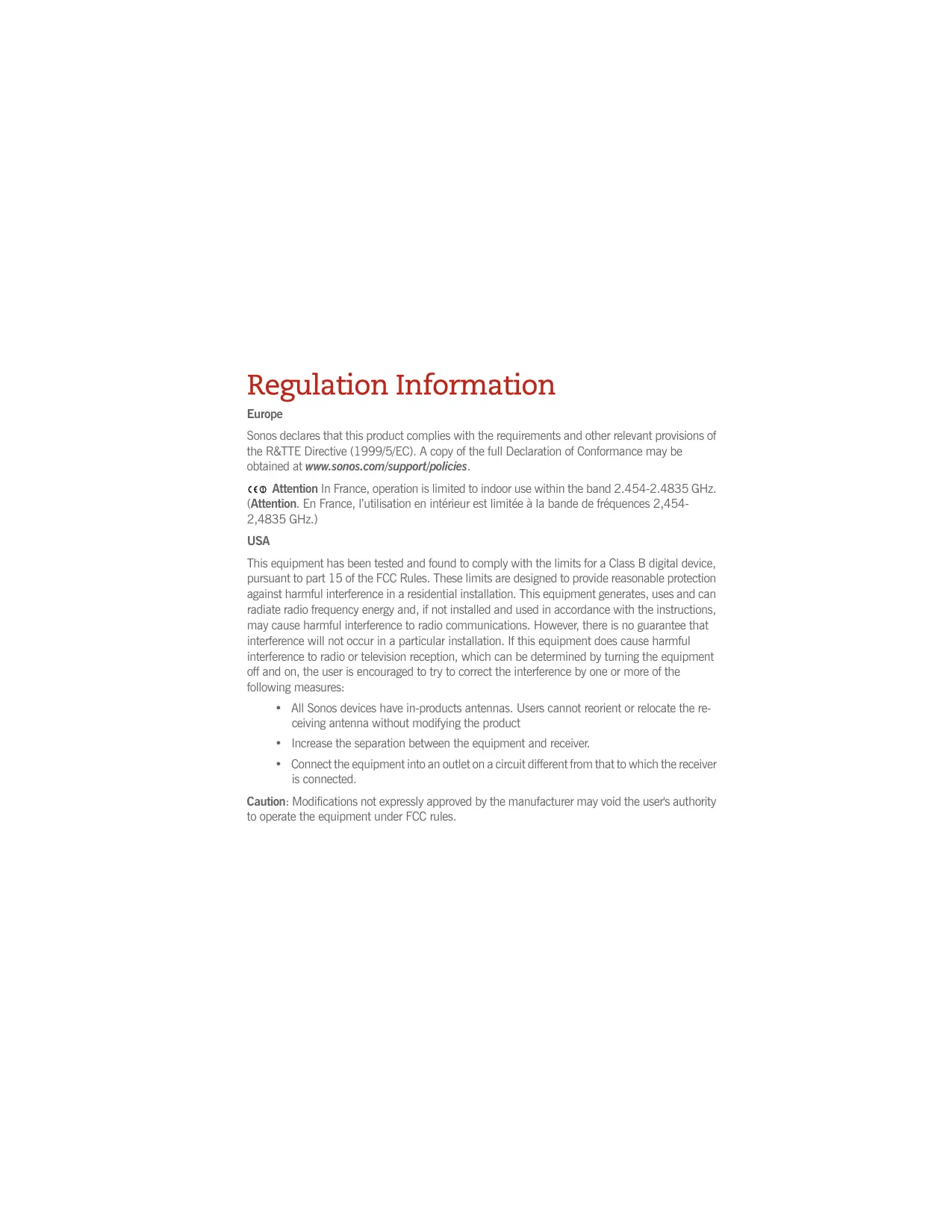
Regulation Information
Europe
Sonos declares that this product complies with the requirements and other relevant provisions of the R&TTE Directive (1999/5/EC). A copy of the full Declaration of Conformance may be obtained at www.sonos.com/support/policies.
This equipment has been tested and found to comply with the limits for a Class B digital device, pursuant to part 15 of the FCC Rules. These limits are designed to provide reasonable protection against harmful interference in a residential installation. This equipment generates, uses and can radiate radio frequency energy and, if not installed and used in accordance with the instructions, may cause harmful interference to radio communications. However, there is no guarantee that interference will not occur in a particular installation. If this equipment does cause harmful interference to radio or television reception, which can be determined by turning the equipment off and on, the user is encouraged to try to correct the interference by one or more of the following measures:
- All Sonos devices have in-products antennas. Users cannot reorient or relocate the receiving antenna without modifying the product
- Increase the separation between the equipment and receiver.
- Connect the equipment into an outlet on a circuit different from that to which the receiver is connected.
Caution: Modifications not expressly approved by the manufacturer may void the user's authority to operate the equipment under FCC rules.
Canada
This Class B digital apparatus complies with Canadian ICES-003 and RSS-210. Operation is subject to the following two conditions: (1) this device may not cause interference, and (2) this device must accept any interference, including interference that may cause undesired operation of the device.
Industry Canada
The installer of this radio equipment must ensure that the product is located such that it does not emit RF field in excess of Health Canada limits for the general population; consult Safety Code 6, obtainable from Health Canada's Web site www.hc-sc.gc.ca/rpb. As mentioned before, the installer cannot control the antenna orientation. However, they could place the complete product in a way that causes the problem mentioned above.
RF Exposure Requirements
To comply with FCC and EU exposure essential requirements, a minimum separation distance of 20cm (8 inches) is required between the equipment and the body of the user or nearby persons.
Recycling Information

This symbol on the product or on its packaging indicates that this product shall not be treated as household waste. Instead please deliver it to the applicable collection point for the recycling of electrical and electronic equipment. By recycling this product correctly, you will help conserve natural resources and prevent potential negative environmental consequences. For more detailed information about recycling of this product, please contact your local city office, your household waste disposal service or the shop where you purchased the product.
License Agreement and Limited Warranty
Sonos, Inc.
READ THE TERMS OF THIS LICENSE AGREEMENT AND LIMITED WARRANTY ("AGREEMENT") GOVERNING THE USE OF THE SOFTWARE AND RELATED FIRMWARE AND DOCUMENTATION (COLLECTIVELY, THE "SOFTWARE") PROVIDED TO YOU BY SONOS ("SONOS") CAREFULLY BEFORE USING THE APPLICABLE SONOS PRODUCT (SUCH HARDWARE, TOGETHER WITH THE SOFTWARE, REFERED TO AS THE "PRODUCT").
BY OPENING THIS PACKAGE, INSTALLING AND USING THE PRODUCT, YOU ARE (1) REPRESENTING THAT YOU ARE OVER THE AGE OF 18, (2) REPRESENTING THAT YOU HAVE THE RIGHT AND AUTHORITY TO LEGALLY BIND YOURSELF OR YOUR COMPANY, AS APPLICABLE, AND (3) CONSENTING TO BE LEGALLY BOUND BY ALL OF THE TERMS OF THIS AGREEMENT. IF YOU DO NOT AGREE TO ALL THESE TERMS OR CANNOT MAKE SUCH REPRESENTATIONS, DO NOT USE THE PRODUCT. IF YOU ELECT NOT TO ACCEPT THE TERMS OF THIS AGREEMENT, YOU MAY RETURN THE NEW, UNUSED PRODUCT WITHIN THIRTY (30) DAYS OF PURCHASE TO THE RETAIL LOCATION WHERE YOU PURCHASED IT, WITH ALL ORIGINAL PACKAGING FOR A FULL REFUND.
1.GRANT OF LICENSE
(a) Subject to the terms and conditions of this Agreement, Sonos grants to You a worldwide, non-exclusive, non-transferable, personal license (without the right to sub-license) to (i) use the Software as embedded in the Product for the purpose of operating the Product, and (ii) use the desktop application portion(s) of the Software on any personal computer owned or controlled by You during the Term. Except as provided above, You may not transfer the Software to any other computing device or otherwise remove the Software from the Product. Notwithstanding any license granted herein by Sonos, You acknowledge and agree that it is Your sole responsibility to comply with U.S. and international copyright laws with respect to Your use of the Software.
(b) You agree not to copy, modify, reverse engineer, decompile or disassemble the Product to the extent that such restriction is not prohibited by law. Except for the limited license granted herein, Sonos and its suppliers hereby retain all right, title and interest in and to all worldwide intellectual property rights embodied in the Software. All other rights are reserved by Sonos. You acknowledge and agree that the
technology embedded in and used to create the Product constitute the valuable trade secrets and know-how of Sonos, and to the extent you discover any such trade secrets, You will not disclose them to any third party.
(c) Sonos shall have no obligation to provide any updates or upgrades to the Product, but in the event that it does, such updates, upgrades and any documentation shall be deemed the "Product", and shall be subject to the terms and conditions of this Agreement.
2. TERM OF AGREEMENT
(a) You may terminate this Agreement at any time by notifying Sonos, discontinuing use of the Product and purging the Software from Your computing device.
(b) This Agreement will automatically terminate if You violate any of its terms.
(c) Sections 1(b), 3, 4, 6(c), 7 and 9 shall survive termination or expiration for any reason.
3.COMPLIANCE WITH COPYRIGHT LAWS
Sonos complies with U.S. and international copyright laws and in consideration of the licenses granted herein, You agree to do the same. You acknowledge that unauthorized copying or distribution of music or other content accessed using the Product ("Content") is prohibited by such copyright laws, and You agree that You will not, directly or indirectly, copy or distribute any Content without the express written authorization of the copyright holder. You agree to indemnify and hold harmless Sonos and its licensors from and against any and all claims, suits, losses, damages, liabilities, costs and expenses incurred by Sonos or its licensors arising out of or related to Your failure to comply with the terms of this Section 3.
4.SONOS PRIVACY POLICY
Use of Sonos Products is subject to the Sonos Privacy Policy, which can be found at www.sonos.com/legal/privacy_policy.htm and by reference is made a part of this Agreement. The Sonos Privacy Policy outlines the type of information that may be collected from you by Sonos and how such information may be used by Sonos. It is important that you read and understand the terms of the Privacy Policy.
5. THIRD PARTY CONTENT AND TECHNOLOGIES SUPPORT
From time to time, Sonos may provide access to third party content providers via the Product. In addition, Sonos may support certain third party technologies, such as specific file formats or codecs.
Sonos reserves the right to discontinue access to and/or support for such third party content or technologies at any time, and for any reason. Sonos makes no representations or warranties whatsoever regarding the selection of, or continuing support for, any such third party content or technologies.
6.WARRANTY AND DISCLAIMER
(a) Limited Warranty. Sonos warrants to You that for a period of one (1) year after the date of original purchase of the Product, the Product will be free from defects in materials and workmanship. SONOS DOES NOT WARRANTY THAT THE PRODUCT WILL OPERATE WITHOUT INTERRUPTION OR WILL BE ERROR-FREE, OR THAT ALL ERRORS MAY BE CORRECTED. EXCEPT AS SET FORTH IN SECTION 6(C), SONOS'SOLE LIABILITY, AND YOUR SOLE REMEDY, FOR BREACH OF THE FOREGOING WARRANTY WILL BE, AT SONOS'SOLE DISCRETION, REPAIR OR REPLACEMENT OF THE PRODUCT, OR, IF NEITHER OF THE FOREGOING ARE REASONABLY AVAILABLE, A REFUND OF THE AMOUNT YOU PAID, LESS AMOUNTS ATTRIBUTABLE TO YOUR PRIOR USE.
(b) Limitations. The foregoing warranty does not extend to problems in the Product that result from: (i) Your failure to implement all bug fixes or error corrections to the Product which are made available by Sonos; (ii) any use of the Product in a manner for which it was not designed or as not authorized under this Agreement; or (iii) any use of the Product with other products, hardware or products not supplied by, and inconsistent with the documentation provided by, Sonos.
(c) Disclaimer. EXCEPT AS EXPRESSLY SET FORTH ABOVE, SONOS MAKES NO WARRANTYES, WHETHER EXPRESS, IMPLIED, STATUTORY OR OTHERWISE, WITH RESPECT TO THE PRODUCT. SONOS AND ITS SUPPLIERS HEREBY SPECIFICALLY DISCLAIM ALL OTHER EXPRESS, STATUTORY AND IMPLIED WARRANTYES AND CONDITIONS, INCLUDING THE IMPLIED WARRANTY OF MERCHANTABILITY, FITNESS FOR A PARTICULAR PURPOSE, NON-INFRINGEMENT AND THE IMPLIED CONDITION OF SATISFACTORY QUALITY. EXCEPT AS EXPRESSLY STATED IN SECTION 6(A), THE PRODUCT IS SUPPLIED ON AN "AS IS" BASIS WITHOUT WARRANTY. YOU ASSUME ALL RESPONSIBILITIES FOR SELECTION OF THE PRODUCT TO ACHIEVE YOUR INTENDED RESULTS, AND FOR THE INSTALLATION AND USE OF THE PRODUCT. Some jurisdictions do not allow a limitation on implied warranties, and so the foregoing disclaimer may not apply to You. In any event, any implied warranties that may exist under the laws
of Your jurisdiction are limited to the one (1) year period set forth in the limited warranty given under subsection (a) above.
7.LIMITATION OF LIABILITY
(a) TO THE MAXIMUM EXTENT ALLOWED UNDER LAW, IN NO EVENT WILL SONOS OR ITS SUPPLIER BE LIABLE FOR ANY DAMAGES, INCLUDING BUT NOT LIMITED TO, INCIDENTAL, SPECIAL, CONSEQUENTIAL, EXEMPLARY, OR INDIRECT DAMAGES, AND INCLUDING BUT NOT LIMITED TO, COST OF COVER, LOSS OF DATA, LOSS OF PROFITS, BUSINESS INTERRUPTION, LOSS OF BUSINESS INFORMATION, OR OTHER PECUNIARY LOSS ARISING FROM THE USE OF (OR INABILITY TO USE) THE PRODUCT, NO MATTER HOW CAUSED AND ON ANY THEORY OF LIABILITY. BECAUSE SOME STATES/JURISDICTIONS DO NOT ALLOW THE EXCLUSION OR LIMITATION OF LIABILITY FOR CONSEQUENTIAL OR INCIDENTAL DAMAGES, SOME OF THE ABOVE LIMITATIONS MAY NOT APPLY TO YOU, BUT THEY SHALL APPLY TO THE MAXIMUM EXTENT PERMITTED BY LAW.
(b) IN NO EVENT SHALL SONOS' TOTAL LIABILITY TO YOU FOR ALL DAMAGES IN ANY ONE OR MORE CAUSES OF ACTION EXCEED THE AMOUNT PAID BY YOU FOR THE PRODUCT.
(c) The limitations in Section 7 will apply even if Sonos, its suppliers or dealers have been advised of the possibility of such damage or of any type of use intended by You. These limitations shall apply notwithstanding the failure of essential purpose of any limited remedy. You acknowledge that these limitations reflect a reasonable allocation of risk.
8.INFRINGEMENT INDEMNITY
(a) Indemnity. Sonos shall defend or settle any claim, demand, suit, proceeding or action ("Claim") against You to the extent that such Claim is based on an allegation that any portion of the Product, as furnished to You under this Agreement and used as authorized in this Agreement, infringes any third party's U.S. copyright or misappropriates such third party's trade secrets, provided that You: (i) give prompt written notice of the Claim to Sonos; (ii) give Sonos the exclusive authority to control and direct the defense or settlement of such Claim; and (iii) give Sonos, at Sonos' expense (except for the value of Your time), all necessary information and assistance with respect to the Claim. Sonos shall pay all settlement amounts, damages and costs finally awarded to the extent attributable to such Claim. You
may participate in the defense of Claim at Your expense. Sonos will not be liable for any costs or expenses incurred without its prior written authorization.
(b) Limit on Indemnity. The foregoing notwithstanding, Sonos shall have no liability for a Claim to the extent based on: (i) the use by You of any Product more than thirty (30) days after Sonos notifies You in writing that continued use of the Product may give rise to such Action; (ii) the combination of the Product, or any part thereof, with other hardware or products not provided by Sonos, which Claim would have been avoided if the Products had not been so combined; or (iii) use of the Products other than as authorized under this Agreement.
(c) Entire Liability. THE FOREGOING PROVISIONS OF THIS SECTION 8 STATE THE ENTIRE LIABILITY AND OBLIGATIONS OF SONOS, AND YOUR EXCLUSIVE REMEDY, WITH RESPECT TO ANY ACTUAL OR ALGLED INFRINGEMENT OF OR MISAPPROPRIATION OF ANY INTELLECTUAL PROPERTY RIGHT BY THE PRODUCT.
9.MISCELLANEOUS
You acknowledge that the Product is subject to the export control law and regulations of the United States, and any amendments thereto. You warrant that You will comply in all respects with United States exports laws and regulations. This Agreement shall be governed by the laws of the State of California, without reference to its conflict of law principles. You consent to the jurisdiction of the federal and state courts sitting in the State of California. This Agreement constitutes the entire agreement between You and Sonos with respect to the subject matter hereof, and supersedes all prior oral or written understandings, communications or agreements not specifically incorporated herein. If any provision of this Agreement is found to be invalid or unenforceable pursuant to judicial decree or decision, the remainder of this Agreement shall remain valid and enforceable according to its terms. You may not assign this Agreement, or any of its rights or obligations hereunder, whether by operation of law or otherwise, without the prior written consent of Sonos. Any attempted assignment by You without prior written consent shall be void.
For inquiries or questions regarding this Agreement, please send an e-mail to support@sonos.com or call (800) 680-2345.
Sonos Controller 200
Before You Begin
If you are setting up a new Sonos Multi-Room Music System, Sonos recommends you set up at least one ZonePlayer (or ZoneBridge) before adding a Sonos Controller 200 to your music system. For help with this step, you can refer to the Quick Setup Instructions included with your ZonePlayer(s).

Note: The Sonos Controller 200 is compatible with Sonos software version 3.0 or later. If you are adding to an existing Sonos system, use the Desktop Controller software to check for the latest Sonos software update by selecting Help Check for Updates. Once you update your music system, you can add the Sonos Controller 200.
Once you've got one or more zones set up, connect the power adapter to the back of the charging cradle (included) and plug the cradle into a power outlet. Place the Controller 200 into the charging cradle to wake it up (the screen will come alive when it's ready), and then follow the Controller's on-screen instructions to add it to your Sonos Multi-Room Music System.
For battery charging or battery replacement information, you can turn to page 13.
The Sonos Controller 200...
-
Lets you wirelessly control the music and where it's being played, from any room in your house—no pointing or line-of-sight requirements
Full-color LCD touch screen makes it simple to: -
search or browse for songs
- queue up tracks and playlists
- select zones—listen to different songs in every room, or listen to the same song in every room.
control volume, playback and system settings
For Additional Information
- For the latest product guides, go to www.sonos.com/support and click Documentation.
- To view the Sonos License Agreement and Limited Warranty, go to www.sonos.com/support and click Policies.
- To access the online help system included with your software, select Sonos System Help from the Help menu.
- For the latest Sonos Multi-Room Music System product news, go to www.sonos.com.
Using the Controller
Navigation

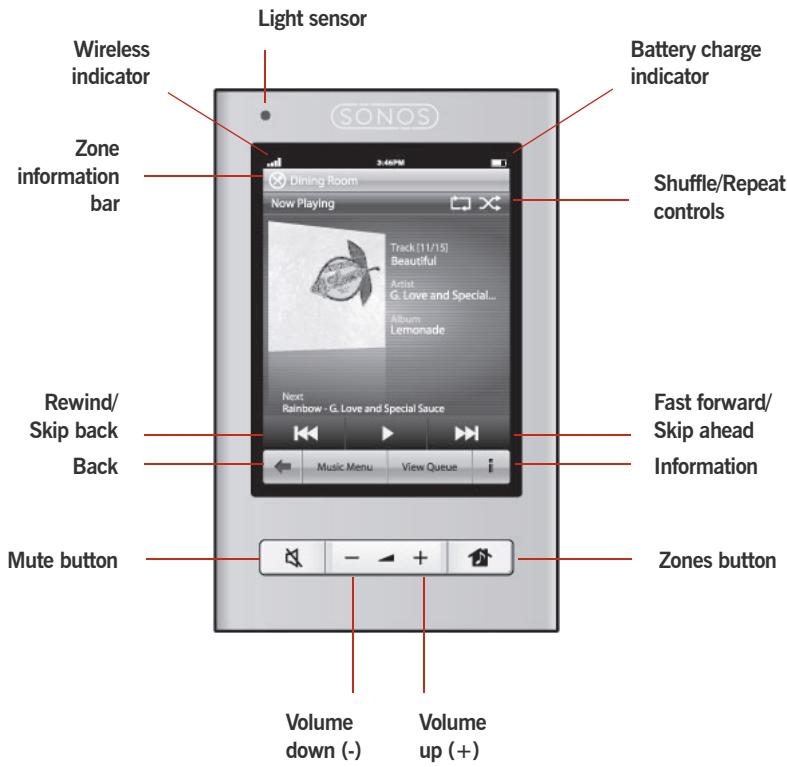
Zones. Touch the Zones button to select a zone to play music in, to view the music selections playing in each room, or to create or modify zone groups in order to share the same music across zones.
You can also use the Zones button to lock the Controller so that nothing happens when you touch the screen (such as when cleaning the screen, or carrying the Controller in your pocket.) To lock the Controller, touch and hold the Zones button for two (2) seconds. To unlock, simply touch and hold the Zones button again.

Back. Touch the Back arrow to return to the previous screen.

Music Menu. Touch Music Menu to browse or select music, access playlists, and change the default settings for a Sonos ZonePlayer or Controller.

View Queue. Touch View Queue to view the tracks in the current queue.

Scrolling/browsing. While touching the screen, drag your finger up or down to scroll through any displayed list. Flickr the screen to scroll quickly. Touch an item in a list to make a selection.

Information. Touch Information to view additional choices or view more information for a music selection.
Playback Controls

Play / Pause. Toggles between playing and pausing the current track.

Next / Fast Forward. Jumps to the start of the next track in the music queue.
Touching and holding this control displays the track position slider while you move forward through the current track.

Previous / Rewind. If you are more than 3 seconds into the track, this control returns to the start of the current track; if you are less than 3 seconds into the track, this control jumps to the start of the previous track.
Touching and holding this control displays the track position slider while you skip backward through the current track.
Volume

Volume controls. Use the volume control buttons to increase (+) or decrease (-) the volume in any zone, or across a zone group.

Mute. Use the Mute button to temporarily silence the music in a zone. Touch the Mute button again to unmute.
To mute all zones, touch and hold the Mute button for 3 seconds. Touch and hold for 3 seconds to unmute all zones.
Controller Sensors and Indicators

Light sensor. The light sensor automatically turns on the button backlights based upon the brightness of the environment.

Wireless signal strength indicator. Indicates the current strength of the Controller's wireless signal.

Battery charge indicator. Indicates the Controller's remaining battery charge.
Clocks and Alarms
1. From the Music Menu, select Alarms.
- Touch View Clock to display the clock on this Controller.
- Touch Sleep Timer to select a sleep time interval.
-
Touch Alarms to set or change an alarm. Select the desired settings for the alarm, including the alarm time, the zone you would like the alarm to play in, the music source you'd like to play from, the frequency of the alarm, and the volume setting. Touch Save Alarm to save the alarm preferences.
-
Touch Advanced to select additional alarm preferences, such as the length of time you want the alarm music to play, and whether or not to include linked zones. If you select Yes, the alarm will play in the zones that are linked together when the alarm goes off (not in the zones that were linked together at the time the alarm was set.)

Note: If the music you've selected is not available (such as an Internet radio station that has dropped off), your alarm will play the Sonos chime instead.
- Touch Date and Time Settings to select the way in which date and time settings are determined and displayed on this Controller.
Additional Settings
The following settings can be adjusted by selecting Settings Controller Settings from the Music Menu:
Lock Controller. You can choose to lock the Sonos Controller 200 so that nothing happens when you touch the LCD touch screen or buttons (such as when cleaning the screen, or carrying the Controller in your pocket.) When you are ready to unlock the Controller, simply touch and hold the Zones button for two (2) seconds.
(You can also lock the Controller by touching and holding the Zones button for two (2) seconds.)
Controller Sounds. The Controller 200 makes a clicking sound when you touch a selection. You can choose to turn all sounds on, turn all sounds off, or enable keyboard sounds only by selecting Controller Sounds.
Light sleep. Your Controller will go into light sleep (the screen will turn off) to preserve the battery life when it is unused for a specified period of time. When motion is detected or a button is pressed, the Controller awakens immediately. Use the Sleep Timer Docked (when seated in charging cradle) and Sleep Timer Undocked settings to select the amount of time after which your Controller will enter light sleep.
Screen Brightness. Drag your finger across the slider to adjust the brightness of your Controller screen.
Button Brightness. Drag your finger across the slider to adjust the brightness of the buttons on your Controller. The button brightness is controlled by the light sensor, so the button brightness will vary depending upon your environment (such as whether it's night or day, or whether your are inside or outside your home.)
Motion sensor. The Controller has a motion sensor to automatically wake your Controller when motion is detected. If you wish to disable the motion sensor, select Motion Sensor from the Advanced Settings menu.
Language. Select Language from the Advanced Settings menu to change the language setting for your Controller.
Turn Off Controller. Select Turn Off Controller from the Advanced Settings menu to turn the Controller off. To turn it back on, simply place the Controller into the charging cradle. Use this setting to put your Controller into deep sleep anytime it will not be in use for an extended period of time, or when you are transporting your Controller to another destination. (The Controller cannot be turned off while it is seated in the charging cradle.)
Playing Music
Touch Music Menu on the Sonos Controller to display the Music Menu.
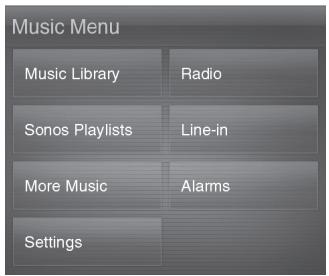
To read more about the features and functions of your new Sonos system, please download the complete user guide from our Web site at:
www.sonos.com/support/documentation or start your Desktop Controller software and select Sonos System Help from the Help menu.
Radio
Sonos includes a radio guide that provides immediate access to thousands of free Internet radio stations and broadcast programs. You can easily find radio from all over the world—music, news, and variety programming, including archived shows and podcasts.
To select an Internet radio station, simply touch Radio.
Music services
A music service is an online music store or online service that sells audio on a person, per audiobook, or subscription basis. Sonos is compatible with several music services - you can visit our Website at www.sonos.com/howitworks/music/partners for the latest list. (Some music services may not be available in your country. Please check the individual music service's Web site for more information.)
If you are currently subscribed to a music service that's compatible with Sonos, simply add your music service user id and password information to Sonos and you'll have instant access to the music service from your Sonos system.
- To add a music service, touch More Music...
- Select the Sonos-compatible music service you would like to add.
- Select I already have an account. Type your music service user name and password, and then touch Done. Your user name and password will be verified with the music service.
Once your credentials have been verified, this music service will display on the Music Menu so any time you want to listen to this music service, simply touch Music Menu, select the music service, and touch a selection.
Free music service trials are available in some countries. (Please check the individual music service's Web site for more information.) If there is a music service trial visible on your More Music... menu, simply touch it to select. Touch I'm new to [music service], and then follow the prompts to activate the music trial. After the trial period is up, you will need to subscribe to the music service to keep the music playing.
Music folders
The Sonos Multi-Room Music System can play music from any computer or network-attached storage (NAS) device on your home network where you have shared music folders. During the Sonos setup process, you are guided through the process of accessing these shared music folders. Over time, you may wish to add or remove folders from this list.
- To add new music folders to Sonos, touch Settings Music Library Management Music Library Setup Add Share.
- To remove music folders, touch Settings Music Library Management Music Library Setup. Touch the share you wish to remove and then select Remove Share.
The Sonos Multi-Room Music System indexes your music folders so you can view your music collection by categories (such as artists, albums, composers, genres, or tracks.) If you add new music to a folder that is already indexed, simply update your music index to add this music to your Sonos music library.
- To update your music index, touch Settings Music Library Management Update Music Index Now. If you'd like your music index to update automatically each day, select Schedule Music Index Updates and then select a music index update time.
Recharging
The Sonos Controller 200 can be recharged by placing it in the Sonos Charging Cradle 200. The Battery Charge Indicator on your Controller displays the current battery charge level. To extend the battery life, it's best not to let the Lithium Ion battery discharge completely before recharging. Keep the Controller seated in the charging cradle when not in use, as this type of battery does not suffer from memory effect and can be charged anytime.
If the battery charge begins to run low, a message will appear on your Controller screen indicating that it's time to recharge. Simply place it in the cradle to recharge.
If you should miss this message and the Controller's battery discharges completely, simply place the Controller into the charging cradle. The Controller's light sensor will turn orange, indicating that a reset is in process. It will take a few minutes for the Controller screen to wake up.
Battery Replacement
After several years (depending upon usage), the battery on your Controller may not hold a charge as long as it once did. You can purchase a replacement battery (visit our Web site at www.sonos.com for more information), and then follow the instructions below to replace the battery.

Caution: Risk of explosion if battery is replaced by incorrect type. Dispos of used batteries according to the instructions. (Check with your local waste or recycling company to determine the proper disposal method in your area.)
- Remove the battery door on the back of your Controller 200.
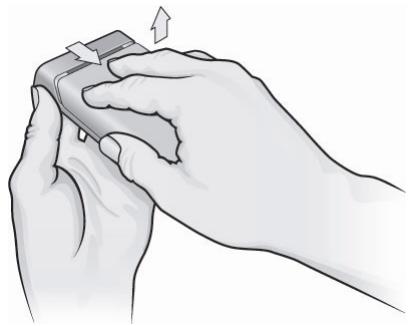
Slide the battery door back, and then lift it off
- Remove the existing battery by gently pulling the gray battery tab toward you to dislodge the battery, and then lift up to remove.
- Remove the protective wrap from the new battery.
- Insert the battery into the battery compartment with the Sonos logo facing out, making sure the battery snaps gently into place.
- Close the battery door.
- Place the Controller into the charging cradle to wake it up.
Basic Troubleshooting
If a problem occurs, you can try the troubleshooting suggestions listed below. If one of these doesn't remedy the problem, or you are not sure how to proceed, please contact the Sonos Technical Support team (see page 16), and we'll be happy to help.
The Controller is acting sluggish, or all zones aren't visible
You are probably experiencing wireless interference. Change the wireless channel your Sonos system is operating on by following the steps below.
Change the wireless channel your Sonos system is operating on
- Using a Sonos Controller, touch Music Menu Settings Advanced Settings. Touch Wireless Channel, and then select another channel from the list.
- Using the Desktop Controller software for Windows, select Preferences from the File menu. Click the Advanced tab, and then select another wireless channel from the Wireless Channel list.
- Using the Desktop Controller software for Macintosh, select Preferences from the Sonos menu. Click the Advanced tab, and then select another wireless channel from the Wireless Channel list.
It may take several seconds for the switch to take effect. If you have music playing, a short music dropout may occur during the wireless channel change.
Reset the Controller 200
If the Controller 200's screen should ever become unresponsive, you can remove the battery from the back of the unit, and then immediately put it back in. Place the Controller into the charging cradle for a few moments to wake it up.
Restart the Controller 200
There may be an occasion when you need to renew your DHCP lease (get a new IP address from your Internet provider's DHCP server.) If this occurs, you can restart your Controller by selecting Settings Controller Settings Advanced Settings Restart Controller from the Music Menu.

Caution: Household cleaners or solvents can damage the finish on your ZonePlayers or Controllers. Clean only with a dry soft cloth.
Technical Support
Web site: www.sonos.com/support
- For help with troubleshooting and support issues, visit our Web site where you can visit the Forums, browse our Frequently Asked Questions (FAQ) pages, or request assistance.
Email: Support@sonos.com
Text-Chat and Telephone: www.sonos.com/support/contact
US/Canada: +1.800.680.2345 toll-free
United Kingdom: 0808 2346596
If your country is not listed here, please visit the Text-Chat and Telephone link (above) to find the correct telephone number for your country.
Sonos Controller 200
Website: www.sonos.com/support
Website: www.sonos.com/support
E-post: Support@sonos.com
Site Web: www.sonos.com/support
Sito Web: www.sanos.com/support
- Sonos® Controller CR200 Contents
- Regulation Information
- Canada
- Industry Canada
- RF Exposure Requirements
- Recycling Information
- License Agreement and Limited Warranty
- Sonos, Inc.
- 1.GRANT OF LICENSE
- TERM OF AGREEMENT
- 3.COMPLIANCE WITH COPYRIGHT LAWS
- 4.SONOS PRIVACY POLICY
- THIRD PARTY CONTENT AND TECHNOLOGIES SUPPORT
- 6.WARRANTY AND DISCLAIMER
- 7.LIMITATION OF LIABILITY
- 8.INFRINGEMENT INDEMNITY
- 9.MISCELLANEOUS
- Sonos Controller 200
- Before You Begin
- The Sonos Controller 200...
- For Additional Information
- Using the Controller
- Navigation
- Playback Controls
- Volume
- Controller Sensors and Indicators
- Clocks and Alarms
- From the Music Menu, select Alarms.
- Additional Settings
- Playing Music
- Radio
- Music services
- Music folders
- Recharging
- Battery Replacement
- Basic Troubleshooting
- The Controller is acting sluggish, or all zones aren't visible
- Change the wireless channel your Sonos system is operating on
- Reset the Controller 200
- Restart the Controller 200
- Technical Support
Brand : SONOS
Model : CONTROLLER 200
Category : Audio Controller