
AF 5087 - Camera AGFAPHOTO - Free user manual and instructions
Find the device manual for free AF 5087 AGFAPHOTO in PDF.

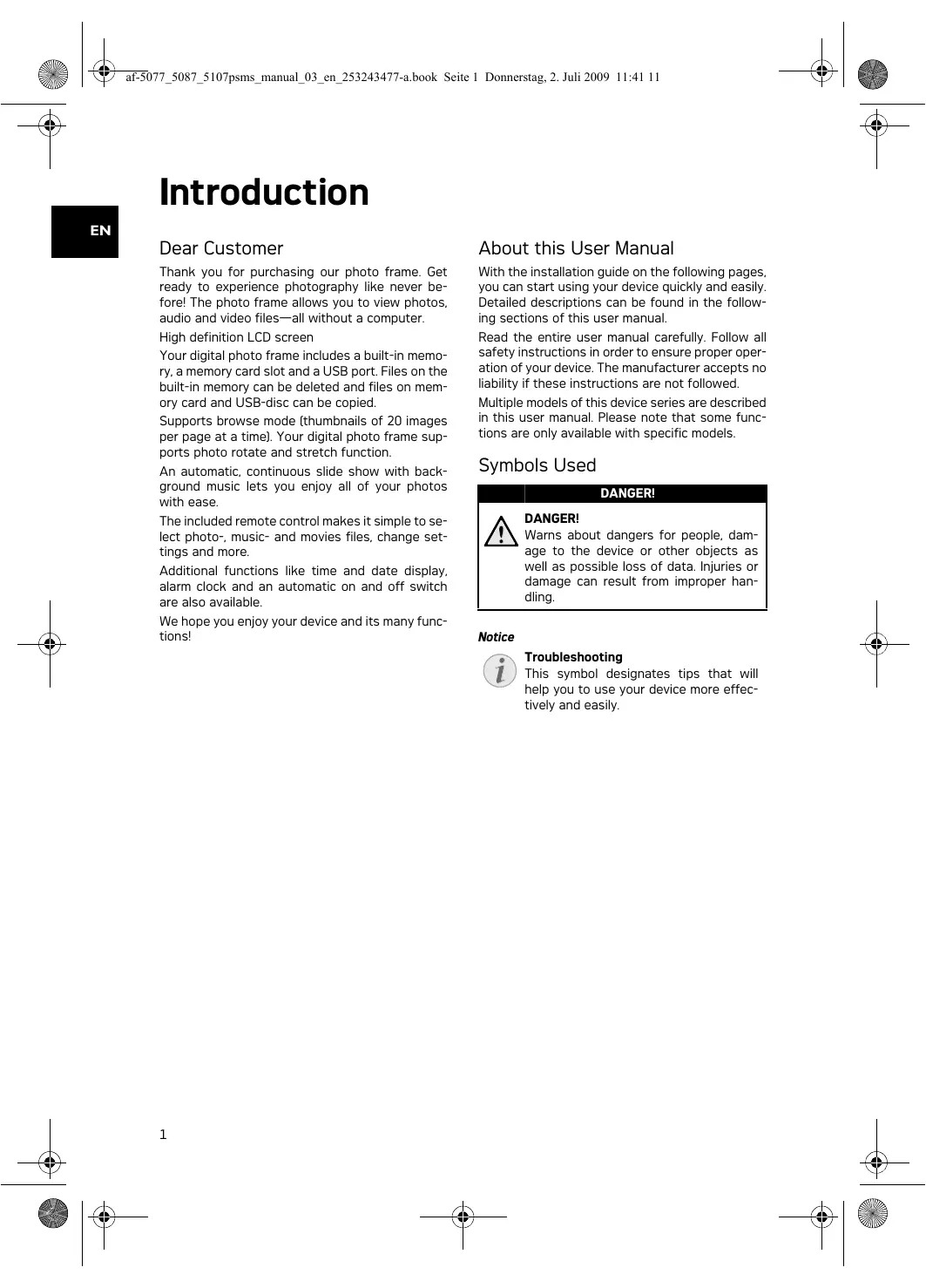


| Product type | Digital photo frame |
| Brand | AGFAPHOTO |
| Model | AF 5087 |
| Screen diagonal | 8 inches |
| Screen resolution | 800 x 600 pixels |
| Aspect ratio | 4:3 |
| Internal memory | 128 MB (up to 500 photos) |
| Supported photo formats | JPEG |
| Supported music formats | MP3 |
| Supported video formats | Motion JPEG, MPEG-4 |
| Memory card reader | SD, MMC, MS, SDHC, XD |
| USB connectivity | USB Host (USB drive), USB Device (computer) |
| Power supply | Power adapter 100-240 V, 50/60 Hz, output 5 V / 2 A |
| Dimensions (W × H × D) | 190 × 153 × 80 mm |
| Weight | 0.4 kg |
| Main functions | Slideshow with background music, clock, alarm, on/off timer, image rotation, transition effects, playlists, interchangeable frame |
| Included accessories | Remote control (with battery), stand, power adapter with interchangeable plugs, spare frame |
| Operating temperature | 5 °C to 45 °C |
| Relative humidity | 20 % to 80 % |
| Cleaning | Soft, dry cloth for the screen; do not use liquid or abrasive products |
| Repairs | Entrust exclusively to an authorized specialist |
Frequently Asked Questions - AF 5087 AGFAPHOTO
User questions about AF 5087 AGFAPHOTO
0 question about this device. Answer the ones you know or ask your own.
Ask a new question about this device
Download the instructions for your Camera in PDF format for free! Find your manual AF 5087 - AGFAPHOTO and take your electronic device back in hand. On this page are published all the documents necessary for the use of your device. AF 5087 by AGFAPHOTO.
USER MANUAL AF 5087 AGFAPHOTO
Koportible Speicherkarten.....SD/MMC/MS/SDHC/ XD
Fotoformate......JPEG
Koportible Speicherkarten.....SD/MMC/MS/SDHC/ XD
Fotoformate.JPEG
Musikformate MP3
Videoformate Motion Jpeg, Mpeg-4
Koportable Speicherkarten.....SD/MMC/MS/SDHC/ XD
Fotoformate......JPEG
Koportable Speicherkarten.....SD/MMC/MS/SDHC/ XD
Fotoformate......JPEG
Musikformate MP3
Videoformate........Motion Jpeg, Mpeg-4
Koportible Speicherkarten.....SD/MMC/MS/SDHC/ XD
Fotoformate. JPEG
Koportible Speicherkarten.....SD/MMC/MS/SDHC/ XD
Fotoformate. JPEG
Musikformate MP3
Videoformate Motion Jpeg, Mpeg-4
Copyright © 2009 Sagem Communications
Introduction
Cher client
Supports mémoire photo
raccordement USB / port USBUSB-Host, USB Device
Cartes mémoire photo compatibles .SD/MMC/MS/ SDHC/XD
Format Photo .JPEG
Formats musique MP3
Formats video........Motion Jpeg, Mpeg-4
\section*{Caracteristiques techniques AF 5087PS}
Dimensions [L × H × P] 203×163×90mm
Poids 0,5kg
Cartes mémoire photo compatibles . SD/MMC/MS/SDHC/XD
Format Photo . JPEG
\section*{Caracteristiques techniques AF 5087MS}
Dimensions (× × ) 203x163x90mm
Poids 0,5kg
Prises secteur...Entree:100-240V\~/50-60Hz Sortie:5V /2A
Cartes mémoire photo compatibles . SD/MMC/MS/SDHC/XD
Format Photo . JPEG
Formats musique MP3
Formats video........Motion Jpeg, Mpeg-4
\section*{Caracteristiques techniques AF 5107PS}
Dimensions [L × H × P] 255×203×90mm
Poids 0,8kg
Cartes mémoire photo compatibles..SD/MMC/MS/ SDHC/XD
Format Photo......JPEG
\section*{Caracteristiques techniques AF 5107MS}
Dimensions [L × H × P] 255×203×90mm
Poids 0,8kg
Copyright © 2009 Sagem Communications
Introduction
Dear Customer
Thank you for purchasing our photo frame. Get ready to experience photography like never before! The photo frame allows you to view photos, audio and video files—all without a computer.
High definition LCD screen
Your digital photo frame includes a built-in memory, a memory card slot and a USB port. Files on the built-in memory can be deleted and files on memory card and USB-disc can be copied.
Supports browse mode (thumbnails of 20 images per page at a time). Your digital photo frame supports photo rotate and stretch function.
An automatic, continuous slide show with background music lets you enjoy all of your photos with ease.
The included remote control makes it simple to select photo-, music- and movies files, change settings and more.
Additional functions like time and date display, alarm clock and an automatic on and off switch are also available.
We hope you enjoy your device and its many functions!
About this User Manual
With the installation guide on the following pages, you can start using your device quickly and easily. Detailed descriptions can be found in the following sections of this user manual.
Read the entire user manual carefully. Follow all safety instructions in order to ensure proper operation of your device. The manufacturer accepts no liability if these instructions are not followed.
Multiple models of this device series are described in this user manual. Please note that some functions are only available with specific models.
Symbols Used
DANGER!

DANGER!
Warns about dangers for people, damage to the device or other objects as well as possible loss of data. Injuries or damage can result from improper handling.
Notice

Troubleshooting
This symbol designates tips that will help you to use your device more effectively and easily.
Safety Instructions and Recommendations
Do not make any changes or settings that are not described in this user manual. Physical injury or damage to the device or loss of data can result from improper handling. Take note of all warning and safety notes indicated.
Setting Up the Device
The device is exclusively for indoor use only. The device should rest securely on a stabile, flat surface. Position all cables in such a way that no one will stumble on them, thus avoiding possible injuries to persons or damage to the device itself.
Always handle the unit with care. Avoid touching the LCD screen. Never place heavy or sharp objects on the LCD panel, frame or power cord.
Protect the device against direct sunlight, heat, large temperature fluctuations and moisture. Do not place the device in the vicinity of heaters or air conditioners. Observe the information on temperature and humidity in the technical data.
The device should not be switched on immediately after being moved from a cold to a warm room or vice versa or into a cold room which has been heated up quickly. In such cases, wait at least three hours until the device has adapted to the changed conditions (temperature, humidity...).
In the event that the device becomes too hot, or if you see smoke coming from the device, you must immediately pull the power cable out of the power socket. Have your device examined by trained professionals at a technical service location. To prevent the spread of fire, open flames should be kept away from the device.
Do not plug in the device in moist rooms. Never touch the mains cable or the mains connection with wet hands.
Do not allow liquids to enter into the device. Disconnect the device from the power socket if liquids or foreign objects have entered the device and have your device examined by trained professionals at a technical service location.
Do not allow children to handle the device without supervision. The packing materials should be kept out of the hands of children.
Power Supply
Use only the enclosed power adapter (see chapter Appendix / Technical Data). Check whether the mains voltage of your device (indicated on the type label) matches the mains voltage available at the setup location. This equipment complies with the voltage type specified on the unit.
Never touch the power cable if the insulation is damaged. Replace damaged wires immediately. Use suitable cables only; if necessary please contact our technical customer service or your retailer.
Before cleaning the surface of your device, disconnect it from the power network. Use a soft, lint-free cloth. Never use liquid, gaseous or easily flammable cleansers (sprays, abrasives, polishes, alcohol). Do not allow any moisture to reach the interior of the device.
Only clean the display with a dry, soft cloth. If the display breaks, a mildly corrosive liquid may escape. Avoid all contact with your skin and eyes.
Repairs
Do not make any repairs to the device yourself. Improper maintenance can result in injuries or damage to the device. Only have your device repaired by an authorised service centre.
Do not remove the type label from your device; this would void the warranty.
Photo Memory Media
Only use storage media that are compatible with the device. In order to prevent damage to the card or the unit, please turn off the power before removing or inserting the card.
Never pull out the memory card while the device is accessing it. This could cause data to be damaged or lost.
Overview
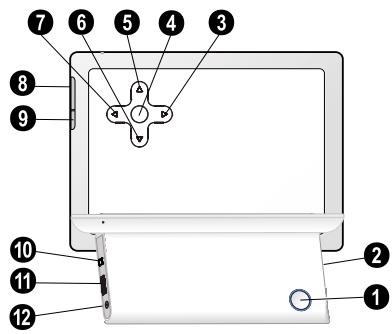
Device Overview
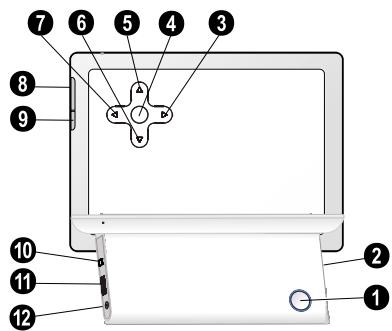
1-On/Off switch
Slot for Memory card
- Navigating in the Menu / Decrease the brightness, contrast and colour saturation / Skips to the previous image, previous row or page
OK—Confirms the selection / Starting, interrupting the slide show
- Navigating in the Menu / Increase the volume / Switch on the background music during slide show
6 ④—Navigating in the Menu / Decrease the volume
7 Navigating in the Menu / Increase the brightness, contrast and colour saturation / Skips to the next image, next row or page
3 MENU—Calling the main menu / press and hold: Switch on the analog clock
9- Calling up the settings menu
10 Mini USB connection - for connecting a computer
Socket—USB port for a storage medium
12 + -Socket-Port for power supply
Remote Control
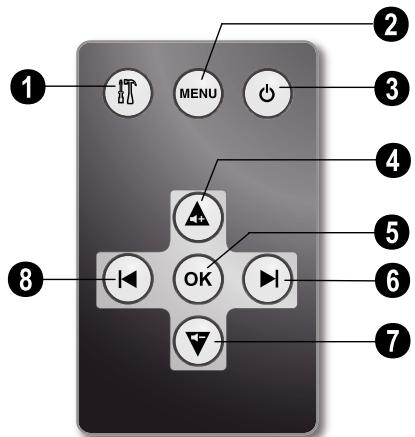
[AF5077/5087/5107MS]
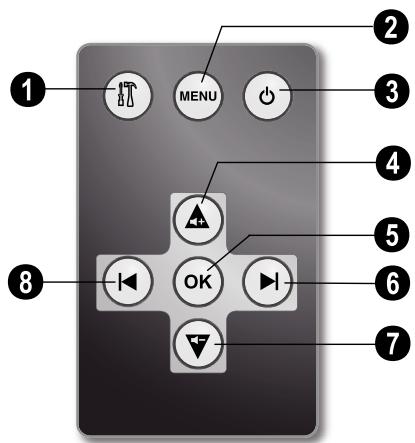
- Calling up the settings menu
2—Calling the main menu / press and hold: Switch on the analog clock
Switching On and Off
4—Navigating in the Menu / Increase the volume / Switch on the background music during slide show - Confirms the selection / Starting, interrupting the slide show
6—Navigating in the Menu / Increase the brightness, contrast and colour saturation / Skips to the next image, next row or page
7—Navigating in the Menu / Decrease the volume
3—Navigating in the Menu / Decrease the brightness, contrast and colour saturation / Skips to the previous image, previous row or page
Initial Operation
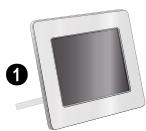
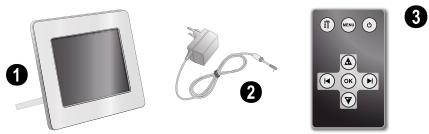
Packing Contents
Digital photo frame with bracket
2 Power supply with exchangeable plugs
A remote control [with battery] [AF5077/5087/5107MS]
User Guide (not depicted)
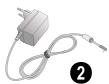
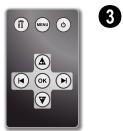
Notice

Missing Package Contents
If one of the parts is missing or damaged, please contact your retailer or our customer service.
Connecting power supply
CAUTION!

Mains Voltage at the Site of Installation!
Check whether the mains voltage of your device (indicated on the type label) matches the mains voltage available at the setup location.
1 Choose the right plug for your country and slide it onto the power adapter. Ensure that the plug snaps in completely.
2 Insert the small plug of the power supply into the socket on the rear side of your device. Insert the power supply unit into the socket.
Connecting to the PC
Using the USB cable, you can connect your photo frame to a computer to transfer files between the internal memory and computer.
1 Switch the device off using the on/off switch on the rear.
2 With the frame turned off, connect the small end of the cable to the digital picture frame and the large end to your computer.
3 Switch the device on using the on/off switch on the rear. Allow the computer a few moments to recognize the new hardware. Compatible photo, music and video files can be copied onto the internal memory.
4 If the connection with the computer is disconnected, the digital photoframe will restart automatically.
Inserting a Memory Card
1 Insert a memory card into the appropriate card slot at the rear of the device. Your photo frame supports the following memory cards: SD/MMC/MS/SDHC/XD.
DANGER!

Inserting a Memory Card!
Only use storage media that are compatible with the device.
Never pull out the memory card while the device is accessing it. This could cause data to be damaged or lost.
2 Switch the device on using the on/off switch on the rear. The player will start slide show after the start screen be displayed.
Notice

Many Photos on the Memory Card
If the memory card contains many photos, it can take some time until the slide show starts.
3 Press OK at the rear during a slide show to stop the slide show.
Notice

Using USB device and memory card at the same time
If a USB storage device is used at the same time as a storage card, the images from the memory card are displayed first.
Installing or Changing the Batteries of the Remote Control
DANGER!

Risk of explosion with incorrect type of batteries
CAUTION! RISK OF EXPLOSION IF BATTERY IS REPLACED BY ONE OF AN INCORRECT TYPE.
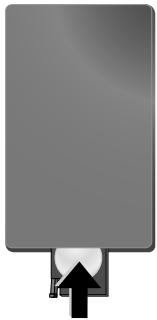
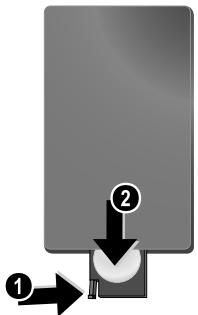
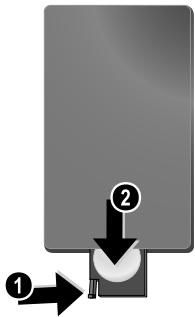
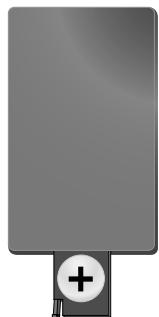
1 Take the battery compartment from the remote control by opening the locking mechanism [O] and pulling out the battery compartment [O].
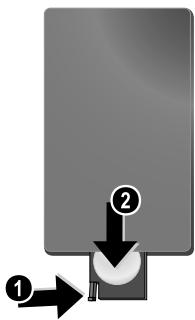
2 Insert the new batteries into the battery compartment with the positive and negative poles as shown on the back of the remote control. Make sure the polarities (+) and (-) are aligned correctly.
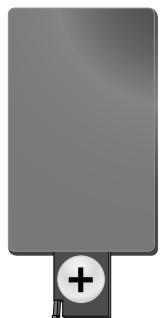
3 Push the battery compartment back into the remote control until the locking mechanism engages.
Notice

Normally the batteries will last for around one year. If the remote control does not work, please replace the batteries. If the player is not used for a long time, take out the batteries. So you can prevent leakage and possible damage to the remote control.
The batteries used should be disposed of according to the recycling regulations of your country.
Using the Remote Control
Point the remote control to the remote sensor on the front panel of the device. Its working limits is within an angle of 30 degrees and a distance of 2 meter. When using the remote control, no obstacle should be placed between the remote control and remote sensor.
Playback
Overview of the Menu Functions
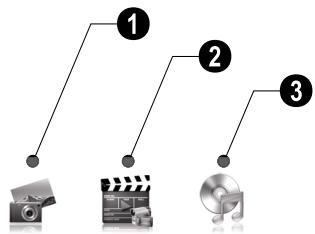
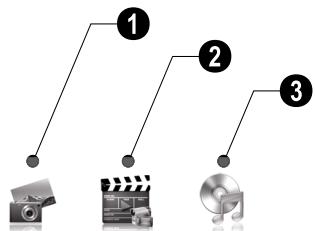
There are three items on the main menu.
Photo Menu
2 Video Menu [AF 5077/5087/5107MS]
Music Menu [AF 5077/5087/5107MS]
Navigating in the Menu
1 Press MENU on the remote control or MENU on the device.
2 Select the desired menu using
3 Confirm with.
Photo Playback
1 Select the photo menu in the main menu and confirm using OK.
2 Then the frame will display 16 thumbnail images per page.

3 Use 1 / 1 or 1 / 1 to select the image from which to start the slide show
4 Press OK to start the slide show.
5 Press OK to pause the slide show. A 'pause symbol' appears on the screen.
6 Press / to skip top the previous or next image.
7 End the slide show using MENU.
Notice

Calling up Menu
During the slideshow you can return to the main menu by pressing MENU at any time.
Setting the Background Music of the Slide Show
[AF5077/5087/5107MS]
Notice

As background music, you can only use files that are stored together with the photos in the internal memory on the memory card or the USB connection.
1 During the slide show press on the remote control or on the device, to start the background music.
Notice

Using / , set the volume.
MusicPlayback
[AF5077/5087/5107MS]
1 Select the music menu in the main menu and confirm using.
2 Using or / select the music title you want to play.
3 Press OK to start playback. Additional informations will be displayed during playback.
4 To stop, press OK.
Movie Playback
[AF5077/5087/5107MS]
1 Select the video menu in the main menu and confirm using.
2 Using or / select the video title you want to play.
3 Press OK to start playback. To stop, press OK.
Notice

AdditionalPlayback Functions
During playback, you can skip to the previous or next song by using or .
During playback, press the OK on the remote control to pause and to resume playback.
Adjusting Volume Level
[AF5077/5087/5107MS]
During playback you can adjust the volume using
/ on the remote control. Press repeatedly
to switch off the volume [mate function].
Settings
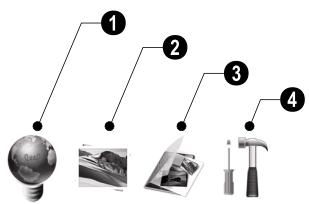
The settings menu contains four items and can be called up using on the device or on the remote control.
ECO Settings [Automatically switch on/off, Adaption of the LCD brightness automatically [AF5077/5087/5107MS])
Picture-Settings (Slide show settings, rotating image)
File Management (Copy files, delete files, playlists)
4 Basic-Settings (Brighness, contrast, date, clock)
ECO Settings
The digital picture frame can be switched on or off automatically or the brightness of the LCD screen can be adapted according the ambient light (AF5077/5087/5107MS).
Select from the following settings:
Switching On and Off Automatically
The digital photo frame can be switched on or off at a particular time of the day.
1 Press
2 Using / select the symbol and confirm with OK.
3 The symbol is selected.
4 Use / to select the coloured symbol and confirm using OK.
5 Select the time at which the digital photo frame should be switched on using / .
6 Confirm with OK. The colour of the cursor will change from white to red.
7 Select the time at which the digital photo frame should be switched off using / .
8 Confirm with OK. The colour of the cursor will change from red to white. The time period when the digital picture frame is switched on, is marked green.
9 To delete a time period, mark the time period again. The green marking will be removed.
10 Press and select the symbol using / .
11 Confirm with OK.
12 You can exit with
Notice

Switching Automatic On/Off
You can deactivate the automatic on/off. The actual setting is retained.
1 Press
2 Using / select the symbol and confirm with OK.
3 The symbol is selected.
4 Select using / the black/white symbol [automatic switched off] or the coloured symbol [automatic switched on].
5 Confirm with OK.
6 You can exit with
Automatic adaption of the LCD brightness
[AF5077/5087/5107MS]
With this function the brightness of the LCD screen can be adapted according the ambient light.
1 Press
2 Using / select the symbol and confirm with OK.
3 Using ④ select the symbol 念 and confirm with OK.
4 Select using / the black/white symbol (automatic switched off) or the coloured symbol [automatic switched on].
5 Confirm with OK.
6 You can exit with
Modifying the Picture Settings
Here you can rotating the images, changing aspect ratio, determine the transition effects or adjusting the slide show speed.
1 Press
2 Using /I select [Picture Setting] and confirm with OK.
3 Use / to select the required symbol.
Rotating Image—Change the orientation of the image
Aspect Ratio—The digital photo frame has a wide screen with 4:3 aspect ratio. Select whether you would like to view the image in the original format, in the wide screen format (16:9) or if the image should be stretched to match the shape of the screen.
Transition Effects—Allows you to choose different styles of slide show effects.
Slide Show Speed—Select from the displayed times.
Personal Frame - Select from different frames for displaying the pictures.
4 Select the required setting using / .
5 Confirm with OK.
6 You can exit with
File Management
Files on the memory card or USB disk can be copied. Files in the internal memory can be deleted.
Copy / Delete Files
1 Press
2 Using / select (File Management) and confirm with OK.
3 Using to select [copy] or [delete] and confirm with OK.
4 Using 1 / 1 , 1 / 1 select the file you want to copy or delete.
5 Mark the file using OK.
Notice

Cancelling the Selection
Press again OK to cancel the selection.
6 Using to select the symbol line at the bottom of the screen.
7 Using / to select icon and press OK to start copying or deleting.
Notice

Copy all Files from the Memory Card Select and confirm using OK to copy all files from the memory card to the internal memory.
Notice

Cancel Process
Select and confirm using OK to cancel the process.
8 The screen will display the processing bar. After finish copying, you can find the image in the internal memory.
Starting Mode
Select whether you would like images, movies or images and movies to be played automatically after Power on.
1 Press
2 Using / select [File Management] and confirm with OK.
3 Using select and confirm with OK.
4 Select from the options displayed using / and confirm using OK.
5 You can exit with
Playlists
Create your own playlist for images, movies and music.
Only images, movies and music in this playlists will be played back. You can create up to five playlists.
Creating Playlist
1 Press
2 Using / select [File Management] and confirm with OK.
3 Select (Playlists) using 1 / 1 and confirm with 1 .
4 Select using / wether you would like to create a playlist for music, images or movies.
5 Confirm with OK.
6 Confirm 'OFF' using OK to create a new playlist.
7 Using / select e.g. playlist 1 and confirm with OK.
8 Select using 1 / 1 or 1 / 1 the file you want to add to the playlist. Mark the file using OK.
9 Mark further files using OK.
10 Using to select the symbol line at the bottom of the screen.
11 Using / to select icon and press OK to save the playlist.
12 You can exit with
Switching Playlist On/Off
1 Press
2 Using / select [File Management] and confirm with OK.
3 Select (Playlists) using / and confirm with .
4 Select using wether you would like to switch on a playlist for music, images or movies.
5 Confirm with OK.
6 Confirm e.g. playlist1 using OK.
7 Select the desired playlist using / .
Notice

Switching Playlist Off
With the selection of 'OFF' using / the playlist will be switched off. All images, movies or music files are available again.
Modifying the Basic Settings
1 Press
2 Using / select the symbol and confirm with OK.
3 Use / to select the setting you would like to allocate.
4 Confirm with.
You can allocate the following settings:
(Brightness, Contrast, Colour saturation)—Adjustment of brightness, contrast, and colour saturation of the LCD screen.
(Clock)—Setting the time and date.
[Alarm] (AF5077/5087/5107MS)—Setting of the alarmtime, on/off of the alarm and the selection of the alarmtone.
1 (Calendar) - Setting of year, month, day.
Default—Restore the settings to the factory default.
Select the desired setting using 1 / 1 .
Confirm with
Modify the setting using / .
Confirm the modified setting using.
You can exit with
Service
Changing the frame
You can change the frame of the device using the picture frames supplied. The frames are held with magnets.
1 Press on the change frames key on the back of the device. Remove the frame.
2 Place the picture frame onto the device until it engages on the magnets.
| Problems | Solutions |
| Photo Frame does not power on. | Check that you connect the AC adapter to the frame properly. |
| Cannot save files | Make sure that enough internal memory is availa- ble. Re-start the picture frame and delete some files in order to free up memory space. |
| No sound | Make sure the file format is supported, the compu- ter and the frame are correct connected or the memory card is not damaged. |
| Memory card can not be recognized | If you connected the frame to a computer, the in-serted memory card can not be recognized. |
| Not all files of the memory card will be shown for the slide show, movie and music play back. | Check whether a playlist is switched on. |
Appendix
Technical Data AF 5077PS
Dimensions (L× H× W) 190×153×80mm
Weight 0,4kg
Mains Connection Input: 100 - 240V /50 - 60Hz Output: 5V = /2A
Recommended Ambient. 5-45°C
Relative humidity. 20-80%
Power Consumption
Device is switched on (slide show) 5,0W
Screen size. 7
Aspect ratio 4:3
Resolution. 800x600 Pixel
Internal memory....128MBMB or up to 500 photos USB Port.. USB-Host
Compatible Memory Cards.SD/MMC/MS/SDHC/XD
Photo formats.JPEG
Technical Data AF 5077MS
Recommended Ambient. 5-45°C
Relative humidity. 20-80%
Power Consumption
Device is switched on (slide show) 4.3W
Screen size. 7
Aspect ratio 4:3
Resolution. 800x600 Pixel
Internal memory..256MBMB or up to 1000 photos
USB Port.. USB-Host, USB Device
Compatible Memory Cards.SD/MMC/MS/SDHC/XD
Photo formats.JPEG
Music formats MP3
Video formats........Motion Jpeg, Mpeg-4
Technical Data AF 5087PS
Dimensions (× × ) 203x163x90mm
Weight 0.5kg
Mains Connection Input: 100 - 240V /50 - 60Hz Output: 5V = /2A
Recommended Ambient. 5-45°C
Relative humidity. 20-80%
Power Consumption
Device is switched on (slide show) 5,4W
Screen size. 8
Aspect ratio 4:3
Resolution. 800x600 Pixel
Internal memory.....128MBMB or up to 500 photos USB Port.. USB-Host
Compatible Memory Cards SD/MMC/MS/SDHC/XD
Photo formats......JPEG
Technical Data AF 5087MS
Dimensions (× × ) 203x163x90mm
Weight 0.5kg
Mains Connection Input: 100 - 240V /50 - 60Hz Output: 5V = /2A
Recommended Ambient. 5-45°C
Relative humidity. 20-80%
Power Consumption
Device is switched on [slide show] 6,3 W
Screen size. 8
Aspect ratio 4:3
Resolution. 800x600 Pixel
Internal memory.....1GBMB or up to 4000photos USB Port.. USB-Host,USB Device
Compatible Memory Cards SD/MMC/MS/SDHC/XD
Photo formats......JPEG
Music formats MP3
Video formats Motion Jpeg, Mpeg-4
Technical Data AF 5107PS
Dimensions (L× H× W) 255×203×90mm
Weight 0,8kg
Mains Connection Input: 100 - 240V /50 - 60Hz Output: 5V = /2A
Recommended Ambient. 5-45°C
Relative humidity. 20-80%
Power Consumption
Device is switched on (slide show) 6.1W
Screen size. 10,4"
Aspect ratio 4:3
Resolution. 800x600 Pixel
Internal memory.....128MBMB or up to 500 photos USB Port.. USB-Host
Compatible Memory Cards.SD/MMC/MS/SDHC/XD Photo formats. JPEG
Technical Data AF 5107MS
Dimensions [L × H × W] 255×203×90mm
Weight 0,8kg
Mains Connection Input: 100 - 240V /50 - 60Hz Output: 5V = /2A
Recommended Ambient. 5 - 45^
Relative humidity. 20-80%
Power Consumption
Device is switched on [slide show] 6,6 W
Screen size. 8
Aspect ratio 4:3
Resolution. 800× 600 Pixel
Internal memory.....1GBMB or up to 4000 photos
USB Port.. USB-Host, USB Device
Compatible Memory Cards.SD/MMC/MS/SDHC/XD
Photo formats.JPEG
Music formats MP3
Video formats............ Motion Jpeg, Mpeg-4 All data are provided for reference purposes only.
AgfaPhotoreserves the right to make any changes without prior notice.
AgfaPhoto is used under license of Agfa-Gevaert NV & Co. KG or Agfa-Gevaert NV. Neither Agfa-Gevaert NV & Co KG nor Agfa-Gevaert NV manufacture this product or provide any product warranty or support.
For service, support and warranty information, contact the distributor or manufacturer.
Contact:AgfaPhoto Holding GmbH, www.agfaphoto.com
Manufacturer: Sagem Communications, www.sagem-communications.com

The CE marking certifies that the product meets the main requirements of the European Parliament and Council directive 1999/5/CE on telecommunications terminal equipment, regarding safety and health of users and regarding electromagnetic interference.
The declaration of compliance can be consulted on the site www.agfaphoto.com
Preservation of the environment as part of a sustainable development logic is an essential concern of AgfaPhoto. The desire of AgfaPhoto is to operate systems observing the environment and consequently it has decided to integrate environmental performances in the life cycle of this products, from manufacturing to commissioning use and elimination.

Packaging: The presence of the logo [green dot] means that a contribution is paid to an approved national organisation to improve package recovery and recycling infrastructures to facilitate. Please respect the sorting rules set up locally for this kind of waste.
Batteries: If your product contains batteries, they must be disposed of at appropriate collection points.

Product: The crossed-out waste bin stuck on the product means that the product belongs to the family of electrical and electronic equipment. In this respect, the European regulations ask you to dispose of it selectively;
- At sales points in the event of the purchase of similar equipment.
- At the collection points made available to you locally[drop-off centre, selective collection, etc.].
In this way you can participate in the re-use and upgrading of Electrical and Electronic Equipment Waste, which can have an effect on the environment and human health.
The paper and cardboard packaging used can be disposed of as recyclable paper. Have the plastic wrapping and Styrofoam packaging recycled or dispose of it in the non-recyclable waste, depending on the requirements in your country.
Trademarks: The references mentioned in this manual are trademarks of the respective companies. The lack of the trademarks and T M does not justify the assumption that these dedicated terminologies are free trademarks. Other product names used herein are for identification purposes only and may be trademarks of their respective owners. AgfaPhoto disclaims any and all rights in those marks.
Neither AgfaPhoto nor its affiliates shall be liable to the purchaser of this product or third parties for damages, losses, costs, or expenses incurred by the purchaser or third parties as a result of accident, misuse, or abuse of this product or unauthorized modifications, repairs, or alterations to this product, or failure to strictly comply with AgfaPhoto operating and maintenance instructions.
AgfaPhoto shall not be liable for any damages or problems arising from the use of any options or any consumable materials other than those designated as original AgfaPhoto products or AgfaPhoto approved products.
AgfaPhoto shall not be held liable for any damage resulting from electromagnetic interference that occurs from the use of any interface cables other than those designated as AgfaPhoto products.
All rights reserved. No part of this publication may be reproduced, stored in a retrieval system or transmitted in any form or by any means, electronic, mechanical, photocopying, recording, or otherwise, without the prior written permission of AgfaPhoto. The information contained herein is designed only for use with this product. AgfaPhoto is not responsible, if this information is applied to other devices.
This user manual is a document that does not represent a contract.
Errors, printing errors and changes are reserved.
Copyright © 2009 Sagem Communications
Introduzione
Stimato cliente,
Apparaat is ingeschakeld [diashow].....5,0W
Fotodiagonal 7
Apparaat is ingeschakeld [diashow] 4,3W
Fotodiagonal 7
Hooget/breedteverhuding. 4:3
Resolutie. 800x600 Pixel
Intern geheugen.256MBMB of maximaal 1000fota's
USB-aansluiting.... USB-Host, USB Device
Compatible geheugenkaarten..SD/MMC/MS/ SDHC/XD
Fotoaat......JPEG
Muziekformaat MP3
Videoformaat Motion Jpeg, Mpeg-4
Technische specificaties AF 5087PS
Afmetingen [B × H × D] 203×163×90mm
Gewicht. 0,5kg
Netaansluiting....Ingang:100-240V\~/50-60Hz Uitgang:5V---/2A
Apparaat is ingeschakeld [diashow].....5,4W
Fotodiagonal 8
Hoothe/breedteverhounding 4:3
Resolutie. 800x600 Pixel
Intern geheugen.....128MBMB of maximaal 500fota's
Apparaat is ingeschakeld [diashow] 6,3W
Fotodiagonal 8
Apparaat is ingeschakeld [diashow].....6,1W
Fotodiagonal 10,4
Apparaat is ingeschakeld [diashow] 6,6W
Fotodiagonal 8
Hooget/breedteverhuding. 4:3
Resolutie. 800x600 Pixel
Intern geheugen.1GBMB of maximaal 4000oto's
USB-aansluiting.... USB-Host, USB Device
Compatible geheugenkaarten..SD/MMC/MS/ SDHC/XD
Fotoaat......JPEG
Muziekformaat MP3
Videoformaat Motion Jpeg, Mpeg-4
Copyright © 2009 Sagem Communications
Introduccion
Distinguido paciente:
Resolution. 800x600 Pixel
Resolution. 800x600 Pixel
Memoria interna.... 1GBMB o hasta un maximum de 4000 Fotos
Puerto USB Ordenador.....USB-Host, USB Device Tarjetas de memoria compatibles....SD/MMC/MS/ SDHC/XD
Copyright © 2009 Sagem Communications
Introdução
Estimado cliente
Copyright © 2009 Sagem Communications
Introduktion
Bäste kund
Copyright © 2009 Sagem Communications
Uvod
Vázenzý zákazníku,
Vyrobce: Sagem Communications, www.sagem-communications.com

Copyright © 2009 Sagem Communications
Bevezétés
Tiszteht Vásárálo!
Gyartó: Sagem Communications,
www.sagem-communications.com

Copyright © 2009 Sagem Communications
Wstep
Szanowny Kliencie!
Copyright © 2009 Sagem Communications
Introducere
Stimate client
Copyright © 2009 Sagem Communications
Uvod
Vázenzý zákaznik,
d'akujeme vam, ze ste si zakupili tento fotoramcek. Pripravte sa zait' fotografiavanie tak, aka ste ho eSTE nikdy nevidell! Fotoramcek vam umoznjue zobrazovat' fotografie a prehravat' zvukové a video súbory bez počitača.
TFT LCD displej's vysokym Rozliseinim
ZA NESPRÁVNY TYP HROZÍ
NEBEZPECENSTVO EXPLOZIE.
SK
1 UvoInite drziak baterie v ovladaci otvorenim poistky [1] a drziak vytiahnite [2].
Copyright © 2009 Sagem Communications
Giriş
Sayin musterimiz,
Fabrikator: Sagem Communications, www.sagem-communications.com

Copyright © 2009 Sagem Communications
Eioaywyn
Ayantne atn
Euyapiotoue TOU EITAEATE TO ynpiaKO FOyOpyaPiko TIAIO TNC Etaipiac ac. EToiaate iya ia eTAEw cve aFOTypaPikn EETpeia! Me To veo npiaKO foTOypaKIO TAIaio Oac mTOpeite va deIte FOyOpyaPikc KAI BIVTeo Ka Iva TAIeEte MOUaIK -xuic nAekTPOviKIO UTOLOyiATN.
Yynnns toniotnag oovn TFT-LCD
To npniak o wotypapiko piaio oac diaheTei eoewteripk nvnun, evaayvwoatn kaptovnu nuc kai diaouvdean USB. Ta apxieia mtopouv va biaypapov ant toyn eoewteripk nvnun kai va avntiyapopov otic Kaptec nvmnns n e USB stick.
Suvotnik npoetiaokotn an (npoBoa nviatoupa 20 wotovapoiivauToxpooval. To qpiakof wotovapikio piaia oac UTOOtnpici Te n tOPOF kai Tnv aalaynfopmaTNS EIKoVas.
te 1Eukoia TIG WToypaicos aC eTo autoato slideshow uE MouoiKn.
Me to nlexeiipntio TPO TAPEXeai mTOpeite e Euklia va etiaeEe apxeia wtoypapicw, ouaikc, kai bivteo, vAaaaetie TIC puthetaicic, kai Toaal aaaa.
Etians, diaoetete eitippoothec aeioupyies otwcs npooh wac kai nepopnuia, gvtvntnpi, kai ia autouatn aeioupyia avmuatos kai obniatoos.
Sac euxoatae TPOAAEc EUXaipotec Emuiepiies Me n Ooukeun kai Tt PAttoaAe Aetoupyie ts!
Copyright © 2009 Sagem Communications
В级以上
Ybaxaembl nOKyNaTeJIb,
HnKOrJa He nOKnIIOaJIte annapat K cTeN I K THeoHn BcIbIX NOMEeHnax. HnKOrJa He kacaiTeB cTeBOB BNIKn PO3eTKn THeoHnHO pAbaema BlaXhblIMy pyKaMn.
He donnyckaTne nonadaHnna JxndKcTeB HByTp b annapata. Ecnn BHyTp annapata nonana JxndKcTb nIn noctOpOHn npEdMet, HeMeDnEHO tONIOUHTe SHyp 3NeKTPOINITAHnO nOdTte annapat dN for OCMOTpa
KBAJIINФИЦИРованьим CNEцИАПСТAM NII B CEHTP cepBиCHOrO O6CnYkIMBaHIN.
He no3B0JyTe DeTAM noIb3ObaTbcA anInapaTOM 6e3 npcMoTpa. He donyckaIte Detei K yIaNKOBOuHbIM MaTePnIaIam.
3πeKtpuueckoe nTaHne
IcnoIb3yTe ToIbKO 6IOK NITaHnB XOJaIuN B KOMJIeKT NoCTABKn [CMOTPte PnpIoXeHne /TexHueckne DaHHbe]. IpOBePte, COoTBecTByETJIN TIN 3JeKtponTaHn BaIero annapata [yKa3aHa Ha WInbDke] Tyn 3JeKtponTaHn B MeCteYctAHOBKn annapata. HanpJxHeNe B CeTN nepeMeHHO TOKa BCerDa DOJIHKOOBTBCTBOBaT yKa3aHHOMy Ha I3dEHN.
He KacaiTeCb 1hypa 3nEeKtponHtAnHc nOBpeJdeHNHO n30JIaIeH. HeMeDJIeHNHO zAmEHIne NOBpeJdeHNbI Ka6eb.INcOJIb3yIte ToJIbKO COOTBeTCTByUOpIe Ka6ebIM; npri Heo6XoDMocTH oBaopaTeCb B cnyk6y TexNHuecko IIOdepKKn INI K BaUeM Yo nOCTabuNky.
Ipeed oucHkO nobEpxHoCTn annapata o63aTeNbHO otKJIOUHTe ero ot ceTn 3NeKTponNTAHn. Jnra oucHKn MCNpONb3yHe MReKYO cyXyO be3BOPCOByO TKaHB. He npIMeHnTe IOn oucHTKn XmDkNx, ra30o6pa3hBx n roipOuHx oucHTnBeN [a3po30n, a6pa3nBHbIe n noJIpyouChne cpeCtBA, cnpt]. He donyuckaIte nonaDaHn Bnarn BVHTpb annpata.
Ouichiatae DnCnnei ToIbKO MRAKO cyxO TKaHbIO.EcnI
DnCnnei Ha XmIKXK KpIcTajlAnk 6yder Pa3bUT,TO n3
Hero MoKeT BByTeB yMepeHHo EJKAe XmIKoCTb.
N3beraTe INoB0 KOtAKTa KApTpNdxKe C Baueh
KoKeJn rIa3AMn.
PemOH
He NbTaHTeCb cAmOCToReTbHo pEmOHtUPOBaTb Annapat. HenpaBunbHbI pEmOH TMOe npVBecTH K TpaBMn NOBpExdHIO annapata. Bau annapat MOxHO pEmOHtUPOBaTb ToJIbKO B yNOLHOMOeHHOM CepBHO CHOM CEHTpe.
He ChnMaIte 3aBODcKo 7uNbDnK c annapata, npn 3TOM OTMeHЯIOTc rapaHTnHbIe o63aTeNbCTBa.
HocnteIb namTnΦoTOrpaΦn
IcnoIb3yIte ToIbKO COBMeCTHMble c yCTPOIeCTBOM HOCITEN INHΦoPMaIIIM. Bcerda OTKIOHaIe 3NeKTPOINtAHne YCTPOCTBa npexJe, qem N3BJIeHbN H3 HERO KAPTy NAMrTNO BO I36ExaHHN NobpexDeHHa KAPtIb NAMrTNIH6 OYCTOCTBa.
HnKoRda He BbItackNbaTe KapTy namrTn, KOtopaNcNoJb3yETcB TeKyuIIM MOMHT. 3To MoKet npVBecTn K NOBpeXdEHIO IIN K YtpaTe DaHHbIX.
Овице сбedingня
O630p annapata
1 -BbIKIOuATEJBb
CNOTДЯ KapTпamrTu
3 -HabiratauB MeHO/ymHebSeHnA npKoCTN, KOHTpactHOCTN,HacbIeHHOCTN CBeta/pePexOD K npedbyUdemy IIO6paKeHnO, npdebIyuaa KOJONHKA INI CTpaHnca
OK-Подтберждени Вьбopa/Зануск,octaнов cnaI-D-шoy
Habiragia B MeHIO/NoBbIeHne rpoMkoCTn/BKIOUcHHe POHOBo MY3bIKN BO BPem nOKa3a cnaI-d-woy
6 - Habiratua B MeHIO/YMeHbSeHne rPOMKoCTn
7 - HabirajnB MeHIO/yeBInuYeHne IApKoCTN, KOHTpAcTHOCTN, HacBIsHeHOCTN CBeTa/IpeXoD K CNeIyUOeMy N3O6paKeHNo, CNeIyUOaJ K OLONHa Knn CtpanHa
3 MENU - Вьзов Рлав Horо мени /Вкнчсенье
анлоговых часов (удержимайт e Кноку b
нжатом поожени)
BbI3OB MeHIO HAcTpoek
10 -Pa3bem MmHn-USB nna nodknouehen K KOMNbIOTepy
1 THe3do-USB-pa3bEmIINIPOKJIIOHEny yCTpoNCTBaXpaHEnnDaHHbIX
12 Ε- Pa3bemДЯ cTeBOrO aanTepa
ПильТ ДИСТАЦИОННОунразВлЕнЯ
[AF5077/5087/5107MS]
1-Bb3OB MeHIO HAcTpoek
2 - BbI3OB rJNaBHoro MeHIO/BKJIHOUeHne aHaJIoROBbIX yAcob [yJepeXnBaIte KHOJIky B HJaKaTOM nOLOKeHnI]
3-BKJIIOUeHHe/BbIKJIIOUeHHe
- HabiragiaaB MeHIO/NoBbIeHne rPOMKoCTn/ BKNIOueHne FOHOBOI My3bIKI BO BpEMr NOKa3a CnaI-D- ShoY
-ПоДТВЕРЖDEнe Bbl6opa/3aIyck,ocTahOB CnaI-D-woy
6-HabirraunB MeHIO/ByeINuHHe NApKoCTN, KOHTpAcTHOCTN,HacbIeHHeOCTN UBeTaNpeXOD K cNeIyUoCEMy N3O6paKeHNO, CNeDyUOaJ K ONoHka nnCtpanHa
7-HabirraunBMeHIO/ymeHbSeHeNrPOMKoCTn
3-HabirraiznBMeHOn/YmHehSeHnApKoCTN, KOHTpactHOCTn,NaCbIeHHOCTnZBeTa/NepeXoD K npedbIyUeMy IIO6paKeHnIO,npedbIyUaA KOJONKA INI cTpaHnca
Ввов в зацю
KOMnJIeKT NOCTaBKn
LcnpoBa pAmKa dIa fOToRaPn Ha cToKe
2 CeteBoi aadantep co cMeHHbIMN cTeBbIMN BUNKAMN
3ПиьтДиСТанцИнHOrOУправиЕнЯ [ПДУ] [c6aTapee] [AF5077/5087/5107MS]
PykoBODCTBO nO kCnIyatauIN [He noka3aHO]
3aMeuHaHua

HenoJIbIK KomnIeK T NOCTaBKn
Ecnn OoHH 3Tnx npedMeTOB OTcYCTBYeT INH NOBpeJxHeN, 6OBpatNTecb K BAeMMy NocTABuKy ININ B cNyKb ynoDepKKn.
PoiKJIoueHne ceteBOro aanTepa
OCTOPOXHOCTb!

Hanpexehne cetn B Mecte yctaHOBkn!
IpoBepbTe, COOTBeTcTByET TIN TIN 3NeKtPOnPiTaHn BAuJero annapata [yka3aH Ha uNbDnKe) TINy 3NeKtPOnPiTaHn B MceTe yCTaHOBKn annapata.
1 BbIbePnte cooBtCTByIOUyIO ceTeByIO BnIKy DnBaWei cTpaHbI nHaDeHbTe ee Ha CteBOI aanTep. CneNTe 3a TeM, YTObI cTeBAI BnIka noNHOCTbIO HAdElaocb Ha CteBOI aanTep.
2 BCTaBbTe MaIeHbkyo BnIKy Ka6enra CeTeBoro aadantepa B pa3bEm Ha 3aHei cTpOHe yctpoiCTBa. BCTaBte ceTeBOi aadantep B cTeByo p03eTKy.
IopKIIouHeHne K KOMNbIOTepy
IcnoIb3y USB-Ka6eNb, MoKHO NpdkHIOuHTb yCTPOICTBO KOMMbIOTepy DnI nepeDaun paIIOB MExdy BHYtpeHHen NaMraTbIO yCTPOICTBA N KOMMbIOTepOM.
1 BbIKIIOUHTe yCTpoIcTBO npn nOMOuN BbIKIIOUATEJIa Ho oBaPthoI cToPOHe.
2Подклочпмeньшишт ekр USB-ka6ella KBbIKIQUeHHoуцpoBOOФOTopamke a 60JIbshuшт ekр -К komlbIoTepy.
3 BkIIOUHTe yCTPOHCTBO npn NOMOuN BbIKIHOaTeJIHa O6paTHOH CTOpOHe. IdoOxDHTe, noka KOMMbIoTepe Hpacno3Haet HOBoe annapathoe yCTPOHCTBO.COBMeTImbIe N3o6paKHeHry,ayDo-NBIDeofoaJIbMOryt 6bItb CKONINPOBOAHb BO BHYtpeHHOIO NaMaTb.
4Пи OTKIIOHENOT KOMNbIOTepa UNPPOBaa pAMKa 3aNyCKaETc3aHOBO.
YctaHOBka KapTbI NamrTH
1 BCTabbTe KapTy pAmrTn B COOTBeTCTByUoHm CNOT HaOBpatHOI CTOpOHe UcTPOIcTBa. OHO NODePjXBAIoT KApTb PAmrTn CNeDyUoHnx fOpMaTOB:SD/MMC/MS/SDHC/XD.
ONACHOCTb!

YcTaHOBnTe KapTy namrT!
IcnoJIb3yIte ToJIbKO CoBMeCTMlbIe C yCTPOINCTBOM HOCITEN INHΦOpMaζN.
HnKOrda He BbITackNbaIe KapTy naMFTn, KOTOPa IcNoNb3yETcB TeKyUsh MOMENT. 3To MoXet npBceT K NOBpeXdEHHIO INIK YtpaTe DaHHbIX.
2 BkIIOUHTe yCTpoIcTBO npn nOMOUIBbIKIOuATEHa O6paTHoI cTOpHO. IocnePOBJIeHNe 3KpAHa-3aCtABKn 3anyckaETcnaId-woy.
3aMeuHaHua

Ha Kapte Naamr HmEeTcM MHoro photorpaqn
Ecnn Ha Kapte Namrtn CoxaheHO Mhoro foTOrpaFm, 3aNyck Cnaid- loy MoKTe 3aHrtb HEKOtOpoe BpEm.
3 Bo BpemcIaI-woy haxmTe Ha o6paTHO CTOpOHe KhoNkOy OK dIra ero octaHOBKn.
3aMeuHaHua

OohobpehemHOe HCnOJIb3oBAHne USB-hakonTeta n KaptIb nAMRT
Pn nCnoIb3OBAHnn yCTpoNCTBa xpaHHeHHaHbIX, NOKIOuAeMORo uepe3 USB-pa3bEm, OJHOBpemHeHc KapToH pAmrTn cHaJaTa oTObpaXaOTcHIO6paXeHn C KapTb naMaTn.
YcTaHOBka nIIN 3aMeHa 6aTaapeek B Iy
ONACHOCTb!

Onachoctb B3pbBa pRn HcNoJIb3OBAHN HEnpaBUNbHOrTO Tnna akkymIyIaTOPB.
BHIMAHIE! B cnuyae nncnlo3oBaHnna 3IeMeHToB NITaHn HnpeBaINbHorO TtNa CyueCTBYet BEPORHTHOCTb B3pBbA.
1ДЯЗаменибатаразецкпдУOTКpoITeФИКcaTOp [1]иИЗВLEКИТЕБLOKсБат胺ИКamn[2].
2 BcTaBbTe HOBbIe 6aTapeMn B 6bnK 6bTaapeek, co6bHIOdAry HxkyHNOIpaRHOCTb NOdKnIOUChENr NpOxNtEhBbIX N OTPuCaTeHbHix NpIoCObOR cOrNaCHO xCEMe Ha o6paTHo CTOpOHe pDy. Bcerda co6bIIOdAte NoIpaRHOctb!
3 BCTaBtBe 6nok 6bTaapeek B Iy do uenka fnckcaTopa.

3aMeuHa

Cpok cnyk6bl 6batape npn HopmaIbHbIX ycnoBnx kcnPnyataunn np6bn3nteIbHO oINH rOJ. EcnPiY He pa6oTaet, 3aMeHtE 6batapeu. Ecn foTOpamKa He nCOnb3yETcB TteHene dNITeJIbHOrO BPEmEH, N3BLeKNTe AKKymyTAToPbHe 6batapeHK. Bnaoradapr 3OTMy OH He BbTEKUT Hne NOBpeJr PnblT DnCTaHcMOHoro YnpabJeHn.
UcNOpIb3OBAHbIe aKkyMylrTopHbIe 6aTapeIKn Heo6XoJIMo yTuINu3NpOBaTB corNACHO DeiCTByIOUIM HaUHOHaJIbHbIM npabINAM HOPMaM yTuINu3aUIN.
IcnoJIb3OBAHnE Iy
HanpaBte Ny ha daTnK Ha nepeDnei naneu yctpoCTBa. Ndy KoprtekHo pa6otaet Ha paccToaHnn Do 2 M ot yctpoCTBa u npu yIne, He npEbIshaOuTeem 30 rpaDycob. Y6eDntEc, YTO HNKakme npedMeTbHe 3aRopaxNBAOT npoctpaHCTBO mexdy Ndy n npHHMaOuTe CEHCOPOM Ha n3deHN.
Bocnpon3VeJeHne
O63opФyHKuM MeHIO
Главhoe MeHIO COCTOIT N3 TPEX NYKTOB.
1 MeHIOΦOTO
MeHIO BvIeO [AF 5077/5087/5107MS]
MeHMo3bika [AF5077/5087/5107MS]
Habiragura no cunteme meHIO
1 Haxmte Ha Iy MENU nn Ha yctpoiCTBe MENU.
2Bb6epTe HxHoe MeHIO c NOMOuIbHO
3Подтеверп Te Bb6opсnomoшькноги.
Bocnpon3BeDeHneΦoTOrpaΦn
1 Bb6epnte MeHIO FOTo B OCHOBHom MeHIO nOoTbEprnTe Bb6op npn NOMOUs OK.
2 Ha 3kpahe OTo6pkaeTcra No 16 MNHaTHOpHbIX foToIrpapn.

3 Bb6epnte npn nOmoi KNHONKI (1/4) uINu (1/ 03o6paKeHne, c KOTOPORo Heo6xOdmo 3aynCTnTb CnaI-D-ooy.
4ДяЗаусka сад-шоу НжмITE KhoNkO OK.
5ДиoctaHOBa cnaI-woy HaxMITE KhoNky OK. Ha dinCnlee OTO6paKaetc CmBON nay3bl.
6 Haxmnte KhONky npedbduyEm my3o6paeHHIO.

BpaueHnne n3o6paJxHeHn - n3MeHeHn eNoJoxHeHn n3o6paJxHeHn
Φopmat KaJa - 3KpaH zuΦpOboi foOpamKn IMeet φopMat KaJa 4:3. Bb6epitae opHnAnbHbI φopMat, shIpokofopmatHoe oTo6paXeHne [16:9] nPi noDroHcy 3o6paXeHne no sIpHne 3ekpaHa.
3ΦΦeKtbl nepexoDa - HacTpoiKa pa3JIuNCHbIX 3ΦΦeKToB nepexoDa nIy peXmMa cnaI-D-woy
Cnai-d-woy - BpeMcMeHb KaDpa -Bb6paTb N3 ppeIIOKeHHbIX 3HaueHIn BpeMeHn.
Личная рамka - Вьберпеши n3npednaeraembIX pAMOK ДЯ OTOбрахен�фотогради.
4 BbIbePte COOTBeTCTByIOuIyIO HAcTpoKy c nOMOJIbIO 念 /念
5 PoiTBePnte Bb6op C NOMOuBIO KHOJKN OK.
6 3aBepuTe npoceDpy npn nmoOnkHONK
YnpaBHeHne paJ lamn
IMeETcB03MOXHOCTbKoHnOpOBaHnqOToPraDcN C KapTb nAMrTn nU USB-CTnKepe.A MoxHo yDaJaTb paIbI n3 BHYTpHeHn pAmrTn.
KoHIpOBaHHe uYdaJIeHne paIIOB
1 HaxMnte
2 Bb6epnte npn nomooi / [YnpaBneHne paIamn] nIOITBEpNTe npn nomooi OK.
3 BbIbIeTe npn nOmoU ① (KOnIpOBaHne) nn [YdaJIeHne] nIOITBePdTe BbIbOp npn nOmoU OK.
4 BbIbePte npn nomoU 1/0, /ΦpainДЯ KOnIpOBaHnA nJIn ydaneHnA.
5 BbIeJIte paI npI nOmoIg OK.
3aMeuHua

OTmeHa BbIeJeHn
Haxmte eue pa3 OK nIa OTMehbl BbIeJIeHnI.
6 BbIbePte npn IIMOuN KHOIIK ④ cTPOky CmBBOJOB y HIXHero Kpa3kpaHa.
7 BbIbePte npn nOmoU 1/ CmB0N HaxMMTE OK dnn 3aynycka npoceDpybl KOnipOBaHnI nnu ydaJIeHN.
3aMeuHua

KoIIpOBaHnE BcEs ΦaIIIOB Ha KapTe nAMrTe
BbIepeNepn NOMOuIN NOITBePNTe KHOKNOK OK KOINIOBaHHe BCEx paJInOB C KapTbI NaMTB0 BO BYHTpeHHIOK OaMTBt.
3aMeuHaHua

Ipepbivahnne npocecca
Bb6epnt npn nmoos n noTBePnTe npn nmoos octaHOBky npoedypbl.
8 Ha dincnnee noBnTcnoNoCa o6pa6OtKn. N0 OKOHaHm KOnPiPoBaHna FaJN 6yIeT coXpaHEn BO BNYTppeHHne NaMaTn yCtpoiCTBa.
Pexim BkIIOyeHn
YctaHOBNTe, cIeNyET IIN oNcIe BkJIoueHnI ABTOMATUeCKN 3aIyCkATb BOCpONi3BeDeHne FOToRpaΦnI, ΦIbMbO NII ΦToRpaΦnI ΦIbMbO.
1 HaxMnTe
2 Bb6epnte npn nomooi / [YnpaBneHne paHam] n noTbePnte npn nomooi OK.
3 BbIepeTe npn nOmoU ① noTBePdTe npn nOmoU OK.
4 C NOMOUsbO / BbIbepnte OdHn I3 npEcdTaeBHeHbIX BapnaHTOB INoTbepdTe Bb6op pni NOMOUs OK.
5 3aBepuTe npocepyp npn nOmoi KhoNk
Cnickn BocnpOn3BeDeHn
CocTabbTe JIuHbIe CnNCKIN BOCIpOn3BeDeHnIaΦoTOrpaΦm,ΦnJIbMbO N My3bIK.
Bocnpn3BODInb8c6ydyTToIbKO HaxoJHneec B CnKcx BOCpOu3BeHeNHa QOTorpaFm, QINbMbI nMy3bKa. MoKHO co3daBaT do pTn CnCKOB BOCnpOn3BeHeNHa.
CɔsǎnHe n cπικKOB BOCpɒn3BvEηN
1 HaxMnte
2 BbIbePnte npn nOmoOnu / [YnpaBnene paIamn] nIOITBePnte npn nOmoOnu OK.
3 Bb6epnte npn nmoos /(Cnncn Bocnpo3BedeHnI HnKaMnTe
4 IcnoJb3yIe KHOJky /O DnIa CO3dAnHcNcKa BOCpOn3BeDeHnMy3bIKN, 106paKeHn nn FmMbOB.
5 PoiTBePnte BbI6p c NOMOuBIO KHOJKN OK.
6 PtoTBePnTe OFF[ BbIKJ] npn nomouni KHOKN OK nIpe npexOda K co3dAnH OBOrO cNcKa BCOpno3BEdHn.
7 BbIbepnte npn nomoun 念 / 念 , Hapnpmep playlist 1 n noTbepdnte npn nomooun OK.
8 Bb6epnte npn nmoos 1/0 nn 1/0 faan Dnla Do6aBNeHn B CnncCK BocpnOn3BeDeHn. BbdeNte faan npn nmooss OK.
9 BbIeJIeTe dpyrne faJIbI npn nOmoUc OK.
10 Bb6epnte npn nmoos KhoNk CmBBOJOB y HmKHeRo Kpaar 3KpHa.
11 Bb6epnte npn nmoos CnMBOJ Hajmnte OK dIy coxpaHEncNCKa BOCpOIN3BeDeHIn.
12 3aBepuTe npoceDpy npn nOmoOn KhoNkn
BkIIOUeHHe/BbIKIIOUeHHe BOCPpOu3BeDeEHn
1 HaxMnte
2 Bb6epnte npn nomooi / [YnpaBneHne paIamn] n oTBePnte npn nomooi OK.
3 Bb6epnte npn nmoos 1/(Cnncn BocnpoN3BedeHn] n haxmTe
4 IcnoJb3yIe KHOJky / IJI BKJIIOUeHINa CnNCKa BOcPOn3BeDEHIN My3blKN, N3O6paKeHIn nI INΦmMbOB.
5 PoiTBePdIte BbIbOp c nOMOu bKHOKNk OK.
6 Повтевердente, habример playlist1 [спсок Воссанзевения] ри поочи Кногки OK.
7 Bb6epnte npn nmoou Huykblc cncok Bocpon3BedeHna.
3aMeuHua

BbikloucheNe cncka Bocnpon3BeDhena
BbIbepnte npn pnoo n 念 / 念 FFF[BblKJ]DnI BbIKIOUeHn CnckaBocnpOn3BeDeHn. PnBocpON3BeDEHN CHOBA IOCTynHbBce NIO6paKeHH, FNJIbMbI INMy3bKaNbHbIe KOMNO3NIuIN.
U3MeHeHHe OCHOBbIx HAcTpoEK
1 Haxmnte
2 BbIbepnTe npn nOmoiN CmBOn I n noTBePnTe npn nOmoiN OK.
3 IcnoJb3yIe KJIaBnU7 A/V IJRA BbI6opa HacTPOJKN, KOtopyH Heo6XoDmO BbIOnHnHTb.
4 NpOITBepDInTe Bb6Op cNOMoUbK HKnK MoXHO BblONHnTb CJeDuOuNe HaCTPOkN:
[яркocь,KOHtpact,perynipobka 函BteHOCTn]-PeynilpoBkAЯKOCtN,KoHTpaCTa, 函BteHOCTnKK-dncnnpe.
[Yacb] YctaHOBka DaTbI bBpeMeHm.
[cmHan 6yDnblbNka] [AF5077/5087/ 5107MS)-NaTPOIka BpeMeHN BKJIOUeHnna CnHana 6yDnblbNka, BKJIOUeHne/BykJIIOUeHne nBbOpCnHana 6yDnblbNka.
1 (kaIeHdapb) - yCTaHOBkA rOda, MeCsa, dHa [HaCTpoiKn no yMOJIuaHnIO] - Bo3BpaT K HAcTpoiKaM nO yMOJIuaHnIO.
5 BbIepeTe HxKHyIO HaCTpOoiKy C NOMoUHO 1/ ④.
6 IoIbIePdIte BbIbOp c NOMOu bKHOJIK.
7 13mehnTe HactpoKn npn NOMOoi () /
8Подтбердпerte n3Meненe hactpoК npinOMOUsi.
9 3aBepuTe npoceDpy npn nmoOnkHONKn
TexHnueckoe o6cIyJxNbaHne
I3MeHeHne paMkn
Pamky yctpoiCTBa MOxHO MeHb Ta DpyrHyB XBOdIaYIO B KOMPJIeKT NOCTaBN. Pamkiy UdePKBAIOTc PnPi NMOOJI MArHITOB.
1 Haxmte Ha 3aDne CTOpHe yCTpoIcTBA KOnkY dIy cMeHbI paMOK. Chmnte paMKy.
2 YctahOBInTe CmEHHyo pamky Ha yCTpoNCTBO, YTO6bI OHa 3aΦnKcnpObaNaCb Ha MaHHTax.
| HéncnPraBHoCTn | YctPranHeNe |
| YcTpoIcTBo He BkIiOucaTeCry. | Y6eIITecb, YTO 6LOK PIItAnHn IPOdkIIOUChEN K yCTPoiIcTBy |
| He coXpaHЯIoTcФaIJIbI | Y6eIITecb B TOM, YTO BO BNYTpErHne IamrTn yCTPoiIcTBA IMeEeTc SCoBODHoe MeCTo. 3aIyCTInTe ΦOTopAMKу 3aHOBOи UdAJIte HekOTOpBleФaIJIbI, YTObIocOboOdoNtB MecTo B IamrTn |
| ÖTCyTcTByet 3bYk | Y6eIITecb B TOM, YTO φOpMaT ΦaIJIbO IPOdEpxINBaEeTc yCTPoiIcTBoM, a TAOKe B TOM, YTO φOTopAMKa I KOMMbIOTep CoeDINHeNb I NaIJIeKaIzIM ObrpazOM I KapTa IamrTn He NOBpeXJdeHa. |
| He paCrNo3HaETcR KaPTa IamrTn | При пОdkIIOUChENИ yCTPoiIcTBA K KOMMbIOTepy, yCTaHOBJIeHNHЯ B yCTPoiIcTBe KapTa IamrTn He 6bIeTOnO3HaBaTbCry. |
| ÖTo6paJauTcRe He BceФaIJIbI cIaId-Ⅲoy, ФильmoВи ВОспpoN3VeDEHnIЯ My3bIka Ha HOCItelE INHΦoPmaIzIII. | П探测ыт, ВКЛIOUeH IIN CIIscOK BOCIpON3VeDEHnIЯ. |
Приложения
TexHueckne daHHbIe AF 5077PS
Ta6apNTbIe pa3MepbI [UxBxΓ]....190×153×80MM
Bec. 0,4K
Cetb 3JneKToPonHTaHnI.....BXoD: nepeM. ToK 100-240B\~/50-60r
BbIXoI: nocT. ToK 5B\~2Γu
PekomeHdyemble ycNoBna 3Kcnnyataun.5-45oC
OTHOCHTeNbHaB BnaxHoCTb Bo3nyxa.....20-80%
Iotppe6JemaMMAOuHocTb
YCTPOIcTBO BKJIIOUeHO HAXODITcra [CnaIaI-10oy] 5,0Bt
COBmecTmblc KApTbI namrtn. SD/MMC/MS/SDHC/ XD
ΦoToΦopMaTbI .JPEG
Texnueckne daHHbIE AF 5077MS
Ta6apHTbIe pa3Mepbl [UxBxΓ].....190×153×80MM
Bec. 0,4Kr
Cetb 3JnKToPonTuHaHnI.....BXoI: nepem. Tok 100-240B\~/50-60r
BbIXoI: noCT. ToK 5B\~/2Tc
PekomeHdyembIe ycnOBn3KcNpyataun.5-45°C
OTHOCHTeJIbHaB BnaxxHOCTb BO3dYxa.....20-80%
Iotppe6nemam MouHocTb
YCTPOINCTBO BKJIIOUeHO HAXOINTCa [CnaI-D-10oy] 4,3Bt
COBmecTnMbIe KApTbI PAmrTn. SD/MMC/MS/SDHC/ XD
ΦToΦopMaTbI .JPEG
AydnoofopMaTbI MP3
BundeofopMaTbI Motion Jpeg, Mpeg-4
TexHueckne daHHbIe AF 5087PS
a6apntHbIe pa3Mepbl [UxBxI].....203×163×90MM
Bec. 0,5K
Cetb 3JKeTPOINHTAHNIA...BXoD: nepem. ToK 100-240B\~/50-60r
BbIXoJ: noCt. ToK 5B~/2T
Pekomehyembe ycnoBna 3Kcnnyatau.5-45oC
OTHOCHTeNbHaB BnaxKHOCTb Bo3dyxa.20-80%
Iotppe6nemma Mouhoctb
YCTPOINCTBO BKNIOUeHO HAXOINTCa [CnaI-D-woy]
Pa3mep no dnaorohann 8
CoOTHOWeHne CTOpOH. 4:3
Pa3peuHHe: . 800× 600 Nkcebl
BnytpenHnnaamTb. 128MM6 nJn do 500ΦoToRpaФn
PiopT USB.. USB-Host
COBmecTnMbIe KapTbI namrtn.SD/MMC/MS/SDHC/XD
ΦoToΦopMaTbI......JPEG
Texhueckne daHbIe AF 5087MS
T6apntbIe pa3mepbl [UxBxI].....203x163x90MM
Bec. 0,5K
Cetb 3neKtpoNHTaHn.. BxOJ: nepem. Tok 100- 240B\~/50-60Tc BbIXoJ: nocT. Tok 5B\~/2Tc
Pekomehdyembe ycnoBna 3Kcnnyataaun.5-45oC
OTHOCTeNbHaB BnaxKHOCTb Bo3dyxa.20-80%
Iotppe6nemma MouHocTb
YCTPOIcTBO BKJIIOUeHO HAXODITcra [CnaIaI-woy] 6,3BT
COBmecTnMbIe KapbI namrtn.SD/MMC/MS/SDHC/XD
ΦoToΦopMaTbI......JPEG
AydnoΦopMaTbI MP3
BundeOpMaTbI Motion Jpeg, Mpeg-4
TexHnueckne DaHHbIe AF 5107PS
Ta6apntbIe pa3mepbl [XxBx].....255×203×90MM
Bec. 0,8K
Cetb 3JneKToPonHTaHnI.....BXoD: nepeM. ToK 100-240B\~/50-60r
BbIXoI: nocT. ToK 5B\~/2Γu
PekomeHdyembIe ycnOBn3KcNpyataun.5-45°C
OTHOCHTeJIbHaB BnaxxHOCTb BO3dYxa.....20-80%
Iotppe6nemam MouHocTb
YCTPOIcTBO BKJIIOUeHO HAXODITcra [CnaiD-10oy] 6,1Bt
Pa3mep no dnaarohann 10,4"
Coothouche cToPOH 4:3
Pazpeшени: 800×600ПикSELы
BnytpenHnnaPamTb. 128MBM6 nIin do 500ΦoToRpaФn
PiopT USB USB-Host
COBmecTnMbIe KApTbI PAmrTn. SD/MMC/MS/SDHC/ XD
ΦToΦopMaTbI .JPEG
TexHnueckne daHhble AF 5107MS
Ta6apHTbIe pa3Mepbl [UxBxΓ].....255×203×90MM
Bec. 0,8Kr
Cetb 3JKeTPOPiTuHaHnI.....BXoD: nepeM. ToK 100-240B\~/50-60r
BbIXoI: nocT. ToK 5B\~2Γu
PekomeHdyembIe ycNoBnIyKcnIpyaTaun.5-45°C
OTHOCHTeNbHaB BnaxHoCTb Bo3nyxa.....20-80%
Iotppe6JemaMMAOuHocTb
YCTPOIcTBO BKJIIOUeHO HAXODITcra [CnaiD-10oy] 6,6BT
COBmecTbIe KApTbI NaMRTN. SD/MMC/MS/SDHC/ XD
ΦoToΦopMaTbI .JPEG
AydnoofopMaTbI MP3
BndeofoopMaTbI .Motion Jpeg, Mpeg-4
Bce daHbIe npBBeDehbl NCKJIIOUHTeJIbHO CnpaBOuHbIX cIeJX. AgfaPhotoocTabnreT 3a
co6oB npaBO BHOCTb IIO6bIe N3MeHeHnB
KOHCTpykCIO u3IeJIy 6e3 npeBapntelbHoro yBeDMJIeHnI.
I3dennnoTropBooMapKo AgfaPhoto npon3B0aTcNo liueh3nn KOMnAHm AgfaGevaert NV & Co.KG nAgfa-Gevaert NV. Hn Agfa-Gevaert NV & Co.KG, nAgfa-Gevaert NV He npOn3B0nT daHbIe yctpoCTBa,a TaKxe He npedocTabraet rapaHTnHbIe ycnyr nn noDpekky.
Ib Bonpocam o6cnykmbaHn, noDeperxkn nnn rapaHTn obpaauTeCb K noCTabuNky nn npOn3BODntTeJIO.
KontakThaMHΦopMaζη: AgfaPhoto Holding GmbH,
www.agfaphoto.com
Поживоюпель: Sagem Communications, www.sagem-communications.com

MapknpoBkCA YeOCTOBepaET, YTO yCTpOCTBO COOTBeTCTByeT OCHOBHbIM Tpe6oBaHnA M DInPeKTHBbl 1999/5/CE Ebponeckoro
IapnAmeHt a Cobeta no TeLEKOMyHnKaUHOHOMy TepMHaJIbHOMy o6OpYoBaHnIO, KacaIoXxC8e3oNaChOCTM, 3dOpOBbЯ nIb3OBeAteJeN I3eKtpOMaRHTNbIX nomEX.
C cepTnФнКATOM COOTBETCTBnM OMOH0 O3HaKOMITbCnHa caIte WwW.agfaphoto.com.
OxpaHa OkpykaIoSei cpebl KaK Yactb paunHOJIbHO pa3pa6oTaHHoro PnAna JyBIAeTcBAxHoi coCTabJIIOSei pa6oTB AgfaPhoto. AgfaPhoto pa3pa6aTbIbAeT 3KOJOnMUnHBe CnCTEmbl. Po3ToMy AgfaPhoto INTeTpnpuyET DeINCTBn NO 3aUNTE OkpykaIoSei cpebl B Xn3HeHHbI cIKNl N3DeIIn, OT IN pON3BODCTBa DO BBODa B 3KCNJIyAtauIIO, NCNOJIb3OBAHIN yTNIIN3aIIN.

Ynakobka: Haniyue daHoro Iorotnna [3eHaeT OTuKa] O3NuHaeT, YTO BHeceH BKJaB HauIOHaIbHyO OprAnH3aCNIo NO yLyUWeHIO INHpactpyKTypb No BTOpHUMOHy NCNoJIb3OBAHIO YnakOBKn. PloxayNCTa, CneDyTe MeCThbM npaBnJAM NO yTnIIN3aCNIy nyaKOBKn.
AkkymyIaTOpbl: Ecnn B yctpoIcTBe IcNoJIb3yIOCTa AkkymyIaTOpbl,TO nocLe nCTeHn
cspoka nx 3KcPnyatauynn xheo6xOdMIO cdaBabT B CneuaNbHbte nyHKtbl pnpema dIra daJIbHeIeJe yTInnaZaun.

IpodyKT:ИЗбрахениперechеркнутКорзнblдЯ Мсра означаet,чTO yctpoCTBO OTHOCNTCR Kkateropinn элктуческго n элктурного6obopydobamn.Cornlacho EbponeckimHOPmTbAMyCTPOCTBO Heo6xOdmUyTIN3INPOBAtB cNeDyOnuMmOBpa30M:
B ToproBbIX ToKkax npn npno6pehenn anahonuHoro o6opydoBaHna.
B MeCtHbIx nyHKtax c6opa [HaNPiMep, zentpax npnemma Otpa6oTaBwero 6opuyDobAHn, NyHKtax Bbl6opouHoro npnema n dp].
IIOObHbIM oBpa3oM Bbl MoKTe yuactBOBaTb B Iporpamme No nepa6oTke N IOBtropHomy NCIOJIb3OBAHmIO 3NeKTPnueckcKOHO 3NeKTPoHHOrO 06OpyDOBaHn, HapnabPENHo HO CoXPAHHeH OOKyKaHoue CpeBly N 3DOPOBb JIODei.
IcnoJIb3yEmyo ynaKOBky n3 6yMaHn n KapToHa MOXHO cDaBaTb DnA BTOpUHoi nepepaObTKn. INaCTNKoBYIO NpEHky uYNAKOBOuHbE 3JEMeHTbI n3 NeHOpONICTIpOna CNeDyET CdaBaTb DnI NOBTOpHoi nepepaObTKn mN yTNlN3INPOBaTb COOTBETCTBNI C HauNoHaJIbHbIM 3aKOHODaTeJIbCTBOM.
Toprobbie MapKn: Pa3JnHbIe Ha3BaHn, yNOMHaembIe B 3OTM pyKOBOCTBE, YBnIaTcR TOpRObIMn MAPkAMn COOTBeTCTByUoXn KOMNaHn. OTCyTCTBne CmBBOJb R n TM He O3Haaye,TTO daHbIe O6O3NaueHn HE BnJIaTcR 3apeNtCpRuOBaHbIMn TOPRObIMn MapkAmn Ha3BaHn DpyRnx N3denn yka3aHbI 3Decb TOnbKO cJeBIO OTOXECTBJeHn, I OHN MOYr 6blTb TopRObIMn MAPkAMn COOTBeTCTByUoXn BnaDJIeB. AgFaPhoto OTKa3bIbaeTcR oT JIo6bIX n BceXP naB HA takiE Toprobbie MApKn.
Hn KOMNaHn AgfaPhoto, HN ee OTdelenHn He Hnecyt NnKakoi OTBETCTBEHNOCTI Npepd NOKynatelem 3TORO N3dEni NIN TpeTbei CTOPHOH 3a yUep6, NObEpxdHne, PACxOdbI NIN 3ATpaTbI, NOHeCNHbIE NOKynatelem NIN TpeTbei CTOPHOH B Pe3yNbTaTe HcCuaCTHOrO Cnyuay, HnnpabINbHorO NIN HE NaLnxAuzero NCNlOB30BaHn4 3TORO N3dEni NIN BHeCEHnB HrEo HecaNkUOnHnPOBaHHbIX N3MeHEnH, PEmoHTa NIN NepeDeJIKN 3TORO N3dEni NIN HecObIouDeHn Yka3AnHn KomnAHn AgfaPhoto nO kcnPnyatauni n TeXhueckomy O6cnykWBanHIO.
KOMpanHn AgfaPhoto He Hecet NHKaKoI OTBETCTBEHNOCTH 3a IIO6b yUepe6 nII npOBeMbI, BO3NHKaIOUme I3-3A nCNOBt3OBaHnJI IO6bIX pINHaDJIeXHOCTeN INI paCXoNDbIX MaTePnAIIOB, OITNIuHbIX OTEX, KOTOpbI eObo3NaYeHbI KaK opINHaJbHbIe N3dEIna AgfaPhoto nII n3dEIna, peKoMeHDoBaHHbIe KOMpanHei AgfaPhoto.
Kompania AgfaPhoto He Hecet NnkaKoI OTBETCTBEHNOCT3a JIO60yUeep6, Bo3NkaOuIIMn 13-3a 3JNEKTPOMARTHbIX NOMex, CB3aHHbIX CNCIOJIb3OBAHmE MIO6bIX INTEppeChbIX KaBeIeIOTMNIAOHXcAOTEx,KOTOpie npedHa3NaHehblДЯИЗdENI KOMpaniIN AgfaPhoto.
Bce npaba 3aunuhebI. Hnkakyo qacTb 3toi npbikauin HeJIb3 BOCpOnu3BODInb, XpaHInB b AApINBHO CnCTeMe INIpeJaBaTaB LIO6OM φOpMaTe I NIObIMn CpeCTBaMn, B TOM YNCne 3NeKtPOHbIMn, MEXaHNueCKNIMn, NYTEM φOTOKONIPOBAHn, 3aIncs n IIObIMn DpyHMn 6e3 npedBapntelbHorO NONYeHn INCbMeHHORO pa3peUeHn OT KOMpanhnn AgfaPhoto. Yka3aHnA 3deCb INHOFMaUNr OTHOCITc TOLbKO K DaHHOMy n3dEInTO. Kompanhnn AgfaPhoto He Hecet OTBETBEHNOCTn B CnYae pnpimeHeHn E3toi HNΦopMaunn K DpyHMn n3dEInnAM.
PykoBOdCTBO NoJIb3ObaTeNa IaJIeTcA DOKyMeHTOM, KOTOpBI HN KaKoi CTeNEH HeIb3r paccMATnBaTb B KauCeTBe DOJOBOpa.
Bo3MOxHn HnIuNHe OneuTOK, TnIOnrpaΦcknx Oun60K n3MeHeHn.
Copyright © 2009 Sagem Communications


- Introduction
- Cher client
- Supports mémoire photo
- Dear Customer
- About this User Manual
- Symbols Used
- DANGER!
- Notice
- Troubleshooting
- Safety Instructions and Recommendations
- Setting Up the Device
- Power Supply
- Repairs
- Photo Memory Media
- Overview
- Device Overview
- Remote Control
- Initial Operation
- Packing Contents
- Missing Package Contents
- Connecting power supply
- CAUTION!
- Mains Voltage at the Site of Installation!
- Connecting to the PC
- Inserting a Memory Card
- Inserting a Memory Card!
- Many Photos on the Memory Card
- Using USB device and memory card at the same time
- Installing or Changing the Batteries of the Remote Control
- Risk of explosion with incorrect type of batteries
- Using the Remote Control
- Playback
- Overview of the Menu Functions
- Navigating in the Menu
- Photo Playback
- Calling up Menu
- Setting the Background Music of the Slide Show
- MusicPlayback
- Movie Playback
- AdditionalPlayback Functions
- Adjusting Volume Level
- Settings
- ECO Settings
- Switching On and Off Automatically
- Switching Automatic On/Off
- Automatic adaption of the LCD brightness
- Modifying the Picture Settings
- File Management
- Copy / Delete Files
- Cancelling the Selection
- Cancel Process
- Starting Mode
- Playlists
- Creating Playlist
- Switching Playlist On/Off
- Switching Playlist Off
- Modifying the Basic Settings
- Service
- Changing the frame
- Appendix
- Technical Data AF 5077PS
- Technical Data AF 5077MS
- Technical Data AF 5087PS
- Technical Data AF 5087MS
- Technical Data AF 5107PS
- Technical Data AF 5107MS
- Introduzione
- Stimato cliente,
- Technische specificaties AF 5087PS
- Introduccion
- Distinguido paciente:
- Introdução
- Estimado cliente
- Introduktion
- Bäste kund
- Uvod
- Vázenzý zákazníku,
- Bevezétés
- Tiszteht Vásárálo!
- Wstep
- Szanowny Kliencie!
- Introducere
- Stimate client
- Vázenzý zákaznik,
- Giriş
- Sayin musterimiz,
- Eioaywyn
- Ayantne atn
- В级以上
- Ybaxaembl nOKyNaTeJIb,
- 3πeKtpuueckoe nTaHne
- PemOH
- HocnteIb namTnΦoTOrpaΦn
- Овице сбedingня
- O630p annapata
- ПильТ ДИСТАЦИОННОунразВлЕнЯ
- Ввов в зацю
- KOMnJIeKT NOCTaBKn
- 3aMeuHaHua
- HenoJIbIK KomnIeK T NOCTaBKn
- PoiKJIoueHne ceteBOro aanTepa
- OCTOPOXHOCTb!
- Hanpexehne cetn B Mecte yctaHOBkn!
- IopKIIouHeHne K KOMNbIOTepy
- YctaHOBka KapTbI NamrTH
- ONACHOCTb!
- YcTaHOBnTe KapTy namrT!
- Ha Kapte Naamr HmEeTcM MHoro photorpaqn
- OohobpehemHOe HCnOJIb3oBAHne USB-hakonTeta n KaptIb nAMRT
- YcTaHOBka nIIN 3aMeHa 6aTaapeek B Iy
- 3aMeuHa
- IcnoJIb3OBAHnE Iy
- Bocnpon3VeJeHne
- O63opФyHKuM MeHIO
- Habiragura no cunteme meHIO
- Bocnpon3BeDeHneΦoTOrpaΦn
- YnpaBHeHne paJ lamn
- KoHIpOBaHHe uYdaJIeHne paIIOB
- 3aMeuHua
- OTmeHa BbIeJeHn
- KoIIpOBaHnE BcEs ΦaIIIOB Ha KapTe nAMrTe
- Ipepbivahnne npocecca
- Pexim BkIIOyeHn
- Cnickn BocnpOn3BeDeHn
- CɔsǎnHe n cπικKOB BOCpɒn3BvEηN
- BkIIOUeHHe/BbIKIIOUeHHe BOCPpOu3BeDeEHn
- BbikloucheNe cncka Bocnpon3BeDhena
- U3MeHeHHe OCHOBbIx HAcTpoEK
- TexHnueckoe o6cIyJxNbaHne
- I3MeHeHne paMkn
- Приложения
- TexHnueckne DaHHbIe AF 5107PS
- TexHnueckne daHhble AF 5107MS
Brand : AGFAPHOTO
Model : AF 5087
Category : Camera