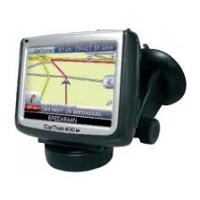
200 - GPS Navigation System CARTREK - Free user manual and instructions
Find the device manual for free 200 CARTREK in PDF.



User questions about 200 CARTREK
0 question about this device. Answer the ones you know or ask your own.
Ask a new question about this device
Download the instructions for your GPS Navigation System in PDF format for free! Find your manual 200 - CARTREK and take your electronic device back in hand. On this page are published all the documents necessary for the use of your device. 200 by CARTREK.
USER MANUAL 200 CARTREK
English: CarTrek 200
First time use of your navigation solution 2
More options for the selection of your destination 4
Blocking routes. 5
The options of your device 5
Overview of the main navigation screen. 7
Contact & support details 7
End user license agreement 8
Nederlands: CarTrek 200
We would like to thank you for the purchase of your Cartrek 200 navigation solution. This booklet contains important information on the correct use of your Cartrek 200. Read this information carefully before using your navigation solution.
First time use of your navigation solution
Make sure your device is powered and the SD memory card is inserted correctly into the SD slot of your Cartrek 200. Also, make sure that the SD card is NOT locked (slider at the left side of your SD card). Carefully read the hardware manual of the Cartrek 200.
Navigation solutions are based on digital maps. These digital maps are created with great care. However, actual situations such as one-way streets, street names, traffic signs etc change on a regular basis. Navigation systems can not take into account all these changes immediately. Therefore, you must always follow the local traffic rules. Neither CosmicNavigation BV, (partner) nor any other party can be held responsible for inconsistencies in the navigation solution.
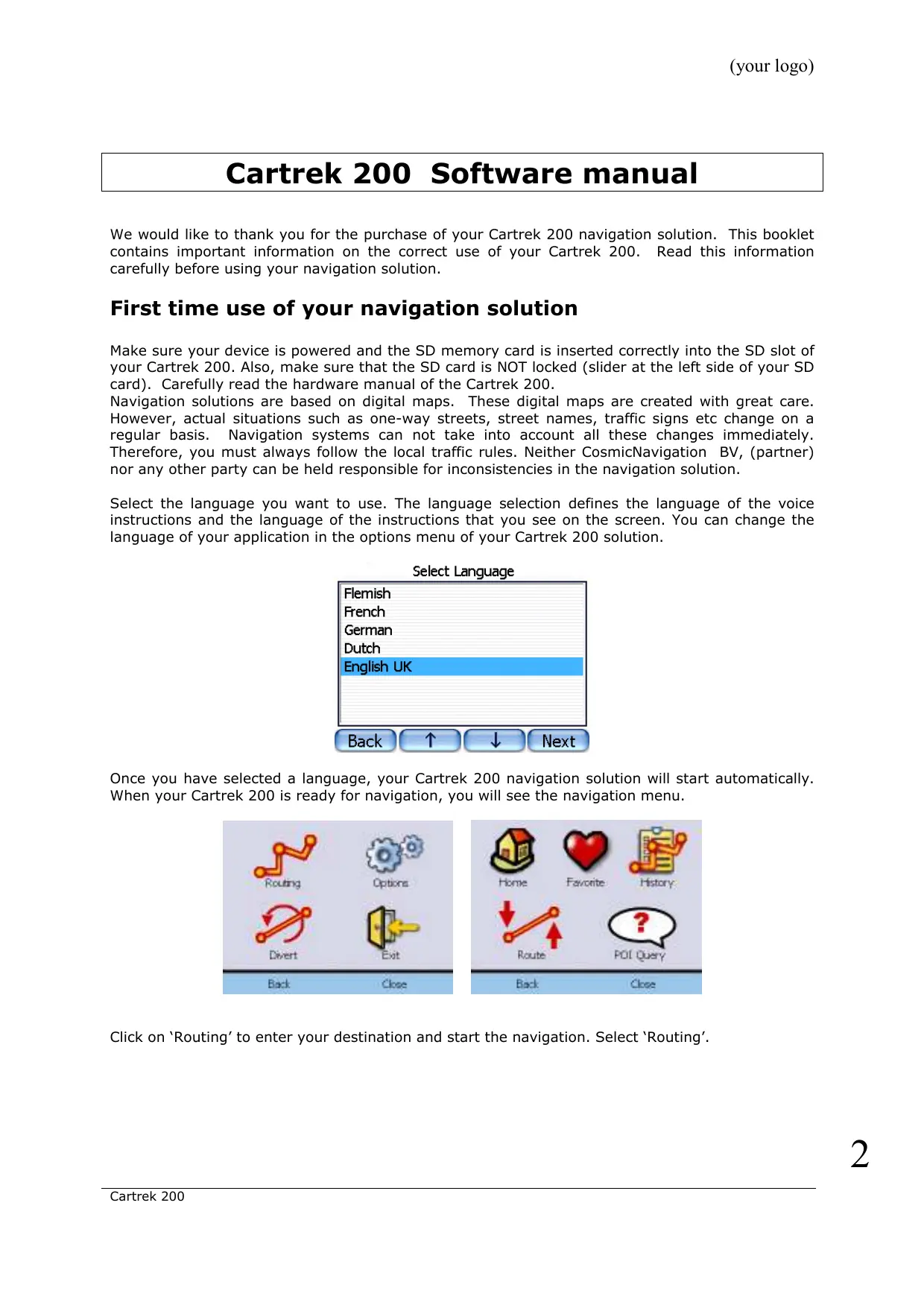
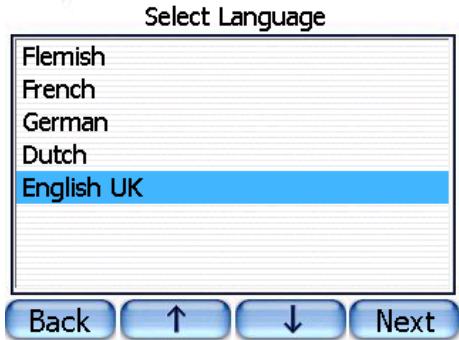
Select the language you want to use. The language selection defines the language of the voice instructions and the language of the instructions that you see on the screen. You can change the language of your application in the options menu of your Cartrek 200 solution.
Once you have selected a language, your Cartrek 200 navigation solution will start automatically. When your Cartrek 200 is ready for navigation, you will see the navigation menu.
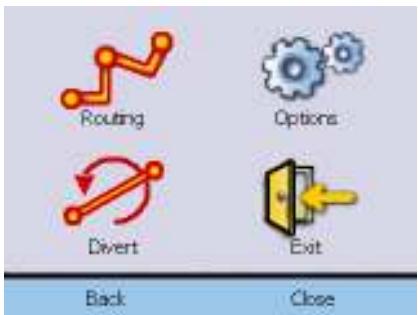
Click on 'Routing' to enter your destination and start the navigation. Select 'Routing'.
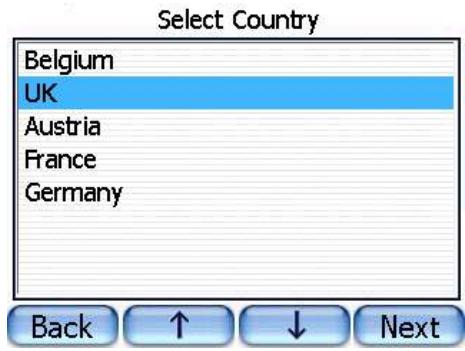
Select the region to which you want to plan a route. Click on 'Next'.
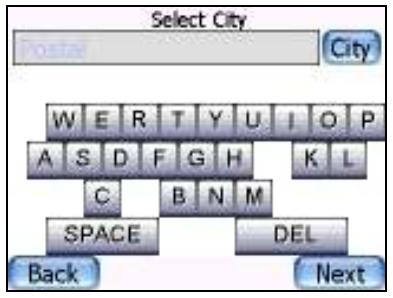
Enter the city name by clicking on the keyboard. You will notice that only these characters will remain visible that can be entered in combination with the characters that you already entered.
Once you have selected the city, click on 'Next'. If there are multiple city names that match the characters that you have already entered, you will be able to select the correct city from a list. You can browse the list by clicking on the up/down buttons at the lower part of the screen. Once you have entered the street name, click on 'Next'. If you do not enter a street name and click on 'next', you will be routed to the city centre of the selected city. You have the possibility to enter the house number. This is optional. You do not need to enter a house number.
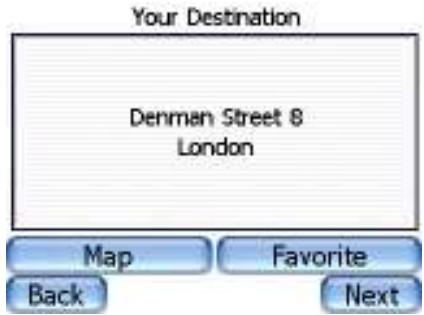
Click on the 'Next' button to start the navigation. If you want to store the address as a favourite destination, click on 'Favourite'. You can also see the destination on the map by clicking on 'Map'. Follow the audio instructions and follow the coloured line on your Cartrek 200 screen. Drive safely! If you click on the textual instructions, the last audio command will be repeated. If the selected street is closed for traffic, you will be guided to the nearest open street.
Important: GPS signals can only be received in your car or outdoors. Inside buildings or covered places, you will not be able to receive GPS signals. Cars with shielded windows will have limited GPS reception. An optional external GPS antenna can resolve this problem.
More options for the selection of your destination
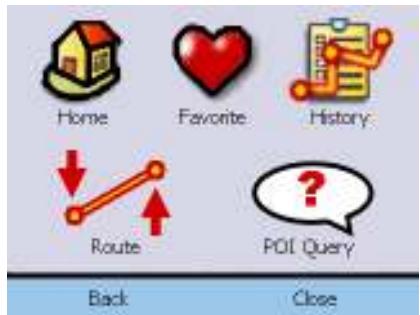
If you tap on the map, the Quickpick menu will open immediately. Click on 'Routing' to set up the different possibilities to create routes.
| Click on this icon to plan a route to your home destination. If you did not save your home address earlier, you will be asked to enter your home address. You can save your current position as your home address, or you can enter a full address. | |
| Select a favourite destination to navigate to. You can add new favourites by entering an address and save the address as a favourite in the address confirmation window (see above). | |
| Select a destination from the routes that you have recently driven. | |
| Select a POI (Place of Interest) to navigate to. See below for more explanation. | |
| Once you have created a route, you can delete the route by clicking on this icon. |
If you want to enter a destination by postal code, click on 'postal' (next to the address entry field). Enter the postal code and click on 'next'.
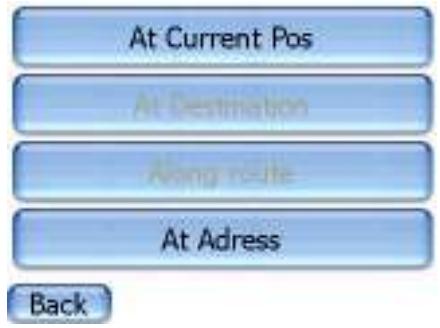
To select a POI as your destination, click on the POI icon. You can select a POI at your current position, at your destination (if a route is planned), along the route (if you have planned a route), or at a specific address.
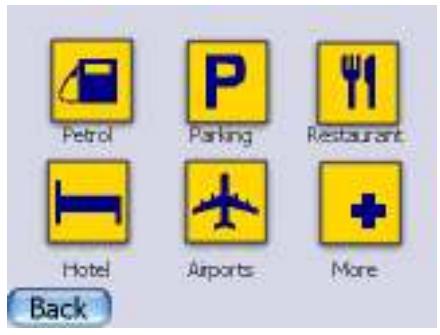
Once you have made a selection, click on the POI category that you want to find.
Blocking routes
To block routes, go to the Quickpick and click on

eBVvironment around your car. To block or avoid a route, click on the street on the map and click on avoid to avoid the street during your current trip. You can also block roads. A blocked road will remain blocked till you unblock the road again. You can also block roads for 5 or 15 kilometres. This is useful if you want to block, for instance, highways. In the block list, you can see all the roads that you have blocked. You can unblock roads here.
You will see a small map of the
The options of your device
In the Quickpick menu, click on
| To change the language of the application. If you change the language of the application, you will need to reset your Cartrek 200. | |
| To change the time zone of your device. These settings, in combination with the GPS time, define the clock of device. | |
| To adjust the route settings of your navigation solution. See below for more details. | |
| To adjust the screen settings of your device. See below for more details. | |
| To adjust the system options of your device. See below for more details. | |
| To adjust the audio volume of your device. |
In the route setting menu, you can change the route options:
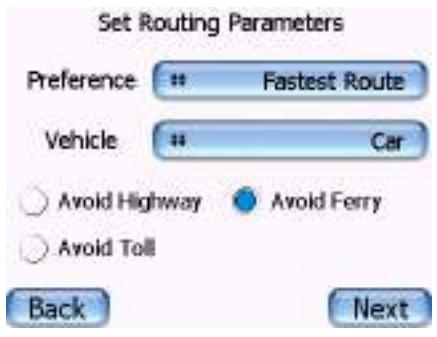
You can select the route type, the vehicle type and select the route options, such as avoiding ferry connections and highways. The default vehicle type is a car. If you want to use your navigation solution as a pedestrian or by bike, you need to change this setting.
In the screen settings menu, you can change the settings of the screen:
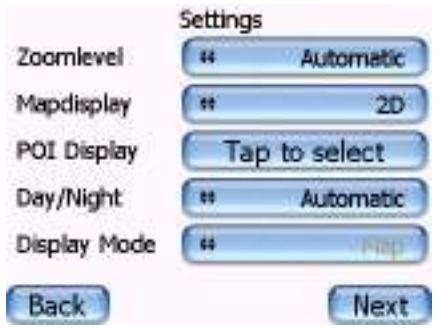
You can set your Cartrek 200 to automatically adjust the zoom level or your can set the zoom level manually. The map display can be shown in 2D (two dimensional) or 3D (three dimensional). You can also select which POIs should be displayed on the screen. Double tap on a POI category to make a POI visible or iBVisible. The Day/night toggle will change the colours of the screen to bright colours (during day) or darker colours (during night). If you set this toggle to automatically, the colours will change automatically when the sun sets or rises. The display mode defines if you see an arrow or a map display during navigation.
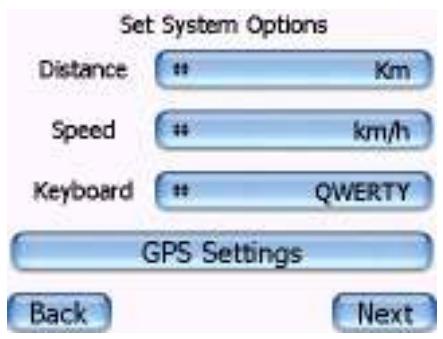
In the system options menu, you can change the basic settings of your device.
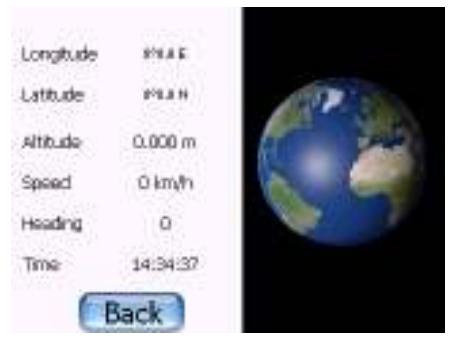
You can select which units your Cartrek 200 uses to indicate distance and speed. You can also change the keyboard layout: azerty/qwerty or an ABCD mode. If you click on GPS settings, you will see detailed information on the quality of the GPS reception.
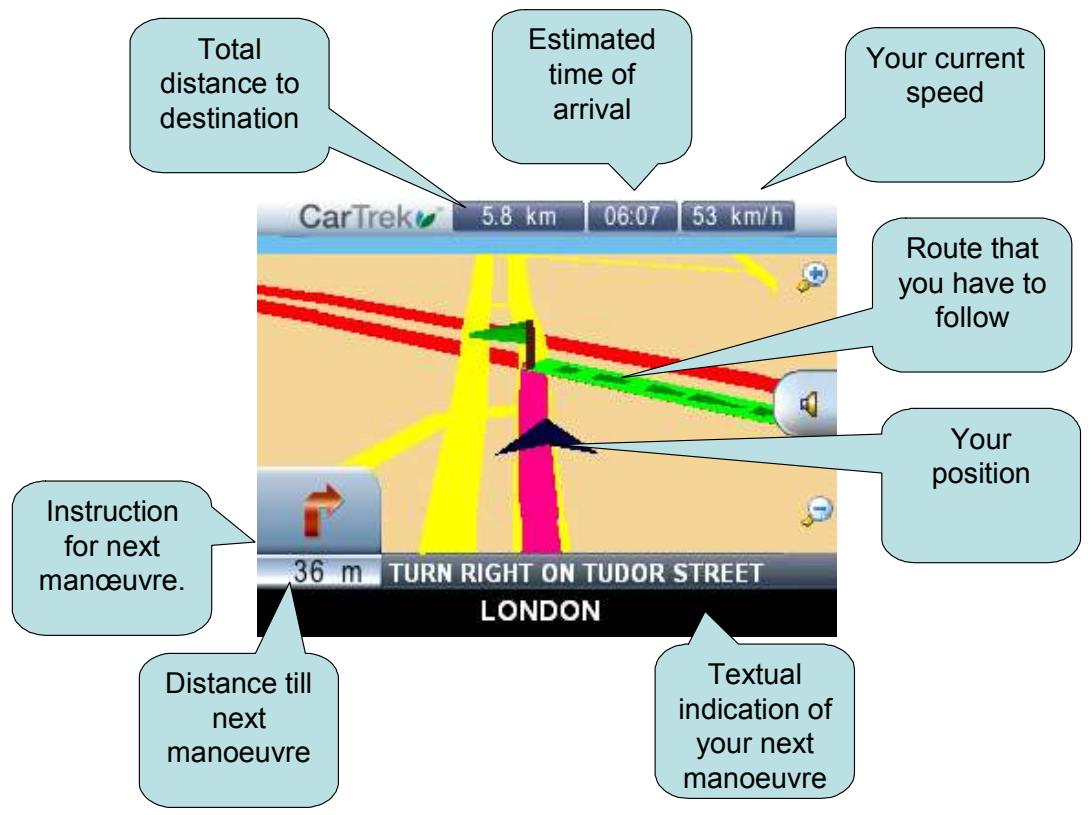
Overview of the main navigation screen
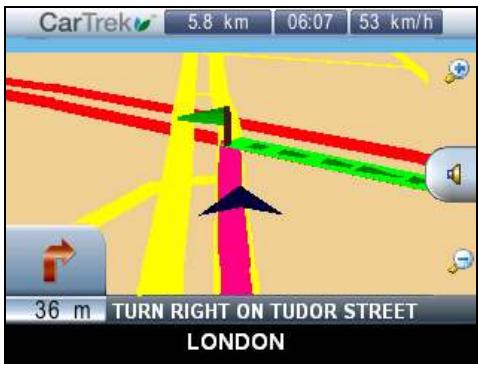
When you are driving you will see the screen below. This screen contains useful information about your navigation solution.
Contact & support details
If you have any questions about the navigation solution, or if you wish to contact us and provide us with feedback information, you can reach us at:
Our website: WWW.CARTREK.INFO
End user license agreement
Grant of Software License. This CosmicNavigation License Agreement ('License') permits Licensee to use one (1) copy of the software package ('Software Package') enclosed with the License for its own internal purposes only. The Software Package includes software ('Software'), if applicable, and their respective documentation. This non-exclusive License, without the right to sub license, grants to Licensee the right to install and use the Software on a single personal navigation device (PND). Neither concurrent use on two or more PNDs nor use in a local area network or other network (including but not limited to the Internet) is authorized without the advance written consent of Licensee and the payment of additional license fees. Subject to the foregoing, Licensee may not use the Software in a manner that allows other users than Licensee to use the Software. If Licensee has multiple Licenses for the Software, then, at any time, Licensee may have as many copies of the Software in use as Licensee has Licenses. 2. CosmicNavigation 's Rights. Licensee acknowledges that the Software consists of proprietary, unpublished products of CosmicNavigation, protected under copyright law and trade secret laws of general applicability of the U.S.A. and/or other countries. Licensee further acknowledges and agrees that all right, title and interest in and to the Software are and shall remain with CosmicNavigation . This Agreement does not coBvey to Licensee an interest in or to the Software, but only a limited right of use, revocable in accordance with the terms of this Agreement. CosmicNavigation reserves all rights not expressly granted to Licensee. The data used in combination with the Software Package are the property of a third party and are subject to terms and conditions of such third party. 3. Term. This License is effective upon Licensee's first use of the Software and shall continue until terminated. Licensee may terminate this Agreement at any time by returning the Software to CosmicNavigation . CosmicNavigation may terminate this Agreement upon breach by Licensee of any terms hereof. Upon such termination by CosmicNavigation , Licensee agrees to return immediately the Software to CosmicNavigation . 4. Other Restrictions. This License is Licensee's proof of a non-exclusive license to exercise the rights granted herein and must be retained by Licensee. Licensee may not rent, lease, or otherwise commercialize the Software in any manner. Licensee may not reverse engineer, decompile, or disassemble the Software, except to the extent that the foregoing restriction is expressly prohibited by applicable law. Licensee may not export the Software or the Hardware or transfer them to another who exports them in violation of applicable US law or other export laws and regulations. 5. Limited Warranty. CosmicNavigation warrants solely to Licensee that the Software shall perform substantially in accordance with the program specifications in effect at the time of delivery and shall be free from defects in materials and workmanship, when given normal, proper and intended usage, for a period of thirty (30) days from the date of delivery of the Software Package to Licensee. CosmicNavigation agrees to repair or replace at its option and without cost to Licensee, all defective Software Package components, provided that Licensee has given CosmicNavigation written notice of such warranty claim within such thirty (30) day warranty period. CosmicNavigation shall have no obligation to make repairs or replacements which are required by normal wear and tear, or which result, in whole or in part, from catastrophe, fault or negligence of Licensee, or from improper or unauthorized use of the Software Package (including any use by third parties and by Licensee's employees, consultants and agents who are not authorized users), or use of the Software Package in a manner for which it is not designed, or by causes external to the Software Package. No suit or action shall be brought against CosmicNavigation more than one (1) year after the related cause of action has occurred. Furthermore, CosmicNavigation grants to Licensee only such warranty on the Hardware, as it receives from its hardware provider. 6. Limitation of Liability. IN NO EVENT WILL COSMICNAVIGATION BE LIABLE FOR ANY INDIRECT, SPECIAL, INCIDENTAL, ECONOMIC OR CONSEQUENTIAL DAMAGES, ARISING OUT OF THE USE OF OR INABILITY TO USE THE SOFTWARE PACKAGE, INCLUDING SOFTWARE, DOCUMENTATION, OR HARDWARE, IF APPLICABLE, EVEN IF ADVISED OF THE POSSIBILITY OF SUCH DAMAGES. IN NO CASE SHALL COSMICNAVIGATION 'S LIABILITY EXCEED THE AMOUNT PAID BY LICENSER FOR THE SYSTEM. Furthermore, CosmicNavigation explicitly states that Licensee should not operate the Software Package while its vehicle is in motion. Licensee must keep its attention focused on the road, road traffic and the operation of the vehicle. By using the Software Package, Licensee acknowledges that it releases CosmicNavigation , CosmicNavigation 's partners, employees and shareholders from any actions directly or indirectly related to the use and/or operations of the Software Package. 7. Remedies. A breach by Licensee will irreversibly harm CosmicNavigation and CosmicNavigation shall be entitled to injunctive and/or other equitable relief, in addition to other remedies afforded by law. 8. Governing Law. This Agreement shall be governed by the laws of Belgium. 9. Severability. Should any term of this Agreement be declared void or unenforceable by any court of competent jurisdiction, such declaration shall have no effect on the remaining terms hereof. 10. No Waiver. The failure of either party to enforce any rights granted hereunder or to take action against the other party in the event of any breach hereby shall not be deemed a waiver by that party as to subsequent enforcement of rights or subsequent actions in the event of future breaches. 11. Restricted Rights. RESTRICTED RIGHTS: If this Product is acquired by or for the U.S.Government, then it is provided with Restricted Rights. Use, duplication, or disclosure by the U.S.Government is subject to restrictions as set forth in subparaphg c)(1)(ii) of The Rights in Technical Data and Computer Software clause at DFARS 252.227-7013, or subparagraphs c)(1) and (2) of the Commercial Computer Software - Restricted Rights at 48 CFR 52.227-19, or clause 18-52.227-86(d) of the NASA Supplement to the FAR, as applicable, or any successor regulations. The contractor/manufacturer is CosmicNavigation N.V., Vollickstraße 67, 1785 Brussemegel, Belgium. 12. Register your CosmicNavigation GPS solution within 30 days of your purchase on www.CosmicNavigation.com/registration. If the product is still unregistered 30 days after purchase of the product, the purchaser can not benefit from technical support and access to the CosmicNavigation Auto Update Service. The serial number provided with this software is your personal serial number. If you hand it over to 3rd parties, you will be denied access to the CosmicNavigation Auto Update Service. 13. You are not allowed to use the application in combination with a back-end solution for track and trace. If you connect a back-end solution for track and trace to the CosmicNavigation GPS navigation application, an additional royalty fee for use of the map data will apply. Please contact CosmicNavigation BV for price information on prices. © Copyright 2001 - 2006 CosmicNavigation N.V. All rights reserved. All product names referenced herein are trademarks or registered trademarks of their respective owners. Screenshots and pictures used in this manual can change without prior notice and are for reference only..
CosmicNavigation
Cartrek 200 Software handleiding
Copyright 1 - 5 CosmicNavigation N.V. All rights reserved. All product names referenced herein are trademarks or registered trademarks of their respective owners.
LICENCE AGREEMENT: MAP DATA
The data ("Data") is provided for your personal, internal use only and not for resale. It is protected by copyright, and is subject to the following terms and conditions which are agreed to by you, on the one hand, and CosmicNavigation BV ("CosmicNavigation BV") and its licensors (including their licensors and suppliers) on the other hand. © 2005 Navigation Technologies. All rights reserved. The Data for areas of Canada includes information taken with permission from Canadian authorities, including: Her Majesty the Queen in Right of Canada, © Queen's Printer for Ontario. TERMS AND CONDITIONS: Personal Use Only. You agree to use this Data together with CosmicNavigation GPS for the solely personal, non-commercial purposes for which you were licensed, and not for service bureau, time-sharing or other similar purposes. Accordingly, but subject to the restrictions set forth in the following paragraphs, you may copy this Data only as necessary for your personal use to (i) view it, and (ii) save it, provided that you do not remove any copyright notices that appear and do not modify the Data in any way. You agree not to otherwise reproduce, copy, modify, decompile, disassemble or reverse engineer any portion of this Data, and may not transfer or distribute it in any form, for any purpose, except to the extent permitted by mandatory laws. Restrictions. Except where you have been specifically licensed to do so by CosmicNavigation BV, and without limiting the preceding paragraph, you may not (a) use this Data with any products, systems, or applications installed or otherwise connected to or in communication with vehicles, capable of vehicle navigation, positioning, dispatch, real time route guidance, fleet management or similar applications; or (b) with or in communication with any positioning devices or any mobile or wireless-connected electronic or computer devices, including without limitation cellular phones, palmtop and handheld computers, pagers, and personal digital assistants or PDAs. No Warranty. This Data is provided to you "as is," and you agree to use it at your own risk. CosmicNavigation BV and its licensors (and their licensors and suppliers) make no guarantees, representations or warranties of any kind, express or implied, arising by law or otherwise, including but not limited to, content, quality, accuracy, completeness, effectiveness, reliability, fitness for a particular purpose, usefulness, use or results to be obtained from this Data, or that the Data or server will be uninterrupted or error-free. Disclaimer of Warranty: CosmicNavigation BV AND ITS LICENSORS (INCLUDING THEIR LICENSORS AND SUPPLIERS) DISCLAIM ANY WARRANTYES, EXPRESS OR IMPLIED, OF QUALITY, PERFORMANCE, MERCHANTABILITY, FITNESS FOR A PARTICULAR PURPOSE OR NON-INFRINGEMENT. Some States, Territories and Countries do not allow certain warranty exclusions, so that extent the above exclusion may not apply to you. Disclaimer of Liability: CosmicNavigation BV AND ITS LICENSORS (INCLUDING THEIR LICENSORS AND SUPPLIERS) SHALL NOT BE LIABLE TO YOU: IN RESPECT OF ANY CLAIM, DEMAND OR ACTION, IRRESPECTIVE OF THE NATURE OF THE CLAIM, DEMAND OR ACTION ALGEGING ANY LOSS, INJURY OR DAMAGES, DIRECT OR INDIRECT, WHICH MAY RESULT FROM THE USE OR POSSESSION OF THE INFORMATION; OR FOR ANY LOSS OF PROFIT, REVENUE, CONTRACTS OR SAVINGS, OR ANY OTHER DIRECT, INDIRECT, INCIDENTAL, SPECIAL OR CONSEQUENTIAL DAMAGES ASRISING OUT OF YOUR USE OF OR INABILITY TO USE THIS INFORMATION, ANY DEFECT IN THE INFORMATION, OR THE BREACH OF THESE TERMS OR CONDITIONS, WHETHER IN AN ACTION IN CONTRACT OR TORT OR BASED ON A WARRANTY, EVEN IF CosmicNavigation BV OR ITS LICENSORS HAVE BEEN ADVISED OF THE POSSIBILITY OF SUCH DAMAGES. Some States, Territories and Countries do not allow certain liability exclusions or damages limitations, so that extent the above may not apply to you. Disclaimer of Endorsement: Reference to any products, services, processes, hypertext links to third parties or other Data by trade name, trademark, manufacturer, supplier or otherwise does not necessarily constitute or imply its endorsement, sponsorship or recommendation by CosmicNavigation BV or its licensors. Product and service information are the sole responsibility of each individual vendor. The Navigation Technologies name and logo, the NAVTECH and NAVTECH ON BOARD trademarks and logos, and other trademarks and trade names owned by Navigation Technologies may not be used in any commercial manner without the prior written consent of Navigation Technologies. Export Control. You agree not to export from anywhere any part of the Data provided to you or any direct product thereof except in compliance with, and with all licenses and approvals required under, applicable export laws, rules and regulations. Indemnity. You agree to indemnify, defend and hold CosmicNavigation BV and its licensors (including their respective licensors, suppliers, assignees, subsidiaries, affiliated companies, and the respective officers, directors, employees, shareholders, agents and representatives of each of them) free and harmless from and against any liability, loss, injury (including injuries resulting in death), demand, action cost expense or claim of any kind character including but not limited to attorney's fees arising out of or in connection with any use or possession by you of this Data. Entire Agreement. These terms and conditions constitute the entire agreement between CosmicNavigation BV (and its licensors, including their licensors and suppliers) and you pertaining to the subject matter hereof and supersedes in their entirety any and all written or oral agreements previously existing between us with respect to such subject matter. Governing Law. The above terms and conditions shall be governed by the laws of The Netherlands, without giving effect to (i) its conflict of laws provisions, or (ii) the United Nations CoBvention for Contracts for the International Sale of Goods, which is explicitly excluded. You agree to submit to the jurisdiction of The Netherlands for any and all disputes claims and actions arising from or in connection with the Data provided to you hereunder. Government End Users. Traffic Information is provided by the Ministerie van de Vlaamse Gemeenschap and the Ministerie de l'Equipement et des Transports.
source of the map data:
France: "Géoroute® IGN France & BD Carto® IGN France"
Norway: "Copyright © 2000; Norwegian Mapping Agency"
Portugal: "Source: IgeoE - Portugal"
Sweden: "Based upon electronic data Ó National Land Survey Sweden."
If the NAVTECH Data is being acquired by or on behalf of the United States government or any other entity seeking or applying rights similar to those customarily claimed by the DFARS 252.227-7013(b)(3), TECHNICAL DATA-NONCOMMERCIAL ITEMS, and NAVTECH Data delivered or otherwise furnished with "Limited Rights" shall be marked with the following "Limited Rights Notice" set forth at DFARS 252.227-7013(f)(3), and shall be treated in accordance with such Notice:
CONTRACT NO.:
CONTRACTOR (MANUFACTURER/ SUPPLIER) NAME: Navigation Technologies
CONTRACTOR (MANUFACTURER/SUPPLIER) ADDRESS: 222 Merchandise Mart Plaza, Suite 900, Chicago, Illinois 60654
The Government's rights to use, modify, reproduce, release, perform, display, or disclose these technical data are restricted by paragraph (b)(3) of the Rights in Technical Data-Noncommercial Items clause contained in the above identified contract. Any reproduction of technical data or portions thereof marked with this legend must also reproduce the markings. Any person, other than the Government, who has been provided access to such data must promptly notify the above named Contractor.
and; (ii) for civilian agency acquisitions, the NAVTECH Data is licensed in accordance with the rights set forth at FAR 52.227-14(g)(1), RIGHTS IN DATA-GENERAL (Protection of limited rights data and computer software). In the event that the Contracting Officer requires the delivery of limited rights NAVTECH Data that has been withheld or would otherwise be withholdable in accordance with FAR 52.227-14(g)(1), the NAVTECH Data is licensed with "Limited Rights" as set forth in the following "Limited Rights Notice" at FAR 52.227-14(g)(2) (Alternate II), which shall be affixed to the NAVTECH Data and the NAVTECH Data shall be treated in accordance with such Notice (which shall be marked on any reproduction of these data, in whole or in part): LIMITED RIGHTS NOTICE (JUN 1987).
These data are submitted with limited rights under Government Contract No. (and subcontract, if appropriate). These data may be reproduced and used by the Government with the express limitation that they will not, without written permission of the Contractor, be used for purposes of manufacture nor disclosed outside the Government; except that the Government may disclose these data outside the Government for the following purposes, if any, provided that the Government makes such disclosure subject to prohibition against further use and disclosure: There are no additional purposes permitting disclosure of such Data. The manufacturer/supplier of the Data is Navigation Technologies, 222 Merchandise Mart Plaza, Suite 900, Chicago, Illinois 60654.
If the Contracting Officer refuses to use either of the licenses provided in (i) or (ii), herein, the Contracting Officer must notify Navigation Technologies prior to seeking additional or alternative rights in the NAVTECH Data.