
SPRINTER - Stopwatch IROX - Free user manual and instructions
Find the device manual for free SPRINTER IROX in PDF.

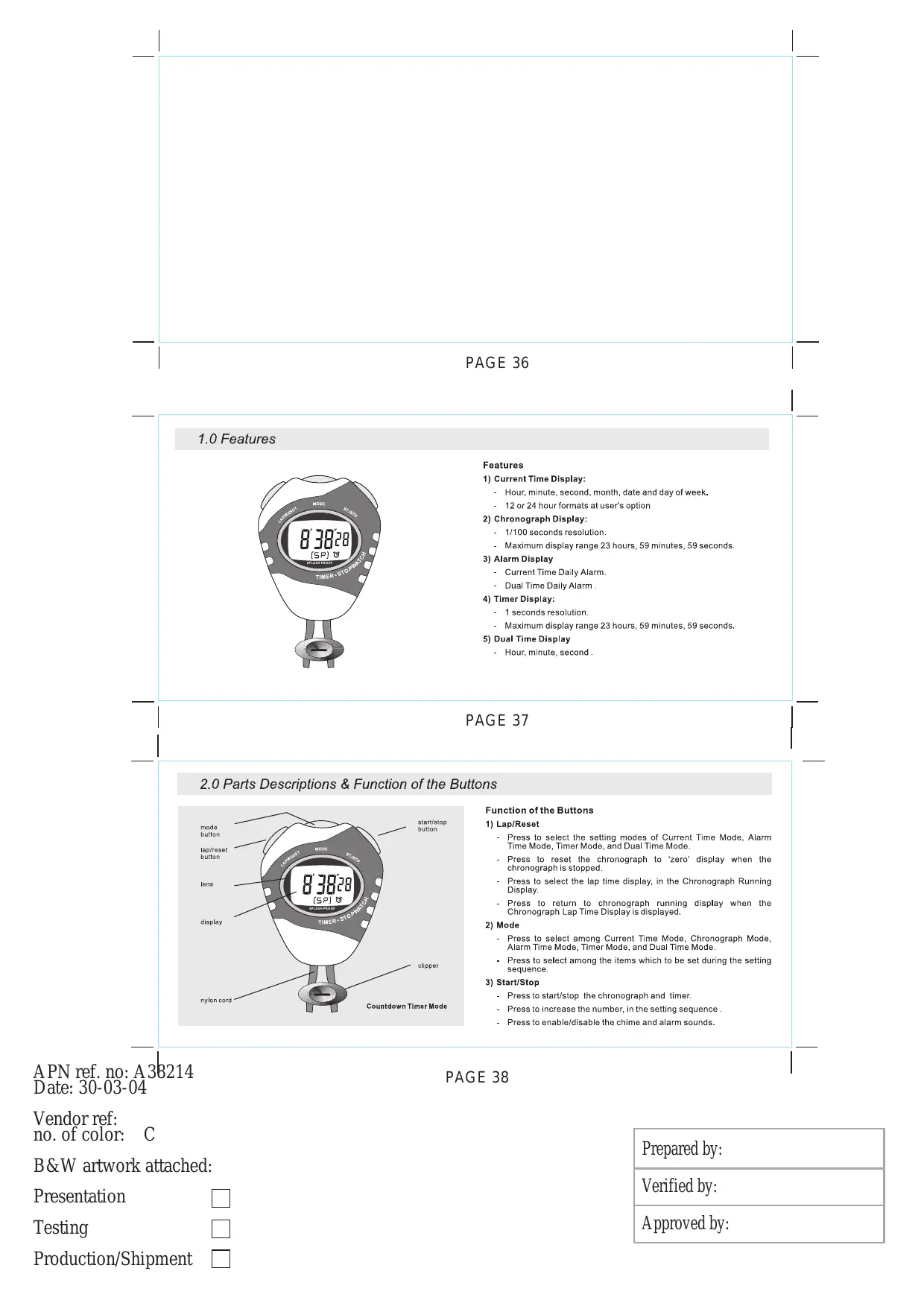


| Product type | Digital stopwatch |
| Brand | IROX |
| Model | SPRINTER |
| Power supply | Button cell battery (type CR2032) |
| Display | Digital LCD |
| Time format | 12h or 24h selectable |
| Main functions | Time/date, stopwatch, alarm, timer, second time zone |
| Stopwatch - Resolution | 1/100th second (up to 30 min), then 1 second |
| Stopwatch - Maximum measurement | 23 h 59 min 59 s |
| Stopwatch - Functions | Simple measurement, lap time (intermediate time) |
| Timer - Resolution | 1 second |
| Timer - Range | 0 to 23 h 59 min 59 s |
| Alarm | Daily alarm (main zone and second time zone), hourly chime |
| Alarm tones | 20-second beep |
| Timer tones | Progressive beeps and final 3 beeps over 16 s |
| Second time zone | Display of a second time zone |
| Keys | MODE, LAP/RESET, START/STOP |
| Care and cleaning | Avoid water and shocks. Clean with a soft, dry cloth. |
| Safety | Do not expose to extreme temperatures or humidity. |
| Spare parts and repairability | Not specified. In case of failure, contact customer service. |
Frequently Asked Questions - SPRINTER IROX
User questions about SPRINTER IROX
0 question about this device. Answer the ones you know or ask your own.
Ask a new question about this device
Download the instructions for your Stopwatch in PDF format for free! Find your manual SPRINTER - IROX and take your electronic device back in hand. On this page are published all the documents necessary for the use of your device. SPRINTER by IROX.
USER MANUAL SPRINTER IROX
APN ref. no: A'38214
Date: 02-04-04
PAGE 2
Vendor ref:
no. of color:
C
B&W artwork attached:
Presentation

Testing

Production/Shipment

Prepared by:
Verified by:
Approved by:
APN ref. no: A38214
Date: 31-03-04
Vendor ref: no. of color:
PAGE 5
B&W artwork attached:
Presentation
Testing
Production/Shipment


Prepared by:
Verified by:
Approved by:
Verified by:
Approved by:
APN ref. no: A38214 Date: 31-03-04
Vendor ref: no. of color: C
B&W artwork attached:
Presentation
Testing
Production/Shipment

PAGE 8


Prepared by:
Verified by:
Approved by:
B&W artwork attached:
Presentation
Testing
Production/shipment
Prepared by:
Verified by:
Approved by:
PAGE 12
1.0 Funktionen
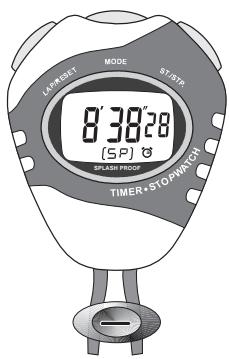
Funktionen
1) Uhr
B&W artwork attached:
Presentation
Testing
Production/Shipment
PAGE 14
Prepared by:
Verified by:
Approved by:
3.0 Hauptfunktionen
APN ref. no: A38214 Date: 31-03-04
Vendor ref: no. of color:
PAGE 17
B&W artwork attached:
Presentation
Testing
Production/Shipment


Prepared by:
Verified by:
Approved by:
APN ref. no: A38214 Date: 31-03-04
Vendor ref: no. of color: C
PAGE 20
B&W artwork attached:
Presentation
Testing
Production/Shipment


Prepared by:
Verified by:
Approved by:
7.1 Timer verwenden
B&W artwork attached:
Presentation
Testing
Production/Shipment
Prepared by:
Verified by:
Approved by:
PAGE 24
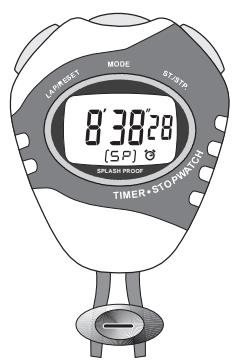
1.0 Fonctions
Fonctions
1) Horloge
B&W artwork attached:
Presentation
Testing
Production/Shipment
PAGE 26
Prepared by:
Verified by:
Approved by:
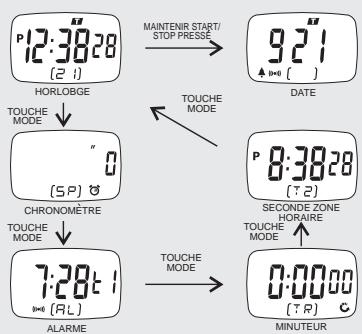
Major Function Modes
B&W artwork attached:
Presentation
Testing
Production/Shipment
Prepared by:
Verified by:
Approved by:
APN ref. no: A38214 Date: 31-03-04
Vendor ref: no. of color: C
PAGE 32
B&W artwork attached:
Presentation
Testing
Production/Shipment
Prepared by:
Verified by:
Approved by:
- AM, PM, heures, minutes, secondes
B&W artwork attached:
Presentation
Testing
Production/Shipment
Prepared by:
Verified by:
Approved by:
| Prepared by: |
| Verified by: |
| Approved by: |
PAGE 36
1.0 Features
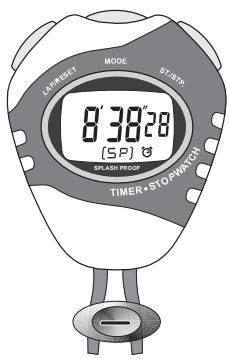
Features
1) Current Time Display:
- Hour, minute, second, month, date and day of week.
- 12 or 24 hour formats at user's option
2) Chronograph Display:
- 1/100 seconds resolution.
Maximum display range 23 hours, 59 minutes, 59 seconds.
3) Alarm Display
Current Time Daily Alarm.
Dual Time Daily Alarm.
4) Timer Display:
- 1 seconds resolution.
Maximum display range 23 hours, 59 minutes, 59 seconds.
5) Dual Time Display
- Hour, minute, second.
PAGE 37
2.0 Parts Descriptions & Function of the Buttons

Function of the Buttons
1) Lap/Reset
- Press to select the setting modes of Current Time Mode, Alarm Time Mode, Timer Mode, and DualTime Mode.
Press to reset the chronograph to 'zero' display when the chronograph is stopped.
Press to select the lap time display, in the Chronograph Running Display. - Press to return to chronograph running display when the Chronograph Lap Time Display is displayed.
2) Mode
- Press to select among Current Time Mode, Chronograph Mode, Alarm Time Mode, Timer Mode, and Dual Time Mode.
- Press to select among the items which to be set during the setting sequence.
3) Start/Stop
- Press to start/stop the chronograph and timer.
- Press to increase the number, in the setting sequence.
- Press to enable/disable the chime and alarm sounds.
APN ref. no: A38214
Date: 30-03-04
PAGE 38
Vendor ref:
no. of color:
C
B&W artwork attached:
Presentation

Testing

Production/Shipment

Prepared by:
Verified by:
Approved by:
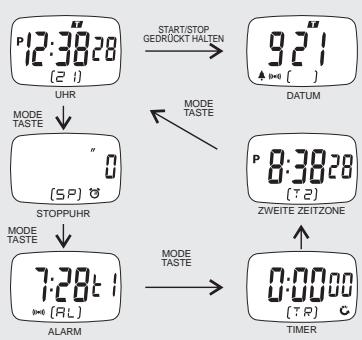
3.0 Major Function Modes
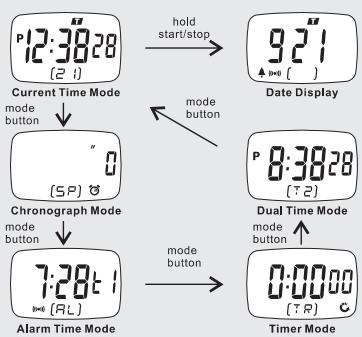
Major Function Modes
Major Function Modes
- There are 5 major function modes:
1) Current Time Mode,
2) Chronograph Mode,
3) Alarm Mode,
4) Timer Mode, and
5) Dual Time Mode.
How to Select among Function Modes
- Press the [mode] button once to select among Current Time Mode, Chronograph Mode, Alarm Mode, Timer Mode, and Dual Time Mode.
How to Select Date Display
- Press and hold the [start/stop] button to select Date Display, in the Current Time Mode.
PAGE 39
4.0 How to Set the Time and Date
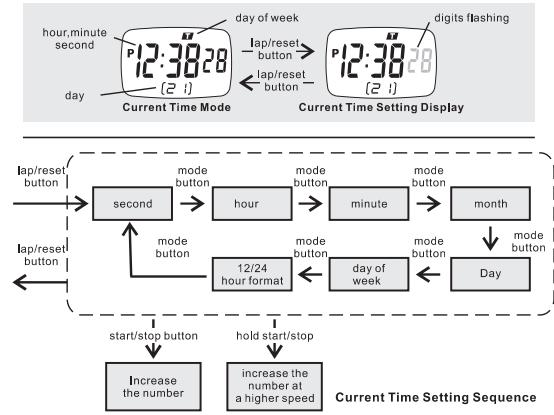
How to Set the Time and Date
- Press the [lap/repeat] button to select the Current Time Setting Display, in the Current Time Mode.
- The second digits start flashing on the display because they are being selected. Press the [mode] button to select among the different setting items following the Current Time Setting Sequence, or press the [start/stop] button once to reset the second to zero second.
- If one of the setting items (hour, minute, month, day, day of week) is flashing press the [start/stop] button to change the setting, or hold down the [start/stop] button to change the setting at a higher speed.
- If the '12' or '24' is flashing, press the [start/stop] button once to select between '12' (12 hour format) and '24'(24 hour format).
- After you set the current time, date and 12/24 hour format, press the [lap/resel] button once to exit the Current Time Setting Sequence.
- If no key-stoke has been activated for 30 seconds, the setting display will return to Current Time Mode.
PAGE 40
5.0 Chronograph Mode
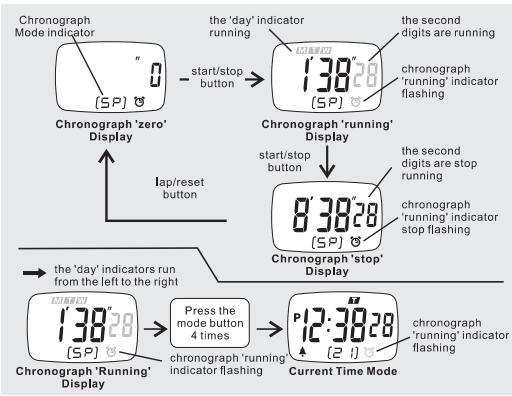
Chronograph Mode
The Chronograph measures elapsed times and lap times. The display shows the 'Zero' display, if the chronograph is being selected the first time or the chronograph has been reset.
To Start/Stop the Chronograph
- When the chronograph is stopped, press the [start/stop] button once to start the chronograph; press the [start/stop] button once again to stop the chronograph.
- The elapsed time between the two 'start/stop' keystrokes will be appeared on the display.
- Repeat the above mentioned steps to get the accumulative time of which the chronograph is running.
To Reset the Chronograph - Record a new set of accumulative elapsed time, press the [lap/reset] button to reset the chronograph to 'Zero' display when the chronograph is stopped.
NOTE: (1) The maximum counting range of the chronograph is 23 hours 59 minutes and 59 seconds.(2) If the accumulated time is long than 30 minutes, the display shows chronograph time in hours, minutes and seconds instead of minutes, seconds and 1/100 seconds. (3) If the Chronograph 'running' Indicator is flashing, the chronograph is running. If the Chronograph 'running' Indicator stop flashing, the chronograph is stopped.
APN ref. no: A38214
Date: 30-03-04
Vendor ref:
no.of color: C
B&W artwork attached:
Presentation
Testing
Production/Shipment
PAGE 41
Prepared by:
Verified by:
Approved by:
5.1 How to Record Lap Time
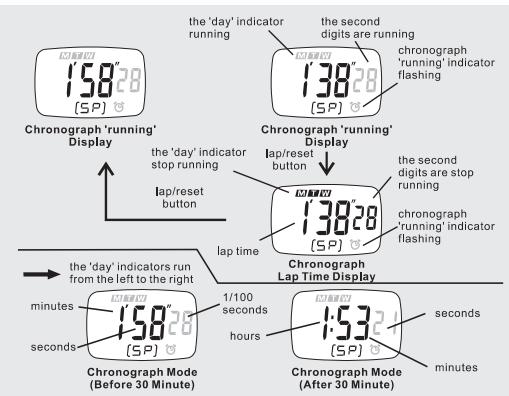
To Record Lap Time
- The Chronograph Mode allows you to record lap time.
- Press the [lap/reset] button once to record the lap time during the chronograph is running. During the lap time is displaying, the chronograph keeps on running.
- Press the [lap]/reset button once again to return to chronograph running display during the lap time is displaying.
- Repeat the steps mentioned above to get another lap time.
NOTE: (1) The maximum counting range of the chronograph is 23 hours 59 minutes and 59 seconds.(2) If the accumulated time is long than 30 minutes, the display shows chronograph time in hours, minutes and seconds instead of minutes, seconds and 1/100 seconds. (3) If the Chronograph 'running' Indicator is flashing, the chronograph is running. If the Chronograph 'running' Indicator stop flashing, the chronograph is stopped.
PAGE 42
6.0 Alarm Time Mode
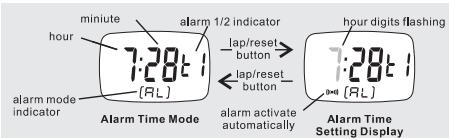
Alarm Time Mode
- Alarm 1 for the Current Time Mode; Alarm 2 for the Dual Time Mode.
To Set the Alarm Time
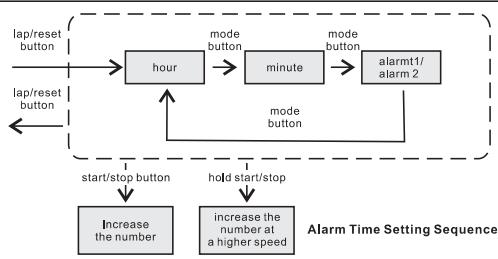
- Press the [lap/reset] button to change from Alarm Time Mode to Alarm Time Setting Display. The hour digits flash on the display because it is being selected.
The Setting Procedures
- Press [mode] button to select among the items which to be set following the Alarm Time Setting Sequence.
- If the digits are flashing, press the [start/stop] button to increase the number; hold the [start/stop] button to change the number at a higher speed.
- After setting the alarm time, press the [lap/reset] button to exit the setting sequence. If no key-stoke has been activated for 30 seconds, the setting display will auto return to Alarm Time Mode.
NOTE: Alarm will be activated automatically when setting alarm.
How to Select the ON/OFF of the Alarm and Chime
- Press the [start/stop] button to change the ON/OFF status of the hourly chime and alarm, in the Alarm Time Mode.
- If the chime indicator A is appeared (chime ON), the unit beeps every hour on the hour. If the alarm indicator ( ) is appeared (alarm ON), the unit sounds at the pre-set alarm time every day.
PAGE 43
7.0 Timer Mode
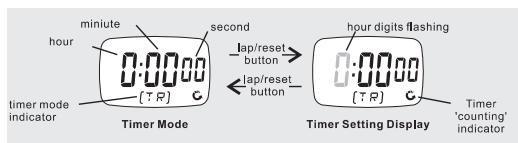
To Set the Timer
- The timer can be set/start counting from within the range from 0 to 23 hours, 59 minutes, 59 seconds.
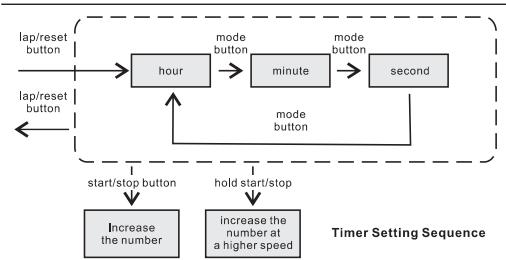
- Press the [lap/reset] button to change from Timer Mode to Timer Setting Display. The hour digits flash on the display because it is being selected.
The Setting Procedures
- Press [mode] button to select among the items which to be set following the Alarm Time Setting Sequence.
- If the digits are flashing, press the [start/stop] button to increase the number; hold the [start/stop] button to change the number at a higher speed.
- After setting the timer, press the [lap/reset] button to exit the setting sequence.
- If no key-stoke has been activated for 30 seconds, the setting display will auto return to Timer Mode.
APN ref. no: A38214
Date: 30-03-04
PAGE 44
Vendor ref:
no.of color: C
B&W artwork attached:
Presentation
Testing
Production/Shipment


Prepared by:
Verified by:
Approved by:
7.1 How to Use the Timer
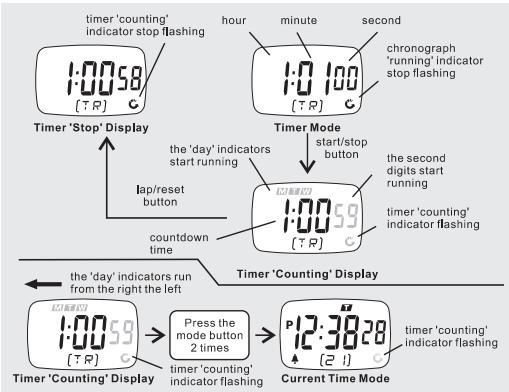
How to Start/Stop the Timer
- Press the [start/stop] button to start the timer when the timer is set.
- press the [start/stop] button once again to stop the timer.
- The countdown time will be shown on the display continuously.
NOTE: If the Timer 'counting' Indicator is flashing, the timer is counting. If the Timer 'counting' Indicator is stop flashing, the timer is stopped.
Alarm Sounds
- Sound 2 beeps at 30-second interval when timer remains at between 11 seconds and 3 minutes.
Sound 1 beep at 1-second interval when timer remains at between 1 second and 10 seconds.
Sound 3 beeps for 10 seconds when timer remains at zero second.
How to Reset/Re-load the Timer
- If the countdown time is come to zero or the timer is stopped, press the [lap/reset] button to re-load the preset countdown time into the display. Press [lap/reset] button once again to get the timer ready for counting.
- Check the 'To Set the Timer' section for setting another countdown time.
PAGE 45
8.0 How to Set the Dual Time
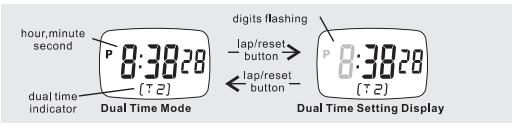
Dual Time Mode
- Dual Time Mode shows the time of the second time zone in hour, minute and second.
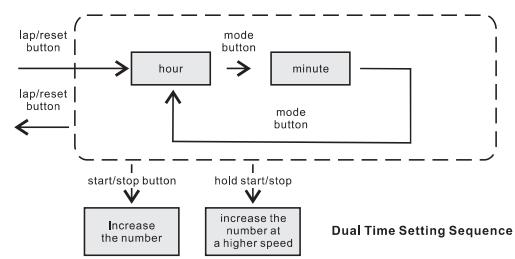
How to Set the Dual Time
- Press the [Iap/restart] button to select Dual Time Setting Display, in the Dual Time Mode.
- The hour digits start flashing on the display because they are being selected. Press the [mode] button to select between hour and minute setting or press the [start/stop] button to change the setting (hold the [start/stop] button to change the setting at a higher speed).
- If the minute digits are flashing, press the [start/stop] button once to increase the setting by 30 minutes.
- After you set the dual time, press the [lap/reset] button to exit the Dual Time Setting Sequence.
- If no key-stoke has been activated for 30 seconds, the setting display will return to Dual Time Mode.
PAGE 46
9.0 Specifications
Current Time Mode
Time System:
- AM, PM, Hour, minute, second
- 12-hour or 24-hour format
Calendar:
Month, date and day of week display
Alarm Mode
Alarm Type:
-
Current time daily alarm
Dual time daily alarm -
Hourly chime
Alarm Sound:
Sound for 20 seconds when it is alarm time
Chronograph Mode
Resolution:
- Within 30 minutes: 1/100 second (Display minutes, seconds and 1/100 seconds).
Over 30 minutes:1 second (Display hours,minutes and seconds).
Range:
- 23 hours 59 minutes 59 seconds
Countdown Timer
Resolution
- 1 second
Range:
- 23 hours 59 minutes 59 seconds
Operation Mode: - Countdown to zero and stop at zero
Timer Sounds:
Sound 2 beeps at 30-second interval when timer remains at between 11 seconds and 3 minutes.
Sound 1 beep at 1-second interval when timer remains at between 1 second and 10 seconds.
Sound 3 beeps for 10 seconds when timer remains at zero second.
Dual Time Display
Time System:
- AM, PM, Hour, minute, second
APN ref. no: A38214
Date: 30-03-04
Vendor ref:
no.of color: C
B&W artwork attached:
Presentation
Testing
Production/Shipment
PAGE 47
Prepared by:
Verified by:
Approved by:

Garantieschein / Certificate de garantie/Warranty
Gerat / Modèle / Nome del prodotto / Product:
SPRINTER
Handler (Adresse) / Nom du revendeur (Adress): Nome del negotiante (indirizzo) / Dealer's name (address):
Kaufdatum / Date d'achat / Data d'acquisito / Date of purchase:
www.irox.info
back cover
APN ref. no: A38214
Date: 24-03-04
Vendor ref: no. of color: C
B&W artwork attached:
Presentation
Testing
Production/Shipment
Prepared by:
Verified by:
Approved by: