
RC-1580 - Audio Amplifier ROTEL - Free user manual and instructions
Find the device manual for free RC-1580 ROTEL in PDF.



| Product Type | Stereo preamplifier |
| Dimensions (W x H x D) | 431 x 99 x 337 mm |
| Net Weight | 7.7 kg |
| Power Supply | 120 V/60 Hz (USA) or 230 V/50 Hz (Europe) |
| Power Consumption | 15 watts (standby 2.5 watts) |
| Audio Inputs | Phono MM/MC, CD, Tuner, Aux (3), Tape 1, Tape 2, Media Player (front) |
| Audio Outputs | 2 pairs of main outputs (RCA), Tape 1 and Tape 2 outputs |
| Frequency Response | Line inputs: 4 Hz - 100 kHz ±0.5 dB; Phono input: 20 Hz - 20 kHz ±0.2 dB |
| Total Harmonic Distortion | < 0.004% (20 Hz - 20 kHz) |
| Signal-to-Noise Ratio | Line inputs: 100 dB; Phono MM: 75 dB; Phono MC: 70 dB |
| Input Sensitivity | Phono MM: 2.5 mV / 47 kΩ; Phono MC: 250 µV / 100 Ω; Line: 150 mV / 220 kΩ |
| Tone Control | Bass ±6 dB at 100 Hz; Treble ±6 dB at 10 kHz |
| Remote Control | RR-AT97 infrared remote with basic functions and control of other Rotel devices |
| Special Features | Theater Bypass mode, 12 V trigger input/output, external IR input, RS-232 port, independent listening and recording selectors |
| Maintenance and Cleaning | Dry cloth or vacuum cleaner; do not use liquid products |
| Safety | Do not expose to moisture; do not open (risk of electric shock); place in a ventilated area |
| Spare Parts and Repairability | Internal fuse replaceable only by an authorized dealer; no user-serviceable parts |
Frequently Asked Questions - RC-1580 ROTEL
User questions about RC-1580 ROTEL
0 question about this device. Answer the ones you know or ask your own.
Ask a new question about this device
Download the instructions for your Audio Amplifier in PDF format for free! Find your manual RC-1580 - ROTEL and take your electronic device back in hand. On this page are published all the documents necessary for the use of your device. RC-1580 by ROTEL.
USER MANUAL RC-1580 ROTEL
Important Safety Instructions
WARNING: There are no user serviceable parts inside. Refer all servicing to qualified service personnel.
WARNING: To reduce the risk of fire or electric shock, do not expose the unit to moisture or water. Do not expose the unit to dripping or splashing. Do not place objects filled with liquids, such as vases, on the unit. Do not allow foreign objects to get into the enclosure. If the unit is exposed to moisture, or a foreign object gets into the enclosure, immediately disconnect the power cord from the wall. Take the unit to a qualified service person for inspection and necessary repairs.
Read all the instructions before connecting or operating the component.
Keep this manual so you can refer to these safety instructions.
Heed all warnings and safety information in these instructions and on the product itself. Follow all operating instructions.
Clean the enclosure only with a dry cloth or a vacuum cleaner.
Do not use this unit near water.
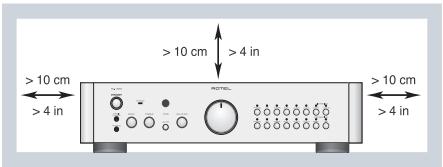
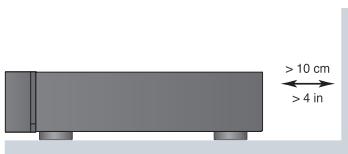
You must allow a minimum 10cm or 4 inches of unobstructed clearance around the unit.
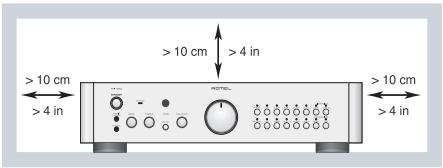
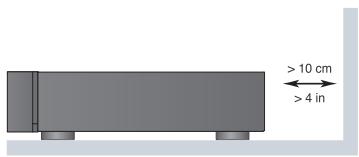
Do not place the unit on a bed, sofa, rug, or similar surface that could block the ventilation openings. If the unit is placed in a bookcase or cabinet, there must be ventilation of the cabinet to allow proper cooling.
Keep the component away from radiators, heat registers, stoves, or any other appliance that produces heat.
WARNING: The rear panel power cord connector is the mains power disconnect device. The apparatus must be located in an open area that allows access to the cord connector.
The unit must be connected to a power supply only of the type and voltage specified on the rear panel. (USA: 120 V/60Hz, EC: 230V/50Hz)
Connect the component to the power outlet only with the supplied power supply cable or an exact equivalent. Do not modify the supplied cable. A polarized plug has two blades, with one wider than the other. A grounding plug has two blades plus a third grounding prong. These are provided for your safety. Do not defeat grounding and/or polarization safety provisions. If the supplied plug does not fit your outlet, please consult an electrician for replacement of the obsolete outlet. Do not use extension cords.
The main plug of the power cordset is a disconnect device of the apparatus. In order to completely disconnect the apparatus from the supply mains, the main plug of the power cordset should be unplugged from the mains (AC) outlet. The stand-by LED indicator will not be lit up to show the power cord is unplugged. The disconnect device shall remain readily operable.
Do not route the power cord where it will be crushed, pinched, bent, exposed to heat, or damaged in any way. Pay particular attention to the power cord at the plug and where the cord exits the back of the unit.
The power cord should be unplugged from the wall outlet during a lightning storm or if the unit is to be left unused for a long period of time.
Use only accessories specified by the manufacturer.
Use only with a cart, stand, rack, bracket or shelf system recommended by Rotel. Use caution when moving the unit in a stand or rack to avoid injury from a tip-over.

Immediately stop using the component and have it inspected and/or serviced by a qualified service agency if:
The power supply cord or plug has been damaged
- Objects have fallen or liquid has been spilled into the unit
The unit has been exposed to rain
The unit shows signs of improper operation
- The unit has been dropped or damaged in any way

CAUTION
RISK OF ELECTRIC SHOCK DO NOT OPEN

CAUTION: TO REDUCE THE RISK OF ELECTRIC SHOCK, DO NOT REMOVE COVER, NO USER-SERVICEABLE PARTS INSIDE REFER SERVICING TO QUALIFIED SERVICE PERSONNEL.
APPLICABLE FOR USA, CANADA OR WHERE APPROVED FOR THE USAGE
CAUTION: TO PREVENT ELECTRIC SHOCK, MATCH WIDE BLADE OF PLUG TO WIDE SLOT, INSERT FULLY.
ATTENTION: POUR EVITER LES CHOCS ELECTRIQUES, INTRODUIRE LA LAME LA PLUS LARGE DE LA FICHE DANS LA BORNE CORRESPONDALE DE LA PRISE ET POUSSER JUSQU AU FOND.

This symbol is to alert the user to the presence of uninsulated dangerous voltages inside the product's enclosure that may constitute a risk of electric shock.

This symbol is to alert the user to important operating and maintenance (service) instructions in this manual and literature accompanying the product.

Rotel products are designed to comply with international directives on the Restriction of Hazardous Substances (RoHS) in electrical and electronic equipment and the disposal of Waste Electrical and Electronic Equipment (WEEE). The crossed wheelie bin symbol indicates compliance and that the products must be appropriately recycled or processed in accordance with these directives.

This symbol means that this unit is double insulated. An earth connection is not required.

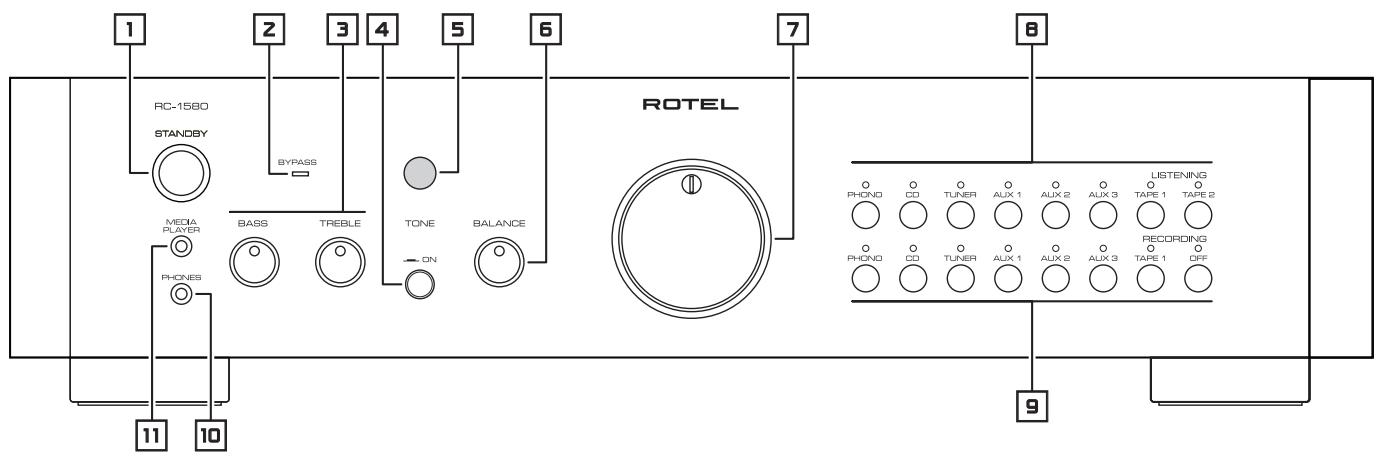
Figure 1: Controls and Connections
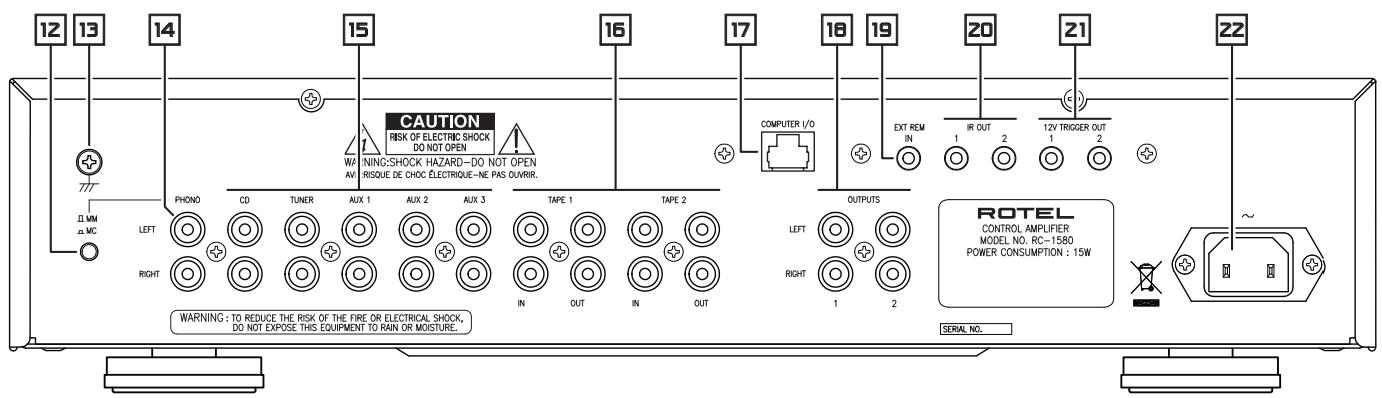
Figure 2: RR-AT97 Remote Control
Telekomande RR-AT97
Fernbedienung RR-AT97
Mando a Distancia RR-AT97
De afstandsbediening RR-AT97
Telekomando RR-AT97
RR-AT97 fjärrkontroll
Пульт RR-AT97
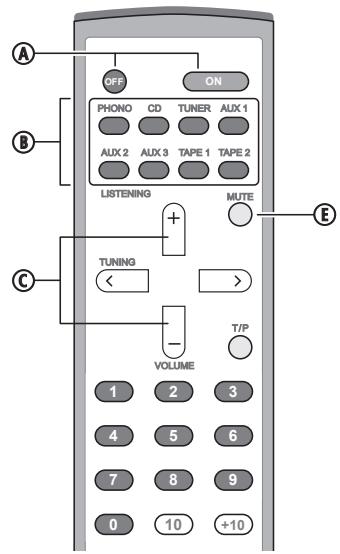
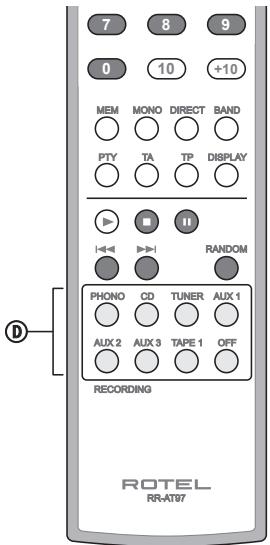
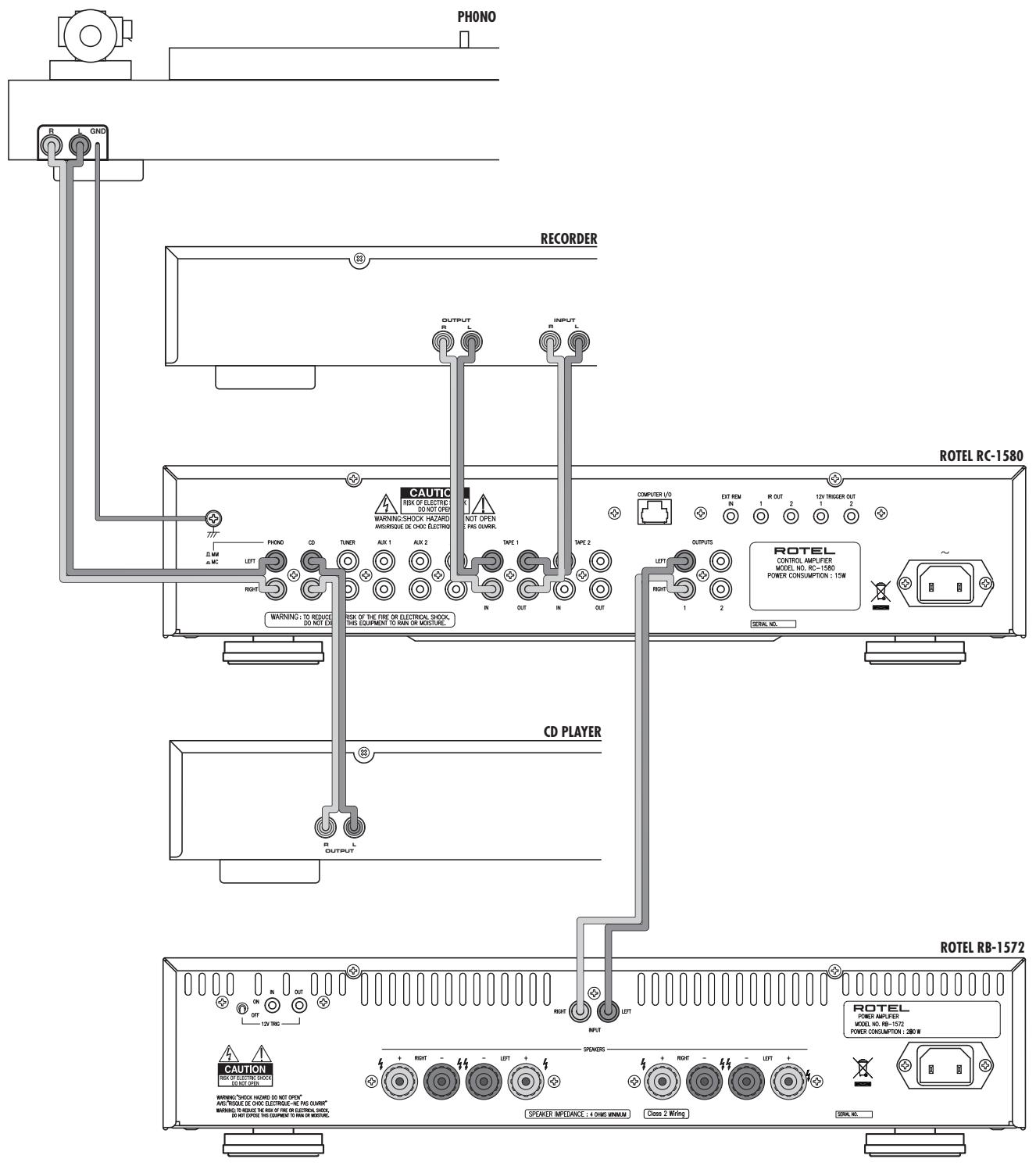
Figure 3: Input and Output Connections Branchements des entrées et des sorties Ein- und Ausgangsanschlüsse Conexiones de Entrada y Salida Het aansluitschema Collegamenti di ingressso ed uscita Anslutningar for in- och utsignaler IoicoeHHeMe BxOIOB M BbIXOIOB
Important Notes
When making connections be sure to:
Turn off all the components in the system before hooking up any components, including loudspeakers.
Turn off all components in the system before changing any of the connections to the system.
It is also recommended that you:
Turn the volume control of the amplifier all the way down before the amplifier is turned on or off.
Remarques importantes
Important Safety Instructions 2
Figure 1: Controls and Connections
Figure 2: RR-AT97 Remote Control
Figure 3: Input and Output Connections
Important Notes
About Rotel. 6
Getting Started 6
A Few Precautions
Placement
Cables
RR-AT97 Remote Control 7
Remote Sensor
AC Power and Control 7
AC Power Input
STANDBY Switch 1
Remote OFF/ON Switch A
STANDBY Indicator
Input Signal Connections [14] and [15] 8
Line Level Inputs [15]
Phono Input Selector Switch [12]
Phono Input 14 and Ground Connection 13
Recorder Connections 16 8
Output Connections 18 8
Theater By-pass Mode 9
BYPASS indicator
IR Inputs and Outputs 9
External Remote Input [19]
IR Output
12V Trigger Connections 21 9
Computer I/O Connector 17 9
Phones Output 10 10
Media Player Input 11 10
Audio Controls 10
Volume Controls 7 and C
Mute Button E
Balance Control 6
Tone On/Off Switch 4
Bass and Treble Controls
Listening Selector Buttons
Recording Selector Buttons
Controlling Other Components. 11
CD Functions
DVD Functions
Tuner Functions
Troubleshooting 11
Standby Power Indicator Is Not Lit
Fuse Replacement
No Sound
Resetting the IR Code
Specifications 11
About Rotel
Our story began nearly 50 years ago. Over the decades, we have received hundreds of awards for our products and satisfied hundreds of thousands of people who take their entertainment seriously - like you!
Rotel was founded by a family whose passionate interest in music led them to manufacture high-fidelity components of uncompromising quality. Through the years, that passion has remained undiminished and the family goal of providing exceptional value for audiophiles and music lovers, regardless of their budget, is shared by all Rotel employees.
Rotel's engineers work as a close team, listening to, and fine tuning, each new product until it reaches their exacting musical standards. They are free to choose components from around the world in order to make that product the best they can. You are likely to find capacitors from the United Kingdom and Germany, semiconductors from Japan or the United States, while toroidal power transformers are manufactured in Rotel's own factory.
We all have concerns about our environment. And, as more and more electronics are produced and later discarded, it is especially important for a manufacturer to do all it can to engineer products that have a minimum negative impact on landfill sites and water tables.
At Rotel, we are proud to do our part. We have reduced the lead content in our electronics by using special ROHS solder, while our new Class D (not digital) amplifiers are up to five times more efficient than our legacy designs and still deliver power and performance. These products run cool, give minimum wasted energy, are good for the environment and give better sound too.
Finally, we have printed this brochure on recycled paper stock.
While we understand that these are small first steps, they are still important ones. And we continue to pursue new methods and materials for a cleaner and greener manufacturing process.
All of us at Rotel thank you for buying this product. We are sure it will bring you many years of enjoyment.
Getting Started
Thank you for purchasing the Rotel RC-1580 Stereo Control Amplifier. When used in a high-quality music audio system, it will provide years of musical enjoyment.
The RC-1580 is a full featured, high performance preamplifier. All aspects of the design have been optimized to retain the full dynamic range and subtle nuances of your music. The RC-1580 has a highly regulated power supply incorporating a Rotel custom-designed toroidal power transformer and custom-made slit foil capacitors. This low impedance power supply has ample power reserves, which enables the RC-1580 to easily reproduce the most demanding audio signals. This type of design is more expensive to manufacture, but it is better for the music.
The RC-1580 printed circuit boards (PCB) are designed with Symmetrical Circuit Traces. This insures that the precise timing of the music is maintained and faithfully recreated. The RC-1580 circuitry uses metal film resistors and polystyrene or polypropylene capacitors in important signal paths. All aspects of this design have been examined with the final goal being faithful reproduction of music.
The RC-1580 has a superb phono preamp stage, derived from Rotel's finest phono preamplifier, the RHQ 10. The preamp stage can be used with either a moving magnet (MM) or a moving coil (MC) phono cartridge. This shows our commitment to phono sound quality and our interest in the recreation of fine music.
The RC-1580 is straightforward in its installation and operation. If you have experience with other stereo systems, you shouldn't find anything perplexing. Simply plug in the associated components and enjoy.
A Few Precautions
Please read this manual carefully. It provides complete information on how to incorporate the RC-1580 into your system as well as general information that will help you get optimum sound performance. Please contact your authorized Rotel dealer for answers to any questions you might have. In addition, all of us at Rotel welcome your questions and comments.
Save the RC-1580 shipping carton and all enclosed packing material for future use. Shipping or moving the RC-1580 in anything other than the original packing material may result in severe damage to your amplifier.
Fill out and send in the owner's registration card packed with the RC-1580. Also be sure to keep the original sales receipt. It is your best record of the date of purchase, which you will need in the event warranty service is ever required.
Placement
Like all audio components that handle low-level signals, the RC-1580 can be affected by its environment. Do not stack the RC-1580 on top of a power amplifier. This will minimize chance it will pick up hum or interference. We recommend installing the RC-1580 in furniture designed to house audio components. Such furniture is designed to reduce or suppress vibration which can adversely affect sound quality. Ask your authorized Rotel dealer for advice about component furniture and proper installation of audio components.
Cables
Be sure to keep the power cords, digital signal cables and regular audio signal cables in your installation away from each other. This will minimize the chance of the regular audio signal cables picking up noise or interference from the power cords or digital cables. Using only high quality, shielded cables will also help to prevent noise or interference from degrading the sound quality of your system. If you have any questions see your authorized Rotel dealer for advice about the best cable to use with your system.
RR-AT97 Remote Control
The RC-1580 includes a full-function remote control that performs most of the functions of the front panel controls. In addition, it can operate many of the controls on other Rotel components. See the "Controlling Other Components" section of this manual for more information.
Most of the RR-AT97 functions duplicate the front panel controls. In this manual the remote control functions are covered in the same section as the front panel control operation. Numbers in boxes such as 1 indicate items on the front and rear panel control and connection illustrations. See Figure 1 on page 3. Letters in circles such as A indicate items on the RR-AT97 illustration. See Figure 2 on page 3.
Remote Sensor
The Remote Sensor picks up the infrared signals from the remote control. Do not cover or block the sensor. It must be clear of obstructions or the remote control will not work properly. The operation of the Remote Sensor can also be affected if it is exposed to bright light, particularly sunlight. In addition remote control functions may not work reliably if the batteries in the RR-AT97 are weak.
AC Power and Control
AC Power Input
Note: Be sure to set the Volume control to the minimum (full counterclockwise) position before connecting the power cord.
Connect the supplied power cord to the AC Input receptacle on the rear panel. Do not connect the power cord to the power outlet until all the audio input and output connections have been made.
It is usually best to plug the RC-1580 directly into a 2-pin polarized wall outlet. Avoid the use of extension cords. A heavy duty multi-tap power outlet strip may be used if it (and the wall outlet) is rated to handle the current demanded by the components connected to it.
Your RC-1580 is configured at the factory for the proper AC line voltage in the country where you purchased it (either 120 volts AC or 230 volts AC with a line frequency of either 50Hz or 60Hz ). The AC line configuration is noted on a decal on the rear panel.
Note: Should you move your RC-1580 amplifier to another country, it is possible to reconfigure your amplifier for use on a different line voltage. Do not attempt to perform this conversion yourself. Opening the enclosure of the RC-1580 exposes you to dangerous voltages. Consult a qualified service person or the Rotel factory service department for information.
If you are going to be away from home for an extended period of time such as a month-long vacation, it is a sensible precaution to unplug your amplifier (as well as other audio and video components) while you are away.
STANDBY Switch Remote OFF/ON Switch A STANDBY Indicator
The STANDBY switch and STANDBY indicator 1 is located on the left side of the front panel. To use the RC-1580, press the STANDBY switch. The switch button will remain in its IN position and the ring around the Standby switch will light. In addition the indicators above the selected Listening and Recording input buttons 89 will light.
When the STANDBY switch is pushed in, you can turn the RC-1580 on, or put it in Standby mode, with the ON and OFF buttons (A) of the RR-AT97 remote control. Also, turn it on with the Listening input button when the unit is in Standby mode.
If you will not be using the RC-1580 for a long period of time, press the front panel STANDBY switch to turn it Off. The button will return to its Out position and all the front panel indicator lights will turn off.
Note: Be sure to set the Volume control to the minimum (full counterclockwise) position before you push in the STANDBY switch.
Input Signal Connections 14 and 15
[See Figure 3.]
The RC-1580 has conventional RCA-type connectors for all inputs.
Note: To prevent loud noises that neither you nor your speakers will appreciate, make sure the system is turned off when you make any signal connections.
Line Level Inputs
The CD, Tuner, and Aux inputs of the RC-1580 are "line level" inputs. These are for connecting the analog outputs from components such as CD players, DVD players, video disc recorders, tuners for audio or video, or VCRs.
The Left and Right channels are clearly labeled and should be connected to the corresponding channels of the source component. The Left RCA connectors are white, the Right connectors are red. Use high quality RCA cables for connecting input source components to the RC-1580. Ask your authorized Rotel dealer for advice about cables.
Phono Input Selector Switch
The Phono input is for a moving magnet (MM) or moving coil (MC) phono cartridge only and is incompatible with line level components. Set the Phono Input Selector Switch as appropriate for the phono cartridge you are using. Leave the switch button in the out position for a moving magnet cartridge; push the switch in for a moving coil cartridge.
Some high output moving coil cartridges are designed to operate in the moving magnet position. If you are in doubt about the correct setting, check the instruction manual for your phono cartridge for information regarding its output voltage and the expected input impedance. The Phono input has 47 kOhms input impedance and 2.5 mV sensitivity in the MM position and 100 Ohms input impedance and 0.25 mV sensitivity in the MC position. If you still have questions about the proper setting of the phono input selector switch, consult your authorized Rotel dealer.
Phono Input and Ground Connection
Plug the cable from the turntable into the appropriate left and right phono inputs. If the turntable has a "ground" wire connect it to the screw terminal to the left of the Phono inputs. It will help prevent hum and noise.
Recorder Connections 16
- Tape 1 input/outputs and Tape 2 outputs can be connected to any playback/record device, Tape 2 inputs are reserved for Theater Bypass Mode, refer to bypass section.
When connecting a recorder to the RC-1580, remember that the outputs of the recorder must be connected to the tape inputs of the RC-1580. Similarly the tape outputs of the RC-1580 must be connected to the inputs of the recorder. As with other sources be sure to connect the Left and Right channels of each device to the proper channels on the associated components. Use high quality connecting cables to prevent loss of sound quality.
Output Connections 18
Most RCA-type output connectors are compatible with most power amplifiers. As always, use high quality cables and be sure to connect the Left and Right channel outputs of the RC-1580 to the correct channels of the amplifier.
Note: There are two sets of RCA outputs on the RC-1580. The second set of outputs may be used in custom system configurations to drive a second power amplifier or to supply a signal to a special signal processor.
Theater By-pass Mode
BYPASS indicator
The input marked Tape 2 [16] has been set to provide a by-pass mode for users requiring a unity gain stage through which they can use their surround sound processor. This input will only function in a by-pass mode so do not connect a tape recording unit to this input.
To use the By-pass mode, plug the front channel output of the surround sound processor into the Tape 2 inputs. When the Tape 2 input is selected, the signal from the processor is sent directly through the preamplifier and by-passes the tone and volume functions. Once made a by-pass mode, the BYPASSindicator of front panel is turned on.
Setting a system up this way provides a way to integrate a stereo amplifier to be used as the front channels of a surround sound system. Only the Tape 2 input can provide the by-pass function. It requires no additional setup, making it easy to switch between normal stereo mode and surround sound mode by using the input selector.
Note: Rotel uses the same operating IR codes for all its audio products. That means that in a situation where the operator will use a remote control then it is recommended that the codes for the RR-AT97 and the RC-1580 be changed.
To change the IR code of the RR-AT97, press the Phono button and the 2 button at the same time.
To change the IR code of the RC-1580, point the RR-AT97 at the RC-1580 and press and hold the 2 button for 5 seconds. The LED in the volume control will flash to indicate the IR code has changed.
It's probably easiest to choose a third party learning remote control and teach the new source selection codes and those of the surround sound processor in to it. Alternatively you can use the two remote controls to operate the different systems.
Note: After changing the remote codes for the remote control and the preamplifier as described above, the remote control will no longer operate the Rotel tuners. To return the RR-AT97 IR code to the default setting, press the Phono button and the 1 button at the same time. To return the IR code of the RC-1580 to the default setting, point the RR-AT97 at the RC-1580 and press and hold the 1 button for 5 seconds. The LED in the volume control will flash to indicate the IR code has changed.
IR Inputs and Outputs
External Remote Input 19
This 3.5 mm mini-jack (labeled EXT REM IN) receives command codes from an industry-standard infrared receivers (Xantech, etc.) located in the main listening room. This feature is useful when the unit is installed in a cabinet and the front-panel sensor is blocked. Consult your authorized Rotel dealer for information on external receivers and the proper wiring of a jack to fit the mini-jack receptacle.
Note: The IR signals from the EXTERNAL REMOTE IN jack can be relayed to source components using external IR emitters or hard wired connections from the IR OUT jacks.
IR Output
The IR OUT 1 and 2 jacks send IR signals received at the EXTERNAL REM IN jack to an infrared emitter placed in front of a source component or to other Rotel components with compatible rear panel IR input connectors.
This output is used to allow IR signals to pass along IR signals from a remote control when the sensors on the source components are blocked by installation in a cabinet.
See your authorized Rotel dealer for information on IR repeater systems.
NOTE: The EXT REM IN jack located next to these jacks is for use with an external IR sensor duplicating the front panel IR sensor and located in the primary zone.
12V Trigger Connections 21
Many Rotel amplifiers offer the option of turning them on and off using a 12 volt trigger signal sent to them. The RC-1580 provides two 12 volt trigger outputs. When the RC-1580 is turned on, a 12 volt DC signal is sent to the amplifiers to turn them on. When the RC-1580 is put in STANDBY mode, the trigger signal is interrupted and the amplifiers turn off.
To use the remote turn on feature, connect one of the RC-1580 12V TRIGGER OUT jacks to the 12 volt trigger input of a Rotel amplifier, using a cable with mono 3.5 ~mm mini-plugs on both ends. The +12 ~V DC signal appears at the "tip" connector.
Note: The number "1" 12V trigger signal is turned off when headphones are plugged into the front panel headphone outlet. See the Phones Output section.
Computer I/O Connector
The RC-1580 can be operated from a personal computer running audio system control software from third-party developers. This control is accomplished by sending the operating codes normally sent by the RR-AT97 remote control over a hard-wired network connection from the computer.
The COMPUTER I/O input provides the necessary connection on the back panel. It accepts standard RJ-45 8-pin modular plugs, such as those commonly used in 10-BaseT UTP Ethernet cabling.
For additional information on the connections, software, and operating codes for computer control of the RC-1580, contact your authorized Rotel dealer.
Phones Output
The Phones output allows you to connect headphones for private listening. This output accommodates standard 18 stereo mini plugs. If your headphones have a 14 plug you will need an adapter plug. Contact your authorized Rotel dealer, to get the correct adapter plug.
Note: Plugging in a set of headphones does not cut off the signal to the outputs. The power amplifier will continue to receive a signal and the speakers will continue to play. However, when headphones are plugged in, the 12V turn-on signal from the number "1" 12V Trigger Output is cut off. (The number "2" 12V Trigger output remains on.) So if your system is configured to use the number "1" 12V Trigger Output to turn the amplifier on and off, plugging in headphones will automatically turn off the power amplifier.
Media Player Input
A 3.5mm (1/8") stereo input socket for a "Media Player" is provided on the front of the RC-1580 and is selected by pressing the AUX 3 Listening input buttons.
Any portable stereo cassette, compact disc player or hard disc playback device can be connected via this input. If the Media Player input is connected to the headphone outputs of the player note that you may need to adjust the volume control on the player for sound to be heard. If the sound is loud and distorted turn down the volume on the player. If the sound is not loud enough, even when the RC-1580 volume control is turned up fairly high, then carefully turn up the volume control on the player.
Note: When the 3.5mm (mini jack) is inserted into the Media Player socket the rear input called AUX3 is disconnected. Removing the 3.5mm plug from the Media player socket will allow the rear AUX3 input to function.
Audio Controls
Volume Controls and
The front panel Volume control increases or decreases the volume in both channels at the same time. Turn it clockwise to increase the volume or counterclockwise to decrease the volume. On the RR-AT97 remote use the Volume + and - buttons to increase or decrease the volume level.
Mute Button
Remote Only
Push the MUTE button on the remote once to turn the sound off. Press the button again to restore previous volume levels. The LED in the volume control will flash when the unit is muted.
Note: Pressing the volume buttons on the remote also cancels the muting function.
Balance Control
The Balance Control adjusts the left-to-right balance of the sound output. Normally the control should be in the center position. In some situations, typically when the main listening position is not ideally centered between the speakers, it may be necessary to adjust the control to achieve proper left-to-right balance. Turning the control counterclockwise shifts the sound balance to the left. Turning the control clockwise shifts the sound balance to the right.
Tone On/Off Switch 4
When the Tone Switch is in the Off (out) position the Bass and Treble Control circuits are bypassed to ensure the purest possible sound. Leave the Tone Switch in the Off position unless you want to use the Tone Controls. Push in the Tone Switch if you want to adjust the Tone Controls.
Bass and Treble Controls
When the Tone Switch is pushed in, turning the Bass and Treble Controls adjusts the tone balance of the sound. Turn the Controls clockwise to increase the bass or treble output. Turn the Controls counterclockwise to decrease the bass or treble output.
A properly set up high-performance audio system produces the most natural sound with little or no adjustment of the tone controls. Use these controls sparingly. Be particularly careful when turning the controls up (clockwise). This increases the power output in the bass or treble range, increasing the load on the amplifier and speakers.
Listening Selector Buttons
Press one of the Listening Selector Buttons to select the input signals that goes to the main outputs and to the power amplifier - or, more simply, which source is heard.
Recording Selector Buttons
Press one of the Recording Selector Buttons to select the input signal that goes to the record outputs. When you are not recording, press the Off button. This minimizes the chance of interference from other components in the system.
Having a separate Recording and Listening selector adds a significant degree of flexibility in how you can use the RC-1580. For example by selecting CD with the Record Selector and selecting Tuner with the Listening Selector you can record a CD onto a tape while listening to the tuner.
If you have a three-head recorder or a DAT recorder that allows simultaneous read and write operation, you can monitor your recording by pressing the TAPE 1 LISTENING button.
Note: The TAPE 2 input is a dedicated Theater Bypass input. See the information in the Theater Bypass Mode section on the preceding page.
Controlling Other Components
In addition to operating many of the controls of the RC-1580, the RR-AT97 remote control can operate basic features of some Rotel CD players, DVD players, and AM/FM tuners.
CD Functions
The PLAY, STOP, PAUSE, TRACK and, RANDOM buttons, and NUMERIC buttons (0 - +10) operate many Rotel CD players after the CD Listening button on the remote has been pressed.
DVD Functions
The PLAY, STOP, PAUSE, TRACK and RANDOM buttons operate Rotel DVD players, after the AUX1 Listening button on the remote has been pressed.
Tuner Functions
The BAND, TUNING , and additional tuning feature buttons (PTY, TA, TP, etc.) operate Rotel tuners, after the TUNER listening button on the remote has been pressed.
Note: By default, the RR-AT97 operates the Rotel RT-1080/RT-1082/ RT-1084 tuners. The remote can be reprogrammed to operate the RT940AX tuner. This programming only needs to be done once:
To program for the RT-940AX: press the ON button and the 2 button simultaneously.
To program for the RT-1080/RT-1082/RT-1084: press the ON button and the 1 button simultaneously.
Troubleshooting
Most difficulties in audio systems are the result of incorrect connections, or improper control settings. If you encounter problems, isolate the area of the difficulty, check the control settings, determine the cause of the fault and make the necessary changes. If you are unable to get sound from the RC-1580, refer to the suggestions for the following conditions:
Standby Power Indicator Is Not Lit
The Standby Power Indicator should be lit whenever the RC-1580 is plugged into the wall power outlet. If it does not light, test the power outlet with another electrical device, such as a lamp. Be sure the power outlet being used is not controlled by a switch that has been turned off.
Fuse Replacement
If another electrical device works when plugged into the power outlet, and the Standby Indicator still will not light when the RC-1580 is plugged into the wall outlet, it indicates that the internal power fuse may have blown. If you believe this has happened, contact your authorized Rotel dealer to get the fuse replaced.
No Sound
Check the signal source to see if it is functioning properly. Make sure the cables from the signal source to the RC-1580 inputs are connected properly. Be sure the Listening Selector is set to the proper input. Check the power amplifier for power and proper operation. Check all the wiring between the RC-1580 and the power amplifier, and the power amplifier and speakers.
Resetting the IR Code
If you reset the RC-1580 IR code to use the Bypass function, you can reset it to the default code using the procedure described in the Note in the Bypass Function section of this manual. Or you can use the front panel buttons. While RC-1580 is turned on, press and hold the Recording Off button for 5 seconds. The LED for the Listening CD button will turn On to indicate the IR code is reset. If the Bypass LED is lit it will turn Off.
Specifications
| Total Harmonic Distortion (20Hz-20kHz) | < 0.004% |
| Intermodulation Distortion (60 Hz : 7 kHz, 4:1) | < 0.004% at 1V output |
| Input Sensitivity / Impedance | |
| Phono - MC | 250 μV / 100 ohms |
| Phono - MM | 2.5 mV / 47 kOhms |
| Line Level | 150 mV / 220 kOhms |
| Phono Overload (MC/MM) | 16 mV / 160 mV |
| Output Sensitivity / Impedance | 1 V/ 100 Ohms |
| Frequency Response | |
| Phono Input | 20Hz-20kHz, ±0.2dB |
| Line Level Input | 4Hz-100kHz, ±0.5dB |
| Tone Controls | |
| Bass | ±6dB at 100Hz |
| Treble | ±6dB at 10kHz |
| Signal to Noise Ratio (IHF “A” weighted) | |
| Phono - MC/MM | 70 dB/75 dB |
| Line Level | 100 dB |
| Power Requirements | |
| USA Version | 120 Volts, 60 Hz |
| European Version | 230 Volt, 50 Hz |
| Power Consumption | 15 Watts |
| Standby Power Consumption | 2.5 Watts |
| Dimensions (W x H x D) | 431 x 99 x 337 mm |
| 17 x 4 x 131/2" | |
| Weight (net) | 7.7 kg, 16.94 lbs. |
12V TRIGGER OUT-Anschlüsse [z]
Indicator "Theaterthuisfungie" 37
Connectore Computer I/O
Media Player-ingang 11 53
Ludkontroller 53
PENEIOCTEPEXHEME:Для снжени OTACHOTN
B03ropanHn Hnnpaxehn 3neKtpuecknTOKOM He nOdbeprnte daHHb annapat Bo3eCTBHO DoxJa Hn BnA. He onyckaTe nonaDnHn noctopOHnHX npEdmetOB BHTpb Kopnyca.EcHn BHytpkOpnyca nonaIbIra HnN noctopOHnn npedMet, HemeJeHNo BbInbTe BNky hUnpa nHTANHn m03eTK.NoCTabTe annapat K KBaJIHPhiuPobAHNOHY cneuaHnCTy dIy OCMToPA IN BO3MOXHO rpoMOnTA.
Ppejde yem nooCoeHnHb anapat n npapBnTb MM, npOHTte BCE uNCTpyKuMN. CoxpaHne pyKOboDcBO n0 3KnJyataaNN dI aJIbHeuero McNoIb3OBaHHa.
06paate BnHmAHne Ha npedeOCTepexeHnY, yka3aHHbIe H Kaopnyce annapata N B daHHom pykoBODCTBe. YnpabnIte annapatom B COOTBETCTBN C N HCTpyKUAMN.
PpOu3BODUte OuyCTky KOpnyCa TOnbKO cyXoT KAnbIO HIn NblIECOCOM.
OctabTe He Mehee 10 cm Cbo6oJHoro npocpTaHCTBa BOKpyr annapata dIra oecneueHn uRkynuMn BO3dyxa.
He ctabte annapat ha KpObatb, dUbaH, KOepe nIIN noo6bHyMOrkyo nobExHOCTb, KOTOPa MOKET 3arOpOHTb BEHTnJIauOnHbIe OTBepTna. Ecn annapat BcTpanBaetcB WkaΦnIuPyroKopNyc, 3OT KOpNyc DoJxhen BEHTnIuPobatbCdIg o6ecneYenH OXJaXdEHH annapata.
Держnte annapat noaIbIe ot padnatoPob OTOnJIeHnA,
O6orpeBaTeJIeN, neeH N IHObIX dpyrIX yCTpoIcTB,
BbIeJIeHOxix TENNo.
PNEIOCTEPEXHEHc: CTeBoi pa3bem Ha 3aDnei naHeI npedHa3NaueH dIy 6bIcTporo OTOeHNHeHryCTpoIcTBO OTJIeKtpuYeCKo cTeN. YcTpoIcTBO JOJIXHO oecneHmbT cBO6OHy bIOCTyn K 3aDnei naHeI, YTO6bI cTeBoi Ka6JIb MOJHO 6blIO 6blCTPO bblDEPHytB.
Cetbeoe HanpajnHeHne, K Kotopomy NoIcoeHNHaeTc annapat, DOnJNHO COOTBETCTBOBAt tpe6oBaHnM, YKaz3aHbM Ha 3aDHei naHeH annapata. (CLJA: 120 B, 60 Tg, EC 230 B, 50 Tg)
IpoDc0eHnHMyTE KOMNHOENT K NITaTOUepeP03eTKe TOnbKo npn N0MOuN CTeBEO UHpyu H3 KOMNJIeKTa NOCTABKN, mIneroTOHOrO 3KBMBaJIeNTA. He nepeDeIbIBaIte NOCTABLIeMBy IUnyp. POnJrN3OBaHHb IToKEp IMeET dBA HOJEBbIX KOHTAKTa, OINH IN3 KOtOpBX WIpE dpyrTO. 3a3eMJIHOUm IToKEp IMeET DBA HOJEBbIX KOHTAKTa n TpeTNI 3a3eMJIHOUm IToBpb. OHn ObcNeuBaIOB Aoiy 6eONACHOCTb. HE OTKa3bIBaIteCb OT MEP 6eONACHOCTn, PneIOCTABLIeMBy 3a3eMJIHOUm INI NpOJIrN3OBaHHbIM tKepeom. EcIn NOCTABLIeMBy IToKEp HE NODxOHT N KaWSeI PO3eTKe, 6oPaTIteCb K 3JIeKTPNKy DIIra 3aMeHbY UcTapeBWeip OPO3eKn. He nCNOb3yTe YdINHNTeJIb NTAnHn.
OCHOBHoi tKeep cTeBoro shHypa ABJyETc OTKJIOUaembIMOT annapata NnnoIHOro OTKJIOUeHHN 3dEINr OT nHTAOuEe CETN, OCHOBHoi tKeep cTeBoro Ka6eJIa CNe dyET oTOeINHtBT ot cTeBOI po3eTKn nepemEHNO torKa. CBetOnIOHNi HNDKATop Jxduero pekmHaLED He 6ydtet ropbet, NOKA3bBAra, 4TO cTeBOI shHyp OTKJIOUeH.
He npoklaabbaite ceteboi shytpam, rde OH moKet 6bIb Ta3a3abHEn, nepeXat, ckpyhen, noDBeprHyT Bo3dJeCTBHO TELI NIN NOBPEJEN KAKM-JN6o CnOc6oM. O6paauite OC6oe BHNMAHme H ceteBOI shyP b6JIns nTEkepaHn TAM, rde OH BXoDHT B3ADHOIO NaHEn yCTpoiCTBA.
CeteboW shyp cneyet OTOcoeHNrTaBt OCTHeHOr po3ETKN BO BVPMa rpo3bI MInI eCIN pN6Op OCTABLeH HEnCnOJIb3yEmbIM DIIITeJIbHOE BVPMA.
McnoIb3yTeToJIbKO pInHaJNeJxHocTn, yKa3aHHbe npOn3BODHTeNEM.
McnoIb3yTe ToIbKO TeJIeKxy, NoCTABKy, cTOnKy, KpOHTeH NnN NoKny CNTEmbl, peKoMeHDoBaHHo KOMnAhnE RoTe. ByJbTe octopoxhbl npn nepemeeHm np6opa Ha NIOCTABKe NnN CTOnKe BO n36ExaHne paHeHr O TOpOKnDbBHaHN.

HemelneHHo npekpatnte HcNolb3OBaHne KOMnoHeNTa n pepeaIte Ha o6cIeDobAHne n/nnn 6ocIyKbAhnE KBaIIncu npovabHOH pemonthooprAn3auee eCNI:
CetebounnhynpnnuTKepe6bI NobpeckdH.
BHytpb npH60pa ypoHHn npeMtebl nln npoHHn XNkKoCTb.
- Pn6op no6bIaI noI doKdEm.
- Pn60p demOHcTprpyet np3HaKHeHOpMaIbHOpa60tBJ.
- Pn60p ypoHnI INI NOBpeHn IIO6bIM npyHM cnoc6om.

BHMMAHNE ONACHOCTb IOPAXEHNIA 3JEKTIPYCECKIM TOKOM. HE OTKPBIATb

BHIMAHME:JINYMHUEHNIPOACHOTNIPANXHEHH3TETKPIKECKMTOK,HE CHIMAMITEBEPXHOHO 3ADHQIO HAIJIH! BYHTPNETHECACTQYDCHYNBIXI DTRO6CLYKXBHAHRIPOI30BATEINIO. DOBPESTEO6CLYKXBHAHKEBAKIMINIPOBBOAHMNO MACTPEJ
JIACU,KAHAdbI IN DPYNXCTPAH,ΓDE
YCTPOINCTBO ODOBPEHO K NCOJb3OBAHIO.
CAUTION: TO PREVENT ELECTRIC SHOCK, MATCH WIDE BLADE OF PLUG TO WIDE SLOT. INSERT FULLY.
ATTENTION: POUR EVITER LES CHOCES ELECTRIQUES, INTRODUIRE LA LAME LA PLUS LARGE DE LA FICHE DANS LA LABORNE CORRESPONDANTE DE LA PRISE ET POUSSER JUSQU AU FOND.

NIO6pakhenne MIOHN NPABHOCTOPONHEM TpeYNOHNI KPeDYNPExkAaONIbTOBATAH O HNJMNHN BHTYNK TOPKNYCA 3dENJIN ENO10NPOBAHHORO HAPRKeHNEX, BENHINVA KOTOPOR MOKET CO3aBADByoNtACOHCTb NOPAKHNCH YeNEOBeka 3JIeKTPrUcEKNM TOKOM.

IIO6PaxBeHEMnBCKNIMATeHbONr3NBAcA BAPBOCTOPOHMH TReyOrlhNIhke IpeDyINPKEETaONbIbOBaERtA O NAHJINu C BOPOBDOAIOUeN Anpattk DOKYMHTAAUM BAKBHxNl HmCTPyrkU nO KCNPLYATAUNi N TECHNECKOMY ObLxynKXBHNIAO.

IpoDyKtB RoteI cnpOeKTHOpOBaHb TaK, YTo6bI COOTBETCTBOBAT Tpe6oBaHnM MekdyHapOdHBIX DInpEKTN O orpaHnueHNO pImHeHnH BpeHbIX BeUeCTB 3JeKTPoTeXnueCkOM n3JeKTPoHHom o6pyoDBAHm (Restriction of Hazardous Substances - RoHS), taKxne no 6opauHenHO COTcLyKNuBIM CBoi Cpok 3JeKTPoTeXnueCkIM N3JeKTPoHHbIM o6pyoDBAHm (Waste Electrical and Electronic Equipment - WEEE). N3o6paJhennepepeKHTyor MycOpHoro 6aKaHa KaLeCaX 03Haayet TAKe To, YTo 3TN IpoDyKtB DOJIKnHb 6bIT BTOpHNo MCIOb3oBAHb (pezKlnpOBaHb) nIIM Xe o6paOboTb B COOTBETCTBN C yNOMaHyTBIM Bblie DInpEKTBAMM.

3TOT CHMBOI O3Hauaet, YTO yCTPOHCTBO MMeet DBOHHyN H03OJIaHIO.3a3eMmHe He Tpe6yTeTCA.

Coepexahanne
Figure 1: OprahbI ynpabJIeHnI pa3bEmbl 3
Figure 2: IyIbT RR-AT97 3
Figure 3:Полбоевинецьховиьхов 4
Baxhblezameyan 5
BaxhbleMHCTpyKmno6e3onachocTm. 55
OKOMPAHNNROTEL 56
IepbIe 56
HeKoTOpbIe npedocToPoxHocTn 57
Pazmeuenie 57
Kabelen 57
Iyblr RR-AT97 57
CencopdctaHOnOHoro ynpablenna 57
Пиогншу уснштей. 57
Pazbem dIe cTeBoro shypa 27
BbKIOHOTeJIb NITaHnA STANDBY 1 58
HCTAHMOHHbBbIKHOHTeJIb NHTAHN A 58
INdkoTOp STANDBY 58
IpoedoeHHeMe BXOHBIX CMHAnOB K yCmHTeIO 14M 15 58
BxOdbIyIINHHeHOro yPoBHn 15 58
Cenektop Bxodob oohokopkektopa 12 58
BxOΦoHNO 14 N KJIeMMo 3a3eMJIeHnI 13 58
IopcoeHneHnIaIaHn 16 58
IopoeHHeHne BbIXoOob 18 58
PeknM o6xoJa Theater By-pass 59
Hdikatop BYPASS 59
BxOdbI M BblXoDbI NK CnHAnOB 59
BxoJ3NeKTPnueckoro CmHaJa DnCTaHcMoHOro ynpabHeHn
(External remote input) 19 59
BbXoD CnHnAOB NK DY (IR OUTPUT) 59
IopoeHnne 12-B TprHrephoro CmHana [2] 59
Pazbem Komblbephoro MHtepeica - Computer I/O 17 59
BbIXoHaHauuHnK 10 60
MeHa nIeep 11 60
PerylaTopbI 3byka. 60
Perynaytorpomkoctn(VOLUME) 60
KhoNka MUTE (3aRnyuWeHne 3bYka) E 60
BALANCE (Pergyantop 6aJana) 60
BbKIOUaTeJIbpeyIaTOpOB Tem6pa(TONEOn/Off) 4 60
BASS TREBLE (PeyraTOpby Tem6pa) 3 60
KhoNk CenekTopa Bxod - Listening Selector 60
KhONKc CeJIeKToPA bIbXoJOB Ha 3aIncB- Recording Selector 60
YnpabJIeHHe IpyrMaH KOMIOHENTAMM 61
HekoToPbIe npedocToPOxHocTn
Ioxayncta, BnmaTeNbHO npOHTne daHnoe pykoBoNCTBO. Oho daet Bam noHyu HOpopMaunio o Tom, KaK BcTponb RC-1580 B BaUy cnCTemy KAK ONTMn3upoBaT bero xapakTepcntkn.
Ecni Bo3HnKHyT BnPoCbI, 6paTntecb K ABTopu3OBaHHOMy DnIepy Rotel. Kpome TorO, BCE MbI, cotpydHnKu Rotel, rotobI oTBetntb Ha Baun BonPoCbI npinraTb Baun 3ameuHaHn.
CoxpaHnTe Kopo6Ku N BCE octaIbHbIe ynaKOBOUHbIe MaTePnAbl,
TO6bI B daJIbHeIeM IMeTb BO3MOxHOCtB BoCpONJIb3OBaTbCra IMN.
TpaHCnpTIpObKa RC-1580 BHe 3aBoDcKo ynaKObKn MoXeT bIb3BaTb
cepBe3HbIe NobpeXdEHHy ycInlTeJia.
O63aTeIbHO coXpaHnte Yek n rapaHTnHbT aTo rnaBHe 1okymentbl, ydoCTOBepraIOuJe daty nOKynKn, B cnyae o6paueHna 3a rapaHTnHbIM o6clyKnBaHneM.
PazmeuHne
Kak n BCE KOMnoHentb, 6pa6aTbIbAIOUne CnAb6e 3NeKtpnueckne cnHaIb, RC-1580 noDbepKeHN BnIaHNO OkpyKaHOuSe cpebl n dpyrOro o6OpyOboAHN. CtapaiTeCb He CTaBnTB RC-1580 Ha npyrne KOMnoHentb n He npoklaabBaTb CnHaJIbHbIe Ka6eJI npdom co Hhypamn NITAHN. 3TO CHN3NT BepoAHTOcTB NOMex.
Y6eIntecb, yTO nonka nII nOCTabKa dOCTaTOHn npOHa, YTO6bl bIdepKATb BEc aannapata. PekOMeHNyEM nCnONb3OBaTb cneuAni3npOBaHHyO Me6JIb DnA ayDnO KOMNoHEtOB. TaKaJ Ma6JIb paccHTaHa Ha noDabNHeHne Bn6paun, oTpNaTeNbHO BnnaHOse HA KaueCTBO 3BykOBocPOn3BedeHn. O6pAtntecb K BAWeMy ABTopIN3OBaHHo MInepy Rotel 3a CoBETAmn No Bb6Opy NIOxODaIe AynIO Me6JIu n UytAHOBKn KOMNoHEtOB Ha Hee.
Kabéni
山HpybI nTAHnI, uΦpOBeI aHaIaIorOBIe ayDnIO Ka6eN IOnJXbI haxoINTcK A K MoxHO dAnbIe npy ot dpyr. B 3tOM cnyae MehIbIe shACOB, yTO aHaIaIorOBI b CnHAn 6yDet 3aqrpa3Hen Uymom N NomexAmN O TcNIOBbIX N uΦpObIX Ka6eNe. C ToJ Xe Zelbo IVcNoJIb3yIte TOnbKO BbICOKOKaeeCTBeHHbIe 3KpaHINPOBaHHbIe Ka6eNl. O6patntecK BAWeM y ABTopu3OBaHHomy DInepy Rotel 3a CObetamn IO Bb6opy CambIX NyuXnx Ka6eN dJa NcNoJIb3OBaHHra B BaIeaydno CnCTeme.
Пульт RR-AT97
RC-1580 KOMnIeKTyE Tc NOHooFyHKUHOHaJIbHbIM NylbTom, KOtOpBb BInOnHReT 6OJIbWuHCTBO FyHKUo OprAHOB UnpaBHeN C nepeJHe naHei. B 3ToI INCTpyKUIN FyHKUIN NpIbTa ONICBAHTcB Tex Xe pa3dEnax, yTO I cyHKUIN KHOJOK HA nepeJHeN naHei. KpOME TORO. OH CNoc6eH KOMaHDoBaTb MOrHMn FyHKUaMm DpyrNX KOMnoHEHTOB Rotel. Cm. Pa3dEN "YnpaBHeHne dpyrUm KOMNoHEHTAMn - Controlling Other Components".
CeIeKToP BxOIOB fOHOKOppeKToPa 12
Bxod Phono npedha3nueh ToIbKO Ira IroNobOK 3ByKoCHMaTeNe C noDBrNkHbIM MaHHTOM (MM) mIn KAtykoK (MC) n HecOBMeCTm C KOMNoHEHTAMn, IMeIoUmm BixOaB bInHeHoro yPobN. YctaHOBtE ceNEKTop Bxodob Phono (Input Selector Switch) B noLoXKeHne, COOTBeCTbYHOoee BaWeJ roNObke 3ByKoCHMaTeNe.Ira MC OH doJIxKeH 6bTB yToONHeHOM noLoXeHHn, a dJa MM-B OTKaTOM.
HekotopbIe MC-rotOBKn C BbICOKM BbIXOHDm CINrHAnOM paccHTaHb Ha pa60Tu B pexKmE MM. EcnB bI He ybepeHb I npabunbHOCTu YCTAHOBKn, npoTnte HNCTpykCmIO BAwero 3ByKoCHMaTeJIa NO BONPocam BixoHDoro HApJxKeHn I OXnDaemOro BXoHDoro IMPeHaHc.BxoD Phono NMeET BXoHDn IMpeDaHC 47 KOM n CyBCTBtEnbHOCTb 2.5 MB B NoOxKeHn MM, a TaKxe 100 OM IMpeDaHc n 0.25 MB CyBCTBtEnbHOCTb B NoOxKeHn MC. Ecny BAC no-PrpHexemy eCtB BonPOcbl No npabunbHOY cTaHOBKe fOHO BXOa, o6patNTecb K BAwEmy ABTopn3OBaHHOMy dInlepy Rotel 3a cobetamn.
BxoJΦoHO 14 n KJIeMMA 3a3EmJeHnra
IopcoeunHte Ka6eBb ot npoirpblateBUNHnA K COOTBeCTByUOuM rHe3dAM PHONO (neBOMy LEFT u npabomY RIGHT).Ecn y npoirpblatena ectb KneMa 3a3emLeHn, noDcoeunHte ee K KneMe 3a3emHnue yCunHtena, KOtopa HaxoDntc CneBa oT PHONO BxoJa. 3To cnooc6ctbyet yEmhSeHnIO Uyma n Nomex.
BxOdbI N BbIXOdbI NK CnrgHaoB
Bxod 3neKtpueckoro CnHana DnCTaHcNoHHOro ynpabJIeHn (External remote input)
Ha 3to 3,5 MM rHe3do (nomeueHHoe EXT REM IN) moxho noaTb cnHnol OT BbIHeceHHoro ceHCopa dntaHcnoHHoro ynpabJIeHnra (hanpimep, mapKn Xantech n dp.). yctahOBJIeHHoro B rIaNbHO KOMHATE. 3to nOJe3HO, kOrda ycInlTeB hXoJITcR He B rIaNbHOKOMHATe npocnyuBaHnA, a TAKKe nomeueH B cKpItyTO CTOKy BmecTe CdpYrIMM KOmNoHENTAMN DomaUHe ABTomAtNK; IIN60 ycInlTeB hXoJITcR B KOMHATE npocnyuBaHnA, HO B WkaFy dIra
annapatypb C TeMhblm CTeKlamn -CNOBOM,ecn CunHan C npIbTa He MoXeT nonactb npraMo H a BCTpoehHbI cEHcop ycuiNtEna. O BbHOChbIX cEHcopax n IX NIOcOeHNHeHH INpOKOHcyIbTnpyIteCb y ABTopu3OBaHnHO dInepa Rotel.
ПРМЕЧАНСИгнан CO BXOДA EXT REM IN MoKet 6bIb NepeDAHдалee Ha Дугпe KMOnHeNTbI-NCTOчнки пи NiMoUZ NBeWnIX IK n3nyateNe iNn npOBoHbIM CoeDInHeHem c rHe3dOM IR OUT.
BbIXoCmHaJIOB NK Dy (IR OUTPUT) 20
C bixoOB IR OUT 1 n 2 cHnA, noCTynAoUuH na BxOd EXT REM IN, nepeaetra HnHpaKpacnbH u3NyateB, nomeueHHb nepeKOMnoHEhTOM-NCToHnKOM, nHn Ha CD-npOnIrpbIbATENB, kaccTeHyIO Deky nHn THOEP npOn3BOoCTBa Rotel, ochaueHHbe COBMeCTmMbIM NK BXODOM.
Takim o6pa3om, moKHO OcUeCTBnIb DnCTaHcNoHHe ynpabNeHne dpyrnn KomnoHentamn, ceHcOpby Iy KOTopbIX Heoctynhbl nI npramoro ynpabHeHn C npbTa.
O6 nHcpaKpaChbix n3JyataTeJx n Hx noDcoEINHeHH npokOHcybTnpuyTecb y aBtopn3OBaHHoro dInepa Rotel.
PIMMEAHNE: He3do EXT REM IN, pacnoonoxeHoe piaom c rHe3dOM IR OUT, npedna3nueho dIra nCNoIb3OBAHn C BHeuHm ceHCOPOM nCTaHnOHHO ynpabLeHn, y6npyoHm ceHCop IK Dy napepeHne paHn.
Подсоевиня 12-B Трпгөрногсгнaja [2]
MHorne yCnHtEn RoteI cnoo6hbl BkHooatbcaN BvBkHooatbcraNo KOMaHdAm 12-B TprirrepHoro CnHana, NocbHaemoro Ha nx BXoJ. Y RC-1580 Imeetc Da 12-B TprirrepHbix BixOda. Korda RC-1580 BkHouen, 12-CnHan noctoHnOro ToKa nocbHaetc H a ycHtEn Iynx BkHouen. Korda RC-1580 nepexoDntB coctoHnne OxKnDaHnRA STANDBY, TprirrepHbI CnHan npepbBaetc H yCnHtEn BvKlHouaHTcra.
Дя И спосьовая Функции достацьоного BKлоченя-coedinhite Oдин n3 pa3bemOB 12V TRIGGER OUT ycninte RA-1580 c taKIM Xe BXODHbIM pa3bemOM 12-B ha ycunitene RoTe, c nomoцью ka6elen C DBYMA MOHO MUNH-Dxkek pa3bemAmn 3.5 MM Ha o6Ox KOncax. CnHan +12 B DC noRBJIeTcHa KOHNke pa3bema.
PernylTop rpoMkoTn (VOLUME) ⑦ ©
YTO6bNoBbICntb rPOMKoCTb7, NoBepHnTe peryIaTOp no yacobO B CTpeNke, YTO6bNoHN3NTb - npOTnb YACOB O CTpeKN. Ha nyIbTe RR-AT97 NOJb3yIeTcB KHOKnAMn Volume ^+ n- ⑥ dIra nobblSeHna I noHIXeHn rPOMKOCTn.
Khonka MUTE (3aŋnyuδηne 3bγκa) E
Tonbko cnynbta
YTo6bI BpeMeHNO 3aRnPyuINb 3ByK, HaxMnte KhoNky MUTE Ha Nytte RR-AT97. YTo6bI BOCCTAHOBInb NcOxDhB yPoBeHb rPOMKOCTn, HaxMnte Ty Xe KhoNky eue pa3. Ppu 3aRnPyuEHHom 3ByKe CBetoDnOHa perynltope rPOMKoCTn Mtraet.
ПРМЕЧАН: Habka.Tne Ha KhoNk peryu npobKn rpoMkoCTn Ha nyIbTe TAKKE OTMeHReT 3aRnyUSeHne 3Byka MUTE.
BALANCE (PergyIaTOp 6aJIaHca)
HopmaJIbHOe noIooKeHne 3ToRo peryIaTopa-cpeIHee.ИHorda,OCo6eHHO ecn MeCTo clyuataTeN CMeUeHO ot cHTpaJIbHOJ OcMEXKdy KOLOHkAMn, Bo3HnKaet Heo6XoDImocTb CMeCTNTb 3ByKOBoB 6aJIaHC BNeBO (NoBOPOT peryIaTopa npOTNB YacOBoi CTpeKN) nII BnpBO (no yacOBoi CTpeKIke).
BbiknouateIbpeyIaTOpOB Tem6pa (TONE On/Off) 4
Korda 3OT BbIKNoCuATEb HaxoDntcB NonoJKeHn Off, to cenn peRyIaTOpOB Tem6pa Bass n Treble uckNIOaHOTc n3 TpaKaT a npoxOJeHn CnHaJa dJa noLyueHn KaK MoXHO 6Oe YUcTOr 3Byka. EcIn Bbl He noMb3yeTeCb peryIaTOpAMn Tem6pa, OCTabBe TE BbIKNoCuATEb B 3tOM NonoJKeHn. B npotuBHom cnyae yCTAHOBITE nepeKIOuOATEb B NonoJKeHne On.
BASS n TREBLE (PeynayTopbI TeM6pa) 3
Korda BbiknoateIb Tone haoontcB nooKeHHn On - Haxat, MoXHO OTPerynnpOBaTb ToHaNbHbI 6aAnHC 3Byka perynlTopamn Bass (YpOBeHb HN3KNx qactOT) n Treble (YpOBeHb BicOKnx qactOT). 4To6bl NObICntb ypOBeHb HN3KNx (BbICOKnx) qactOT, nobOpauNBaTe perynTop Bass (Treble) no acBOB no cpeKe. 4To6bl NoHN3NTb ypOBeHb HN3KNx (BbcOKnx) qactOT, nobOpauNBaTe perynTop Bass (Treble) npotnbacOB no cpeKn.
BbICOKoKaueCTBeHHaN npabInbHo HAcTpoEHHaayDnOscntema 3ByuHt HATpAIBHO n O6bIHy HO He Tpe6yEt perynipOBKn ToHaJIbHoro 6aJAnca. He CneDuYet 3noyOpTe6nIb ter peryIaTopAmn Tem6pa. ByIbTe Oc0eHHo BHNMaTeJIbHbl, NOBIIaH yPOBeHb Hn3Knx IIN BbICOKx qactOT, TAK KAK pni 3OM Co3dAeTC dONOnHITeJIbHaR HArpy3Ka Ha ycInNTeN bKOJOhKn.
KhoIkn CeJeKeTopa BxoIoB - Listening Selector 8
Haxmte Ondy n3 KhoNOK celenkTopa BxOoB nIy Bb6opa BxOnHoro CnHaJana, KOTOpbI noiDet Ha rnaBhble BbXoDbI n Daane Ha ycInTeJIb MOUHOCTn - nonpocty roBopA, nla Bbl6opa nctouHnka, KOTOpbI Bbl 6ynde cnYuWATb.
KhoIkn CeJIeKToPa BbIXoIOB Ha 3aIIncb - Recording Selector D
Haxmte Ondy n3 KhoNOK ceneKTopa BxOoB dIe Bb6opBa XoDHoro CnHana, KOtOpbI noIeT Ha bVIOd IJI 3aIcNc. EcIn Bbl HnUero He 3aIncbIbaete, Haxmte KhONky Off. 3TO MHHIMn3npyET nomexn OT dpynx KOMNOHETOB CNCTembl.
Благорapя pa3дeлььсm сeнгторам 3aписи n росушваня (Recording and Listening) Bbl noIyaeTe ropa3do 6oIbIyIO cTepeH bCbo6OdbI BИСПОЛьЗOBAHIN RC-1580.HanpIMep, Bbl6paB CD c nomоцьIO Record Selector n TIOHEP c nomоцьIO Listening Selector, Bbl CMOxKeTe nepenncbIbATbДИСК CD ha МагнIHуO Лentу n OdHOBpeMeHHO cnUaATb paINo.
Ecni y Bac ectb TpexroIOnOboUHag KaccetHaJa deKa nn DAT-pekopdep, KOtopb IIO3BOJareT ONDOBpeMeHHo Bectn 3aIncb N BOCnpoun3BeDeHne, Bbl CMOKeTe KOHTPOJIupOBaTB IpOcecc 3aIncn, Haxab Ha KNonky TAPE 1 LISTENING.
▶ PLAY, STOP, II PAUSE, TRACK n RANDOM moXho
ynpabnTb MHOrnMm DVD-npeepamr Rotel.
Функции THОнета
Iocne toro, kac ha nybte haxata kHonka TUNER listening,
KhoNkami BAND, TUNING , n DOnONHnTeNbHbIMn KhoNkami
HactpoKn (PTY, TA, TP, n T.d.) MoXHo ynpabraTb TohepaMn Rotel.
PIMMEYAHNE: Iymonuahnno npnbT RR-AT97 moKet ynpabnTb
THOhepaMn Rotel RT-1080/RT-1082/RT-1084. NynbMoXHO TaKKe 3anporpammpoBaTa hA npabIeHne THOhepOM RT-940AX. 3To HxKHO npOeNaT ToNbKO OdnH pa3:
4T06bl3aIporpammmpoBAtbHa pa6Otyc RT-940AX:HOXMMTE
KhoNky ON n uicpOBOyIO KhoNky "2" OndOBpeMeHNO.
4To6bl3anporpammmpoBAtbHa pa6Otyc RT-1080/RT-961/
RT-955: Hαχmnte KhONkOY ON n ζηφροByK hONkY "1"
OJHOBpeMeHNO.
Диагностка и устараенье неюадok
Болшинсво He npoJaoK B aydnocnte max npocxOanT n3-3a HnnpabunbHbIX coeHNHeHn Nn HnnpabunbHbIX yctahOBok opraHOB UnpaBHeHn. Ecn, HeCMOTpHa TtuaTeNbHyo npOBepKy coeHNHeHn uCTaHOBOK, Bbl He moKeTe do6uNTcBvKa ot RC-1580, npocmOTpTe npedCTabHeHHb HnXe CnCOK.
He cBETCTHINDKATOP NHTAHN
Korda Khonka nHTanra RC-1580 haxata, u BnIka ero shypa nHTANRA BCTABJIeHa B cTeBvIO po3ETky,doJIxKeH CBETbCry INdIKATOp nHTAnra. Ecnn OH He CBeTITcR, npOBepbTe HAnuHne HAnpJxKeHnB CTeBOI po3ETke DpyrIM 3NeKTPponpi6Opom, HApPImep, lamnoy. Y6eINTecb, yTO po3ETKa He KOHTpOINpyeTc KaKIM-Pl6o BVIKNHOATEJeM, KOTOpB B DAHNBI MOMENT BVIKNoyeH.
3ameHa npedoxpanHTeia
Ecn npyro 3neKtpnpn6op, noKIOUeHHb K ToJ Ke po3ETke, pa6oTaet, a RC-1580 - HeT, BO3MOXHO, neperopen BHTpeHHn nnabKn ppeOxpaHntenB. B 3tOM cIyuae o6paTnteB b ABtopu3OBaHHyO cepBucHyO cnky6By Rotel dner erO 3ameHbl.
Her 3byka
ПоберътЕ nctочнк сгнани y6eДNTeCB,уTO on pa6oTaet HopmaJIbHo. ПоберътЕ ka6eNi,poIcoeINHЯIOUIne BxOД RC-1580 K nCTOчнky cnHana; y6eДNTeCB,уTO celenkTOp BXoDl Listening Selector уCTaHOBIIEN b HuxHoe NOLOXKeHne. ПоберътЕ tAKKe NOIcoeINHHeHNE RC-1580 K yCUNInTeIIO MOUHOCTN. Y6eДNTeCB,уTO ycINInTeIb MoUHOCTN BKIOUHEn I KOLOHNi POIcoeINHEnb IpabINbHO.EcIn yycuINTeIЯ MoUHOCTn IMeIoTc co6CTBeHHbIe peryInpOBKn rPOMKocTn,поберътЕ b KAKOM OHI nIonoJKeHIn.
C6poc NK-KoIOOB
EcnBb c6pocnnn IK-KoDbI RC-1580 yTo6bI nCnObn3OBaTb cyHKnIO 6xOda Bypass, Bbl MoXeTe BOCCTAHOBNTb KOnbI NO yMOJUHAnIO C nOMoCbI npOceDpybI, ONcAHHO B PnIMeuaHm K pa3dEny "Bypass Function" 3ToI INCTpykUn. NIn JBe Bbl MoXeTe IcNoB3OBaTb KONKn ynpabNeHnHa nepeDneH naHEn. PnB BKlOueHHom RC-1580 HaxMnte UydepKuTe KNOnKy Recording Off [9 B TeueHne 5 cekyn. CBeToNDnO KnONKn Listening CD 3aorOpntc, INndnucpy, YTO NK KoDbI BOCCTAHOBHeIb. Ecn Jxe CBToNDnO Bypass LED 3aorOpntc, To 3TO CBToNDnO norachET -Off.
Texhnueckne xapaktepnctnkn
06une rapmoHmueckne nckxehnna (20 _u - 20 _u) < 0,004%
UyBCTBHTeHbOcTB/HMnEaHc
BxoJ Phono-MC 250MKB/100OM
BxoPhono-MM 2,5MB/47KOM
JIInHeHbIe BxOdbI 150MB/220KOM
Ipeperpyka BxoJa Phono (MC/MM)
YpOBeHb/IMnTeDAnC BbXoDa pIpeyChInTeJIa
YactothaXapaKtepHCTnka
BxoD Phono 20 _ - 20 _, + 0
JIInHeHbIe BxOdb 4Γu-100KΓu,+0,5D6
Peynnpobkntem6pa
H4 +-6abHa100Tc
B4 +-6bHa10K
OTHoWeHne CnHAn/ShyM (B3BeWeHHeNo KpInBOw "A")
BxoJ Phono-MC/MM 70b/75
JIINHeHbIeBXOdb 100d5
Tpe6oAHK 3eKtponHtAHIO
Moei nCLUA 120B,60
Moden Ebpomb
Tpope6IeMaMoouHocBt
TIpTe6IeMaM MoUHocb B pexnme Standby
T6apntb (LJxBx) 431 x 99 x 347 MM
Macca Hetto 7,7 Kt
BceTexnueckne xapaktepuctkncootbetctbyOT deiCTbntbHoctn Ha daTy 13dAnia.
Kompanna Rotal octabniet 3a co6o npabo moepnhnnpobatb n3denn6e3 npedapntelhoro ybeomlenn.
ROTEL
The Rotel Co. Ltd.
10-10 Shinsen-Cho
Shibuya-Ku
Tokyo 150-0045
Japan
Rotel of America
54 Concord Street
North Reading, MA 01864-2699
USA
Phone: +1 978-664-3820
Fax: +1 978-664-4109
Rotel Europe
Dale Road
Worthing, West Sussex BN11 2BH
England
Phone: +44 (0)1903 221 761
Fax: +44 (0)1903 221 525
Rotel Deutschland
- Important Safety Instructions
- APPLICABLE FOR USA, CANADA OR WHERE APPROVED FOR THE USAGE
- Important Notes
- When making connections be sure to:
- It is also recommended that you:
- Remarques importantes
- About Rotel
- Getting Started
- A Few Precautions
- Placement
- Cables
- RR-AT97 Remote Control
- Remote Sensor
- AC Power and Control
- STANDBY Switch Remote OFF/ON Switch A STANDBY Indicator
- Input Signal Connections 14 and 15
- [See Figure 3.]
- Line Level Inputs
- Phono Input Selector Switch
- Phono Input and Ground Connection
- Recorder Connections 16
- Output Connections 18
- Theater By-pass Mode
- BYPASS indicator
- IR Inputs and Outputs
- External Remote Input 19
- IR Output
- 12V Trigger Connections 21
- Computer I/O Connector
- Phones Output
- Media Player Input
- Audio Controls
- Volume Controls and
- Mute Button
- Remote Only
- Balance Control
- Tone On/Off Switch 4
- Bass and Treble Controls
- Listening Selector Buttons
- Recording Selector Buttons
- Controlling Other Components
- CD Functions
- DVD Functions
- Tuner Functions
- Troubleshooting
- Standby Power Indicator Is Not Lit
- Fuse Replacement
- No Sound
- Resetting the IR Code
- Specifications
- 12V TRIGGER OUT-Anschlüsse [z]
- Connectore Computer I/O
- PENEIOCTEPEXHEME:Для снжени OTACHOTN
- JIACU,KAHAdbI IN DPYNXCTPAH,ΓDE
- YCTPOINCTBO ODOBPEHO K NCOJb3OBAHIO.
- Coepexahanne
- HekoToPbIe npedocToPOxHocTn
- PazmeuHne
- Kabéni
- Пульт RR-AT97
- CeIeKToP BxOIOB fOHOKOppeKToPa 12
- BxoJΦoHO 14 n KJIeMMA 3a3EmJeHnra
- BxOdbI N BbIXOdbI NK CnrgHaoB
- Bxod 3neKtpueckoro CnHana DnCTaHcNoHHOro ynpabJIeHn (External remote input)
- BbIXoCmHaJIOB NK Dy (IR OUTPUT) 20
- Подсоевиня 12-B Трпгөрногсгнaja [2]
- PernylTop rpoMkoTn (VOLUME) ⑦ ©
- Khonka MUTE (3aŋnyuδηne 3bγκa) E
- BALANCE (PergyIaTOp 6aJIaHca)
- BbiknouateIbpeyIaTOpOB Tem6pa (TONE On/Off) 4
- BASS n TREBLE (PeynayTopbI TeM6pa) 3
- KhoIkn CeJeKeTopa BxoIoB - Listening Selector 8
- KhoIkn CeJIeKToPa BbIXoIOB Ha 3aIIncb - Recording Selector D
- Функции THОнета
- Диагностка и устараенье неюадok
- He cBETCTHINDKATOP NHTAHN
- 3ameHa npedoxpanHTeia
- Her 3byka
- C6poc NK-KoIOOB
- Texhnueckne xapaktepnctnkn
- ROTEL
Brand : ROTEL
Model : RC-1580
Category : Audio Amplifier