
PACIFIC - Radio MIDLAND - Free user manual and instructions
Find the device manual for free PACIFIC MIDLAND in PDF.



| Product type | Portable Marine VHF Radio |
| Brand | MIDLAND |
| Model | PACIFIC |
| Category | Marine radio |
| Frequency band | Marine VHF (156-174 MHz) |
| Number of channels | 57 international channels |
| Transmission power | 5 W (high) / 1 W (low) |
| Power supply | 4 AA batteries (alkaline or rechargeable NiMH) |
| Dimensions (L x W x H) | 108 x 62 x 35 mm |
| Weight (with batteries) | Approximately 250 g |
| Display | Backlit LCD |
| Synthesizer | PLL (Phase Locked Loop) |
| Squelch | Automatic |
| VOX function | Yes (3 sensitivity levels) |
| Channel scanning | Yes, automatic |
| Dual watch | Yes |
| Channel 16 recall | Yes, via dedicated button |
| Roger Beep | Yes (can be disabled) |
| Keypad lock | Yes |
| Low battery indicator | Yes (icon) |
| Connectors | Microphone/charger jack (2.5 mm stereo), speaker jack (2.5 mm mono) |
| Protection | Splash-proof |
| Operating temperature | -15°C to +50°C |
| Included accessories | Belt clip, AC charger, car charger, NiMH battery pack |
| Maintenance | Clean with a soft cloth and mild soap; avoid solvents |
| Safety | Do not open the device; use only specified batteries |
| Repairability | Entrust to an authorized service center; opening voids warranty |
Frequently Asked Questions - PACIFIC MIDLAND
User questions about PACIFIC MIDLAND
0 question about this device. Answer the ones you know or ask your own.
Ask a new question about this device
Download the instructions for your Radio in PDF format for free! Find your manual PACIFIC - MIDLAND and take your electronic device back in hand. On this page are published all the documents necessary for the use of your device. PACIFIC by MIDLAND.
USER MANUAL PACIFIC MIDLAND
5.5 Pulsante MON (Monitor)
5.9 Power Save/controllo battery
RX 156,300 a 162,000 MHz
Impedenza Antenna 50 Ohm
- Identifying the parts 5
3.1 Display 5
3.2 Radio 6
4.Preparing the transceiver 7
4.1 Installing and removing the belt clip 7
4.2 Installing and removing batteries 7
4.2.a Installation 7
4.2.b Removal 8
4.3 Recharging batteries 8
4.4 Memory effect of rechargeable batteries 8
- Basic operations 10
5.1 Turning on/off 10
5.2 Selection of the operational channel 10
5.3 Volume control 10
5.4 Transmission and reception 10
5.5 Button MON (Monitor) 10
5.6 Choosing high or low transmission power 11
5.7 LCD backlight 11
5.8 Instant selection of Channel 16 11
5.9 Power saving feature 11
- Advanced functions 12
6.1 Scanning all channels 12
6.2 VOX Function 12
6.3 Keypad lock 12
6.4 Roger Beep (End-of-message tone): 13
6.5 Dual Watch 13
6.6 Active band 13
6.7 Private channels: programming and selection 13
- Troubleshooting 14
7.1 Solution table 14
- Technical specifications 15
8.1 Transmitter 15
8.2 Receiver 15
1. Introduction
The new handheld marine transceiver PACIFIC is able to satisfy communication requirements for all types of navigation whether professional or hobbyist. PACIFIC is robust, electronically advanced and enables clear and reliable communications on the VHF nautical band for all international channels assigned by ITU.
It offers security for all navigational requirements thanks also to a dedicated button that gives instant access the emergency channel N.16.
PACIFIC, which boasts 57 channels and outputs 5W transmission power, is made up of components specifically designed for this type of equipment.
PACIFIC is particularly straightforward to use and guarantees best performance in all situations, thanks also to the keypad lock that prevents accidental pushing of buttons while handling the device. A LCD back lit display enables its use in darkness or poor visibility.
In short: PACIFIC is easy to use and it offers total security!
Main features:
- PLL (Phase Locked Loop) synthesizer circuit - for precise and stable channel selection.
- Back-lit LCD display - constantly displays radio's parameters and settings. The backlighting enables you to view the screen when there is little environmental light.
- Automatic squelch - while in standby, this function automatically eliminates bothersome background noise and reduces the battery drain.
- Recall button for Channel 16 - for instant access to channel 16 (the most used marine channel mainly used for emergency contact).
- High/low power selection - reduces transmission power in short-distance communication, allowing the radio to save energy and reducing the risk of interference.
- Keypad lock - locks the transceiver keypad to avoid the accidental activation of buttons or settings.
- Battery discharged icon - alerts you when the batteries are low.
- Sockets for speaker and microphone - these sockets enable the use of various external microphone optional accessories (headphone, microphone/speaker, etc), for a more comfortable use, particularly in noisy environments.
- You can use your marine transceiver either with Ni-MH rechargeable batteries or with non-rechargeable alkaline ones.
- Channel scanning - automatically searches for marine band channel signals.
NOTE: The manufacturer, with its effort to constantly improve product quality, reserve the right to change characteristics and features without prior notice.
2. Above all... safety!
2.1 Symbols used
For ease and convenience of use, this manual uses symbols to highlight urgent situations, practical advice, and general information.
! Exclamation marks such as this one indicate a crucial description regarding technical repairs, dangerous conditions, safety warnings, advice, and/or other important information. Ignoring these symbols may result in serious problems and/or damage and/or personal injury.
Notes such as this one indicate practical advice that we suggest be followed for the optimal performance of the equipment
2.2Warnings
! DO NOT TRANSMIT WITH THE DAMAGED ANTENNA OR WITHOUT THE ANTENNA CONNECTED - although the radio is protected, this may seriously damage its R.F. power stages. Do not use your transceiver if the antenna is damaged.
! Do not keep the antenna too close to your head and body during transmission.
! Do not hold the transceiver by the antenna! This is a delicate part of the device and is vital for the proper functioning of the radio.
! Pay attention to environmental conditions - although the radio was designed to operate under the most severe conditions it is important to avoid exposure to environments that are excessively humid or dusty, or to temperatures outside the -15^ to +55^ range. Also avoid exposure to direct sunlight.
! Avoid strong mechanical shocks and excessive vibrations, the radio is designed to bear mechanical shocks and vibrations, provided that they're the normal ones borne by any electrical equipment.
! Do not use the radio, its accessories, and/or substitute the batteries in potentially explosive environments. A single spark may cause an explosion.
! BATTERIES - Strictly follow all the directions and warnings on the batteries stated at chapters 4.3 and 4.4
! Do not open the radio for any reason! The radio's precision mechanics and electronics require experience and specialized equipment; for the same reason, the radio should under no circumstances be realigned as it has already been calibrated for maximum performance. Unauthorized opening of the transceiver will void the warranty.
! Do not use detergents, alcohol, solvents, or abrasives to clean the equipment. Just use a soft, clean cloth. If the radio is very dirty, slightly dampen the cloth with a mixture of water and a neutral soap.
! Your VHF marine handheld transceiver has a built-in VHF radio transmitter. Be aware that, when you press the PTT button, the radio emits radio frequency (R.F.) energy.
! Before using the radio, ensure that all protective covers and parts are in perfect operating condition, in order to ensure maximum protection against humidity and atmospheric agents.
2.3 Service
We advise you to write the serial number of your transceiver in the space provided below. This number is found on the rear panel of the transceiver and will be useful in the event of repair/ assistance and/or loss and/or theft.
Serial Number
3. Identifying the parts
3.1 Display
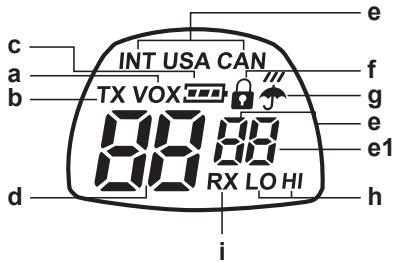
Your marine transceiver keeps you constantly updated about its operational status through a Liquid Crystal Display (LCD). The symbols and their corresponding parameters that may appear, according to the operational status of the device, are described as follows:
a. VOX - Activation of VOX function;
b. TX - During transmission (when you press PTT button)
c. : warns you of battery low charge;
d. Channel - These two large digits show the selected marine channel;
e. INT/USA/CAN and the first of the 2 small digits - Specify the frequency band in use (USA and CAN: can be activated by means of the optional programming software PRG PACIFIC, but they are for American version only).
e-1 Second small digit - Gives further information with regards to the channel being used ("d" duplex).
f. -Appears when the keypad lock is activated.
g. - This symbol marks activation of weather information channels (only for American version - bands USA and CAN).
h. LO (Low) / Hi (High) - indicates the selected power level.
i. RX - (busy channel): appears when the transmitter is receiving a signal.
3.2 Radio
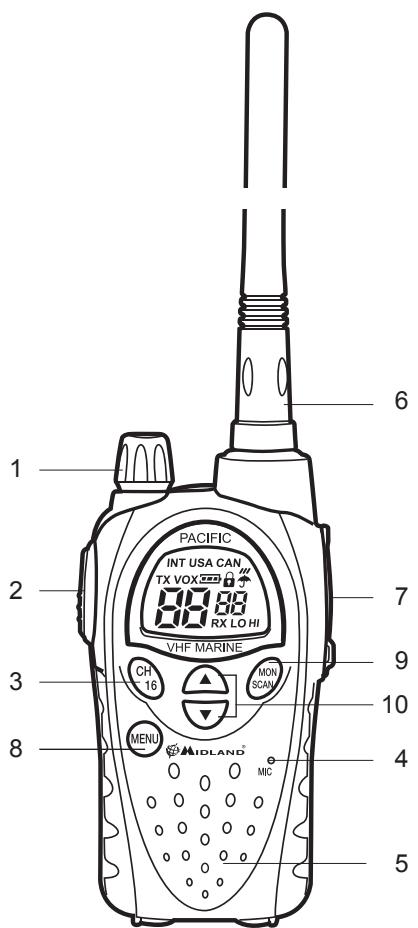
Refer to the following images to identify the various parts of the device:
- VOLUME control - On/off switch for the device and adjusts VOLUME of reception.
- PTT (press to talk) - Press this button to switch to transmission
- Button '16' - Press this button to instantly recall channel 16.
- Built-in MICROPHONE-Here is where sound is picked up by the microphone.
- Built-in SPEAKER - Here is where the speaker is housed.
- ANTENNA - Receives and transmits radio signals.
- MIC/CHG Socket (under protective cover) - To connect to external audio devices (headphones, microphone etc.) and to the battery charger.
- MENU button - Press this button to display the device's MENU.
- MONITOR/SCAN button - Press this button once to activate SCAN (scanning of channels). Keep the same button pressed for about 2 seconds to activate MON function. This function temporarily cuts off Squelch (for weak signals)
- / buttons - Press these buttons to select channel number and to change setting within the MENU.
4. Preparing the transceiver
Make sure the following items are supplied in the package before you start using your transceiver:
Transceiver;
- Desk/wall support
- NiMH battery pack
- Belt clip;
- Desktop charger along with adaptor;
2-way car lighter charger;
- User manual;
If any of the above is missing or damaged contact your supplier immediately.
4.1 Installing and removing the belt clip
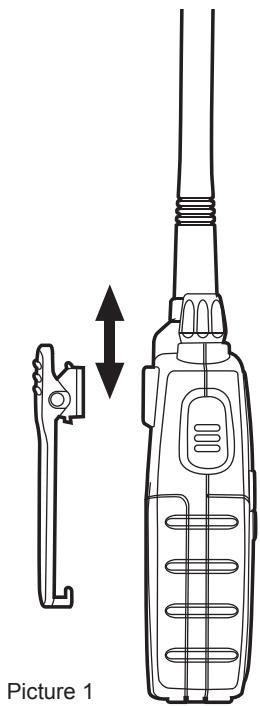
With the belt clip you can easily attach the transceiver to your belt. The clip however, must be removed in order to install or change the batteries. To remove the belt clip follow the instructions of picture 1. To fix the clip back to the device slot it in the guides at the back of the transceiver until it clicks into place.
4.2 Installing and removing batteries
The transceiver is operated by the supplied NiMH battery pack or by 4 optional AA battery. These can be either one of two types:
- Rechargeable NiMH (1,2 V) - available in different capacity (in mA/h). Batteries with higher capacity will supply longer charger but will require longer times to recharge.
Non-rechargeable alkaline (1,5 V)
! Do not install rechargeable and alkaline batteries at the same time in your transceiver. Always use the same batteries as a set (type and make) so that you can be sure their level of charge is the same.
! If you do not use the transceiver for a long time remove the batteries/ battery pack.
4.2.a Installation
1) Remove the belt clip as explained in paragraph 4.1;
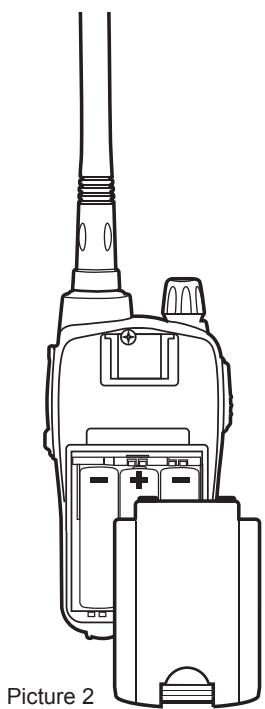
2) Open the batteries compartment as shown in picture 2;
3) Insert the battery pack into the battery compartment as shown in picture 2.
4) Replace the cover on the batteries compartment.
5) Replace the belt clip.
! If you use the batteries, be careful to insert them with the correct polarity as illustrated inside the compartment.
! Be careful to snap close the battery cover.
Picture 1
4.2.b Removal
1) Follow steps 1 and 2 of par 4.2.a;
2) Remove the battery pack from the device;
3) Follow steps 4 and 5 of par 4.2.a.
4.3 Recharging batteries
Batteries can be recharged without taking them out of the transceiver (but the device must be turned off); batteries take 8-10 hours to fully recharge (battery pack 800mAh).
To recharge batteries by means of the 2-way car lighter charger:
- Carefully lift the rubber protection of the socket MIC/CHG.
- Insert the jack of the battery charger into the socket MIC/CHG of the radio, then connect the battery charger to the car lighter charger. Charging will begin
- When charging is complete pull out the charger's jack from the radio and detach it from the mains. Replace the rubber protection mentioned in step 1.
! Do not overcharge the batteries! When these are fully charged the charging process does not stop automatically. Do not forget therefore, to remove the charger from the transceiver as soon as the batteries are charged.
! Do not try to charge alkaline batteries or non rechargeable batteries. Make sure that when you connect the charger only rechargeable batteries NI-MH should be contained in the batteries compartment! It is very dangerous attempting to recharge other types of batteries (for example alkaline batteries). Batteries which are not suitable to be recharged may leak, explode or even burn and cause damage!
! Using a different battery charger other than the one specified can cause damage to your device or may even cause explosions and personal injuries.
! Do not throw batteries into fire or place them near heat as this may cause explosions or personal injuries. Dispose of the batteries according to procedures set out by local regulations.
! Do not mix old and new batteries or batteries of different types or batteries which have been used in different manners. Every battery set which is being used must always be composed of the same elements.
Recharge of the battery pack by means of the desktop charger and wall adaptor:
Connect the socket of the wall adaptor to a mains power socket and insert the jack of the wall adaptor into the desktop charger plug.
Place your transceiver into the cradle of the desktop charger.
When charging is complete take the transceiver out of the cradle and detach the socket of the wall adaptor from the mains.
4.4 Memory effect of rechargeable batteries
Rechargeable NiMH (Nickel-Metal-Hydrate) batteries are affected by what is known as the "memory effect". This phenomenon is associated with a drastic reduction of battery autonomy and is triggered if the batteries are regularly charged before being fully discharged and/or are not completely recharged. To avoid the memory effect:
- When possible, recharge the batteries only when they are completely discharged (until the device turns itself off during normal use)
- Do not disconnect the battery charger before the time indicated for a full battery charge.
- Discharge and recharge your batteries completely at least twice a month. In any case, the best
solution for avoiding the memory effect is to use in turn two battery sets: one in use, and the other as a spare set.
The memory effect can be easily eliminated by completely discharging/charging the batteries 3 or 4 times.
The memory effect should not be confused with the normal battery life, which is 400 cycles of charge/discharge on average. It is completely normal for operating duty to decrease when the batteries have reached the end of their life; at this point, you will need to substitute the battery set.
5. Basic operations
5.1 Turning on/off
To turn on the transceiver, turn the ON/OFF/VOLUME knob clockwise until you hear it clicks: the LCD display will light up and do an Auto-Test. Subsequently you will hear 1 beep. To turn off the transceiver, turn the knob counter-clockwise until you hear another click.
5.2 Selection of the operational channel
1) Press once the MENU button. The number of the channel will start flashing on the display.
2) Press the / buttons to scroll up or down the channel list till you select the desired channel.
3) Press the PTT button to confirm, or wait for 10 seconds.
Refer to the table of frequencies. Moreover, the reception frequency could be different (duplex channels) from the transmission frequency or it could be the same (simplex channels). Normally communications among vessels can only take place on simplex channels.
5.3 Volume control
Turn the knob VOLUME to about half way and adjust it to a comfortable level as soon as you receive a signal. If you do not receive a signal you can use the button MON/SCAN described at par. 5.5.
Ensure the channel you've selected is not a reception-only channel (otherwise the transmission will be disabled) and that no one else is talking (this will appear on your display as the BUSY icon).
5.4 Transmission and reception
The button PTT is located on the top left side of the device. To transmit:
1) Make sure that the selected channel is not reception-only, (otherwise the transmission will be disabled) and that no one else is currently talking;
2) Keep button PTT firmly pressed: ±bT±bX will appear on the display;
3) Before you start talking wait for a fraction of a second then speak normally, in the direction of the microphone, and hold the device at a distance of about 5 cm.
4) When you have finished release the button PTT: TX will disappear from the display;
5) When the button is in reception mode (PTT not pressed) you will automatically receive any communication;
During transmission and reception try, as far as possible, to keep the antenna in vertical position and to avoid obstacles towards the direction of the other party.
5.5 Button MON (Monitor)
The Monitor button is for temporarily excluding (opening) the squelch, in order to listen to signals that are too weak to keep the squelch permanently opened. By excluding the squelch you will avoid listening the communication "chopped" by the squelch. In order to activate the Monitor function, so as to listen to all traffic on the selected channel, keep pressed the MON/SCAN button for about 2 seconds. Keep pressed the button MON/SCAN for about 2 seconds to disable this function.
5.6 Choosing high or low transmission power
Batteries are drained more quickly during transmission. In order to extend the battery life you can select the low power when transmitting over short distances:
1) Press the MENU button twice and the writing 'Pr' will display.
2) Select LO using the scroll buttons /
3) Press PTT to confirm, or wait for 10 seconds.
If you want to transmit a longer distance repeat the above procedure to select the high power. At step 2 use the / to make the writing LO disappear. When the batteries are in good conditions, high power is about 5 watt, whereas low power is about 1 watt.
A low battery level during transmission will have a negative effect on the performance of your device.
5.7 LCD backlight
If there is insufficient light to read the display you can press the MENU button to switch the display back light on for about 5 seconds.
Switching the back light on the display adds an additional drain on the batteries. Try to make a moderate use of this.
5.8 Instant selection of Channel 16
Channel 16 is the marine channel most frequently used for emergency. Your transceiver is equipped with a button that provides instant access to this channel. To recall rapidly channel 16 press the button CH 16. No matter what mode the device is operating, channel 16 will be selected immediately. To go back to the previously selected channel press again the button CH 16.
5.9 Power saving feature
The battery power saving feature enables a reduction in the consumption of up to 50% ; power saving comes on automatically when the transceiver does not receive any signal for more than seven seconds.
When the battery pack is almost discharged, the radio will switch to 'Lo' power; then, this icon will appear to indicate that the battery pack is discharged. Replace the alkaline batteries or recharge the battery pack/rechargeable batteries.
6. Advanced functions
6.1 Scanning all channels
PACIFIC can automatically search for signals throughout the marine band by scanning, i.e. selecting the channels in rapid sequence. When a signal is detected, the scanning pauses on that channel and remains blocked for five seconds before automatically begins scanning again to give you the chance to find other communication.
Press briefly the button MON/SCAN to start scanning:
Press again MON/SCAN to stop scanning. Your transceiver will go back to the channel from which the scanning originally started.
Once you are tuned in the communication you were looking for, press PTT to talk on the selected channel. PACIFIC will however remain in scanning mode (which is indicated by the flashing of the channel on the display) and it is possible to start scanning again by pressing the / buttons. If you press PTT during scanning you can transmit on the channel from which the scanning started. The / keys allow you to change the direction of scanning (from lower channels to higher ones or vice versa) and therefore to skip communications which are of no interest.
6.2 VOX Function
PACIFIC enables hands free conversations through VOX function. The degree of sensitivity of VOX function can be adjusted to three different levels. You can enable VOX function with or without accessories.
1) To activate VOX function press the MENU button four times (except for CH75-76) and VOX will appear on the display
2) Use the keys to select:
A. High sensitivity
B.Middle sensitivity
C. Low sensitivity
3) Press PTT to confirm or wait for 10 seconds
To disable VOX function follow the instructions above and select option 'oF'.
VOX has a better performance when used in conjunction with the optional accessories which plug in the appropriate outlet. This will enable you to keep the microphone at constant distance from your mouth and by holding the transceiver on the belt you can carry on working with your hands in total freedom.
6.3 Keypad lock
You can lock the keypad of your transceiver and avoid pressing buttons accidentally. All buttons are disabled with the exception of MON (opening squelch), PTT, 16, MENU (removal of keypad lock). To insert keypad lock:
1) Press three times the MENU button (except for CH75-76); 'Lc of will appear on the display and the symbol will blink.
2) Using the buttons select 'on'.
3) Press PTT to confirm or wait for 5 seconds.
To disable the keypad lock, press once the MENU button and select 'on'.
6.4 Roger Beep (End-of-message tone):
When you release the PTT, that is every time you end transmission, PACIFIC gives out a sound indicating to the other party that s/he can start talking. This function is factory set. To disable the function:
1) Press six times the MENU button (except for CH75-76); 'rb on' will appear on the display
2) Using the / buttons select 'oF.
3) Press PTT button to confirm or wait for 10 seconds.
To reactivate this function repeat the above procedure. Al step 2 use the buttons to select 'on'.
6.5 DUAL WATCH
This function allows the monitoring of 2 channels of your choice by selecting the channels in rapid sequence.
Procedure:
1) Select the channel you want to monitor.
2) Press seven times the MENU button. 'of d' blinks on the display.
3) Select the second channel to monitor, by pushing the / keys.
4) Push PTT to activate the function.
When the Dual Watch is enabled, the display shows only the two monitored channels.
As for the Scan function, if you transmit when the Dual Watch is activated, the communication remains blocked on that channel for further 10 seconds to let you listening to the other party. Then, it will begin scanning the two channels again.
Press MON/SCAN to disable the Dual Watch.
The unit returns to the channel previously used.
6.6 Active band
The PACIFIC channel selection can be changed to follow the rules of USA, Canada or International regulations.
INT (international) – used in Italy and most countries of the world
USA - used in the United States
CAN - used in Canada
! USA and CAN Bands: for American area only.
! It is your own responsibility to choose the correct band (by means of the optional programming kit PRG-PACIFIC), otherwise you may cause interferences with other services or you may not be able to communicate.
6.7 Private channels: programming and selection
Only authorized customers are allowed to use private channels. For detailed information contact your local radio communication authorities. To program the private channels, it is necessary to connect the optional programming kit PRG-PACIFIC or ask for information to your dealer.
To set the programming mode, switch on the radio while keeping pressed the MENU button: the display will show 'Prog'.
7. Troubleshooting
Your PACIFIC is designed to provide you with years of optimal performance. If for some reason problems arise, refer to this chapter before contacting a service centre in your region.
7.1 Solution table
| Problem | Possible Cause | Solution | Ref. |
| The radio does not turn on | The batteries are not charged and/or are not correctly inserted | Ensure the batteries are charged and correctly inserted in the radio | 4.2 4.3 |
| The radio turns on, but does not receive signals | The volume is too low | The volume is too low | 5.3 |
| You are unsuccessful in establishing contact with your party | Incorrect selection of marine channel or local band | Check your channel and band | 5.2 |
| Reception is broken and/or with noise | Signal is extremely weak | Temporarily deactivate squelch using the Monitor function | 5.5 |
| Your party is too far away and/or transceiver antenna is shielded by obstacles in the direction of your party | Move closer to your party and/ or move the transceiver to a less shielded area | - | |
| Other users are using the same radio channel | Check the radio traffic on the selected channel and change channels if necessary | 5.2 | |
| The radio is positioned too close to other interference devices (televisions, computers, transmitters, etc.) | Move the radio away from the interference devices | - | |
| Battery life is short | Excessive use of display backlighting | Use less display backlighting | 5.7 |
| Excessive use of transmission | Try to reduce transmission times and/or use low transmission power | 5.6 | |
| Memory effect is occurring with the batteries | Eliminate memory effect | 4.4 |
8. Technical specifications
Channels 57 International
Frequency generation . PLL synthesizer
Frequency range (International band) TX 156,025 - 157,425 MHz
RX156,300-162,000MHz
Antenna Impedance 50 Ohm
Power Supply. 6 VDC +/- 10%
Operating Temperature Range. from -15° to +55°C
Size 108x62x35 mm (HxWxD)
Weight (without batteries) 183 g
Duty cycle . TX 5%, RX 5%, Stand-by 90%
8.1 Transmitter
Output power 1 or 5 Watt (Selectable)
Modulation type FM
Residual noise attenuation. 40dB
Audio distortion 3%
8.2 Receiver
Sensitivity @ 12dB SINAD. 0,3 V
Squelch sensitivity 12dBV
Adjacent channel rejection. 70dB
Audio Output Power 300mW @ 10% THD
Intermediate frequencies. 1°:21,4 MHz; 2°:450 KHz
Spurious rejection -40dB
Residual noise attenuation. 43dB
Socket for external microphone/charger/programming 2.5 mm stereo jack
Socket for external speaker 3,5mm mono jack
Specifications are subject to modification without forewarning.
Inhaltsverzeichnis
RX 156,300 - 162,000 MHz
Impedancia de antenna 50 Ohm
Alimentación 6 VDC +/- 10%
Rango de temperatura operativa de -15^ a +55^
dimensiones 108x62x35 mm (HxAxP)
Peso (sin baterias) 183 g
- Specifications techniques 15
8. Specifications techniques
RX 156,300 - 162,000 MHz
Impedance de I'antenne 50 Ohm
Alimentation 6 VDC +/- 10%
Poids (sans batteries) 183 grammes
8.1 Emetteur
Puisance RF 1 ou 5 Watt (programmable)
Type de Modulation FM
Réjection canal adjacent 60dB
4.2 Instalar e remover as pilhas
4.3 Recarregar as pilhas
5.5 Knappen MON (Monitor)
Eupoc ouxvoiTuw (International band. TX 156,025 - 157,425 MHz
RX 156,300 - 162,000 MHz
Avtioaon Kepaiaos 50 Ohm
Turos diauoppwons FM
EeaoThevno unoaleiIou oopou 40dB
Papauopppwn akouotikwv ouxvohtwv 3%
8.2 Δέκτης
Euασθησα @ 12dB SINAD 0,3μV
Euασθησία Squelch 12dBV
Antoppiy ngovikou diauou 70dB
Ioxuc Edoou akouotikwv ouxvoTtWv 300mW @ 10% THD
Evoiueoeosuxvotnte 1:21,4MHz;2:450KHz
Antoppiy npovikwv -40dB
Eeogvno unoaleitou evou opuou .43dB
YTOOxyiia ExTEPIKO MIPoPwVO /opTIOI/ TPOypaMaIIO. 2.5 mm stereo jack
YToOoxn yia 3,5mm mono jack
Ta xapaekniptiká μπoepévi aaλαgouv χwpiεiδotroinən.
INTERNATIONAL CHANNEL (INT)
| Channel ID | Ship Station | |
| Tx Frequency | Rx Frequency | |
| 01 | 156,050 MHz | 160,650 MHz |
| 02 | 156,100 MHz | 160,700 MHz |
| 03 | 156,150 MHz | 160,750 MHz |
| 04 | 156,200 MHz | 160,800 MHz |
| 05 | 156,250 MHz | 160,850 MHz |
| 06 | 156,300 MHz | 156,300 MHz |
| 07 | 156,350 MHz | 160,950 MHz |
| 08 | 156,400 MHz | 156,400 MHz |
| 09 | 156,450 MHz | 156,450 MHz |
| 10 | 156,500 MHz | 156,500 MHz |
| 11 | 156,550 MHz | 156,550 MHz |
| 12 | 156,600 MHz | 156,600 MHz |
| 13 | 156,650 MHz | 156,650 MHz |
| 14 | 156,700 MHz | 156,700 MHz |
| 15 | 156,750 MHz | 156,750 MHz |
| 16 | 156,800 MHz | 156,800 MHz |
| 17 | 156,850 MHz | 156,850 MHz |
| 18 | 156,900 MHz | 161,500 MHz |
| 19 | 156,950 MHz | 161,550 MHz |
| 20 | 157,000 MHz | 161,600 MHz |
| 21 | 157,050 MHz | 161,650 MHz |
| 22 | 157,100 MHz | 161,700 MHz |
| 23 | 157,150 MHz | 161,750 MHz |
| 24 | 157,200 MHz | 161,800 MHz |
| 25 | 157,250 MHz | 161,850 MHz |
| 26 | 157,300 MHz | 161,900 MHz |
| 27 | 157,350 MHz | 161,950 MHz |
| 28 | 157,400 MHz | 162,000 MHz |
| Channel ID | Ship Station | |
| Tx Frequency | Rx Frequency | |
| 60 | 156,025 MHz | 160,625 MHz |
| 61 | 156,075 MHz | 160,675 MHz |
| 62 | 156,125 MHz | 160,725 MHz |
| 63 | 156,175 MHz | 160,775 MHz |
| 64 | 156,225 MHz | 160,825 MHz |
| 65 | 156,275 MHz | 160,875 MHz |
| 66 | 156,325 MHz | 160,925 MHz |
| 67 | 156,375 MHz | 156,375 MHz |
| 68 | 156,425 MHz | 156,425 MHz |
| 69 | 156,475 MHz | 156,475 MHz |
| 70 | 156,525 MHz | |
| 71 | 156,575 MHz | 156,575 MHz |
| 72 | 156,625 MHz | 156,625 MHz |
| 73 | 156,675 MHz | 156,675 MHz |
| 74 | 156,725 MHz | 156,725 MHz |
| 75 | 156,775 MHz | 156,775 MHz |
| 76 | 156,825 MHz | 156,825 MHz |
| 77 | 156,875 MHz | 156,875 MHz |
| 78 | 156,925 MHz | 161,525 MHz |
| 79 | 156,975 MHz | 161,575 MHz |
| 80 | 157,025 MHz | 161,625 MHz |
| 81 | 157,075 MHz | 161,675 MHz |
| 82 | 157,125 MHz | 161,725 MHz |
| 83 | 157,175 MHz | 161,775 MHz |
| 84 | 157,225 MHz | 161,825 MHz |
| 85 | 157,275 MHz | 161,875 MHz |
| 86 | 157,325 MHz | 161,925 MHz |
| 87 | 157,375 MHz | 157,375 MHz |
| 88 | 157,425 MHz | 157,425 MHz |
- Pulsante MON (Monitor)
- Power Save/controllo battery
- Introduction
- Main features:
- Above all... safety!
- Symbols used
- 2.2Warnings
- Service
- Identifying the parts
- Display
- Radio
- Preparing the transceiver
- Installing and removing the belt clip
- Installing and removing batteries
- 4.2.a Installation
- 4.2.b Removal
- Recharging batteries
- To recharge batteries by means of the 2-way car lighter charger:
- Recharge of the battery pack by means of the desktop charger and wall adaptor:
- Memory effect of rechargeable batteries
- Basic operations
- Turning on/off
- Selection of the operational channel
- Volume control
- Transmission and reception
- Button MON (Monitor)
- Choosing high or low transmission power
- LCD backlight
- Instant selection of Channel 16
- Power saving feature
- Advanced functions
- Scanning all channels
- VOX Function
- Keypad lock
- Roger Beep (End-of-message tone):
- DUAL WATCH
- Active band
- Private channels: programming and selection
- Troubleshooting
- Solution table
- Technical specifications
- Transmitter
- Receiver
- Inhaltsverzeichnis
- Specifications techniques
- Emetteur
- Instalar e remover as pilhas
- Recarregar as pilhas
- Knappen MON (Monitor)
- Δέκτης
- INTERNATIONAL CHANNEL (INT)
Brand : MIDLAND
Model : PACIFIC
Category : Radio