
ALAN 121 - CB radio MIDLAND - Free user manual and instructions
Find the device manual for free ALAN 121 MIDLAND in PDF.


| Product type | CB Radio |
| Brand | MIDLAND |
| Model | ALAN 121 |
| Channels | 40 FM (depending on selected frequency band) |
| Frequency range | 25.615 to 30.105 MHz |
| Frequency control | PLL |
| Operating temperature | -10° to +55 °C |
| Supply voltage | 13.8 V DC ± 5% |
| Duty cycle | 5/5/90 (transmit/receive/standby) |
| Dimensions (W x H x D) | 165 x 38 x 123 mm |
| Weight | 0.820 kg |
| Reception type | Double conversion superheterodyne |
| First intermediate frequency | 10.695 MHz |
| Second intermediate frequency | 455 kHz |
| Sensitivity (receiver) | < 1 µV for 20 dB SINAD |
| Audio output power | Min. 2 W into 8 Ω at 10% THD |
| Audio distortion | < 3% at 1 kHz |
| Current consumption (standby) | 200 mA |
| Transmitter output power | 4 W @ 13.8 V DC |
| Modulation | AM: 85 to 95%; FM: 1.8 kHz ± 0.2 kHz |
| Consumption (transmit) | 1,100 mA (without modulation) |
| Display | Multifunction backlit display with 7 customizable colors |
| Connectors | Antenna SO239, microphone jack, external speaker, S-meter |
| Included accessories | High-sensitivity microphone, mounting bracket |
| Maintenance | Clean with a soft, dry cloth; do not use solvents |
Frequently Asked Questions - ALAN 121 MIDLAND
User questions about ALAN 121 MIDLAND
0 question about this device. Answer the ones you know or ask your own.
Ask a new question about this device
Download the instructions for your CB radio in PDF format for free! Find your manual ALAN 121 - MIDLAND and take your electronic device back in hand. On this page are published all the documents necessary for the use of your device. ALAN 121 by MIDLAND.
USER MANUAL ALAN 121 MIDLAND
| Sigla sul display | Paese | Banda | Frequenza |
| I | Italia | 40CH AM/FM 4W | Fx 26,965-27,405 MHz |
| I2 | Italia | 34CH AM/FM 4W | Fx 26,875-27,265 MHz |
| D | Germania | 80CH FM 4W - 12CH AM 1W | Fx 26,565-27,405 MHz |
| D2 | Germany | 40CH FM 4W - 12CH AM 1W | Fx 26,965-27,405 MHz |
| D3 | Germany | 80CH FM 4W - 40CH AM 1W | Fx 26,565-27,405 MHz |
| EU | Europa | 40CH FM 4W - 40CH AM 1W | Fx 26,965-27,405 MHz |
| EC | Europa | 40CH FM 4W | Fx 26,965-27,405 MHz |
| E | Spagna | 40CH AM/FM 4W | Fx 26,965-27,405 MHz |
| F | Francia | 40CH FM 4W - 40CH AM 1W | Fx 26,965-27,405 MHz |
| UKE | Inghilterra | 40CH FM 4W | Fx 26,60125-27,99125MHz |
| UKC | Inghilterra | 40 CH FM 4W CEPT | Fx 26,965-27,405MHz |
ATTENZIONE!
Introduction
Function and location of the controls Pag. 2
Installation Pag. 3
Power supply Pag. 3
Installing an antenna
How to operate with your transceiver
Frequency band selection Pag. 4
Frequency band chart Pag. 5
Technical specifications Pag. 6
ALAN 121 Handheld Multi-standard CB transceiver
ALAN 121 is a small and easy to use CB transceiver. It's extremely compact, sturdy and benefits from basic controls that will satisfy even the most demanding of users. The backlit display can be customised with 7 different colours. Its main feature is its ability to operate in many European and extra-European countries simply by selecting the desired frequency band. The ALAN121 is supplied with a high-performance microphone which guarantees excellent modulation.
FUNCTION AND LOCATION OF THE CONTROLS
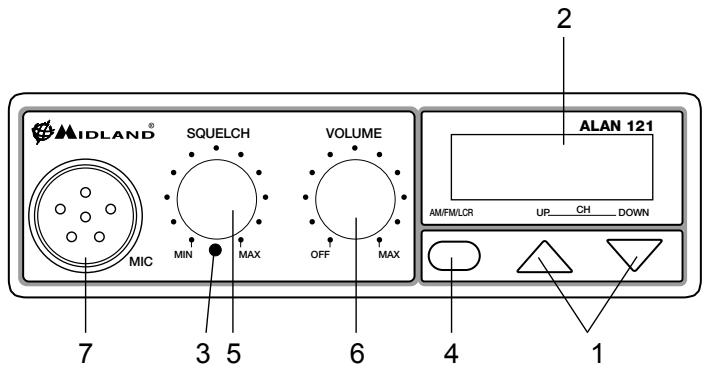
- Channel selector
- Multifunction backlighted display. It shows:
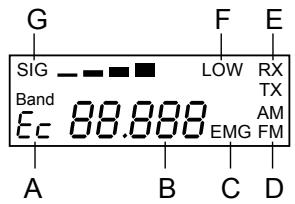
A. Frequency band selected.
B. Channel selected number
C. EMG mode
D. AM/FM mode
E. RX/TX:TX=transmit mode; RX=receive mode
F. LOW: displayed when the radio transmits in low power (this mode is possible with some frequency bands only – see the Frequency band chart)
G. The received signal strength and the power of the transmitting signal
- Button for changing colour: by pushing a pointed object into the hole, you can change the backlight colour of the display. You can choose amongst the following colours: white, yellow, violet, red, light blue, green, blue or no colour.
- "AM/FM"(LCR) button: To select AM or FM mode. If you select a frequency band operating in FM mode only, this button enables the LCR function (Last Channel Recall).
- "Squelch" Control: For the maximum receiver sensitivity, the control must be regulated exactly where the receiver background noise disappears.
- "ON/OFF Volume" Control. In "OFF" position your transceiver is OFF. Turn this control clockwise to switch on the unit. Turn the knob clockwise a little more to set the audio level, until you get a comfortable reception.
- Microphone jack: Insert the mic connector into this jack.
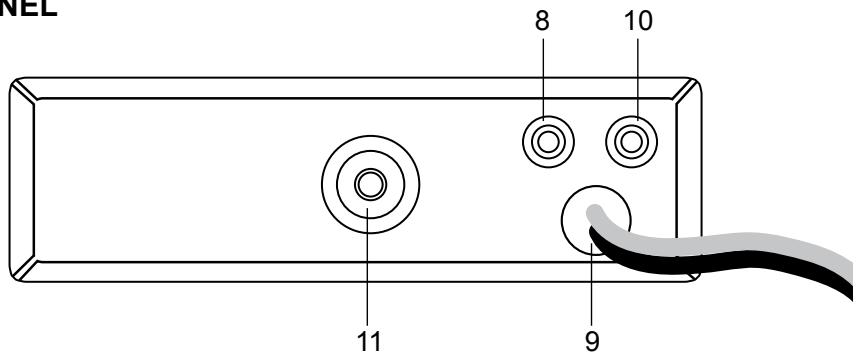
- "EXT" jack: external loudspeaker jack.(the internal loudspeaker is excluded)
- Power 13.8V DC: power supply cable
- S.Meter jack: it allows an external "S. Meter" connection
- Antenna connector (SO239 connector type)
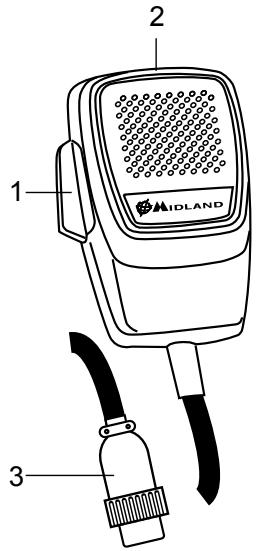
MICROPHONE
- PTT: transmission button
- UP/DOWN buttons: manual channel selector.
3.6 pin microphone connector
INSTALLATION
Safety and convenience are the primary consideration for mounting any piece of mobile equipment. All controls must be readily available to the operator without interfering with the movements necessary for safe operation of the vehicle. Set the proper position in the car to install the transceiver using the supplied supporting bracket or eventually the slide bracket.
Tighten the retaining screws. The fixing bracket must be close to metallic parts.
POWER SUPPLY
Be sure the transceiver is OFF. In the direct-voltage power supply, it is very important to observe the polarity even if the unit is protected against the accidental inversion:
Red = positive pole (+)
Black = negative pole (-)
The same colours are present on the battery and in the fuse box of the car. Correctly connect the cable terminal to the battery.
INSTALLING AN ANTENNA
- Place the antenna as high as possible
- The longer the antenna is, the better will be the performance
- If possible, mount the antenna in the centre of whatever surface you choose
- Keep antenna cable away from noise sources, such as the ignition switch, gauges,etc.
- Make sure you have a solid metal-to-metal ground connection.
- Prevent cable damage during antenna installation.
WARNING: To avoid damage, never operate your CB radio without connecting a proper antenna. A periodical control of the cable and of the S.W.R. is recommended.
HOW TO OPERATE WITH YOUR TRANSCEIVER
- Screw the microphone plug into the microphone jack.
- Make sure your antenna is securely connected to the antenna connector.
- Make sure the SQUELCH control is turned fully counterclockwise.
- Turn on the unit and adjust the volume control.
- Select your desired channel.
- To transmit, press the PTT button and speak in a normal tone of voice.
- To receive, release the PTT button.
The frequency bands must be chosen according to the country where you are going to operate.
Procedure:
Switch off the unit.
Turn it on while pushing the "UP" and "DOWN" buttons at the same time.
Select the desired frequency band by pushing the UP / DOWN buttons (see the chart in the following page).
Wait for 5 seconds or switch off and then on the radio.
NOTE1
In the UKE or UKC frequency bands, you can select directly the other band by pushing the "AM/FM/LCR" button for 3 seconds.
NOTE2
If you select a frequency band which operates in FM mode only, the "AM/FM/LCR" control enables the LCR function (last channel recall).
| Digits displayed | Country | Band | Frequency |
| I | Italy | 40CH AM/FM 4W | Fx 26,965-27,405 MHz |
| I2 | Italy | 34CH AM/FM 4W | Fx 26,875-27,265 MHz |
| D | Germany | 80CH FM 4W - 12CH AM 1W | Fx 26,565-27,405 MHz |
| D2 | Germany | 40CH FM 4W - 12CH AM 1W | Fx 26,965-27,405 MHz |
| D3 | Germany | 80CH FM 4W - 40CH AM 1W | Fx 26,565-27,405 MHz |
| EU | Europe | 40CH FM 4W 40CH AM 1W | Fx 26,965-27,405 MHz |
| EC | Europe | 40CH FM 4W | Fx 26,965-27,405 MHz |
| E | Spain | 40CH AM/FM 4W | Fx 26,965-27,405 MHz |
| F | France | 40CH FM 4W - 40CH AM 1W | Fx 26,965-27,405 MHz |
| UKE | England | 40CH FM 4W | Fx 26,60125-27,99125MHz |
| UKC | England | 40 CH FM 4W CEPT | Fx 26,965-27,405MHz |
ATTENTION!
The frequency band definitely allowed all over Europe is 40 CH FM 4W (EC).
TECHNICAL SPECIFICATIONS
GENERAL
Channels 40 FM (see the frequency band chart)
Frequency Range 25.615 to 30.105 MHz
Frequency Control.. 204
Operating Temperature Range. -10^ / + 55^ C
DC input voltage 13.8V DC ±15%
Duty cycle. 5/5/90 (1 hour of use)
Size. 165 (L)x38 (H)x123 (D) mm
Weight 0,820 Kg
RECEIVER
Receiving system .dual conversion superheterodyne
Intermediate frequency . 1^ IF: 10.695 MHz · II° IF: 455 KHz
Sensitivity. < 1 V for 20 dB SINAD
Audio output power @10% THD Min.2.0 W @ 8 Ohm
Audio distortion . less than 3 % @ 1 KHz
Current drain at stand/by 200mA
TRANSMITTER
Output power 4W @ 13.8V DC
Modulation. AM: from 85% to 95%
FM: 1,8 KHz ± 0,2 KHz
Current drain 1100mA (Power position with no modulation)
A readily accessible disconnect device shall be incorporated in the installation wiring. The disconnect device shall disconnect both poles simultaneously.
INHALT
Einleitung 1
Transceptor movable CB multi-standar ALAN 121
ALAN 121 CB multi standard
| Code affché | Pays | Bande | Fréquence |
| I | Italie | 40CH AM/FM 4W | Fr 26,965-27,405 MHz |
| I2 | Italie | 34CH AM/FM 4W | Fr 26,875-27,265 MHz |
| D | Allemagne | 80CH FM 4W - 12CH AM 1W | Fr 26,565-27,405 MHz |
| D2 | Allemagne | 40CH FM 4W - 12CH AM 1W | Fr 26,965-27,405 MHz |
| D3 | Allemagne | 80CH FM 4W - 40CH AM 1W | Fr 26,565-27,405 MHz |
| EU | Europe | 40CH FM 4W 40CH AM 1W | Fr 26,965-27,405 MHz |
| EC | Europe | 40CH FM 4W | Fr 26,965-27,405 MHz |
| E | Espagne | 40CH AM/FM 4W | Fr 26,965-27,405 MHz |
| F | France | 40CH FM 4W - 40CH AM 1W | Fr 26,965-27,405 MHz |
| UKE | Angleterre | 40CH FM 4W | Fr 26,60 25-27,99 25MHz |
| UKC | Angleterre | 40 CH FM 4W CEPT | Fr 26,965-27,405MHz |
ATTENTION!
Tropoobogia (DC) 13.8V DC ±15%
Kuklos eitoupyia5/5/90 (1 wpa eitoupyia)
△iaotaoεic 165 (L)x38 (H)x123 (P) mm
Bapoc 0,820 kg
EKTH
Zuotnuaa hyns ... 01nns metatpntns utepetepoov
EvoiueoecouxvotnteI .1°IF:10.695 MHz·II°IF:455 KHz
Kanaly 40 FM/AM (see the frequency band chart)
Zakres czestotliwosci 25.615 to 30.105 MHz
Wymiary 165 (L)x38 (H)x 123 (P) mm
Waga 0,820 kg
ODBIORNIK
The World in Communication
- ATTENZIONE!
- ALAN 121 Handheld Multi-standard CB transceiver
- FUNCTION AND LOCATION OF THE CONTROLS
- MICROPHONE
- INSTALLATION
- POWER SUPPLY
- INSTALLING AN ANTENNA
- HOW TO OPERATE WITH YOUR TRANSCEIVER
- Procedure:
- NOTE1
- NOTE2
- ATTENTION!
- TECHNICAL SPECIFICATIONS
- GENERAL
- RECEIVER
- TRANSMITTER
- INHALT
- Transceptor movable CB multi-standar ALAN 121
- ALAN 121 CB multi standard
- EKTH
- ODBIORNIK
Brand : MIDLAND
Model : ALAN 121
Category : CB radio