
CD-P1260 - CD Player TEAC - Free user manual and instructions
Find the device manual for free CD-P1260 TEAC in PDF.



| Product Type | CD player with MP3 compatibility |
| Brand | TEAC |
| Model | CD-P1260 |
| Dimensions (W x H x D) | 435 x 100 x 285 mm |
| Net weight | 4.1 kg |
| Power supply | 230 V~ 50 Hz (Europe/UK model) or 120 V~ 60 Hz (US/Canada model) or 120/230 V~ 50-60 Hz (export model) |
| Power consumption | 10 W |
| Frequency response | 20 Hz - 20 kHz ±2 dB |
| Total harmonic distortion | Less than 0.03% (1 kHz) |
| Signal-to-noise ratio | Greater than 83 dB (IHF-A) |
| Audio output | Analog 2.0 Vrms (RCA) stereo |
| Playback functions | CD audio, MP3, programming (64 tracks), repeat (track, all, album), random play, intro scan, ESP (40 seconds), track search by name or folder |
| Supplied accessories | RCA cable (x1), remote control RC-1044 (x1), remote batteries (x2), user manual (x1), warranty card (x1) |
| Maintenance and cleaning | Use a soft, dry cloth; do not use chemical solvents, sprays, or antistatic liquids |
| Safety | Do not open the casing; do not expose to moisture or water splashes; leave at least 20 cm ventilation space above and 5 cm on the sides |
| Operating temperature | +5 °C to +35 °C |
| Operating humidity | 5% to 85% (no condensation) |
| Country of origin | China |
Frequently Asked Questions - CD-P1260 TEAC
User questions about CD-P1260 TEAC
0 question about this device. Answer the ones you know or ask your own.
Ask a new question about this device
Download the instructions for your CD Player in PDF format for free! Find your manual CD-P1260 - TEAC and take your electronic device back in hand. On this page are published all the documents necessary for the use of your device. CD-P1260 by TEAC.
USER MANUAL CD-P1260 TEAC
The lightning flash with arrowhead symbol, within an equilateral triangle, is intended to alert the user to the presence of uninsulated "dangerous voltage" within the product's enclosure that may be of sufficient magnitude to constitute a risk of electric shock to persons.

The exclamation point within an equilateral triangle is intended to alert the user to the presence of important operating and maintenance (servicing) instructions in the literature accompanying the appliance.
IMPORTANT SAFETY INSTRUCTIONS
1) Read these instructions.
2) Keep these instructions.
3) Heed all warnings.
4) Follow all instructions.
5) Do not use this apparatus near water.
6) Clean only with dry cloth.
7) Do not block any ventilation openings. Install in accordance with the manufacturer's instructions.
8) Do not install near any heat sources such as radiators, heat registers, stoves, or other apparatus (including amplifiers) that produce heat.
9) Do not defeat the safety purpose of the polarized or grounding-type plug. A polarized plug has two blades with one wider than the other. A grounding type plug has two blades and a third grounding prong. The wide blade or the third prong are provided for your safety. If the provided plug does not fit into your outlet, consult an electrician for replacement of the obsolete outlet.
10) Protect the power cord from being walked on or pinched particularly at plugs, convenience receptacles, and the point where they exit from the apparatus.
11)Only use attachments/accessories specified by the manufacturer.
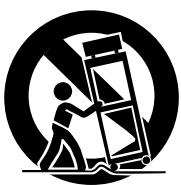
12) Use only with the cart, stand, tripod, bracket, or table specified by the manufacturer, or sold with the apparatus. When a cart is used, use caution when moving the cart/apparatus combination to avoid injury from tip-over.
13) Unplug this apparatus during lightning storms or when unused for long periods of time.
14) Refer all servicing to qualified service personnel. Servicing is required when the apparatus has been damaged in any way, such as power-supply cord or plug is damaged, liquid has been spilled or objects have fallen into the apparatus, the apparatus has been exposed to rain or moisture, does not operate normally, or has been dropped.
- Do not expose this apparatus to drips or splashes.
- Do not place any objects filled with liquids, such as vases, on the apparatus.
- Do not install this apparatus in a confined space such as a book case or similar unit.
- The apparatus draws nominal non-operating power from the AC outlet with its POWER switch in the off position.
- The apparatus should be located close enough to the AC outlet so that you can easily grasp the power cord plug at any time.
- An apparatus with Class I construction shall be connected to an AC outlet with a protective grounding connection.
WARNING: TO PREVENT FIRE OR SHOCK HAZARD, DO NOT EXPOSE THIS APPLIANCE TO RAIN OR MOISTURE.
CAUTION
- DO NOT REMOVE THE EXTERNAL CASES OR CABINETS TO EXPOSE THE ELECTRONICS. NO USER SERVICEABLE PARTS ARE WITHIN!
- IF YOU ARE EXPERIENCING PROBLEMS WITH THIS PRODUCT, CONTACT TEAC FOR A SERVICE REFERRAL. DO NOT USE THE PRODUCT UNTIL IT HAS BEEN REPAIRED.
- USE OF CONTROLS OR ADJUSTMENTS OR PERFORMANCE OF PROCEDURES OTHER THAN THOSE SPECIFIED HEREIN MAY RESULT IN HAZARDOUS RADIATION EXPOSURE.
For U.S.A.
This equipment has been tested and found to comply with the limits for a Class B digital device, pursuant to Part 15 of the FCC Rules. These limits are designed to provide reasonable protection against harmful interference in a residential installation. This equipment generates, uses, and can radiate radio frequency energy and, if not installed and used in accordance with the instructions, may cause harmful interference to radio communications. However, there is no guarantee that interference will not occur in a particular installation. If this equipment does cause harmful interference to radio or television reception, which can be determined by turning the equipment off and on, the user is encouraged to try to correct the interference by one or more of the following measures:
- Reorient or relocate the equipment and/or the receiving antenna.
- Increase the separation between the equipment and receiver.
- Connect the equipment into an outlet on a circuit different from that to which the receiver is connected.
- Consult the dealer or an experienced radio/TV technician for help.
CAUTION
Changes or modifications to this equipment not expressly approved by TEAC CORPORATION for compliance will void the user's warranty.
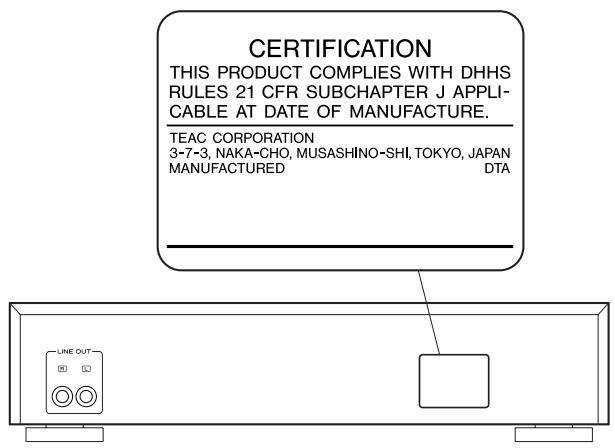
This product has been designed and manufactured according to FDA regulations "title 21, CFR, chapter 1, subchapter J, based on the Radiation Control for Health and Safety Act of 1968", and is classified as class 1 laser product. There is not hazardous invisible laser radiation during operation because invisible laser radiation emitted inside of this product is completely confined in the protective housings.
The label required in this regulation is shown ①.
① For U.S.A.
Optical pickup
Type :KSS213C
Manufacturer : SONY Corporation
Laser output : Less than 0.4 mW on the objective lens
Wavelength : 760 - 800 nm
VARING: APPARATEN INNEHÄLLER LASER KOMPONENT MED STRÄLNING ÖVERSTIGANDE KLASS 1.
"ADVARSEL: USYNLIG LASERSTRÄLING VED ÅBNING NAR SIKKERHEDSAFBRYDERE ER UDE AF FUNKTION. UNDGÅ UDSAETTELSE FOR STRÄLING"
"VAROITUS! SUOJAKOTELOA EI SAA AVATA. LAITE SISÄLTÄLASERDIODIN. JOKA LÄHETTA (NÄKYMÄTONTÄ) SILMILLE VAARALLISTA LASERSÄTEILYÄ".
ADVARSEL: USYNLIG LASERBESTRALING NAR DENNE DELEN ER APEN OG SIKKERHETSSPERREN ER UTKOBLET UNNGA UTSETTALSE FOR STRALING.
Contents
Thank you for choosing TEAC. Read this manual carefully to get the best performance from this unit.
Before Use 4
Contents 4
Discs. 5
Unit Functions. 6
Remote Control Unit. 8
Connection. 8
Listening to CD/MP3 9
RepeatPlayback 12
Intro Check. 13
ShufflePlayback 13
ProgrammedPlayback. 14
Search Mode (MP3 only). 16
Troubleshooting 18
Specifications 19
Before Use
Read this before operation
- As the unit may become warm during operation, always leaves sufficient space around the unit for ventilation.
The ventilation holes should not be covered. Make sure there is at least 20~cm of space above and at least 5cm of space on each side of the unit. Do NOT place anything on top of the unit. - The voltage supplied to the unit should match the voltage as printed on the rear panel of the supplied subwoofer. If you are in any doubt regarding this matter, consult an electrician.
- Choose the installation location of your unit carefully. Avoid placing it in direct sunlight or close to a source of heat. Also avoid locations subject to vibrations and excessive dust, heat, cold or moisture.
- Do not place the unit on an amplifier/receiver or any other electronic device that generates heat.
- Do not open the sealed cabinet as this might result in damage to the circuitry or electrical shock. If a foreign object should get inside the unit, contact your dealer or service agency.
- When removing the power plug from the wall outlet, always pull directly on the plug, never yank the cord.
- To keep the laser pickup clean, do not touch it and always close the disc tray.
- Do not attempt to clean the unit with chemical solvents as this might damage the finish. Use a clean, dry cloth.
- Keep this manual in a safe place for future reference.
DO NOT MOVE THE UNIT DURING PLAYBACK
During playback, the disc rotates at high speed. Do NOT lift or move the unit during playback. Doing so may damage the disc or the laser assembly.
WHEN MOVING THIS UNIT
When relocating or packing the unit for moving, be sure to remove the disc. Moving this unit with the disc loaded may result in damage to this unit.
CAUTION
The product shall not be exposed to dripping or splashing and that no object filled with liquids, such as vases, shall be placed on the product.
Do not install this equipment in a confined space such as a book case or similar unit.
Discs which can be played on this unit:
- Conventional audio CDs bearing the COMPACT DISC DIGITAL AUDIO logo on the label:

- Properly finalized CD-R and CD-RW discs
Note:
- Depending on the quality of the disc and/or the condition of the recording, some CD-R/CD-RW discs may not be playable.
- Copy-protected discs and other discs that do not conform to the CD standard may not play back correctly in this player. If you use such discs in this unit, TEAC Corporation and its subsidiaries cannot be responsible for any consequences or guarantee the quality of reproduction. If you experience problems with such non-standard discs, you should contact the producers of the disc.
- Always place the disc on the disc tray with the label side up. (Compact discs can be played or recorded only on one side.)
- To remove a disc from its storage case, press down on the center of the case and lift the disc out, holding it carefully by the edges.
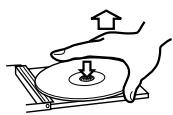
How to remove the disc
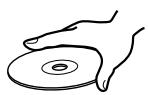
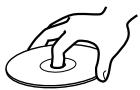
How to hold the disc
- Should the disc become dirty, wipe the surface radially (from the center hole outward towards the outer edge) with a soft, dry cloth:
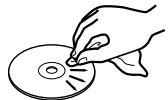
- Never use such chemicals as record sprays, antistatic sprays or fluid, benzine or thinner to clean the discs. Such chemicals will do irreparable damage to the disc's plastic surface.
- Discs should be returned to their cases after use to avoid dust and scratches that could cause the laser pickup to "skip."
- Do not expose discs to direct sunlight or high humidity and temperature for extended periods. Long exposure to high temperatures will warp the disc.
-
Do not play any disc that is warped, deformed or damaged. Playing such discs may cause irreparable harm to the playing mechanisms.
-
CD-R and CD-RW discs are more sensitive to the effects of heat and ultraviolet rays than ordinary CDs. It is important that they are not stored in a location where direct sunlight will fall on them, and away from sources of heat such as radiators or heat-generating electrical devices.
- Printable CD-R and CD-RW discs aren't recommended, as the label side might be sticky and damage the unit.
- Do not stick papers or protective sheets on the discs and do not use any protective coating spray.
- Use a soft oil-based felt-tipped pen to write the information on the label side. Never use a ball-point or hard-tipped pen, as this may cause damage to the recorded side.
- Never use a stabilizer. Using commercially available CD stabilizers with this unit will damage the mechanisms and cause them to malfunction.
- Do not use CDs with an irregular shape (octagonal, heart shaped, business card size, etc.). CDs of this sort can damage the unit:
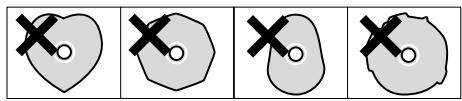
- If you are in any doubt as to the care and handling of a CD-R/ CD-RW disc, read the precautions supplied with the disc, or contact the disc manufacturer directly.
MP3 compatibility
- File names of MP3 should be alphanumeric characters. This unit cannot display symbols and full-size or 2 bytes-wide characters (such as Japanese, Chinese, etc.) correctly. Also, be sure to use the file extension ".mp3".
- The disc must be finalized in order to play.
- The CD-ROM must be ISO 9660, Joliet or Romeo compatible.
- When more than 500 files or 200 folders are recorded on the disc, the unit might not be able to play it correctly.
- Mono or stereo MPEG-1 Audio Layer 2 or 3 format, 32, 44.1 or 48kHz ,fixed bit-rate.
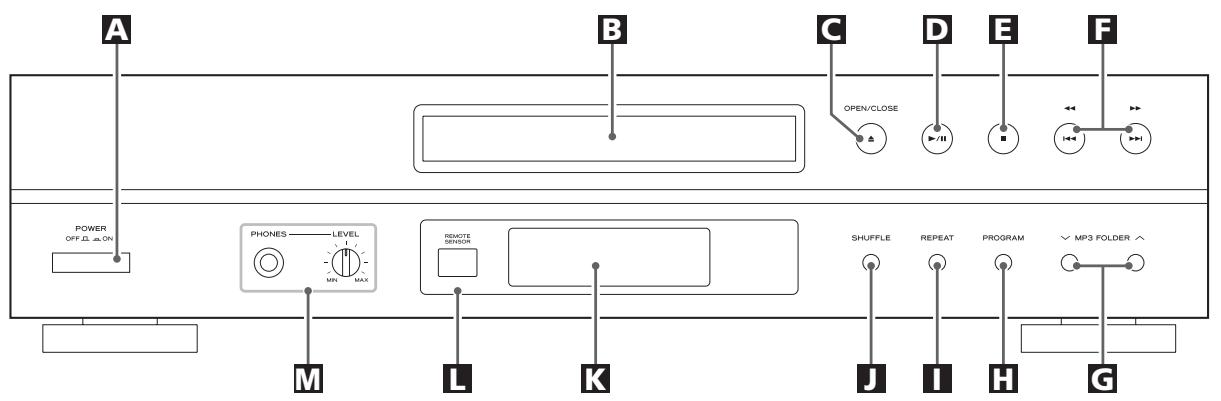
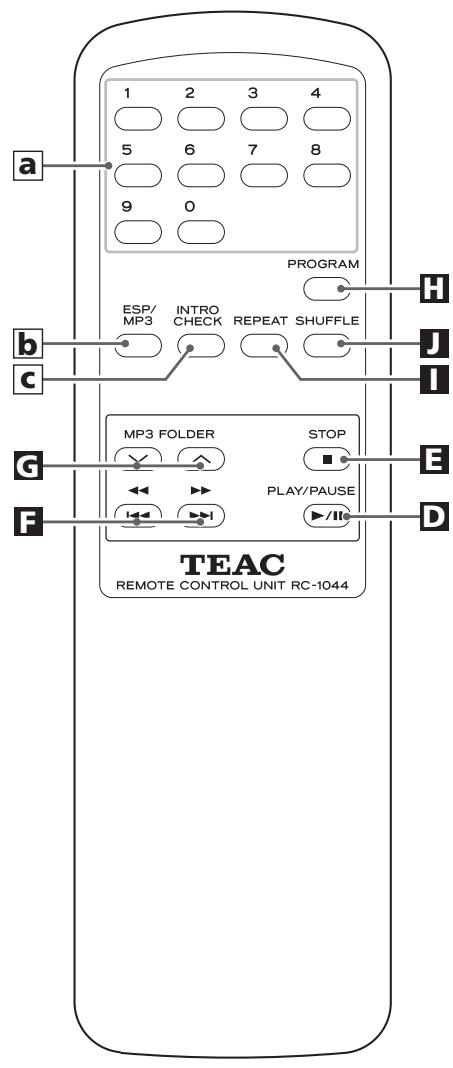
A POWER
Press this switch to turn the unit on or off.
The equipment draws a nominal amount of power from the AC outlet even with its POWER switch in the OFF position.
B Disc tray
C OPEN/CLOSE
Use this button to open and close the disc tray.
PLAY/PAUSE (▶II)
Use this button to start or pause playback of CD/MP3.
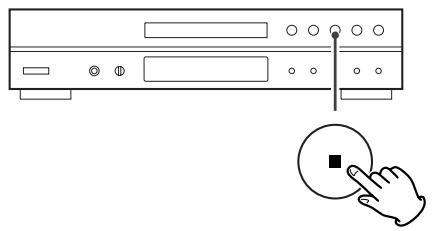
STOP
Use this button to stop playback of CD/MP3.
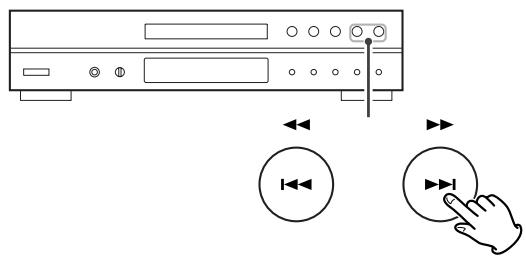
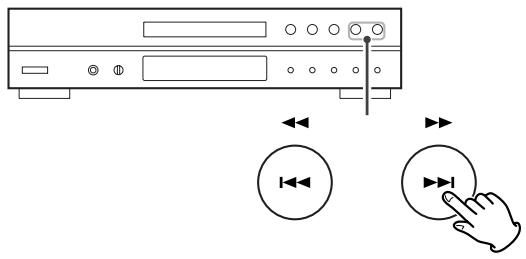
SKIP(11)/SEARCH()
Use these buttons to skip tracks. Hold down these buttons to search for a part of a track.
MP3 FOLDER
During playback of a MP3 disc, use these buttons to select a folder in the disc.
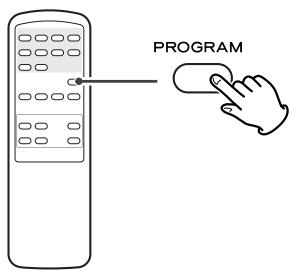
PROGRAM
Use this button to programme tracks.
1 REPEAT
Use this button for repeat playback.
SHUFFLE
Use this button for shuffle playback.
K Display
Remote Sensor
When operating the remote control unit, point it towards here.
M PHONES
For private listening, insert the headphones plug into this jack, and adjust the volume by turning the LEVEL knob.
a Numeric buttons
Use these buttons to select tracks.
b ESP/MP3
During playback of a MP3 disc, use this button to search track name.
During playback of CD, use this button to switch the ESP function on or off.
INTRO CHECK
Use this button to start the Intro Check.
Note:
To simplify explanations, instructions in this manual refer to the names of the buttons and controls on the front panel only. Associated controls on the remote control will also operate similarly.
Voltage Conversion
(General export models only)
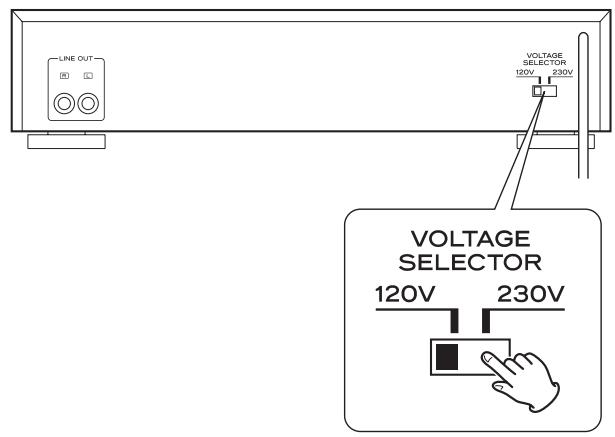
Be sure to remove the power cord from the AC outlet before repositioning the voltage converter switch.
- Locate the voltage selector on the rear panel.
- Using a flat-bladed screwdriver, set to the appropriate 230V or 120V position according to your area.
IN NORTH AMERICA USE ONLY ON 120 V SUPPLY.
Connection
CAUTION
- Turn off the power of all the equipment before making connections.
- Read instructions of each component you intend to use with this unit.
- Be sure to insert each plug securely. To prevent hum and noise, do not bundle the connection cords with the power cord.
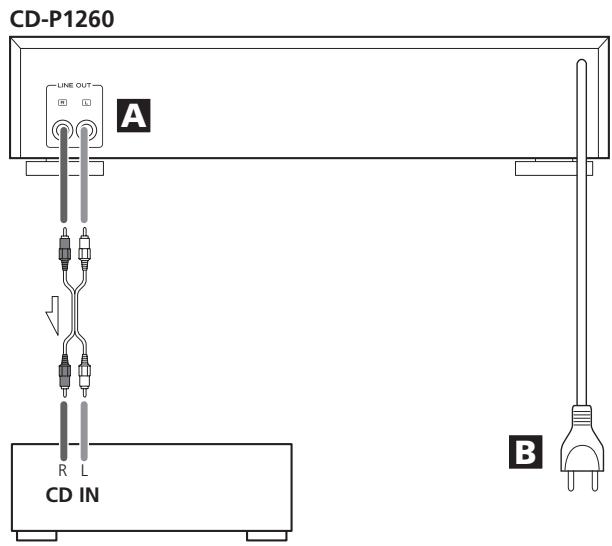
Amplifier
A LINE OUT jack
Analog 2-channel audio signal is output from this jack. Connect this jack to the CD input jack of the amplifier with an RCA cable.
Make sure to connect :
white plug white jack (L: left channel)
red plug red jack (R: right channel)
B AC Power Cord
After all other connections are complete, connect the plug to the AC wall socket.
Be sure to connect the power cord to an AC outlet which supplies the correct voltage.
Hold the power plug when plugging or unplugging the power cord. Never pull or yank on the power cord.
Remote Control Unit
The provided Remote Control Unit allows the unit to be operated from a distance.
When operating the remote control unit, point it towards the remote sensor on the front panel of the unit.
- Even if the remote control unit is operated within the effective range (5m), remote control operation may be impossible if there are any obstacles between the unit and the remote control.
- If the remote control unit is operated near other products which generate infrared rays, or if other remote control devices using infrared rays are used near the unit, it may operate incorrectly. Conversely, the other products may operate incorrectly.
Battery Installation
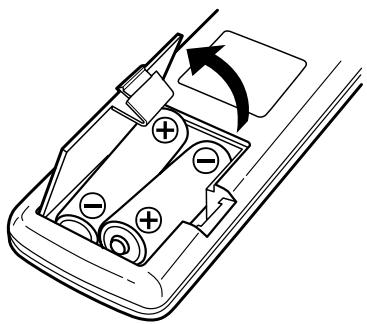
- Remove the battery compartment cover.
- Insert two "AA" (R6 or SUM-3) dry batteries. Make sure that the batteries are inserted with their positive "⊕" and negative "⊗" poles positioned correctly.
- Close the cover.
Battery Replacement
If the distance required between the remote control unit and main unit decreases, the batteries are exhausted. In this case replace the batteries with new ones.
Precautions concerning batteries
- Be sure to insert the batteries with correct positive “⊕” and negative “ ” polarities.
- Use batteries of the same type. Never use different types of batteries together.
- Rechargeable and non-rechargeable batteries can be used. Refer to the precautions on their labels.
- When the remote control unit is not to be used for a long time (more than a month), remove the batteries from the remote control unit to prevent them from leaking. If they leak, wipe away the liquid inside the battery compartment and replace the batteries with new ones.
- Do not heat or disassemble batteries and never dispose of old batteries by throwing them in a fire.
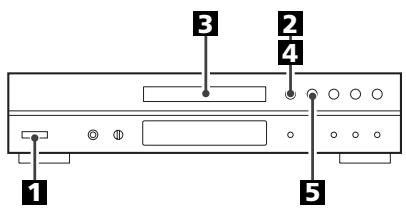
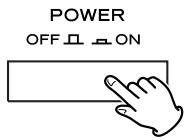
Press the POWER switch to turn the unit on.
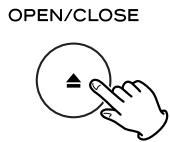
Press the OPEN/CLOSE button.
Place a disc on the tray with the printed label face up.
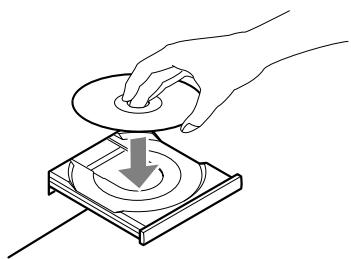
- Never place more than one disc on the tray.
- The disc must be loaded centrally into the disc tray. If the disc is not correctly loaded, it may not be possible to open the tray again once it has closed, so you should ensure the disc is always centrally loaded in the tray.
- Do not force the tray by hand during opening and closing operations.
4 Press the OPEN/CLOSE button to close the CD door.
OPEN/CLOSE
- It takes a few seconds for the unit to load the disc. No buttons will work during loading. Wait until the total number of the tracks and the total play time of the disc are displayed.
- When no disc is loaded in the CD player, "NO DISC" is displayed.
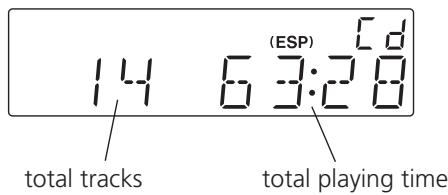
When a CD is loaded
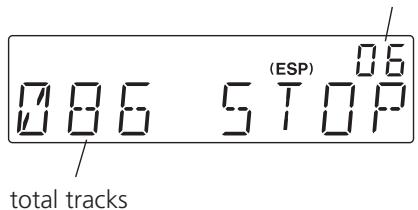
When a MP3 disc is loaded
total number of folders
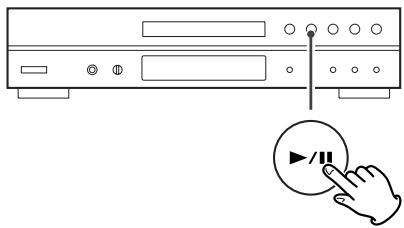
Press the Play/Pause button ( / ) to start playback.

Playback starts from the first track of the disc.
- MP3 tracks recorded out of folders are automatically put in the "ROOT" folder, and playback starts from the first track of the ROOT folder.
- When the playback of all the tracks has finished, the unit stops automatically.
To suspend playback temporarily (pause mode)
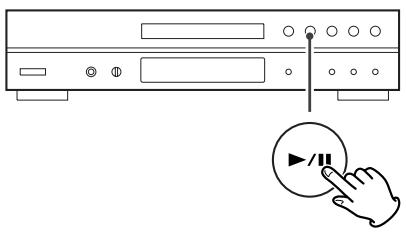
Press the Play/Pause button ( / ) during playback. Playback stops at the current position. To resume playback, press the Play/Pause button ( / ) again.
To stop playbacks
Press the Stop button (■) to stop playback.
Search for a part of a track
During playback, hold down the skip button (I or and release it when the part you want to listen to is found.
To skip to the next or a previous track
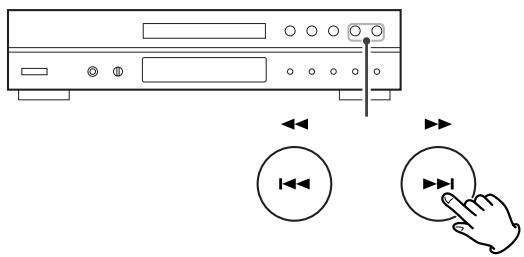
During playback, press the skip button (▶ or▶) repeatedly until the desired track is found. The selected track will be played from the beginning.
In the stop mode, press the skip button (I or ) repeatedly until the track you want to listen to is found. Press the Play/Pause button ( / ) to start playback from the selected track.
- When the 14 button is pressed during playback, the track being played will be played from the beginning. To return to the beginning of the previous track, press the 14 button twice.
- During programmed playback, the next or previous track in the programme is played.
DirectPlayback
While in stop or playback mode, you can use the numeric buttons of the remote control unit to select a track.
Select a track using the numeric buttons, and within 10 seconds press the PLAY/PAUSE button.
Playback starts from the selected track.
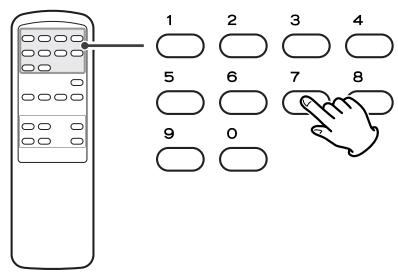
For instance, to select track number 35, press "3" and "5". To play tracks 1 to 9, simply press the corresponding buttons (1 to 9).
- Direct playback isn't possible during shuffle playback and programmed playback.
Listening through headphones
For private listening, insert the plug from your headphones into the PHONES jack, and adjust the volume by turning the LEVEL knob.
CAUTION
Always lower the volume level prior to plugging in your headphones. TO AVOID DAMAGING YOUR HEARING - Do not place your headphones on your head until after you have plugged them in.

ESP (Electronic Shock Protection)
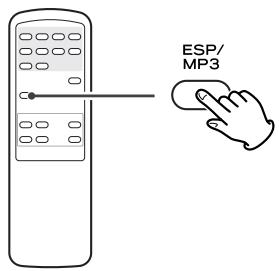
The ESP stores the music in the buffer to prevent sound from skipping.
During playback of a CD, press the ESP button to turn the ESP on or off. When you turn the ESP on, "40 SEC (40 seconds)" briefly appears, and the ESP indicator lights on the display.
- The ESP indicator blinks while the unit is filling the buffer.
- When the unit is on the stable place and free from mechanical shocks, you can turn this function off.
- During playback of MP3, this function is always ON.
To display the MP3 information
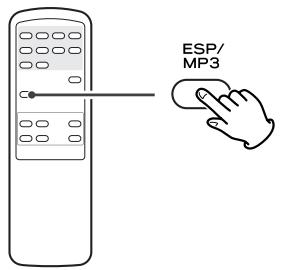
During playback of MP3 disc, press the MP3 button for more than 1 second. The information about the current track is displayed as follows:
Filename Title Artist Album
- NONE appears when there is no information.
- UNKNOWN appears when the unit cannot read the information.
Press the MP3 button for more than 1 second again to cancel the MP3 information mode.
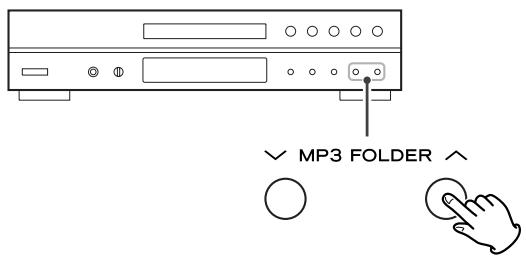
Skip to the next folder (MP3)
Press the MP3 FOLDER buttons to skip folders.
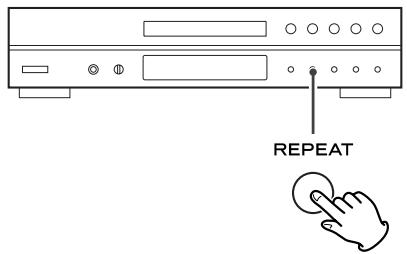
Every time the REPEAT button is pressed, the mode is changed as follows:
When a CD is loaded.
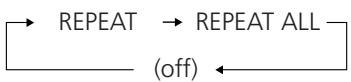
When a MP3 disc is loaded.

- If one of the following buttons is pressed, repeat mode will be canceled:
STOP, INTRO CHECK, POWER, OPEN/CLOSE
Repeat one track (REPEAT)
Press the REPEAT button once during playback. "REPEAT" lights.
The track being played will be played repeatedly. If you press the Skip button (I or ) and select another track, the track you selected will be played repeatedly.
It is also possible to select a track to be repeated in the stop mode. Press the REPEAT button, select a track using the Skip button (I or ), and then press the Play/Pause button ( / ) to start playback.
Repeat all the tracks (REPEAT ALL)
All the tracks will be played repeatedly.
Press the REPEAT button twice. "REPEAT ALL" lights.
During programmed playback, programmed tracks will be played repeatedly.
Repeat all the tracks in the folder (REPEAT ALBUM) (MP3 only)
All the tracks in the folder will be played repeatedly.
Press the REPEAT button three times. "REPEAT ALBUM" lights.
ShufflePlayback
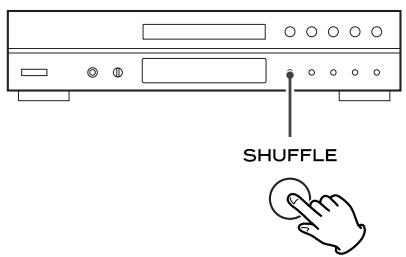
The tracks can be played randomly. Press the SHUFFLE button during playback or when in the stop mode. "SHUFFLE" will then light up in the display.
- If you press the button during shuffle playback, next track will be randomly selected and played. If you press the button, the currently played track will be played from the beginning. A track cannot be replayed during shuffle playback.
- Shuffle playback doesn't work during programmed playback.
- If one of the following buttons is pressed, shuffle mode will be cancelled:
SHUFFLE, STOP, INTRO CHECK, POWER, OPEN/CLOSE
Intro Check
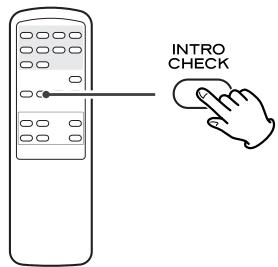
Press the INTRO CHECK button in the stop or play mode. The INTRO indicator lights on the display, and the beginning of all the tracks is played for 10 seconds each. When a track you want to listen to is found, press the INTRO CHECK button to resume normal playback.
- To skip to the next or a previous track, press the SKIP button.
- To stop Intro Check function, press the STOP button.
- Repeat and shuffle playback don't work during the intro check.
- If one of the following buttons is pressed, the intro check mode will be cancelled:
INTRO CHECK, SHUFFLE, STOP, POWER, OPEN/CLOSE
Up to 64 tracks can be programmed in the desired order.
Shuffle function doesn't work during programmed playback.
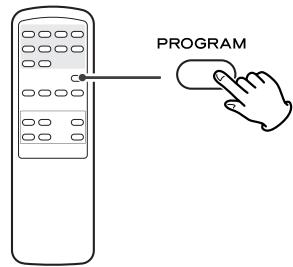
Press the PROGRAM button in the stop mode.
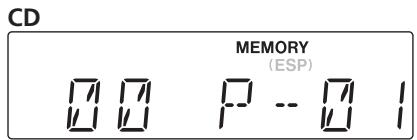
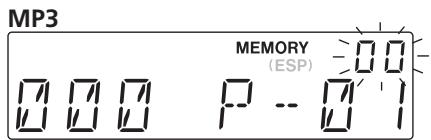
The MEMORY indicator appears on the display.
- To cancel the program mode, press the Stop button (■)
Press the numeric buttons (or press the Skip button (1 / 1) repeatedly) to select a folder on a MP3 disc, then press the PROGRAM button.
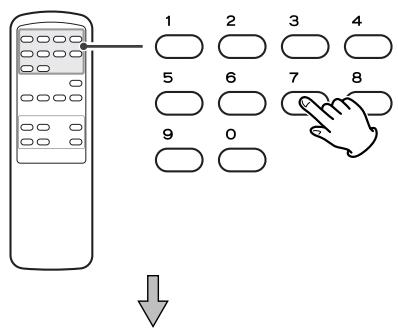
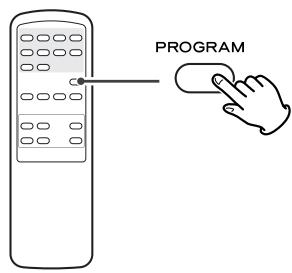
- MP3 tracks recorded out of folders are in the "01" (ROOT) folder.
- Skip this step when playing a CD.
Press the numeric buttons (or press the Skip button (1 or ) repeatedly) to select a track, then press the PROGRAM button.
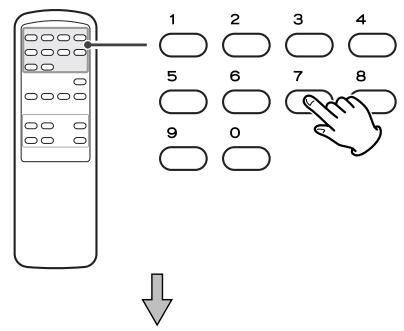
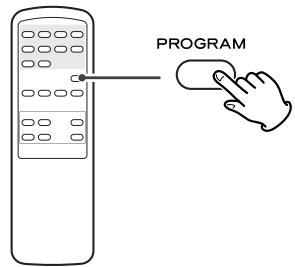
The track is programmed, and "P-02" is displayed.
- Repeat steps 2 and 3 to program more tracks.
- You can program up to 64 tracks.
4 When the selection of track numbers is completed, press the Play/Pause button ( /II) to start programme playback.
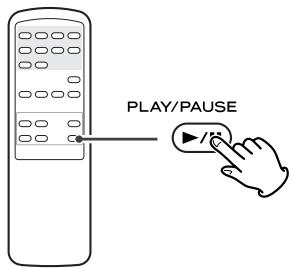
- When the playback of all the programmed tracks has finished, or if the STOP button is pressed, the MEMORY indicator will go off and the program mode will be cancelled.
The program is retained in memory until the OPEN/CLOSE button or the POWER switch is pressed. You can return to the programmed playback by pressing the PROGRAM button and the PLAY/PAUSE button (▶/■).
To check the programmed order
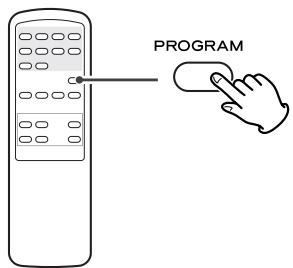
In the stop mode, press the PROGRAM button repeatedly. The track number and program number will be shown on the display.
To add a track to the end of the program
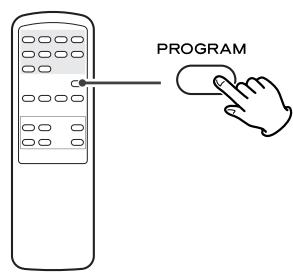
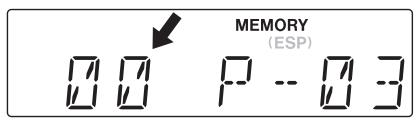
In the stop mode, press the PROGRAM button repeatedly until "00" appears on the display. Select a track number using the numeric buttons or the Skip button (I
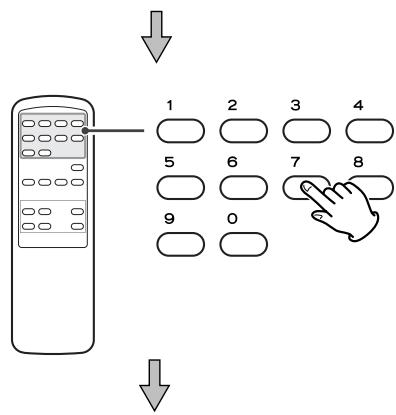
To overwrite the program
In the stop mode, press the PROGRAM button repeatedly until the program number to be changed appears on the display.
Select a new track number using the numeric buttons or the Skip button (I or I) and then press the PROGRAM button.
To clear program
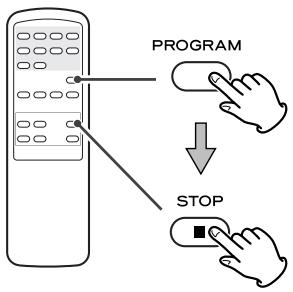
To clear the programmed contents, press the PROGRAM and the STOP button (■) in the stop mode.
- If the OPEN/CLOSE button or the POWER switch is pressed, the programmed contents will also be cleared.
Search for a name of track
You can select the track by searching for its name.
Press the MP3 button once.
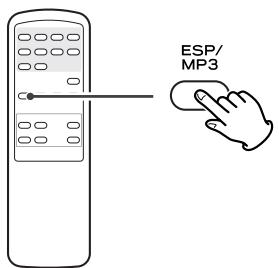
An alphabet (initial letter of a track name) and a track name are displayed.
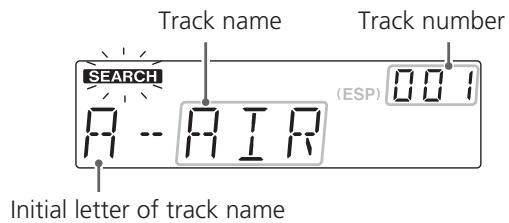
- To cancel the search mode, press the STOP button (■).
2 Select the initial letter of the track you want to listen to by pressing the SKIP button (I or
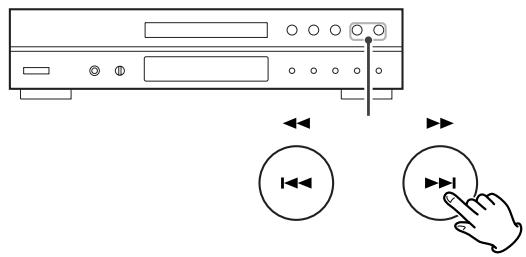
Press and hold the SKIP button (1 or >1).
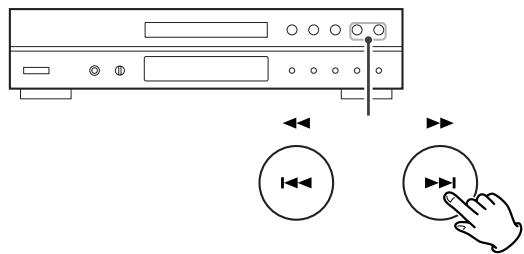
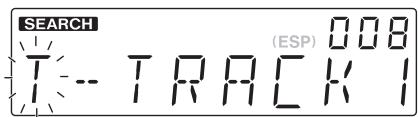
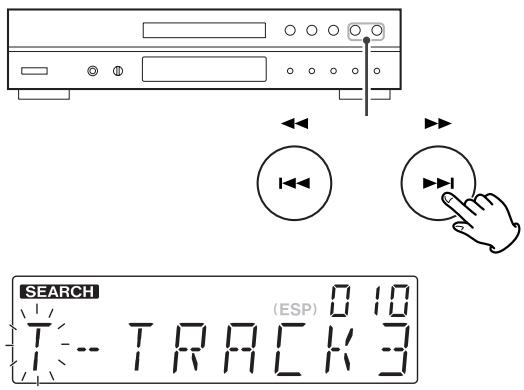
4 Select the track that has same initial letter by pressing the SKIP button (I or
Press the PLAY/PAUSE button ( /II)
Playback starts from the selected track.
Search for a track in a folder
Press the MP3 button twice.

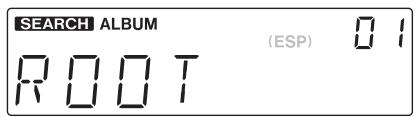
The name of folder is displayed.
Press the SKIP button (or to find the folder that the track you want to listen to is included.
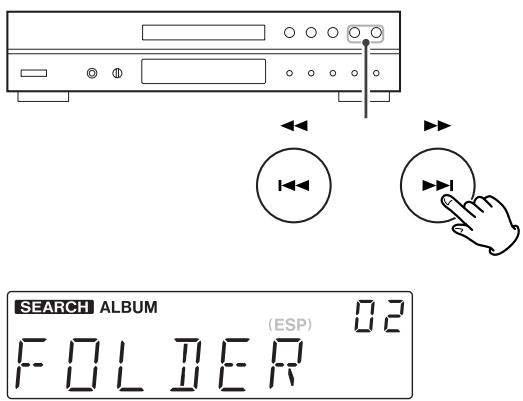
- MP3 tracks recorded out of folders are in the "ROOT" folder.
Press and hold the SKIP button (i or i).
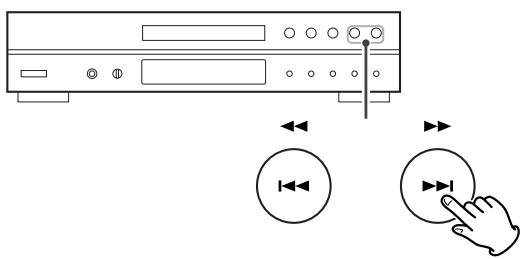
4 Select the track in the folder by pressing the SKIP button (i or >).
Press the PLAY/PAUSE button ( /II) to start playback.
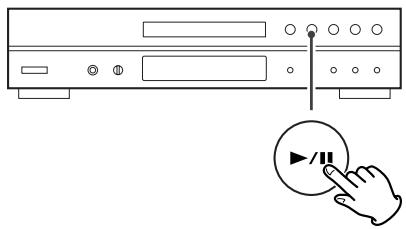
Playback starts from the selected track.
- If you skip steps 3 and 4, playback will start from the first track in the selected folder.
If you have problems with your system, look through this chart and see if you can solve the problem yourself before calling your dealer or TEAC service center.
No power
Check the connection to the AC power supply. Check and make sure the AC source is not a switched outlet and that, if it is, the switch is turned on. Make sure there is power to the AC outlet by plugging another item such as a lamp or fan into the outlet.
Remote control doesn't work.
Press the POWER switch of the main unit to turn it on.
If the batteries are dead, change the batteries.
Use remote control unit within the range (5 m) and point at the front panel.
Clear obstacles between the remote control unit and the main unit.
If a strong light is near the unit, turn it off.
No sound
Check the connection to the amplifier.
Check the operation of the amplifier.
Will not play.
Load a disc with the playback side facing down.
If the disc is dirty, clean the surface of the disc.
A blank disc has been loaded. Load a prerecorded disc.
Depending on the disc, etc. it may not be possible to play back CD-R/RW discs. Try again with another disc.
You cannot play back unfinalized CD-R/RW discs. Finalize such a disc in a CD recorder and try again.
Sound skips.
Place the unit on a stable place to avoid vibration and shock.
If the disc is dirty, clean the surface of the disc.
Don't use scratched, damaged or warped discs.
If normal operation cannot be recovered, unplug the power cord from the outlet and plug it again.
Beware of condensation
When the unit (or a disc) is moved from a cold to a warm place, or used after a sudden temperature change, there is a danger of condensation; vapor in the air could condense on the internal mechanism, making correct operation erratic or impossible. To prevent this, or if this occurs, leave the unit for one or two hours with the power turned on. The unit will stabilize at the temperature of its surroundings.
Maintenance
If the surface of the unit gets dirty, wipe with a soft cloth or use diluted mild liquid soap. Never spray liquid directly on this unit. Apply your cleaner to your cleaning cloth and wipe gently. Be sure to remove any excess completely. Do not use thinner, benzene or alcohol as they may damage the surface of the unit. Allow the surface of the unit to dry completely before using.
CD Player
Pickup 3-beam, semiconductor laser
Digital filter 8-times oversampling
Frequency Response. 20 Hz - 20 kHz ±2dB
Total Harmonic Distortion .Less than 0.03% (1 kHz)
Signal-to-Noise Ratio (S/N) . More than 83 dB (IHF-A)
Output Analog: 2.0 Vrms (RCA)
General
Power Requirement . . . . . . AC 230 V, 50 Hz (Europe model)
AC 120 V, 60 Hz (U.S.A./Canada model)
AC 120 V/230 V, 50-60Hz (General export model)
Power Consumption 10 W
Dimensions (W x H x D) 435 x 100 x 285 mm
(17 1/8" x 3 15/16" x 11 1/4")
Weight (Net) 4.1 kg (9 1/8 lb)
Operating temperature. +5^ C - +35^ C
Operating humidity . 5 % to 85 % (no condensation)
Storage temperature. -20^ + 55^
Standard Accessories
RCA cable x 1
Remote Control Unit (RC-1044) x 1
Battery for Remote Control x 2
Owner's Manual x 1
Warranty Card x 1
- Design and specifications are subject to change without notice.
- Weight and dimensions are approximate.
- Illustrations may differ slightly from production models.
For European customers
Disposal of your old appliance
- When this crossed-out wheeled bin symbol is attached to a product it means the product is covered by the European Directive 2002/96/EC.
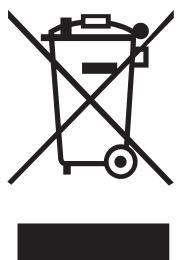
- All electrical and electronic products should be disposed of separately from the municipal waste stream via designated collection facilities appointed by the government or the local authorities.
- The correct disposal of your old appliance will help prevent potential negative consequences for the environment and human health.
- For more detailed information about disposal of your old appliance, please contact your city office, waste disposal service or the shop where you purchased the product.
Sommaire
$$ F I L E \rightarrow T I T L E \rightarrow A R T I S T \rightarrow A L B U M $$
STOP, INTRO CHECK, POWER, OPEN/CLOSE
SHUFFLE, STOP, INTRO CHECK, POWER, OPEN/CLOSE
Balayage des introductions

INTRO CHECK, SHUFFLE, STOP, POWER, OPEN/CLOSE
STOP, INTRO CHECK, POWER, OPEN/CLOSE
Repetir una pista (REPEAT)
SHUFFLE, STOP, INTRO CHECK, POWER, OPEN/CLOSE
INTRO CHECK, SHUFFLE, STOP, POWER, OPEN/CLOSE
This appliance has a serial number located on the rear panel. Please record the model number and serial number and retain them for your records.
- IMPORTANT SAFETY INSTRUCTIONS
- WARNING: TO PREVENT FIRE OR SHOCK HAZARD, DO NOT EXPOSE THIS APPLIANCE TO RAIN OR MOISTURE.
- CAUTION
- For U.S.A.
- Optical pickup
- Contents
- Thank you for choosing TEAC. Read this manual carefully to get the best performance from this unit.
- Before Use
- Read this before operation
- DO NOT MOVE THE UNIT DURING PLAYBACK
- WHEN MOVING THIS UNIT
- Discs which can be played on this unit:
- Note:
- MP3 compatibility
- A POWER
- B Disc tray
- C OPEN/CLOSE
- PLAY/PAUSE (▶II)
- STOP
- SKIP(11)/SEARCH()
- MP3 FOLDER
- PROGRAM
- REPEAT
- SHUFFLE
- K Display
- Remote Sensor
- M PHONES
- a Numeric buttons
- b ESP/MP3
- INTRO CHECK
- Voltage Conversion
- (General export models only)
- Connection
- A LINE OUT jack
- B AC Power Cord
- Remote Control Unit
- Battery Installation
- Battery Replacement
- Precautions concerning batteries
- To suspend playback temporarily (pause mode)
- To stop playbacks
- Search for a part of a track
- To skip to the next or a previous track
- DirectPlayback
- Listening through headphones
- ESP (Electronic Shock Protection)
- To display the MP3 information
- Skip to the next folder (MP3)
- Repeat one track (REPEAT)
- Repeat all the tracks (REPEAT ALL)
- Repeat all the tracks in the folder (REPEAT ALBUM) (MP3 only)
- ShufflePlayback
- To check the programmed order
- To add a track to the end of the program
- To overwrite the program
- To clear program
- Search for a name of track
- Press the MP3 button once.
- Press the PLAY/PAUSE button ( /II)
- Search for a track in a folder
- No power
- Remote control doesn't work.
- No sound
- Will not play.
- Sound skips.
- Beware of condensation
- Maintenance
- CD Player
- General
- Standard Accessories
- For European customers
- Disposal of your old appliance
- Sommaire
- Balayage des introductions
- Repetir una pista (REPEAT)
Brand : TEAC
Model : CD-P1260
Category : CD Player