USER MANUAL 650 XP SOHO INFOSEC
To ensure this product is correctly installed and used in the right way, we highly advise you to read this user guide very carefully.
1. INTRODUCTION
This UPS range is specially designed for multimedia Personal Computers. Its light weight and compact design suit limited working environments. The XP range of UPS is equipped with boost and buck AVR to stabilize input voltage. It also has a built-in DC start function. This function enables the UPS to be started up without an AC power supply. The main features of XP UPS are listed below.
2. MAIN CHARACTERISTICS
- Microprocessor control guarantees high reliability
- Equipped with boost and buck AVR
- Green Power Function for energy saving
DC Start Function
- Auto restart during AC recovery
- Compact size, lightweight
- Provides modem / phone line surge protection
3. SAFETY INSTRUCTIONS - Security
The UPS unit uses potentially hazardous voltages. Do not take this equipment apart. It does not contain accessible components that can be repaired by users.
All repairs should be performed by qualified technicians only.
The UPS has its own internal power supply (battery). There is a risk that output sockets may still be live after the UPS has been disconnected from the mains power supply.
The UPS has been designed for power computers. It should not be used with power electronic equipment with inductive loads such as motors or fluorescent lights.
Do not connect any non-computer units to the UPS, such as medical equipment for artificial life handling, microwave, vacuum cleaner, etc.
Laser printers should not be connected to the UPS as they consume too much power.
Make sure that the power supply required does not exceed the capacity of the UPS. We recommend using an optimum power load equivalent to half or one third of the nominal power for longer backup time and battery life.
Do not leave any container with liquid on the UPS or close to it.
Unplug the UPS before proceeding to cleaning it. Do not directly apply any liquid detergent or sprays.
The UPS should not be used in a damp place, nor exposed to direct sunlight or heat-emitting sources. Do not cover the ventilation slots.
In case of emergency, switch the UPS to the "OFF" position and then unplug the power cord from the power socket to disable the UPS completely.
Should the UPS fail to operate correctly, please refer to section 10: Trouble Shooting.
4. STORAGE INSTRUCTIONS
The UPS should be stored with its battery fully recharged. Storage temperatures above 20^ should be avoided as this will significantly shorten battery life. The UPS should be recharged once every 3 months. This is done by leaving it connected to the mains power supply for 24 hours. Batteries kept in storage should be recharged every 3 months, failure to do so could result in battery damage.
5. AFTER SALES SERVICE
IMPORTANT!
When calling the After-Sales Department, please have the following information ready, it will be required regardless of the problem: UPS model, serial number and date of purchase.
Accurate description of the problem providing the following details: type of equipment powered by the UPS, indicator led status, alarm status, installation and environmental conditions.
You will find the technical information you require on your guarantee or on the identification plate on the back of the unit. If convenient you may enter the details in the following box.
| Model | Serial number | Date of purchase |
| ... XP SoHo | | |
! Please keep the original packaging. It will be required in the event the USP is returned to the After-Sales Department.
IMPORTANT :
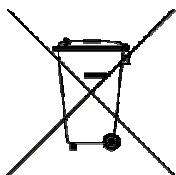
UPS are part of electronic and electric equipments category. At the end of their lives, they have to be collected separately.
6.DESCRIPTION
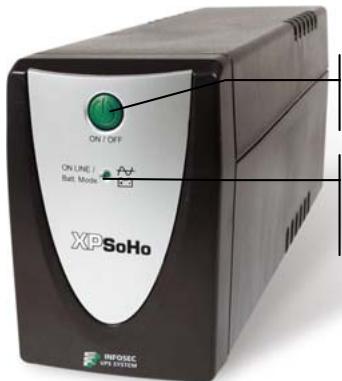
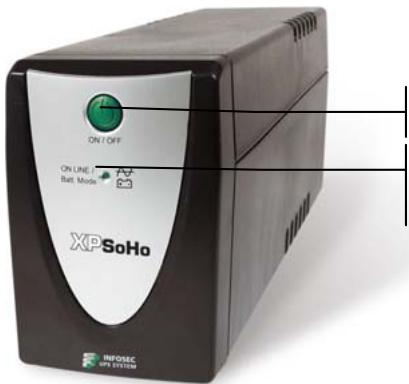
FRONT PANEL
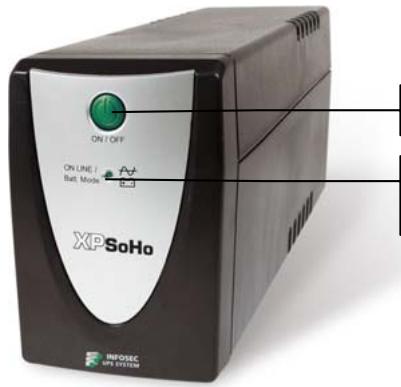
On/Off switch
Lighting green led : AC mode
Flashing green led : Battery mode
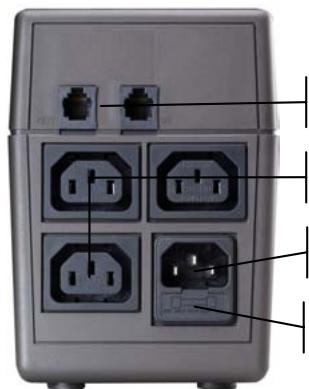
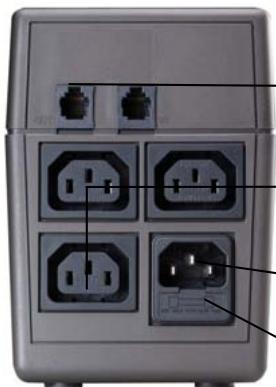
BACK PANEL
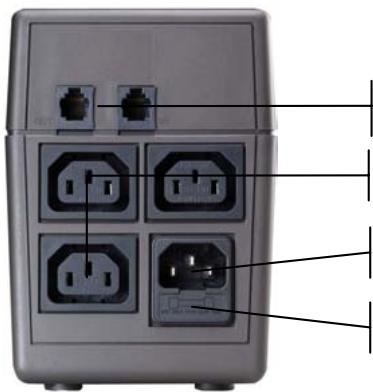
RJ11 Telephone/Fax/Internet protected outlets
3 UPS protected outlets
Input outlet
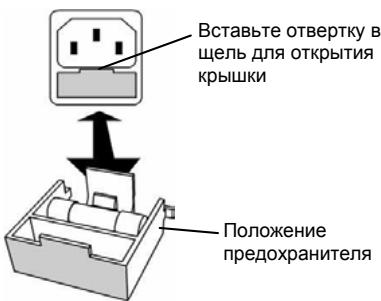
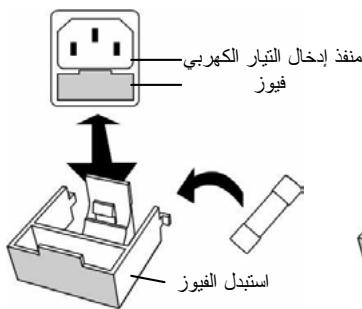
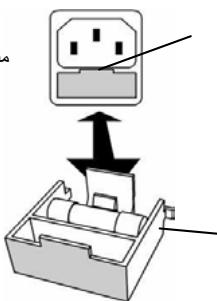
Fuse
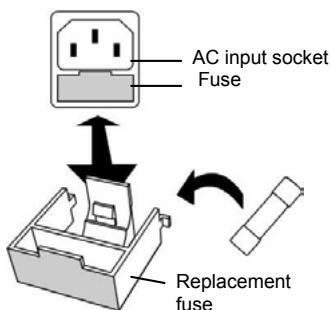
FUSE REPLACEMENT
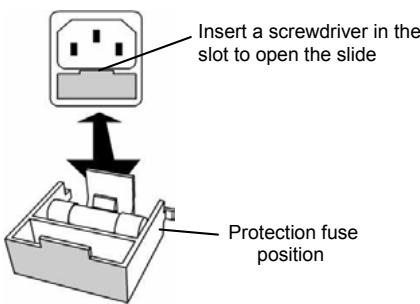
1. Checking
When you receive your equipment, open the packaging and check that your UPS has not been damaged. The packaging includes:
a UPS unit, 2 IEC output cables and a user guide. In the event of damage, please submit a standard claim to the after-sales service department.
2. Charging the batteries
This unit is shipped from the factory with its internal battery fully charged, however, some charge may be lost during shipping and the battery should be recharged prior to use. Plug the unit into an appropriate power supply and allow the UPS to charge fully by leaving it plugged-in, with no load, for at least 8 hours.
3. Where to set up
The UPS has been designed to operate in a protected environment, at temperatures between 0^ and 40^ and at a humidity level ranging between 0% and 90% (no condensation).
Do not obstruct the ventilation slots. Install the unit in an environment which is free from dust, chemical vapours and conductors.
Moreover, in order to avoid any interference, keep the UPS at least 20cm away from the CPU (central processing unit).
4. Connection
Check on the identification plate at the back of the UPS that the power supply is compatible with network voltage and that the device is powerful enough to protect the given power load. Plug the UPS into a 2-pole, earthed outlet (use the original power cable of your computer or it is recommended to use a power cable 2P + E/CEE22/10A ). Then, use the 2 IEC cables to connect one computer-related device to each of the power outlets supplied on the back of the UPS. You can also connect a device that does not require backup time, such as a printer, to the surge protected and filtered outlet.
5. On/Off
To turn the UPS unit on, lightly press the power switch. To turn it off, press the power switch again.
6.DC Start
XP units are equipped with an integrated DC start function. To start the UPS in the absence of a power supply and with a full battery, press the button.
7. Power Saving Function
XP range is equipped with a Power Saving Function. If no load connects to the UPS, it will automatically shut down after 5 minutes to save energy during a power failure. The Power switch must be kept in the 'ON' position, otherwise, the UPS will be disabled and your equipment will not be protected during a power failure.
8. PROTECTION TELEPHONE/FAX/MODEM LINE
If you wish to protect a fax or a modem, connect the telephone cable from the wall outlet to the "IN" jack. Connect the telephone cable (provided) from the "OUT" jack to the fax or modem.
Caution: The telephone line lightning arrester could be rendered inoperable if improperly installed. This surge protection device is for indoor use only. Never install telephone wiring during a lightning storm.
Note: This connection is optional. It is not necessary to use this UPS.
9. BATTERY
The battery is the only UPS component which is not in permanent use. It has a useful life of approximately 3 to 5 years. However, frequent major discharges or exposure to temperatures over 20^ will shorten its life span. We therefore recommend that users recharge the battery once every 3 months when the unit is not in use in order to compensate for natural discharging. UPS backup time will depend on the powered load, as well as the age and condition of the batteries.
WARNING!
Batteries should always be replaced by qualified technicians. Batteries have a very high short circuit current: connection errors could cause electric arcs resulting in serious burns.
10. TROUBLE SHOOTING
Should the UPS fail to function correctly we recommend you perform the following tests before calling the Hot Line.
Check list:
- Is the main switch in the "ON" position?
- Is the UPS plugged into the mains power supply?
- Does the power supply fall within specified unit values?
- Has the fuse gone in the mains plug?
Is the UPS overloaded?
Is the battery flat or defective?
| SYMPTOM | POSSIBLE CAUSE | SOLUTIONS |
| No LED display on the front panel. | 1. Battery missing. | 1. Charge battery up to 8 hours. |
| 2. Faulty battery. | 2. Replace with the same type of battery. |
| 3. Power switch was not pressed for at least 5 seconds. | 3. Press and Hold power switch for at least 5 seconds. |
| Alarm buzzer beeps every 1/2 second when AC supply is normal. | 1. UPS overload. | 1. Verify that the load matches the UPS capability stipulated in the specifications. |
| In the event of power failure, reduced backup time. | 1. UPS overload or the connected equipment is defective. | 1. Remove some non-critical load. |
| 2. Flat battery. | 2. Recharge the battery by plugging the UPS in for 24 hours. |
| 3. Battery defect due to high temperature operation environment, or improper operation to battery. | 3. Replace with the same type of battery. |
| Mains normal but LED is flashing and beeping. | 1. Blown fuse. | 1. Replace the same type of fuse. |
| 2. Power cord is loose. | 2. Reconnect the power cord properly. |
| 3. No mains power supply or UPS is not on. | 3. Check the power supply |
11. TECHNICAL SPECIFICATIONS
| 650 XP SoHo | 1100 XP SoHo |
| TECHNOLOGY | Technology | Line Interactive with Auto Voltage Regulation |
| Output form | Modified sine wave |
| Protection | Discharge / Overcharge and overload protection + fax modem line |
| Power | 650 VA | 1000 VA |
| Power factor | 0,55 | 0,5 |
| PHYSICAL | Dimensions W x D x H | 100 X 330 X 140 (mm) |
| Weight kg | 6 | 6,5 |
| Output connectors | 3 UPS protected outlets2 surge protected RJ11 |
| INPUT | Voltage | [110-120 V] or [220 - 230 - 240 V] |
| Voltage range | [81 - 145 V] [162 - 290 V] |
| Frequency | 50 - 60 Hz auto detection |
| OUTPUT | Voltage | [110-120 V] or [220 - 230 - 240 V] |
| Regulation | +10 % (battery mode) |
| Frequency | 50 or 60 Hz |
| BATTERY | Type | 12V/7AH x 1pc | 12V/9AH x 1pc |
| Backup time(depending on the load) | 20 mins | 25 mins |
| Recharge time | 8 hours to 90 % after complete discharge |
| FILTER | Spike protection | 125 Joules |
| ENVIRONMENT | Noise level | < 40 dB at 1 meter |
| Operating environment | 0°C - 40°C, 0 to 90 % humidity rate(non condensing) |
| INDICATOR | AC Mode | Green led lighting |
| Backup Mode | Green led flashing |
| AUDIBLE ARLARM | AC Mode | Sounding every 10 seconds |
| Battery replacement | Sounding every 2 seconds |
| Low battery | Sounding every second until automatic stop |
| Overload or defect | Every 1/2 second |
| Fault | Continuously sounding |
| STANDARDS | Security / Standard | CE - ISO 9001 |
Instrukcja obslugi
PykoBoDCTBO noIb3OBaTeJIa
IpyaBnBHO yCTaHOBKn I 3KcnPnyatauIN DaHHOR O 3JeINHaCTOyTeNbHO peKomeHdyem BHNMaTeJbHo IPOuyTaTb HAcTOyUee pyKOBoDCTBO NO 3KcnPnyatauIN.
1. BBEDEHNE
IbI OTHOCaTc K KaTeOpnN 3NeKTpOHHOrO N 3NeKTpUeCKOrO o6OpyIDoBaHnI. PocJIe OKOHuaHnI cPoka CnyKbI nOJleJkaT OTdJIbHoI yTInu3aunn.
NEPEHЯ NAHEJIb
BkI./BbIKI.
HopmaJIbHoe nITaHHe: 3eJIeHbI CBET BaTapeHbI peXIM: MmraIoUm 3eJIeHbI CBET
3ADHЯ NAHEJIb
3aui. pa3bembl RJ11 dIe TeI./paKaCa/Moema
3aunueHHbX paBema IVI
Pazbem nodklouchenny nitaHnry
IpeoOxpanHtJIb
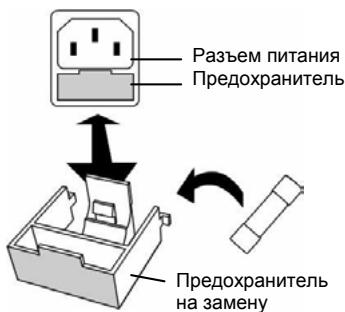
3AMEHA INPEDOXPAHNTIEL
1.Пpo2epka
Iocne noluyehn oobpyodobAHn BckpoTe ynaKOBky u y6eDntecb, YTO BAu N5P He nobpeXdH. YnaKOBka dOJxHa cOepKaTb CneDuOuee:
IV5I, 2 BbIXoHbIX Ka6eIg cTaHdApTa M3K i pykoBocTBo noJIb3ObaTeIg. B cnyae nobpejXdeHnry, noXaIyIcTa, HappaBbTe cTaHdApTHyIO peKNaMaUIO B OTdIe IocIenpoJadXhoro o6cIyKuBaHnry.
2.3apdka akkymyTopa
UcTpoIcTBO NOCTabJIaETcC 3aOda C NOnHocTbIO 3apJxKeHHbIM AkKymJIaTOpOM. OHaKO UaCTb 3apJa MoXeT bItb NTopeRHa 3a BpEmr NocTaBKn, N03Tomy nepeH naJom IcNoJIb3OBaHnA aKKymJIaTOp Tpe6yETcN peE3apJdntb. BkJIouHTe ycTpoIcTBO B cTe bI daIte EmY NoJIHOCTbIO 3apJdntbC6e3 Harpy3Kn B TeueHne 8 YaCoB.
3. MecTo yCTaHOBKn
Ibπ npedna3haen dЯ kcnnyataunn B nomeueneux npn TeMnepaType OkpykaoJero BO3dyxa ot 0^ do 40^ n OTHocntelhON BnaxKHOCTN B Dnana3OHe ot 0% do 90% (6e3 KOndeHcaunn).
He 3akpbBaIte BENTINLAIOHbIe IeJI.N. YcTaHaBnBaIte yCTpoCTBO B MeCTe, rIe HET nbIIn, npoB XIMNUeCKNX COeINHeHNI TOKOpPOBDAIUX CpeI.
Kpome toro, nIy n36exaHn BO3NkHOBeHn IomEx pa3MeuTe IVbI Ha pacctOHHn He Mehee 20 cm ot LIIy (UeHTpaJIbHoro npoueccopa).
4. PodklioucheNe
Провьт e Днье Ha ndeHTnФикauOnHNo TabNue He 3aDne H cTeHKe I5П n y6eintecb,чTo HapFxkeHne COOTBeTCTByet BaWemy HapFxkeHIO CTeN, a Harpy3ka He npEbyIaET MOUHocTN yCTpoiCTBa. BkIouHte I6Pb V 2-KoTHaKTHyO 3a3EmNeHHyO po3ETky (ICnoJIb3yIe T CeTEBOI shyp OT BaWero KOMNbIoTepa IIN peKOMeHdyEmbI Ka6eIb 2P+E/CEE22/10A). Pocne 3toro npn nomOuN 2 Ka6eJe CTaNdApTa M3K noDcoEInHte kaxdoe n3 KOMNbIoTePbIx yCTpoiCTB K COOTBeTCTByIOUeMy pa3bemy Ha 3aDne I naHeN I6Pb. Bbl TaKxe MoKTe IOdkIIOUHTb yCTpoiCTBO, He Tpe6yIOUee 6ecnepe6oHoro nITaHnra (HanpIMep, npInTep), K pa3bemy, 3aUmIeHHOMy OT nepenadOB HapFxkeHnY.
5.BkIIOueHne/BBIKIOueHne
Jus 1 Jus 1 Jus 1 Jus 1 Jus 1 Jus 1 Jus 1 Jus 1
yjlll Jg jgc g jzjj 0jglj glaalglg UPS s d aas y
UPS 1
a aallll lalal alalal alalal alalal alalal alalal alalal alalal alalal alalal alalal alalal alalal alalal alalal alalal alalal alalal alalal
. jujupus
u 1
a a a a a a a a a a a a a a a a a a a a
y
y j 1j 1j 1j 1j 1j 1j 1j
a 20 20 20 20
5
a a a a a a a a a a a a a a a a a a a a a a a a a a a a a a a a a
. 1
Jlll Jg jaiil jaiil jaii jaii.
e jlll aillaaa aaijlaa o jss sddd d aalaaa aalaaa aalaa
.
!pL
-
-
-
-
-
-
-
-
-
-
-
-
-
-
-
-
-
-
-
-
-
- 1.
j 1 j 1 j 1 j 1 j 1 j 1 j 1 j
Jusill Ccal / Jusill C
$$
\begin{array}{l} \therefore \angle A C E = \angle A D E = 1 8 0 ^ {\circ} \ \therefore \lim _ {a \to 0} \frac {\sin a}{a} = \frac {1}{2} \lim _ {a \to 0} \frac {\cos a}{a} \ \end{array}
$$
02g 0jzg
psall/ jshill RJ11 1
2020 3 12
j
jglll
C 1
Jg
.1
LgLo g aal g j 120 1 1 (UPS) Euaaiaaae
2
8 8 8
90 40 0 20
(2023) %90