
ACS 150 ET - Air conditioner ALPATEC - Free user manual and instructions
Find the device manual for free ACS 150 ET ALPATEC in PDF.


| Product type | Monobloc portable air conditioner |
| Brand | ALPATEC |
| Model | ACS 150 ET |
| Indoor unit dimensions (W x H x D) | 48,2 x 75 x 42 cm |
| Outdoor unit dimensions (W x H x D) | 47,9 x 48 x 29,9 cm |
| Weight | 43 kg |
| Power supply | 220-240 V ~ 50 Hz |
| Cooling capacity | 4,3 kW |
| Energy class (cooling) | C |
| Annual consumption | 765 kWh |
| EER (energy efficiency ratio) | 2,81 |
| Noise level | 56 dB(A) |
| Dehumidification | 68 L/day |
| Maximum air flow | 420 m³/h |
| Fan speeds | 3 + automatic |
| Exhaust hose length | 3 m |
| Recommended area | Up to 45 m² |
| Refrigerant | R410A (0,665 kg) |
| Main functions | Air conditioning, dehumidification, timer, night mode, remote control |
| Filter maintenance | Clean every 2 months with a vacuum cleaner or damp cloth |
| Safety instructions | Install on flat surface, 50 cm clearance, mandatory grounding, do not use without filter |
| After-sales service | Alpatec customer service: 0892 707 544 (Mon-Fri 8:45 AM-12:30 PM, 2 PM-6 PM) |
| Environmental information | Fluorinated greenhouse gas, recycling at end of life |
Frequently Asked Questions - ACS 150 ET ALPATEC
User questions about ACS 150 ET ALPATEC
0 question about this device. Answer the ones you know or ask your own.
Ask a new question about this device
Download the instructions for your Air conditioner in PDF format for free! Find your manual ACS 150 ET - ALPATEC and take your electronic device back in hand. On this page are published all the documents necessary for the use of your device. ACS 150 ET by ALPATEC.
USER MANUAL ACS 150 ET ALPATEC
Support mural foumi (Gé: 2)

For your comfort and safety,
ALPATEC has checked all the steps of manufacturing. The products have been made for you to enjoy their design and easiness to use.
ALPATEC, a complete range of air conditioners, coolers, fans and heaters for you to be completely satisfied.
CAUTION
When using electrical appliances, some rules have to be respected.
READ THESE INSTRUCTIONS CARREFULLY BEFORE USING THIS PRODUCT.
- Take care to install this product by complying with the national rules of electric installation. Make sure that the voltage on the rating plate is same as your main one before plugging. Always connect to earth ground.
- This product contains R 410A gas whose handling is regulated by the decree n° 2007-737 of May 7th 2007. Any operation in relation with refrigerant has to be done by a qualified technician.
- Place the appliance on a dry and level surface, with enough room, without obstacle. Clearance of 50 cm between product and wall is needed.
- Always place the appliance in a vertical position, in order to maintain the compressor in good working conditions.
- Never let the appliance in a room with children and handicapped people without supervising.
- Do not use outdoor, in a wet environment, close to a bath-tub, a shower or a swimming pool.
- Do not immerse appliance or power cord
- This product is provided with its own power cord. Do not use any other electrical connection but the one supplied and recommended by the manufacturer. This could be dangerous and may damage the appliance.
- Do not use if power cord or appliance is damaged
- Only use this appliance for domestic purpose, following the instructions of that manual.
- Never move or unplug by pulling the power cord.
- Unplug before cleaning or replacement of one part.
- Do not use without filter.
- In order to avoid any electrical interference, keep away from electric sources.
- Never use near a hot place.
- Do not use if it is not totally assembled and particularly if the protection grid is not secured, or the exhaust pipe is not assembled.
- Do not introduce parts through the grid.
- Do not put anything on the appliance. Do not block air inlet and outlet.
- Do not attempt to repair the appliance yourself. Otherwise, guarantee would cancel. It has to be repaired by a qualified worker. Power cord has to be changed by a qualified person if needed.
THE MANUFACTURER WILL NOT ASSUME ANY RESPONSABILITY IN CASE OF NON ADHERENCE TO
THIS RECOMMANDATIONS.
KEEP THIS MANUAL CAREFULLY.
TECHNICAL SPECIFICATIONS
| Brand | : ALPATEC |
| Reference | : ACS 150 ET |
| Rotative compressor | : with R 410 A* / 0,665 Kg |
| Cooling class | : C |
| Annual consumption (kW) | : 765 |
| Cooling capacity (kW) | : 4,3 |
| EER | : 2,81 |
| Type | : cooling only |
| Cooling mode | : by air |
| Noise level dB (A) | : 56 |
| Power supply | : 220-240 V ~ 50 Hz |
| Dehumidification | : 68 liters / day |
| Air flow | : 420 m³ / h |
| Fan speed | : 3 |
| Pipe length | : 3 m |
| Suitable for room up to | : 45 m² |
| Indoor unit dimensions | : 47,6 x 35,8 x 84 |
| Outdoor unit dimensions | : 51 x 33 x 43 |
| Weight | : 43 kg |
- Contains gas with fluorinated greenhouse effect that depends on the protocol of Kyoto.

ELECTRICAL DIAGRAM:
PARTS LIST
- Adjustable air outlet
- Control panel
- Receiver for remote control
- Pipe
- Handle
- Holes for attachment
- Handles
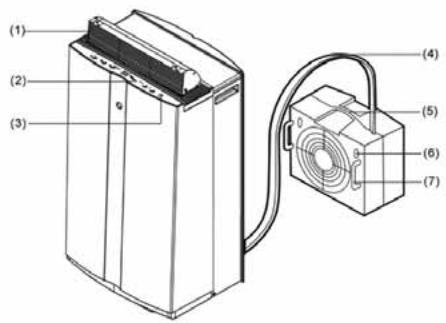
- Air filter
- Air inlet
- Casters
- Power cord
- Drainage hose
- Outdoor unit
- Remote control


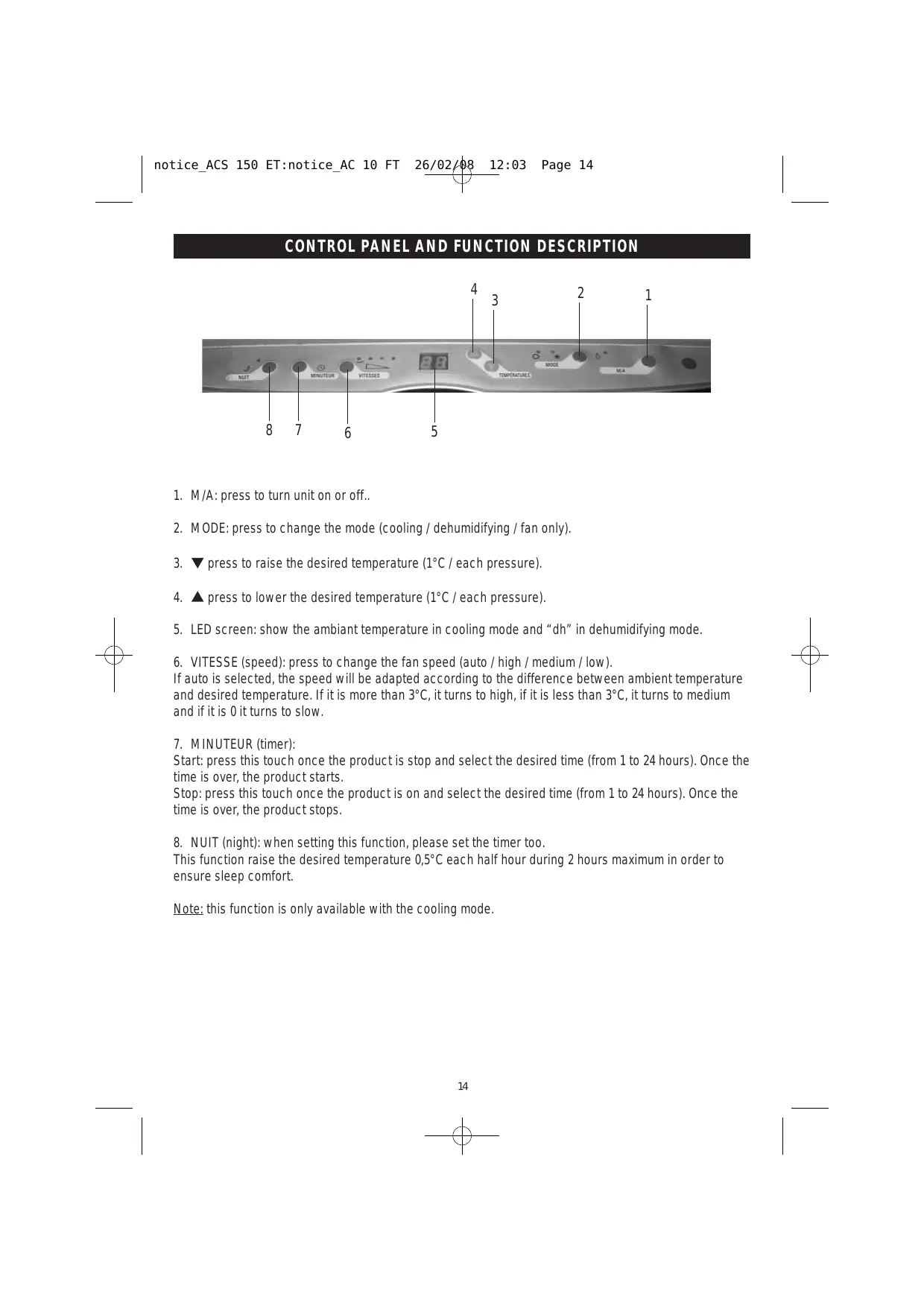
CONTROL PANEL AND FUNCTION DESCRIPTION

- M/A: press to turn unit on or off..
- MODE: press to change the mode (cooling / dehumidifying / fan only).
- press to raise the desired temperature (1°C / each pressure).
- press to lower the desired temperature (1°C / each pressure).
- LED screen: show the ambient temperature in cooling mode and "dh" in dehumidifying mode.
- VITESSE (speed): press to change the fan speed (auto / high / medium / low). If auto is selected, the speed will be adapted according to the difference between ambient temperature and desired temperature. If it is more than 3ircC , it turns to high, if it is less than 3ircC , it turns to medium and if it is 0 it turns to slow.
7. MINUTEUR (timer):
Start: press this touch once the product is stop and select the desired time (from 1 to 24 hours). Once the time is over, the product starts.
Stop: press this touch once the product is on and select the desired time (from 1 to 24 hours). Once the time is over, the product stops.
- NUIT (night): when setting this function, please set the timer too.
This function raise the desired temperature 0,5ircC each half hour during 2 hours maximum in order to ensure sleep comfort.
Note: this function is only available with the cooling mode.
REMOTE CONTROL
1 RC TRANSMITTER
2 DISPLAY SCREEN
3 MODE
5 ON/OFF
6 NIGHT
7 TIMER
4 TEMPERATURE
8 AUTO FAN SPEED
9 HIGH SPEED
10 MEDIUM SPEED
11 SLOW SPEED
| Picto | Function |
| Cooling | |
| Dehumidifying | |
| Sleeping | |
| Timer ON/OFF | |
| Temperature | |
| Automatic air flow speed | |
| High speed | |
| Medium speed | |
| Low speed |

You can run the product either with the remote control or with the control panel.
Touch 3: select the mode (cooling or dehumidifying).
Touch 4: each pressure increase or lower the temperature by 1ircC
Touch 5: start or stop the product.
Touch 6: night mode. Fan speed will turn to low speed. Temperature will increase by 0,5ircC after half an hour in this mode, then by 2ircC after 2 hours.
Press again this touch to cancel the mode.
Touch 7: timer on or timer off.
When the product is ON, it is possible to set an automatic stop. Press the touch 7 till the time on the screen corresponds to the time you want the product to stop.
When the product is OFF, it is possible to set an automatic start. Press the touch 7 till the time on the screen corresponds to the time you want the product to start.
Touch 8: automatic fan speed. If auto is selected, the speed will be adapted according to the difference between ambient temperature and desired temperature. If it is more than 3ircC , it turns to high, if it is less than 3ircC , it turns to medium and if it is 0 it turns to slow.
Touch 9: HIGH fan speed.
Touch 10: MEDIUM fan speed.
Touch 11: LOW fan speed.
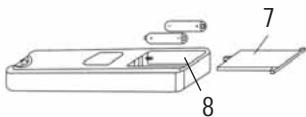
- Beware of the polarity.
- Do not mix new and old batteries.
- If you don't use the remote control for a long time, please take out batteries.
- At the end of your product's life, remove the batteries before you hand it for recycling.
- Old batteries have to be hand over a collection point.

INSTALLATION
Put the indoor unit near a window or a door and the pipe through the opening.
Make the opening as small as possible to have as less hot entering as possible.

Outdoor unit can be put on the floor or fixed on the wall.
The unit can be placed directly on a suitable external level base. Alternatively the mounting brackets can be used.
- Secure the outdoor unit into the two brackets by the steel spacer handles.

Fix the brackets with wall-screws onto an outside wall.

Note : The air intake and discharge must be unobstructed.

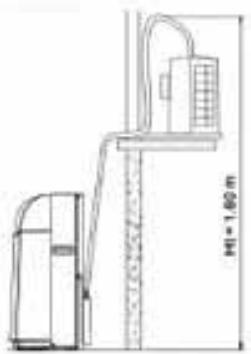
If there is more than 1.6 meters high between the two units, moistures have to be removed using the drainage knob:
- Remove the drainage knob at the back of the product
- connect a 015/17 pipe to this hole
- make sure the water flow away correctly

CLEANING
Before any cleaning operation, stop and unplug the product.
Do not use chemical solvent.
Use a dry and wet cloth to clean the outside of the units.
ANTI DUST AIR FILTER
The filter is located at the back of the product.

Remove and clean it using a vacuum cleaner or a damp cloth and dry it before replacing.
If the filter is dirty, the air conditioner will be less performing.
Clean the filter at least every two months.
TROUBLE SHOOTING
| Problems | Causes | Suggest solution |
| Unit does not work | - It is not plugged in - Socket or plug is damaged - Fuse or power cord are damaged | - Plug in - Make it changed - Make it repair by a qualified person |
| Unit stops working automatically | - Timer was on | - Cancel timer |
| No cool in cooling mode | - Room temperature is lower than set temperature - Evaporator is frosted | - Normal symptom - Eliminate frost |
| Screen display E7 | - Water tank is full | - Empty water tank |
| Screen display E1 | - Sensor is faulty | - Make it repair by a qualified person |
When there is something wrong with your unit, contact a qualified person.
Accueil France Service, our after sales department is on line from Monday to Friday 8h45am to 12h30 and 2pm 6pm (0 892 707 544*).
Before calling, please note the exact reference of the product and the serial number.
Other information: www.alpatec.fr.

Instructions on environment protection
Do not dispose of this product in the usual household garbage at the end of its life cycle; hand it over a collection point for the recycling of electrical and electronic appliances. The symbol on the product, the instructions for use or the packing will inform about the methods of disposal. The materials are recyclable as mentioned in its marking. By recycling or others forms of re-utilization of old appliances, you are making an important contribution to protect our environment. Please inquire at the community administration for the authorized disposal location.
ALPATEC
SOLUTIONS CLIMATIQUES
02/08
Brand : ALPATEC
Model : ACS 150 ET
Category : Air conditioner