USER MANUAL AC 280 - AC280KT ALPATEC
K

Rafraîchisseur
R750

Cher Client,

Many thanks for choosing to purchase a TAURUS
ALPATEC brand product.
Thanks to its technology, design and operation and the fact that it exceeds the strictest quality standards, a fully satisfactory use and long product life can be assured.
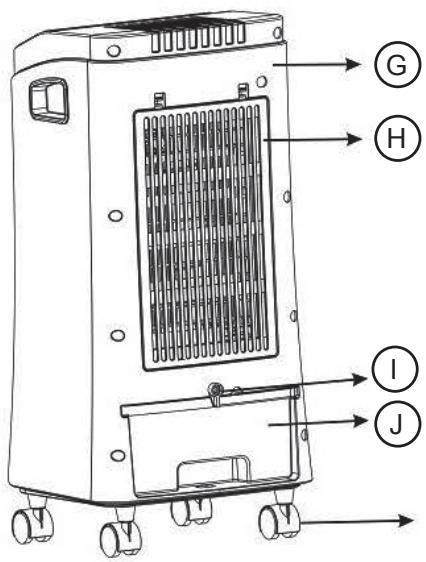
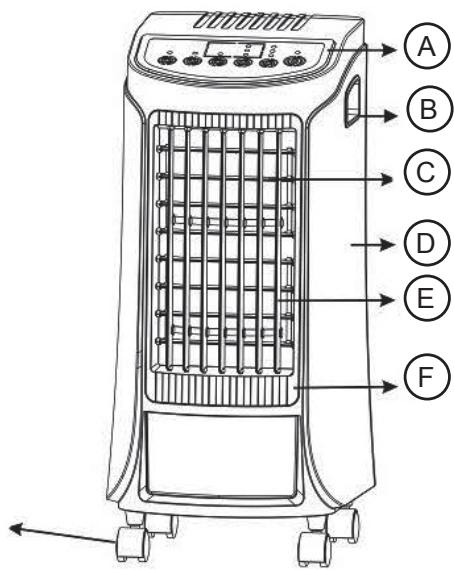
Product description
| A Control Panel | G Back cover |
| B Handle | H Filter |
| C Inner leaf | I Water tank clip |
| D Front cover | J Water tank |
| E Outer leaf | K Wheels |
| F Outlet | |
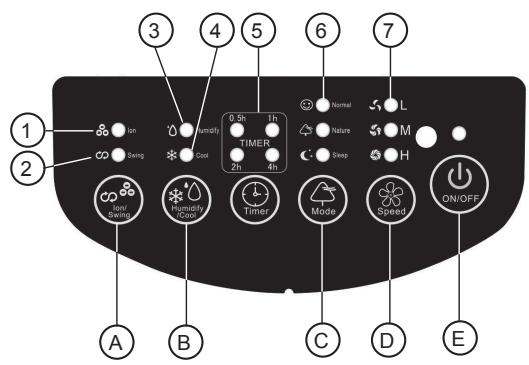
Control panel description
| 1 | Ion light |
| 2 | Swing light |
| 3 | Humidity pilot light |
| 4 | Cool pilot light |
| 5 | timer pilot light |
| 6 | Mode fan pilot light (Normal, Nature, Sleep) |
| 7 | Speed pilot light (Low, Medium, High) |
| A | Ion/swing button |
| B | Humidity/Cool button |
| C | Mode button |
| D | Speed |
| E | On/Off button |

Safety advice and warnings
- This appliance can be used by children aged from 8 years and above and persons with reduced physical, sensory or mental capabilities or lack of experience and knowledge if they have been given supervision or instruction concerning use of the appliance in a safe way and understand the hazards involved.
- Cleaning and user maintenance shall not be made by children unless they are supervised.
- This appliance is not a toy. Children
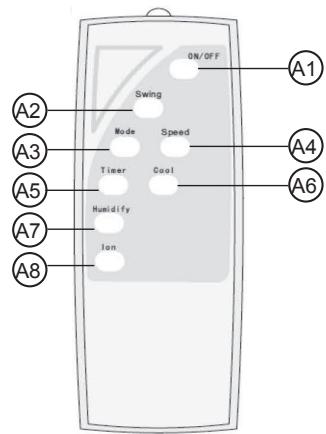
Remote control description
A1 On/Off button
A2 Swing button
A3 Mode button
A4 Speed button
A5 Timer button
A6 Cool button
A7 Humidify button
A8 Ion button
- Read these instructions carefully before switching on the appliance and keep them for future reference. Failure to follow and observe these instructions could lead to an accident.
should be supervised to ensure that they do not play with the appliance.
- Disconnect the appliance from the mains before undertaking any cleaning task. Ensure that the fan is switched off from the supply mains before removing the guard.
- Only use the appliance with the remote controller provided.
- If the connection to the mains has been damaged, it must be replaced, take the appliance to an authorised technical support service. Do not attempt to disassemble or repair the appliance by yourself in order to avoid a hazard.
- Ensure that the voltage indicated on the rating label matches the mains voltage before plugging in the appliance.
- Connect the appliance to a base with an earth socket withstanding a minimum of 10 amperes.
- The appliance's plug must fit into the mains socket properly. Do not alter the plug. Do not use plug adaptors.
- Do not place the appliance where it can reach the sunlight.
- Keep children and bystanders away when using this appliance.
- The appliance must not be placed below a power socket.
- The appliance must be used and placed on a flat, stable surface.
- When the appliance is placed on its support, make sure that the surface on which it is placed is stable.
- Place the appliance on a horizontal, flat, stable surface away from heat sources and contact with water (splashes etc.)
- Place the appliance a minimum distance of 50cm away from combustible materials, such as curtains, furniture ...
- CAUTION: In order to prevent overheating do not cover the appliance.
- Ensure that neither the air access nor exit become either totally or partially covered by drapery, clothing, etc., as this increases the risk of fire.
- Do not use the appliance in association with a programmer, timer or other device that automatically switches it on.
- Do not use the appliance if the cable or plug is damaged.
- If any of the appliance casings breaks, immediately disconnect the appliance from the mains to prevent the possibility of an electric shock.
- Do not use the appliance if it has fallen on the floor, if there are visible signs of damage or if it has a leak.
- CAUTION: Maintain the appliance dry.
- Do not use the appliance near bathtubs, showers or swimming pools.
- Do not use the appliance with damp hands or feet, or when barefooted.
- Do not force the power cord. Never use the power cord to lift up, carry or unplug the appliance.
- Do not wrap the power cord around the appliance.
- Do not clip or crease the power cord.
- Keep the appliance away from heat sources and sharp edges.
- Keep the appliance well away from heat sources, oil, sharp edges or moving parts.
- Check the state of the power cord. Damaged or tangled cables increase the risk of electric shock.
- The appliance is not suitable for outdoor use.
- Supply cord should be regularly examined for signs of damage, and if the cord is damaged, the appliance must not be used.
- As an additional protection to the electrical supply for the appliance, it is advisable to have a differential current device with a maximum sensitivity of 30 mA. Ask for advice from a competent installer.
- Appliance must be supplied through a differential current device with a maximum sensitivity of 30 mA. Ask for advice from a competent installer.
- Do not use or store the appliance outdoors.
- Do not leave the appliance out in the rain or exposed to moisture. If water gets into the appliance, this will increase the risk of electric shock.
- Do not touch the plug with wet hands.
- Do not touch any of the appliance's moving parts while it is operating.
Use and care:
- Fully unroll the appliance's power cable before each use.
- Do not use the appliance if its accessories are not properly fitted.
- Do not use the appliance if the on/off switch does not work.
- Do not remove the support feet of the appliance.
- Do not move the appliance while in use.
-
Use the appliance handle/s, to catch it or move it.
-
Do not use the appliance if it is tipped up and do not turn it over.
- Do not turn the appliance over while it is in use or connected to the mains.
-
If you use the appliance in a bathroom or similar place, unplug the appliance from the mains when it is not in use, even if it is only for a short while, as proximity to water involves a risk, even if the appliance is disconnected.
-
Unplug the appliance from the mains when not in use and before undertaking any cleaning task.
- This appliance is for household use only, not professional, industrial use.
-
This appliance should be stored out of reach of children and/or the disabled.
-
Do not expose to extreme temperatures or strong magnetism.
- Keep the appliance in a dry, dust-free place, out of direct sunlight.
- Make sure that dust, dirt or other foreign objects do not block the fan grill on the appliance.
- Keep the appliance in good condition. Check that the moving parts are not misaligned or jammed and make sure there are no broken parts or anomalies that may prevent the appliance from operating correctly.
- Never leave the appliance connected and unattended if is not in use. This saves energy and prolongs the life of the appliance.
Service:
- CAUTION: There is a risk of fire if the appliance's cleaning is not done according to these instructions.
- Any misuse or failure to follow the instructions for use renders the guarantee and the manufacturer's liability null and void.

Installation
- Be sure to remove all packaging material from inside the appliance.
- Ensure that the fan is switched off from the supply mains before start any installation or assembly operation.
- Ensure that the appliance is level with respect to the floor.
- The appliance requires suitable ventilation in order to work properly. Leave a space of 20cm above the appliance, 10cm behind the appliance, and 5cm on either side.
- Do not cover or obstruct any of the openings of the appliance.
- The plug must be easily accessible so it can be disconnected in an emergency.
- The appliance should be used with its wheels attached.
Assembling the wheels:
- To assemble the wheels, place the appliance face down
- Remove the four rubber stoppers from the holes in the base plate.


- Push 2 swivel wheels into the front holes (1) using the pins and make sure they are secure.
- Push 2 swivel wheels into the back holes (2) using the pins and make sure they are secure.
- Put the unit in an upright position, on the wheels.
Instructions for use
Before use:
- Remove the appliance's protective film.
- Make sure that all the product's packaging has been removed.
- Prepare the appliance according to the function you wish to use.
Use:
- Unroll the cable completely before plugging it in.
- Pull the water tank roughly 10 cm backwards and fill with clean water. Do not exceed the MAX level.
-If you wish to use the humidification function, ensure there is sufficient water in the reservoir.
- Connect the appliance to the mains.
- Turn the appliance on, by using the on/off button.
-The pilot light (red) comes on.
- Select the appliance function desired.
Fan function:
Pressing on the Speed button allows you to choose a ventilation speed.
Select a different speed each time you press: L (low) – M (medium) – H (high). The corresponding light will then come on.
- Pressing on the Mode button allows you to select a method of ventilation; you can set the speed using the 'speed' button.
- Normal – gives a regular breeze
- Natural – gives a natural, irregular breeze
- Sleep – gives a natural, irregular breeze that switches to low speed, irrespective of the fan speed setting, after half an hour.
Timer function:
- The appliance's operating time can be controlled.
- To program the operating time simply select it using the timer button.
- Each press on the button gives a further half hour, until max. 7.5 hours.
- Pressing it again switches this function off. The lights indicate the set time.
Humidify function:
- Press the ion button to activate this function.
- The corresponding light will come on.
- Pressing it again switches this function off.
Ionic function:
- The appliance can generate negative ions.
- Press the ion button to activate this function.
- The corresponding light will come on.
- Pressing it again switches this function off.
- Negative ions are useful for removing the static electricity, smells and fumes.
Swing function:
The Swing button makes the breeze swivel from left to right horizontally
The corresponding light will come on. Pressing it again switches this function off. By adjusting the horizontal panels manually, you can adjust the vertical outlet direction.
- The oscillation function makes it possible to direct the flow from the apparatus so that it automatically alternates over a range of 75°
- To activate this function, press the oscillation button.
- To deactivate this function, follow the procedure for switching it on in reverse.
Off-mode function:
- In order to save energy, the appliance passes to off-mode after the timer turned off if the user does not use it.
- The power indicating light will keep on red indicate that this function has activated.
- To turn it on again, you simply have to press the on/off button.
- To return to normal operation simply press the appliance's on/off button.
Once you have finished using the appliance:
- Turn the appliance off using the on/off button.
- Unplug the appliance from the mains.
- Empty the water tank.
- Clean the appliance.
Carry handles:
- This appliance has a handle on the side of the body, which facilitates comfortable transport.
Safety thermal protector:
- The appliance has a safety device, which protects the appliance from overheating.
- If the appliance turns itself off and does not switch itself on again, disconnect it from the mains supply, and wait for approximately 15 minutes before reconnecting. If the machine does not start again seek authorised technical assistance.

Cleaning
- Disconnect the appliance from the mains and allow it to cool before undertaking any cleaning task.
- Clean the electrical equipment and the mains connection with a damp cloth and dry. DO NOT IMMERSE IN WATER OR ANY OTHER LIQUID.
- Clean the equipment with a damp cloth with a few drops of washing-up liquid and then dry.
- Do not use solvents, or products with an acid or base pH such as bleach, or abrasive products, for cleaning the appliance.
- Do not let water or any other liquid get into the air vents to avoid damage to the inner parts of the appliance.
- Never submerge the appliance in water or any other liquid or place it under running water.
- If the appliance is not in good condition of cleanliness, its surface may degrade and inexorably affect the
duration of the appliance's useful life and could become unsafe to use.
- Then dry all parts before its assembly and storage.
Cleaning the appliance:
- In order to avoid the creation of odours and ensure the unit works properly, it must be cleaned internally once every two weeks.
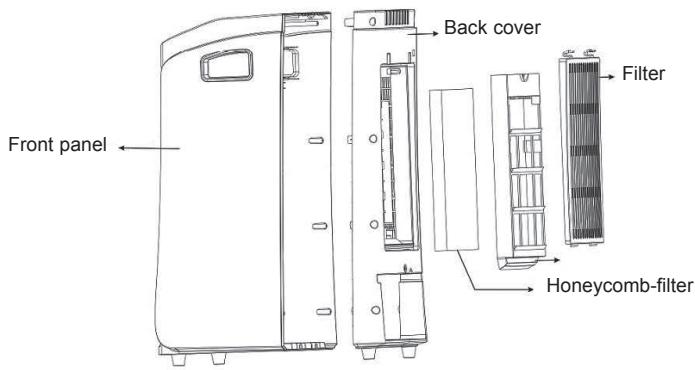
- Remove the front panel by loosening the two attachment pins and lifting the panel upwards, off the 2 upper attachment points. Remove the filter and the honeycomb filter from the unit.
- Wash the filter in warm water with a mild, soapy solution; use a soft brush if necessary. Rinse with clean water and leave to dry.
- Wash the honeycomb filter with clean water and a soft brush if necessary. Leave to dry.
- Empty the water tank and clean with water, a mild soapy solution and a soft brush if necessary. Rinse with clean water and leave to dry.
- At the end of the season, store the cleaned and dried heater in the original packaging if possible. Store it upright in a cool, dry and dust-free place.

Anomalies and repair
- Take the appliance to an authorised technical support service if product is damaged or other problems arise.
Do not attempt to disassemble or repair the appliance yourself as this may be dangerous.
- If any anomaly is detected, check the following table:
| Anomaly | Causes | Solutions |
| The device does not work | - No electricity.- Is the ON/OFF button pressed in?- An internal component is broken | - Check to ensure the plug is in the socket and that the socket is live- Press the on/off button- Consult the after sales service |
| The unit will not switch off | - ON/OFF button not pressed in- An internal component is broken | - Press the on/off button.- Consult the after sales service |
| Peculiar sounds | - Something is not positioned correctly inside the machine- A swivel wheel is broken/missing.- Ther is an internal problem | - Remove the filter and the water reservoir and install it correctly- Consult the after sales service |
| The unit humidifies too much or too little | - Filters are blocked by dirt- Technical breakdown | - Clean the filters.- Consult the after sales service |
Fan power input(P): 46 W
Service value (SV) (according to IEC 60879): 0,23 (m 3 /min)/W
Standby power consumption (PSB): 0,47 W
Fan sound power level (LWA): 56 dB(A)
Maximum air velocity( c ): 2,97 meters/sec

For EU product versions and/or in case that it is requested in your country:
Ecology and recyclability of the product
- The materials of which the packaging of this appliance consists are included in a collection, classification and recycling system. Should you wish to dispose of them, use the appropriate public recycling bins for each type of material.
- The product does not contain concentrations of substances that could be considered harmful to the environment.

- This symbol means that in case you wish to dispose of the product once its working life has ended, take it to an authorised waste agent for the selective collection of Waste from Electric and Electronic Equipment (WEEE).
- This appliance complies with Directive 2006/95/EC on Low Voltage, Directive 2004/108/EC on Electromagnetic Compatibility, Directive 2011/65/EU on the restrictions of the use of certain hazardous substances in electrical and electronic equipment and Directive 2009/125/EC on the ecodesign requirements for energy-related products.
Climatizador
R750