
AC280 KT - Air conditioner ALPATEC - Free user manual and instructions
Find the device manual for free AC280 KT ALPATEC in PDF.



| Brand | ALPATEC |
| Model | AC280 KT |
| Product type | Monoblock portable air conditioner |
| Power supply | 230 V ~ 50 Hz |
| Nominal power | Approx. 1500 W (estimated) |
| Cooling capacity | Approx. 7000 BTU/h (estimated) |
| Dimensions (approx.) | 30 x 30 x 80 cm |
| Weight (approx.) | 25 kg |
| Operating modes | Cooling, Dehumidification, Fan |
| Fan speeds | Low, Medium, High |
| Temperature range | 16 °C - 31 °C |
| Timer | Programmable from 1 to 24 hours |
| Special functions | Sleep, Swing, Anti-freeze protection |
| Water tank | With full level indicator and manual drain |
| Auto-evaporation | Yes (in cooling mode) |
| Remote control | Included with On/Off, Timer, Mode, etc. |
| Maintenance | Clean filter every 2 weeks |
| Compressor protection | 3-minute delay before restart |
| Safety distance | At least 50 cm from surrounding objects |
| Included accessories | Exhaust hose, adapter, casters, remote control |
Frequently Asked Questions - AC280 KT ALPATEC
User questions about AC280 KT ALPATEC
0 question about this device. Answer the ones you know or ask your own.
Ask a new question about this device
Download the instructions for your Air conditioner in PDF format for free! Find your manual AC280 KT - ALPATEC and take your electronic device back in hand. On this page are published all the documents necessary for the use of your device. AC280 KT by ALPATEC.
USER MANUAL AC280 KT ALPATEC
Many thanks for choosing to purchase a TAURUS ALPATEC brand product.
Thanks to its technology, design and operation and the fact that it exceeds the strictest quality standards, a fully satisfactory use and long product life can be assured.
Description
A Control panel
G Filter frame lower
B Air outlet
H Power cord
C Fan blade
I Exhaust hose
D Castor wheels
J Slide bar connector
E Filter frame upper
K Remote control
F Exhaust connector
(Batteries not included)
Remote control
1 On/Off
2 Timer
3 Down
4 Mode
5 Up
6 Fan
7 Sleeping
8 Swing

Safety advice and warnings
- This appliance can be used by children aged from 8 years and above and persons with reduced physical, sensory or mental capabilities or lack of experience and knowledge if they have been given supervision or instruction concerning use of the appliance in a safe way and understand the hazards involved.
- This appliance is not a toy. Children should be supervised to ensure that they do not play with the appliance.
- Cleaning and user maintenance shall
Panel Control
a. Power indicator
b. Water full indicator
c. Cool indicator mode
d. Dehumidifier indicator mode
e. Fan indicator mode
f. Timer indicator
g. Up/ down indicator
h. High speed indicator
i. Mid speed indicator
j. Low speed indicator
k. Sleep indicator
I. Swing indicator
- Read these instructions carefully before switching on the appliance and keep them for future reference. Failure to follow and observe these instructions could lead to an accident.
not be made by children unless they are supervised.
- The appliance shall be installed in accordance with national wiring regulations
- If the connection to the mains has been damaged, it must be replaced, take the appliance to an authorised technical support service. Do not attempt to disassemble or repair the appliance by yourself in order to avoid a hazard.
- The appliance requires suitable ventilation in order to work properly. Leave a space of 50cm between walls or other obstacles
- Do not cover or obstruct the sides of the appliance, and leave a minimum space of 50cm front other walls, ceiling.
- Ensure that the voltage indicated on the rating label matches the mains voltage before plugging in the appliance.
- Connect the appliance to a base with an earth socketwithstanding a minimum of 10 amperes.
-
The appliance's plug must fit into the mains socket properly. Do not alter the plug. Do not use plug adaptors.
-
Do not force the power cord. Never use the power cord to lift up, carry or unplug the appliance.
- Do not wrap the power cord around the appliance.
- Do not clip or crease the power cord.
- Do not allow the power cord to hang or to come into contact with the hot surfaces of the appliance.
- Check the state of the power cord. Damaged or tangled cables increase the risk of electric shock.
- As an additional protection to the electrical supply for the appliance, it is advisable to have a differential current device with a maximum sensitivity of 30mA . Ask for advice from a competent installer.
- Do not touch the plug with wet hands.
- Do not use the appliance if the cable or plug is damaged.
- If any of the appliance casings breaks, immediately disconnect the appliance from the mains to prevent the possibility of an electric shock.
- Do not use the appliance if it has fallen on the floor, if there are visible signs of damage or if it has a leak.
- Use the appliance in a well ventilated area.
- If other gas or fuel appliances can be used at the same time in the room where the appliance is to be used, that room must be well ventilated.
- Do not place the appliance where it can reach the sunlight.
- Place the appliance on a horizontal, flat, stable surface away from heat sources and contact with water (splashes etc.)
- Do not use or store the appliance outdoors.
- Do not leave the appliance out in the rain or exposed to moisture. If water gets into the appliance, this will increase the risk of electric shock.
- CAUTION: Do not use the appliance near water.
- Do not force the power cord. Never use the power cord to lift up, carry or unplug the appliance.
- Keep the appliance away from heat sources and sharp edges.
Use and care:
- Fully unroll the appliance's power cable before each use.
- Do not use the appliance if the on/off switch does not work.
- Do not remove the support feet of the appliance.
- Do not move the appliance while in use.
- Use the appliance handle, to catch it or move it.
- Do not turn the appliance over while it is in use or connected to the mains.
- Unplug the appliance from the mains when not
in use and before undertaking any cleaning task.
- This appliance is for household use only, not professional, industrial use.
- Store this appliance out of the reach of children and/or those with reduced physical, sensory or mental abilities or unfamiliar with its use
- Do not expose the appliance to extreme temperatures.
- Keep the appliance in a dry, dust-free place, out of direct sunlight.
- Never leave the appliance connected and unattended if it is not in use. This saves energy and prolongs the life of the appliance.
- Any misuse or failure to follow the instructions for use renders the guarantee and the manufacturer's liability null and void.

Installation
- Be sure to remove all packaging material from inside the appliance.
- Respect the legal provisions concerning safety distances from other elements such as pipes, electrical connections, etc.
- Ensure that the appliance is level with respect to the floor.
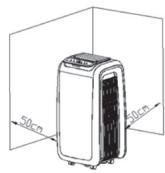
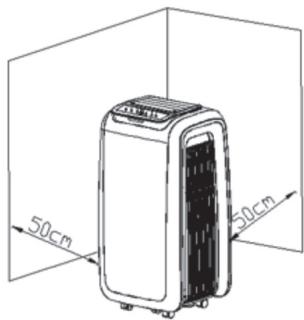
- The appliance requires suitable ventilation in order to work properly. Leave a space of 50cm between walls or other obstacles. (Fig 1)
- Do not cover or obstruct any of the openings of the appliance.
- Do not cover or obstruct the sides of the appliance, and leave a minimum
space of 50cm front other walls, ceiling.
- The plug must be easily accessible so it can be disconnected in an emergency.
- To achieve the highest efficiency from the appliance it should be situated in a place where the atmospheric temperature is between 12 and 32ircC .
- Ensure that the extraction pipe remains in a horizontal position. (Fig 2)
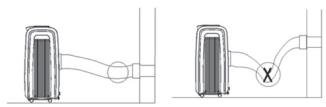
- Do not add new sections to the extraction tube provided, as it could cause the appliance to malfunction.
- The appliance should be used with its base feet fitted.
- The appliance should be used with its wheels attached.
Assembly of the exhaust hose
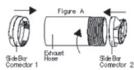
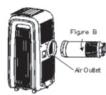
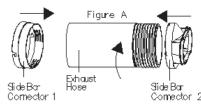
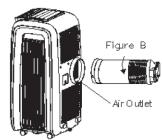
- Lengthen one head of the hose, and spin the exhaust hose into exhaust connector (counter-clockwise).
Instructions for use
Use:
- Unroll the cable completely before plugging it in.
- Connect the appliance to the mains.
- Press the ON/OFF button, the unit will enter in cooling mode with low fan speed.
- Press the mode button to select cooling dehumidifying, fan and heating mode.
Fan Speed:
-
Under the cooling and the fan mode, the speed goes as follow:
-
Lower Fan-> Mid Fan-> High Fan.
- Under the dehumidifying mode, fan is working in low speed.
Timer function:
- The appliance's operating time can be controlled from 1~24h.
- Press that button. If you press the button once, the appliance will working 1 hour, if you press twice, 2 hours etc up to 24 hours.
- Auto-shut off timer is only available when the unit is on.
- Under the cooling and heating mode, the setting temperature ranges from 16irc 31irc C .
Swing:
- Press this button to control the movement of the louver.
Cooling mode:
- Press mode to select cooling mode, cooling mode indicator turns on.
- Press Up or Down to adjust temperature from 16ircC to 31ircC .
- Press speed to select high or low fan speed.
Fan mode:
- Press mode to select fan mode fan indicator turns on.
- Press speed to select high speed or low speed.
- Temperature and sleeping function cannot be setup.
Dehumidifying mode:
- Press "MODE" to select dehumidifying mode, dehumidifying mode indicator turns on.
- Under dehumidifying mode, sleeping function cannot be setup, and fan speed is low.
Sleeping mode:
- Press key "SLEEP" enters into sleeping mode, default value of fan speed is low.
- When sleeping mode turns on, under cooling mode, the first one hour later, setting temperature will go up 1ircC , the second one hour later, setting temperature will go up another 1ircC , and then keep the same.
- Sleeping mode is invalid under dehumidifying and fan mode. Under water full, machine standby and mode conversion, sleeping mode will be cancelled.
Compressor protection:
- Three minutes later after power on / restart, compressor starts to run.
Water tank full protection:
- When the water level in the bottom water plate is above the warning level, the unit will alert automatically a.
-Please discharge water in the machine according to chapter "water drainage".
Water drainage:
- When the inner water tank is full, its indicator will flash on the screen.
- The appliance enters into standby mode.
- Pull out the plug to drain out water, power off the machine and restart it, the machine will runs normally.
-This model have self evaporative function, under cooling mode, please do not use continue drainage to get better cooling effect.
Once you have finished using the appliance:
- Turn the appliance off, using the on/off switch.
- Unplug the appliance from the mains.

Cleaning
- Disconnect the appliance from the mains and allow it to cool before undertaking any cleaning task.
- Clean the electrical equipment and the mains connection with a damp cloth and dry. DO NOT IMMERSE IN WATER OR ANY OTHER LIQUID.
- Clean the equipment with a damp cloth with a few drops of washing-up liquid and then dry.
- Do not use solvents, or products with an acid or base pH such as bleach, or abrasive products, for cleaning the appliance.
- Never submerge the appliance in water or any other liquid or place it under running water.
- If the appliance is not in good condition of cleanliness, its surface may degrade and inexorably affect the duration of the appliance's
useful life and could become unsafe to use.
Air filter cleaning:
- Clean the air filters every 2 weeks. If the air filter is blocked with dust, the efficiency will reduce.
- Pull out up and down filter as below pictures
- Wash the air filters by immersing it gently into warm water with a neutral detergent, rinse it and dry it thoroughly in a shaded place.
- Install air filters carefully after cleaning the filters.
After Season Maintenance:
- Pull out the plug in drainage hole and empty the water received plate, or drain out the water by leaning the unit, then shift the unit mode to Fan mode, and press the button till it low fan speed.
-Keep this mode for half day till the conduit is dried. Doing like this can keep the inner unit dried and not go mouldy. - Turn off the unit and pull out the plug.
- Coil the wire and bind it together, then put it into the accessories room.
- Separate the air-exhausted pipe and safely keep it.
- Put the unit into a plastic bag, and then keep it in a dried place.
- Take out the batteries of remote control and safely keep them.

Anomalies and repair
- Take the appliance to an authorised technical support service if product is damaged or other problems arise.
Do not attempt to disassemble or repair the appliance yourself as this may be dangerous.
- If any anomaly is detected, check the following table:
| Anomalies | Causes | Solutions |
| The unit does not work | - No power supply - Water full indicator illuminate | - Turn on the appliance - Drain out the inner stored water |
| The unit does not seem to perform | - Indirect sunlight - Window or doors open - Filter is very dirty - Air inlet or air outlet is blocked - Room temperature is lower than the setting one. | - Draw the curtains - Close windows and turn on another air conditioner - Clean or change the air filter - Clean out the stemming - Change the temperature setting |
| The unit noise is too high | - The unit is not put on a flat surface | - Put the unit on a flat and stable surface that can support its weight |
| Compressor does not work | - Heat exceeded protection is active | - Re start the unit 3 minutes later till the temperature low down |
For EU product versions and/or in case that it is requested in your country:
Ecology and recyclability of the product:
- The materials of which the packaging of this appliance consists are included in a collection, classification and recycling system. Should you wish to dispose of them, use the appropriate public recycling bins for each type of material.
- The product does not contain concentrations of substances that could be considered harmful to the environment.
- This symbol means that in case you wish to dispose of the product once its working life has ended, take it to an authorized waste agent for the selective collection of Waste from Electric and Electronic Equipment (WEEE).
This appliance complies with Directive 2014/35/ EC on Low Voltage, Directive 2014/30/EC on Electromagnetic Compatibility and Directive 2011/65/EU on the restrictions of the use of certain hazardous substances in electrical and electronic equipment.
A
-
aiee 150000000000000000000000000000000000000
Cuaaillg aalee
a 14 14 14 14 14 14 14 14 14 14 14 14 14 14 14 14 14 14
1 4
1 1
a a a a a a a a a a a a a a a a a a a a a a
a a a a a a a a a a a a a a a a a a a a a a a a a a a a a
Aasssaa aagaae aegs (a) sleeping 1
: (A) sleeping
aiee iieiie aie eae ee eee (a) sleep gaa (a) "SLEEP" ciee ie
1 1 1 1 1 1 1 1 1 1 1 1 1 1 1 1 1 1 1 1 1 1 1 1 1 1 1 1 1 1 1 1 1 1 1 1 1 1 1 1 1 1 1
e 1 1 1 1 1 1 1 1 1 1 1 1 1
g jie jie jie jie jie jie jie jie jie jie jie jie jie jie jie jie jie jie jie jie jie jie jie jie jie jie jie jie jie jie jie jie jie jie jie jie jie jie jie jie jie jie jie jie jie jie jie jie jie jie jies
(△) sleeping
:bc
Jauu ly blll lss sioe / (s) on le biall no gai d
:alai jia jia
iieiie iiee ie eieieieieieieieieieieieieieieieieieieieieieieieieieieieieieieieieieieieieieieieieieieieieieieieieieieieieieieie
"clal y a 0a jaii ci iia jy jai jai jai clal k s
:clal
aillll g jw jall e g jw wlll clll j jj jj j j j l aic -
.(J)standby
j 1 j 1 j 1 j 1 j 1 j 1 j 1 j 1 j 1 j 1 j 1 j 1 j 1 j 1 j 1 j 1 j 1 j 1 j 1 j 1 j 1 j 1 j 1 j 1 j 1 j 1 j 1 j 1 j 1 j 1 j 1 j 1 j 1 j 1 j
J 1
.
jLjJlJoo
j/1j 1 j 1 j 1 j 1 j
J 1
品
aai aie 1
jil jilw j j ofo f 1200000000000000000000000000000000000000000000
aio jaoi jai jia yia jia gao aia jia aia jia jia jia jia
a 1
Aiiiaaii iiaiaia 1234567890123456789012345678901234567890123456789012345678901234567890123456789012345678901234567890123456789
a a a a a a a a a a a a a a a a a a a a a a a a a a a a a a
Jill
y
A
g g g g g g g g g g g g g g g g g g g g g g g g g g g g g g g g g
aagaae aee
a 1
Laloll jSo a a a a a a
(alei wjie oai jSe) Ugallb bjjg jbjlba
sill sb
aolilal p 1
Jusll 1s sssssas 4s jssssssssssssssssssssssssssssssssssssss
aalil pab jol gell aanp aall jll
1
l原点 = 9x
aui jia Jai LdSll 1i -
jll jlll
a 10000000000000000000000000000000000000000000
a a a a a a a a a a a a a a a a a a a a
aagaae
i 1
a1 = 2,a2 = - 4
4c1w24~1 jz jzll jzjzjjzjjz
jill b
J 1
jai jai jai laoi laia iia gai ai aai
J (down) up
31 16 20
(ω) Swing
a a a a a a a a a a a a a a a a a a a
31 16 16 16 16 16 16
Ae yll lai jol ayj (ae y) speed le bai -
:
aall jao gao gao jao mode ge baiai
aJyll jolj (ac) speed 1c b
Aa aaa aee
y jaiiaaiial aiee iayiie 1 yjaiinll cuiill g jn no jalil 1g / jlebl Jgluio jc jge Ila bia -
y
a a a a a a a a a a a a a a a a a a a a a
jiee aae ae aalbgl aell bll g y jy g y
45 1 1 1 1 1 1 1 1 1 1 1 1 1 1 1 1 1 1 1 1 1 1 1 1 1 1
aaioll
中
jgl jgl jgl jgl jgl jgl jgl jgl jgl jgl jgl jgl jgl jgl jgl jgl jgl jgl jgl jgl jgl jgl jgl jgl jgl jgl jgl jgl jgl jgl jgl jgl jgl jgl jgl jgl jgl jgl jgl jgl jgl jgl jgl jgl jgl jgl jgl jgl jgl jgl jgl
a 1
Fig). jaljall jaljall no jg jj jn jnn 50 aala al jil .
(1)
jlll lii jia aai 1 1
a a a a a a a a a a a a a a a a a a a a a a a a a a a a a a a a a a a a a a a a
aiaiaiaiaiaiaiaiaiaiaiaiaiaiaiaiaiaiaiaiaiaiaiaiaiaiaiaiaiaiaiaiaiaiaiaiaiaiaiaiaiaiaiaiaiaiaiaiaiaiaiaiaiaiaiaiaiaiaiaiaiaiaiaiaiaiaiaiaiaiaiaiaiaiaiaiaiaiaiaiaiaiaiaia
Alici jiall jiall l g
y jn y n y 1 1 1 1 1 1 1 1 1 1 1 1 1 1 1 1 1 1
aBgl 1
J 1 J 1 1 1 1 1 1 1 1 1 1 1 1 1 1 1 1 1
jia 1ie jiu dui yu
j 50 50 50
j50 50 j5 j5 j5 j5 j5 j5 j5
y
a a a a a a a a a a a a a a a a a a a a a a a a a a
i j k l m n o p q r s t
aallll llll llll llll llll llll llll llll
joll boll jell
AaBaae aae ae aee aee aee aee aee aee aee
.0alall jj jj jj jjj 2:
Jg j 1 1 1 1 1 1 1 1 1 1 1 1 1 1 1 1 1 1 1 1 1 1
aal alal gallg jlll jll l
aalgl
aill 10000000000000000000000000000000000
Jaiy ay aalil jay/ Jajnil oij 1j jai Jaiwi y -
jieell jiaaa all jya
Juaaai 1 a joo lae i jao
jglal jgi isy jygal Jaiin
y
aaii aie gai yai gaiyai gaiyai gai yai gai yai gai
glial all j igall Jaaill wjg jiaai jiail Jaaill jiai llae! pa
a
Jg20 1g8
AC 280
:Jy
aaii i aiee eae eae
j 1 j 1 j 1 j 1 j 1 j 1 j 1 j 1 j 1 j 1 j 1 j 1 j 1 j 1 j 1 j 1 j 1 j 1 j 1 j 1 j 1 j 1 j 1 j 1 j 1 j 1 j 1 j 1 j 1 j 1 j 1 j 1 j 1 j
#
A
cjjB
a2 + a3 + a4 = 6 ②
SΔOBC = SΔCOD + SΔBOC
OE BC
p56
Jauu Juaa Jua G
H
p
J
SΔOBC = SΔCOD + SΔBOC
0 1
2
jswi 3
4
5
ai a ai 6
(2) Sleep 7
(ω< ) Swing 8
#
ooll a
Cali Cio 10
2y 1
a.
aagall gaa jgaa .e
aill 20
aall
jai/1di jia 0
SgddcJ .i
j
(a) sleep jwso k
(ω) Swing
- Description
- Remote control
- Safety advice and warnings
- Panel Control
- Use and care:
- Installation
- Assembly of the exhaust hose
- Instructions for use
- Use:
- Fan Speed:
- Timer function:
- Swing:
- Cooling mode:
- Fan mode:
- Dehumidifying mode:
- Sleeping mode:
- Compressor protection:
- Water tank full protection:
- Water drainage:
- Once you have finished using the appliance:
- Cleaning
- Air filter cleaning:
- After Season Maintenance:
- Anomalies and repair
- For EU product versions and/or in case that it is requested in your country:
- Ecology and recyclability of the product:
- #
Brand : ALPATEC
Model : AC280 KT
Category : Air conditioner