
QF 215 - Graphic equalizer PEAVEY - Free user manual and instructions
Find the device manual for free QF 215 PEAVEY in PDF.


| Product Type | Graphic Equalizer |
| Brand | Peavey |
| Model | QF 215 |
| Channels | Dual channel (15 bands per channel) |
| Equalization Range | 25 Hz to 16 kHz |
| Filter Type | Constant Q, 2/3 octave |
| Boost/Cut per Band | +12 dB boost / -18 dB cut |
| Gain Control | +15 dB / -15 dB |
| Low-Cut Filter | 40 Hz @ 18 dB/octave, with status LED |
| Output Level LEDs | -12 dB to +12 dB |
| Feedback Locating System | FLS® circuitry with LED indicators per band |
| Inputs/Outputs | XLR and 1/4" TRS balanced/unbalanced |
| Bypass Switch | Yes, with status LED (low-cut filter active in bypass) |
| Frequency Response | ±1 dB (20 Hz – 20 kHz) |
| Total Harmonic Distortion | 0.002% (20 Hz – 20 kHz) |
| Input Impedance | 20 kΩ balanced |
| Output Impedance | 660 Ω |
| Maximum Input Level | +18 dBV (8 V RMS) |
| Maximum Output Level | +21 dBV balanced |
| Power Supply | 120 VAC, 60 Hz, 12 W (domestic); 220/230 VAC, 50/60 Hz, 12 W (export) |
| Dimensions (H x W x D) | 3.5" x 19" x 7.375" (89 mm x 483 mm x 187 mm) |
| Weight | 7.8 lbs (3.54 kg) |
| Rack Mountable | Yes, 2U (requires rear support) |
| Warranty | 2 years (+ 3 years if registered) |
Frequently Asked Questions - QF 215 PEAVEY
User questions about QF 215 PEAVEY
0 question about this device. Answer the ones you know or ask your own.
Ask a new question about this device
Download the instructions for your Graphic equalizer in PDF format for free! Find your manual QF 215 - PEAVEY and take your electronic device back in hand. On this page are published all the documents necessary for the use of your device. QF 215 by PEAVEY.
USER MANUAL QF 215 PEAVEY
Q™ Series Graphic Equalizers

SERIES

Q215B

QF215

QF131

Intended to alert the user to the presence of uninsulated "dangerous voltage" within the product's enclosure that may be of sufficient magnitude to constitute a risk of electric shock to persons.

Intended to alert the user of the presence of important operating and maintenance (servicing) instructions in the literature accompanying the product.
CAUTION: Risk of electrical shock — DO NOT OPEN!
CAUTION: To reduce the risk of electric shock, do not remove cover. No user serviceable parts inside. Refer servicing to qualified service personnel.
WARNING: To prevent electrical shock or fire hazard, do not expose this appliance to rain or moisture. Before using this appliance, read the operating guide for further warnings.

Thank you for purchasing a Peavey Electronics Q Series graphic equalizer. The Q family features two dual-channel models and one single-channel unit, all incorporating Peavey's legendary low-noise, low-distortion design. Ruggedly constructed, Q Series EQs have 45 mm, center-detented control sliders enclosed in metal for durability. These two rack-space units also offer ±15 dB gain control and an LED display indicating output level. Other shared features include switchable low-cut filters, +21 dBu balanced inputs and outputs, and bypass switches. Q Series equalizer filters are set at ISO center frequencies within 3% accuracy. Whether on stage, in the studio, or simply tweaking your home hi-fi system, the Q Series has an EQ for you.
FEATURES
Q 215B
- Dual channel (15 bands per channel)
2/3 octave filter sets
25 Hz to 16 kHz effective equalization range - Constant Q filters
- 15 dB boost / 15 dB cut per band
Output level LEDs (-12 to +12 dB) - 18 dB per octave 40 Hz low-cut filter with status LED
- 1/4" TRS inputs and outputs for balanced or unbalanced operation
- Bypass switch with status LED
- 15 dB boost / 15 dB cut Gain Control
QF 215
- Dual channel (15 bands per channel)
2/3 octave filter sets
25 Hz to 16 kHz effective equalization range - Constant Q filters
- 12 dB boost / 18 dB cut per band
Output level LEDs (-12 to +12 dB) - 18 dB per octave 40 Hz low-cut filter with status LED
- XLR and 1/4" TRS inputs/outputs for balanced or unbalanced operation
- Bypass switch with status LED
- New FLS (Feedback Locating System) circuitry for improved sensitivity
- 15 dB boost / 15 dB cut Gain Control
QF 131
- Single channel (31 band)
1/3 octave filter sets
20 Hz to 20 kHz effective equalization range - Constant Q filters
- 12 dB boost / 18 dB cut per band
Output level LEDs (-12 to +12 dB) - 18 dB per octave 40 Hz low-cut filter with status LED
- XLR and 1/4" TRS inputs/outputs for balanced or unbalanced operation
- Bypass switch with status LED
- New FLS® (Feedback Locating System) circuitry for improved sensitivity
- 15 dB boost / 15 dB cut Gain Control
EQUALIZATION PROCESS
Always begin the equalization process with all sliders at their center-detent (flat response) positions. For units equipped with FLS®, increase system volume until slight feedback occurs. Note the LED(s) that illuminate, and lower the corresponding fader(s) until feedback is eliminated. In other words, see the light pull down the fader. For the Q 215B, lower each fader until the feedback frequency is found. Lower the faders in small amounts to avoid adversely affecting sound quality. Likewise, excessive boosting of a frequency may result in feedback.
EXERCISE CAUTION WHEN ATTEMPTING TO BOOST FREQUENCIES BELOW SPEAKER SYSTEM TRANSDUCER CUT-OFF.
Typical sound reinforcement enclosures are not designed for 20Hz performance, and transducer damage could result from "over-boosting" low frequencies. Excessive boost at very low frequencies could also limit overall system headroom. Engaging the 40Hz low-cut filter is the best way to avoid these problems.
NOTE: Superb tonality, absence of feedback, and great-sounding systems may not be possible with any graphic equalizer. All other system components must be of high quality and designed for the application. No amount of equalization will correct an acoustically bad room, bad microphone/speaker arrangement, or completely correct the response curve of a poor loudspeaker.
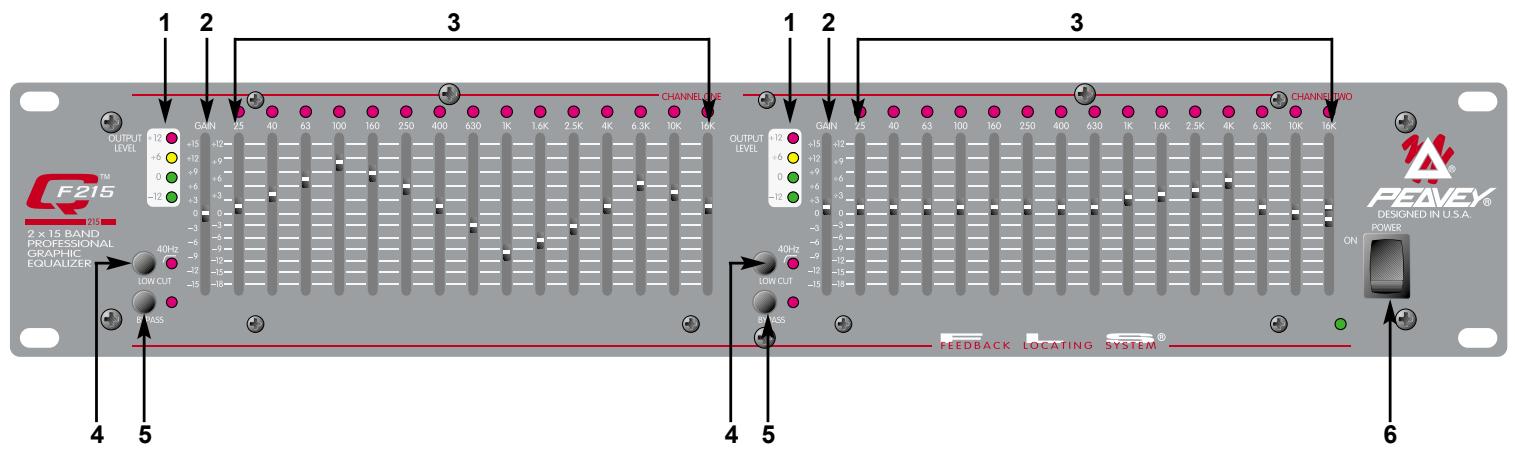
FEATURES AND CONTROLS
FRONT PANEL
(1) OUTPUT LEVEL LED METER
This LED array indicates output level from -12dB to +12dB .
(2) GAIN
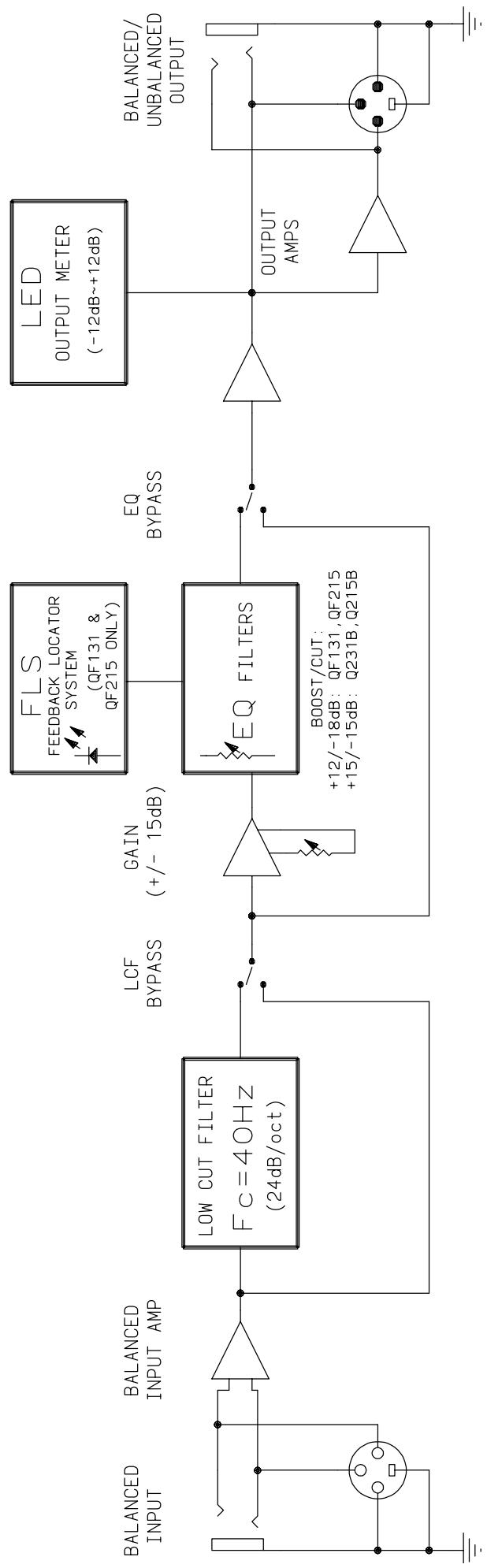
This calibrated, detented control regulates overall gain of the EQUALIZER SECTION (3). Unity gain throughout the signal chain can be maintained by recovering lost signal gain at this point. The equalization process may result in noticeable signal loss. To compensate for this loss, engage the BYPASS (5) switch and compare the signal level with that of the equalized level. Increase the GAIN control until the equalized level approximates that of the bypassed level. Let your ears be your guide.
(3) EQUALIZER SECTION
These calibrated, detented controls adjust the amount of cut or boost at their respective frequencies. They are adjustable from 18 dB cut to 12 dB boost (15 dB cut to 15 dB boost on the 215B). For units equipped with FLS, the LED at the top of each band will illuminate as an indication of feedback at that frequency.
(4) LOW-CUT FILTER
This switch activates the low-cut filter that rejects frequencies below 40Hz . Frequency roll off is 18 dB per octave with the switch engaged. This filter will operate even with the BYPASS (5) switch engaged. The adjacent red LED indicates activation.
(5) BYPASS
This switch allows the signal to bypass the unit with the exception of the LOW-CUT FILTER (4). When this switch is engaged, the signal is routed from INPUT (10 and 11) though the low-cut filter to output (8 and 9).
(6) POWER
This 2-position rocker switch applies mains power to the unit when in the ON position. The adjacent green LED indicates mains power activation.
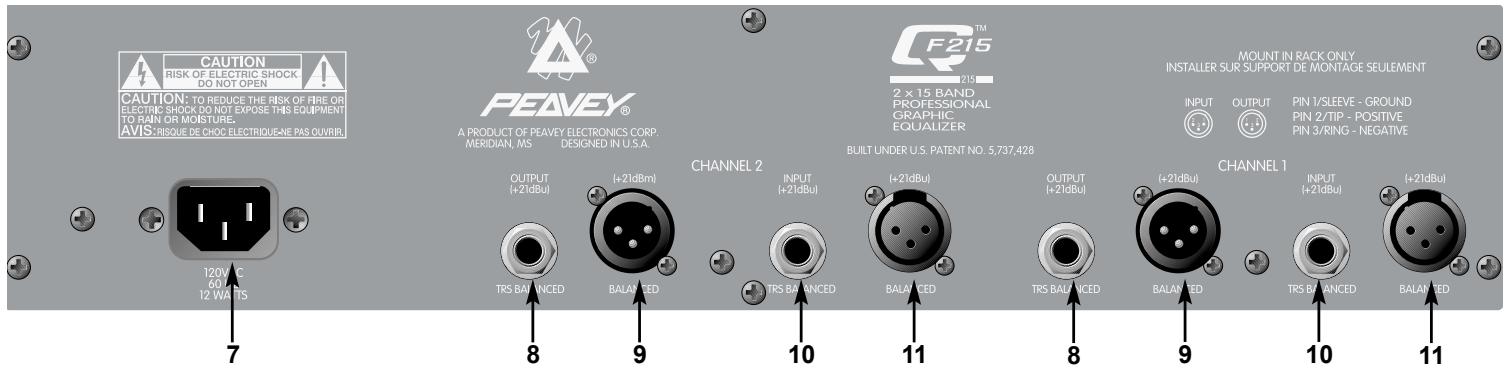
REAR PANEL
(7) IEC MAINS CONNECTOR
This is a standard IEC power connector. An AC mains cord having the appropriate AC plug and ratings for the intended operating voltage is included in the carton.
Never break off the ground pin on any equipment. It is provided for your safety. If the outlet used does not have a ground pin, a suitable grounding adapter should be used and the third wire should be grounded properly. To prevent the risk of shock or fire hazard, always be sure that the equalizer and all associated equipment is properly grounded.
NOTE: FOR UK ONLY
If the colors of the wires in the mains lead of this unit do not correspond with the colored markings identifying the terminals in your plug, proceed as follows: (1) The wire that is colored green and yellow must be connected to the terminal that is marked by the letter E, the earth symbol, colored green, or colored green and yellow. (2) The wire that is colored blue must be connected to the terminal that is marked with the letter N or the color black. (3) The wire that is colored brown must be connected to the terminal that is marked with the letter L or the color red.
(8) TRS BALANCED OUTPUT
These 1/4" Tip/Ring/Sleeve (stereo) jacks provide balanced output when used with TRS connectors and 2-conductor shielded cables. When used with a mono 1/4" (TS) phone plug, the output is unbalanced.
(9) XLR OUTPUT
These male 3-pin connectors provide balanced output when used with female XLR connectors.
(10) TRS BALANCED INPUT
These 1/4" Tip/Ring/Sleeve (stereo) jacks provide balanced input when used with TRS connectors and 2-conductor shielded cables. When used with mono 1/4" (TS) phone plugs, the input is unbalanced.
(11) XLR INPUT
These female 3-pin connectors provide balanced input when used with male XLR connectors.
| SPECIFICATIONS* | QTM F131 | QTM 215B | QTM F215 |
| Filter Q | 4.77 | 2.3 | 2.3 |
| Filter Frequencies (Hz) | 20, 25, 32, 40, 50, 63, 80, 100, 125, 160, 200, 250, 315, 400, 500, 630, 800, 1 K, 1.25 K, 1.6 K, 2 K, 2.5 K, 3.15 K, 4 K, 5 K, 6.3 K, 8 K, 10 K, 12.5 K, 16 K, 20 K | 25, 40, 63, 100, 160 250, 400, 630, 1 K, 1.6 K, 2.5K, 4 K, 6.3K, 10 K, 16 K | 25, 40, 63, 100, 160, 250, 400, 630, 1 K, 1.6 K, 2.5 K, 4 K, 6.3 K, 10 K, 16 K |
| Maximum Boost and Cut Filter | +12 dB / -18 dB | +15 dB / -15 dB | +12 dB / -18 dB |
| Output Noise | |||
| Bypass Mode | -101 dBV | -100 dBV | -100 dBV |
| Filter Mode (Flat) | -95 dBV | -98 dBV | -98 dBV |
ALL MODELS
| Frequency Response: | ± 1 dB (20 Hz – 20 kHz) |
| Distortion: | .002% (20 Hz – 20 kHz) |
| Input Impedance: | Balanced 20 K ohms (equal impedances to ground) |
| Output Impedance: | 660 ohms |
| Maximum Input Level: | +18 dBV (8 V RMS) |
| Maximum Output Level: | -18 dBV unbalanced; +21 dBV balanced |
| Nominal Input Level: | 0 dBV (1 V RMS) |
| Nominal Output Level: | 0 dBV (1 V RMS) |
| Input Headroom: | Nominal 18dB |
| Output Headroom: | 18 dB |
| Maximum Boost and Cut Gain: | +15 dB / -15 dB |
| Low Cut Filter: | 40 Hz @ 18 dB per octave |
| Power Consumption: | Domestic: 120 VAC, 60 Hz, 12 Watts Export: 220/230 VAC, 50/60 Hz, 12 Watts |
| Dimension: | 3.5" (89 mm) H x 19" (483 mm) W x 7.375" (187 mm) D |
| Weight: | 7.8 lbs. (3.54 kg) |
- All specifications are typical unless otherwise noted. 0 dBV = 1 volt. All specifications are referenced to nominal output level (0 dBV) unless otherwise stated.
NOTE: All specifications measured at 1 V RMS input, unbalanced output, sliders at mid position, and all switches out unless otherwise noted.
ESPÁÑOL
(7) CONNECTEUR D'ALIMENTATION IEC
| Frequency Response: | ± 1 dB (20 Hz – 20 kHz) |
| Distortion: | .002% (20 Hz – 20 kHz) |
| Input Impedance: | Balanced 20 K ohms (equal impedances to ground) |
| Output Impedance: | 660 ohms |
| Maximum Input Level: | +18 dBV (8 V RMS) |
| Maximum Output Level: | -18 dBV unbalanced; +21 dBV balanced |
| Nominal Input Level: | 0 dBV (1 V RMS) |
| Nominal Output Level: | 0 dBV (1 V RMS) |
| Input Headroom: | Nominal 18dB |
| Output Headroom: | 18 dB |
| Maximum Boost and Cut Gain: | +15 dB / -15 dB |
| Low Cut Filter: | 40 Hz @ 18 dB per octave |
| Power Consumption: | Domestic: 120 VAC, 60 Hz, 12 Watts Export: 220/230 VAC, 50/60 Hz, 12 Watts |
| Dimension: | 3.5" (89 mm) H x 19" (483 mm) W x 7.375" (187 mm) D |
| Weight: | 7.8 lbs. (3.54 kg) |
- All specifications are typical unless otherwise noted. 0 dBV = 1 volt. All specifications are referenced to nominal output level (0 dBV) unless otherwise stated.
NOTE: All specifications measured at 1 V RMS input, unbalanced output, sliders at mid position, and all switches out unless otherwise noted.
NOTE IMPORTANTE CONCERNANT LA SECURITE
CONSERVEZ CES INSTRUCTIONS!
DEUTSCH
Q™ SERIES EQUALIZERS
Effective Date: July 1, 1998
What This Warranty Covers
Your Peavey Warranty covers defects in material and workmanship in Peavey products purchased and serviced in the U.S.A. and Canada.
What This Warranty Does Not Cover
The Warranty does not cover: (1) damage caused by accident, misuse, abuse, improper installation or operation, rental, product modification or neglect; (2) damage occurring during shipment; (3) damage caused by repair or service performed by persons not authorized by Peavey; (4) products on which the serial number has been altered, defaced or removed; (5) products not purchased from an Authorized Peavey Dealer.
Who This Warranty Protects
This Warranty protects only the original retail purchaser of the product.
How Long This Warranty Lasts
The Warranty begins on the date of purchase by the original retail purchaser. The duration of the Warranty is as follows:
| Product Category | Duration |
| Guitars/Basses, Amplifiers, Pre-Amplifiers, Mixers, Electronic Crossovers and Equalizers | 2 years * (+ 3 years) |
| Drums | 2 years * (+ 1 year) |
| Enclosures | 3 years * (+ 2 years) |
| Digital Effect Devices and Keyboard and MIDI Controllers | 1 year * (+ 1 year) |
| Microphones | 2 years |
| Speaker Components (incl. speakers, baskets, drivers, diaphragm replacement kits and passive crossovers) and all Accessories | 1 year |
| Tubes and Meters | 90 days |
[Denotes additional warranty period applicable if optional Warranty Registration Card is completed and returned to Peavey by original retail purchaser within 90 days of purchase.]
What Peavey Will Do
We will repair or replace (at Peavey's discretion) products covered by warranty at no charge for labor or materials. If the product or component must be shipped to Peavey for warranty service, the consumer must pay initial shipping charges. If the repairs are covered by warranty, Peavey will pay the return shipping charges.
How To Get Warranty Service
(1) Take the defective item and your sales receipt or other proof of date of purchase to your Authorized Peavey Dealer or Authorized Peavey Service Center.
OR
(2) Ship the defective item, prepaid, to Peavey Electronics Corporation, International Service Center, 412 Highway 11 & 80 East, Meridian, MS 39301 or Peavey Canada Ltd., 95 Shields Court, Markham, Ontario, Canada L3R 9T5. Include a detailed description of the problem, together with a copy of your sales receipt or other proof of date of purchase as evidence of warranty coverage. Also provide a complete return address.
Limitation of Implied Warranties
ANY IMPLIED WARRANTY, INCLUDING WARRANTYES OF MERCHANTABILITY AND FITNESS FOR A PARTICULAR PURPOSE, ARE LIMITED IN DURATION TO THE LENGTH OF THIS WARRANTY.
Some states do not allow limitations on how long an implied warranty lasts, so the above limitation may not apply to you.
Exclusions of Damages
PEAVEY'S LIABILITY FOR ANY DEFECTIVE PRODUCT IS LIMITED TO THE REPAIR OR REPLACEMENT OF THE PRODUCT, AT PEAVEY'S OPTION. IF WE ELECT TO REPLACE THE PRODUCT, THE REPLACEMENT MAY BE A RECONDITIONED UNIT. PEAVEY SHALL NOT BE LIABLE FOR DAMAGES BASED ON INCONVENIENCE, LOSS OF USE, LOST PROFITS, LOST SAVINGS, DAMAGE TO ANY OTHER EQUIPMENT OR OTHER ITEMS AT THE SITE OF USE, OR ANY OTHER DAMAGES WHETHER INCIDENTAL, CONSEQUENTIAL OR OTHERWISE, EVEN IF PEAVEY HAS BEEN ADVISED OF THE POSSIBILITY OF SUCH DAMAGES.
Some states do not allow the exclusion or limitation of incidental or consequential damages, so the above limitation or exclusion may not apply to you.
This Warranty gives you specific legal rights, and you may also have other rights which vary from state to state.
If you have any questions about this warranty or service received or if you need assistance in locating an Authorized Service Center, please contact the Peavey International Service Center at (601) 483-5365 / Peavey Canada Ltd. at (905) 475-2578.
Features and specifications subject to change without notice.
IMPORTANT SAFETY INSTRUCTIONS
WARNING: When using electric products, basic cautions should always be followed, including the following:
- Read all safety and operating instructions before using this product.
- All safety and operating instructions should be retained for future reference.
- Obey all cautions in the operating instructions and on the back of the unit.
- All operating instructions should be followed.
- This product should not be used near water (i.e., a bathtub, sink, swimming pool, wet basement, etc.)
- This product should be located so that its position does not interfere with its proper ventilation. It should not be placed flat against a wall or placed in a built-in enclosure that will impede the flow of cooling air.
- This product should not be placed near a source of heat such as a stove, radiator, or another heat producing amplifier.
- Connect only to a power supply of the type marked on the unit adjacent to the power supply cord.
- Never break off the ground pin on the power supply cord. For more information on grounding, write for our free booklet "Shock Hazard and Grounding."
- Power supply cords should always be handled carefully. Never walk on or place equipment on power supply cords. Periodically check cords for cuts or signs of stress, especially at the plug and the point where the cord exits the unit.
- The power supply cord should be unplugged when the unit is to be unused for long periods of time.
- If this product is to be mounted in an equipment rack, rear support should be provided.
- Metal parts can be cleaned with a damp rag. The vinyl covering used on some units can be cleaned with a damp rag or an ammonia-based household cleaner if necessary. Disconnect unit from power supply before cleaning.
- Care should be taken so that objects do not fall and liquids are not spilled into the unit through the ventilation holes or any other openings.
- This unit should be checked by a qualified service technician if:
a. The power supply cord or plug has been damaged.
b. Anything has fallen or been spilled into the unit.
c. The unit does not operate correctly.
d. The unit has been dropped or the enclosure damaged.
- The user should not attempt to service this equipment. All service work should be done by a qualified service technician.
- This product should be used only with a cart or stand that is recommended by Peavey Electronics.
- Exposure to extremely high noise levels may cause a permanent hearing loss. Individuals vary considerably in susceptibility to noise induced hearing loss, but nearly everyone will lose some hearing if exposed to sufficiently intense noise for a sufficient time. The U.S. Government's Occupational Safety and Health Administration (OSHA) has specified the following permissible noise level exposures.
| Duration Per Day In Hours | Sound Level dBA, Slow Response |
| 8 | 90 |
| 6 | 92 |
| 4 | 95 |
| 3 | 97 |
| 2 | 100 |
| 1 1/2 | 102 |
| 1 | 105 |
| 1/2 | 110 |
| 1/4 or less | 115 |
According to OSHA, any exposure in excess of the above permissible limits could result in some hearing loss. Ear plugs or protectors for the ear canals or over the ears must be worn when operating this amplification system in order to prevent a permanent hearing loss if exposure is in excess of the limits as set forth above. To ensure against potentially dangerous exposure to high sound pressure levels, it is recommended that all persons exposed to equipment capable of producing high sound pressure levels such as this amplification system be protected by hearing protectors while this unit is in operation.
SAVE THESE INSTRUCTIONS!

LISTEN TO THIS
Features and specifications subject to change without notice.
Peavey Electronics Corporation • 711 A Street • Meridian • MS • 39301
(601) 483-5365 • FAX (601) 486-1278 • www.peavey.com
- Q™ Series Graphic Equalizers
- FEATURES
- Q 215B
- QF 215
- QF 131
- EQUALIZATION PROCESS
- EXERCISE CAUTION WHEN ATTEMPTING TO BOOST FREQUENCIES BELOW SPEAKER SYSTEM TRANSDUCER CUT-OFF.
- OUTPUT LEVEL LED METER
- GAIN
- EQUALIZER SECTION
- LOW-CUT FILTER
- BYPASS
- POWER
- IEC MAINS CONNECTOR
- NOTE: FOR UK ONLY
- TRS BALANCED OUTPUT
- XLR OUTPUT
- TRS BALANCED INPUT
- XLR INPUT
- ESPÁÑOL
- CONNECTEUR D'ALIMENTATION IEC
- NOTE IMPORTANTE CONCERNANT LA SECURITE
- CONSERVEZ CES INSTRUCTIONS!
- DEUTSCH
- Q™ SERIES EQUALIZERS
- What This Warranty Covers
- What This Warranty Does Not Cover
- Who This Warranty Protects
- How Long This Warranty Lasts
- What Peavey Will Do
- How To Get Warranty Service
- OR
- Limitation of Implied Warranties
- Exclusions of Damages
- IMPORTANT SAFETY INSTRUCTIONS
Brand : PEAVEY
Model : QF 215
Category : Graphic equalizer