
CARDBUS FAST-ETHERNET CARD 10-100MB - Network card VIVANCO - Free user manual and instructions
Find the device manual for free CARDBUS FAST-ETHERNET CARD 10-100MB VIVANCO in PDF.


| Product type | CardBus 32-bit network card |
| Brand | Vivanco |
| Model | CARDBUS FAST-ETHERNET CARD 10-100MB |
| Network standards | IEEE 802.3 10BASE-T, IEEE 802.3u 100BASE-TX |
| Data rate | 10/100 Mbps (auto-negotiation), up to 200 Mbps in full duplex |
| Protocol | CSMA/CD |
| Host interface | CardBus 32 bits (PCMCIA Type II) |
| Network connector | RJ-45 female |
| Supported cables | 10BASE-T: UTP Cat. 3,4,5 (2 pairs); 100BASE-TX: UTP Cat. 5 (2 pairs) |
| LED indicators | 1 LED 10M (solid green), 1 LED 100M (solid green/blinking) |
| Power supply | Powered by CardBus bus (3.3 V) |
| Power consumption | Less than 1 W |
| Dimensions (L x W x H) | 85 x 54 x 5 mm (standard CardBus Type II) |
| Weight | Approximately 30 g |
| Operating temperature | 0°C to 50°C |
| Storage temperature | -10°C to 70°C |
| Operating humidity | 10% to 90% (non-condensing) |
| Storage humidity | 5% to 90% (non-condensing) |
| Certifications | FCC Class B, CE, VCCI-B |
| Supported operating systems | Windows 98/ME/2000/XP (drivers included) |
| Installation | Plug and Play, insert into CardBus slot, automatic drivers |
| Maintenance | Clean with a soft dry cloth. Do not use solvents. |
| Safety precautions | Avoid shocks, excessive humidity, and extreme temperatures. |
| Spare parts and repairability | Parts not available separately. In case of failure, replace the card. |
Frequently Asked Questions - CARDBUS FAST-ETHERNET CARD 10-100MB VIVANCO
User questions about CARDBUS FAST-ETHERNET CARD 10-100MB VIVANCO
0 question about this device. Answer the ones you know or ask your own.
Ask a new question about this device
Download the instructions for your Network card in PDF format for free! Find your manual CARDBUS FAST-ETHERNET CARD 10-100MB - VIVANCO and take your electronic device back in hand. On this page are published all the documents necessary for the use of your device. CARDBUS FAST-ETHERNET CARD 10-100MB by VIVANCO.
USER MANUAL CARDBUS FAST-ETHERNET CARD 10-100MB VIVANCO
D-22926 Ahrensburg/Germany
Phone +49 (0) 4102/231-0
Fax +49 (0) 4102/231-160
Instructions for use
Bedienungsanleitung
Notice d'emploi
Thank you for purchasing the Vivanco 10/100 Fast Ethernet Cardbus Adapter. This Fast Ethernet Adapter allows to connect your notebook to a wired 10 or 100 Mbps network.
This card is equipped with 2 LEDs indicating the Link/Activity status in 10Mbps or 100Mbps environment.
- 10M LED: This indicator lights green when the RJ-45 port is connected to a 10Mbps Ethernet network. A flashing green LED indicates that the adapter is sending or receiving data.
- 100M LED: This indicator lights green when the RJ-45 port is connected to a 100Mbps Fast Ethernet network. A flashing green LED indicates that the adapter is sending or receiving data.
| General | |
| Standards | IEEE 802.3 10BASE-T Ethernet IEEE 802.3u 100BASE-TX Fast Ethernet ANSI/IEEE NWay Auto-Negotiation 32-bit CardBus PC Card |
| Protocol | CSMA/CD |
| Data Transfer Rate | Ethernet: 10Mbps (half-duplex) 20Mbps(full-duplex) Fast Ethernet: 100Mbps (half-duplex) 200Mbps (full-duplex) |
| Network Cables | 10BASE-T: 2-pair UTP Cat. 3,4,5 EIA/TIA- 568 100-ohm STP 100BASE-TX: 2-pair UTP Cat. 5 EIA/TIA- 568 100-ohm STP |
| Physical and Environmental | |
| Temperature | Operating: 0° ~ 50°C, Storage: -10° ~ 70°C |
| Humidity | Operating: 10% ~ 90%, Storage: 5% ~ 90% |
| EMI: | FCC Class B, CE Mark B, VCCI-B |
Hardware Installation
This section describes how to install your Vivanco 10/100 Fast Ethernet Cardbus Adapter. Please perform the following steps to install the card.
Card insertion
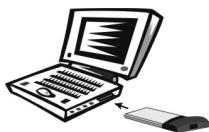
- Find/select an available Type II or Type III 32-bit PC Card slot on your notebook's side or rear panel.
-
Hold the PC Card with the LED indicator facing up and insert into the PC Card slot.
-
Slide the PC Card all the way into the PC Card slot until it reaches a firm stop.
Connect to the Network
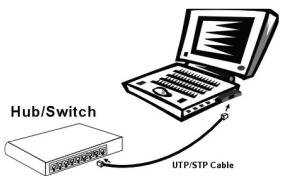
Simply plug one end of the cable (RJ-45 connector) into an available hub/switch port, and plug the other end (RJ-45 connector) into the RJ-45 port of the Vivanco 10/100 Fast Ethernet Cardbus Adapter.
Card Removal
Use the computer's PC Card Eject mechanism to remove the Fast Ethernet Cardbus Adapter from the computer's PC Card slot. The Fast Ethernet Cardbus Adapter will then protrude from the PC Card slot and you can easily remove it by gripping and withdrawing it from the PC Card receptacle.
Installation of the driver
Windows® ME/2000/XP/Server 2003/Vista
Windows will automatically install the drivers for Vivanco Fast Ethernet Card.
Einleitung
Hardwareinstallation
Hardware installation


Brand : VIVANCO
Model : CARDBUS FAST-ETHERNET CARD 10-100MB
Category : Network card