
LPJ-960SI - Projector LENCO - Free user manual and instructions
Find the device manual for free LPJ-960SI LENCO in PDF.
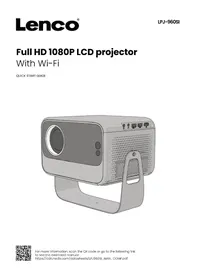


Pick your language and provide your email: we'll send you a specifically translated version.
| Product Type | Multimedia video projector |
| Brand | LENCO |
| Model | LPJ-960SI |
| Brightness | 3,000 lumens |
| Native Resolution | 1920 x 1080 pixels (Full HD) |
| Contrast Ratio | 10,000:1 |
| Lamp Life | Up to 50,000 hours in LED mode |
| Keystone Correction | Manual, vertical ±15° |
| Focus | Manual |
| Built-in Speaker | Yes, powerful and clear |
| Connectivity | HDMI, USB, VGA, AV, 3.5mm audio output |
| Supported Video Formats | MP4, AVI, MKV, MOV, JPEG, BMP, PNG |
| Power Supply | Mains 100-240V, 50/60Hz |
| Power Consumption | Approximately 120W in operation |
| Dimensions (L x W x H) | 260 x 220 x 95 mm |
| Weight | 1.5 kg |
| Operating Temperature | 5°C to 35°C |
| Mounting | Tabletop or ceiling (bracket required) |
| Maintenance | Clean the lens with a soft, dry cloth |
| Air Filter Cleaning | Every 500 hours of use |
| Safety | Avoid looking directly at the light source |
| Spare Parts | Lamp, air filter, remote control, cables |
| Repairability | Designed for easy access to internal components |
| Box Contents | Projector, remote control, HDMI cable, power cable, quick start guide |
| Warranty | 2 years |
Frequently Asked Questions - LPJ-960SI LENCO
How do I turn on the LENCO LPJ-960SI video projector?
Plug the device into a power outlet, then press the POWER button on the top panel or use the power button on the remote control.
What is the maximum supported resolution?
The LPJ-960SI supports native Full HD (1920x1080 pixels) resolution and can display signals up to 4K via scaling.
How do I connect a smartphone to the video projector?
You can use an HDMI cable with a compatible adapter (USB-C to HDMI or Lightning to HDMI depending on your device), or a wireless adapter if you have an HDMI dongle.
Why is the image blurry or distorted?
Focus is adjusted manually by turning the focus ring on the lens. For keystone distortion, use the keystone correction setting available in the menu or via the dedicated buttons.
How do I clean the projector lens?
Use a soft, dry cloth with gentle circular motions. Never use chemical cleaners or abrasive cloths.
Can I use the projector to watch videos from a USB drive?
Yes, insert a USB drive into the USB port, then select 'USB' mode from the input source. The projector plays compatible video, audio, and image files.
What is the lamp life and how do I replace it?
The LED light source has a lifespan of up to 50,000 hours, which significantly reduces the need for replacement. If necessary, consult a professional for replacement.
How do I adjust the audio volume?
Use the +/- buttons on the control panel or the remote control to increase or decrease the volume of the built-in speaker.
Is it possible to mount the projector on the ceiling?
Yes, the LPJ-960SI is compatible with standard ceiling mounts (VESA). Make sure the mount is securely attached and that the image is inverted via the 'Ceiling mount' setting in the menu.
What should I do if the projector does not turn on?
Check the power cable and the electrical outlet. Make sure the lamp cover is properly closed and that the projector has cooled down. If the problem persists, contact LENCO support.
User questions about LPJ-960SI LENCO
0 question about this device. Answer the ones you know or ask your own.
Ask a new question about this device
No questions yet. Be the first to ask one.
Download the instructions for your Projector in PDF format for free! Find your manual LPJ-960SI - LENCO and take your electronic device back in hand. On this page are published all the documents necessary for the use of your device. LPJ-960SI by LENCO.
USER MANUAL LPJ-960SI LENCO
Manual assistant
Powered by Anthropic
Waiting for your message
Product information
Brand : LENCO
Model : LPJ-960SI
Category : Projector