
ST 4020 - Microscope LEICA - Free user manual and instructions
Find the device manual for free ST 4020 LEICA in PDF.


| Product type | Linear staining automate |
| Brand | LEICA |
| Model | ST 4020 |
| Dimensions (L x D x H) | 620 mm x 250 mm x 200 mm |
| Height with open cover | 430 mm |
| Weight (dry) | approx. 16 kg |
| Weight with accessories | approx. 19 kg |
| Packaged weight | approx. 21 kg |
| Power supply | 100 – 240 V AC, 50/60 Hz, 1 A max, 25 VA |
| Fuses | 1.0 A T, ∅5.0 × 20 mm |
| Operating temperature | 15 °C to 30 °C |
| Relative humidity | 20 % to 80 % without condensation |
| Maximum altitude | ≤ 6500 ft (approx. 1981 m) |
| Loading capacity | Up to 4 slide holders |
| Number of stations | 14 maximum (reagents and/or rinsing) |
| Reagent volume per station | 50 ml |
| Agitation (dipping cycles) | 0 to 3 per station (for times > 30 s) |
| Adjustable immersion time | 2 to 300 seconds per station |
| Flow rate of rinsing stations | 250 ml/min ±100 ml |
| Display | LCD 2 lines of 16 characters |
| Keypad | 6 membrane keys (Menu, +, -, Enter, Pause/Stop, Run) |
| Programmable functions | Staining time, dipping cycles, start position, continuous mode, contrast |
| Cleaning | Exterior surfaces with mild detergent; interior stainless steel with detergent; containers in dishwasher ≤ 65 °C |
| Included accessories | 14 reagent containers, 3 rinsing containers, 3 slide holders, set of cables, tubes, metal cover |
| Standards | UL, cUL, CE |
Frequently Asked Questions - ST 4020 LEICA
User questions about ST 4020 LEICA
0 question about this device. Answer the ones you know or ask your own.
Ask a new question about this device
Download the instructions for your Microscope in PDF format for free! Find your manual ST 4020 - LEICA and take your electronic device back in hand. On this page are published all the documents necessary for the use of your device. ST 4020 by LEICA.
USER MANUAL ST 4020 LEICA
natural_image
Laboratory equipment with digital display and control panel (no visible text or symbols)Leica ST4020
Small Linear Stainer
CE
Operating Manual
Leica ST4020
V1.0 English – 02/2010
Always keep this manual with the instrument.
Read carefully before working with the instrument.
The information, numerical data, notes and value judgments contained in this documentation represent the current state of scientific knowledge and state-of-the-art technology as we understand it following thorough investigation in this field.
We are under no obligation to update the present manual periodically and on an ongoing basis according to the latest technical developments, nor to provide our customers with additional copies, updates etc. of this manual.
For erroneous statements, drawings, technical illustrations etc. contained in this manual we exclude liability as far as permissible according to the national legal system applicable in each individual case. In particular, no liability whatsoever is accepted for any financial loss or consequential damage caused by or related to compliance with statements or other information in this manual.
Statements, drawings, illustrations and other information as regards contents or technical details of the present manual are not to be considered as warranted characteristics of our products.
These are determined only by the contract provisions agreed between ourselves and our customers.
Leica reserves the right to change technical specifications as well as manufacturing processes without prior notice. Only in this way is it possible continuously to improve the technology and manufacturing techniques used in our products.
This documentation is protected under copyright laws. All copyrights of this document are retained by Leica Biosystems Nussloch GmbH.
Any reproduction of text and illustrations (or of any parts thereof) by means of print, photocopy, microfiche, web cam or other methods—including any electronic systems and media—requires express prior permission in writing by Leica Biosystems Nussloch GmbH.
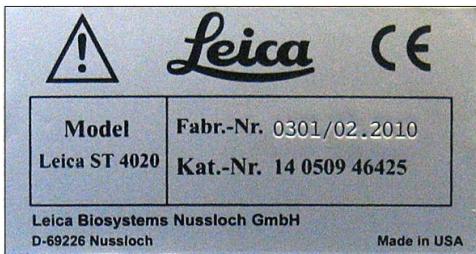
For the instrument serial number and year of manufacture, please refer to the nameplate at the back of the instrument.
- Important Information......6
- Safety 7
2.1 Safety notes 7
2.2 Warnings 7
- Instrument Components and Specifications....10
3.1 Overview – Instrument Parts ...... 10
3.2 Instrument specifications .... 11
3.3 Functional Description of Components - System overview.... 12
3.3 Functional Areas of the Slide Carrier 14
3.4 Standard delivery 15
3.5 Technical Data 16
- Setting Up the Instrument 17
4.1 Location Conditions 17
4.2 Unpacking the Instrument....17
4.3 Setup 19
4.4 Water Connection 20
4.5 Installing the Rinsing Water Containers 20
4.6 Remedy if hose is too short....24
- Operation 25
5.1 Switching on the Instrument 25
5.2 Control Panel Functions 25
5.3 Setting the Operating Parameters 27
5.4 Setting the Rinsing Water Flow Rate 30
5.5 Processing Slides 31
5.5.1 Starting a staining run 32
5.5.2 Adding more slide carriers during a staining run.... 33
5.5.3 Temporarily pausing a staining run 34
5.5.4 Ending a staining run prematurely 35
5.5.5 Removing Processed Slides 36
6. Cleaning and Maintenance 38
6.1 Cleaning the Instrument 38
6.2 Maintenance Instructions....39
7. Troubleshooting 40
7.1 General 40
7.2 Alarms 40
7.3 Fault Detection and Correction List 41
7.4 Power Failure 43
8. Optional accessories .... 44
8.1 Ordering information 44
9. Warranty and service 51
Symbols in the text and their meanings

Warnings
appear in a gray box and are marked by a warning triangle ⚠️.

Notes,
i.e. important user information, appear in a gray box and are marked by an information symbol


Inflammable solvents and reagents are identified using this symbol.

This warning symbol on the device notifies users of the danger of electric shock. To avoid the risk of injury from electric shock, a panel bearing this marking, or this housing, must not be opened.

Samples processed on this instrument may be biohazard. Appropriate safety procedures must be followed to prevent a biohazard.
(5)
Numbers in brackets refer to item numbers in figures.
RUN
Function keys to be pressed on the instrument are written in bold-print capital letters.
Intended use
The Leica Small Linear Stainer ST4020 is used for the automated preparation of routine histological and cytological stains. It is intended for use in pathology laboratories to assist with the following tasks:
- Staining thin tissue sections or cytological specimens on slides. Frozen sections can also be stained.
- The instrument may be operated only according to the instructions contained in this manual.
Any other use of the instrument is considered improper!
Qualification of personnel
- The Leica ST4020 may be operated by trained laboratory personnel only.
- All laboratory personnel designated to operate the Leica instrument must read this Operating Manual carefully and must be familiar with all technical features of the instrument before attempting to operate it.
Type
All information contained in this Operating Manual applies solely to the instrument type listed on the cover page. A nameplate indicating the instrument serial number is attached to the rear side of the instrument.
The safety and caution notes in this chapter must be observed at all times.
Be sure to read these instructions, even if you are already familiar with the operation and use of other Leica products.
2.1 Safety notes
This Operating Manual contains important instructions and information regarding the operational safety and maintenance of the instrument.
The Operating Manual is an important part of the product, and must be read carefully prior to startup and use and must always be kept near the instrument.
This instrument has been built and tested in accordance with the safety regulations for electrical measuring, control, regulating, and laboratory devices.
To maintain this condition and ensure safe operation, the user must observe all notes and warnings contained in this Operating Manual.

The Operating Manual must be expanded by corresponding instructions if this becomes necessary due to existing national regulations on accident prevention and environmental protection in the country where the instrument is operated.

For current information about applicable standards, please refer to the CE declaration for the instrument and to our Internet site: http://www.leica-microsystems.com

The protective devices located on the instrument and the accessories must not be removed or modified. The instrument must only be opened and repaired by service technicians authorized by Leica.
2.2 Warnings
The safety devices installed in this instrument by the manufacturer only constitute the basis for accident prevention. Operating the instrument safely is, above all, the responsibility of the owner, as well as the designated personnel who operate, service or repair the instrument.
To ensure trouble-free operation of the instrument, make sure to comply with the following instructions and warnings.
Hazards – safety regulations on the instrument itself

Warning labels on the instrument marked with a warning triangle indicate that the correct operating instructions (as defined in this Operating Manual) must be followed when operating or replacing the item marked. Failure to adhere to these instructions may result in an accident, personal injury, damage to the instrument or accessory equipment.
Hazards – transport and installation

Once unpacked, the instrument may be transported only in an upright position.
Place the instrument on a laboratory bench and align it horizontally.
The instrument must not be placed in direct sunlight (e.g., next to a window). Avoid impacts, bright direct light, and excessive temperature fluctuations.
Only connect the instrument to a grounded power socket. The protective effect may not be eliminated by an extension cable without a protective grounding conductor.
The instrument will automatically detect the voltage/frequency of the power source.
The installation location must be well ventilated, and must contain no sources of ignition of any kind. The chemicals used in the Leica ST4020 are easily inflammable and hazardous to health.
Do not operate the instrument in rooms with explosion hazard.
Condensation water may form in the instrument, if there is an extreme difference in temperature between the warehouse and the installation site and if air humidity is high at the same time. In this case, a two-hour waiting period must be maintained before switching on the instrument.
Warnings – Handling reagents

Take care when handling solvents!
Always wear rubber gloves and safety goggles when handling the chemicals used in this instrument.
The reagents used can be both toxic and/or flammable.
When disposing of spent reagents, observe the applicable local regulations and the waste disposal regulations of the company/institution in which the instrument is being operated.
Do not smoke near the stainer or the reagents.
The stainer should be operated under an extractor hood.
Hazards – working with the instrument

The instrument may be operated by trained laboratory personnel only. It must only be operated for the purpose of its designated use and according to the instructions contained in this manual.
In the event of an emergency, switch off the power switch and unplug the instrument from the power supply.
The instrument must be positioned so that the connection socket and the power switch are easily accessible at all times.
The power supply cord must be routed so that it is not likely to be walked on or pinched by items placed on or against it.
Suitable protective clothing (lab coat, gloves, protective goggles) must be worn when working with reagents.
There is a danger of fire if a open flame (e.g. Bunsen burner) is used directly beside the instrument (solvent fumes). Therefore, keep all ignition sources at least 2 meters away from the instrument!
While the stainer is not in use, keep the reagent containers covered with the Reagent Cover provided with the stainer.
Hazards – cleaning and maintenance

Before any maintenance, switch off the instrument and unplug it from power supply.
When using cleaners, please comply with the safety instructions of the manufacturer and the laboratory safety regulations.
Do not use any of the following for cleaning the outside surfaces of the instrument: alcohol, detergents containing alcohol (glass cleaners), abrasive cleaning powders, solvents containing acetone, chlorine or xylene!
Clean the Hood and the housing with commercial mild household cleaning agents. The finished surfaces are not resistant to solvents!
Prevent liquids from entering the interior of the instrument while the instrument is being cleaned or during operation.
Do not use any attachments or accessories not recommended by the product manufacturer as such attachments and accessories may cause hazards, damage the instrument and void the warranty.
3. Instrument Components and Specifications
3.1 Overview – Instrument Parts
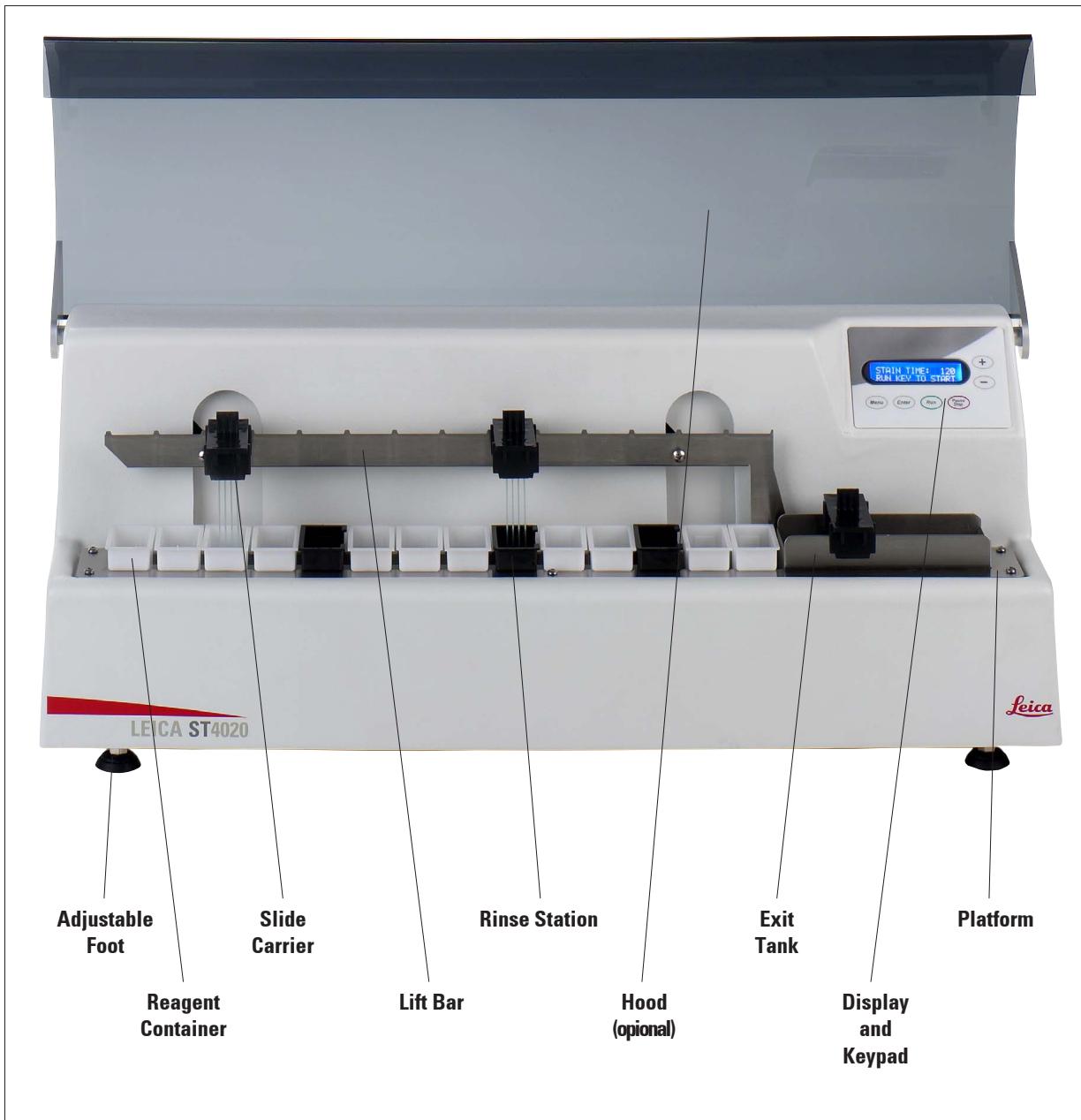
Fig. 2
Instrument rear view
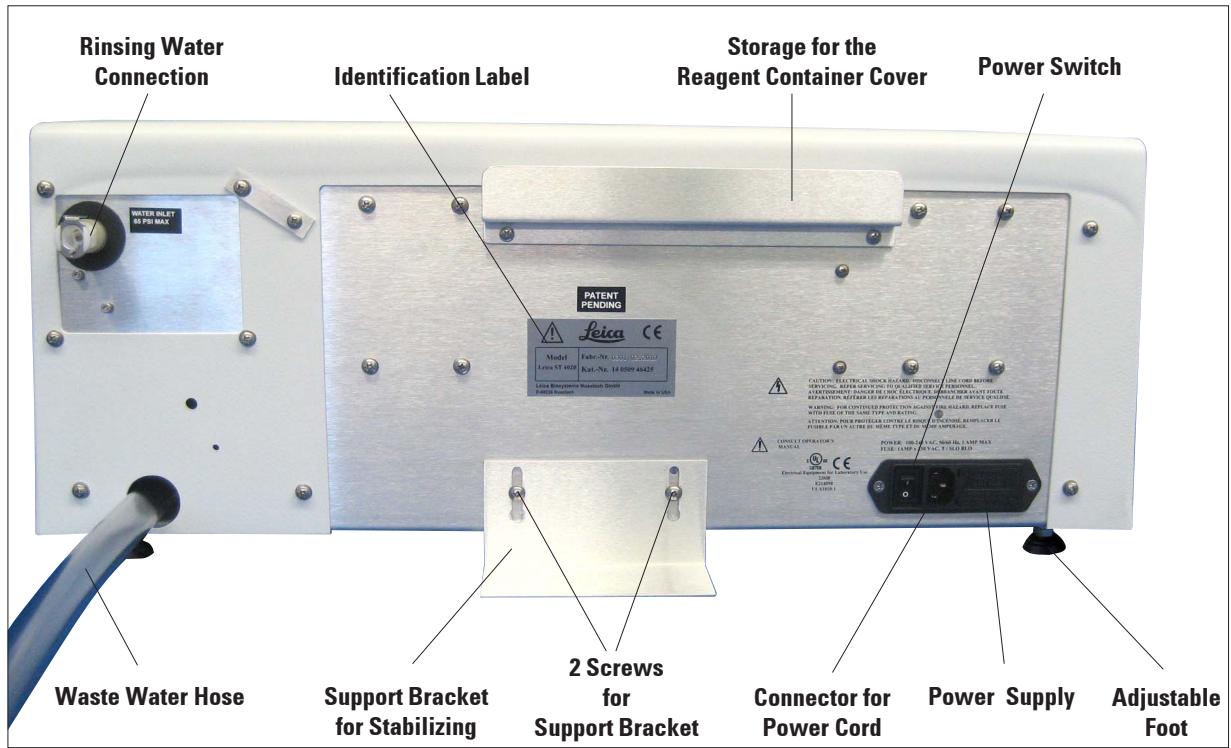
Fig. 3
3.2 Instrument specifications
The Leica ST4020 is an automatic linear stainer designed for stand-alone use, and can be used for staining frozen tissue sections in histology labs as well as anatomical pathology laboratories.
It is ideal for use in staining samples from either Mohs technique laboratories or sections from frozen section laboratories or general surgical pathology. In addition it is intended to be used in hematology, cytology, as well as performing routine H & E stains.
The user loads the slides in a carrier that can hold up to 4 slides at a time. The stainer provides 14 reagent stations that can be used as reagent stations or running rinse water stations and has an Exit Tank that can hold up to four processed slide carriers.
The slides will remain in each reagent station for a fixed programmable time that is applicable to all stations during staining. Station time, number of dips and start position are programmable.
3.3 Functional Description of Components - System overview
Figure 2 on page 10 shows an overview of the stainer.
The Leica ST4020 Linear Stainer has the following functional areas:
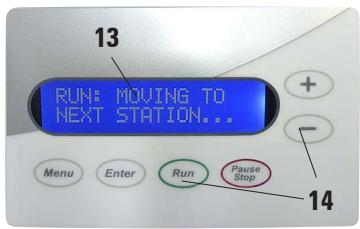
Fig. 4
Keypad (14) with Display (13)
A membrane keypad with 6 keys allows the user to set up the processing parameters and also allows the user to start and stop the processing runs.
An LCD display consisting of two rows, each row 16 characters long, in which the progress of slide processing and the stainer's processing parameters are displayed. The user is directed to take various actions as necessary.
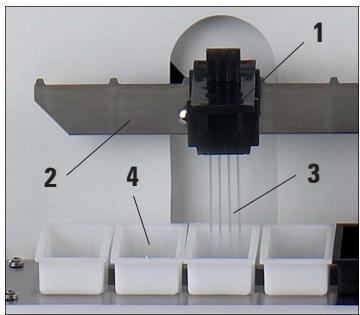
Fig. 5
Slide carrier (1) and lift Bar (2)
The user inserts the slides for staining (3) in the slots of the slide carrier (1). This is then placed onto the lift bar (2), by which it is transferred to the first reagent container.
The lift bar moves the slide carriers from one station to the next station and eventually deposits them in the exit tank.
natural_image
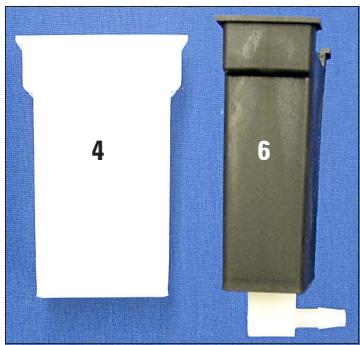
Two plastic containers labeled 4 and 6, displayed against a blue background (no text or symbols on the containers themselves)Fig. 6
Reagent container (4) and Rinsing Water Container (6)
Each reagent container (4) can hold up to 50 ml of the reagent for staining and processing.
A total of 14 reagent and rinse containers (6) can be arranged to customize the stainer to carry out a specific staining protocol.
Each of the 14 processing positions must have either a reagent container or a rinse container present.
The rinse containers allow the slides to be subjected to running rinse water while the slides are being processed.
Functional Description of Components (continued)
natural_image
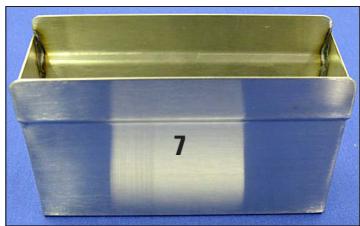
Metallic rectangular container with a gold lid and the number 7 on its side (no text or symbols on the container itself)Fig. 7
Exit Tank (7)
The exit tank holds the processed slides. It can hold up to 4 slide carriers.
As soon as the exit tank is full, the stainer pauses processing until the slide carriers are removed.
natural_image
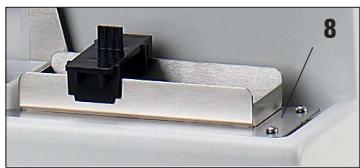
Close-up of a mechanical assembly with a black component and textured base, no visible text or symbolsFig. 8
Platform (8)
The platform holds the reagent containers, rinse containers and the exit tank in fixed locations to ensure the proper operation of the stainer. All 14 containers and the exit tank must be placed on the platform to ensure proper operation of the stainer.
natural_image
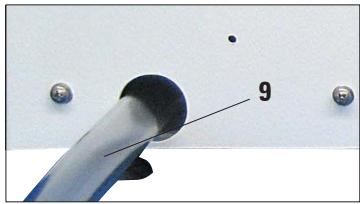
Close-up of a blue tool tip with a black circular component and two metallic screws, labeled '9' (no text or symbols on the tool itself)Fig. 9
Waste Water Drain Hose (9)
The waste water drain hose must always be inclined downwards so that the rinsing water drains into a collecting receptacle or drainage basin, and cannot collect in the stainer.
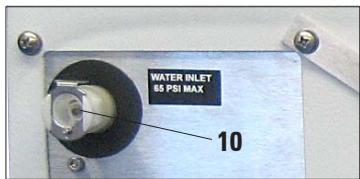
Fig. 10
Rinsing Water Supply (10)
A connection port for the rinsing water supply is located on the rear of the stainer. The necessary connecting hose is included in the equipment supplied.
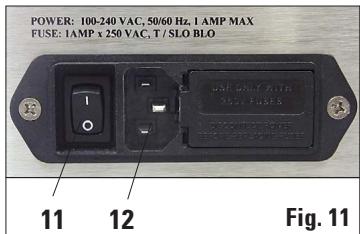
Main Switch and (11) Connection to Power Supply (12)
The stainer is connected to the power supply (12) by the power supply cord, and activated with the main switch (11).
The instrument can be operated with alternating current at 100 to 230 Volt with a power frequency of 50/60 Hz.
3.3 Functional Areas of the Slide Carrier
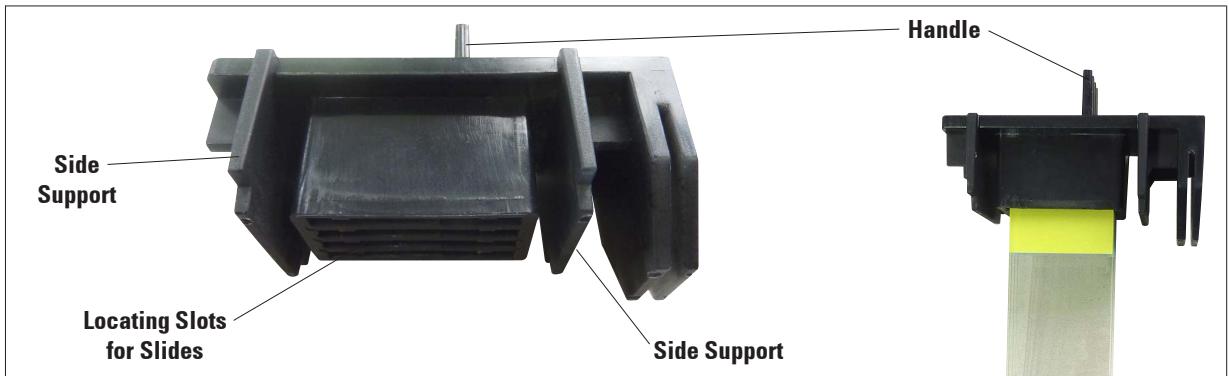
Fig. 12 and Fig. 13 show how the slide carriers are to be positioned over the reagent containers.
While placing a slide carrier with slides for staining in the lift bar, ensure that the side supports of the slide carrier are aligned so that the slide carrier is positioned above the container.
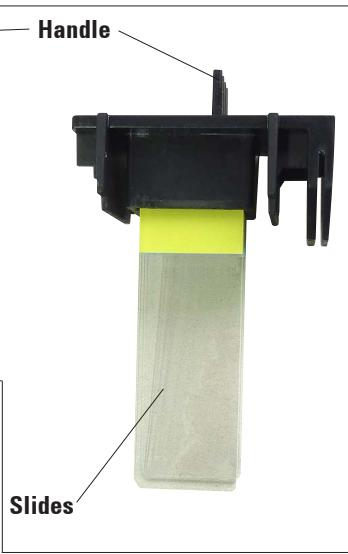
Fig. 12
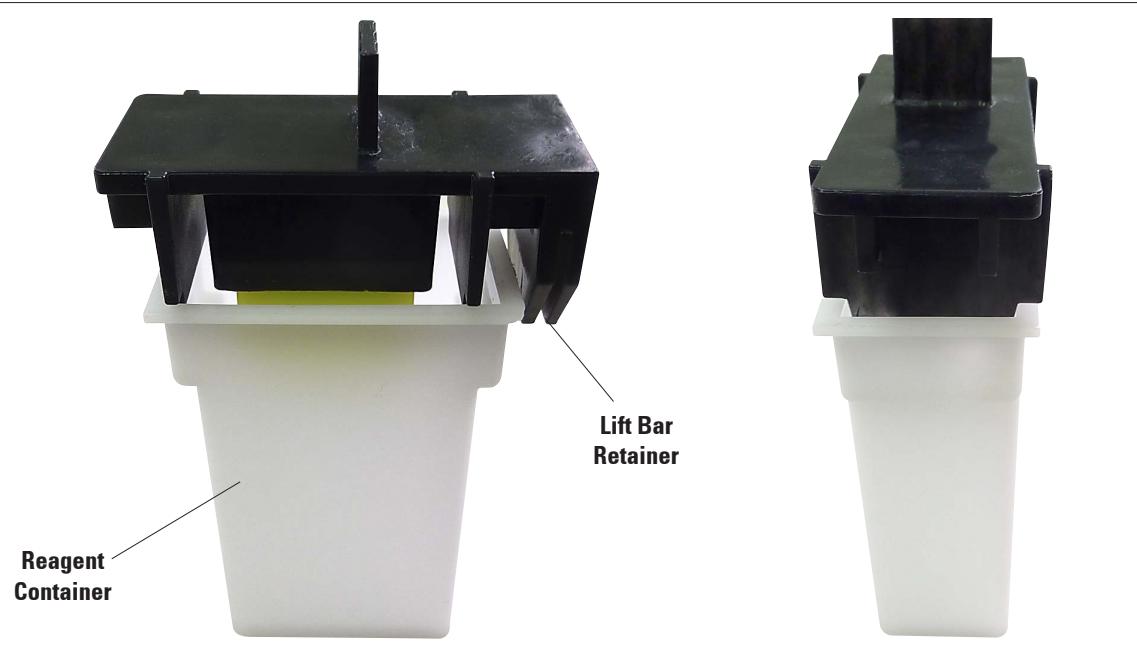
Fig. 13
3.4 Standard Delivery
The Leica ST4020 standard delivery consists of the following items:
1 Leica ST4020 basic instrument 14 0509 46425
14 Reagent containers (white) 14 0509 46437
3 Water rinse containers (black) 14 0509 46441
3 Slide carrier 14 0509 46438
1 Set of Power cords:
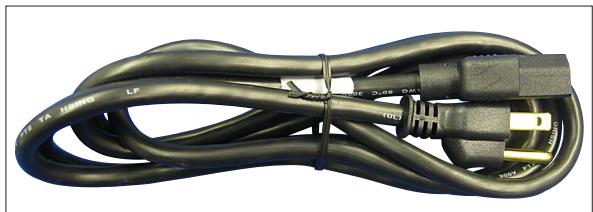
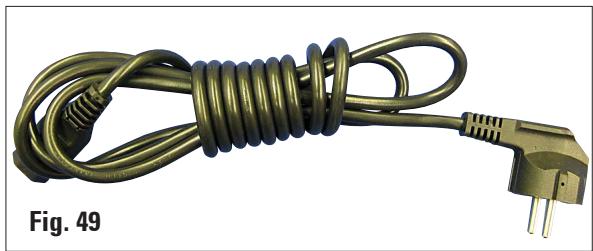
1 Power cord "D" 14 0509 46480
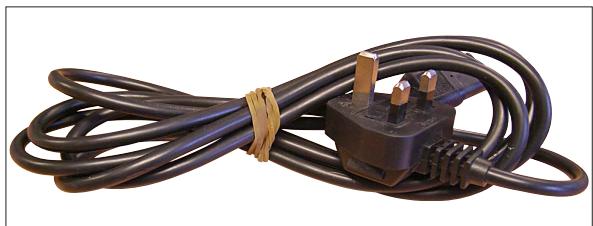
1 Power cord "UK" ST-BU F-5A 14 0509 46481
1 Power cord "US" 14 0509 46479
1 Water inlet hose 14 0509 46532
1 Water drain hose (already installed) 14 0509 46445
1 Rinse Manifold with restrictor (already installed) 14 0509 46533
1 Exit collection tank 14 0509 46450
1 Set with tubings, fittings, tie wraps: 14 0509 46459
1 Water hose 16" long, ∅1/8"
3 in line fittings
2 plugs
10 tie wraps
1 Support Bracket 14 0509 46570
1 Metal reagent container cover 14 0509 46442
1 Set replacement fuses:
2 Fuses 250 V, T 1.0 A 14 0509 46463
1 Instruction manual for Leica ST4020 "Small Linear Stainer" 14 0509 80001

Please check all delivered parts against the packing list and against your order to verify whether the delivery is complete! Should you find any discrepancies, please contact your Leica sales office without delay.
3.5 Technical Data
General
| Admissions: | UL, cUL, CE |
| Nominal voltage: | 100 V – 240 V +/- 10% AC |
| Nominal frequency: | 50 to 60 Hz |
| Power draw: | 25 VA |
| IEC 1010 classification: | Protective class 1Pollution degree 2Overvoltage installation category II: |
| Secondary fuses: | Melting fuses 1.0 A T ∅ 5.0 x 20 mm |
| Operating temperature range: | 15°C to 30°C |
| Relative humidity: | 20% to 80%, non-condensing |
| Altitude: | ≤ 6500 ft (Ambient pressure. 29 - 31 inch Hg) |
Dimensions and weights
| Dimensions, (W x D x H): | 620 mm x 250 mm x 200 mm |
| Height with Hood open: | 430 mm |
| Dry weight, unpacked: | approx. 16 kg |
| Instrument with accessories: | approx. 19 kg |
| Weight incl. packing material: | approx. 21 kg |
Performance
| Slide processing rate: | Depends on program structure and loading |
| Loading capacity: | max. 4 slide carriers |
| Stations: | max. 14 |
| Reagent stations: | max. 14 |
| Washing stations: | max. 3 (then only 11 reagent stations are possible) |
| Reagent container volume: | 50 ml |
| Agitation: | 0 to 3 dips per station for dwell times >30 sec. |
| Throughput rate of washing stations: | 250 ml/min +/-100 ml, depending on number of stations |
| Dwell time adjustment: | 2 to 300 sec. at each station |
| Capacity of the slide carrier: | max. 4 slides |
| Capacity of the exit tank: | max. 4 slide carriers |
4.1 Location Conditions
- The instrument requires an installation area of approx. 250 x 700 mm. A clearance of at least 25 cm must be left between the instrument and the closest wall or other instruments.
- If the stainer is to be operated with rinsing stations, fresh water and waste water connections must be no more than 1.2 m from the ports on the back of the instrument.
- It must be ensured that there is sufficient clear space (approx. 30 cm) above the instrument to allow unobstructed opening of the optional Hood.
• Room temperature consistently between +10°C and +30°C. - Relative air humidity maximum 80%, non-condensing.
- Practically vibration-free floor. Avoid vibrations, direct sunlight and heavy variations in temperature.

The chemicals used in the Leica ST4020 are easily inflammable and hazardous to health.
The installation site for the Leica ST4020 must be well ventilated, and there must be no ignition sources of any kind in the area.
The instrument must not be operated in areas at risk of explosion.
4.2 Unpacking the Instrument

First check the shipment for external damages upon arrival. If it is evident that the shipment was damaged during transport, please make a claim to the carrier immediately.
- Open the packaging.
- Remove all foam material.
• Take out all accessories and the Operating Manual. - Check the contents of the delivered pack against the order form to ensure that all components and accessories are included.
Unpacking the Instrument (continued)

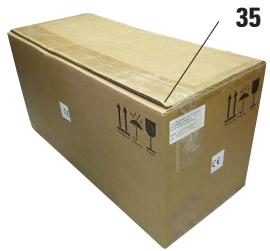
These unpacking instructions only apply if the box is placed with the symbols facing upwards for unpacking.

natural_image
Illustration of a cardboard box with visible internal components and a numbered label (35), no readable text or symbols beyond labels.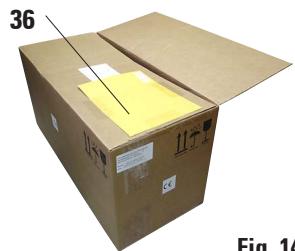
natural_image
Illustration of a cardboard box with a yellow sticker on top, labeled 'Fig. 14' (no text or symbols on the box itself)Fig. 14

natural_image
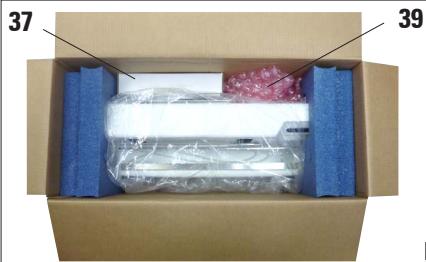
Interior view of a cardboard box with blue foam strips and a wrapped sheet of paper (no visible text or symbols)Fig. 15
- Cut through the packing tape (35) on the top edge of the box.
-
Remove the yellow envelope with "Documents of Conformity" (36) and store in a safe place.
-
Remove the Accessories (37), packaging material (39) and operating manual.
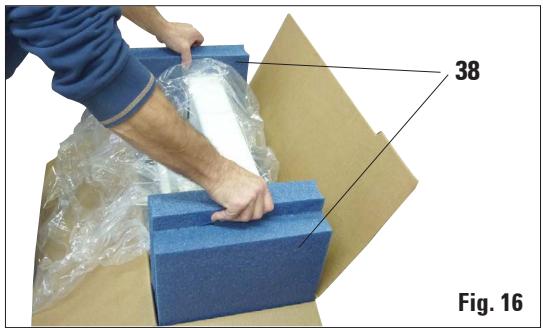
- Use the molded foam pads (38) to pull the instrument out of the inside packaging and place it on a firm laboratory bench.

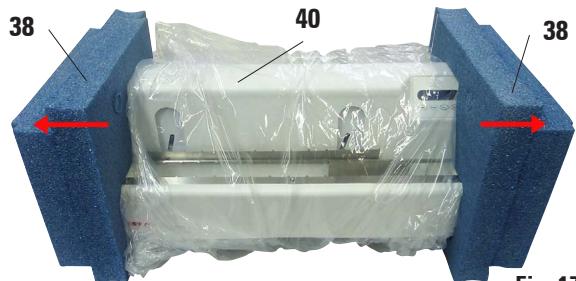
Fig. 17
- Pull the molded foam pads (38) away from the sides of the instrument.
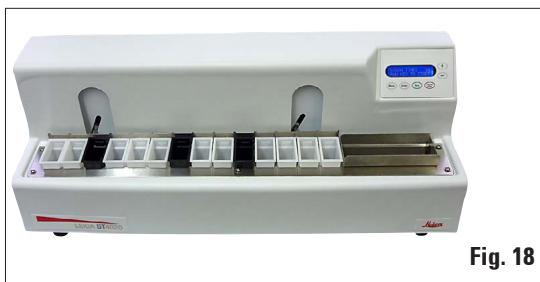
Remove the protective film (40) from the instrument. - The instrument must now be prepared for correct use in accordance with the instructions in the accompanying Operating Manual.
natural_image
Laboratory instrument with digital display and multiple compartments (no visible text or symbols)
The packaging must be retained for the duration of the warranty period.
To return the instrument, follow the instructions above in reverse order.
4.3 Setup
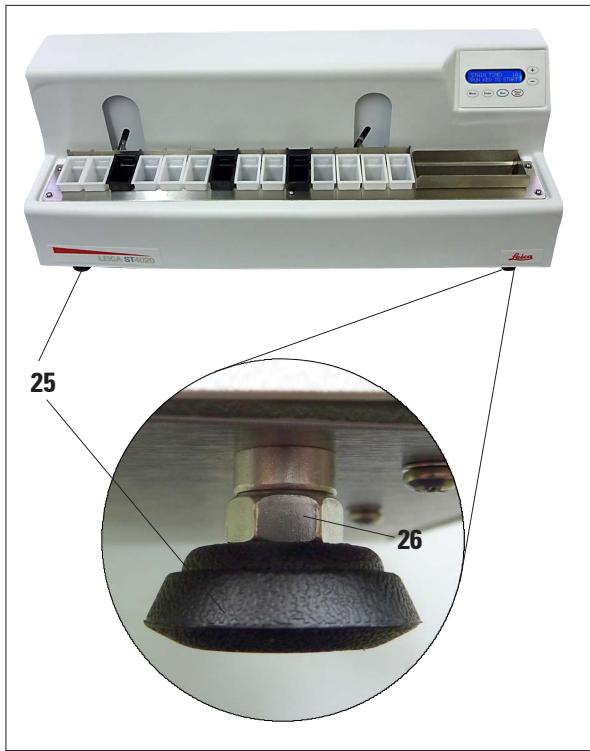
Fig. 19
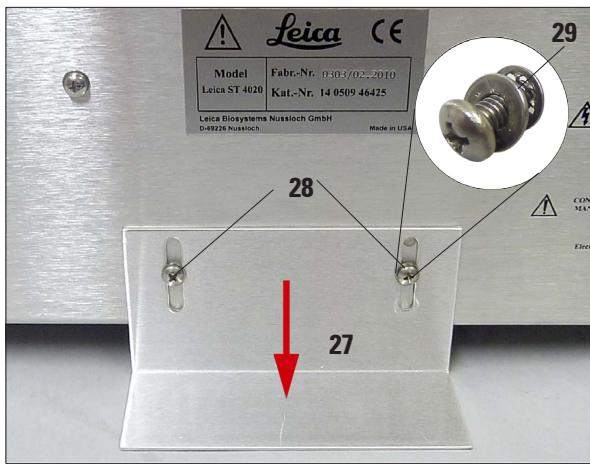
Horizontal Alignment
For safe and accurate work, it is important that all instrument feet are in uniform contact with the installation surface.
The stainer is horizontally aligned at the factory. If a completely level or horizontal surface is not available at the installation site, the instrument must be realigned.
For this purpose, the instrument feet (25) are height-adjustable.
- For alignment, loosen the locknuts (26) using a size 7/_16 " open-end wrench.
- Adjust the instrument feet (25) until the instrument is in a stable position at the installation location according to requirements.
- Retighten the locknuts.
Mounting the Support Bracket
To ensure that the instrument cannot tip over when its keys are pressed, the support bracket (27) must be mounted on the rear.
- To do this, first unscrew the two Philips head screws (28) with a screwdriver. Place them together with the two associated washers (29)
- Place the support bracket against the rear of the instrument (Fig. 20), reinsert but do not fully tighten the two screws.
- Press the support bracket down onto the support surface until a face of the plate lies flush with the bench surface, then tighten the plate in this position.
4.4 Water Connection
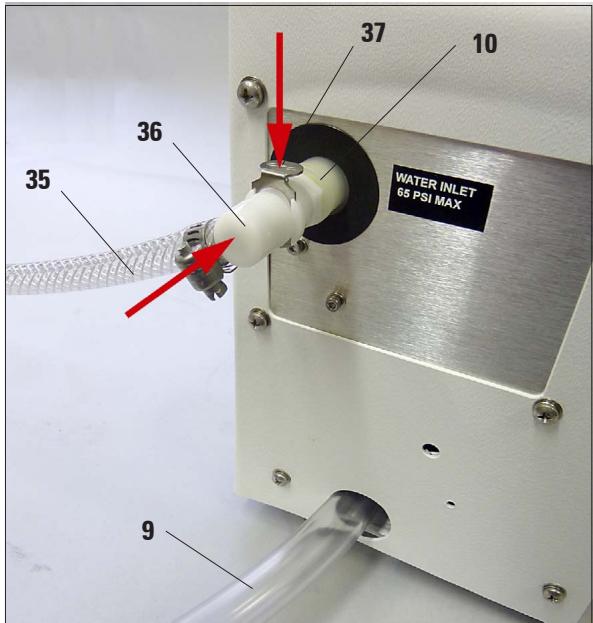
Fig. 21
- Run the drain hose (9) into a suitable collecting tank or waste basin. Make sure that the hose is not kinked and that the water is able to drain freely downwards.
- Then connect the rinsing water supply (35) to the stainer.
- To do this, push the connector (36) into the orifice (10) on the instrument until it clicks into place. To detach the hose, press on the plate (37) and pull the connector back.
- Connect the other end of the hose to a suitable water tap. Do not open the water supply yet!
Adjustment of the rinsing water flow rate is described in Chapter. 5.4.
4.5 Installing the Rinsing Water Containers
Up to three rinsing stations may be provided on the stainer. The rinsing water containers can be located at any of the 14 reagent stations.
The equipment supplied includes three hoses with Y-connectors. The cable ties on these Y-connectors must not be removed. Also, do not detach the Y-connectors from the associated hoses.
Watertight, functional rinsing stations in accordance with the desired staining protocol can be set up with the aid of additional cable ties, hoses, plugs and connectors that are also included in the scope of delivery.

While the rinsing stations are being set up, it must be ensured that the rinsing water containers are positioned horizontally on the platform, and all hoses are lying horizontally on the bottom of the drainage tank, outside of the travel path of the lift bar. The rinsing water hoses must not be subjected to any kind of pulling or stretching stresses.
Installing the Rinsing Water Containers (continued)
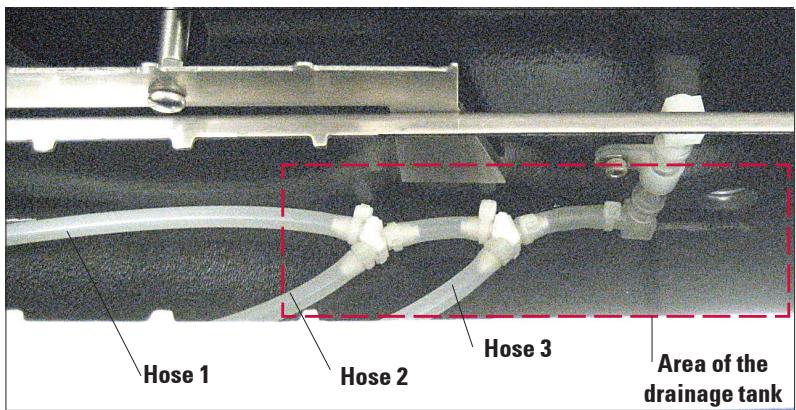
Fig. 22
Fig. 22 shows how the hoses are routed in the instrument.
If you want to work entirely without water, no further steps are necessary – simply do not connect a water supply line to the instrument.
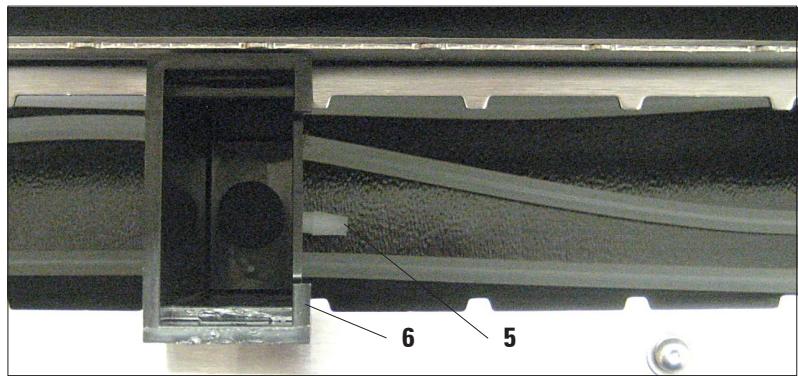
Fig. 23
Place the rinsing water containers (6) in the desired position on the platform. The rinse container bar fitting pointed (5) to the exit tank (refer to fig. 23).
Start with the station closest to the drainage tank.
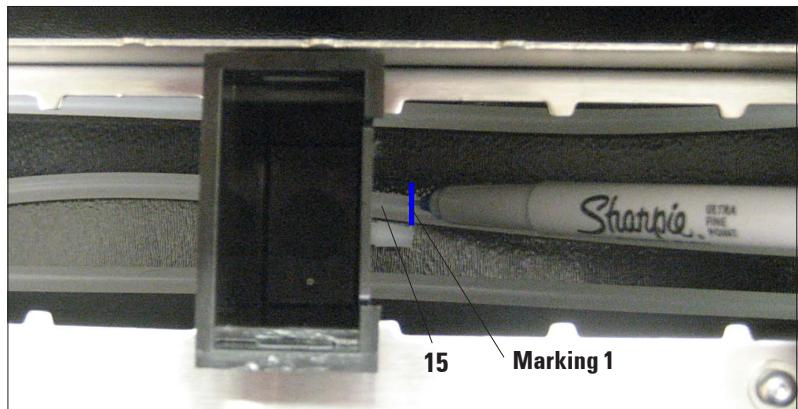
Fig. 24
The hose (15) should run level along the bottom of the instrument.
Mark the end of the hose that will connect to the rinsing water container.
This is "Marking 1".
Installing the Rinsing Water Containers (continued)
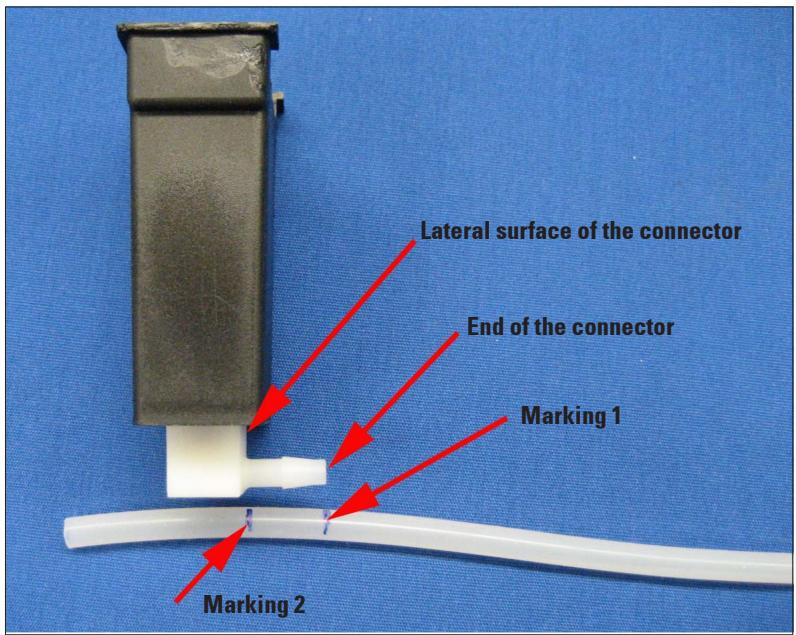
Fig. 25
- Now take the rinsing water container and the hose out of the stainer.
- Align Marking 1 on the end of the connector and make a second marking ("Marking 2") to indicate the lateral surface of the connector (Fig. 25).
- Cut the hose off at Mark-ing 2.
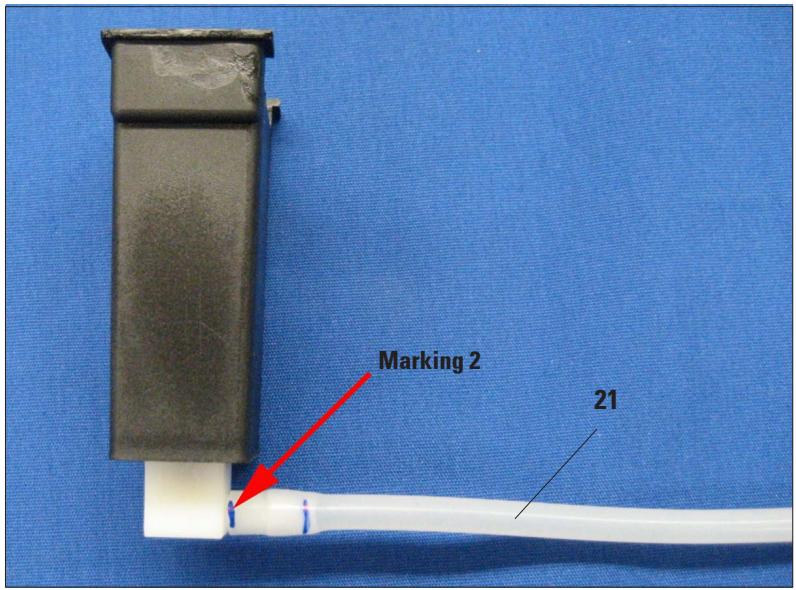
Fig. 26
- Then push the hose (21) fully onto the connector by twisting until the end of the hose is flush against the lateral surface of the connector (Fig. 26).
- If the hose is not pushed completely onto the connector, it may become detached as soon as the water supply is turned on.

Do not stretch tubing to fit on the fitting.
Installing the Rinsing Water Containers (continued)
- Place the rinsing water container back in the desired position on the platform. Check that the rinsing water container is positioned horizontally on the platform. If the hose is too long, the rinsing water container will tilt to the right; if it is too short, it will tilt to the left.

If the rinsing water container is not positioned horizontally on the platform, it cannot be guaranteed that the stainer will function properly.
- Repeat the steps described above for the other rinsing stations.
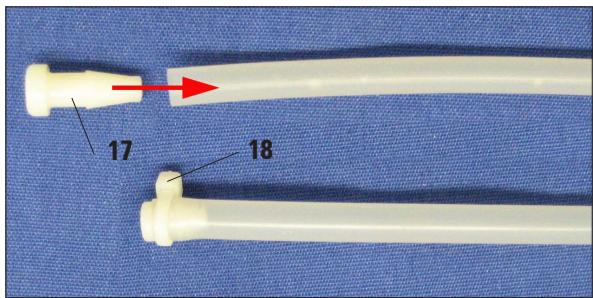
Fig. 27
If only one or two rinsing stations are required, the hoses that are not used must be sealed with a plug (17), see Fig. 27.
- To do this, twist and push the plug fully into the end of the hose, and then secure it with a cable tie (18).
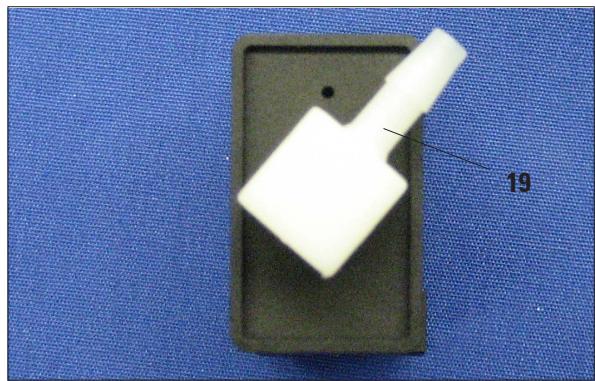
natural_image
Close-up of a white plastic object mounted on a dark gray base, placed on a blue textured surface (no text or symbols visible)Fig. 28
If two rinsing stations are to be located immediately beside one another, the connector (19) for the left station must be aligned as shown in Fig. 28.
4.6 Remedy if Hose is too short
If the hose (21) at one of the stations should be too short, or if a hose has been cut too short by mistake, the following remedy may help:
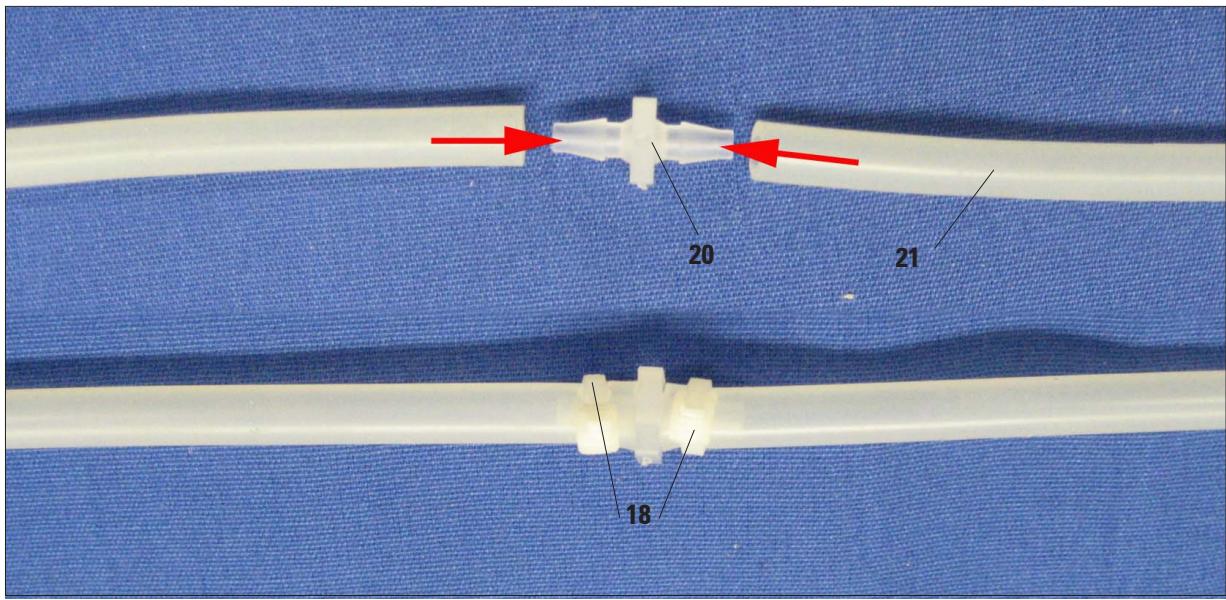
Fig. 29
- Cut the hose roughly in the middle between the Y-connector and the rinsing station.
- Use the extension connector (20) included with the package to attach an additional hose section (21) of the required length.
- To do this, measure the length of the hose again, and if necessary cut it to exactly the required length.
- Push both ends of the hose as far as they will go onto the extension connector, and then secure each hose with a cable tie (18).
- Finally, check again that the rinsing water container is positioned horizontally on the platform.
5.1 Switching on the Instrument

The instrument MUST be connected to a grounded power socket.
Only the power cord provided may be used, which is intended for the local power supply (socket). The protective effect must not be eliminated by an extension cable without a protective grounding conductor.
The AC socket used for the power supply must be close to the instrument and easily accessible.
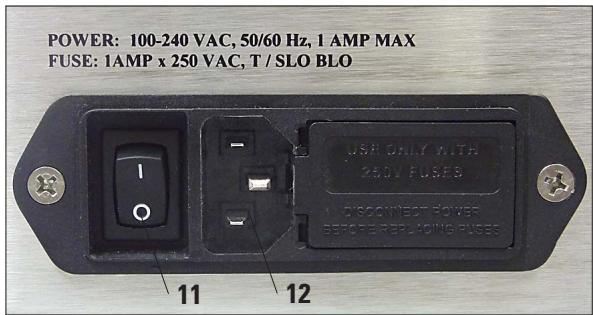
Fig. 30
- Before plugging the instrument into the mains, make sure that the main switch (11) on the rear of the instrument is in the OFF ("0") position.
- Plug the power cable into mains power supply socket (12) and connect it to the power socket on the wall. If applicable, switch on the switch for the power socket.
- Then switch on the main switch (11) on the instrument, (ON = "I").
5.2 Control Panel Functions
The control panel consists of a membrane keypad with six pressure keys, and a screen consisting of a two-line display, each line being 16 characters long.
This is used for controlling the functions of the instrument and for programming the software. The current state of the stainer and ongoing operations are displayed while a staining task is being processed.
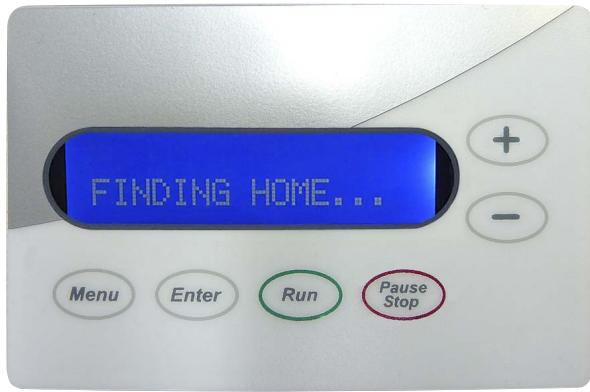
Fig. 31
- The instrument will take a few seconds to initialize. During this time, the installed version of the software will be displayed on the monitor.
- Then, the lift bar performs a circular motion to ensure that the bar is in the correct position at the start of staining.
The message FINDING HOME... is displayed on the screen.
Control Panel Functions (continued)

There are six push-buttons on the control panel, and these are used to adjust the operating parameters and control the instrument.
The keys have been assigned the following functions:
The operating parameters can be displayed and checked with the MENU key.
Each time the MENU key is pressed, another one of the six operational parameters will be displayed.
Whenever a new setting is made, it will take effect immediately. Furthermore, since all settings are saved in memory, it will automatically be used the next time the system is powered up.
The operating parameter that is currently being displayed can be raised or lowered by pressing the PLUS (+, increases the displayed value) and MINUS (-, reduces the displayed value) keys respectively.

Pressing the PAUSE/STOP key allows the operator to exit the setup menu without changing the parameter currently being displayed.
While running:
Pressing PAUSE/STOP once interrupts the current staining operation so that another slide carrier can be placed in the lift bar.
Pressing PAUSE/STOP twice (in quick succession) terminates the current program, and the system returns to idle mode.
If the ENTER key is pressed, the selected parameter is stored in the system.
The system returns to its idle mode whenever a new setting is entered, or whenever the user exits the setup menu by pressing the PAUSE/STOP key,

Pressing the RUN key starts a staining operation on the basis of the values shown in the display. At the same time, the flushing valve is activated, the display changes, and the timer appears, counting down to show the remaining processing time.
5.3 Setting the Operating Parameters
The process of adjusting the operational parameters is simple and direct.
When the system is "ON" and in the idle mode (that is, neither RUNNING nor in a SETUP mode), the operator may display and check the setup parameters by pressing the MENU key.
If the ENTER key is pressed, the selected parameter is stored in the system.
Pressing the PAUSE/STOP key allows the operator to exit the setup menu without changing the parameter currently being displayed.
Whenever a new setting is made, it will take effect immediately.
Furthermore, since all settings are saved in memory, it will automatically be used the next time the system is powered up.
The system returns to its idle mode whenever a new setting is entered, or whenever the user exits the setup menu by pressing the PAUSE/STOP key.
Processing time
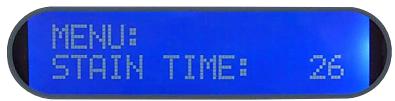

The amount of time that the slides are immersed at each station can be varied from 2 to 300 seconds.
- When the PLUS or MINUS key is pressed ("+" or "-"), the staining time is altered:
one second at a time in a range from 2 to 30 seconds, five seconds at a time in a range from 30 to 60 seconds, ten seconds at a time in a range from 60 to 300 seconds.
- After ENTER is pressed, the new processing time is activated, and this time is stored for future use.
Display Contrast
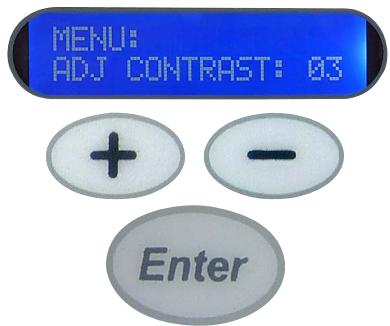
The contrast on the liquid crystal display can be adjusted according to the preferences of individual users.
- The adjustment range is between 1 and 15, 1 being the brightest setting.
- Pressing the PLUS or MINUS key changes the number of contrast for the display.
• After ENTER is pressed, the setted contrast is stored.
Transfer Mechanism Calibration
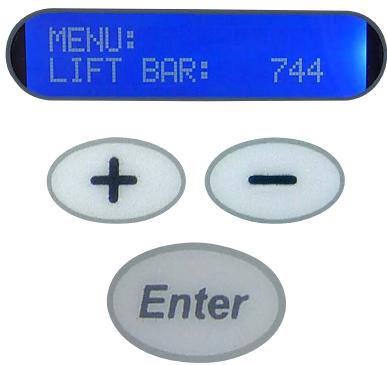
The position at which the transfer movement is paused and processing started may be adjusted by pressing the PLUS (+) or MINUS (-) keys, followed by the ENTER key.
- Pressing the PLUS or MINUS key changes the number of steps carried out by the stepping motor by 8. The minimum permitted value is 704, the maximum permitted value is 1000. The typical setting is 944 to 960.
- After ENTER is pressed, the number of steps is stored. Also, the transfer mechanism advances to the next station, stopping when the selected number of steps has been taken.
Number of Dips
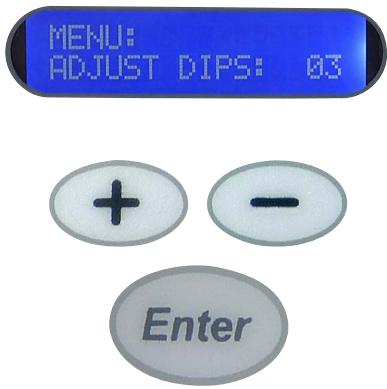
The number of dips that are carried out for uniform staining can be set in a range from 0 to 3.
- Pressing the PLUS or MINUS key changes the number of dips carried out by the instrument.
• After ENTER is pressed, the number of dips is stored.
If a value of 1, 2 or 3 has been selected, the system dips the slide carriers the corresponding number of times as soon as they reach a station.
All subsequent dip motions are carried out at intervals of 20 seconds each if the processing time is 30 seconds or more. If the processing time is less than 30 seconds, then no dips will occur, regardless of the setting selected.
Start position
Run Forever
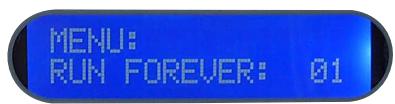
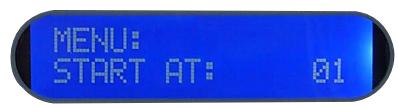
The start position has to be set if staining protocols that do not make use of all 14 staining positions are being run.
In order to make the processed slides available to the user at the exit tank in the least amount of time possible, a programmable start position feature has been added.
- Pressing the PLUS or MINUS key changes the number of start position carried out by the system.
• After ENTER is pressed, the start position is stored.
The user can specify which station is being used for the start position.
- For example, a protocol that requires only ten stations could use stations 5 through 14 rather than beginning at the first station.
- This puts the slides into the exit tank as soon as they leave the last process station. By specifying the start position as position 5, the user allows the system to issue its "reminder beep" at the correct time.
- This beep informs the operator that slides have reached the exit tank.
There are two settings, and these can be set using the PLUS or MINUS keys.
- With a setting of "00", the stainer runs for as long as slide carriers are loaded into it and are undergoing the staining process.
- A beep sounds every time a slide carrier is ready. When 3 racks have reached the exit tank, a signal sounds 5 times.
- With the "01" setting, the stainer runs continuously whether it is loaded or not. A beep sounds every time a slide carrier is ready.
• After ENTER is pressed, the run mode is stored.
5.4 Setting the Rinsing Water Flow Rate
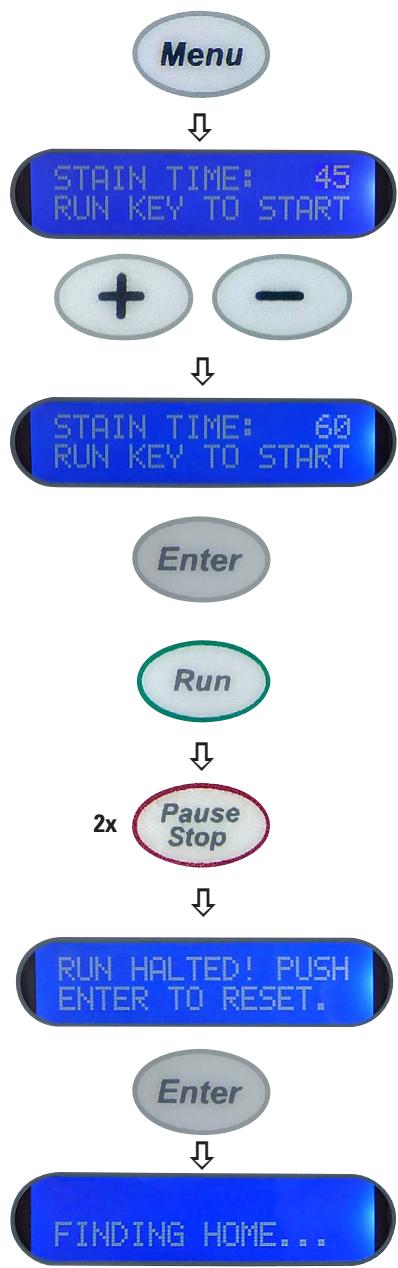
To set the flow rate for the rinsing water, proceed as follows:
flowchart
graph TD
    A["Menu"] --> B["STAIN TIME: 45 RUN KEY TO START"]
    B --> C["+ -"]
    C --> D["STAIN TIME: 60 RUN KEY TO START"]
    D --> E["Enter"]
    E --> F["Run"]
    F --> G["2x Pause Stop"]
    G --> H["RUN HALTED! PUSH ENTER TO RESET."]
    H --> I["Enter"]
    I --> J["FINDING HOME..."]
- First set a staining time of 60 seconds. To do this, press MENU once, and then press the PLUS or MINUS key repeatedly until a processing time of 60 seconds is displayed.
- Then press the ENTER key to confirm this processing time.
- Now press RUN. The countdown of station time will be displayed while the rinse water valve inside the unit activates.
- Now slowly turn on the tap to which the supply hose is connected, and adjust the flow rate so that water flows into the rinsing water container at a sufficient rate and the rinsing water can drain without obstruction.

DO NOT adjust the flow rate too high. This can cause spills on the platform to the next stain station or can overflow the drain area of the stainer.
- Once the flow rate is adjusted properly, press the PAUSE/STOP key twice, and then press the ENTER key to reinitialize the mechanism when prompted by the instrument.
5.5 Processing Slides
The Leica ST4020 Stainer is a relatively simple and trouble-free system. The user must inform the system via the keypad whenever slides are to be added to or removed from the stainer.
Directions as to how this is done appear in the following sections. Slides must be loaded and unloaded in the prescribed fashion.

Important!
Failure to follow the directions given here may result in improper or incomplete processing of slides.
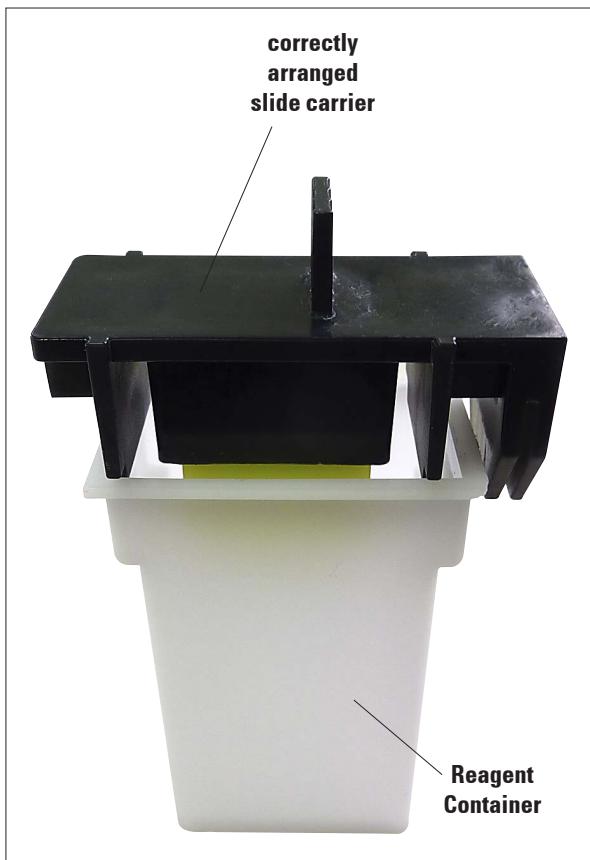
Fig. 32
- The slide carrier must be prepared carefully, because if it is positioned incorrectly, the slides may not be properly transported by the lift bar.
There are two occasions that slides may be loaded onto the start position:
• before the start of processing, and
• after the start of processing.
In both cases, the slides will be immersed in the start position's reagent.
The user should be prepared to start or resume the staining run as soon as the slide carrier is in position, so that extra staining time may be kept to a minimum.
5.5.1 Starting a staining run
It is, of course, the user's responsibility to verify that each of the setup parameters (station time, number of steps, number of dips, etc.) is set to an acceptable value before slides are placed in the starting position and RUN is pressed.
Slides should not be loaded while the user is verifying setup parameters, because changing the number of steps ("transfer mechanism calibration") will cause the transfer mechanism to advance to the next position!
All parameters should be verified BEFORE loading the first set of slides.
A staining run cannot be started unless the stainer is in standby-mode.
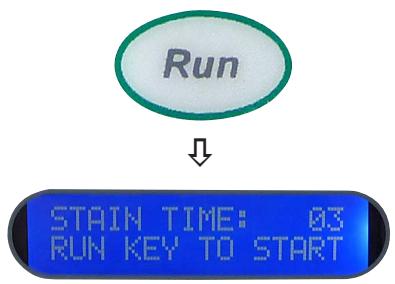
In this mode, the system displays the process time and instructions to press the RUN key to start:
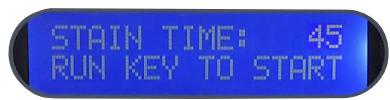


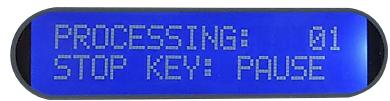

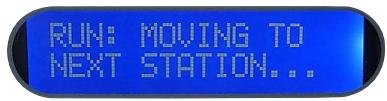
When the RUN key is pressed, the flushing valve is actuated, the display changes and the remaining processing time appears, counting downwards:
When a staining run is started by pressing the RUN key, the system receives the information that there are slides in the start position that are to be stained.

Note that the first station's process time begins as soon as the RUN key is pressed. This means that the slide carriers must be loaded in the start position immediately before the RUN key is pressed.
- The stainer will continue running until these slide carriers are transferred from station 14 to the exit tank.
- The current operation appears successively in the display.
- When the last slide carrier has been transferred to the exit tank, the system stops the process and returns to IDLE mode, unless more slides are inserted in the correct manner.
5.5.2 Adding more slide carriers during a staining run
The PAUSE/STOP function can be used to allow additional slide carriers to be placed in the instrument after processing has begun.
The following procedure should always be followed:


PLEASE WAIT TO LOAD SLIDES...
Please wait, and do not add any further slides!
This message is displayed until the slide carriers have been removed from a position by the lift bar and transferred to the next station.

LOAD SLIDES... PRESS RUN.


PROCESSING: 01 STOP KEY: PAUSE
If a staining run is already underway and more slide carriers are to be inserted, press the PAUSE/STOP key once.

Important!
Only press PAUSE/STOP ONCE!
If this key is pressed twice, the entire staining run will be aborted.
When:
LOAD SLIDES...
PRESS RUN
appears in the display, the new slide carriers must be inserted at the start position immediately, and the RUN key pressed.
As soon as the RUN key is pressed, the system resumes processing, and continues counting down the process time.
It should also be noted that the entire operation is interrupted until the RUN key is pressed again.
Therefore, the operator should be prepared to load the new slides as quickly as possible and should then press the RUN key quickly to avoid having all slides already in the system spend extra time immersed.
5.5.3 Temporarily pausing a staining run

↓

If the PAUSE/STOP and RUN keys are pressed in this order, the instrument receives the information that more slide carriers have been inserted at the start position.
The stainer continues operating until these slide carriers are transferred from station 14 to the exit tank.
If no other slides have been added in the meantime, it emits an audible signal to alert the operator that the staining run has been completed. A corresponding message appears in the display.
RUN COMPLETE!

This procedure applies for inserting slide carriers after processing has begun, and must be followed under all circumstances.
Attempting to add slide carriers without pressing the PAUSE and RUN keys will result in the carriers not being transported to all of the stations, since the stainer will not know that additional slide carriers have been added!
Occasionally, it may be necessary to stop the system when it is processing slides. This too can be accomplished with PAUSE/STOP key.
Staining can be interrupted,
• to allow access to the instrument if anomalies requiring such arise during staining.
• so that reagents can be checked, and changed if necessary.
LOAD SLIDES... PRESS RUN.

Important!
The lift bar will complete the current cycle, and will move the slide carriers to the next station. Do not attempt to open the instrument until "LOAD SLIDES... PRESS RUN" appears in the display.
5.5.4 Ending a staining run prematurely
The role of the PAUSE/STOP key in loading additional slides was described in the previous chapter.
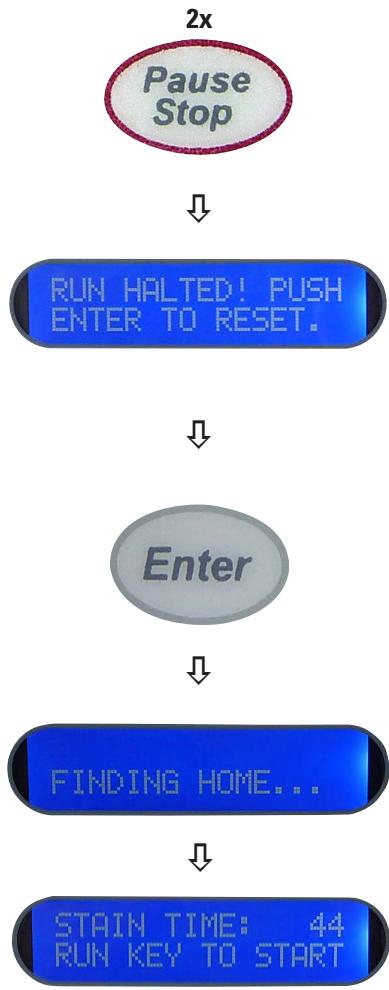
However, this key has a second function, that of terminating a staining run that has already been started.
flowchart
graph TD
    A["Pause Stop"] --> B["RUN HALTED! PUSH ENTER TO RESET."]
    B --> C["Enter"]
    C --> D["FINDING HOME..."]
    D --> E["STAIN TIME: 44 RUN KEY TO START"]
It has been noted already that the PAUSE/STOP key should be pressed only ONCE when additional slides are to be loaded.
Because if the PAUSE/STOP key is pressed TWICE, processing is stopped. If this happens, the message opposite appears in the display.
- This means that the staining run has been aborted, and the instrument must be reset by pressing ENTER.

Important!
All slide carriers must be removed from the instrument, because all the information in the software has been reset.
- As soon as the user presses the ENTER key in this situation, the transfer mechanism returns to the home position. This is then the same situation as when the instrument is first switched on.
- The corresponding message appears in the display.
- As soon as the transfer mechanism reaches the start position, the stainer returns to idle mode; then, the same status message is displayed as the one shown when the instrument is initialized after it is switched on.
5.5.5 Removing Processed Slides
Removing processed slides means more than the mere physical act of removing slides. It also involves informing the instrument that slide carriers have been removed, so that the stainer may keep an up-to-date count of how many slide carriers are still in the system.
- Every time the system transfers a slide carrier from station 14 to the exit tank, an audible signal (beep) is emitted to inform the user that slides are available for removal.
- The system also increments its count of the number of slide carriers that are in the exit tank.
- The operator should remove processed slides as quickly as possible.
- The exit tank can hold up to four slide carriers. This enables the operator to remove the slides at a more convenient time.
- As soon as there are 3 slide carriers in the exit tank, the stainer emits a distinctive audible signal to alert the operator.
- In this case, the slides should be removed immediately, before the counter in the system is set to 4;

Important!
As soon as there are four slide carriers in the exit tank, the stainer stops processing, because the exit tank cannot hold any more slides.
- It is often convenient to insert new slides for staining at the same time as the processed slides are being removed.
In this case it may be assumed that the operator normally removes all the stained slides from the exit tank every time new slides are loaded.
Removing Processed Slides (continued)
Of course, there will be times when slides are being removed but no additional slides are being loaded.
These two different situations are handled in the following ways:
1 To remove processed slides only:
- Take ALL of the slide carriers out of the instrument's exit tank.
- Press the RUN key once to start processing the loaded slide carriers.
flowchart
graph TD
    A["Pause Stop"] --> B["LOAD SLIDES... PRESS RUN."]
    B --> C["Run"]
-
To remove the carriers with stained slides and load fresh slide carriers:
-
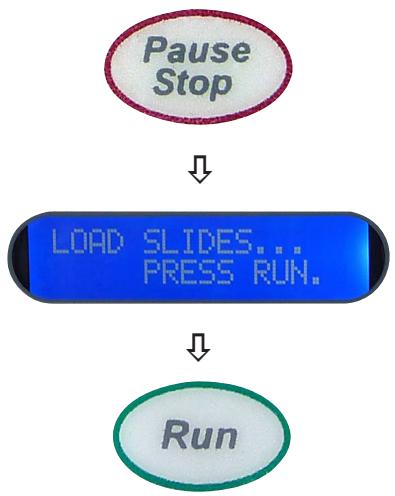
Press the PAUSE/STOP key once.
- Wait until the system prompts you to load the slides and press the RUN key.
- Place the new slide carriers in the system.
- Press the RUN key once.
- Remove ALL the slides from the exit tank.
6.1 Cleaning the Instrument

Prior to cleaning the instrument, always switch off power supply and unplug the power cord!
When using cleaners, comply with the safety instructions from the manufacturer and the labor-safety regulations at your laboratory.
Dispose of spent reagents in accordance with the laboratory guidelines in force in your country!
Wipe off spilled solvents (reagents) without delay! The Hood surfaces only have moderate resistance in the event of prolonged contact with solvents!
The painted surfaces and the control panel of the instrument are not resistant to xylene or acetone!
Do not use any of the following for cleaning the outside surfaces of the instrument: alcohol, detergents containing alcohol (window cleaner!), abrasive cleaning powders, solvents containing acetone or xylene!
No liquid must be allowed to come into contact with the electrical connections or get inside the instrument!
Instrument interior
Remove the reagent and rinsing water containers. To clean the stainless steel inner walls, use a normal detergent and then rinse thoroughly with water.
Lift bar
Wipe the surfaces of the lift bar with a damp cloth.
Instrument exterior
The outer surfaces can be cleaned with a mild detergent and wiped off afterwards with a damp cloth.
Do not use any solvents for cleaning the outer surfaces and the Hood!
Slide carrier
Clean with domestic or laboratory cleaning agents as necessary.
Drain
The drain hose must periodically be checked for contamination, particularly by algae, and bacteriasl cleaned as necessary.
In order to prevent by algae and bacterial contamination, the drainage system can be flushed with a 5% solution of sodium hypochlorite. However, metal parts must not remain in contact with this solution for prolonged periods (e.g., overnight). Flush thoroughly with water afterwards.
Cleaning the Instrument (continued)
Reagent container and rinsing water container
The reagent and rinsing water containers must be cleaned regularly in order to achieve consistently good staining results.
They can also be cleaned in the dishwasher at a max. temperature of +65°C. Any standard cleaning agent for laboratory dishwashers may be used.

Caution!
The stations must not be exposed to elevated temperatures (e.g., in industrial dishwashers, which operate at a temperature of +85°C), because the heat can deform the stations!
6.2 Maintenance Instructions

Only authorized and qualified Leica service personnel may repair the instrument and access the instrument's internal components.
For your safety, never attempt to repair the instrument yourself.
Unauthorized repairs will render any claims under the warranty null and void.
See also the section on "Warranty" in Chap. 8 on this matter.
The instrument is basically maintenance-free.
To ensure trouble-free operation of the instrument over a long period of time, the following is recommended:
- Have the instrument checked at least 1 x year by a qualified service technician authorized by Leica.
- At the end of the warranty period, enter into a service contract. For more information, please contact your local Leica technical service center.

In the following table there is a list of the most common problems which can arise while working with the instrument, along with possible causes and troubleshooting procedures.
If faults occur that cannot be corrected with the recommended procedures, or if they occur again, Leica Service Support must be informed immediately.
7.1 General
The Leica ST4020 is equipped with a simple fault detection system, and can identify certain movement errors automatically.
- If an operation error is detected, the transfer mechanism will first stop moving.
- It will then back up a short distance, stop again, and then move forward in a second attempt to reach the desired position.
- If this error recovery attempt is successful, processing continues normally.
7.2 Alarms
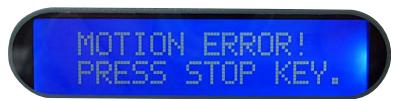
- However, if the second attempt to reach the position for advancing the slide carriers is also unsuccessful, the system emits a continuous audible alarm.
- The message shown here also appears in the display.
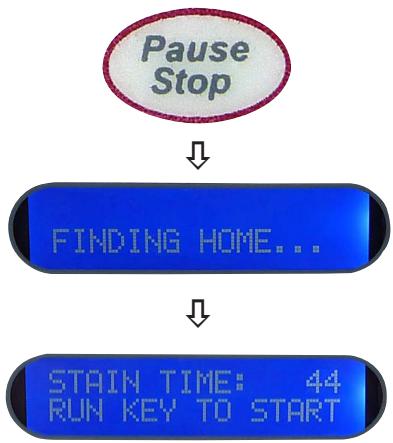
flowchart
graph TD
    A["Pause Stop"] --> B["FINDING HOME..."]
    B --> C["STAIN TIME: 44 RUN KEY TO START"]
- As soon as the PAUSE/STOP key is pressed, the system returns to the start position, reinitializes, and switches to idle mode.
- In this event, any staining run currently in progress is terminated and must be restarted.
7.3 Fault Detection and Correction List
| Issue | Possible cause | Corrective action |
| The instrument cannot be started up | The power supply cord is not plugged into wall outlet properly.The power supply cord is not plugged into the stainer properly.The power supply in the instrument is faulty. | Check the cable connections at both ends, replace the power supply cord if necessary.Inform Technical Service. |
| Display appears blue, but no text is visible. | The contrast may have to be adjusted again.The control board in the instrument is faulty. | Adjust the contrast as described in Chapter 5.3.Inform Technical Service. |
| Unit powers up, but the transfer mechanism does not initialize. | The main mechanism is jammed.The motor seems to turn, but the Lift bar does not move because a belt is worn or broken, or a set screw on the motor has come loose. | Check for visible external obstruction and remove as necessary. |
| The motor does not turn. | Motor or control board faulty. | Inform Technical Service. |
7. Troubleshooting
| Issue | Possible cause | Corrective action |
| Keypad does not respond to key presses | The keypad or the control board is faulty. | Inform Technical Service. |
| Water does not flow. | Water hose is not connected.Tap is not open.The valve in the instrument is faulty (does not open) or the control board is faulty. | Connect the water hose to the stainer and the tap.Turn on the tap.Inform Technical Service. |
| Water overflows at the rinse stations. | Tap is open too far.The drain hose is clogged.The drain hose is routed incorrectly, gradient insufficient. | Adjust the flow rate for the rinsing water at the tap as described in Chap. 5.4.The drain hose must not be kinked.Check the drain hose for objects that might block it.Place the drain hose so that water does not have to rise above the level of the drain fitting. |
7.4 Power Failure
- Check whether there is a general power failure (no power).
- Check whether the power cord is inserted correctly into the power socket and whether the power socket is switched on, if applicable.
- Check whether the power cable is plugged into the socket on the instrument properly.
- Check whether the power switch is switched on correctly.
- Some instrument malfunctions / failures are caused by defective fuses.
Check whether one or both secondary fuse(s) is/are faulty.

Before replacing a fuse, always switch the instrument off and unplug from power supply. Defective fuses may be replaced only with the replacement fuses supplied together with the instrument.
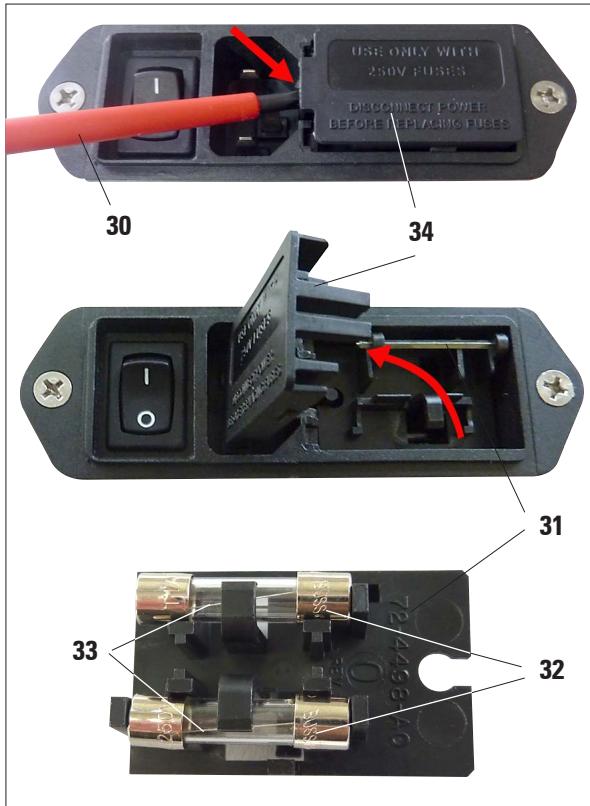
Fig. 33
To replace a fuse, proceed as follows:
- With a screwdriver (30), carefully push out the Hood (34) of the fuse insert (31) at rear of instrument and and open it upwards. (Fig. 33).
- Remove the fuse insert (31) – it contains two fuses (32) on its rear.
- Check that the thin wire (33) in the glass capillary of a fuse is intact. If not, the fuse must be replaced.

Before plugging the power cable back in and switching on the instrument, you must have identified and corrected the cause of the faulty fuse.
- Insert the fuse insert with the two fuses and start up the instrument again.
8.1 Ordering information
Reagent Containers (6 in a pack) 14 0509 46437
Reagent Containers (48 in a pack) 14 0509 46439
Slide Carriers (4 in a pack) 14 0509 46438
Slide Carriers (48 in a pack) 14 0509 46440
Rinse Station (1 container, 1 rinse nozzle, 1 fitting, 1 tubing).... 14 0509 46441
Rinse Tubing (24" long; ∅ 1/8") 14 0509 46457
Tubing and Fitting Kit (48" rinse vessel tubing - ∅ 1/8", 2 Y fittings, 3 in-line fittings, 2 plugs, 10 tie wraps).... 14 0509 46459
Water Inlet Hose Assembly (with fitting, in-line filter, and 4 hose clamps,
2 brass fittings, 5' long, ∅ 1/4" reinforced tubing) 14 0509 46443
Water Inlet Hose Assembly (with fitting, 2 hose clamps, 5' long, ∅ 1/4" reinforced tubing, no in-line filter) 14 0509 46532
Adapter kit for Water Inlet Hose Connection to Faucets (including one with 34 " NPT male thread) 14 0509 46444
Drain Hose (5' long, ∅ 5/8"), 1/8" tie wrap 14 0509 46445
Exit Tank 14 0509 46450
Support Bracket.... 14 0509 46570
Stabilizer Bar 14 0509 46451
Reagent Container Cover (metal) 14 0509 46442
Optional Plexiglas Hood 14 0509 46478
North American Power Cord 14 0509 46479
European Power Cord 14 0509 46480
British Power Cord 14 0509 46481
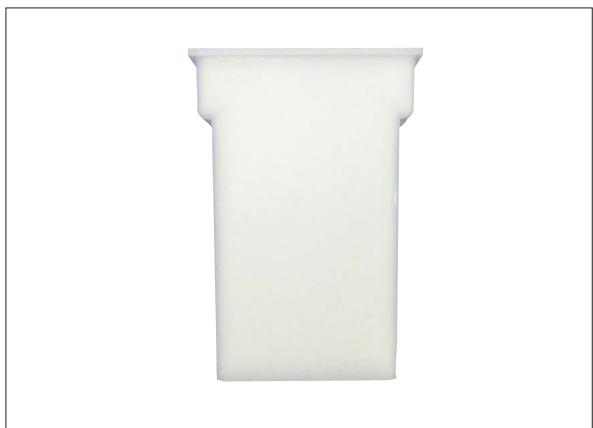
natural_image
White plastic cylindrical object with a flared top and stepped base, isolated on white background (no text or symbols)Fig. 34
Reagent Containers
6 in a pack
Order-No. 14 0509 46437
48 in a pack
Order-No. 14 0509 46439
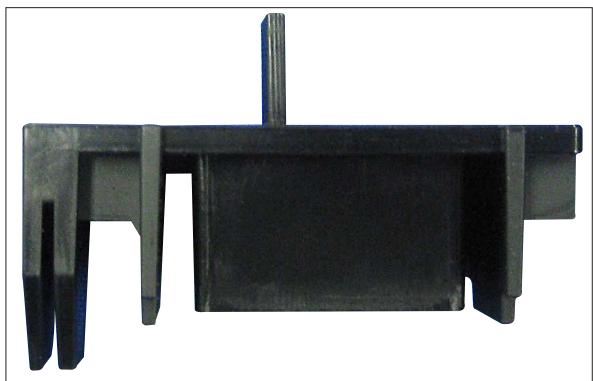
natural_image
Close-up of a black mechanical component with cutouts and a central shaft (no text or symbols visible)Fig. 35
Slide Carriers
4 in a pack
Order-No. 14 0509 46438
48 in a pack
Order-No. 14 0509 46440
natural_image
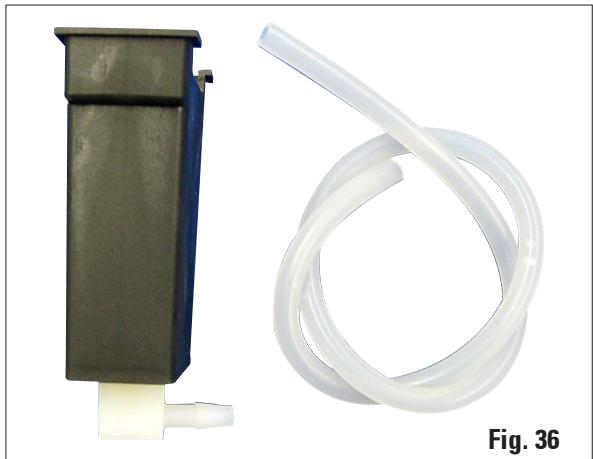
Two medical or laboratory equipment components: a black device with a tube and a transparent tubing, labeled Fig. 36 (no text or symbols on the devices themselves)Rinse Station
1 container, 1 rinse nozzle, 1 fitting, 1 tubing
Order-No. 14 0509 46441
natural_image
Close-up of a translucent, coiled plastic or gel-like structure with no visible text or symbols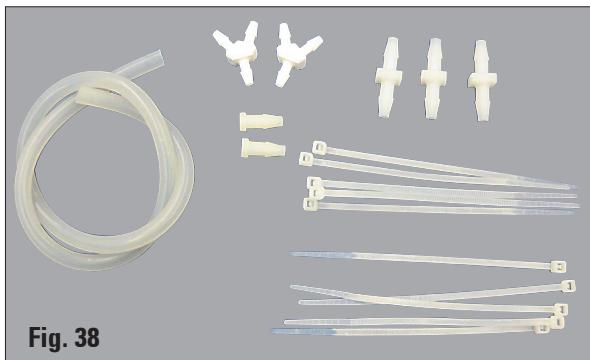
natural_image
Product display showing various plastic tube designs and connectors, labeled Fig. 38 (no text or symbols on the devices themselves)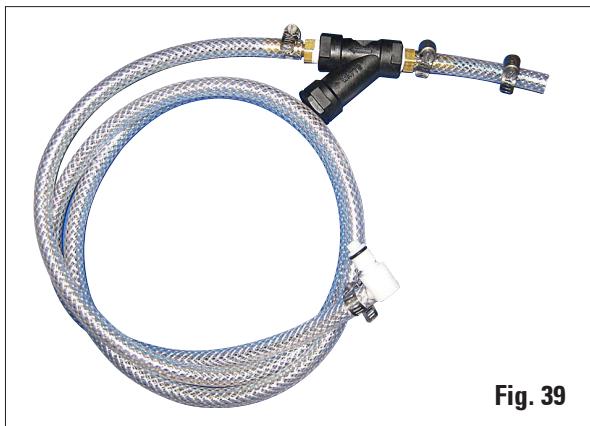
natural_image
Coiled blue and white plastic hose with black connectors, labeled Fig. 39 (no text or symbols on the main subject)Rinse Tubing
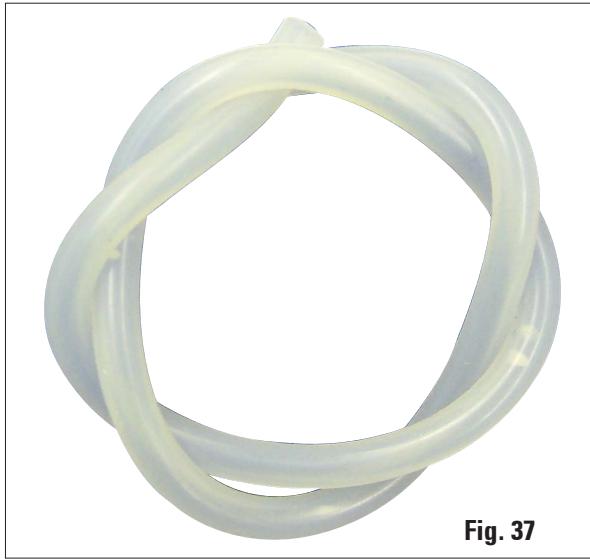
24" long; ∅ 1/8"
Order-No. 14 0509 46457
Tubing and Fitting Kit
48" rinse vessel tubing - ∅ 1/8", 2 Y fittings, 3 in-line fittings, 2 plugs, 10 tie wraps
Order-No. 14 0509 46459
Water Inlet Hose Assembly
with fitting, in-line filter, and 4 hose clamps, 2 brass fittings, 5' long, ∅ 1/4" reinforced tubing
Order-No. 14 0509 46443
natural_image
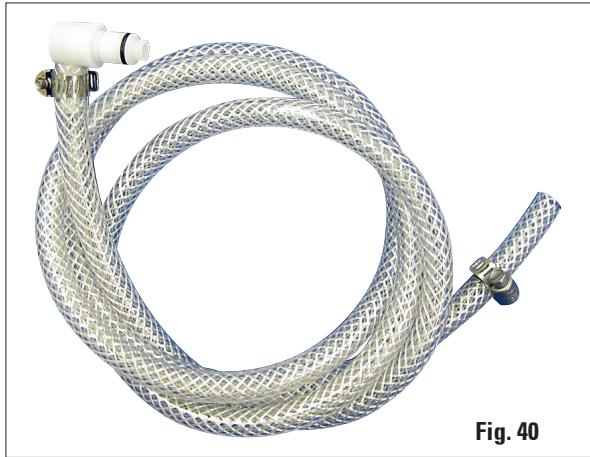
Coiled blue and white hose with mesh pattern, labeled Fig. 40 (no text or symbols on the hose itself)Water Inlet Hose Assembly
with fitting, 2 hose clamps, 5' long, ∅ 1/4" reinforced tubing, no in-line filter
Order-No. 14 0509 46532
natural_image
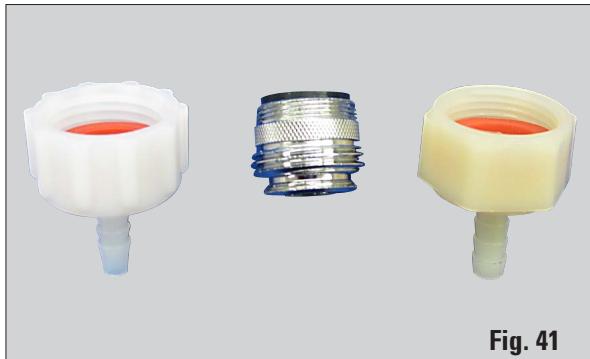
Three plastic connectors with different color and texture designs, labeled Fig. 41 (no text or symbols on the connectors themselves)Adapter kit for Water Inlet Hose Connection to Faucets
including one with 3/4" NPT male thread
Order-No. 14 0509 46444
natural_image
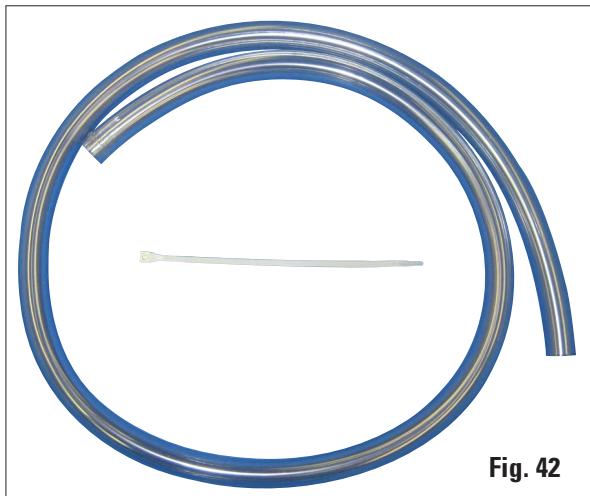
Coiled blue plastic tube with a white cable, labeled Fig. 42 (no text or symbols on the tube itself)Drain Hose
5' long, ∅ 5/8"), 1/8" tie wrap
Order-No. 14 0509 46445
8. Optional accessories
natural_image
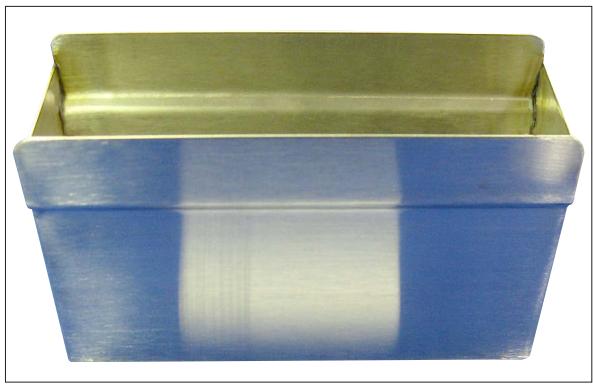
Two rectangular containers with blue and gold stripes, no text or symbols visibleFig. 43
Exit Tank
Order-No. 14 0509 46450
natural_image
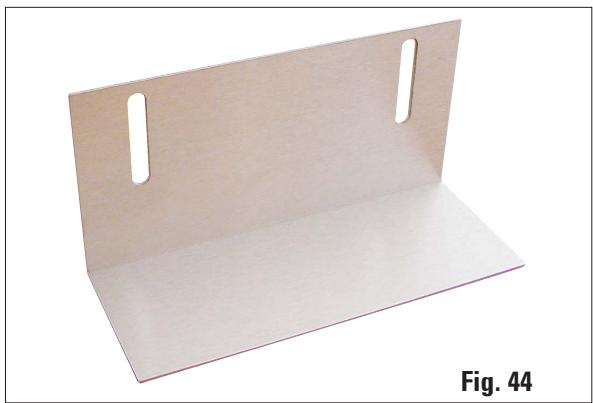
Wooden rectangular panel with two side slots, labeled Fig. 44 (no text or symbols on the panel itself)Support Bracket
Order-No. 14 0509 46570
natural_image
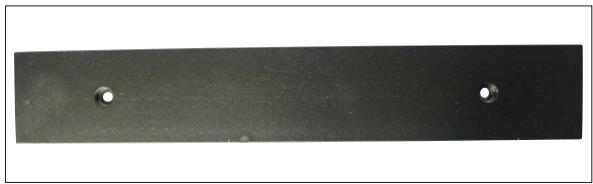
Metal plate with two circular holes, no text or symbols visibleFig. 45
Stabilizer Bar
Order-No. 14 0509 46451
natural_image
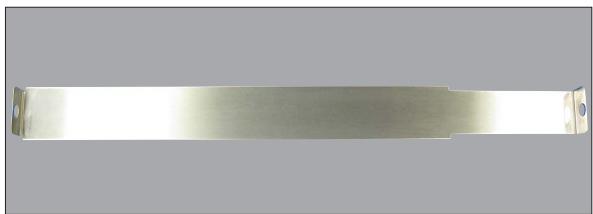
Metallic rectangular object with a flat top and small circular end, isolated on gray background (no text or symbols)Fig. 46
Reagent Container Cover, metal
Order-No. 14 0509 46442
natural_image
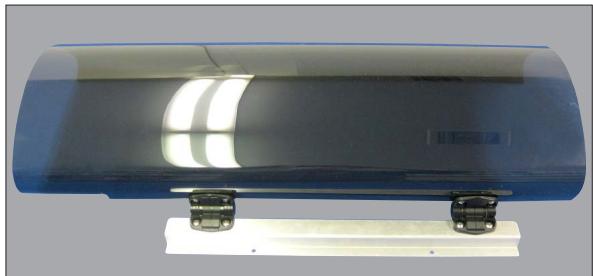
Blue cylindrical device with metallic connectors and a white base, no visible text or symbolsFig. 47
Optional Plexiglas Hood
Order-No. 14 0509 46478
natural_image
Coiled black electrical plug with terminal connector (no visible text or symbols)Fig. 48
North American Power Cord
Order-No. 14 0509 46479
natural_image
Coiled metal wire with a terminal plug, labeled Fig. 49 (no text or symbols on the cable itself)European Power Cord
Order-No. 14 0509 46480
natural_image
Coiled black electrical plug with metal fittings, no visible text or symbolsFig. 50
British Power Cord
Order-No. 14 0509 46481
natural_image
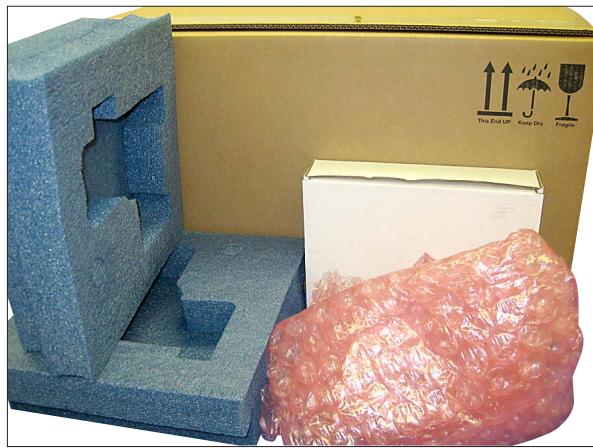
Product display of a cardboard box with foam blocks and a wrapped pink material, no visible text or symbols on the main components.Fig. 51

Fig. 52
Packaging,
with foam, outer carton, bubble wrap, and accessory box) with packaging instructions
Order-No. 14 0509 46455
Outer Carton Only
Order-No. 14 0509 46456
Warranty
Leica Biosystems Nussloch GmbH guarantees that the contractual product delivered has been subjected to a comprehensive quality control procedure based on the Leica in-house testing standards, and that the product is faultless and complies with all technical specifications and/or agreed characteristics warranted.
The scope of the warranty is based on the content of the concluded agreement. The warranty terms of your Leica sales organization or the organization from which you have purchased the contractual product shall apply exclusively.
Service information
If you are in need of technical customer service or spare parts, please contact your Leica representative or the Leica dealer where you purchased the unit.
Please provide the following information:
- Model name and serial number of the instrument.
- Location of the instrument and name of the person to contact.
- Reason for the service call.
- Delivery date
Decommissioning and disposal
The unit or parts of the unit must be disposed of according to existing local applicable regulations.
- Leica ST4020
- Small Linear Stainer
- Operating Manual
- Cleaning and Maintenance 38
- Troubleshooting 40
- Optional accessories .... 44
- Warranty and service 51
- Symbols in the text and their meanings
- Intended use
- Any other use of the instrument is considered improper!
- Qualification of personnel
- Type
- Safety notes
- Warnings
- Hazards – working with the instrument
- Hazards – cleaning and maintenance
- Instrument Components and Specifications
- Overview – Instrument Parts
- Instrument specifications
- Functional Description of Components - System overview
- Keypad (14) with Display (13)
- Slide carrier (1) and lift Bar (2)
- Reagent container (4) and Rinsing Water Container (6)
- Functional Description of Components (continued)
- Exit Tank (7)
- Platform (8)
- Waste Water Drain Hose (9)
- Rinsing Water Supply (10)
- Main Switch and (11) Connection to Power Supply (12)
- Functional Areas of the Slide Carrier
- Standard Delivery
- Technical Data
- Location Conditions
- Unpacking the Instrument
- Unpacking the Instrument (continued)
- Setup
- Horizontal Alignment
- Mounting the Support Bracket
- Water Connection
- Installing the Rinsing Water Containers
- Installing the Rinsing Water Containers (continued)
- Remedy if Hose is too short
- Switching on the Instrument
- Control Panel Functions
- Control Panel Functions (continued)
- Setting the Operating Parameters
- Processing time
- Display Contrast
- Transfer Mechanism Calibration
- Number of Dips
- Start position
- Run Forever
- Setting the Rinsing Water Flow Rate
- Processing Slides
- Important!
- Starting a staining run
- Adding more slide carriers during a staining run
- LOAD SLIDES...
- PRESS RUN
- Temporarily pausing a staining run
- Ending a staining run prematurely
- Removing Processed Slides
- Removing Processed Slides (continued)
- Cleaning the Instrument
- Instrument interior
- Lift bar
- Instrument exterior
- Slide carrier
- Drain
- Cleaning the Instrument (continued)
- Reagent container and rinsing water container
- Caution!
- Maintenance Instructions
- General
- Alarms
- Fault Detection and Correction List
- Troubleshooting
- Power Failure
- Ordering information
- Reagent Containers
- Slide Carriers
- Rinse Station
- Rinse Tubing
- Tubing and Fitting Kit
- Water Inlet Hose Assembly
- Adapter kit for Water Inlet Hose Connection to Faucets
- Drain Hose
- Optional accessories
- Packaging,
- Warranty
- Service information
- Decommissioning and disposal
Brand : LEICA
Model : ST 4020
Category : Microscope