
TL RC - Mirrorless camera LEICA - Free user manual and instructions
Find the device manual for free TL RC LEICA in PDF.


| Product Type | Transmitted light base for Leica M series stereomicroscopes |
| Brand | LEICA |
| Model | TL RC |
| Dimensions (L x H x D) | 340 x 390 x 95 mm |
| Weight | 6.0 kg |
| Power Supply | External cold light source with light guide (fiber f=10 mm, pipe f=13 mm) |
| Illuminated Area | 35 mm |
| Lighting Types | Brightfield, darkfield, oblique light, relief contrast (RC) |
| Deflection Mirror | Integrated, rotatable and sliding, flat and concave sides |
| Filter Holder | Up to 3 filters (accessories) |
| Standard Stage | Glass, 220 x 170 x 4 mm, included |
| Ambient Temperature | 10 to 40 °C |
| Maintenance and Cleaning | Protect from moisture, vapors, and corrosive substances; clean with a soft cloth; do not lubricate sliding surfaces |
| Safety | Disconnect before maintenance; avoid contact with hot bulbs; use only original Leica parts |
| Spare Parts and Repairability | Repairs reserved for authorized Leica personnel; spare parts available from Leica Microsystems |
| General Information | Conforms to CE declaration; disposal according to local regulations |
| Optional Accessories | IsoPro™ stage, sliding stage, polarization stage, Leica MATS temperature control system, Leica USB mouse, etc. |
Frequently Asked Questions - TL RC LEICA
User questions about TL RC LEICA
0 question about this device. Answer the ones you know or ask your own.
Ask a new question about this device
Download the instructions for your Mirrorless camera in PDF format for free! Find your manual TL RC - LEICA and take your electronic device back in hand. On this page are published all the documents necessary for the use of your device. TL RC by LEICA.
USER MANUAL TL RC LEICA
Safety regulations 6
Controls 8
Assembly 10
Operation
Relief contrast 12
Path-folding mirror 12
IsoProTM cross stage 12
Light intensity and color temperature 12
USB mouse 13
Methods with transmitted light 14
Relief display 14
Filter 16
Lamp replacement 16
Care, maintenance 17
Expansion diagram 18
Scope of delivery 19
Dimensioned drawing 20
Technical data 22
Dear User
Thank you very much for your trust in Leica Microsystems. We hope your work with our high-quality, efficient products is both enjoyable and successful.
In developing our instruments, we have placed great weight on simple, self-explanatory operation. However, take your time to read the user manual, in order to familiarize yourself with the optimal use of all the benefits and options of your stereo microscope. Should you have any questions, please consult your local Leica representative. You will find the address of the closest local representative as well as valuable information about products and services from Leica Microsystems on our homepage at www.leica-microsystems.com
We are gladly at your service. CUSTOMER SERVICE is a big thing with us. Not only before the sale, but afterwards as well.
Leica Microsystems (Switzerland) Ltd.
Stereo & Macroscope Systems
www.stereomicroscopy.com
The user manual
This user manual is available in 20 additional languages on our interactive CD-ROM.
User manuals and updates are also available for download on our homepage at www.stereomicroscopy.com.
The user manual at hand describes the safety instructions, assembly, and handling of the TL RCTM and TL RCITM transmitted-light bases.
Safety concept
1.1 The user manual
The TL RCTM /TL RCI transmitted-light bases come with an interactive CD-ROM containing all relevant manuals in 20 additional languages. Keep this CD-ROM in a safe place, where it is available to the user. User manuals and updates are also available for download and print-out on our homepage at www.stereomicroscopy.com.
The TL RCTM and TL RCITM transmitted-light bases are a module of the Leica M stereo microscope series. This user manual describes the special functions of the transmitted-light base and contains important instructions for operating safety, maintenance and the accessory parts.
The M2-105-0 user manual for the Leica M stereo microscopes contains additional safety rules for the stereo microscope, accessories and electrical accessories, as well as instructions for maintenance.
You can combine the transmitted-light base TL RCTM with any cold light source and a glass fiber light guide (active f = 10mm tail tube f = 13mm ). Please read the user manual and the safety requirements of the supplier.
Before assembly, start up and use, please read the user manuals cited above. In particular, please observe all safety instructions.
To maintain the unit in its original condition and to ensure safe operation, the user must follow the instructions and warnings contained in these user manuals.
1.1.1 Symbols used

Warning of danger
This symbol indicates information, which must be read and obeyed. Disregarding these instructions
- can cause hazards to personnel!
- can lead to functional disturbances and damaged instruments.

Warning of dangerous electrical voltage
This symbol indicates especially important information, which must be read and obeyed Disregarding these instructions can lead to
- can cause hazards to personnel!
- can lead to functional disturbances and damaged instruments.

Warning - hot surface
This symbol warns you of tangible, hot points, such as light bulbs.

Important information
This symbol indicates additional information or explanations that intend to provide clarity.
Action
This symbol within the text indicates that certain operations must be carried out.
Explanatory notes
- This symbol indicates additional notes and explanations provided in the text.
Figures
(1.5) Numbers in brackets within the descriptions relate to the figures and the items within those figures. Example (1.3): Figure 1 is located, for example, on Page 8 and item 3 is the filter carrier.
1.2 Safety regulations
Description
The transmitted-light bases TL RCTM and TL RCITM fulfill the highest requirements for observation and documentation of Leica stereo microscopes of the M series. It contains a path-folding mirror, a device for partial pupil illumination and relief contrast generation, a ground-glass screen, an additional condenser and Fresnel lenses. The complete stand consists of:
- Transmitted-light base TL RCTM or TL RCITM
- Stand 300mm or 500mm long with focusing drive, manual coarse/fine or motorized focus
Glass stage plate, clear, 220 × 170 × 4mm
Light source and light guide according to requirements
Accessories:
Gliding stage
Leica MATS Thermocontrol System with heating stage
- Polarization set and many more (see Expansion diagram)
Intended uses
TL RCTM and TL RCI™ transmitted-light bases are used in the assembly of Leica M series stereoscopios via tripod column and microscope carrier. They can be combined with any cold light source and light guide and allows you to observe transparent specimen with relief contrast and direct transmitted light. The TL RCI™ transmitted-light base possesses an integrated halogen lamp that particularly supports control by Leica Application Suite (LAS) software.
Prohibited uses
If you use the transmitted-light base TL RCTM/TL RCITM, its components, and the accessories in a way other than that described in the user manual, harm may be caused to people or objects.
Never:
- Change, rebuild or take apart parts, if not specifically instructed to in this manual.
- Let non-authorized persons open parts of the instrument.
Use the transmitted-light base TL RCTM/TL RCI for investigations and operations on the human eye.
The units or accessory components described in the user manual have been checked for safety and possible dangers. Always consult the responsible Leica office or the main plant in Wetzlar at any time there is a need to adjust the unit or it is combined with non Leica components which go beyond the scope of this manual.
Unauthorized adjustment of the unit or improper use renders the warranty null and void.
Place of use
Only use the transmitted-light base TL RCTM/TL RCITM in closed, dust free rooms and between +10^ and +40^ . Make sure that the rooms are free of oil vapors or other chemical vapors and extreme humidity.
- Set up the electrical components at least 10cm from walls and combustible objects.
- Avoid large temperature fluctuations, direct sunlight and vibrations. This can cause faulty measurements or microphotographs.
In warm, or warm and humid climatic zones, the transmitted-light base TL RCTM/TL RCITM requires particular care to prevent formation of fungus.
Responsibilities of person in charge of the instrument
Ensure that
The transmitted-light base TL RC^TM / TL RCI^TM and the accessories are only operated, maintained and repaired by authorized and trained personnel.
- Personnel who use the instrument have read and understood this user manual and in particular the safety instructions and obey them.
Repairs, servicing work
- Repairs may only be carried out by servicing engineers trained by Leica Microsystems or your own authorized technical personnel.
Only original Leica Microsystems parts may be used. - Before opening the devices, turn off power and unplug mains cables.

If you touch the electric circuit of the. ment, you may receive an electric shock.
Transport
- Use the original packaging for shipping or transporting the transmitted-light base TL RCTM/TL RCI™ and the accessory components.
- To prevent damage through vibrations, remove and pack specially all the moving components which you installed yourself, in accordance with the user manual.
Integration in third-party products
The following must be observed if Leica products are built into third-party products: The manufacturer of the complete system or the person putting it on the market is responsible for adhering to applicable safety regulations, laws and guidelines.
Disposal
The products described here must be disposed off in accordance with applicable local laws and regulations.
Legal requirements
Adhere to general and local regulations relating to accident prevention and environmental protection.
EU declaration of conformity
The transmitted-light base TL RCTM/TL RCI and the accessories have been constructed according to the state of the art and issued with an EU declaration of conformity.
Controls
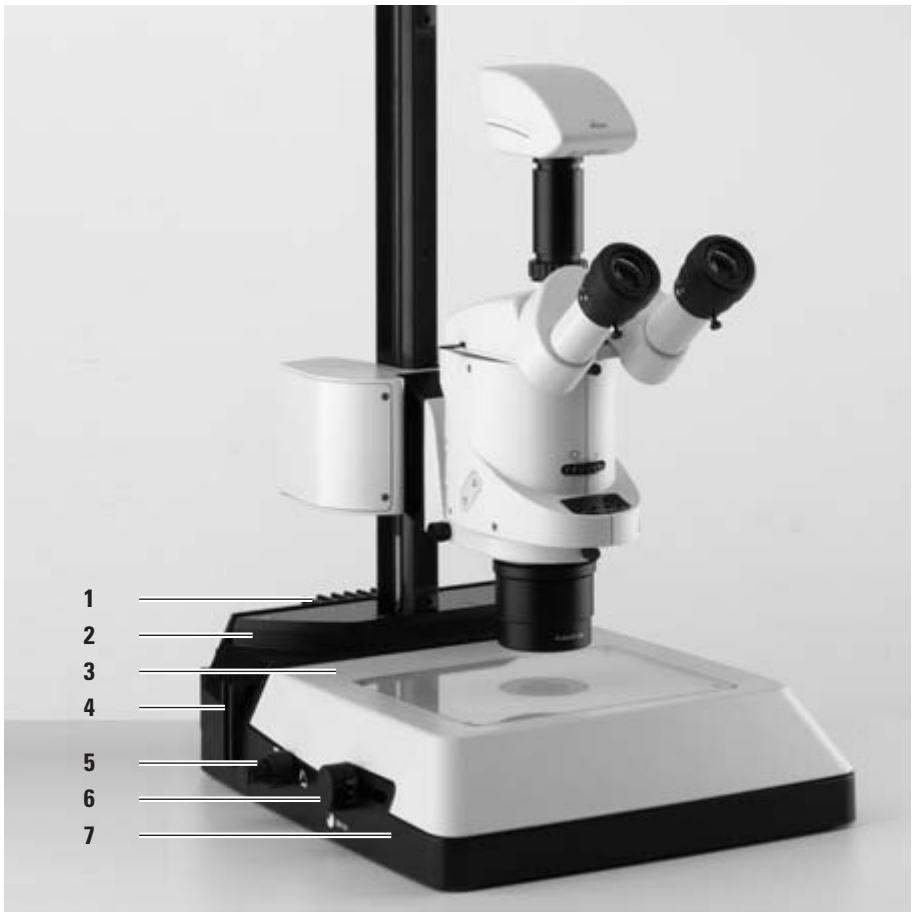
Fig. 1
1 Cooling element of integrated halogen illumination (TL RCI™ only)
2 Adapter plate for easy assembly of focusing drives
3 Standard stage 10 447 269
4 Filter bracket for up to three filters
5 Control button for the upper and lower Rottermann-ContrastsTM flap
6 Button to rotate and side-to-side movement of mirror
7 TL RCI™ transmitted-light base
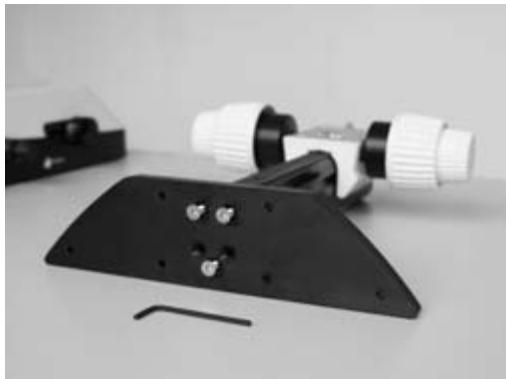
Fig. 2 Adapter plate vertical pole - transmitted-light base
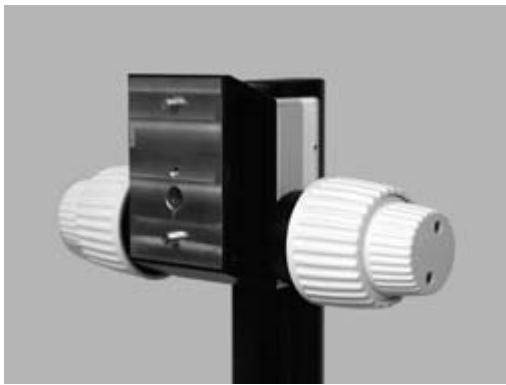
Fig. 3 Adapter between focusing drive and microscope carrier
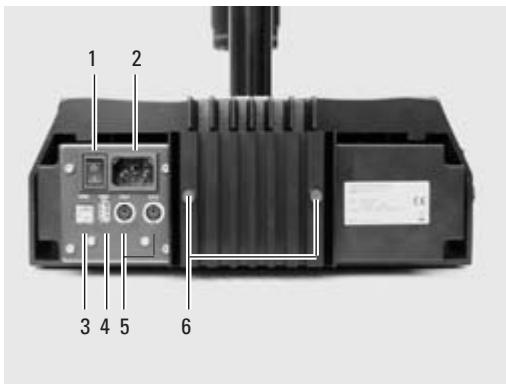
Fig. 4 Back side of transmitted-light base TL RCI™
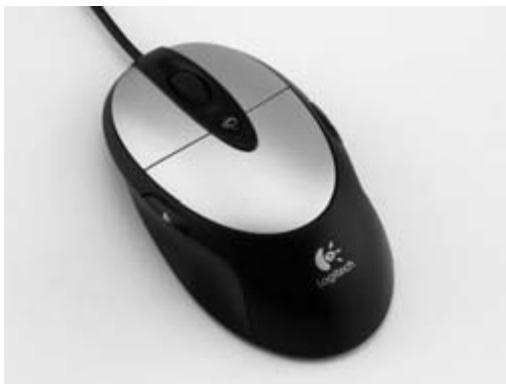
Fig. 5 USB mouse for TL RCI™ control
1 Power switch
2 Power socket
3 USB socket Type B
4 USB socket Type A
5 2× Can-Bus
6 Screws for halogen lamp replacement

Before unpacking, make sure no person can get injured by falling or tilting part.
3.1 Unpacking the base
The base is delivered with the adapter plate attached. The selected stage (IsoPro™ cross-stage or standard stage 10447269), and the focusing drive will have to be mounted later. Make sure the devices are unpacked on a flat, sufficiently dimensioned, and non-slip surface.
3.2 Stage assembly
The TL RCTM/ RCI™ transmitted-light base can be equipped with two different stages. The selected stage is mounted on the base before start-up. The two stages can be easily exchanged at any time.
The following paragraph assumes the base without the stage mounted. Disassembly is performed in reverse order of the following steps.
3.2.1 Standard stage
Take the glass plate from the rectangular gap in the standard stage.
Position the stage on the transmitted-light base in such way that the four holes align over those in the base.
Attach the stage to the base with the four supplied Allen screws.
Insert the glass plate back into the standard stage.
3.2.2 IsoProTM cross-stage
Before the IsoPro™ cross-stage is mounted to the base, the axis containing the control buttons is attached optionally on the left or the right side of the cross-stage.
If the controls shall be mounted on the left side, the gear rod on the bottom side of the cross-stage must be unscrewed and re-attached in reverse.
Take the glass plate from the cross-stage.
Turn the cross-stage around and place it onto a non-slip surface.
Change the gear rod (6.2) from the left to the right side.
Skip the next two steps to mount the controls.
Control assembly
Take the glass plate from the cross-stage.
Turn the cross-stage around and place it onto a non-slip surface.
Attach the axis with the control buttons (6.1) to the desired side. The fastener snaps into the cross-stage magnetically.
Attach the axis with the two supplied Allen screws.
Attach the cover rail to the cross-stage.
Cross-stage assembly
Place the cross-stage onto the base.
Pull the upper part of the cross-stage carefully toward the user, fixing the lower part onto the transmitted-light base.
Attach the cross-stage evenly to the three threaded holes.
Push the cross-stage all the way back to the fence in direction of the column.
Re-insert the glass plate back into the standard stage.
3.3 Focusing drive column
Unscrew the adapter plate (1.2) from the base using the supplied Allen key.
Attach your focusing drive column to the bottom with the three Allen screws (2).
Re-attach the adapter plate to its original position.
3.4 Intermediate adapter assembly
Mount the supplied adapter between the column and microscope carrier, to balance the enlarged distance between focusing drive and optical axis.
Attach the adapter (3) to the focusing drive for the pins to lock in recess.
Attach the adapter using the supplied Allen key.
3.5 Equipment assembly
After mounting the adapter to the focusing drive, the microscope carrier, optics carrier, and the entire equipment can be assembled as usual.
3.6 Connecting the cold light-source to the TL RC™ base
Push the appropriate end of the cold light guide into the base back-side.
For further information about the use of cold light sources refer to the instructions supplied separately.
3.7 Connecting the power cable (TL RCI™)
Make sure the power switch (4.1) on the base is turned to "0".
Insert the power cable into the mains socket (4.2), and then connect it to a grounded outlet.
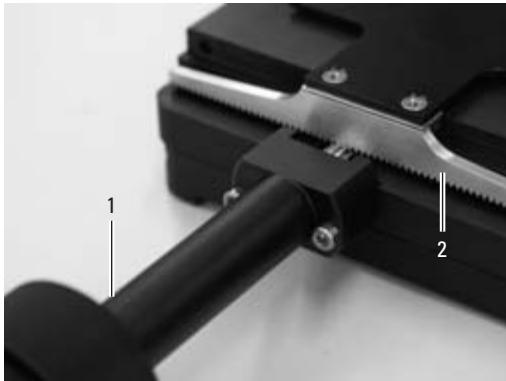
Fig 6 Rear side of the IsoProTM cross-stage
1 Axis with controls
2 Gear rod, mounted to cross-stage
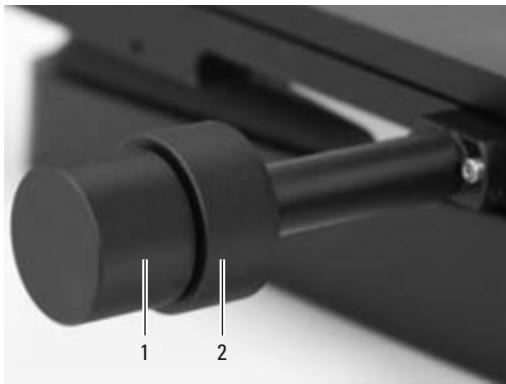
Fig. 7 Cross-stage controls
1 Control button for x-direction movement
2 Control button for y-direction movement
4.1 Switch for adjusting the relief contrast
Use the two switches (8.1 and 8.2) on the left side of the transmitted-light base TL RCTM/TL RCI to actuate the two integrated flaps. The outer switch (8.1) controls the inverted relief contrast. The inner switch (8.2) controls the positive relief contrast. Depending on the flap position, part of the opening of the integrated Fresnel lens is covered causing different contrast effects. Phase structures typically appear as spatial, relief images - like hills in a positive relief contrast and as recesses in inverted relief contrast.
The contrast can be increased without relief by adjusting the two diaphragms to 45^ . A slot shaped illuminated area appears. The slot can be moved over the entire field of view and quickly switched between positive and negative relief view by precise tilting of the path-folding mirror. The dynamic effect makes it simple to distinguish phase structures from amplitude structures.
Depending on the properties of the object (refractive index to environment) and your own sensitivity, it may occur that you need to operate the switches for the positive and inverted relief contrast in reverse. These switches are described below.
I.e. instead of the top switch (8.1), the bottom switch (8.2) controls the inverted relief contrast. Instead of the bottom switch (8.2), the top switch (8.1) controls the positive relief contrast.
4.2 Path-folding mirror
The built-in path-folding mirror features a flat and a concave side and can be rotated and moved. The concave side was specifically designed for the optical features of objectives with high
numeric aperture. Using the black rotary knob (8.1) on the left side of the transmitted light base you can turn and push the path-folding mirror back and forth.
The concave recess at the grip shows the concave side of the mirror and allows the intuitive operation without eye contact at anytime.
Depending on the angle and position of the mirror the angle of light incidence changes on the specimen level so that you can move between a transmitted light bright field, through oblique illumination to dark field like illumination.
The black rotary knob (8.1) on the left side of the transmitted-light base is used:
- To rotate the path-folding mirror from the flat to the concave side
- For slight tilting, to steer the light beam more steeply or flatly through the object level
- To shift the path-folding mirror (forward/backward)
4.3 Operating the cross-stage IsoPro™
To move the stage in X direction rotate the outer knob (7.1)
To move the stage in Y direction rotate the inner ring around the knob (7.2)
4.4 Light intensity and color temperature
4.4.1 Transmitted-light base TL RC™
Please observe the user manual and in particular the safety regulations of the manufacturers of the light guide and cold light source.
Turn on the cold light source according to the manufacturer's user manual and connect, activate, and adjust the light intensity.
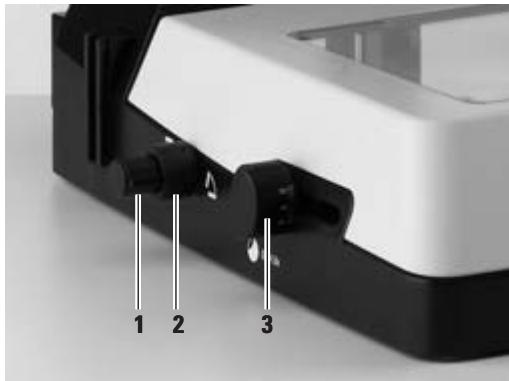
Fig. 8
1 Switch to control the inverted relief contrast
2 Switch to control the positive relief contrast
3 Path-folding mirror
4.4.2 TL RCI™ transmitted-light base
The TL RCI^TM transmitted-light base has two electronic potentiometers to control the dye intensity (9.1), and dye temperature (9.2) separately.
Adjust the dye intensity using the front potentiometer (9.1) to match your requirements.
With the rear potentiometer (9.2), set the dye temperature to match the color impression to your requirements.
The dye temperature control also serves as electronic shutter:
For process interruption, press the potentiometer (9.2).
To switch on the illumination, press the potentiometer again. The electronics return to the previously selected settings.
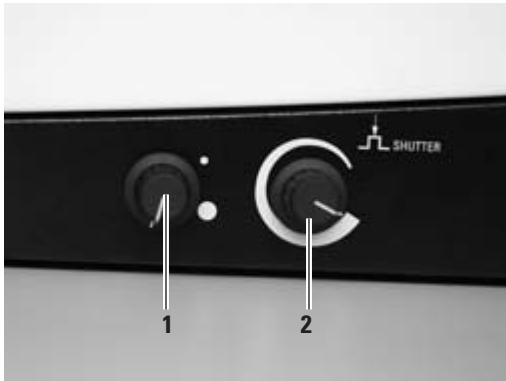
Fig. 8
1 Potentiometer Control of IsoCol™ illumination intensity
2 Potentiometer Control of dye temperature
4.5 Leica USB mouse (TL RCI™ only)
The Leica USB mouse controls the IsoColTM and the dimming function of the TL RCITM base.
Connect the mouse (5) to the appropriate USB port of the base (4.4).
- By default, the scroll wheel of the mouse is assigned to the IsoColTM control.
Scroll away from the user to increase the illumination intensity in IsoColTM mode.
Scroll towards the user to decrease the illumination intensity in IsoColTM mode.
Click the scroll wheel briefly to switch the illumination on or off.
To switch between the IsoColTM- and dimming mode and back, click on and hold the scroll wheel for more than 2 seconds.
- The intensity in the dimming mode changes analog to the IsoColTM mode.
4.6 Methods with transmitted light
4.6.1 Vertical bright field illumination
Suitable for colored amplitude preparations with sufficient contrast.
Both switches should be placed in horizontal position.
The flaps are open.
Using the black rotary knob (8.3) on the left-hand side of the transmitted-light base, shift the path-folding mirror towards the column until it hits the stop.
According to the aperture of the used objective rotate either the plane or concave side of the path-folding mirror toward the top.
Turn the path-folding mirror to the notch position at 45^ .
The light beams are steered vertically through the object. The outcome of this is an exact bright field with maximum brightness.
4.6.2 Inclined transmitted light
Suitable for semitransparent, opaque objects such as foraminiferes and fish eggs.
Both switches should be placed in horizontal position.
The flaps are open.
Turn the path-folding mirror (8.3) so that the light beams fall through the object diagonally.
Shift the path-folding mirror until the required information is visible.
4..3 Asymmetrical dark-field illumination
Both switches should be placed in horizontal position.
- The flaps are open.
Rotate the path-folding mirror (8.3) so that the light beams pass flatly through the object.
The flatter the light rays are deflected into the objects the darker the background appears.
A transmitted light similar to a dark field is created. Contours, fine edges and structures are brightly emphasized by diffraction of the light on the dark background.
4.6 Relief display
Starting position
Using the black rotary knob (8.3) on the right-hand side of the transmitted-light base, shift the path-folding mirror towards the column until it hits the stop.
Turn the path-folding mirror to the notch position at 45^ .
4.6.1 Positive relief contrast
Both switches should be placed in horizontal position.
- The flaps are open.
Rotate the inner switch (8.2) close to the upright position.
- The bottom flap is closed. There is positive relief contrast. The phase structures act like hills.
Intensify or weaken the effect by tilting the path-folding mirror.
4.6.2 Negative relief contrast
Rotate the inner switch (8.2) close to the horizontal position.
- The bottom flap is open.
Rotate the upper switch (8.1) close to the upright position.
- The top flap is closed. There is negative relief contrast. Phase structures appear as recesses.
Intensify or weaken the effect by tilting the path-folding mirror (8.3).
4.6.3 Dynamic relief contrast
Place both switches in about a 45^ degree position.
- The flaps are set to 45^ . A slot shaped illuminated area appears. The slot can be moved over the entire field of view and can be quickly switched between positive and negative relief view by precise tilting of the path-folding mirror (8.3). The dynamic effect makes it simple to distinguish phase structures from amplitude structures.
4.6.4 Limitations
The relief methods give good results from medium zoom up to a high level of magnification and with the 1 × , 1.6 × and 2 × objectives. In the bottom half of the zoom scale and with weaker objects, it may occur that the object field is not homogeneously lit. We recommend using the transmitted-light base with objectives of 1 × and higher and not with objectives with long focal distances.
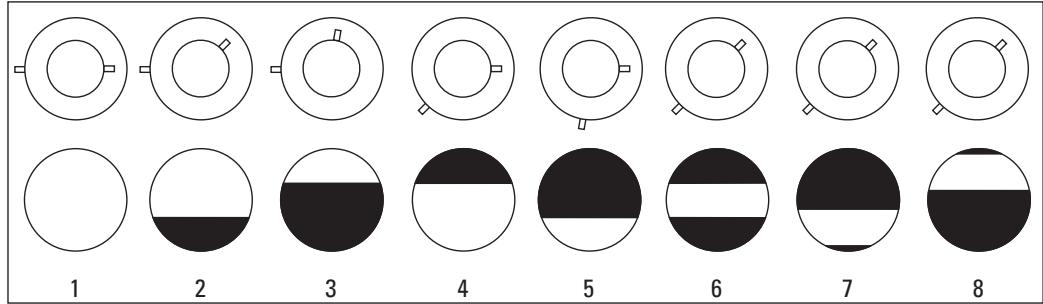
Fig. 10 Switch positions to control the transmitted light
1 Switch position with transmitted light: Both flaps are open
2 Switch position with positive relief contrast, medium
3 Switch position with positive relief contrast, strong
4 Switch position with inverted relief contrast, medium
5 Switch position with inverted relief contrast, strong
6 Switch position with increased contrast without relief contrast
7 Switch position with increased contrast without relief contrast, path-folding mirror tilted
8 Switch position with increased contrast without relief contrast, path-folding mirror tilted
4.7 Filter
TL RCTM and TL RCI transmitted-light bases can be equipped with up to three filters simultaneously, that are available as accessory (see Expansion Diagram page 18/19). The individual filters are also available to customers upon special request.
Turn off the light source or press (TL RCI™) the switch for the shutter (9.2).
Retrieve the empty filter from an available filter location at the filter holder.
Insert the desired filter.
Activate the light source again.
4.8 Changing the halogen lamp (TL RCI™)

It is absolutely necessary that you unplug
the power cord form the base before changing the lamp in order to prevent possible electrical shock!

The halogen lamp is getting very hot during
operation. Keep the base turned off for about 10 minutes to allow for cooling and in order to prevent burns!
Loosen the two bolts at the cooling element (11.1).
Carefully pull out the entire cooling element, including the lamp.
Remove the lamp holder (11.2) by pulling it from the guide rail.
Carefully pull off the lamp including its socket from the holder.
Remove the lamp (11.3) out of the socket.

Never touch the new halogen lamp with
bare fingers since this will significantly reduce the life expectancy of the lamp!
Push the new lamp into the socket.
Perform all above identified steps in reverse order.
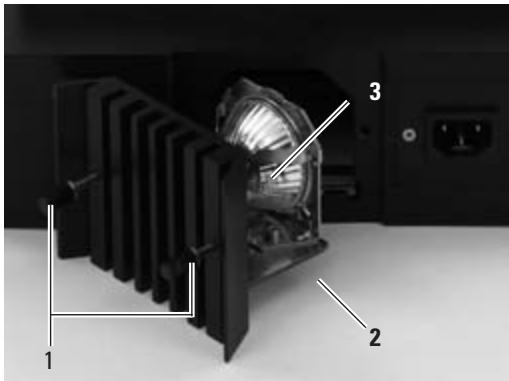
Fig. 11 TL RCI™ transmitted-light base open lamp housing
1 Screws for loosening the cooling fins
2 Lamp holder
3 Halogen lamp 12V/20W
Care, maintenance
In this chapter
we would like to explain and help you understand the careful handling of your valuable instrument, and provide you with some tips for proper maintenance and cleaning.
We guarantee the quality
You are using a precision instrument with many performance features.
As appropriate for such instruments we guarantee the quality of our products. This guarantee covers all manufacturing and material defects of the original equipment, but not any damages that are the result of inappropriate use or negligence.
Please handle your valuable optical instrument with appropriate care. If you do so you will be able to enjoy many decades of accurate service by this equipment without any deterioration. This is the reputation of our equipment.
Should your equipment, however, no longer provide accurate service, please contact your authorized service representative, your Leica distributor or directly Leica Microsystems (Switzerland) Ltd., CH-9435 Heerbrugg.
Protect your instruments
- Protect from moisture, fumes, acids, bases and corrosive materials. Do not store any chemicals in close proximity of the instrument.
- Protect from inappropriate use or handling. Never use off-brand electrical connectors or wires; never disassemble optical systems or mechanical components, if no particular reference is made to that purpose in the instructions.
- Protect from oil and grease. Slide surfaces and mechanical components shall never be lubricated.


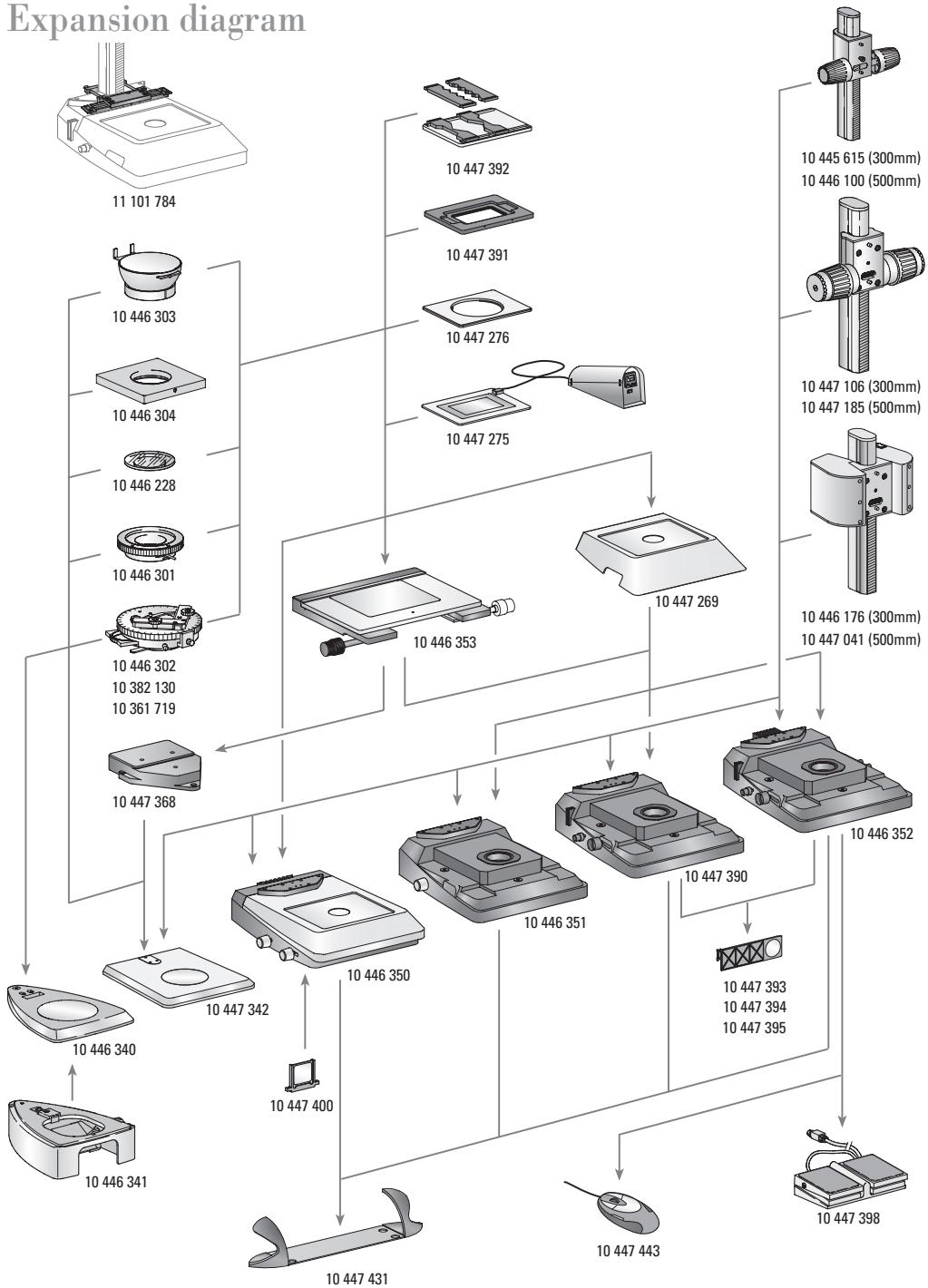
Expansion diagram
Scope of delivery
| 10 446 340 | Incident-light bases | 10 445 615 | Focusing drive |
| 10 446 341 | Incident-light base for S series | 10 445 615 | Focusing drive with 300mm profile column for incident and transmitted-light bases |
| 10 447 342 | Transmitted-light sub-base for incident-light base S series | 10 446 100 | Focusing drive with 500mm profile column for incident and transmitted-light bases |
| 10 446 350 | Incident-light base for M series | 10 446 100 | Focusing drive, fast/fine, with 300mm profile column for incident and transmitted-light bases |
| 10 446 351 | Transmitted-light base TL BDF | 10 447 106 | Focusing drive, fast/fine, with 300mm profile column for incident and transmitted-light bases |
| 10 447 390 | Transmitted-light base TL RCTM for external cold light sources | 10 447 106 | Focusing drive, fast/fine, with 300mm profile column for incident and transmitted-light bases |
| 10 446 352 | TL RCTM transmitted-light base with integrated halogen illumination | 10 447 185 | Focusing drive, fast/fine, with 500mm profile column for incident and transmitted-light bases |
| Stages | |||
| 10 447 269 | Standard stage for transmitted-light bases TL BDF, TL RCTM and TL RCTM | 10 446 176 | Motorized focus drive with 300mm column and power adaptor for incident and transmitted-light bases |
| 10 446 353 | Cross-stage for transmitted-light bases TL BDF, TL RCTM, TL RCTM and incident-light base (with adapter 10 447 368) | 10 447 041 | Motorized focus drive with 500mm column and power adapter for incident and transmitted-light bases |
| 10 447 368 | Adapter between cross-stage and incident-light base 10 447 342 | Filter | |
| 10 447 400 | Day light filter for basis TL ST | ||
| 10 447 275 | Thermo stage Leica MATS TL with controller | 10 447 394 | BG38 Fluorescent filter for transmitted-light bases TL RCTM/RCITM |
| 10 447 276 | Adapter for stages with ∅120mm | ||
| 10 447 391 | Stage for LifeOnStage accessory | 10 447 395 | UV filter for bases TL RCTM/RCITM |
| 10 447 392 | Universal carrier for Petri inserts, object carriers (up to four pieces) etc. | 10 447 393 | Filter ND (gray filter) for bases TL RCTM/RCITM |
| 11 101 784 | Column adapter for micromanipulation | Illumination | |
| 10 447 443 | Leica USB mouse, freely assignable five key mouse for connecting to transmitted-light bases TL RCTM or PC | ||
| 10 446 301 | Sliding stage, ∅120mm | ||
| 10 446 302 | Polarization stage, ∅120mm | ||
| 10 382 130 | Objective guide for polarization stage | 10 443 401 | USB cable to connect TL RCTM basis to a PC |
| 10 361 719 | Compensator Red I for Pol rotating stage | 10 447 398 | Foot switch with CAN bus connector |
| 10 446 303 | Cup stage, ∅120mm | ||
| 10 446 304 | Universal carrier, ∅120mm | Ergo accessories | |
| 10 446 228 | Glass insert with Pol, ∅120mm | 10 447 431 | Leica ErgoRest (palm rest to prevent |
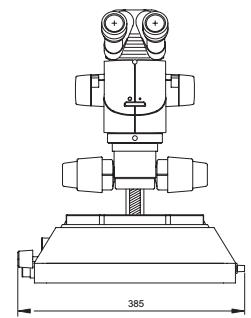
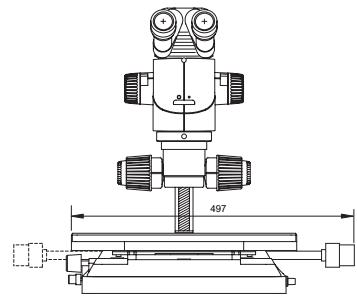
Measurements transmitted-light base TL RC^TM
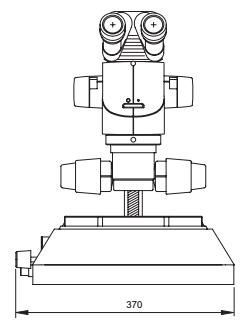
Dimensions in mm
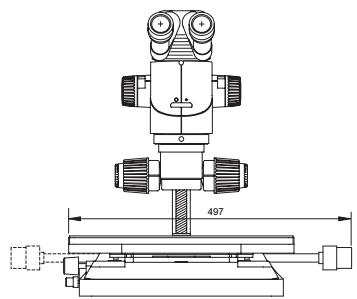
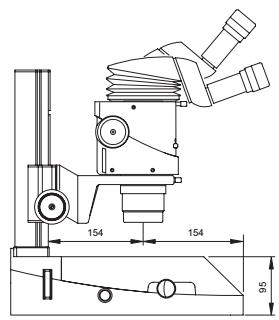
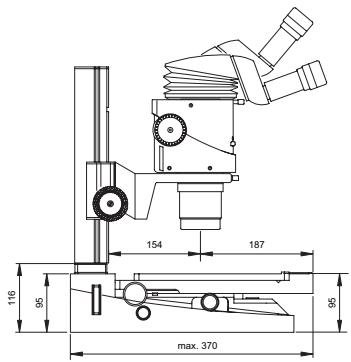
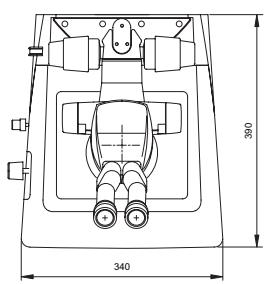
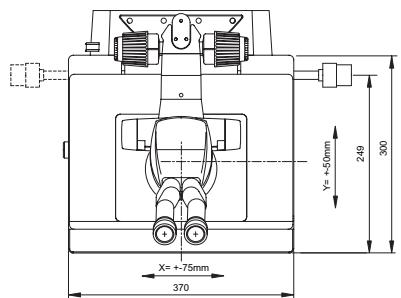
Transmitted-light base TL RCTM with standard stage 10 447 269
Transmitted-light base TL RC™ with IsoPro™ cross-stage
Measurements TL RCI^TM transmitted-light base
Dimensions in mm
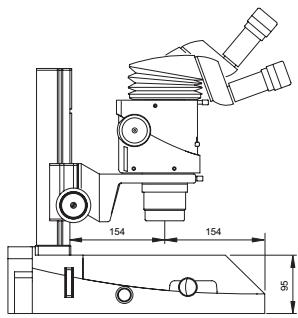
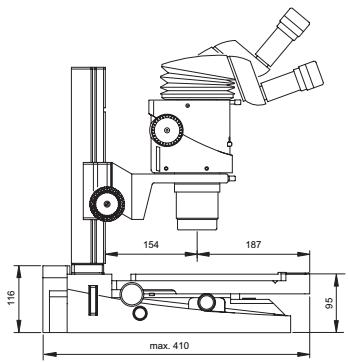
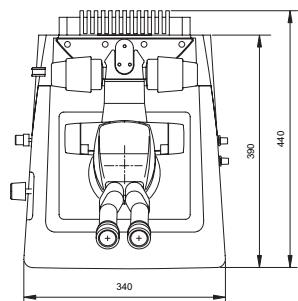

TL RCI™ transmitted-light base with standard stage 10 447 269
TL RCI™ transmitted-light base with IsoPro™ cross-stage
Technical data
| Leica TL RCTM | Leica TL RCTTM | |
| Light source | external via cold light source | Halogen lamp 12V/20W |
| Fast exchange of illuminant | - | yes |
| Illuminated area | 35mm | 35mm |
| Power Connector | - | Input Voltage 100 - 240 V~ |
| - | Frequency 50 - 60 Hz | |
| - | Energy consumption 30 W max. | |
| - | Ambient temperature 10 - 40 °C | |
| Connectors | Connection for cold light guide active f=10mm End pipe f=13mm | 1×USB Type A, 1×USB Type B 2×CAN-BUS |
| Weight | 6.0 kg | 7.2 kg |
| Illumination types | ||
| Bright field | yes | yes |
| Dark field | yes* | yes* |
| Oblique light | yes | yes |
| Relief contrast system (RCTM) | yes | yes |
| CCIC (Constant Color Intensity Control) | no | yes |
| Internal shutter/Lamp control | yes** | yes |
| Integrated filter holder | yes | yes |
| Coated optic to raise color temperature | yes | yes |
| Matching of high num. aperture | yes*** | yes*** |
| Remote control possibility AntiShock™ Pads | yes***** yes | yes yes |
| Size of the base (W×H×D, in mm) | 340×390×95 | 340×440×95 |
- single sided with cold light source Leica CLS150 LS concave mirror *** with external light source
Leica Microsystems – the brand for outstanding products
Leica Microsystems' mission is to be the world's first-choice provider of innovative solutions to our customers' needs for vision, measurement, lithography and analysis of microstructures.
Leica, the leading brand for microscopes and scientific instruments, developed from five brand names, all with a long tradition: Wild, Leitz, Reichert, Jung and Cambridge Instruments. Yet Leica symbolizes innovation as well as tradition.
Leica Microsystems - an international company with a strong network of customer services
Australia: Gladesville, NSW Tel. +1 800 625 286 Fax +61 2 9817 8358
Austria: Vienna Tel. +43 1 486 80 50 0 Fax +43 1 486 80 50 30
Canada: Richmond Hill/Ontario Tel. +1 905 762 20 00 Fax +1 905 762 89 37
China: Hong Kong Tel. +8522 564 6699 Fax +8522 564 4163
Denmark: Herlev Tel. +45 44 5401 01 Fax +45 44 5401 11
France: Rueil-Malmaison
Cédex Tel. +33 1 4732 8585 Fax +33 1 4732 8586
Germany: Bensheim Tel. +49 6251 1360 Fax +49 6251 136 155
Italy: Milan Tel. +39 02 57 486 1 Fax +39 02 5740 3273
Japan: Tokyo Tel. +81 3 543 596 09 Fax +81 3 543 596 15
Korea: Seoul Tel. +82 2 514 6543 Fax +82 2 514 6548
Netherlands: Rijswijk Tel. +31 70 41 32 130 Fax +31 70 41 32 109
Portugal: Lisbon Tel. +35 1 213 814 766 Fax +35 1 213 854 668
Singapore: Tel. +65 6 77 97 823 Fax +65 6 77 30 628
Spain: Barcelona Tel. +34 93 494 9530 Fax +34 93 494 9532
Sweden: Sollentuna Tel. +46 8 625 45 45 Fax +46 8 625 45 10
Switzerland: Glattbrugg Tel. +41 44 809 34 34 Fax +41 44 809 34 44
United Kingdom: Milton Keynes Tel. +44 1908 246 246 Fax +44 1908 609 992
USA: Bannockburn/llinois Tel. +1 800 248 0123 Fax +1 847 405 0164
and representatives of Leica Microsystems in more than 100 countries.
In accordance with the ISO 9001 certificate, Leica Microsystems (Switzerland) Ltd, Business Unit Stereo & Macroscope Systems has at its disposal a management system that meets the requirements of the international standard for quality management. In addition, production meets the requirements of the international standard ISO 14001 for environmental management.
The companies of the Leica Microsystems Group operate internationally in four business segments, where we rank with the market leaders.
- Microscopy Systems
Our expertise in microscopy is the basis for all our solutions for visualization, measurement and analysis of microstructures in life sciences and industry. With confocal laser technology and image analysis systems, we provide three-dimensional viewing facilities and offer new solutions for cytogenetics, pathology and materials sciences.
Specimen Preparation
We provide comprehensive systems and services for clinical histo- and cytopathology applications, biomedical research and industrial quality assurance. Our product range includes instruments, systems and consumables for tissue infiltration and embedding, microtomes and cryostats as well as automated stainers and coverslippers.
Medical Equipment
Innovative technologies in our surgical microscopes offer new therapeutic approaches in microsurgery.
- Semiconductor Equipment
Our automated, leading-edge measurement and inspection systems and our E-beam lithography systems make us the first choice supplier for semiconductor manufacturers all over the world.
- Operation
- Dear User
- The user manual
- Safety concept
- The user manual
- Symbols used
- Warning of danger
- Warning of dangerous electrical voltage
- Warning - hot surface
- Important information
- Action
- Explanatory notes
- Figures
- Safety regulations
- Description
- Accessories:
- Intended uses
- Prohibited uses
- Never:
- Place of use
- Responsibilities of person in charge of the instrument
- Ensure that
- Repairs, servicing work
- If you touch the electric circuit of the. ment, you may receive an electric shock.
- Transport
- Integration in third-party products
- Disposal
- Legal requirements
- EU declaration of conformity
- Controls
- Unpacking the base
- Stage assembly
- Standard stage
- IsoProTM cross-stage
- Control assembly
- Cross-stage assembly
- Focusing drive column
- Intermediate adapter assembly
- Equipment assembly
- Connecting the cold light-source to the TL RC™ base
- Connecting the power cable (TL RCI™)
- Switch for adjusting the relief contrast
- Path-folding mirror
- Operating the cross-stage IsoPro™
- Light intensity and color temperature
- Transmitted-light base TL RC™
- TL RCI™ transmitted-light base
- Leica USB mouse (TL RCI™ only)
- Methods with transmitted light
- Vertical bright field illumination
- Inclined transmitted light
- 4..3 Asymmetrical dark-field illumination
- Relief display
- Starting position
- Positive relief contrast
- Negative relief contrast
- Dynamic relief contrast
- Limitations
- Filter
- Changing the halogen lamp (TL RCI™)
- Care, maintenance
- In this chapter
- We guarantee the quality
- Protect your instruments
- Scope of delivery
- Measurements transmitted-light base TL RCTM
- Measurements TL RCITM transmitted-light base
- Technical data
- Leica Microsystems – the brand for outstanding products
- Leica Microsystems - an international company with a strong network of customer services
- and representatives of Leica Microsystems in more than 100 countries.
- - Microscopy Systems
- Specimen Preparation
- Medical Equipment
- - Semiconductor Equipment
Brand : LEICA
Model : TL RC
Category : Mirrorless camera