
WAP3205 - Wireless Access Point ZYXEL - Free user manual and instructions
Find the device manual for free WAP3205 ZYXEL in PDF.



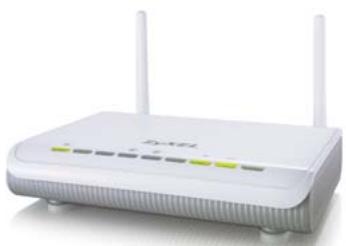
| Product type | Wireless access point |
| Brand | ZYXEL |
| Model | WAP3205 |
| Dimensions | Approximately 150 x 100 x 30 mm |
| Weight | Approximately 200 g |
| Power supply | Power adapter (output 5V DC, 1A) |
| Interfaces | 4 Ethernet ports 10/100 Mbps (LAN), 2 removable external antennas |
| Main functions | Access point, repeater, bridge, wireless client modes |
| Wireless standards | IEEE 802.11b/g/n (2.4 GHz) |
| Maximum data rate | Up to 300 Mbps |
| Wireless security | WEP, WPA-PSK, WPA2-PSK, WPS (button) |
| Configuration | Web interface (http://192.168.1.2), default password 1234 |
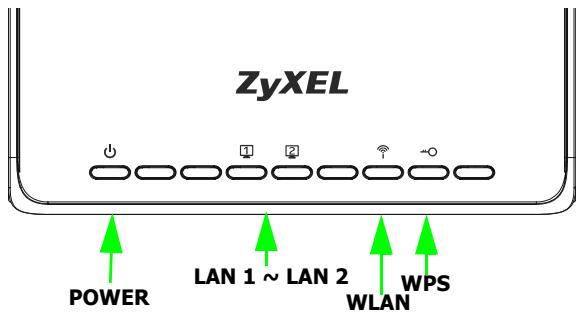
| LED indicators | Power, LAN, WLAN, WPS |
| Operating temperature | 0°C to 40°C |
| Humidity | 10% to 90% non-condensing |
| Package contents | Access point, power adapter, Ethernet cable, quick start guide |
| Maintenance and cleaning | Clean with a dry, soft cloth. Do not use chemical products. |
| Safety | Do not expose to moisture, do not open the casing |
| Spare parts and repairability | External antennas available; repair by authorized center. |
Frequently Asked Questions - WAP3205 ZYXEL
User questions about WAP3205 ZYXEL
0 question about this device. Answer the ones you know or ask your own.
Ask a new question about this device
Download the instructions for your Wireless Access Point in PDF format for free! Find your manual WAP3205 - ZYXEL and take your electronic device back in hand. On this page are published all the documents necessary for the use of your device. WAP3205 by ZYXEL.
USER MANUAL WAP3205 ZYXEL
Wireless N Access Point
Quick Start Guide
Version: 1.00

Quick Start Guide
Wireless N Access Point
Version 1.00
Edition 1, 6/2009
DEFAULT Login DETAILS
LAN Port: LAN LAN 2
IP Address http://192.168.1.2
Password: 1234
CONTENTS
| ENGLISH | 5 |
| DEUTSCH | 15 |
| ESPÁÑOL | 25 |
| FRANÇAIS | 35 |
| ITALIANO | 45 |
| SVENSKA | 55 |
| NEDERLANDS | 65 |
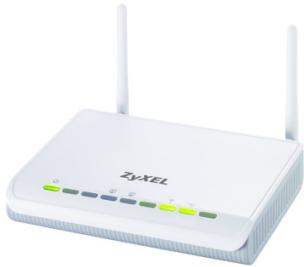
ZyXEL
Device Panels
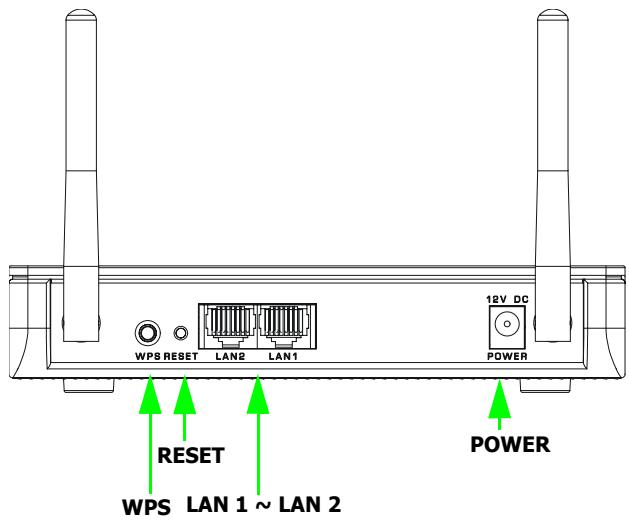
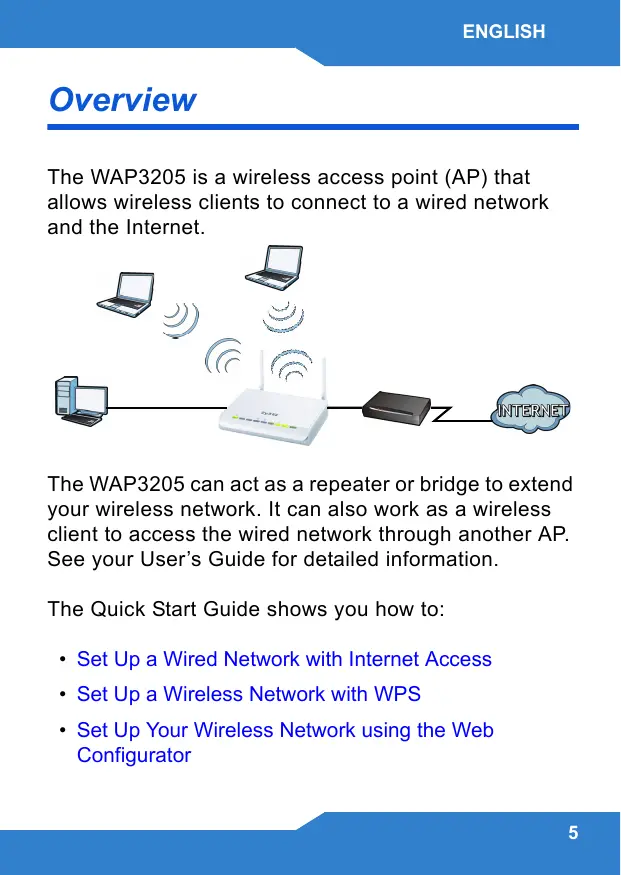
Overview
The WAP3205 is a wireless access point (AP) that allows wireless clients to connect to a wired network and the Internet.
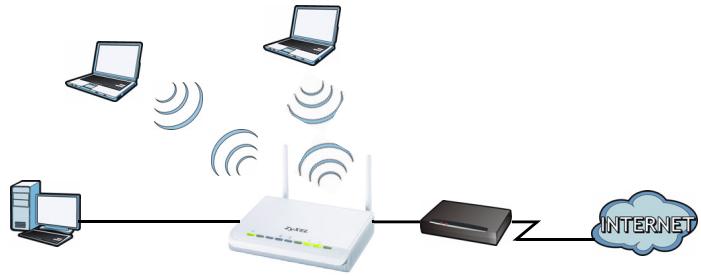
The WAP3205 can act as a repeater or bridge to extend your wireless network. It can also work as a wireless client to access the wired network through another AP. See your User's Guide for detailed information.
The Quick Start Guide shows you how to:
- Set Up a Wired Network with Internet Access
- Set Up a Wireless Network with WPS
- Set Up Your Wireless Network using the Web Configurator
Set Up a Wired Network with
Internet Access
-
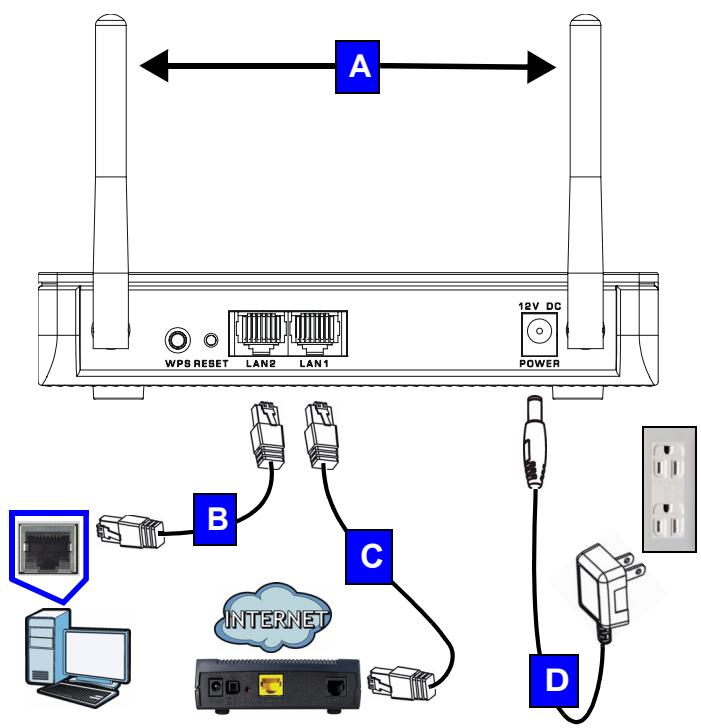
Make the following hardware connections to set up your WAP3205:
-
Connect the antennas (A) to the antenna sockets, ensuring they are screwed in firmly and angled upwards.
- Connect the Ethernet port on your computer to a LAN port (B) on the WAP3205 using an Ethernet cable.
- Connect another LAN port (C) on your WAP3205 to the Ethernet port on the device with which you are accessing the Internet (for example, a modem) using an Ethernet cable.
-
Use the power adapter (D) from the package to connect the POWER socket to an appropriate power source.
-
Check your Internet connection. Open a web browser on your computer and enter www.zyxel.com in the address bar.

If you cannot access the Internet, make sure the WAP3205's IP address is in the same subnet as your broadband modem or router and restart your WAP3205. See the User's Guide for information on setting up the WAP3205's IP address.
Set Up a Wireless Network with
WPS
Use Wi-Fi Protected Setup (WPS) to let WPS-enabled wireless devices securely access the WAP3205.
Check if your wireless device has the WPS logo and follow these steps to set up your wireless network using WPS.
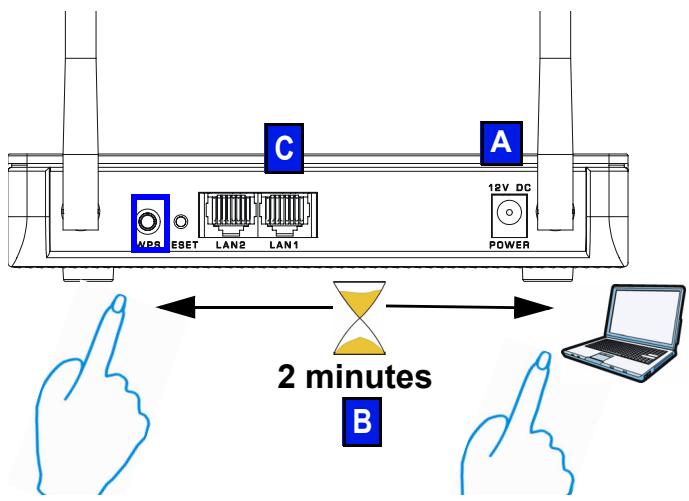
- Make sure your WAP3205 is turned on (A). Place your wireless device within range of the WAP3205.
- Press the WPS button for two to three seconds on the WAP3205 as well as the WPS button on the wireless adapter connected to your notebook (B). It doesn't matter which button is pressed first. You must press the second button within two minutes of pressing the first one.
The WPS LED ( 0) on the WAP3205 blinks during the WPS process, then shines steadily when the WPS process is finished.

If your WPS connection is successful, you should now be able to access the WAP3205.
- Connect a LAN port (C) on your WAP3205 to your broadband modem. You are now ready to connect to the Internet wirelessly through your WAP3205.

If your wired Internet connection is fine but your wireless connection is not, repeat step 3. If WPS is not working or your wireless device does not support WPS, go to the next section.
Set Up Your Wireless Network using the Web Configurator
- Set your computer's IP address to be between 192.168.1.3 and 192.168.1.254 with subnet mask 255.255.255.0. Connect the computer to the WAP3205.
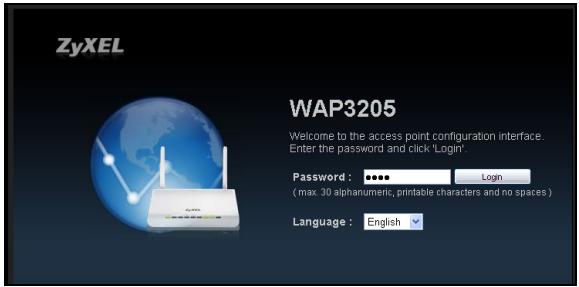
- Open a web browser on the computer connected to the WAP3205. Type "http://192.168.1.2" as the website address. Enter "1234" (default) as the password, choose your Language and click Login.
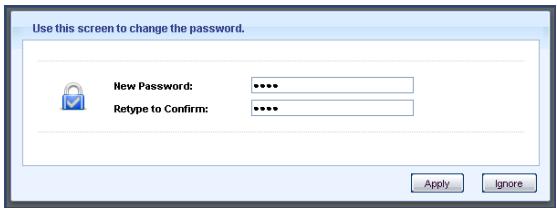
- Enter a new password (retype it to confirm) and click Apply.
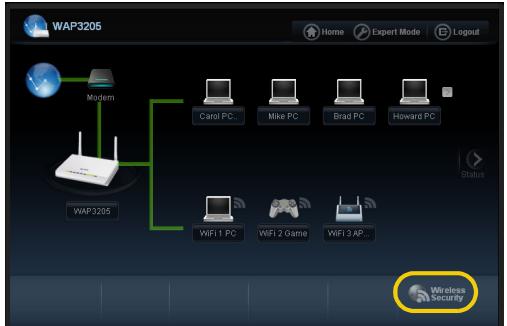
- Click Wireless Security in the control panel.
- Specify a network name (SSID) to identify your wireless network. Choose the most secure security option that all wireless devices in your network can support. For WPA-PSK/WPA2-PSK, type in the password for your wireless network. Click Apply.
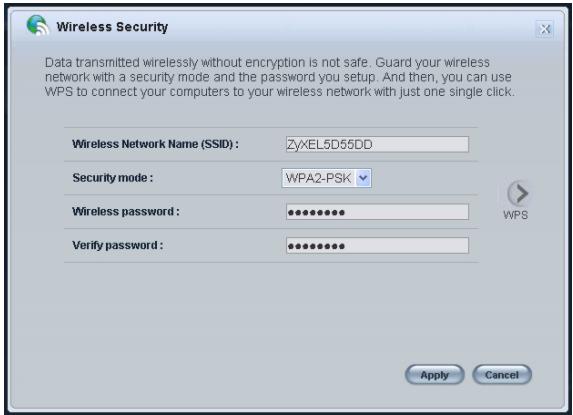
- Your wireless clients now can use the same SSID and password to connect wirelessly to the WAP3205.

Refer to the User's Guide for complete descriptions of each screen and for instructions on configuring the advanced features of your WAP3205 using the Web Configurator.
Procedure to View a Product's Certification(s)
- Go to www.zyxel.com.
- Select your product from the drop-down list box on the ZyXEL home page to go to that product's page.
- Select the certification you wish to view from this page.
Übersicht
| ENGLISH | DEUTSCH |
| Green Product DeclarationRoHS Directive 2002/95/ECRoHSVerified !ROHS Directive 2002/95/ECRoHS Directive 2002/95/ECRoHS Directive 2002/96/EC(WEEE: Waste Electrical and Electronic Equipment)2003/108/ECWEEE Directive 2002/96/EC(WEEE: Waste Electrical and Electronic Equipment)2003/108/ECWEEE Directive 2002/96/EC(WEEE: Waste Electrical and Electronic Equipment)WEEE Directive 2002/96/EC(WEEE: Waste Electrical and Electronic Equipment)2003/108/ECWEEE Directive 2002/96/EC(WEEE: Waste Electrical and Electronic Equipment)WEEE Directive 2002/96/EC(WEEE: Waste Electrical and Electronic Equipment)WEEE Directive 2002/96/EC(WEEE: Waste Electrical and Electronic Equipment)WEEE Directive 2002/96/EC(WEEE: Waste Electrical and Electronic Equipment)WEEE Directive 2002/96/EC(WEEE: Waste Electrical and Electronic Equipment)WEEE Directive 2002/96 | Green Product DeclarationRoHS Directive 2002/95/ECRoHS Directive 2002/96/EC(WEEE: Waste Electrical and Electronic Equipment)2003/108/ECWEEE Directive 2002/96/EC(WEEE: Waste Electrical and Electronic Equipment)2003/108/ECWEEE Directive 2002/96/EC(WEEE: Waste Electrical and Electronic Equipment)2003/108/ECWEEE Directive 2002/96/EC(WEEE: Waste Electrical and Electronic Equipment)2003/108/ECWEEE Directive 211/108/ECWEEE Directive 211/108/ECWEEE Directive 211/108/ECWEEE Directive 211/108/ECWEEE Directive 211/108/ECWEEE Directive 211/108/ECWEEE Directive 211/108/ECWEEE Directive 211/108/ECWEEEDirective 211/108/ECWEEE Directive 211/108/ECWEEE Directive 211/108/ECWEEE Directive 211/108/ECWEEE Directive 211/108/ECWEEE Directive 211/108/ECWEEE Directive 211/108/ECWEEE Directive 211/108 |
| Declaration Signature:Alan ChoName/Title:Alan Cho / Quality Assurance DirectorDate (yyyy/mm/dd): 2009/3/24 | Unterschrift des Erklärenden:Alan ChoName/Titel:Alan Cho / Quality Assurance DirectorDatum (JJJJ/MM/TT): 2009/3/24 |
| ESPÁÑOL | FRANÇAIS |
| Declaración de Producto Ecológico | Déclaration de Produkt Green |
| Directiva RoHS 2002/95/EC RoHS VERIFIED | Directive RoHS 2002/95/EC RoHS VERIFIED |
| Directiva REEEE 2002/96/EC (REEE : Residuos de Equipos Eléctricos y Electrónicos) 2003/108/EC | Directive DEEE 2002/96/EC (DEEE : Déchets des Equipements Electriques et Electroniques) 2003/108/EC |
| Firma de declaración: Alan Cho | Signature de la déclaration : Alan Cho |
| Nombre/Titulo: Alan Cho / Quality Assurance Director Fecha (aaaa/mm/dd): 2009/3/24 | Nom/Titre : Alan Cho / Quality Assurance Director Date (aaaa/mm/jj) : 2009/3/24 |
| ITALIANO | NEDERLANDS |
| Dichiarazione Green Product Direttiva RoHS 2002/95/CE ROHS VERIFIED | Productmilieuverklaring RoHS-richtlijn 2002/95/EC ROHS VERIFIED |
| Direttiva RAEE 2002/96/CE (RAEE: Rifiuti di Apparecchiature Elettriche ed Elettroniche) 2003/108/CE | AEA-A-richlijn 2002/96/EC (AEEA: Afgedankte Elektrische en Elektronische Apparaten) 2003/108/EC |
| Firma dichiarazione: Alan Cho | Verklaringshandtekening: Alan Cho |
| Nome/titolo: Alan Cho / Quality Assurance Director Data (aaaa/mm/gg): 2009/3/24 | Naam/titel: Alan Cho / Quality Assurance Director Datum(yyyy/mm/dd): 2009/3/24 |
Declaration of Conformity
We, ZyXEL Communications Corp., located at No.6, Innovation Rd II, Science-Park, Hsin-Chu, 300, Taiwan, declare under our sole responsibility that the product:
Product information
Product Name : Wireless N Access Point
Model Number : WAP3205
Produced by
Company Name : ZyXEL Communications Corporation
Company Add. : No. 6, Innovation Road II, Science-Park, Hsin-Chu, 300, Taiwan
to which this declaration relates, is in conformity with the following standards or other normative documents:
EN 301489-17 V1.3.2 (2008-04)
EN 55022:2006+A1: 2007
EN 301489-1 V1.8.1 (2008-04)
EN 61000-3-2: 2006
EN 300 328 V1.7.1 (2006-10)
EN 61000-3-3: 1995+A1: 2001+A2: 2005
EN 50385:2002
Safety EN 60950-1:2006
Following the provisions of 2004/108/EC; 92/31/EEC Directive; 93/68/EEC, 99/5/EEC and LVD 2006/95/EC.
In accordance with Annex III of the Directive 1999/5/EC.
The TCF-File is located at:
Company Name : ZyXEL Communications UK Limited
Company Address : 11 The Courtyard, Eastern Road, Bracknell, Berkshire, RG12 2XB United Kingdom
Person is responsible for marking this declaration:
Hung-Chun Kuo
Name (Full Name)
2009-05-20
Date
Managing Director
Position/ Title
Heng-Chen Kuo
Legal Signature
Wireless N Access Point



This product is designed for the 2.4 GHz WLAN network throughout the EC region. http://www.zyxel.com/index.php
Copyright © 2009 ZyXEL. Communications Corp. All rights reserved. ZyXEL, ZyXEL logo are registered as property of ZyXEL. The use of this property in any form without the prior written permission is illegal and may be subject to copyright law. The property of their respective owners. All specifications are subject to change without notice.
- Wireless N Access Point
- Quick Start Guide
- Device Panels
- Overview
- Set Up a Wired Network with
- Internet Access
- Set Up a Wireless Network with
- WPS
- Set Up Your Wireless Network using the Web Configurator
- Procedure to View a Product's Certification(s)
- Übersicht
- Declaration of Conformity
- Product information
- Produced by
Brand : ZYXEL
Model : WAP3205
Category : Wireless Access Point