
NSA-2401 - NAS Server ZYXEL - Free user manual and instructions
Find the device manual for free NSA-2401 ZYXEL in PDF.


| Brand | ZYXEL |
| Model | NSA-2401 |
| Product Type | NAS Server (Network Attached Storage) |
| Number of Drive Bays | 4 bays for SATA-1 hard drives |
| Network Interfaces | 2 Gigabit LAN ports (10/100/1000 Mbps) |
| Power Supply | External power supply (power cord included) |
| Main Features | File sharing, data backup, RAID protection, web browser access, NDU discovery utility |
| Minimum System Requirements | Computer with network card and TCP/IP, network switch or hub |
| Supported Operating Systems | Windows (with NDU), others via web browser |
| Supplied Accessories | CD with NDU and Genie Backup Manager, Ethernet cable, power cord |
| Security | HTTPS connection, username and password authentication (default admin/1234) |
| Maintenance and Cleaning | Clean the device with a dry, soft cloth. Do not use chemicals. |
| Repairability and Spare Parts | Hot-swappable hard drives. Contact the dealer for any other hardware issues. |
| LED Indicators | PWR (power), SYS (system), LAN1/LAN2 (network activity) |
| Dimensions (estimated) | Approximately 21 x 20 x 15 cm (not confirmed) |
| Weight (estimated) | Approximately 2.5 kg (not confirmed) |
Frequently Asked Questions - NSA-2401 ZYXEL
User questions about NSA-2401 ZYXEL
0 question about this device. Answer the ones you know or ask your own.
Ask a new question about this device
Download the instructions for your NAS Server in PDF format for free! Find your manual NSA-2401 - ZYXEL and take your electronic device back in hand. On this page are published all the documents necessary for the use of your device. NSA-2401 by ZYXEL.
USER MANUAL NSA-2401 ZYXEL
| DEFAULT Login DETAILS | |
| LAN1 IP Address: | http://192.168.1.3 |
| LAN1 IP Address: | http://192.168.100.3 |
| Username: | admin |
| Password: | 1234 |
| CONTENTS | |
| ENGLISH | 3 |
| DEUTSCH | 21 |
| FRANÇAIS | 39 |
| ITALIANO | 57 |
| SVENSKA | 75 |
| 繁體中文 | 93 |
ZyXEL
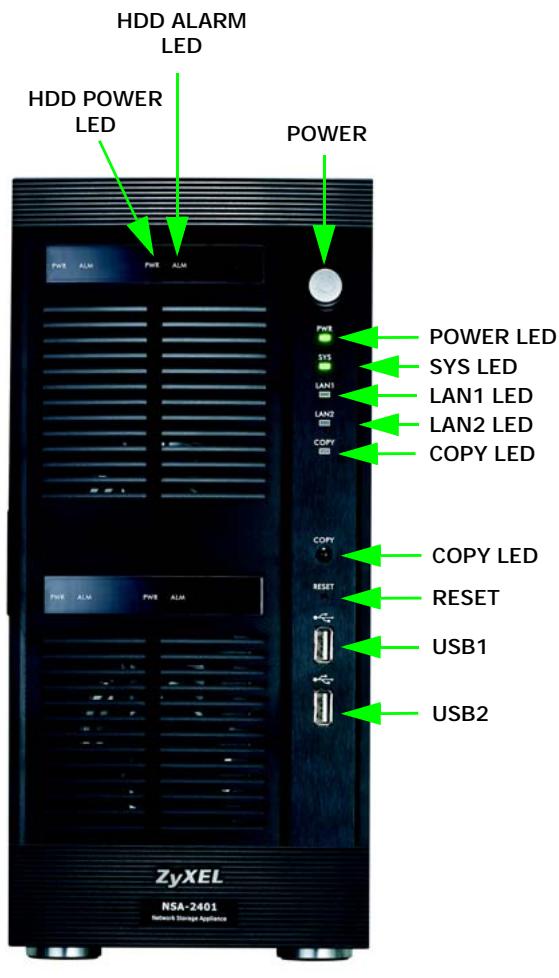
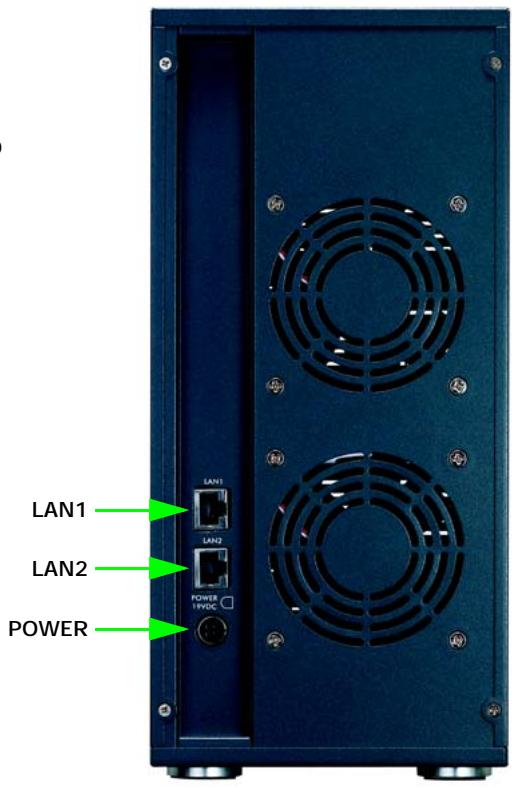
Front and Rear Panels
Overview
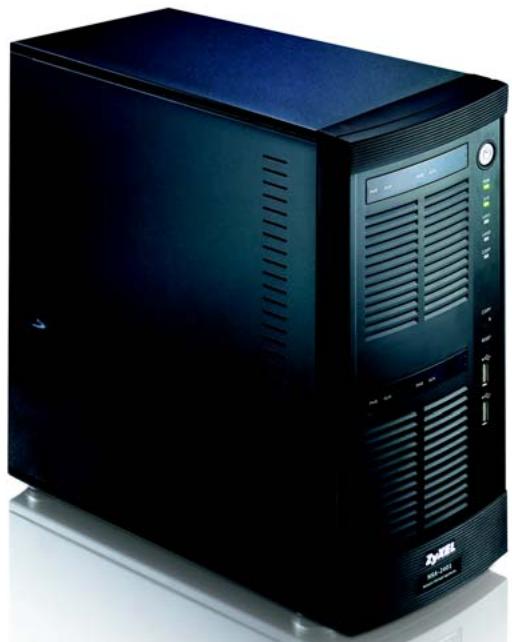
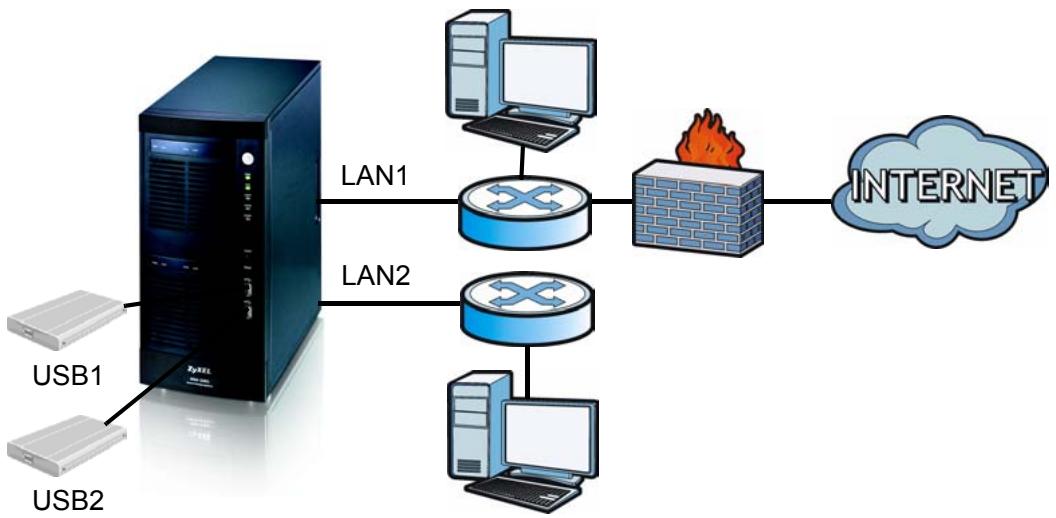
The NSA-2401 (the NSA) is a network storage device for file sharing, data backup and data protection in small (home) offices and/or medium-sized offices. The NSA has two Gigabit LAN ports for connecting to one or two networks.
This guide shows you how to:
Install hard drives
Make NSA Connections
- Access the NSA using NDU (NSA Discovery Utility) or your web browser
- Set up the NSA using the wizard
Map the NSA to a network drive from any computer
See the User's Guide for more details and specifications on the NSA.
Requirements
You need the following before you start:
- NSA
- Included CD containing the NDU (NSA Discovery Utility) and Genie Backup Manager
- Power cord and power supply (external)
- 8-wire Ethernet cable for Gigabit Ethernet
- Up to four SATA-1 or 2 (Serial Advanced Technology Attachment) compatible hard disks
- Screwdriver to install the hard disks in the disk trays
- USB cable (optional: you only need this if you want to expand storage capacity by connecting compatible USB 2.0 drives)
- Computer with Network Interface Card (NIC) and TCP/IP installed
Network access device such as a switch or hub
Install Hard Drives
For optimal performance and RAID storage capacity, use hard drives of the same speed and capacity.
Back up any data you want to keep to another location before installing the hard drives. You will have to format these hard drives so all data stored on them will be lost.
- Pull the tab on the left of the front door of the NSA to open it.
- Pull out the latch and grip the sides of the tray to remove disk tray 1. Be careful not to break the latch. Disk bay 1 is labelled on your NSA (the top-left bay).
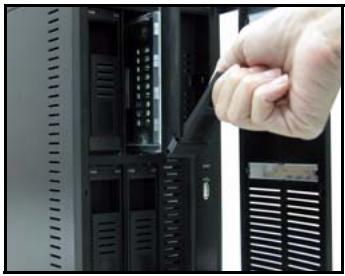
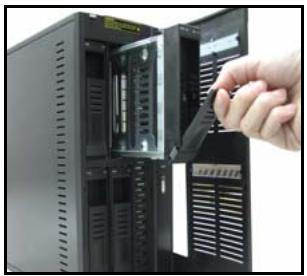
- Place the disk tray on a flat surface with the panel facing up. Place a hard disk with the screw holes facing up on the same surface and slide it into the disk tray. Secure it with the screws as shown.
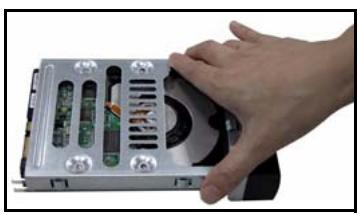
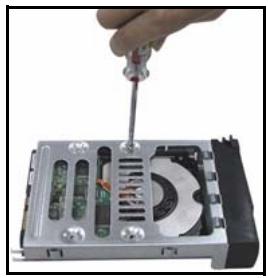
- Push the top of the tray back into NSA disk bay 1 until it snaps into place and push the latch up as shown.
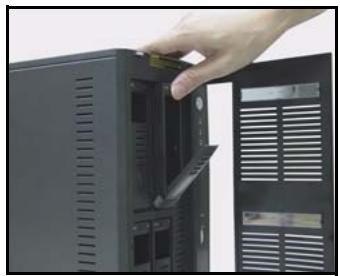
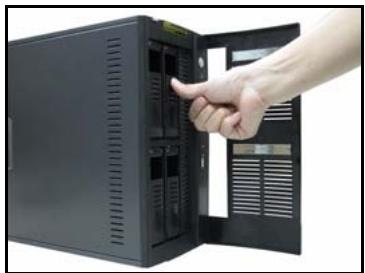
- Repeat steps 1 to 3 for other hard drives that you may have.
Make the NSA Connections
- The Ethernet ports are on the rear. Use Ethernet cables to connect each Ethernet port to a hub, switch, or router on your network. You can connect them to the same subnet or different subnets. Use an 8-wire Ethernet cable for Gigabit connections.
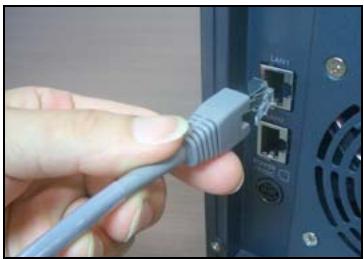
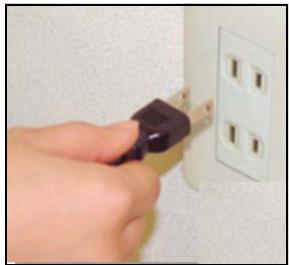
- Connect one end of the power cord to the power socket on the rear of the NSA and the other end to the external power supply. Connect the external power supply to a power outlet.
- Turn on the power by pressing in the power button on the front of the NSA. Look at the front panel lights.
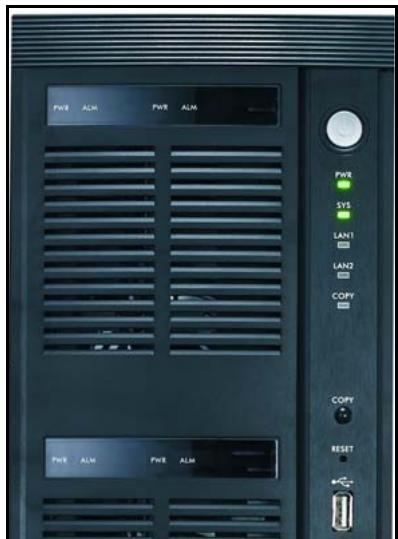
- The PWR light turns steady green.
- The SYS light turns steady green after the NSA has booted successfully (it takes about 50 seconds).
- The LAN1 and LAN2 lights turn on if the NSA Ethernet ports are properly connected to your network. The LAN lights blink while transmitting or receiving traffic.
Access the NSA
You can access the NSA in one of two ways: using the NDU (NSA Discovery Utility) or directly entering the NSA IP address into your web browser.
Use the NDU to Discover the NSA IP Address
Use the NDU (NSA Discovery Utility) on a Windows computer if your network has a DHCP server that will assign the NSA an IP address and/or if you have many NSAs in your network.
The Genie Backup program uses the same network port as the NDU to discover the NSA. To avoid a port conflict, do not run the Genie Backup at the same time as the NDU.
- Insert the included CD into your CD-ROM drive. The next screen should automatically display (autorun). Click the Setup icon.
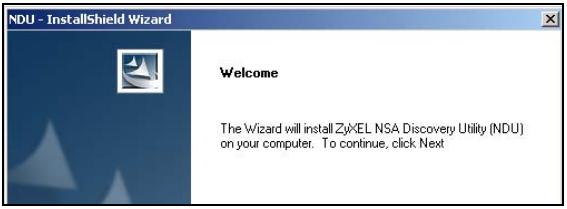
- The NDU installation wizard begins. Follow the installer instructions. Click Finish to complete the installation.
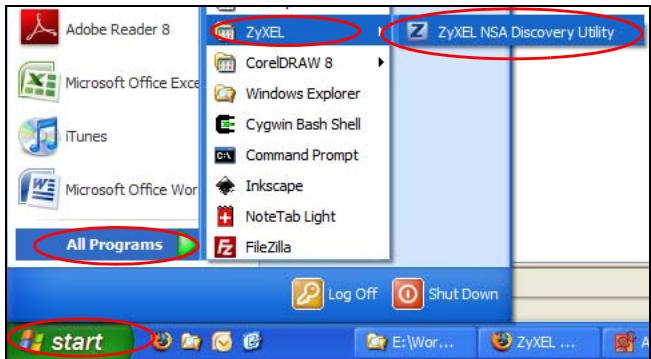
- In Windows XP, click Start > All Programs, ZyXEL > NSA Discovery Utility > ZyXEL NSA Discovery Utility to run the NDU. For other Windows operating systems, procedures should be similar. If your computer has more than one network card, then you will first be prompted to select a network interface card.
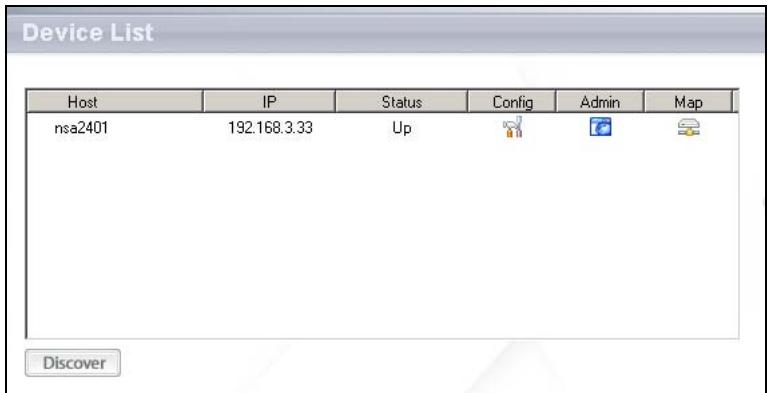
- The NDU main screen appears listing all hostnames, IP addresses and status of all NSAs in your network. Click the icon under Admin to see the main web configurator screen as shown in section . (If you want to change the NSA IP address, click the icon under Config. If you want to map the NSA to a Windows network drive, click the icon under Map (see section ). To refresh the screen, click Discover.)
Direct Access Via Web Browser
If the NSA cannot get an IP address from a DHCP server, then the NSA's LAN1 uses default IP address 192.168.1.3 and LAN2 uses 192.168.100.3. Before directly entering the NSA IP address into your web browser, you must make sure that your computer and the NSA are in the same subnet. This section shows you how to set your Windows NT/2000/XP computer to have an IP address in the same subnet as the NSA. Refer to your User's Guide for detailed IP address configuration for other operating systems.
- In Windows XP, click Start > Control Panel. In Windows 2000/NT, click Start > Settings > Control Panel.
- In Windows XP, click Network Connections. In Windows 2000/NT, click Network and Dial-up Connections.
- Right-click Local Area Connection and then click Properties.
-
Select Internet Protocol (TCP/IP) (under the General tab in Win XP) and click Properties.
-
The Internet Protocol TCP/IP Properties screen opens (the General tab in Windows XP).
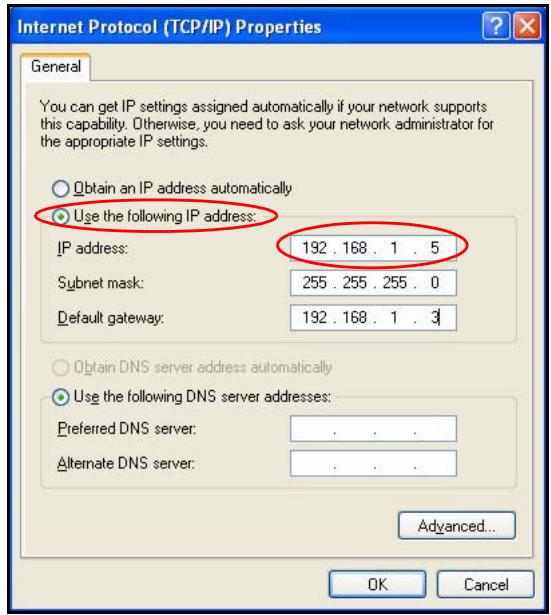
- Select Use the following IP address and enter an IP address from 192.168.1.1 to 192.168.1.254 excluding 192.168.1.3 (the NSA) and any other IP addresses in this range already being used by a device on your network.
- Click OK to close the Internet Protocol (TCP/IP) Properties window.
-
Close the Local Area Connection Properties window and then the Network Connections screen.
-
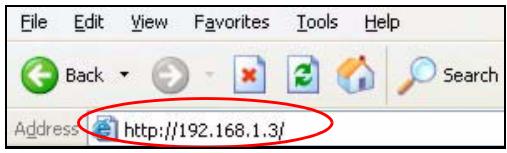
Launch your web browser and enter "192.168.1.3" as the web site address.
NSA Wizard Setup
- Access the NSA using the NDU or web configurator directly.
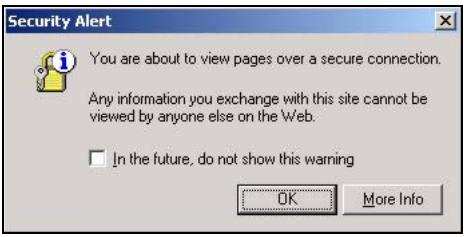
- When you first access the NSA web configurator, you may see this screen telling you that this is a secure connection using HTTPS. Click OK to continue.
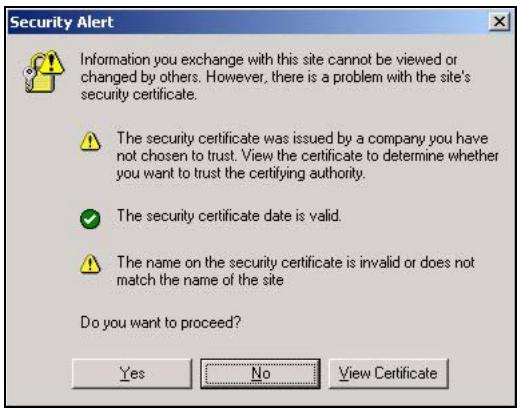
- The web browser client uses certificates to authenticate the NSA. The default NSA certificate will most likely show a name and certification authority mis-match; however encryption is still performed. Click Yes to proceed.
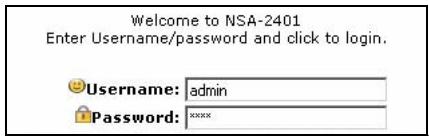
- When you access the NSA web configurator, the login screen appears. The default user name and password are 'admin' and '1234' respectively. Click Login.
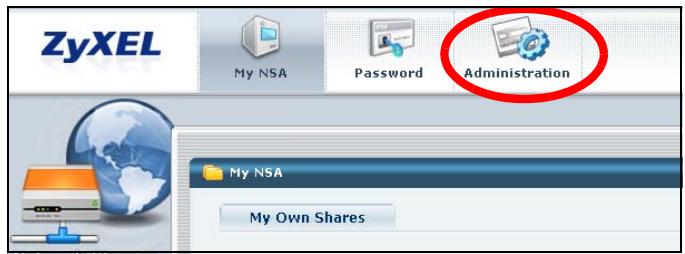
- The My NSA screen displays. Click Administration.
Setup Wizard
The first time you access the administration screens, the setup wizard opens. Each time you click Next in the wizard, your settings are saved to the NSA. Click Back to return to a previous screen in the wizard.
See the online help for more information on the wizard screens.
You may access the wizard again by clicking on the icon in the top-right of the screen as shown. Access any of the menus in the navigation panel on the left for more advanced configuration.
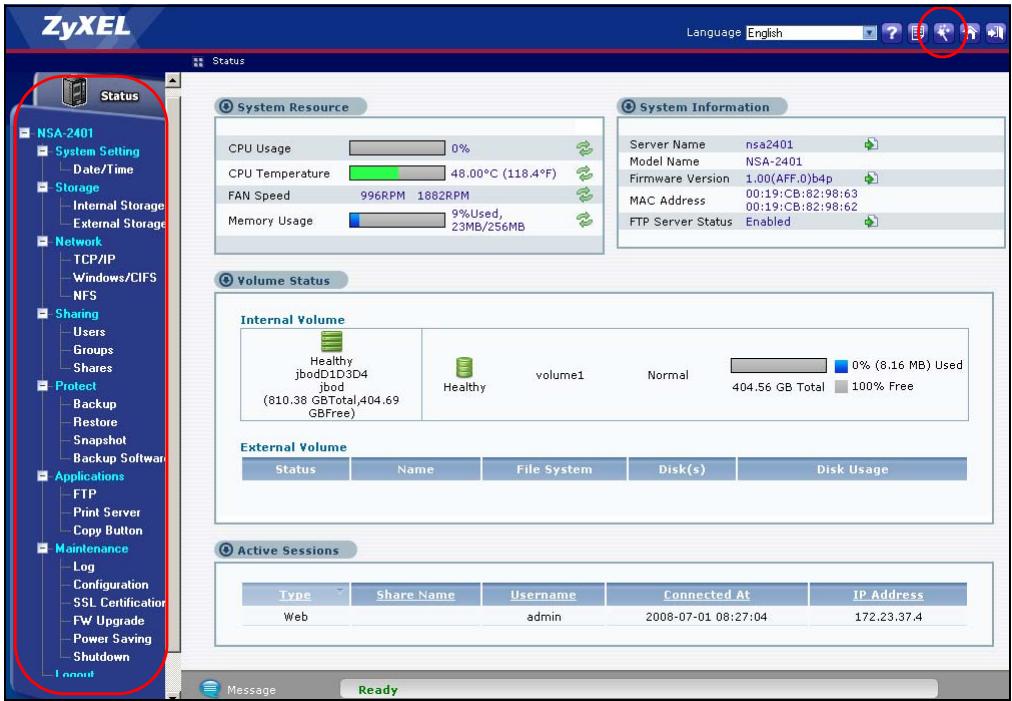
See your User's Guide for more information on these advanced screens.
Although the hard drives are hot-swappable, it is recommended that you use the web configurator to shut down a hard drive before removing it. If you are not using RAID, notify the users before you remove a drive.
Map the NSA to Your Computer Network Drive
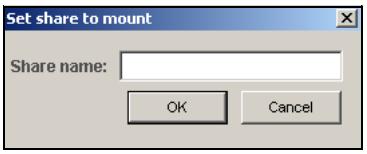
Mapping a share (a folder where you store data) on the NSA to a Windows network drive makes it easy for Windows users to transfer files to and from the NSA (using CIFS). Click the MAP icon in the NDU (see section ) to display the NSA's shares in Windows Explorer. Enter the name of the share you want to map.
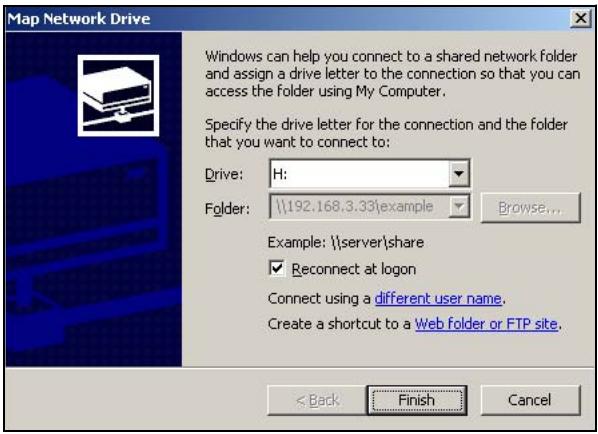
Click Tools > Map Network Drive. Select the network drive that you want to map NSA to from the Drive list box and browse to the share on the NSA. You must use the user name and password from an account that has access to the share. You can then simply drag files from/to your local computer's drives to or from this network folder.
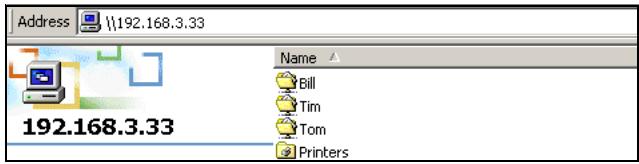
Alternatively (from another computer that does not have NDU installed for example), open Windows Explorer and type two back slashes followed by the NSA system name or IP address.
Troubleshooting
| PROBLEM | CORRECTIVE ACTION |
| None of the LEDs turn on when you connect the power. | Make sure that the NSA is turned on. Check that there are no loose cable connections, that there are no faulty cables and that Ethernet cable connections do not exceed 100m. Make sure that you have the power cord connected to an active power source. If the LEDs still do not turn on, you may have a hardware problem. In this case, you should contact your local vendor. |
| Cannot access the NSA from my computer. | Check the Ethernet cable connection from your network to the NSA. If the NSA's IP address has changed, then enter the new one as the website address. Make sure your computer's IP address is in the same subnet as the NSA's IP address (see section Direct Access Via Web Browser). Ping the NSA from your computer. Make sure your computer's Ethernet adapter is installed and functioning properly. In a (Windows) computer, click Start, (All) Programs, Accessories and then Command Prompt. In the Command Prompt window, type “ping” followed by the NSA's IP address (192.168.1.3 is the default) and then press [ENTER]. Use Internet Explorer 6.0 (and later) or Firefox 1.07 (and later) with JavaScript enabled. Make sure you enter the user name and password correctly (these fields are case sensitive). |
| The NSA cannot send e-mails. | Check the NSA's logs. In the NSA's logs report configuration, check the e-mail server and authentication settings. Check the network connection to the e-mail server. Check that the DNS server the NSA is using can resolve the e-mail server's address. If the e-mail server uses a private IP address, the NSA needs to use a private DNS server. If the e-mail server uses a public IP address, the NSA needs to use a public DNS server. |
| I cannot turn off the NSA. | Press the power button in and hold it until you hear a beep. Then release the button. The SYS light blinks red until the NSA is shut down. If the above shut-down procedure does not work (which may happen if the NSA has crashed), hold the power button in a few more seconds until you hear a second beep. The NSA turns off immediately. |
Refer to the User's Guide for further troubleshooting instructions.
Übersicht
Setup Wizard (Installationsassistant)
- Front and Rear Panels
- Overview
- Requirements
- Install Hard Drives
- Make the NSA Connections
- Access the NSA
- Use the NDU to Discover the NSA IP Address
- Direct Access Via Web Browser
- NSA Wizard Setup
- Setup Wizard
- See your User's Guide for more information on these advanced screens.
- Map the NSA to Your Computer Network Drive
- Troubleshooting
- Übersicht
- Setup Wizard (Installationsassistant)
Brand : ZYXEL
Model : NSA-2401
Category : NAS Server