
360X - Drill Sharpener DRILL DOCTOR - Free user manual and instructions
Find the device manual for free 360X DRILL DOCTOR in PDF.



| Product type | Drill bit sharpener |
| Brand | DRILL DOCTOR |
| Model | 360X |
| Weight | 0.9 kg (1.979 lbs) |
| Power supply | 110-120 V~60 Hz or 220-230 V~50 Hz, 1.75 A max / 0.88 A max |
| Rotation speed | 15,000 rpm |
| Sharpening capacity | Drill bits from 2.5 mm to 13 mm (3/32 to 1/2 in) |
| Compatible drill bit types | High-speed steel, cobalt, TiN, carbide, masonry |
| Point angles | 118° standard, convertible from 135° to 118° |
| Included accessories | Chuck, grinding wheel key, instruction manual |
| Maintenance | Regular cleaning after 20-25 sharpenings; reversal/replacement of diamond grinding wheel |
| Safety | Eye protection mandatory; grounding; disconnect before maintenance |
| Warranty | 1 year |
| Spare parts | Standard diamond grinding wheel (DA31320GF), coarse grinding wheel (DA31325GF) |
| Manufacturer | DRILL DOCTOR / Ets V Dehaye sa-nv, Belgium |
Frequently Asked Questions - 360X DRILL DOCTOR
User questions about 360X DRILL DOCTOR
0 question about this device. Answer the ones you know or ask your own.
Ask a new question about this device
Download the instructions for your Drill Sharpener in PDF format for free! Find your manual 360X - DRILL DOCTOR and take your electronic device back in hand. On this page are published all the documents necessary for the use of your device. 360X by DRILL DOCTOR.
USER MANUAL 360X DRILL DOCTOR
...for purchasing a Drill Doctor®. It is sure to become a valuable tool because you will always have sharp drill bits before a project, during a project, and after a project.
As president of this company, I am very proud of the quality of our products—and I am equally proud of the great people at Drill Doctor® who design and produce them. If you have questions or need help with your Drill Doctor®, please contact us and one of our customer representatives will be there to help. We support what we build!
Use this User's Guide to learn to operate your Drill Doctor® quickly and easily. I'd also like to invite you to visit our website at www.DrillDoctor.com. There you will find:
- Demonstrations of all operations with the sights and sounds leading to successful drill bit sharpening
- Downloadable copies of the User's Guide
Warranty registration
Service and contact numbers
Again, thank you for buying a Drill Doctor. Now go enjoy its convenience and quality.
Haeh O'Dougletz
Hank O'Dougherty
President, Drill Doctor
Contents
English 1
Important Safety Instructions 2
Getting to Know Your Drill Doctor 8
Identifying Basic Drill Bits 9
Anatomy of a Drill Bit. 9
The Drill Doctor® Sharpening Process 10
Aligning the Drill Bit 10
Sharpening the Drill Bit. 11
Identifying Correctly Sharpened Drill Bits 12
Sharpening Bits of Different Lengths and Diameters 13
Aligning and Sharpening Masonry Drill Bits. 14
Questions and Answers 16
Drill Doctor® Maintenance. 19
Accessories 21
Warranty 22
Espanol 23
Français 42
IMPORTANT SAFETY INSTRUCTIONS
For your own safety read all of these instructions before attempting to operate this product and save these instructions. Wear eye protection.
Precautions
WARNING! When using electric tools, basic safety precautions should always be followed to prevent the risk of fire, electric shock, and personal injury.
-
KEEP GUARDS IN PLACE and in working order.
-
KEEP WORK AREA CLEAN. Cluttered areas and bench invite accidents.
-
DO NOT USE IN DANGEROUS ENVIRONMENT. Do not use power tools in damp or wet locations or expose them to rain. Keep work area well lit. Do not use tools in the presence of flammable liquids or gases.
-
KEEP CHILDREN AWAY. All visitors should be kept safe distance from work area.
-
MAKE WORKSHOP KID PROOF with padlocks, masterswitches, or by removing starter keys.
-
DO NOT FORCE THE TOOL. It will do the job better and safer at the rate for which it was designed.
-
USE THE RIGHT TOOL. Don't force tool or attachment to do a job for which it was not designed.
-
GUARD AGAINST ELECTRICAL SHOCK, avoid body contact with earthed or grounded surfaces.
-
USE PROPER EXTENSION CORD. Make sure your extension cord is in good condition. When using an extension cord, be sure to use one heavy enough to carry the current your product will draw. An undersized cord will cause a drop in line voltage resulting in loss of power and overheating. The Drill Doctor® has a 1.75 ampere rating (.4 ampere in E.U; .74 ampere in Japan). Therefore, when choosing an extension cord, please select cords of the following gauge:
—a 25 ft. cord must be at least 18 gauge
—a 50 or 100 ft. cord must be at least 16 gauge
—a 150 ft. cord must be at least 14 gauge
- USE MARKED OUTDOOR EXTENSION CORD LEADS when the tool is used outdoors.
- WEAR PROPER APPAREL. Do not wear loose clothing, gloves, neckties, rings, bracelets, or other jewelry which may get caught in moving parts. Nonslip footwear is recommended. Wear protective hair covering to contain long hair.
- ALWAYS USE SAFETY GLASSES. Also use face or dust mask if cutting operation is dusty. Everyday eyeglasses only have impact resistant lenses, they are NOT safety glasses.
- USE EAR PROTECTION DURING USE. Drill Doctor® can generate up to 85 dB (A) noise emissions when in operation.
SECURE WORK. Use clamps or a vise to hold work when practical. It's safer than using your hand and it frees both hands to operate tool. - DO NOT OVERREACH. Keep proper footing and balance at all times.
- MAINTAIN TOOLS WITH CARE. Keep the Drill Doctor® clean for best and safest performance. Follow instructions for maintenance and changing accessories. Inspect cords periodically and if damaged have them repaired by an authorized service facility. Inspect extension cords periodically and replace if damaged. Keep unit dry, clean and free from oil and grease.
- DISCONNECT TOOLS from power supply before servicing. Always disconnect the Drill Doctor® when cleaning, inspecting, and changing accessories, such as the diamond sharpening wheel. When not in use, disconnect from the power supply. Never touch internal parts of the sharpener when it is turned on or plugged in. The rotating diamond wheel can cause injury.
- REDUCE RISK OF UNINTENTIONAL STARTING. Make sure switch is in the "OFF" position before plugging in.
- WARNING! USE RECOMMENDED ACCESSORIES. Consult this manual for recommended accessories. The use of any accessory or attachment other than one recommended in this instruction manual may present a risk of personal injury
- NEVER STAND ON TOOL. Serious injury could occur if the tool is tipped or if the cutting tool is unintentionally contacted.
- CHECK DAMAGED PARTS. Before further use of the tool, a guard or other part that is damaged should be carefully checked
to determine that it will operate properly and perform its intended function. Check for alignment of moving parts, binding of moving parts, breakage of parts, mounting and any other conditions that may affect its operation. A guard or other part that is damaged should be properly repaired or replaced by an authorized service center unless otherwise indicated in the instruction manual. Have defective switches replaced by an authorized service center. Do not use the tool if the switch does not turn it on and off. Do not use if the grinding wheel is damaged. Use only grinding wheels recommended by Drill Doctor.
- NEVER LEAVE TOOL RUNNING UNATTENDED; TURN POWER OFF. Don't leave the tool until it comes to a complete stop.
- USE THE RIGHT TOOL, do not force small tools to do the job of a heavy duty tool, do not use tools for purposes not intended (for example do not use this unit to sharpen anything other than standard twist bits)
- STORE IDLE TOOLS. When not in use, tools should be stored in a dry, locked-up place out of the reach of children.
- DO NOT ABUSE THE CORD. Never yank the cord to disconnect it from the socket. Keep the cord away from heat, oil and sharp edges.
- STAY ALERT. Watch what you are doing, use common sense and do not operate the tool when you are tired.
- HAVE YOUR TOOL REPAIRED BY A QUALIFIED PERSON. This electric tool complies with the relevant safety rules. Repairs should only be carried out by qualified persons using original spare parts; otherwise this may result in considerable danger to the user.
Grounding Instructions
In the event of a malfunction or breakdown, grounding provides a path of least resistance for electric current to reduce the risk of electric shock. Drill Doctor® is equipped with an electric cord having an equipment-grounding conductor and a grounding plug. The plug must be plugged into a matching outlet that is properly wired and grounded (110V or 230V) in accordance with all local codes and ordinances.
DO NOT MODIFY THE PLUG PROVIDED. If it does not fit the outlet, have the proper outlet installed by a qualified electrician.
Improper connection of the equipment-grounding conductor can result in a risk of electric shock. The conductor with installation (having an outer surface that is green with or without yel
low stripes) is the equipment-grounding conductor. If repair or replacement of the electric cord or plug is necessary, do not connect the equipment-grounding conductor to a live terminal.
Check with a qualified electrician or service personnel if the grounding instructions are not completely understood, or if in doubt as to whether the tool is properly grounded. Use only 3-wire extension cords that have 3-prong grounding plugs and 3-pole receptacles that accept the tool's plug. Repair or replace damaged or worn cord immediately.
GROUNDED, CORD-CONNECTED TOOLS, such as the Drill Doctor® are intended for use on a supply circuit having a nominal rating less than 150 volts.
USA Only
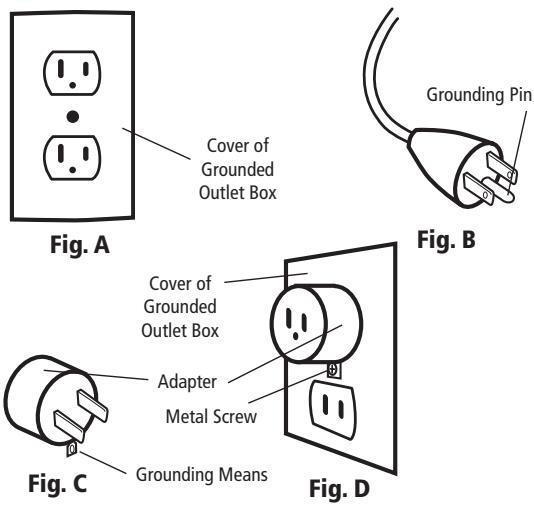
This tool is intended for use on a circuit that has an outlet that looks like the one illustrated in Figure A following. It has a grounding plug that looks like the one in Figure B following. A temporary adapter, which looks like the adapter illustrated in Figures C & D following, may be used to connect this plug to a 2-pole receptacle as shown in Figure D if a properly grounded outlet is not available. The temporary adapter should be used only until a properly grounded outlet can be installed by a qualified electrician. The green-colored rigid ear, lug, and the like, extending from the adapter must be connected to a permanent ground such as a properly grounded outlet box.
Installation
- Carefully unpack the Drill Doctor® drill bit sharpener and set it on a table. Check to see that no damage has occurred in shipment. Check all packing material to be sure that all parts are present. See User's Guide for part identification diagram.
- The unit is completely assembled; the Drill Doctor® only needs to be placed on a flat stable tabletop.
- Connect to properly wired outlet and grounded (110V or 230V) outlet.
Safety Markings
15,000 RPM 110-120V - 60Hz - 1.75A max / 0.77A nom
-or- 220-230V - 50Hz - 0.88A max / 0.4A nom
AC Only All electrical symbols
Tool mass including detachable parts.
(1) 360X unit
(1) User's Guide
(1) Wheel wrench
WARNING:
Some dust created by power sanding, grinding, miscellaneous construction activities, as well as contents from the machine including the molding, wiring, grinding wheel, or any other parts may contain chemicals known to the State of California to cause cancer, birth defects or other reproductive harm and can be hazardous to your health.
Service
Ets V Dehaye sa-nv
Rue G Moreaustraat,
B-1070 Brussels
Belgium D-33104
Phone: +32 (0)2 521 47 49
FAX: +32 (0)2 522 02 68
Email: info@drilldoctor.be
DECLARED DUAL-NUMBER SOUND POWER LEVEL in accordance with ISO 3744
Declared sound power value: L_d = L + K
where the maximum K_1 = 3.0 dB (per ISO 11201)
Manufacturer: Professional Tool Mfg.
Model: DD360X
Rated Input: 78W Hz: 50 Source: 230VAC
Measure Surface sound pressure level, L_pAf , in decibels:
Un-Loaded: 72.4
Measured A -weighted sound power level,
L_W (ref. 1 pW), in decibels:
Un-Loaded: 85.4
Uncertainty Correction, K_W , in decibels: 0
DECLARED DUAL-NUMBER NOISE EMISSION VALUES in accordance with ISO 4871
Declared noise emission value: L_d = L + K
where the maximum K = 3.0dB (per ISO 11201)
Manufacturer: Professional Tool Mfg.
Model: DD360X
Rated Input: 78W Hz: 50 Source: 230VAC
A-weighted emission sound pressure level, L_pA
(ref. 20 Pa ) at the operator's position, in decibels:
Un-Loaded: 77.1 Loaded: 86.9
Uncertainty, K_ A , in decibels: 3.0
At 1m Distance: Un-Loaded: 72.7 Loaded: 82.5
Peak C-weighted emission sound pressure level, L_pC
peak (ref. 20 Pa ) at the operator's position, in decibels:
Un-Loaded: 76.2 Loaded: 84.9
Uncertainty, K_ C , peak, in decibels: 3.0
At 1m Distance: Un-Loaded: 71.7 Loaded: 79.8
DECLARED DUAL-NUMBER SOUND POWER LEVEL in accordance with ISO 3744
Declared sound power value: L_d = L + K , where the maximum K_1 = 3.0dB (per ISO 11201)
Manufacturer: Professional Tool Mfg.
Model: DD360X
Rated Input: 78W Hz: 60 Source: 115VAC
Measure Surface sound pressure level, L_pAf in decibels:
Un-Loaded: 68.9
Measured A -weighted sound power level, L_W (ref. 1 pW), in decibels:
Un-Loaded: 81.9
Uncertainty Correction, K_W , in decibels: 0
DECLARED DUAL-NUMBER NOISE EMISSION VALUES in accordance with ISO 4871
Declared noise emission value: L_d = L + K where the maximum K = 3.0dB (per ISO 11201)
Manufacturer: Professional Tool Mfg.
Model: DD360X
Rated Input: 78W Hz: 60 Source: 115VAC
A-weighted emission sound pressure level, L_pA
(ref. 20 Pa ) at the operator's position, in decibels:
Un-Loaded: 77.0 Loaded: 84.1
Uncertainty, K_ A , in decibels: 3.0
At 1m Distance: Un-Loaded: 72.7 Loaded: 80.5
Peak C-weighted emission sound pressure level, L_pC peak (ref. 20 Pa ) at the operator's position, in decibels:
Un-Loaded: 74.9 Loaded: 82.6
Uncertainty, K_ C peak, in decibels: 3.0
At 1m Distance: Un-Loaded: 73.0 Loaded: 78.5
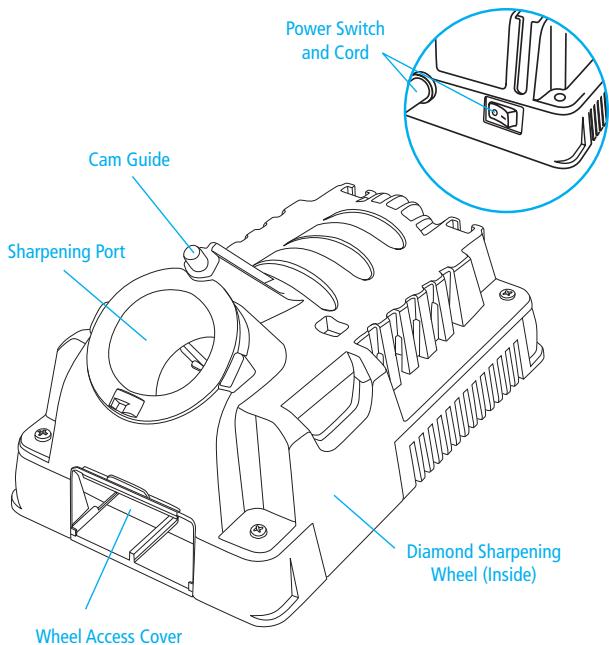
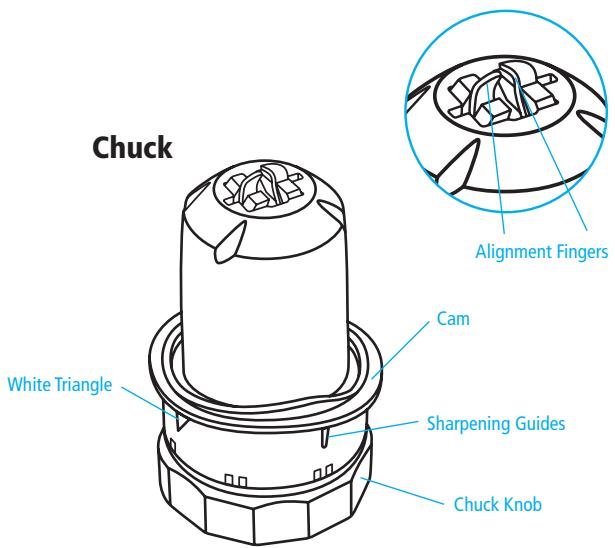
Getting to Know Your Drill Doctor
Identifying Basic Drill Bits
The Drill Doctor is most efficient when used to sharpen a drill bit's original point angle. With its standard Diamond Sharpening Wheel it will sharpen high-speed steel, cobalt, TiN-coated, carbide and masonry drill bits.
The Model 360X has been designed and engineered to sharpen the most common drill point types:
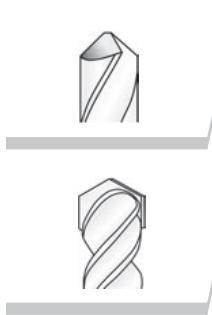
Standard Point
This general-purpose point (normally 118^ ) is used for drilling softer materials like cold rolled steel, aluminum, and wood.
Masonry Bits
Masonry bits have a carbide insert at the point and are used for drilling materials like cement, brick, and ceramic.
Anatomy of a Drill Bit
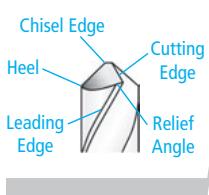
It is important to understand that each bit has a Chisel Edge, a Cutting Edge, a Heel, a Relief Angle, and a Leading Edge. (The Leading Edge will be important in bit alignment.)
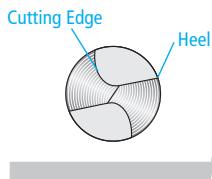
When viewing a well-sharpened bit from the end, the entire surface from the Cutting Edge to the Heel will have a finely ground surface without ridges or indentations. The Heel will always be lower than the Cutting Edge; this is called positive relief.
The Drill Doctor® Sharpening Process
The sharpening process includes 2 easy procedures:
- Aligning the bit in the Chuck.
- Sharpening the bit.
Aligning the Drill Bit
This makes sure that the Drill Doctor creates the right geometry. It also sets the bit so that only a small amount of the tip is taken off during sharpening.
(See page 14-15 to align and sharpen a masonry drill bit.)
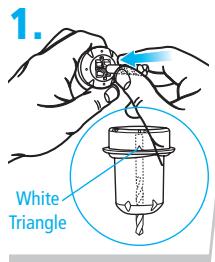
Insert bit in Chuck.
Hold the Chuck with the White Triangle facing up. Insert the bit into the front of the Chuck, leaving 1/2 of bit sticking out the front.
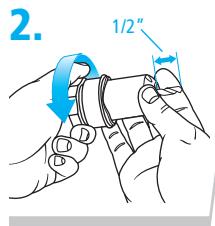
Tighten Chuck slightly.
Tighten the Chuck by turning the Chuck Knob clockwise just to the point where the bit is snug but can still be slid in and out. The Chuck should not be completely tightened until we set the bit depth for sharpening in Step 4.
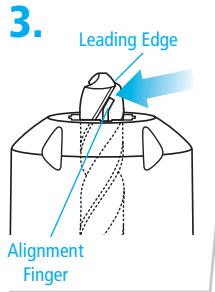
Align Leading Edge.
Rotate the drill bit in the Chuck so that the Leading Edge of the flute is against the Alignment Finger. This aligns the bit for accurate sharpening. Note: A good test to see if the Chuck is tightened the correct amount is to make sure it moves when you pull on it with your fingers, but will not fall out when you turn the Chuck upside down.
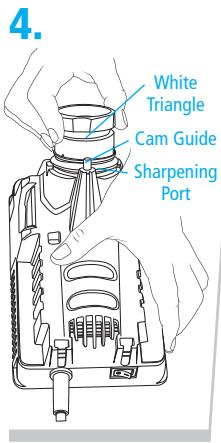
Set depth of bit and tighten Chuck.
With the machine turned off, align the White Triangle on the Chuck with the Cam Guide. While keeping the Chuck against the Cam Guide on the 360X, insert the Chuck into the Sharpening Port. Push the Chuck all the way into the Port. Tighten the Chuck Knob while it's still in the Sharpening Port. Remove the Chuck and make sure it is tight so the bit won't move when you sharpen it. The bit should not move in the Chuck. Your depth is now set and you are ready to sharpen.
Sharpening the Bit
Before sharpening you should know:
- Keep the Cam in contact with the Cam Guide as you sharpen—push the Chuck straight into the Port.
Only light pressure is required. - You will hear a grinding noise (zzzzzzzz) as you complete each half-turn and each side of the bit face is ground.
- The Chuck will rock as you turn it and the Cam rides on the Guide.
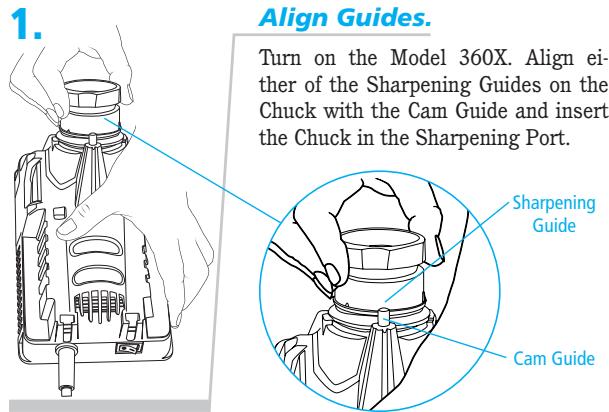
2.
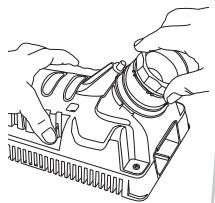
Turn until sharp.
Making sure that the Chuck rests firmly against the Cam Guide, turn the Chuck one half-turn to the right—to the other Sharpening Guide. Turn from Guide to Guide in a smooth and even motion until the bit is sharp. To sharpen both sides of the bit evenly, always use an even number of half-turns. The number of half-turns needed to sharpen the bit depends on its size.
Turn the Chuck an even number of half-turns with light inward pressure:
3/32-inch bits—use 2 to 4 half-turns,
1/8-inch bits—use 4 to 6 half-turns,
3/8-inch bits—use 16 to 20 half-turns.
Note: Use just enough pressure to keep the Cam against the Cam Guide. Let the machine do the sharpening.
Identifying Correctly Sharpened Drill Bits (and what to do with those that aren't!)
Correctly Sharpened Bits
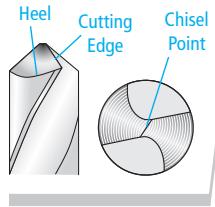
The entire surface from the Cutting Edge to the Heel will have a finely ground surface without ridges or indentations. The Heel will always be lower than the Cutting Edge (positive relief).
Problem
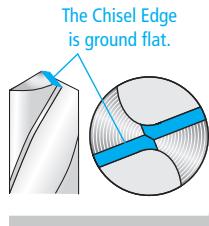
Cause
Alignment Fingers did not position the drill bit properly in the aligning process (pages 10-11).
Solution
Realign the bit by carefully following steps 1 through 4 on page 10-11.
Problem
Surface of the bit isn't smooth and/or heavy grinding sound.
Cause
Too much drill bit is sticking out of the end of the chuck.
Solution
Realign the bit. During the re-alignment process, be sure to keep the White Triangle against the Cam Guide as you insert the Chuck into the Sharpening Port to set the depth of the bit. The bit should be pushed up inside the Chuck and should rotate slightly as the Chuck is plunged into the Sharpening Port and contacts the Diamond Sharpening Wheel. Push until the Chuck is fully inserted into the Port.
Problem
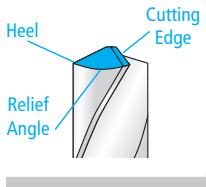
Heel same height or higher than the cutting edge
Cause
Bit is misaligned or the Cam failed to stay in contact with the Cam Guide during sharpening.
Solution
Carefully repeat the alignment and sharpening procedure, making sure to use light pressure to keep the Cam in contact with the Cam Guide during sharpening.
Problem
Bit backing out or slipping out of the jaws when you are sharpening
Cause
Too much pressure during sharpening, dirty Chuck, or Chuck not tightened enough.
Solution
Use just enough pressure to keep the Cam in contact with the Cam Guide. If the bit continues to slip, clean the Chuck as described on Page 19.
Sharpening Bits of Different Lengths and Diameters
Drill Bits Of Different Sizes
Too many rotations of a small-diameter bit may result in incorrect sharpening and too few on a large bit may not sharpen enough.
3/32-inch bits—use 2 to 4 half-turns,
1/8-inch bits—use 4 to 6 half-turns,
3/8-inch bits—use 16 to 20 half-turns.
Large Drill Bits
Large drill bits (3/8" to 1/2") will require more half-turns of the Chuck. A well-sharpened bit will have a smooth surface from Cutting Edge to Heel. It may take two or three complete sharpenings (repeat all steps) to re-sharpen a very dull or chipped large drill bit. A 1/2" bit will need a minimum of 20 half-turns.
Short Drill Bits
The new Chuck design on the 360X enables you to sharpen short bits as easily as longer ones. Simply align the bit in the Chuck as normal. Then sharpen the bit using very light pressure and fewer half-turns. The bit should only briefly contact the Sharpening Wheel. Note that it is OK for the Chuck Fingers to come into contact with the Sharpening Wheel. This will not damage the Chuck.
Aligning and Sharpening Masonry Drill Bits
To sharpen a masonry bit, you do not turn the Chuck. Instead you insert the Chuck until it touches the wheel, remove, and repeat on the other side.
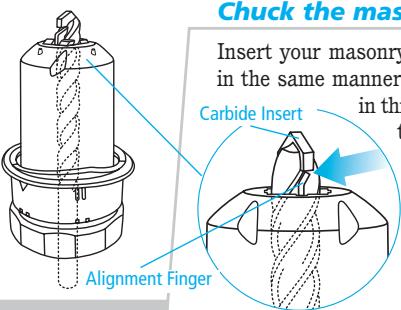
1.
Chuck the masonry bit.
y bit in the Chuck as other bits, but is case, make sure the carbide insert is touching the end of the Alignment Fingers as shown.
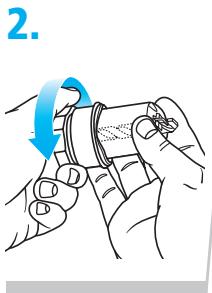
Tighten.
Tighten the Chuck while checking that the insert is touching the end of the Alignment Fingers. Tighten until the bit no longer moves in the chuck
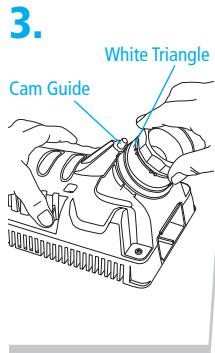
Plunge until sharp.
Align the White Triangle on the Chuck with the Cam Guide on the machine. Plunge the Chuck into the Sharpening Port until it contacts the Sharpening Wheel. Remove the Chuck and rotate one half-turn to the opposite White Triangle. Plunge the Chuck into the Sharpening Port again to sharpen the other side of the carbide insert. Start with four plunges. Inspect the bit. Then sharpen more if needed.
Questions and Answers
1. Question:
Why was my drill bit sharpened improperly?
Answer:
The most common cause of improper sharpening is improper drill bit alignment.
Key causes are:
- Chuck not pushed all the way into the Sharpening Port.
- Drill not aligned in the Alignment Fingers correctly.
- Chuck is dirty and the bit slipped out of alignment. See page 19, "Cleaning the Chuck," to correct.
- Too many rotations of a small-diameter bit results in incorrect sharpening, and too few on a large bit may not sharpen enough. See pages 13-14, "Drill Bits of Different Sizes." In order to correct these problems be sure the Chuck is all the way in the Sharpening Port with the Guides correctly matched up.
2. Question:
When I aligned the drill bit and sharpened it, why was no material removed?
Answer:
This happens when the bit is not protruding out of the Chuck far enough. The Chuck may not have been tightened enough and the bit may have slipped in the Chuck. Making sure it is sticking out 1/2 , carefully realign the bit in the Chuck and set its depth in the Sharpening Port again.
3. Question:
I sharpened the bit. Why will it not cut?
Answer:
This happens when the Heel on the bit is higher than the Cutting Edge (negative relief). Realign the drill bit and resharpen in the Sharpening Port.
-
Maintain consistent inward light pressure during the half-turns of the Chuck.
-
You may have a specialty drill bit. Slow and fast spiral, helix, turbo flutes, and raised margin drill bits are considered specialty bits. Your Drill Doctor does not sharpen these types of bits.
- Follow the normal sharpening procedure. You may have to realign and sharpen more than once to ensure that the bit is sharpened correctly. If the problem persists contact the Technical Service Department.
4. Question:
Why is the drill point off center?
Answer:
If the tip of the drill bit appears to be sharpened off center, check the following items:
- You may not have completed an even number of halfturns when you sharpened and one face of the bit was ground more than the other. Always use an even number of half-turns when you sharpen.
Make sure the Chuck is clean.
Make sure the bit is not loose in the Chuck. - During the sharpening process be sure to keep the same pressure on each half-turn.
5. Question:
What can I do about flat spots on the bit point between the Cutting Edge and the Heel?
Answer:
The flat spots on a sharpened bit are the result of an incomplete or paused half-turn of the Chuck in the Sharpening Port. To correct, apply light, inward pressure and rotate the Chuck smoothly while sharpening. Be sure to complete the half-turns.
6. Question:
Why is the Chisel Edge on my drill bit flat?
Answer:
During the alignment process the Alignment Fingers may have been gripping the high points of the drill bit. Reinsert the drill bit in the Chuck making sure that the Alignment Fingers grip the narrowest section of the bit (the flutes) and the Leading Edge of the Flute is against the Alignment Finger. (See pages 10-11.)
7. Question:
Why does the drill bit back up into the Chuck during the sharpening procedure?
Answer:
Make sure the bit is tight in the Chuck before sharpening. Your Chuck may be dirty. Clean the Chuck as described on page 19.
8. Question:
Can I change a 135^ drill bit into a 118^ drill bit?
Answer:
You can change the point angle of any drill bit from 135^ to 118^ by using normal sharpening procedures.
Drill Doctor® Maintenance
After sharpening 20 to 25 drill bits, the drill bit grinding dust will accumulate in the grinding compartment. Grinding particles will promote wear in the Sharpening Port and Chuck, so cleaning on a consistent basis can add life to your machine. Before any maintenance or cleaning is performed, be sure to disconnect your Drill Doctor.
Removing the Wheel Access Cover
With the Drill Doctor unplugged, use your nail or the tip of your finger to pull the Wheel Access Cover forward. It will come completely off for easy access. To close, insert the Cover in the slots and snap it back into place.
Cleaning Your Drill Doctor
With the Drill Doctor unplugged, shake accumulated drill bit grinding dust from behind the Wheel Access Cover into a disposable container. Remove dust particles around the wheel with a small, dry brush. Dispense of the container and drill bit dust in a safe and environmentally approved manner. With a dry cloth wipe the inside and outside of the Sharpening Port to remove any grinding dust that may have accumulated. A standard 1" vacuum hose works equally well.
Cleaning the Chuck
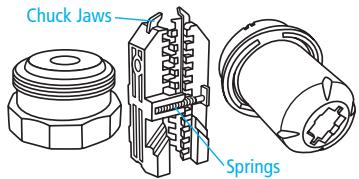
Unscrew the Knob from the body and clean both threads with a soft brush or cotton swab. Re-assemble the Chuck and operate
the Knob through its travel to ensure it turns freely. When the Knob is removed, be careful not to lose the small springs that separate the Chuck Jaws.
Determining if Replacing the Diamond Grinding Wheel Is Required
You can double the life of the Diamond Sharpening Wheel by reversing it before you replace it. The Diamond Sharpening Wheel supplied with the Drill Doctor is designed to give you long and trouble free service, with an average of more than 200 sharpenings for 3/32'' to 1/2'' drill bits.
The Sharpening Wheel may need to be changed if:
- Sharpened drill bits burn or turn blue no matter how fast or slow you rotate the Chuck.
- When touching the Sharpening Wheel (with the machine unplugged), the lower portion feels too smooth (nonabrasive).
- When sharpening the drill bit, it takes too many halfturns to sharpen.
Contact the store or dealer where you purchased the Drill Doctor, or contact Drill Doctor directly, to purchase a replacement Sharpening Wheel.
Reversing or Replacing Your Diamond Sharpening Wheel
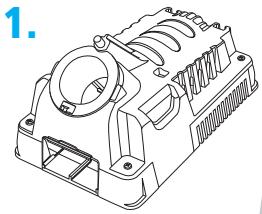
Disconnect your Drill Doctor, make sure machine is cool, then remove Wheel Access Cover.
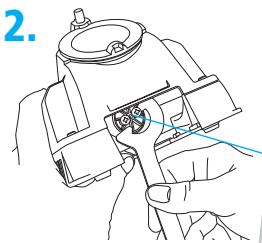
Use wrench supplied with your Drill Doctor to lock sharpening wheel in place.
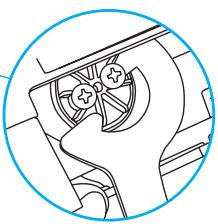
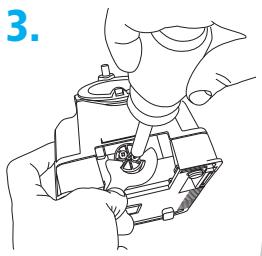
With Phillips-head screwdriver, remove the two screws and wheel retainer.
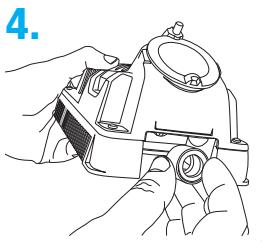
Remove worn wheel by twisting slightly and lifting wheel off shaft. Install new wheel and reinstall wheel retainer and screws. Don't over-tighten mounting screws. Remove the wrench and replace the Wheel Access Cover before turning on the machine.
Accessories
Order Accessories through our website: www.drilldoctor.com, or by contacting us at the phone number listed on the Warranty page (page 22), or at the retailer where you purchased your Drill Doctor®.
Standard Diamond Sharpening Wheel (180 grit)
DA31320GF
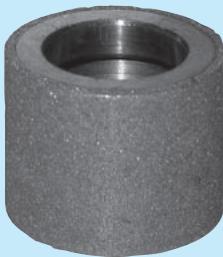
Coarse Diamond Sharpening Wheel (180 grit)
DA31325GF
WARNING:
The use of any accessory other than one recommended in this user's manual may present a risk of personal injury.
USA and Canada Only
Your Drill Doctor is warranted to be free of defects due to workmanship or design for 1 year from the purchase date. If your Drill Doctor fails to operate, or if any operating problem occurs, contact Drill Doctor Technical Service at:
In North America: 1-800-418-1439
(Pleases call 8:00 AM-3:30 PM Pacific Time.)
Outside North America: +32 (0) 25214749
Do not return this product to the store where you purchased it. Do not attempt any service or repairs other than those suggested by a Drill Doctor Technical Service Representative (TSR). During the period of warranty, Drill Doctor will, at our discretion, repair or replace this product free of charge and refund postage or shipping charges providing that the following conditions are met:
- A copy of the proof of purchase is provided.
- The product has been operated for the purpose intended as described in the operating instructions and has not been abused or mishandled in any way.
- The product has not been dismantled and no service or repairs have been attempted other than those suggested by a Drill Doctor TSR.
- The Return Goods Authorization number (RGA #) (assigned by the Drill Doctor TSR) is written on the shipping label. Please make certain to package items in such a way as to eliminate further damage during shipping. Ship via a traceable carrier and properly insure the package.
No CODs are accepted. Unapproved shipping charges are nonrefundable.
Complete and mail back the Warranty Registration or register online (USA and Canada only), at: www.DrillDoctor.com
Please Fill in the Following for Your Records.
Drill Doctor Model #:
Date of Purchase: / /
Purchased from:
Contenido
Hank O'Dougherty
Presidente, Drill Doctor
Drill Doctor Modelo No.
Fabricant: Professional Tool Mfg.
Modèle: DD360X
Entree nominale:78WHz:50 Source:230VCA
Fabricant: Professional Tool Mfg.
Modèle: DD360X
Entree nominale:78W Hz:50 Source:230VCA
Fabricant: Professional Tool Mfg.
Modèle: DD360X
Entree nominale:78W Hz:60 Source:115VCA
Fabricant: Professional Tool Mfg.
Modèle : DD360X
Entrée nominale: 78 W Hz: 60 Source: 115 VCA
The Drill Bit Sharpener
Professional Tool Manufacturing, LLC
P.O.Box 730
210 E. Hershey St.
Ashland, OR 97520
USA
In N. America/ En Norteamérica/
Drill Doctor® is a registered trademark of
Professional Tool Manufacturing, LLC.
Drill Doctor® es unamarca registrada de
Professional Tool Manufacturing, LLC.
Professional Tool Manufacturing, LLC.