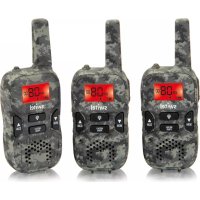
WTF 736 - Talkie Walkie SWITEL - Free user manual and instructions
Find the device manual for free WTF 736 SWITEL in PDF.


| Product type | PMR446 two-way radio |
| Brand | SWITEL |
| Model | WTF 736 |
| Power supply | 8 AAA NiMH rechargeable batteries 1.2 V |
| Included power adapter | CSD0900200G, output 9.0 VDC 200 mA |
| Charging time | 10 to 14 hours (first charge) |
| Maximum range | Approx. 8 km line of sight |
| Output power | 0.5 W |
| Number of channels | 8 PMR446 channels |
| Analog calling codes (CTCSS) | 38 codes (1-38) |
| Digital calling codes (DCS) | 83 codes (1-83) |
| VOX function (hands-free) | Yes, 3 sensitivity levels + off |
| Dual channel monitoring | Yes, with separate calling codes |
| Call signal | 5 selectable ringtones |
| Vibration alert | Yes, selectable |
| Screen backlight | Yes, approx. 5 seconds |
| Timer | Yes, with interval function |
| Roger Beep | Enable/disable |
| Key lock | Yes, prevents accidental changes |
| Maintenance | Clean with a soft, lint-free cloth, no solvents |
| Safety | Do not use near medical devices; use only the provided power adapter |
| Warranty | 24 months (excluding rechargeable batteries) |
| Included accessories | 2 transceivers, 2 belt clips, 1 power adapter, 8 rechargeable batteries, user manual |
Frequently Asked Questions - WTF 736 SWITEL
User questions about WTF 736 SWITEL
0 question about this device. Answer the ones you know or ask your own.
Ask a new question about this device
Download the instructions for your Talkie Walkie in PDF format for free! Find your manual WTF 736 - SWITEL and take your electronic device back in hand. On this page are published all the documents necessary for the use of your device. WTF 736 by SWITEL.
USER MANUAL WTF 736 SWITEL
COMMUNICATIONPRODUCTS
Walkie-Talkie Set
Kit talkie-walkie
Operating Instructions
SWITEL
Bedienungsanleitung 3
Mode d'emploi 18
Istruzioni per l'uso 33
Operating Instructions 48
Declaration of Conformity 64
1DCS: Digital Coded Squelch = Selectivruf
2CTCSS: Continuous Tone Coded Squelch System = Selectivruf
Monitoraggio dual watch
Please read this operating instruction manual thoroughly.
Intended use
These walkie-talkies have been conceived for communication with other walkietalkies complying to the same standards. Any other use is considered unintended use. Unauthorized modification or reconstruction is not permitted. Under no circumstances open the devices or complete any repair work yourself.
Installation location
Prevent excessive exposure to smoke, dust, vibration, chemicals, moisture, heat and direct sunlight.
Do not use the devices in potentially explosive areas.
Power adapter plug

Attention: Only use the power adapter plug supplied because other power supplies could damage the devices. Ensure access to the power adapter plug is not obstructed by furniture or such.
Rechargeable batteries

Attention: Never throw batteries into a fire. Only use batteries of the same type. Pay attention to correct polarity. Incorrect polarity of the batteries represents a risk of explosion during charging.
Medical equipment

Attention: Never use the walkie-talkies in the vicinity of medical equipment. Effects on such equipment cannot be fully ruled out. Walkie-talkies can cause an unpleasant humming sound in hearing aids.
Disposal
In order to dispose of your device, take it to a collection point provided by your local public waste authorities (e.g. recycling centre). The adjacent symbol indicates that the device must not be disposed of in normal domestic waste! According to laws on the disposal of electronic and electrical devices, owners are obliged to dispose of old electronic and electrical devices in a separate waste container.
Batteries must be disposed of at the point of sale or at the appropriate collection points provided by the public waste authorities.
Packaging materials must be disposed of according to local regulations.


2 Preparing the Walkie-Talkies
Safety information

Attention: It is essential to read the Safety Information in Chapter 1 before starting up.
Checking the package contents
The package contains:
-
two walkie-talkies with belt clip
-
one power adapter plug
eight rechargeable batteries
- an operating manual
Attaching/Detaching the belt clip
Slide the belt clip in the guide from the top until it audiably snaps into place. To detach the belt clip, prize the fastening tab up a little with your fingernail and slide the belt clip upwards.
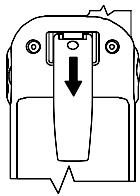
Preparing the Walkie-Talkies
Inserting the batteries
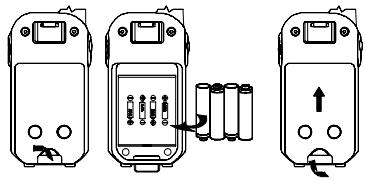
Open the battery compartment. Insert the rechargeable batteries in the open battery compartment. Only use batteries of the type 1.2 V AAA NiMH. Pay attention to correct polarity! Close the battery compartment.

Remove the belt clip beforehand, if necessary; Page 49.
Charging the walkie-talkies
For safety reasons, only use the power adapter plug supplied.

Before using the walkie-talkies for the first time, charge them for at least 10-14 hours.
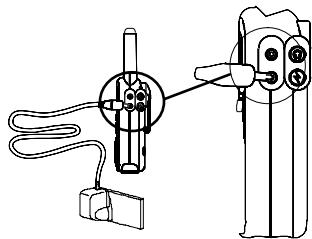

Use the power adapter plug labelled with no. CSD0900200G and output data 9.0V_DC200mA .

Do not charge the walkie-talkies with charging units from other manufacturers. To ensure an optimal service life of the batteries, only stop the charging process when the walkie-talkie is fully charged.
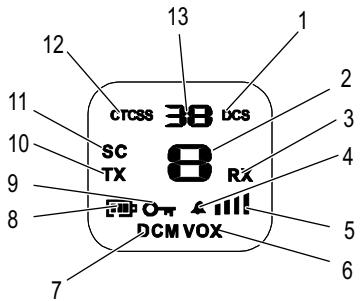
The current battery charge status is indicated in the display:
Full

Half empty

Low

Empty


The walkie-talkie must be charged as soon as the indicator flashes in the display.
3 Operating Elements
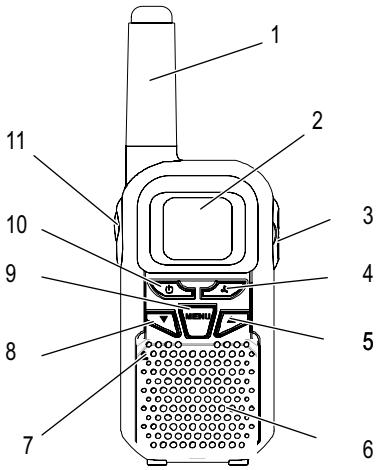
The features and functions available on the walkie-talkies are explained in the diagrams below.
The buttons in this operating manual are illustrated with a uniform contour. Therefore, slight deviations in the appearance of the symbols on the buttons compared to those depicted here are possible.
Walkie-talkie
- Antenna
- Display
- Headset, microphone and charging socket
- Transmit ring tone / Stopwatch
- Increase setting
- Loudspeaker
- Microphone
- Decrease setting
- Menu
- On/Off
- PTT button
Display
- DCS code
- Channel
- Receiving
- Call and vibration alarm Call alarm Vibration alarm
- Volume control
- VOX mode activated
- Dual-channel monitoring activated
- Battery capacity indicator
- Key lock activated
- Transmitting
- Channel scanning
- CTCSS² code
- CTCSS / DCS code number
4 Menu Structure
You can start programming functions by pressing the MENU button to open the menu. Confirm selections by pressing the PTT button.
| 1 x MENU | Select channel |
| 2 x MENU | Select CTCSS² code |
| 3 x MENU | Select DCS¹ code |
| 4 x MENU | VOX sensitivity 1 - 3 or OF |
| 5 x MENU | Channel scanning |
| 6 x MENU | Channel scanning with CTCSS code |
| 7 x MENU | Channel scanning with DCS code |
| 8 x MENU | Ringing tone 01 - 05 |
| 9 x MENU | Select call signal / vibration signal |
| 10 x MENU | Roger Beep ON / OF |
| 11 x MENU | Key tone ON / OF |
| 12 x MENU | Dual channel monitoring, channel 1 - 8 / OF |
| 13 x MENU | Dual channel monitoring, CTCSS |
| 14 x MENU | Dual channel monitoring, DCS |
5 Operating the Walkie-Talkies
Description of operating sequences in the manual
| PTT | Press the button depicted |
| PTT | Press and hold the button depicted |
| PTT | Release the button depicted |
| ON | Text in the display |
| Speak into the microphone |
1DCS: Digital Coded Squelch = Selective call
2CTCSS: Continuous Tone Coded Squelch System = Selective call
Switching the walkie-talkie on/off

Switch the walkie-talkie on

The channel last set and the CTCSS/DCS code then appear.

Switch the walkie-talkie off

If you are not going to use the walkie-talkie for a longer period, we recommend removing the batteries.
Volume control

Increase or reduce volume
Transmitting and receiving
Transmitting

Transmit

Hold the walkie-talkie approx. 5-7 cm from your mouth and speak at a normal volume. In order to talk to other subscribers, the respective walkie-talkies must be set to the same channel and CTCSS/DCS code.
Receiving

Receive

Radio signals cannot be received when the PTT button is being pressed.
Selecting a channel
PMR446 (Private Mobile Radio) walkie-talkies can be used throughout Europe free of registration and call charges. There are 8 radio channels available within the frequency range 446.000 MHz to 446.100 MHz.
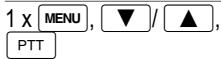
Select the channel and confirm it

Every process is automatically cancelled if there is no input within 5 seconds.
| Channel | Frequency (MHz) | Channel | Frequency (MHz) |
| 1 | 446.00625 | 5 | 446.05625 |
| 2 | 446.01875 | 6 | 446.06875 |
| 3 | 446.03125 | 7 | 446.08125 |
| 4 | 446.04375 | 8 | 446.09375 |
Select DCS ^1 /CTCSS ^2 code (squelch)
There are 38 analogue (CTCSS 1 - 38) and 83 digital (DCS 1 - 83) squelch codes available per channel. It is only possible to communicate using the walkie-talkies when they are each set to the same channel and CTCSS/DCS code.

The CTCSS/DCS codes are transmitted as inaudible signals together with the standard voice communication. When received, the voice communication signal is only transferred to the loudspeaker when the channel and CTCSS/DCS code set on the receiver are identical to that of those received (settings on the transmitter). If, by coincidence, another subscriber is using the same channel and CTCSS/DCS code, change to a free channel together with the party being called.
| 2 x MENU | Activate CTCSS code programming mode |
| ▼ / ▲ PTT | Select the CTCSS code and confirm it or |
| 3 x MENU | Activate DCS code programming mode |
| ▼ / ▲ PTT | Select the DCS code and confirm it |
1DCS: Digital Coded Squelch = Selective call
2CTCSS: Continuous Tone Coded Squelch System = Selective call
Operating the Walkie-Talkies

An exception here is CTCSS/DCS code 0 (zero). When this setting is set, all calls made on the channel set can be heard. In order to participate in the radio communication, you must set the corresponding CTCSS/DCS code.
Monitor function
The Monitor function enables the search for weak signals on the channel currently set. If you receive an external signal, switch to a free channel. Always communicate with other subscribers on a free channel to prevent interference.
MENU and Start monitoring (press both buttons simultaneously)
END monitoring
VOX^1 (handsfree)
With this function, the walkie-talkie begins to transmit automatically on detecting a voice or a sound without the PTT button needing to be pressed.

When you start to speak, there is a slight delay before the walkie-talkie starts to transmit.
Activating VOX mode
4x [MENu] Select VOX mode
Select the sensitivity
PTT Confirm the selection
There are three sensitivity levels available for operation in VOX mode which can be selected according to the ambient noise.
| 1 | 2 | 3 | OF |
| Loud ambient noise | Normal ambient noise | Low ambient noise | VOX deactivated |
Scanning for a channel
If an active channel is detected, the channel scan stops.
- Press the PTT button to enable radio communication on this channel. The walkie-talkie is set to the channel and channel scanning is ended.
- If you do not press the PTT button, channel scanning is resumed five seconds after no further signal has been transmitted on this channel.
Start / End channel scanning
5x [MENU] / ▲ Start channel scanning
The scanning routine stops at every channel on which a signal is received regardless of the CTCSS/DCS code transmitted with the signal.
6x [MENU, / Start channel scanning with CTCSS2
The scanning process stops when a signal with a CTCSS code is transmitted on the set channel.
7 x [MENU, / Start channel scanning with DCS
The scanning process stops when a signal with a DCS code is transmitted on the set channel.
PTT End channel scanning
Transmitting the ringing tone
The ringing tones indicate to other subscribers that you want to talk to them. A condition for this is that the other subscribers are using the same channel and CTCSS/DCS code.
Transmit the ringing tone
Selecting/Deactivating ringing tones
There are 5 ringing tones available for selection.
8x [MENU Open the menu
V/ ▲, PTT Select a ringing tone and confirm it
1DCS: Digital Coded Squelch = Selective call
2CTCSS: Continuous Tone Coded Squelch System = Selective call
Call alert/ Vibration alert
| 9 x MENU | Open the menu |
| ▼ / ▲ | {(A)} / {(A)}, Select the alarm type |
| PTT | Confirm the selection |
Confirmation signal
The confirmation signal is issued on releasing the PTT button. This signals to the caller that you have ended transmission.
Activating/Deactivating the confirmation signal
| 10 x MENU | Open the menu |
| ▼ / ▲, PTT | Select ON / OF and confirm it |
Key tone on/off
| 11 x MENU | Open the menu |
| ▼ / ▲, PTT | Select ON / OF and confirm it |
Dual-channel monitoring
It is possible to monitor a second channel with CTCSS/DCS code in addition to the currently set channel with CTCSS/DCS code.
Activating dual-channel monitoring
| 12 x MENU | Select dual-channel monitoring |
| ▼ / ▲, PTT | Select the 2nd channel and confirm it |
| 13 x MENU / ▲, PTT | Select CTCSS² for the 2nd channel and confirm it |
| 14 x MENU / ▲, PTT | Select DCS¹ for the 2nd channel and confirm it |
Both channels are scanned for signals. If an active channel is detected, the two-channel scan stops. Channel scanning is resumed when no signal has been transmitted on the channel for two seconds.
Press the PTT button to enable radio communication on this channel.
1DCS: Digital Coded Squelch = Selective call
2CTCSS: Continuous Tone Coded Squelch System = Selective call
Deactivating dual-channel monitoring
12x [MENU]
Select dual-channel monitoring


End dual-channel monitoring
Key lock
The key lock function prevents inadvertent modification of settings.
MENUE
Activate the key lock function
MENU
Deactivate the key lock function
The PTT and buttons are not locked.
Display illumination
The display illumination is activated after pressing any button. Exceptions are the and buttons.

The lighting illuminates for approx. 5 seconds.
Microphone, headset and charging socket

Switch the walkie-talkie off before connecting a microphone, headset or power adapter plug.

Only use the device with approved headsets. If other headsets are used, damage to the device/headset cannot be ruled out.
Stopwatch

Display the stopwatch

Start the stopwatch
While the stopwatch is running

Display the split time
While the split time is displayed

Display/Resume the stopwatch

Reset the stopwatch to "0"

End the stopwatch function
6 In Case of Problems
Should problems arise with the walkie-talkies, please refer to the following information first. In the case of technical problems, you can contact our hotline service, Tel. 0900 00 1675 within Switzerland (Swisscom fees at time of going to print: CHF 2.60/min). In the case of claims under the terms of guarantee, please contact your sales outlet. There is a 2 year period of guarantee.
Problems and solutions
| Problems | Solutions |
| Equipment does not function | - Walkie-talkie is not charged - Key lock has been activated - Walkie-talkie is switched off |
| Transmission is not possible | - Hold the PTT button pressed to transmit - Channel is being used by other subscribers |
| No reception | - Release the PTT button - Volume setting is too low - You are outside the range of reception, change your position - Obstructions such as trees and buildings impair the range - CTCSS/DCS code set is not identical to that of the other party - Channel is being used by other subscribers - Battery charge status too weak |
7 Technical Properties
Technical data
| Feature | Value |
| Output power | 0.5 W |
| Range | Approx. 8 km in open space |
| Charging time | 10 to 14 hours |
| Batteries | AAA NiMH 1.2 V |
Declaration of Conformity
This device fulfils the requirements stipulated in the EU directive: 1999/5/EC directive on radio equipment and telecommunications terminal equipment and the mutual recognition of their conformity. Conformity with the above mentioned directive is confirmed by the CE symbol on the device.
To view the complete Declaration of Conformity, please refer to the free download available on our web site at www.switel.com.

8 Maintenance / Guarantee
Maintenance
Clean the housing surfaces with a soft, fluff-free cloth.
- Never use cleaning agents or solvents.
Guarantee
SWITEL equipment is produced and tested according to the latest production methods. The implementation of carefully chosen materials and highly developed technologies ensure trouble-free functioning and a long service life. The terms of guarantee do not apply to the batteries or power packs used in the products. The period of guarantee is 24 months from the date of purchase.
All deficiencies related to material or manufacturing errors within the period of guarantee will be redressed free of charge. Rights to claims under the terms of guarantee are annulled following intervention by the purchaser or third parties. Damage caused as the result of improper handling or operation, normal wear and tear, incorrect positioning or storage, improper connection or installation or Acts of God and other external influences are excluded from the terms of guarantee. In the case of complaints, we reserve the right to repair defect parts, replace them or replace the entire device. Replaced parts or devices become our property. Rights to compensation in the case of damage are excluded where there is no evidence of intent or gross negligence by the manufacturer.
If your device does show signs of a defect within the period of guarantee, please contact the sales outlet where you purchased the SWITEL device, producing the purchase receipt as evidence. All claims under the terms of guarantee in accordance with this agreement can only be asserted at the sales outlet. No claims under the terms of guarantee can be asserted after a period of two years from the date of purchase and hand-over of the product.
This equipment complies with the European R&TTE directive.
To view the complete Declaration of Conformity, please refer to the free download
available at our web site: www.switel.com.
Service Hotline
In the event of technical problems, you can contact our hotline service,
Tel. 0900 00 1675 within Switzerland (cost via Swisscom at time of going to print:
CHF 2.60/min).