
VYOO - Toaster YOO DIGITAL - Free user manual and instructions
Find the device manual for free VYOO YOO DIGITAL in PDF.


| Product type | Toaster |
| Brand | YOO DIGITAL |
| Model | VYOO |
| Main functions | Browning, Pastry, Defrost, Reheat, Cancel |
| Browning adjustment | 7 levels (1 to 7) |
| Number of slices | 2 (two slots) |
| Power | 1000 W (estimated) |
| Power supply voltage | 220-240 V ~ 50/60 Hz |
| Dimensions (approx.) | 30 × 20 × 20 cm |
| Weight (approx.) | 1.5 kg |
| Material | Stainless steel and plastic |
| Viewing window | Yes, glass |
| Crumb tray | Removable |
| Guide grid | Automatic, adjusts to thickness |
| Safety | Automatic shut-off, safety lever, overheat protection |
| Cleaning | Removable tray, do not immerse |
| Included accessories | None specific |
| Use | Bread, pastries, waffles, frozen pastries |
| Recycling instructions | Compliant with WEEE (2002/96/EC) |
Frequently Asked Questions - VYOO YOO DIGITAL
User questions about VYOO YOO DIGITAL
0 question about this device. Answer the ones you know or ask your own.
Ask a new question about this device
Download the instructions for your Toaster in PDF format for free! Find your manual VYOO - YOO DIGITAL and take your electronic device back in hand. On this page are published all the documents necessary for the use of your device. VYOO by YOO DIGITAL.
USER MANUAL VYOO YOO DIGITAL
When using electrical appliance. Basic safety precautions should always be followed including the following :
- Read all instructions.
- Make sure that your outlet voltage corresponds to the voltage stated on the rating label of the toaster.
- Do not touch hot surface. Use handles or knobs only.
- To protect against electrical shock, do not immerse cord, plug, or any part of the toaster in water or other liquid.
- Close supervision is necessary when it is used by or near children.
- Unplug unit from outlet when not in use and before cleaning.
- Do not operate any appliance with a damaged cord or plug, or in abnormal state. If its main cord is damaged, it must be replaced by the manufacturer : the nearest service agent or a qualified person.
- Do not let the cord hang over edge of table or counter, or touch hot surface.
- Do not place on or near a hot gas or electric burner, or in a heated oven.
- Do not use the appliance for other than its intended use.
- Oversize food, metal foil packages or utensils must not be inserted in the toaster as they may cause fire or electric shock.
- Bread may burn, so coasters must not be used near or below curtains and other combustible materials, and must be watched.
- The use of accessory attachments not recommended by the appliance manufacturer may cause injuries.
- Don't attempt to dislodge food when toaster is in operation • Be sure to take the bread out carefully after toasting so as to avoid injuries • This appliance can be used by children aged from 8 years and above and persons with reduced
Using your toaster
Be sure to make selections for each slot immediately after pressing the toast control lever
- Adjust the itoast shade selector to desired setting (on a scale of 1 to 7)
Note: When using for the first time, select setting 3 Re-ajust the setting to suit personal preference on successive toasting operations. Hint: When toasting thin sliced breads, use a lighter setting than you would normally select.
2. Place the sliced bread or other foods into the slots and press toast control lever down until it locks into place(c) The bread guides will automatically adjust to hold the food place.
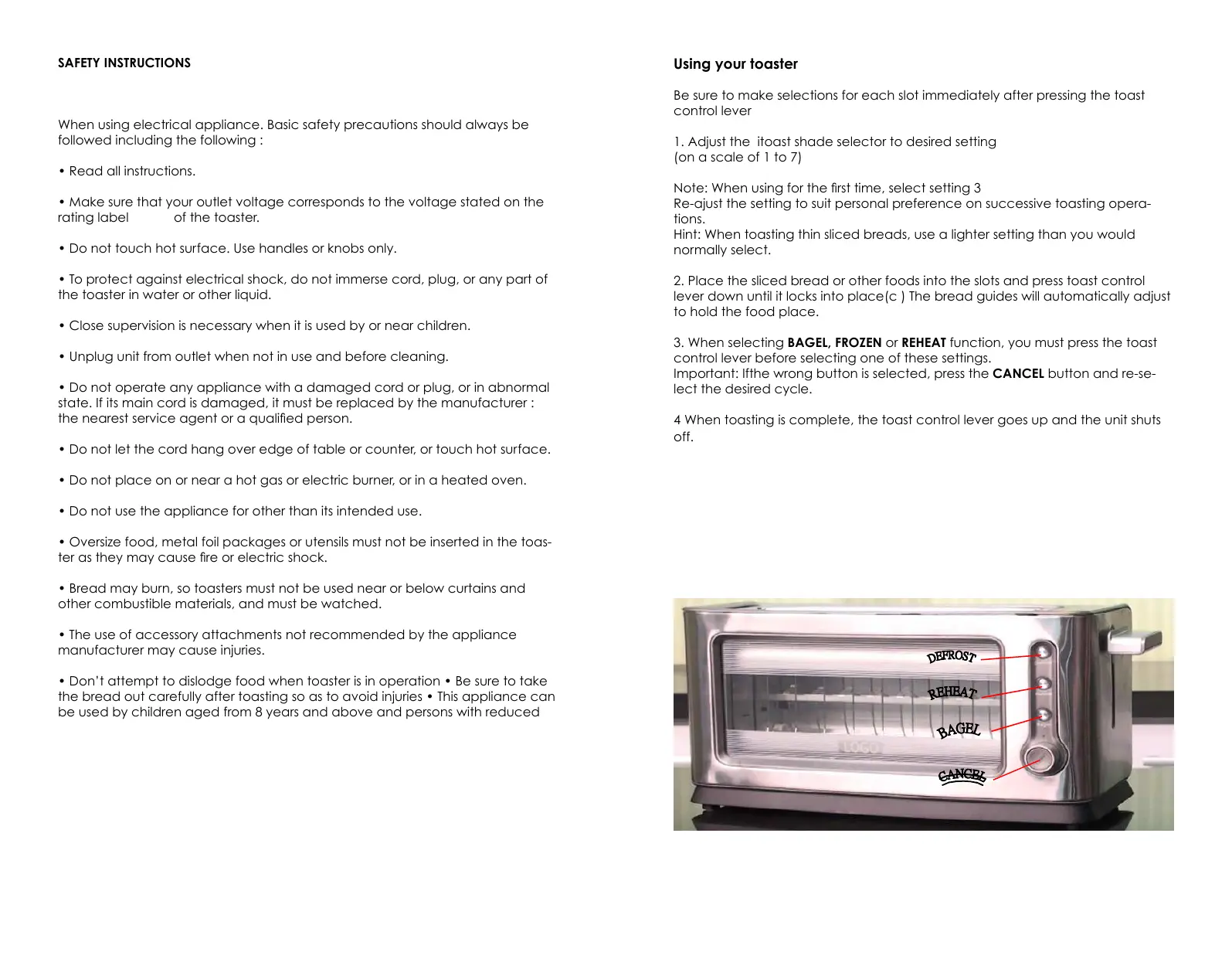
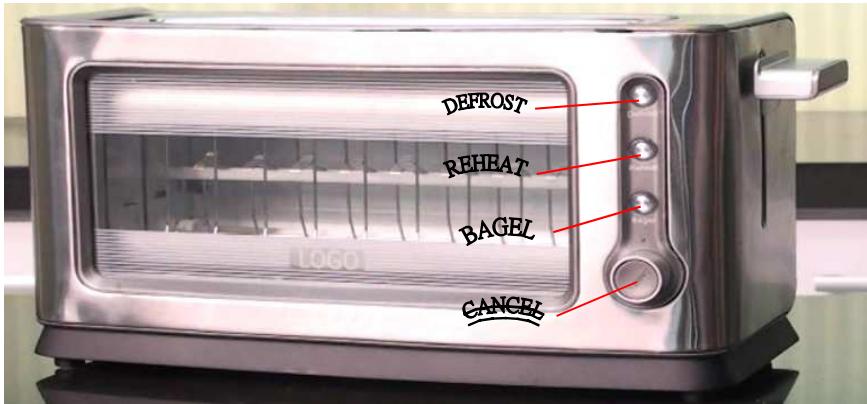
3. When selecting BAGEL, FROZEN or REHEAT function, you must press the toast control lever before selecting one of these settings. Important: If the wrong button is selected, press the CANCEL button and re-select the desired cycle.
4 When toasting is complete, the toast control lever goes up and the unit shuts off.
TROUBLESHOOTING
| PROBLEM | POSSIBLE CAUSE | SOLUTION |
| Unit is not heating or stop heating. | Electrical outlet is not working or toaster is unplugged | Check to make sure outlefs working. Unplug unit and re-insert plug. Test toaster by selecting a setting and depressing the toast control level with nothing in the toaster. |
| Second toasting is too dark. | Setting on toast is too dark | If doing repeated toasting in the toaster, you may want to select a shade slightly lighter than the previous setting. |
| Bread is jammed | The bread may be too thick. | Most breads, pastries and bagels will fit into the slot however, occasionally the bread may be too thick. Simply remove from the toaster and slice thinner |
| Toast is too light or too dark | You may have changed the shade selector and need to re-adjust the setting | Simply reset the shade selector to the desirable setting for the function you wish to use |
| You smell burnt food or smoke is coming out when toaster is being use | Remnants of foodin crumb tray | Refer to the directions in CARE AND CLEANNING section if this booklet. Make sure the crumb tray is empty and wiped clean. Check to make sure no large crumbs are caught in the slot. Turn unplugged unit upside down over the sink and shake to remove crumbs. |
BAGEL FUNCTION
This function toasts bagels or English muffins crispy on the cut side and warm on the outside
-
Ajust the toast shade selector to the desired setting ( 1 through 7 )
-
Insert the bagel into the slot with the cut side towards the inside of the toaster:
-
Press the toast control lever down until it locks into place; the press BAGEL button: The bread guides will automatically adjust to hold the bagel slices in place.
Note: The BAGEL button illuminates until the toast cycle is complete or until the CANCEL button is pressed.
Important: If the wrong button is selected, press the CANCEL button and re-select the desired cycle.
- When toasting is complete, the toast control lever goes up and the units shuts off.
DEFROST FUNCTION
USE to thaw and toast frozen bread, bagels,waffles and pastries.
- Adjust the toast shade selector to the desired setting (1 through 7).
- Insrt the food to be toasted inti the slot or slots.
- Press the toast control lever down until it locks into place.
- Press DEFROST (for bread and waffles) or DEFROST and BAGEL buttons. The button illuminate until the defristing and toasting are complete or until the cancel button is pressed.
Important: if the wrong button is selected, press the CANCEL button and re-select the desired cycle.
- When toasting is complete, the toast control lever goes up and the unit shutt off.
REHEAT FUNCTION
Use to warm foods that have been toasted and have cooled.
- Insert previously toasted food into slot
Note: Do not reheat foods with butter or any toppings.
- There is no need to adjust the toast shade selector.
- Press the toast control lever down until it locks into place.
- Press the reheat button.
Important: if the wrong button is selected, press CANCEL button and re-select the desired cycle.
- When reheating is complete, the toast control lever goes up and the unit shuts off.
HELPFUL HINTS
- For quick foods, such as pop tarts and frozen waffles, follow the instructions on the box.
For the best toasting results, be sue to keep the crumb tray clean. - This toaster has a built-in toast control lever rise. If toasted food does not clear the top of the toaster use the toast control lever to raise the food for easy removal.
- Never stick a fork or fingers into the toasted slot.
- If food becomes jammed, unplug the unit, then raise and lower the toast control lever to loosen the jammed food.
- Never Use metal ustensils to lift food from the toaster or to free jammed food
- To interrupt toasting at any time, press the CANCEL button
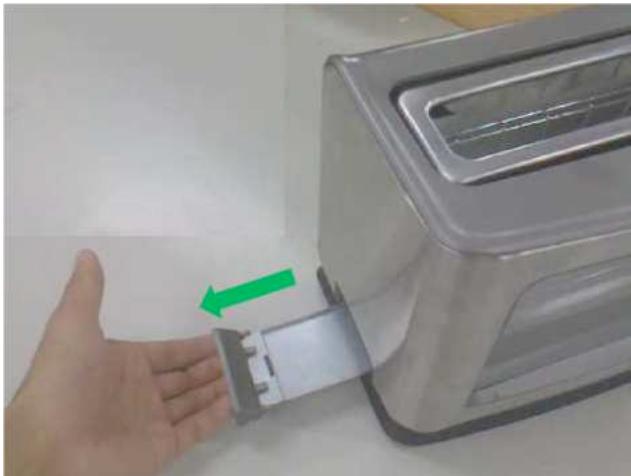
Removeable vrumb tray

The center front of toaster has full view glass window wich is constructive to the client's good visibility into the toast status; the detectable inner glass clamp is helpful for cleaning.
Usage: press the buckle of the inner glass clamp handle while pulling the inner glass clamp out from the toaster.
ENVIRONMENT FRIENDLY DISPOSAL

You can help protect the environment! Please remember to respect the local regulations : hand in the non-working electrical equipments to an appropriate waste disposal center.


Brand : YOO DIGITAL
Model : VYOO
Category : Toaster