
ID-2 - Audio Dock LENCO - Free user manual and instructions
Find the device manual for free ID-2 LENCO in PDF.



| Product type | Audio docking station |
| Brand | LENCO |
| Model | ID-2 |
| Power supply | 230 V AC ~ 50 Hz |
| Power consumption | 13.5 W max |
| Main functions | iPod player and charger, line output, auxiliary input, 2 built-in speakers |
| iPod compatibility | iPod, iPod Mini, iPod Nano, iPod Shuffle (adapters included) |
| Auxiliary input | 3.5 mm jack (AUX IN) for external audio sources |
| Line output | Stereo jack (LINE OUT) for connection to an amplifier |
| Speakers | 2 built-in high-fidelity speakers |
| Included adapters | 5 interchangeable adapters for different iPod models |
| Included cables | Power cord, auxiliary audio cable (3.5 mm) |
| Cleaning | Damp cloth (not wet), no solvents or detergents |
| Safety instructions | Do not expose to water, unplug during storms, do not block ventilation |
| Maintenance | Avoid shocks, dust, extreme temperatures; do not alter internal components |
| Repairability | Entrust to qualified personnel in case of damage (cable, fall, liquid) |
Frequently Asked Questions - ID-2 LENCO
User questions about ID-2 LENCO
0 question about this device. Answer the ones you know or ask your own.
Ask a new question about this device
Download the instructions for your Audio Dock in PDF format for free! Find your manual ID-2 - LENCO and take your electronic device back in hand. On this page are published all the documents necessary for the use of your device. ID-2 by LENCO.
USER MANUAL ID-2 LENCO
PLEASE READ THIS MANUAL THROUGHLY BEFORE
OPERATING THE UNIT.
RETAIN IT FOR FUTURE REFERENCE.
CAUTION
RISK OF ELECTRIC SHOCK
DO NOT OPEN

CAUTION:
TO REDUCE THE RISK OF ELECTRIC SHOCK
DO NOT REMOVE COVER (OR BACK)
NO USER-SERVICEABLE PARTS INSIDE
REFER SERVICING TO QUALIFIED SERVICE PERSONNEL
AVIS
RISQUE DE CHOC ELECTRIQUE/NE PAS OUVRIR

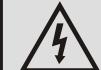
This symbol is intended to alert the user to the presence of uninsulated "dangerous voltage" within the product's enclosure that may be of sufficient magnitude to constitute a risk of electric shock to persons.

This symbol is intended to alert the user to the presence of important operating and maintenance instructions in the literature accompanying the appliance.
WARNING - TO REDUCE THE RISK OF FIRE OR ELECTRIC SHOCK, DO NOT EXPOSE THIS APPLIANCE TO RAIN OR MOISTURE.
CAUTION: TO PREVENT ELECTRIC SHOCK, FULLY INSERT THE POWER PLUG INTO AC MAIN OUTLET.
USE OF CONTROLS OR ADJUSTMENTS OR PERFORMANCE OF PROCEDURES OTHER THAN THOSE SPECIFIED MAY RESULT IN HAZARDOUS RADIATION EXPOSURE.
The rating label is located at bottom of the unit.
The apparatus shall not be exposed to dripping or splashing and that no objects filled with liquid, such as vases, shall be placed on the apparatus.
Important Safety Instructions
When used in the directed manner, this unit has been designed and manufactured to ensure your personal safety.
However, improper use can result in potential electrical shock or fire hazards. Please read all safety and operating instructions carefully before installation and use, and keep these instructions handy for future reference. Take special note of all warnings listed in these instructions and on the unit.
1.Water and Moisture
The unit should not be used near water. For example: near a bathtub, washbowl, kitchen sink, laundry tub, swimming pool or in a set basement.
- Heat and Flame
The unit should be situated away from heat sources such as radiators, heat registers, stoves or other appliances (including amplifiers) that produce heat.
3.Power Source
The unit should be connected to a power supply only of the type described in the operating instructions or as marked on the appliance.
4.Power Cord Protection
Power supply cords should be routed so that they are not likely to be walked on or pinched by items placed upon or against them. It is always best to have a clear area from where the cord exits the unit to where it is plugged into an AC outlet.
5.Cleaning
The unit should be cleaned only as recommended. See the section "Care and Maintenance" of this manual for cleaning instructions.
6.Object and Liquid Entry
Care should be taken so that objects do not fall and liquids are not spilled into any openings or vents located on the product.
- Attachments
Do not use attachments that are not recommended by the product manufacturer.
8.Lightning and Power Surge Protection
Unplug the unit from the wall outlet and disconnect it during these periods of time. This will prevent damage to the product due to lightning and power-line surges.
9.Overloading
Do not overload wall outlets, extension cords, or integral convenience receptacles as this can result in a risk of fire of electric shock.
10.Damage Requiring Service
This unit should be serviced by qualified service personnel when:
A.The power supply cord or plug has been damaged.
B Objects have fallen into or liquid has been spilled into the enclosure.
C.The unit has been exposed to rain.
D.The unit has been dropped or the enclosure damaged.
E.The unit exhibits a marked change in performance or does not operate normally.
11.Periods of Nonuse
If the unit is to be left unused for an extended period of time, such as a month or longer, the power cord should be unplugged from the unit to prevent damage or corrosion.
12.Environment
Attention should be drawn to the environmental aspects of the use of apparatus in moderate climates.
13.Servicing
The user should not attempt to service the unit beyond those methods described in the user's operating instructions.
Service methods not covered in the operating instructions should be referred to qualified service personnel.
Warning:
- The ventilation should not be impended by covering the ventilation openings with items, such as newspaper, table-cloths, curtains, etc.
- No naked flame sources, such as lighted candles should be placed on the apparatus.
- It shall not be exposed to dripping or splashing and that no objects filled with liquids, such as vases, shall be placed on the apparatus.
- Do not place the product in closed bookcases or racks without proper ventilation.
- Where the mains plug or an appliance coupler is used as the disconnect device, the disconnect device shall remain readily operable.
Features
Thank you for purchasing this Digital Music Audio System, it incorporates following features :
- iPod®, iPod® mini and iPod® nano Player / Re-charger
- Interchangeable iPod® Adaptors
- Audio Line-out provides audio signal output when iPod® is docked
Audio line-in for connecting other digital audio player
Built-in 2 High Fidelity Speakers
iPod®, iPod® mini, iPod® nano and iPod® shuffle are trademarks of Apple Computer Inc., registered in the U.S. and other countries.
iPod® not included
Installation
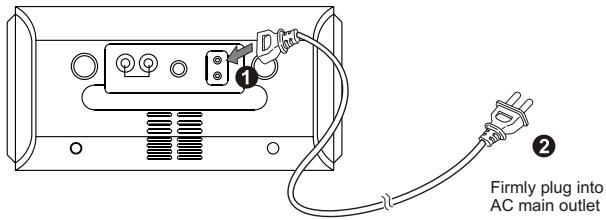
AC power Connection
(1) Plug the power cord firmly into the AC IN socket of the unit.
(2) Connect the AC power plug into AC main outlet.
Description of Parts
Main Unit
Top view
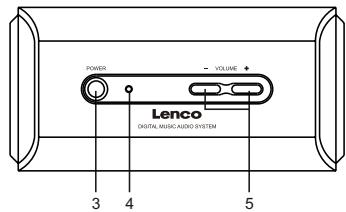
Front view
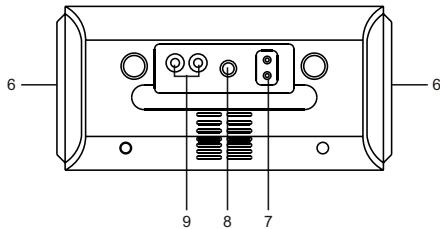
Rear view
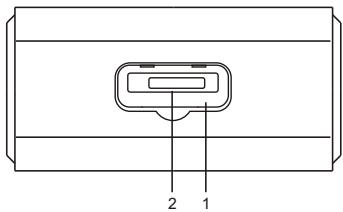
- iPod® docking station
- iPod® docking connector
- POWER button ---- To turn the uniton or off
- Power StatusLED
- VOLUME +1 -button -----Adjust volume level up or down.
- Pair of Speakers
- AC IN socket ---- Forthe connection of power cord
- AUXINjack-----Auxiliary audio signalinput
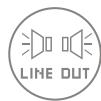
- LINE OUTjacks ---- Audio signal output for the connection of external audio amplifier.
Accessories
Power Cordx 1
- Auxiliary audio signal cable x 1
iPod®Adaptors
Five different adaptors are designed to suit any "dockable" iPod® model to the docking station. Before connecting your iPod® to the system, select and insert the proper adaptor for your iPod® model into the docking station first (refer to following iPod® adaptor table).
iPod adaptor Table :
| Adapters\IPod Versionsl IPod Capacities | nano | mini | photo | 3G | 4G | 5G | ||||||||||
| 2GB | 4GB | 4GB | 6GB | 20GB | 30GB | 40GB | 60GB | 10GB | 15GB | 30GB | 40GB | 20GB | 40GB | 30GB | 60GB | |
| 4G Pod (Pod photo (20 GB) / 20/30 GB) 3G IPod (10/10 GB) | ● | ● | ● | * | ||||||||||||
| 3G IPod (30/40 GB) | ● | ● | ||||||||||||||
| iPod photo (40/60 GB) | ● | |||||||||||||||
| iPod mini | ● | |||||||||||||||
| iPod nano | ● | |||||||||||||||
| Dust Cover | Install this "Docking Station Dust Cover" in the docking station if no iPod® will be docked for an extended period of time. | |||||||||||||||
- For the 5G (fifth generation) 30GB and 60GB iPods with video capability. Please use the original adaptor from your 5G iPod® model at the time of purchase. No 5G adaptor is provided from this system.
Listening to iPod
This model includes adaptors for adopting different iPod models. If the docking port will not be used for an extended period of time, it is recommended to cover the docking port by using the "Dock Cover" insert (included).
- Select a suitable adaptor for your iPod and insert it into the docking area. Your iPod can now be inserted into the docking port by placing the connector on the bottom of the iPod onto the connector in the docking bay. Caution: Please be careful when seating the iPod into the docking to avoid damaging the 30-pin connector on the iPod or in the docking system.
- Press the POWER button to turn on the unit.
Note: (i) No 3.5mm stereo audio plug should be plugged into the AUX IN jack, otherwise the unit will switch to AUX IN mode.
(ii) Once the power is ON, it charges the iPod.
- Press & hold the PLAY / PAUSE button from your iPod to turn it on.
- Press the iPod PLAY/PAUSE button to start music playback.
- Adjust the sound level by pressing the VOLUME + / - button. Note : The volume level cannot be adjusted using the volume control on your iPod after being docked.
- To remove the iPod from the unit, press and hold the iPod PLAY/PAUSE
button for three seconds to switch off the device and then gently remove it from the docking connector.
iPod playback control (from your iPod):
- Press the PLAY/PAUSE button to pause or resume the iPod playback;
- Press the Skip/Search Forward or Backward button to skip to the next or previous song;
- Press and hold the Skip/Search Forward or Backward button for fast-forwarding or fast-rewinding during playback.
Listening To An External Audio Source
- Connect the audio cable with 3.5mm stereo plug to the AUX IN Jack located at rear of the unit.
- Connect the other end of the cable to a Line Out Jack or Headphone Jack of your external audio device.
- Turn on the external audio device.
- The volume level can now be controlled through the main unit. Operate all other functions on the auxiliary device as usual.
Note:
(1) If you connected the Line Out Jack of your external device then you only need to adjust the volume control of this unit. If you connected the Headphone Jack of your external device then you may need to adjust both the volume control of your external device and the volume control of this unit to find the most desirable volume setting.
(2) Press the POWER button turning off the unit when you finish listening. Don't forget to switch off the power of your external device as well.
Audio Line Out
The unit provides an audio output source for the connection with an other audio device. The Stereo audio LINE OUT Jacks (L&R) located at rear of the unit.
Care and Maintenance
- Do not subject the unit to excessive force, shock, dust or extreme temperature.
- Do not tamper the internal components of the unit.
- Clean your unit with a damp (never wet) cloth. Solvent or detergent should never be used.
- Avoid leaving your unit in direct sunlight or in hot, humid or dusty places.
- Keep your unit away from heating appliances and sources of electrical noise such as fluorescent lamps or motors.
Specifications
Power Supply
Power Input:
AC 230V 50Hz
Power consumption:
13.5W Max
THE SPECIFICATION AND EXTERNAL APPEARANCE OF THE SET ARE SUBJECT TO CHANGE WITHOUT PRIOR NOTICE.

If at any time in the future you should need to dispose of this product please note that: Waste electrical products should not be disposed of with household waste. Please recycle where facilities exist. Check with your Local Authority or retailer for recycling advice. (Waste Electrical and Electronic Equipment Directive)
Lenco
ID-2
DOCKING STATION VOOR iPod
User's Manual
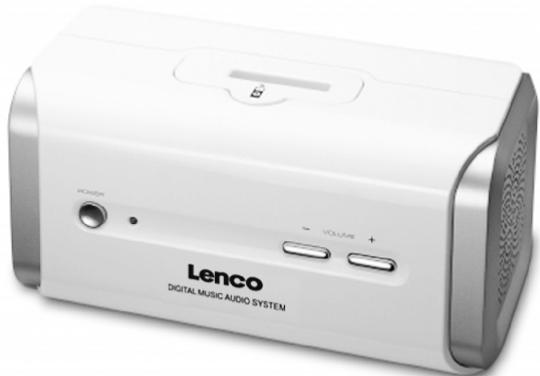

Waarschuwingen
LEES DEZE HANDLEIDING VOOR HET GEBRUK VAN DE UNIT GOED DOOR. BEWAAR HET VOOR DE TOEKOMST

WAARSCHUWING
| Adapters | nano | mini | photo | 3G | 4G | 5G | ||||||||||||
| 2GB | 4GB | 4GB | 6GB | 20GB | 30GB | 40GB | 60GB | 10GB | 15GB | 30GB | 40GB | 20GB | 40GB | 30GB | 60GB | |||
| 4G Pod (IPod photo (20 GB) (30/30 GB)) 3G IPod (40/40 GB) | ● | ● | ● | ● | * | |||||||||||||
| 3G IPod 4G (IPod (30/40 GB) (40 GB) | ● | ● | ||||||||||||||||
| iPod photo (40/60 GB) | ● | |||||||||||||||||
| iPod mini | ● | |||||||||||||||||
| iPod nano | ● | |||||||||||||||||
| Dust Cover | Install this "Docking Station Dust Cover" in the docking station if no iPod® will be docked for an extended period of time. | |||||||||||||||||
| Adapters\IPod Versionsl IPodCapacities | nano | mini | photo | 3G | 4G | 5G | ||||||||||
| 2GB | 4GB | 4GB | 6GB | 20GB | 30GB | 40GB | 60GB | 10GB | 15GB | 30GB | 40GB | 20GB | 40GB | 30GB | 60GB | |
| 4G Pod (Pod photo (20 GB) (30/30 GB) 3G Pod (10/10 GB) | ● | ● | ● | * | ||||||||||||
| 3G Pod, 4G pod (30/40 GB) (40 GB) | ● | ● | ||||||||||||||
| iPod photo (40/60 GB) | ● | |||||||||||||||
| iPod mini | ● | |||||||||||||||
| iPod nano | ● | |||||||||||||||
| Dust Cover | Install this "Docking Station Dust Cover" in the docking station if no iPod® will be docked for an extended period of time. | |||||||||||||||
- Base Dock para iPod
- Conector Dock para iPod
- Botón POWER ---- para encender o apagar launities
- Luz de estado LED
- Botón VOLUME +/------ Augenta o disminuye el volumen.
- Par de altavoces
- Toma de entrada AC IN ---- para la connexion del cable de alimentacion
- Toma de entrada AUX IN ---- entrada de senal de audio auxiliar
- Salidas de LINE OUT --- --- --- --- --- --- --- --- --- --- --- --- --- --- --- --- --- --- --- --- --- --- --- --- --- --- --- --- --- --- --- --- --- --- --- --- --- --- --- --- --- --- --- --- --- --- --- --- --- --- --- --- --- --- --- --- --- --- --- --- --- --- --- --- --- --- --- --- --- --- --- --- --- --- --- --- --- --- --- --- --- --- --- --- --- --- --- --- --- --- --- --- --- --- --- --- --- --- --- --- --- amplificador audio externo.
Accesorios
Cable de alimentacion x 1
Cable de senal de audio auxiliar x 1
| Adapters\iPod Versionsl iPod Capacities | nano | mini | photo | 3G | 4G | 5G | ||||||||||||
| 2GB | 4GB | 4GB | 6GB | 20GB | 30GB | 40GB | 60GB | 10GB | 15GB | 30GB | 40GB | 20GB | 40GB | 30GB | 60GB | |||
| 4G iPod iPod photo (20 GB) (30/30 GB) 3G iPod (16/16 GB) | ● | ● | ● | * | ||||||||||||||
| 3G iPod 42 iPod (30/40 GB) (40 GB) | ● | ● | ||||||||||||||||
| iPod photo (40/60 GB) | ● | |||||||||||||||||
| iPod mini | ● | |||||||||||||||||
| iPod nano | ● | |||||||||||||||||
| Dust Cover | Install this "Docking Station Dust Cover" in the docking station if no iPod® will be docked for an extended period of time. | |||||||||||||||||
- PLEASE READ THIS MANUAL THROUGHLY BEFORE
- OPERATING THE UNIT.
- RETAIN IT FOR FUTURE REFERENCE.
- Important Safety Instructions
- Warning:
- Features
- Installation
- AC power Connection
- Description of Parts
- Main Unit
- Accessories
- iPod®Adaptors
- Listening to iPod
- iPod playback control (from your iPod):
- Listening To An External Audio Source
- Note:
- Audio Line Out
- Care and Maintenance
- Specifications
- Power Supply
- THE SPECIFICATION AND EXTERNAL APPEARANCE OF THE SET ARE SUBJECT TO CHANGE WITHOUT PRIOR NOTICE.
- Lenco
- ID-2
- DOCKING STATION VOOR iPod
- Waarschuwingen
- Accesorios
Brand : LENCO
Model : ID-2
Category : Audio Dock