
TUNECAST 3 #F8M010EA - FM Transmitter BELKIN - Free user manual and instructions
Find the device manual for free TUNECAST 3 #F8M010EA BELKIN in PDF.


| Product type | FM Transmitter |
| Brand | Belkin |
| Model | TuneCast 3 (F8M010EA) |
| Power supply | 2 AAA batteries (alkaline recommended) or 5.5 V / 75 mA car cigarette lighter |
| Battery life | Approximately 20 hours with new 1175 mAh alkaline batteries |
| Transmission frequency | FM, unspecified range (manual scanning) |
| Frequency memory | Yes, with storage of stereo/mono settings |
| Main functions | Audio transmission from iPod to car stereo or hi-fi system, frequency selection, mono/stereo mode, auto shut-off after 60 s without audio, audio detection |
| Dimensions (estimated) | Approximately 12 x 6 x 2.5 cm |
| Weight (estimated) | Approximately 100 g (without batteries) |
| Operating temperature | 0 °C to 45 °C |
| Maintenance | Remove batteries if not used for a long time; avoid exposure to sunlight, cold/humid places |
| Safety | Automatic shut-off in case of no audio signal; protection against battery overcharge |
| Warranty | 3 years limited by Belkin International |
| Included accessories | Car power cord, adhesive mounting bracket |
| Country of manufacture | Not specified |
Frequently Asked Questions - TUNECAST 3 #F8M010EA BELKIN
User questions about TUNECAST 3 #F8M010EA BELKIN
0 question about this device. Answer the ones you know or ask your own.
Ask a new question about this device
Download the instructions for your FM Transmitter in PDF format for free! Find your manual TUNECAST 3 #F8M010EA - BELKIN and take your electronic device back in hand. On this page are published all the documents necessary for the use of your device. TUNECAST 3 #F8M010EA by BELKIN.
USER MANUAL TUNECAST 3 #F8M010EA BELKIN
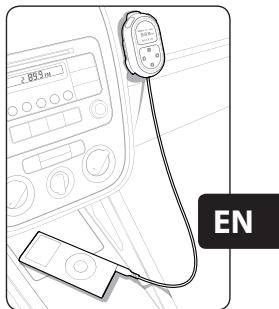
Congratulations and thank you for purchasing the TuneCast 3 Mobile FM Transmitter from Belkin. This product is designed to play your portable audio device through your car, home, or portable stereo. Please review this User Manual carefully so that you can be sure to get the most from your TuneCast 3, virtually anywhere you go.
Introduction | 01
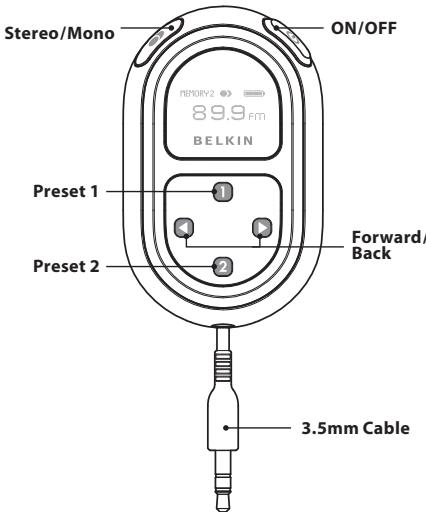
Using the TuneCast 3 Mobile FM Transmitter
- Turn down your car stereo's volume.
- Tune your stereo frequency to a channel with a weak broadcast signal. The ideal channel is one that is not broadcasting a radio program, or is doing so weakly.
- Connect the TuneCast 3 to your portable audio device.
- Connect the included Auto Power Cord to your cigarette-lighter outlet in your car and to the bottom of your TuneCast 3 for optional powering in the car.
- Press and hold the ON/OFF button for approximately two seconds. The display's status bar will indicate when the device is powered on.
- Press the " " or "▶" button on the TuneCast 3 to match the frequency on the radio chosen in step 2. Pressing and holding either button will provide faster tuning.
- Adjust the volume on the audio device to about three-fourths of the maximum. Adjust the volume of your FM radio to the desired listening level.
EN
Storing and Using Presets
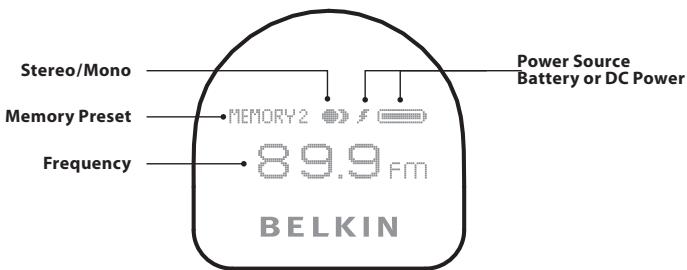
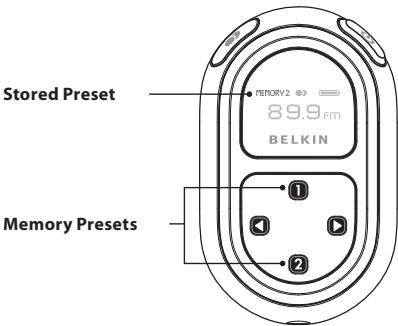
- To store a preset, select the desired frequency using " " or "▶" buttons. Press and hold the desired preset button (1 or 2) for two seconds (the status bar will give you visible feedback). An audible beep sounds in the transmitted audio when the new frequency is programmed. The TuneCast 3 display reflects the change when the memory button is released by showing which memory button was pressed along with the frequency saved in that memory position.
- To select one of your preset frequencies, momentarily press "1" or "2". This will instantly tune the TuneCast 3 to the frequency stored in that preset.
NOTE: Storing a preset will memorize the frequency as well as the current mono/stereo setting.
Operating Instructions
Stereo/Mono Selection
Transmitting music in stereo generally gives you the highest-quality listening experience. However, you may get better FM-signal reception by changing the transmission to mono. The TuneCast 3 transmits in stereo mode by default. We suggest that you switch from stereo to mono transmission only if your car stereo is NOT receiving a clear signal from the TuneCast 3, or if you are listening to mono recordings such as audio books.
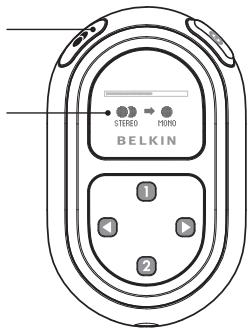
Press and hold the "Mono/Stereo" button located on the upper-left corner of the TuneCast 3. The status-bar indicator will transition from stereo to mono or vice versa. The TuneCast 3 display will return to normal operation where the current frequency is shown along with the current mono or stereo setting represented by:
Mono/Stereo Button
Mono/Stereo Display
Operating Instructions
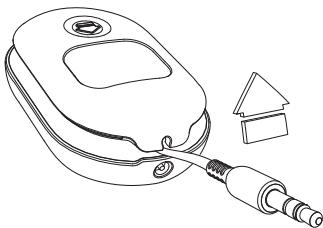
Adjusting and Locking the Cable
The cable length of the TuneCast 3 can be changed and locked for different applications.
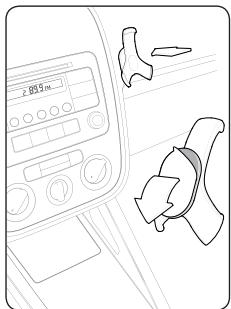
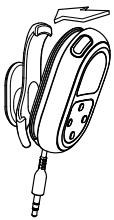
Mounting
Use the cradle and mount with adhesive backing to attach your TuneCast 3 to any smooth surface.

Changing the Batteries
Gently push the battery door on the back of the unit downward. Replace batteries.
Position cover on back by gently sliding it up until it locks in position.
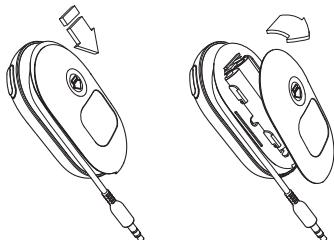
Important TuneCast 3 Battery-Operation Details
TuneCast 3 automatically extends battery life and helps ensure safe operation in these ways:
- TuneCast 3 turns off after approximately 60 seconds without audio detection. We recommend that you manually turn off the TuneCast 3 when not using it, to limit unnecessary battery use.
- When plugged into your vehicle's power outlet, TuneCast 3 automatically switches from battery to DC power.
- TuneCast 3 displays the battery-life status and turns itself off when the batteries no longer contain enough power to operate. This prevents a potentially hazardous over-discharge condition.
Troubleshooting
Issue
The audio is distorted.
Solution 1 Decrease the volume of your audio device until you no longer hear distortion. Keeping the device's volume level at or below three-fourths of the maximum should prevent audio distortion. However, don't turn it so low that the audio-detection circuit shuts down your TuneCast 3.
Solution 2 Tune your car stereo and the TuneCast 3 to a different frequency.
Issue
TuneCast 3 automatically turns off when I am playing music.
Solution Turn up your music-player volume. If the audio-detection circuit does not detect audio for 10 minutes, it shuts down the unit to preserve the battery. Possible causes of this s
ituation are having the music-player volume too low or pausing the player for longer than 10 minutes.
Issue
The battery indicator does not seem to display the correct battery status.
Solution Be sure to use non-rechargeable alkaline batteries. Other battery types can cause TuneCast 3 to display incorrect battery life.
Issue
My TuneCast 3 automatically powers off when I turn off my vehicle or unplug the unit from my car's power outlet.
Solution TuneCast 3 automatically turns off when external DC power is removed.
Issue
I am unable to get clear FM reception.
Solution 1 Tune your car stereo and the TuneCast 3 to a different frequency.
Solution 2 In some instances, lowering the car antenna (in cars where available) improves the clarity of the TuneCast 3 signal.
Solution 3 Change the stereo/mono setting to mono mode. This may improve signal reception, but the audio will be monaural instead of stereo.
Solution 4 If used indoors, attach or reposition the antennae on the stereo receiver.
Issue
TuneCast 3 does not appear to be saving my settings.
Solution Be sure NOT to release the button until the audible beep occurs or the status bar indicator is complete. Your settings are stored in memory when the TuneCast 3 display returns to normal operation.
You can find additional support information on our website www.belkin.com through the tech-support area. If you want to contact technical support by phone, please call the number you need from the list below. Local rates apply
| Country | Number | Internet adress |
| AUSTRIA | 08 - 20 20 07 66 | http://www.belkin.com/uk |
| BELGIUM | 07 07 00 073 | http://www.belkin.com/nl |
| CZECH REPUBLIC | 23 900 04 06 | http://www.belkin.com/uk |
| DENMARK | 701 22 403 | http://www.belkin.com/uk |
| FINLAND | 00800 - 22 35 54 60 | http://www.belkin.com/uk |
| FRANCE | 08 - 25 54 00 26 | http://www.belkin.com/fr |
| GERMANY | 0180 - 500 57 09 | http://www.belkin.com/de |
| GREECE | 00800 - 44 14 23 90 | http://www.belkin.com/uk |
| HUNGARY | 06 - 17 77 49 06 | http://www.belkin.com/uk |
| ICELAND | 800 8534 | http://www.belkin.com/uk |
| IRELAND | 0818 55 50 06 | http://www.belkin.com/uk |
| ITALY | 02 - 69 43 02 51 | http://www.belkin.com/it/support/tech |
| LUXEMBOURG | 34 20 80 8560 | http://www.belkin.com/uk |
| NETHERLANDS | 0900 - 040 07 90 €0.10 per minute | http://www.belkin.com/nl |
| NORWAY | 815 00 287 | http://www.belkin.com/uk |
| POLAND | 00800 - 441 17 37 | http://www.belkin.com/uk |
| PORTUGAL | 707 200 676 | http://www.belkin.com/uk |
| RUSSIA | 495 580 9541 | http://www.belkin.com/uk |
| SOUTH AFRICA | 0800 - 99 15 21 | http://www.belkin.com/uk |
| SPAIN | 902 - 02 43 66 | http://www.belkin.com/es/support/tech |
| SWEDEN | 07 - 71 40 04 53 | http://www.belkin.com/se/support/tech |
| SWITZERLAND | 08 - 48 00 02 19 | http://www.belkin.com/uk |
| UNITED KINGDOM | 0845 - 607 77 87 | http://www.belkin.com/uk |
| OTHER COUNTRIES | +44 - 1933 35 20 00 |
Electrical/Environmental Specifications
Power Requirement: 2x AAA batteries, or 5.5V, 75mA at CLA input
Operating Temperature: 0^ to 45^
Expected Continuous Run Time: 20 hours on new, 1175mAh alkaline batteries
Storage Precautions - When storing the TuneCast 3 for extended periods of time, Belkin recommends the following:
1) Remove the batteries.
2) Keep out of direct sunlight and fluorescent lamps.
3) Avoid low (below 0^ ) and high (greater than 35^ ) temperature environments.
4) Avoid high humidity environments.
European Standards Compliance Statement
This product complies with the following standards: EN 60065, EN 300 320 and EN 301 489. For the full Declaration of Conformity please follow the following link:
www.belkin.com/doc
This product complies to the WEEE directive. For recycling information please follow the following link: www.belkin.com/environmental

EN
What this warranty covers.
Belkin International, Inc. warrants to the original purchaser of this Belkin product that the product shall be free of defects in design, assembly, material, or workmanship.
What the period of coverage is.
Belkin International, Inc. warrants the Belkin product for three years.
What will we do to correct problems?
Product Warranty.
Belkin will repair or replace, at its option, any defective product free of charge (except for shipping charges for the product).
What is not covered by this warranty?
All above warranties are null and void if the Belkin product is not provided to Belkin International, Inc. for inspection upon Belkin's request at the sole expense of the purchaser, or if Belkin International, Inc. determines that the Belkin product has been improperly installed, altered in any way, or tampered with. The Belkin Product Warranty does not protect against acts of God (other than lightning) such as flood, earthquake, war, vandalism, theft, normal-use wear and tear, erosion, depletion, obsolescence, abuse, damage due to low voltage disturbances (i.e. brownouts or sags), non-authorized program, or system equipment modification or alteration.
How to get service.
To get service for your Belkin product you must take the following steps:
- Contact Belkin Customer Service (see details on page 9), within 15 days of the Occurrence. Be prepared to provide the following information:
a. The part number of the Belkin product.
b. Where you purchased the product.
c. When you purchased the product.
d. Copy of original receipt.
- Your Belkin Customer Service Representative will then instruct you on how to forward your receipt and Belkin product and how to proceed with your claim.
Belkin International, Inc. Limited 3-Year Product Warranty
Belkin International, Inc. reserves the right to review the damaged Belkin product. All costs of shipping the Belkin product to Belkin International, Inc. for inspection shall be borne solely by the purchaser. If Belkin determines, in its sole discretion, that it is impractical to ship the damaged equipment to Belkin International, Inc., Belkin may designate, in its sole discretion, an equipment repair facility to inspect and estimate the cost to repair such equipment. The cost, if any, of shipping the equipment to and from such repair facility and of such estimate shall be borne solely by the purchaser. Damaged equipment must remain available for inspection until the claim is finalized. Whenever claims are settled, Belkin International, Inc. reserves the right to be subrogated under any existing insurance policies the purchaser may have.
How state law relates to the warranty.
THIS WARRANTY CONTAINS THE SOLE WARRANTY OF Belkin International, Inc., THERE ARE NO OTHER WARRANTYES, EXPRESSED OR, EXCEPT AS REQUIRED BY LAW, IMPLIED, INCLUDING THE IMPLIED WARRANTY OR CONDITION OF QUALITY, MERCHANTABILITY OR FITNESS FOR A PARTICULAR PURPOSE, AND SUCH IMPLIED WARRANTYES, IF ANY, ARE LIMITED IN DURATION TO THE TERM OF THIS WARRANTY.
Some states do not allow limitations on how long an implied warranty lasts, so the above limitations may not apply to you.
IN NO EVENT SHALL Belkin International, Inc. BE LIABLE FOR INCIDENTAL, SPECIAL, DIRECT, INDIRECT, CONSEQUENTIAL OR MULTIPLE DAMAGES SUCH AS, BUT NOT LIMITED TO, LOST BUSINESS OR PROFITS ARISING OUT OF THE SALE OR USE OF ANY BELKIN PRODUCT, EVEN IF ADVISED OF THE POSSIBILITY OF SUCH DAMAGES.
This warranty gives you specific legal rights, and you may also have other rights, which may vary from state to state. Some states do not allow the exclusion or limitation of incidental, consequential, or other damages, so the above limitations may not apply to you.
Belkin Tech Support
US:310-898-1100 ext.2263
800-223-5546 ext. 2263
Europe:0080022355460
Australia:1800235546
501 West Walnut Street
Los Angeles, CA 90220, USA
310-898-1100
310-898-1111 fax
Belkin Ltd.
Express Business Park, Shipton Way
Rushden, NN10 6GL, United Kingdom
+44 (0) 1933 35 2000
+44 (0) 1933 31 2000 fax
Belkin B.V.
Boeing Avenue 333
1119 PH Schiphol-Rijk, The Netherlands
+31 (0) 206547300
+31 (0) 20 654 7349 fax
Belkin Ltd.
4 Pioneer Avenue
Tuggerah Business Park
Tuggerah, NSW 2259, Australia
+61(0)243504600
+61 (0) 24350 4700 fax
© 2006 Belkin International, Inc.. All rights reserved.
All trade names are registered trademarks of respective manufacturers listed.
BELKIN
FR
Mode d'emploi
Assistance Technique Belkin
501 West Walnut Street
Express Business Park, Shipton Way
501 West Walnut Street
Los Angeles, CA 90220, USA
310-898-1100
310-898-1111 Fax
Belkin Ltd.
Express Business Park, Shipton Way
Belkin International, Inc. Limited
501 West Walnut Street
Express Business Park, Shipton Way
Rushden, NN10 6GL, Reino Unido
+44 (0) 1933 35 2000
+44 (0) 1933 31 2000 fax
Belkin B.V.
Boeing Avenue 333
1119 PH Schiphol-Rijk, Paises Bajos
+31 (0) 20 654 7300
+31 (0) 20 654 7349 fax
Belkin Ltd.
4 Pioneer Avenue
Tuggerah Business Park
Tuggerah, NSW 2259, Australia
+61(0)243504600
+61 (0) 24350 4700 fax
501 West Walnut Street
Los Angeles, CA 90220, USA
310-898-1100
310-898-1111 fax
Belkin Ltd.
Express Business Park, Shipton Way
Tuggerah, NSW 2259, Australia
+61(0)243504600
+61 (0) 24350 4700 fax
501 West Walnut Street
Los Angeles, CA 90220, USA
310-898-1100
310-898-1111 fax
Belkin Ltd.
Express Business Park, Shipton Way
Rushden, NN10 6GL, United Kingdom
+44 (0) 1933 35 2000
+44 (0) 1933 31 2000 fax
Belkin B.V.
Boeing Avenue 333
1119 PH Schiphol-Rijk, The Netherlands
+31 (0) 206547300
+31 (0) 20 654 7349 fax
Belkin Ltd.
4 Pioneer Avenue
Tuggerah Business Park
Tuggerah, NSW 2259, Australia
+61(0)243504600
+61 (0) 24350 4700 fax
© 2006 Belkin International, Inc. All rights reserved.
All trade names are registered trademarks of respective manufacturers listed.